How do websites detect proxies? Every layer, in order
Websites detect proxies by IP and ASN, TCP stack, TLS, headers, browser leaks and behaviour: what each layer sees, and a self-test you can run.
Quick summary · TL;DR
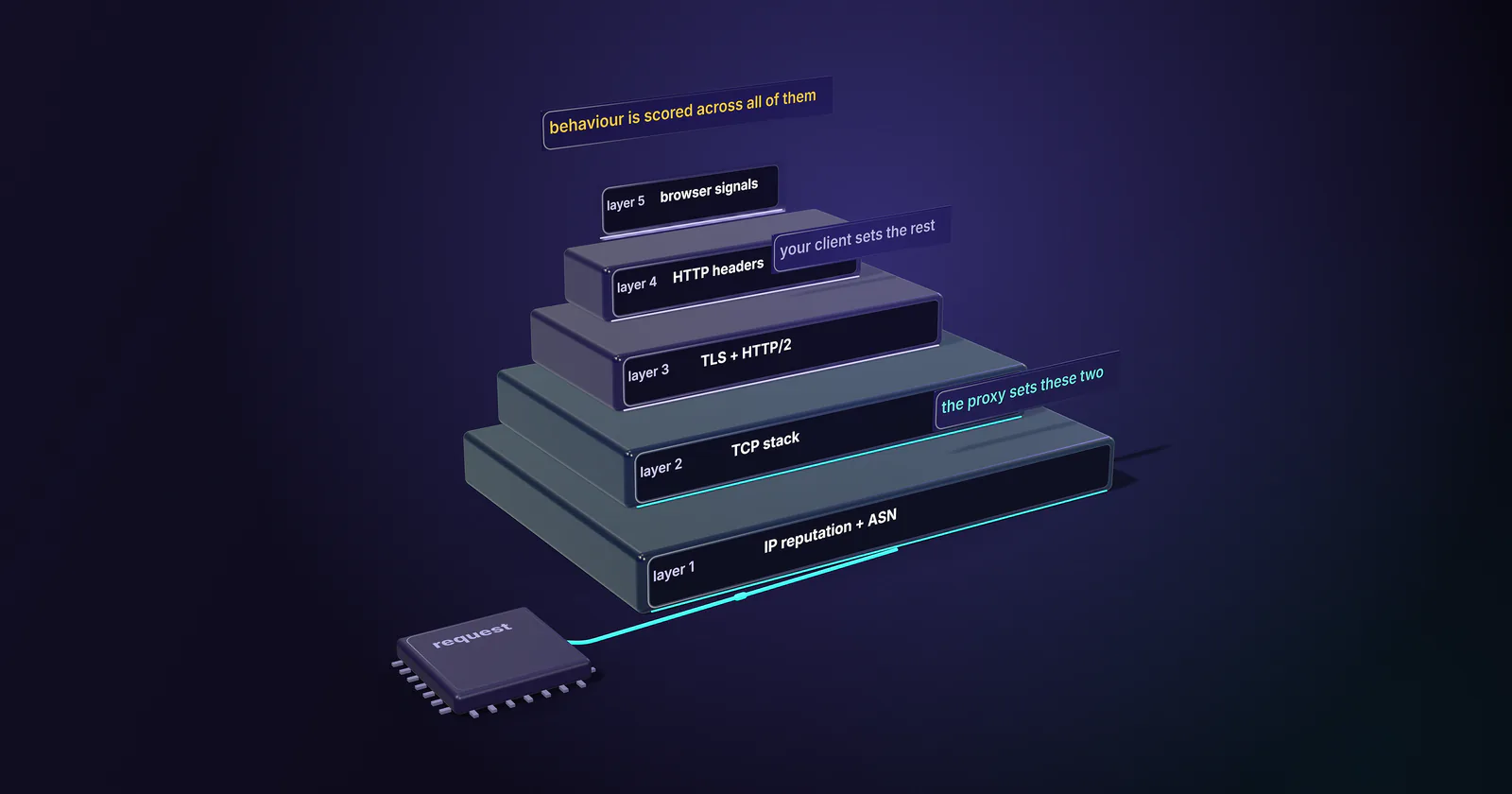
- Detection runs in layers, in a fixed order. A request meets IP reputation and ASN first, then the TCP stack, the TLS and HTTP/2 handshake, HTTP headers and browser signals, with behaviour scored across all of them.
- The proxy tier controls the IP, the ASN and the TCP stack. Through a CONNECT or SOCKS5 proxy, the target's TCP connection ends at the exit device, so its operating system and location shape what the target sees.
- The client controls TLS, most headers and the browser. A CONNECT tunnel is a blind relay under RFC 9110, so the TLS ClientHello comes from the client's own library whatever the exit IP is.
- A residential IP is scored like any other. IP-intelligence feeds such as MaxMind's label suspected residential proxy exits, so the other layers have to tell the same story as the IP.
- Mismatches and leaks give proxies away. A Windows User-Agent on a Linux-looking TCP stack, a timezone that disagrees with the IP, or a WebRTC request that exposes the real address flags traffic even when each layer looks clean on its own.
How do websites detect proxies? They read each request in layers: the IP’s reputation and the network (ASN) that announces it, the TCP/IP fingerprint of the connecting device, the TLS and HTTP/2 handshake, the HTTP headers, browser signals and leaks such as WebRTC, and behaviour over time. A mismatch between layers usually gives a proxy away first.
A new residential pool goes live and the block rate barely moves. A datacenter setup that passed every IP checker still gets challenged on the first page load. The proxy gets the blame both times, and both times the signal may not have come from the proxy at all.
Some of those signals change with the proxy tier. The rest stay with the client whatever proxy sits in between, and each layer below is split that way.
How websites detect proxies, in order
Each layer is cheaper for the target to read than the next. The IP and ASN are known before the TCP handshake finishes, and the TCP stack shows in the first packet. Then come the TLS handshake, the HTTP headers and whatever JavaScript the page runs. Over all of it sits behaviour: what the same IP, cookie or fingerprint did over the last hours.
Consistency across layers decides more than any single layer. A request that claims to be Chrome on Windows, from a home connection in Lyon, is checked against what each layer actually shows, and every mismatch adds to a score.
The proxy owns the first two layers and part of the last ones; the client owns TLS, most of HTTP and most of the browser. That split is why a better proxy alone rarely clears a hard target.
Why websites detect proxies at all
Proxies sit in front of much of the abuse a login page or checkout sees: credential stuffing, fake signups, account takeover, bots that buy up limited stock, and click fraud. Other sites enforce licensing and geo restrictions, such as a streaming catalogue sold per country, or cap what heavy scraping costs them.
The abuse above is what proxymint’s terms of service ban outright.
proxymint acts on abuse reports. This guide is for teams doing permitted work, such as price monitoring, SERP tracking, ad verification and QA, who need to find out why their own traffic gets flagged.
The detection layers, one by one
Layer 1: IP reputation and ASN
The reputation check. The target, or its anti-bot vendor, looks up the source address in reputation data: past abuse, spam lists, known proxy and VPN ranges, and recent traffic volume.
The ASN lookup. Every IP is announced by an Autonomous System whose owner is public record, so the target knows whether an address belongs to a hosting company, a consumer ISP or a mobile carrier. Cloud providers even publish their own ranges so customers can filter them.
This is the part the proxy tier fully controls. Datacenter proxies exit from hosting ASNs. Residential proxies exit from consumer ISP ASNs, and static ISP proxies from ISP-registered ranges. Mobile proxies exit from carrier ASNs, usually behind CGNAT on shared carrier IPs, where many subscribers share one public address.
Residential exits now have their own label. IP-intelligence feeds no longer stop at hosting ranges. MaxMind’s Anonymous IP database documentation (checked September 29, 2026) describes an is_residential_proxy flag for addresses on a suspected anonymizing network that belong to a residential ISP, and notes that the flag does not include peer-to-peer proxy IPs.
What the proxy cannot change is a shared address’s history: an IP someone else used an hour ago carries whatever that traffic earned. Cloudflare made the reverse point in a June 24, 2024 engineering post: it modelled residential proxy traffic instead of leaning on IP blocklists, because the same addresses carry real users too.
Layer 2: TCP/IP fingerprinting and timing
Through an HTTP CONNECT or SOCKS5 proxy, the target’s TCP connection ends at the proxy exit, so the SYN packet it sees comes from the exit device’s operating system.
TCP/IP fingerprinting reads that packet. FoxIO’s JA4T method, published on April 23, 2024, records the window size, the TCP options and their order, the maximum segment size (MSS) and the window scale. The most common MSS is 1460, from a 1500-byte Ethernet MTU, and a lower value such as 1380 points to a tunnel or VPN on the path. Windows also does not send the TCP timestamp option, while Unix-based systems do.
So a User-Agent that says Windows, arriving on a TCP stack that looks like a Linux server, is a signal before the target reads a byte of HTTP.
Timing across layers. Researchers at the University of Michigan, in a paper presented at NDSS in February 2025, showed that proxying splits one session in two. The TCP round trip ends at the exit, while the application-layer round trip still reaches the real client, and the gap between the two marks proxied traffic whatever the protocol. The paper measured it from a network vantage point, for censorship-circumvention proxies. A website can run its own version by comparing the TCP handshake RTT with an in-page WebSocket round trip.
The route sets this layer, so no client setting fixes it.
Layer 3: TLS fingerprints pass through the proxy
HTTPS through a proxy runs inside a CONNECT tunnel. RFC 9110 (June 2022) defines a tunnel as a blind relay that forwards messages without changing them. So the TLS ClientHello the target reads is built by the client’s own TLS library, byte for byte, whatever proxy sits in between.
JA4 and its predecessor JA3 hash that ClientHello: TLS version, cipher suites, extensions, supported groups and ALPN. A Python HTTP library, Go’s standard library and Chrome each produce a different handshake, and a carrier IP carrying a script’s handshake still looks like a script. The TLS fingerprinting posts go into the fields.
HTTP/2 is fingerprinted the same way: the opening SETTINGS frame, window update and header order differ between browsers and libraries, and they come from the client too. The fix is on the client: send a handshake that matches what the request claims to be, or stop claiming to be a browser.
Layer 4: HTTP headers, proxy and client
Proxy headers. For plain HTTP, RFC 9110 requires a forwarding proxy to add a Via header, and many proxies also add X-Forwarded-For or the standard Forwarded header, which carry the original client address. Over HTTPS the proxy cannot add them, because it only relays the encrypted tunnel.
Client headers. Everything else belongs to the client: the User-Agent, header order, Accept-Language and client hints. Accept-Language set to en-US on an IP in Warsaw proves nothing alone, but it adds to the score.
Layer 5: browser signals
If the page runs JavaScript, it can read what the browser says about itself: timezone, language, screen, fonts, WebGL renderer and markers of headless automation. Geography catches proxies most often. A browser timezone of America/Los_Angeles on an IP in Frankfurt is a mismatch the page sees directly.
Country, region and city targeting on rotating residential proxies puts the exit in the market whose pages the job needs. The browser’s timezone and language still come from the client.
The leak checks setups often skip
WebRTC. A page can open a WebRTC connection and ask a STUN server which public address it came from. WebRTC runs over UDP, which an HTTP proxy does not carry, so when the browser is proxied and WebRTC is not, the answer can hold the real IP instead of the exit.
DNS. When the client resolves hostnames itself, the lookup goes to its own resolver. A site that serves a unique hostname sees which resolver asked for it, and a resolver in Kyiv behind an exit in Chicago is a mismatch.
Open proxy ports. A site can probe its visitor’s IP for listening proxy ports such as 1080, 3128 or 8080. An open one on a consumer address suggests a proxy node. That check lands on the exit, the provider’s side.
Behaviour and cross-layer consistency
Rotation is the proxy’s: a new IP on every request, a timer from 5 to 60 minutes, or sticky while the device stays online. Pace, cookies and navigation order are the client’s. Pages that run JavaScript also score input, mouse paths, scrolling and typing rhythm; a headless script produces none of it whatever the IP. A logged-in session that changes IP on every request looks wrong however clean each IP is, and a sticky IP sending dozens of requests a second looks wrong however residential it is.
The link also runs the other way. When the same browser fingerprint or cookie turns up from dozens of IPs, or several accounts share one fingerprint, the target ties them together whatever the proxy does.
A consumer ISP address, a Linux-server TCP stack, a Python TLS handshake and a Chrome-on-Windows User-Agent add up to a story no household tells.
Detection by proxy type
Every tier clears some layers and fails others. None of them touches layers 3 to 5.
No proxy tier changes the client’s TLS handshake; that layer is fixed on the client. For the carrier-specific checks, see proxymint’s guide to what platforms check on mobile proxies.
How the IP layer sees a pool is measurable. Take 25 exits per tier, record each one’s ASN type and anonymous-IP flags in an IP-intelligence database, and capture the TCP operating-system guess and MSS on a server you control. The share flagged as hosting or as a residential proxy says more than any vendor’s label.
Why detection gets it wrong
A website cannot always detect a proxy. It can only score the odds, and proxy detection differs from bot detection: a person on a VPN is a proxy user but not a bot, while a script on a clean home line is a bot with no proxy at all. Sites care about the second question more.
False positives are common, which is why most sites score traffic instead of blocking on one signal. CGNAT puts many real subscribers behind one carrier IP, so blocking that address blocks all of them. Corporate proxies and VPNs are ordinary for office workers.
And Cloudflare’s June 2024 post found that 4 out of 5 requests from IPs active in residential proxy networks were direct, benign connections from the devices themselves. A blocklist built from those IPs mostly blocks real people.
So a site that detects a proxy usually adds friction, a challenge or a tighter rate limit, rather than refusing outright.
How the pool was built matters
Sites score an address partly on how the network behind it behaves, so the way a residential pool was built reaches your traffic. A buyer should put three questions to any provider:
- Enrollment. How does a device join the pool, and did its owner agree?
- Opt-out. Can the owner leave?
- Abuse. How does the provider handle abuse, and what happens to an account that breaks the rules?
proxymint’s answers: residential exits come from device owners who opted in and can opt out. The terms ban fraud, credential stuffing, fake accounts and the other abuse sites defend against, and proxymint acts on abuse reports, as its privacy policy and terms describe. The guide to what a residential proxy is covers sourcing in more depth.
Self-test with real commands
The quickest way to answer “how do websites detect proxies” for one setup is to run the same checks on it, one per layer. The examples use 203.0.113.10, a documentation address, as the exit IP.
-
Exit IP and ASN. Get the exit address, then look up who announces it.
curl -s -x http://USERNAME:PASSWORD@HOST:PORT https://api.ipify.org
whois -h whois.cymru.com " -v 203.0.113.10"
The AS name should fit the tier: an ISP or carrier for residential, ISP and mobile, a hosting company for datacenter.
-
Header echo. Print the raw request on your own server, over plain HTTP so a forwarding proxy could add headers.
# on your server (some netcat builds need: nc -l -p 8080)
nc -l 8080
# on the client, through the proxy
curl -s -x http://USERNAME:PASSWORD@HOST:PORT http://YOUR_SERVER_IP:8080/
Look for Via, X-Forwarded-For or Forwarded lines you did not send. The plain-HTTP echo works only on proxies that forward
http://. On HTTPS-only gateways, such as proxymint’s rotating residential and mobile gateway, a plainhttp://request gets a 301 tohttps://instead, and over CONNECT the tunnel cannot carry injected headers; a September 2026 check found no Via or Forwarded header reaching the target. Headers your own client sends still pass through. -
TCP and TLS fingerprints. Capture on your server while you connect through the proxy, once with your client and once with a real browser.
sudo tcpdump -i eth0 -w hello.pcap 'tcp port 443'
p0f -r hello.pcap
p0f prints an OS guess per SYN and the MTU it infers from the MSS. FoxIO’s JA4 plugin for Wireshark reads each ClientHello’s JA4 from the same capture. If your client’s JA4 differs from the browser’s while its User-Agent says browser, that is the mismatch.
-
WebRTC. In the proxied browser, paste this into the developer console.
const pc = new RTCPeerConnection({ iceServers: [{ urls: 'stun:stun.l.google.com:19302' }] });
pc.createDataChannel('probe');
pc.onicecandidate = (e) => e.candidate && console.log(e.candidate.candidate);
pc.createOffer().then((offer) => pc.setLocalDescription(offer));
A
typ srflxcandidate shows the address STUN saw. If it is not the exit IP, WebRTC leaks. -
DNS. See which resolver answers for this machine.
dig +short whoami.akamai.netThat is the resolver an authoritative server sees. If the client resolves hostnames locally, compare its location with the exit’s. In curl, a
socks5://proxy URL resolves names on the client, whilesocks5h://hands the name to the proxy, as an HTTP proxy’s CONNECT request does. On proxymint’s rotating gateway, CONNECT andsocks5h://resolved names on the proxy side, in the US for our US test exits, when tested in September 2026; plainsocks5://used the client’s own resolver. -
Language. In the browser console,
Intl.DateTimeFormat().resolvedOptions().timeZoneandnavigator.languageshow what a page reads from this browser. For market work, send Accept-Language for the market whose pages the job needs. -
No-proxy baseline. Run the same client, at the same pace, from a home connection. If the target challenges it there too, the problem is the client.
An open-port probe is left out on purpose: the exit is the provider’s side, and proxymint’s terms, like most, ban port scanning.
Which layer to fix first
The self-test step that failed names the layer, and the layer names the fix.
- Hosting ASN on a target that filters hosting ranges: datacenter does not fit that target. Where its terms allow automated access, residential or static ISP proxies fit it, and mobile fits targets built for carrier traffic.
- TLS fingerprint does not match the claimed browser: change the client. No proxy fixes it.
- Headers leak the real address: fix the proxy configuration, or keep the traffic on HTTPS.
- WebRTC or DNS leaks: close them on the client, with WebRTC limited in the browser profile and hostnames resolved on the proxy side (
socks5h://or HTTP CONNECT, not plainsocks5://). - Pages come back for the wrong market: set the exit country or city to the market the job needs, and send Accept-Language for that market.
- Challenged with no proxy at all: stop shopping for IPs.
- Still challenged when every layer is consistent: treat that as the site’s answer. Use its API or data route if it has one, or stop.
Frequently asked questions
Websites check each request in layers: the IP's reputation and ASN, the TCP/IP fingerprint of the connecting device, the TLS and HTTP/2 handshake, the HTTP headers, and browser signals and leaks such as WebRTC. They also score behaviour over time. A mismatch between layers, such as a browser timezone that disagrees with the IP's location, is the strongest signal.
Most commercial VPN exits sit in known ranges on hosting ASNs, and IP-intelligence feeds label them. The tunnel's overhead often lowers the TCP maximum segment size below the usual 1460, which a TCP fingerprint shows. A browser timezone that disagrees with the exit's location, or a WebRTC request that reveals the real address, adds to the signal.
TCP/IP fingerprinting reads the first packets of a connection to guess the operating system that sent them: the window size, the TCP options and their order, the maximum segment size and the window scale. Through a CONNECT or SOCKS5 proxy, that connection starts at the proxy exit, so the fingerprint shows the exit device's stack, and a User-Agent that claims another operating system is a mismatch.
Often, yes. A residential proxy removes the hosting ASN signal, but some IP-intelligence feeds flag suspected residential proxy exits: MaxMind's Anonymous IP database carries an is_residential_proxy field, which by its own definition leaves out peer-to-peer proxy IPs. The target can also see a TLS fingerprint that does not match the claimed browser, a timing gap between the TCP and application layers, or a shared IP with a poor recent history.
To the website, usually not to the person: it sees the exit IP, not the customer behind it. To the provider, yes: a provider keeps connection records and responds to valid legal process. Leaks such as forwarding headers or WebRTC can also expose the origin to the site directly.
Using a proxy is legal in most countries. What the traffic does, and the target's own terms, decide the rest: fraud, credential stuffing and unauthorised account access are illegal whatever the route, and fake accounts break most platforms' terms. proxymint's terms of service ban all of those uses. This is general information, not legal advice.
Some do. For plain HTTP, the HTTP standard requires a forwarding proxy to add a Via header, and many proxies also add X-Forwarded-For or Forwarded headers that carry the original client address. Over HTTPS the proxy only relays the encrypted tunnel and cannot add headers, so leaks of this kind come from plain HTTP or a misconfigured proxy. A September 2026 check through proxymint's rotating gateway found no Via or Forwarded header reaching the target, and over CONNECT it has no way to add X-Forwarded-For.
Researched and drafted with AI tools, then checked against our publishing rules before it went live: 5 outside links, 16 links to other proxymint pages, no prices and a fact-check pass against our product records. How we write.