Proxy detected error: what it means and how to fix it
Proxy detected means a site flagged your IP or your client. What each message means, an eight-check triage, and which causes a new proxy tier actually fixes.
Quick summary · TL;DR
- The message has two kinds of cause. Either the site classified the exit IP, as hosting, VPN, public proxy, Tor or a suspected residential proxy, or the client gave the proxy away through headers, DNS, WebRTC, timezone, request rate or timing.
- Check the address first, then the client. Confirm the proxy is applied, look up who owns the exit IP and how IP intelligence databases flag it, and test several IPs from the pool before touching client settings.
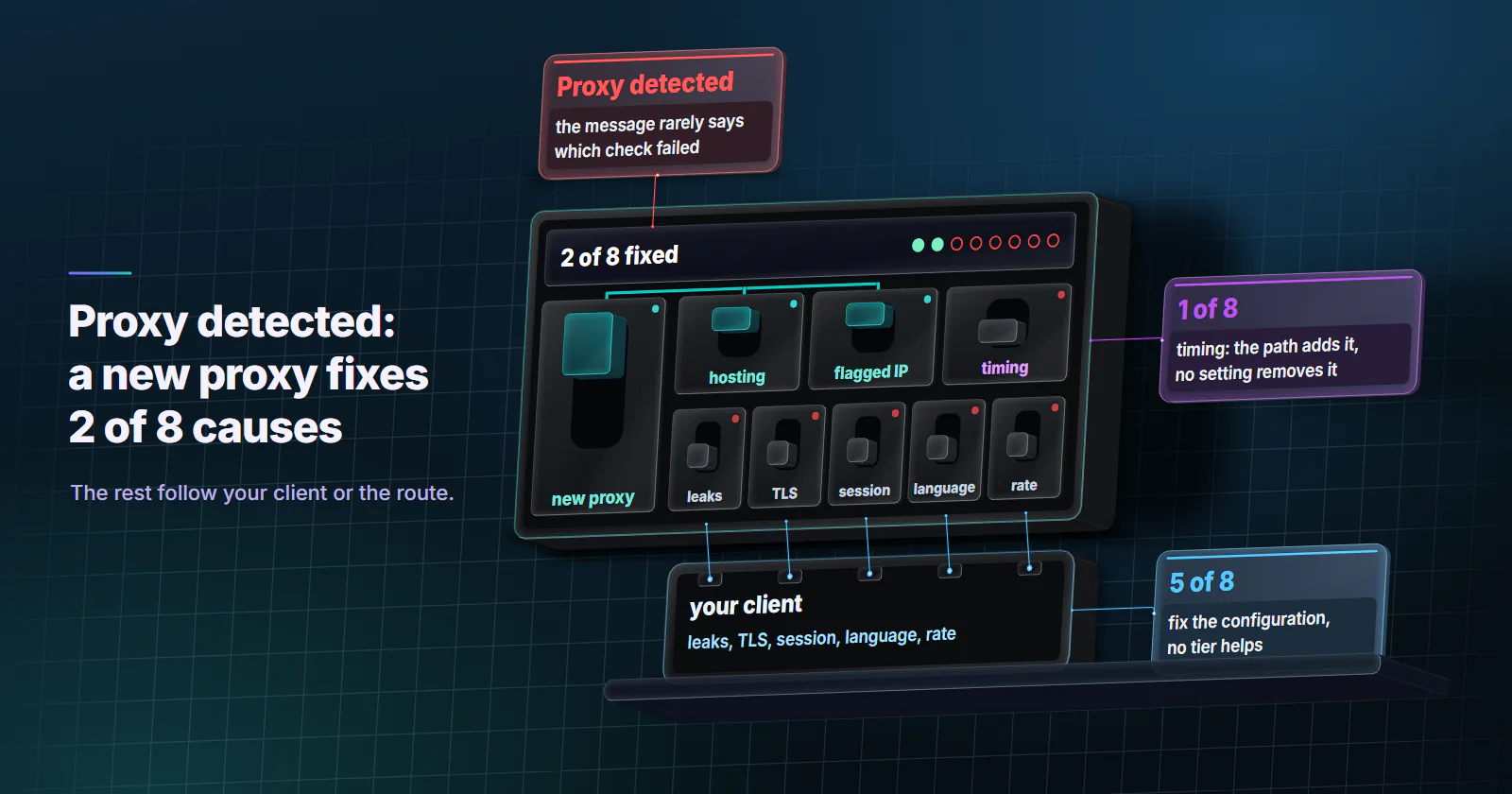
- A new tier fixes two of eight causes outright. Moving off a hosting ASN and rotating off a flagged IP are proxy fixes; leaks, TLS fingerprints, carried-over session state and request rate follow the client to any IP, and round-trip timing comes from the path itself.
- Residential and ISP IPs can be flagged too. IP intelligence databases carry a suspected residential proxy flag, so a home address can still be refused by a site that blocks anonymizing networks.
- Some sites refuse every proxy by policy. Streaming services turn away VPN and proxy exits for licensing reasons; the fix there is to switch the VPN or proxy off.
A proxy detected message means a website matched the connection to a proxy. Either the exit IP is classified as hosting, VPN, public proxy, Tor or a suspected residential proxy, or the request gave the proxy away through forwarding headers, a DNS or WebRTC leak, a timezone that does not fit the IP, or a request rate or timing no person produces.
The message rarely says which check failed, and only two of the eight common causes go away when you buy a different kind of proxy. The rest follow the client to any IP. If you see the message without using a proxy at all, the section on that is further down.
What proxy detected means
When a website says proxy detected, it has matched the request against one of two kinds of evidence.
Evidence about the address. The site, or a data provider it uses, has classified the exit IP. A site that blocks on any of those classes shows the same message whatever the reason.
Evidence from the request itself. The client gave the proxy away: a forwarding header, a DNS lookup or WebRTC connection that went around the proxy, a browser timezone on the other side of the world from the exit IP, or a request rate no person produces.
The first kind is about the proxy and the second about the setup. The triage below rules them out in order, cheapest first.
How IP classification works
Most sites do not classify addresses themselves. They buy an IP intelligence feed and set their own rules on top of it, usually for fraud screening at sign-up and checkout, abuse control, or content licensing. Three kinds of data are common:
- Anonymizer flags. MaxMind’s Anonymous IP database documentation (checked September 29, 2026) lists six:
is_anonymous,is_anonymous_vpn,is_hosting_provider,is_public_proxy,is_tor_exit_nodeandis_residential_proxy. The last one covers residential ISP addresses on a suspected anonymizing network, and MaxMind notes it excludes peer-to-peer proxy IPs. - Proxy type codes. IP2Proxy (checked September 29, 2026) sorts addresses into types such as VPN, TOR, PUB (public proxy), WEB (web proxy), DCH (hosting, data center or CDN), RES (residential proxy), CPN (consumer privacy network) and EPN (enterprise private network).
- Fraud scores. Services such as IPQualityScore return a numeric risk score next to proxy, VPN and Tor flags, connection type, ASN and recent abuse. Each site picks its own cut-off, and the vendors do not publish a universal one.
Classification is per address or per range, and the databases disagree with each other. An address that is clean in one feed can be flagged in another, which is why the same IP passes one site and fails the next. Addresses from free or public proxy lists are the first ones feeds label as public proxies.
What the different messages mean
The wording hints at which layer refused the request, though it never names the check.
- “Anonymous proxy detected.” The usual wording of an IP intelligence flag. The site looked the address up and it came back as an anonymizer. Start with the address checks.
- “You seem to be using a VPN or proxy.” Netflix’s wording, from its help page on the message (checked September 29, 2026). A streaming licensing check; the section on streaming below covers it.
- “Proxy connection detected” or “VPN or proxy not allowed.” Generic. Any of the causes below can produce it, so run the triage in order.
- A bare HTTP 403 or a challenge page. An anti-bot system scored the request as automated. IP reputation is one input, next to the client’s headers, TLS handshake and behaviour.
- HTTP 429 Too Many Requests. A rate limit on your own requests. RFC 6585 (April 2012) defines it for exactly that, with an optional Retry-After header saying how long to wait.
- HTTP 407 Proxy Authentication Required. This one comes from the proxy, not the site. The credentials are wrong or missing.
How to fix a proxy detected error
The placeholders are USERNAME, PASSWORD, HOST and PORT for the proxy, EXIT_IP for the address the target sees, and ECHO_SERVER for a server you control that logs incoming requests. Checks 1 to 3 cover the address. Checks 4 to 7 cover the client. Check 8 covers what no setting changes.
- Exit IP. The proxy returns its exit address, not yours.
- Owner and flags. WHOIS and IP intelligence lookups show who owns the exit and how it is flagged.
- One IP or all. Other exits from the pool pass or fail the same way.
- Forwarding headers. No Via, X-Forwarded-For or Forwarded line arrives that you did not send.
- DNS. Hostnames resolve on the proxy side.
- WebRTC. WebRTC goes through the proxy or not at all.
- Language, rate and handshake. Accept-Language fits the market whose pages the job needs, no 429s appear and the handshake matches the User-Agent.
- Path signals. Timing and the exit’s TCP/IP stack come from the relay itself.
1. Which IP does the target see?
Confirm the proxy is in the path at all. A misconfigured client that sends some requests direct produces confusing results.
curl -s -x http://USERNAME:PASSWORD@HOST:PORT https://ECHO_SERVER/ipIf the address returned is your own, the proxy is not applied. Fix that before anything else.
2. Check what the site sees
Run a WHOIS lookup on the address from step 1 and read the organisation.
whois EXIT_IP | grep -iE "orgname|org-name|netname|descr"A hosting or cloud company means the target saw a server. Sites that block hosting ranges refuse every request from it, and no client setting changes that. On datacenter proxies this is the first suspect, and the one cause a tier change fixes outright.
Then put EXIT_IP through two or three public IP intelligence lookups, the same kind of data the site buys, and read the flags: hosting, VPN, public proxy, Tor, residential proxy. That is all a proxy detection test page does. If two feeds flag the address, assume the target’s feed does too. If none do, the cause is more likely in the client.
3. Is this IP flagged, or all of them?
Send the same request through three or four different exit IPs from the same pool. If one fails and the rest pass, that address has a history. If all fail, the cause is either the whole range or something in the client.
4. Does the proxy add forwarding headers?
Send a plain HTTP request through the proxy to your own server and read what arrives.
# on ECHO_SERVER
nc -l 8080

# from the client
curl -x http://USERNAME:PASSWORD@HOST:PORT http://ECHO_SERVER:8080/
Look for Via, X-Forwarded-For or Forwarded. RFC 9110 (June 2022) requires a proxy that forwards plain HTTP to add a Via header, and some proxies also pass the original client address in X-Forwarded-For. When the target page is HTTPS, the proxy only relays an encrypted tunnel and cannot add them, so this leak lives in plain HTTP or a misconfigured proxy. Headers your own client sets, such as an X-Forwarded-For left in a script, pass through any proxy untouched. On proxymint’s residential and mobile per-GB gateway, proxymint Lab #1 measured no Via or Forwarded header reaching the target through CONNECT, and a CONNECT tunnel gives the gateway no way to add X-Forwarded-For. Plain http:// targets are redirected to https://, so there this check returns a 301 instead of your echo.
5. Does a DNS leak get the proxy detected?
With a SOCKS5 proxy, the client can resolve hostnames itself or hand them to the proxy. In curl, socks5:// resolves locally and socks5h:// sends the hostname to the proxy.
curl -x socks5h://USERNAME:PASSWORD@HOST:PORT https://ECHO_SERVER/ipA local lookup does not change the IP on the connection, but it sends a DNS query from your own network for every host visited, and a site that compares the two sees locations that disagree. Use remote resolution in every client library that supports it. On proxymint’s residential and mobile per-GB gateway, socks5h:// and HTTP CONNECT both resolve names on the proxy side, in the US for our US test exits, while plain socks5:// leaves the lookup on your machine.
6. Does WebRTC leak another address?
This one only applies to real browsers. RFC 8828 (January 2021) defines how WebRTC may expose IP addresses, and its recommended default without user consent uses the operating system’s default route, not the browser’s HTTP proxy. So a page can open a WebRTC connection that reveals the machine’s own public address next to the proxy’s. The RFC’s fourth mode forces WebRTC through the proxy. In managed Chrome, the WebRtcIPHandling policy set to disable_non_proxied_udp does the same, at the cost of breaking direct peer-to-peer calls.
7. Check language, rate and handshake
In the browser console, Intl.DateTimeFormat().resolvedOptions().timeZone returns the timezone the page sees, which comes from the client, not the proxy. For market work, send Accept-Language for the market whose pages the job needs. Then check the response codes from the failing job: a run of HTTP 429 responses is a rate limit, and no proxy change lifts it. Lower the pace and honour Retry-After.
The TLS handshake belongs here too. Through a proxy tunnel the TLS ClientHello comes from the client, not the proxy, so a script whose handshake does not match the browser named in its User-Agent looks the same on every exit. That is a client fix.
Session state is the last client check. A cookie, a login or a browser profile that stays the same while the exit IP changes every few minutes looks like one visitor hopping between addresses, and rotation causes that rather than cures it. For signed-in work, hold one sticky or static address per session; for collection, start each IP with clean state.
8. Signals no setting removes
Two signals come from the path itself, the timing and TCP layers in how websites detect proxies.
Round-trip timing. The target’s TCP connection ends at the proxy exit, so the TCP round trip it measures covers only the exit-to-server leg. The TLS handshake runs end to end through the tunnel, so its round trip also includes the client-to-proxy leg. A large gap between the two says a relay sits in the middle.
TCP/IP stack fingerprint. The TCP packets the target receives are built by the exit’s operating system, not the client’s. A browser that claims Windows arriving over packets that look like another OS is a mismatch the site can score.
Some detectors also probe the exit address itself for open proxy ports, a check aimed at the exit, not at anything the client sends.
Nothing removes either signal. Most sites weigh them next to other evidence rather than block on them alone.
Fix it in this order
Match the fix to what the triage found:
- Your own IP came back in step 1. Configure the proxy in the client; nothing else is worth testing yet.
- The exit belongs to a hosting company and the site blocks hosting ranges. Datacenter does not fit that site; residential or ISP exits do, where its terms allow proxied access. Datacenter proxies remain the right tool for targets without that rule.
- One IP fails, others pass. The cause is that address. Where the site allows proxied access, drop it from the job; where it refuses anonymizing networks, that is its answer.
- Headers, DNS, WebRTC, the TLS handshake or session state. Fix the configuration. No tier helps, and a new provider will show the same proxy detected message.
- Language or rate. Send Accept-Language for the market the job needs, and slow down. Honour 429 and Retry-After.
- Timing only. The gap comes from the relay itself; no tier or setting removes it.
- A residential address is flagged as an anonymizer. If the site refuses anonymizing networks, use its official access route; for account work on a site that allows it, hold one static ISP address.
- Streaming, or no proxy in use. Turn the VPN, relay or proxy setting off.
Which causes a new tier fixes
Only two of the eight causes are fixed outright by buying a different kind of proxy.
So when a proxy detected error survives a switch from datacenter to residential, the likely cause sits in the lower six rows. Changing tiers again will not help.
Websites detect residential proxies too
Residential exits are not immune, and neither are ISP ones. MaxMind’s is_residential_proxy flag exists for exactly this: addresses on a residential ISP that are suspected to be part of an anonymizing network, though MaxMind notes the flag excludes peer-to-peer proxy IPs. A site using that kind of data can show anonymous proxy detected on a home IP, and it will do so for every address in a range that has been classified. A residential proxy removes the hosting signal, not the anonymizer one.
That leaves three options:
- Rotate, where the site allows it. Classification is per address or per range, so a rotating residential proxies pool helps only when one flagged address is the cause and the site allows proxied or automated access. A site that refuses anonymizing networks by policy has answered.
- Hold one static address. For logged-in work, static ISP proxies give one address for the whole term, so a login sees the same IP every day.
- Use the official route. Some sites refuse every anonymizing network by design, including ones that sell access through an official API or data feed. That is the better route for those sites.
A mobile carrier address changes the picture in one way: behind CGNAT, many real subscribers share it, so blocking it by flag costs the site real customers. It does not change the client rows of the table.
Proxy detected without using a proxy
Plenty of people who see the message are not running a proxy on purpose. Something between the device and the site is acting as one:
- A VPN built into other software. Some antivirus suites and browsers ship a VPN or proxy mode that is easy to switch on and forget.
- A proxy setting left on. An old system proxy, a PAC script from a previous job, or a browser extension that routes traffic.
- iCloud Private Relay. Apple’s Private Relay (updated August 2023) sends Safari traffic through two relays, and sites see a temporary relay address instead of the device’s own. Turn it off in Settings on iPhone, or in System Settings on Mac (checked September 2026): the account name, then iCloud, then Private Relay.
- A corporate network. Company traffic often leaves through a security gateway, sometimes a cloud one, so sites see the gateway’s address.
- A shared carrier or ISP address. Behind CGNAT, one public address serves many subscribers, and one flagged neighbour can get the address flagged for everyone. Restarting the router or phone may bring a new address; if not, the ISP can say whether the line sits behind CGNAT.
How to turn off a proxy
- Windows 10 and 11. Settings, Network & internet, Proxy. Under Manual proxy setup, select Set up next to Use a proxy server, turn it off and save. Leave Automatically detect settings as the network needs it. Steps from Microsoft Support (checked September 2026).
- macOS. Apple menu, System Settings, Network, pick the network service, Details, then Proxies, and turn off every proxy listed. Steps from Apple Support (checked September 2026).
- Browsers. Chrome and Edge use the system setting above. Firefox keeps its own under Settings, General, Network Settings, where “No proxy” or “Use system proxy settings” turns it off, per Mozilla Support (checked September 2026). Then check the extension list for anything that routes traffic.
Streaming services refuse both
Streaming services license content by country, so they refuse VPN and proxy exits by policy. Netflix’s own steps are to check whether a VPN is on, check the plan, reset the network settings, and contact the ISP if the message stays.
Frequently asked questions
Confirm the proxy is applied, then look up the exit IP's owner and flags and test other IPs from the pool. If the owner is a hosting company and the site blocks hosting ranges, datacenter does not fit that site; residential or ISP exits do where its terms allow proxied access. If every IP fails, check the client for forwarding headers, DNS and WebRTC leaks and request rate, and fix the one that fails.
Find the public IP address, then look it up in two or three IP intelligence services, which report whether the address is classified as hosting, VPN, public proxy, Tor or residential proxy. A WHOIS lookup shows who owns the range. Different databases disagree, so one flag in one database is weaker evidence than the same flag in several.
Something between the device and the site is acting as one. Common causes are a VPN built into antivirus software or the browser, a system or browser proxy setting left on, iCloud Private Relay, a corporate network gateway, or a carrier or ISP address shared through CGNAT with users who were flagged. Turning those off, or asking the ISP about the shared address, clears most cases.
It means the website matched the request against evidence of a proxy. Either the exit IP is classified as a hosting provider, VPN, public proxy, Tor exit or suspected residential proxy, or the request itself revealed the proxy through forwarding headers, a DNS or WebRTC leak, a timezone that does not match the IP, or an unusual request rate or timing.
The most direct causes are an exit IP owned by a hosting company, an individual IP with a poor history, and leaks from the client. Checking who owns the exit IP, how IP intelligence lookups flag it, and whether other IPs from the same pool pass separates the address causes from the client causes in a few minutes.
It usually means the site looked the IP address up in an IP intelligence database and the address came back flagged as an anonymizer: a VPN, public proxy, Tor exit, hosting range or suspected residential proxy. A different proxy type fixes it only when the address is the cause. Header, DNS and WebRTC leaks and request rate come from the client and appear on every proxy type.
Streaming services license content by country, so they check the location and type of each connection and refuse VPN and proxy exits by policy. Netflix, for example, tells users to turn off any VPN or proxy and try again. The fix is to switch the VPN or proxy off rather than to look for an address that passes.
Researched and drafted with AI tools, then checked against our publishing rules before it went live: 12 outside links, 10 links to other proxymint pages, no prices and a fact-check pass against our product records. How we write.