
HiLink vs stick mode: how a USB modem shows up to a proxy host
HiLink turns a USB modem into a tiny router with its own NAT; stick mode hands the host a bare modem. What that changes for a proxy host and for rotation.
Quick summary · TL;DR
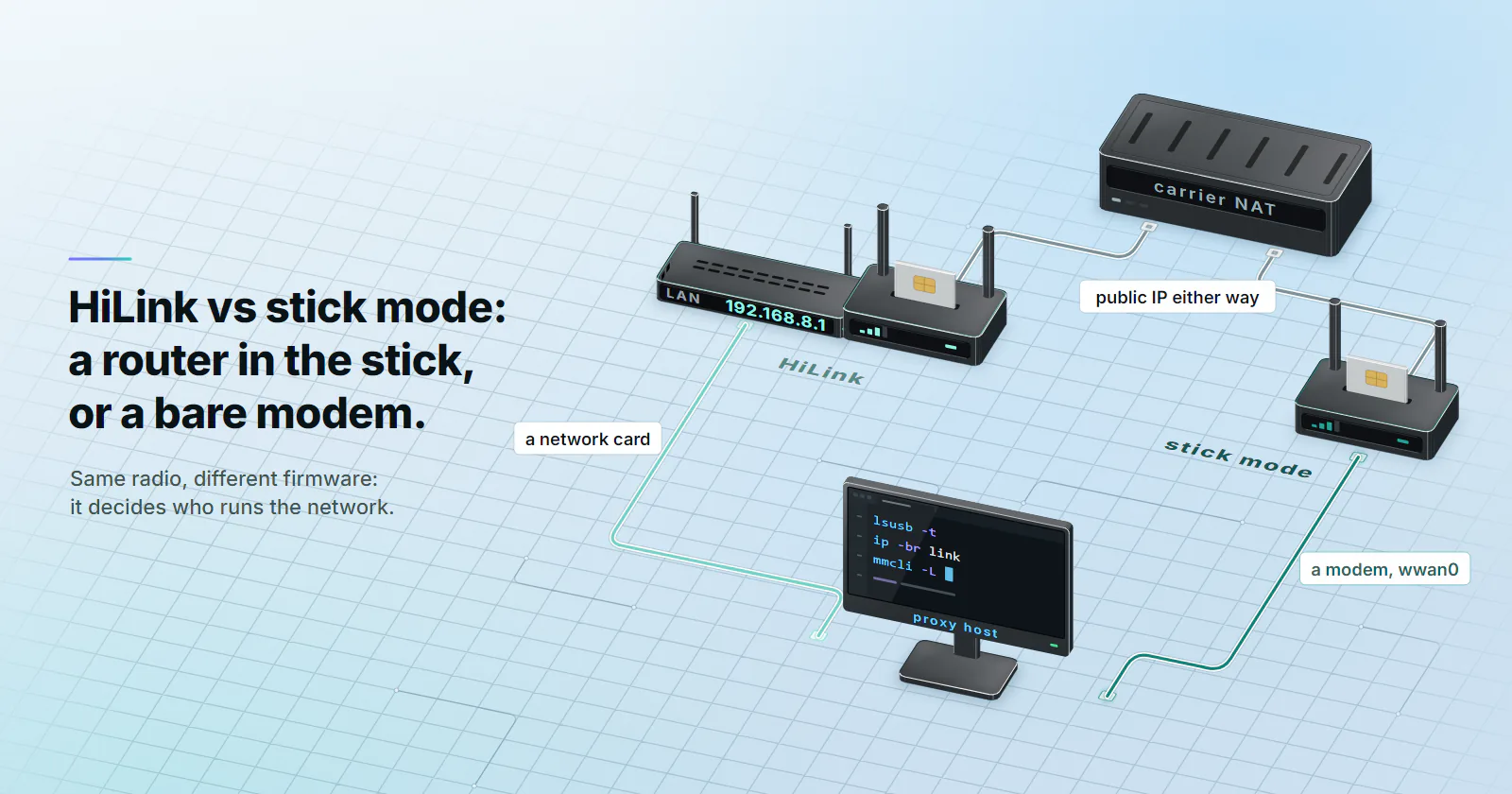
- HiLink puts a router inside the stick. The modem dials the carrier itself and hands your host a 192.168.8.x address over DHCP, so you get a network card, a web UI at 192.168.8.1 and nothing in
mmcli -L. Fine for one stick. - Stick mode gives the host a bare modem. Your machine dials with ModemManager, QMI, MBIM or PPP, sees signal and registration, and reconnects on its own schedule. It is the mode a proxy host with several modems wants.
- The 192.168.8.1 collision is the real problem. Every HiLink stick ships with the same subnet, so four sticks on one box fight over one default route until you renumber them, isolate them in namespaces or route by source address.
- The target does not care which mode you picked. It sees the carrier's public address either way; the mode changes how you control and rotate the modem, not the trust the exit carries.
HiLink vs stick mode decides who runs the network. In HiLink mode a USB modem behaves like a small router: it dials the carrier itself, gives your computer an address from its own DHCP server, usually on 192.168.8.x, and NATs your traffic. In stick mode it is a bare modem, and the host does the dialling, the routing and the control.
You probably met this the way most people do. You plugged a Huawei E3372 into a Linux box or a Raspberry Pi to get a carrier exit, and instead of a modem you got a network card, a web page at 192.168.8.1 and an empty mmcli -L. With one stick that is fine, honestly. With four, every stick claims the same subnet and traffic starts leaving through whichever one the routing table liked first.
What to do depends on what the host is for. For a proxy host, HiLink vs stick mode changes how you rotate, how you monitor and how many sticks one machine can run without a fight.
HiLink vs stick mode at a glance
Same radio, different firmware. On Huawei sticks the mode comes from the firmware family. Stick builds are numbered 21.x and HiLink builds 22.x, and the radio, the SIM and the carrier session behave the same in both. What changes is where the network logic lives. Other makers ship the same split under names like router mode and modem mode, so check the manual for your model before you assume anything.
Read it this way: HiLink is the easy start, stick mode is the one you want once the host has a job to do.
How the host sees a USB modem
When a modem enumerates, the kernel picks one of the USB configurations it offers, and that choice decides what you get. Some sticks first appear as a USB disk holding Windows drivers and need a mode switch before the modem shows up at all, which the ModemManager documentation (2024 edition) lists as a normal case for USB modems. If your stick looks like a CD drive, that is usually all it is.
Run these three before you change anything:
lsusb -t        # which kernel driver claimed each interface
ip -br link     # the network interfaces that appeared
mmcli -L        # the modems ModemManager can actually manage
RNDIS, ECM and NCM: the modem as a network card
RNDIS. Microsoft’s Ethernet-over-USB protocol, and the one many Android phones use for USB tethering. Greg Kroah-Hartman, who maintains the Linux USB stack, proposed disabling every RNDIS driver in a patch posted on 23 November 2022, calling the protocol impossible to secure against untrusted devices. It still works on a box you control, but it is the one to expect trouble from on newer kernels.
ECM and NCM. USB-IF communication classes that make the modem look like an Ethernet adapter. NCM batches frames and copes better at higher throughput. A HiLink E3372 typically lands under cdc_ether or rndis_host, which is why it looks exactly like a USB network dongle: as far as the host can tell, that is what it is.
QMI and MBIM: the modem as a modem
QMI. Qualcomm’s control protocol, driven by the qmi_wwan driver and the qmicli tool from libqmi. Data flows over a network interface such as wwan0, control over a separate /dev/cdc-wdm0 device.
MBIM. A USB-IF standard for mobile broadband modems, built with Microsoft, Qualcomm, Ericsson and Nokia. ModemManager’s MBIM protocol page dates the last official revision to 1 May 2013. Same split as QMI: a data interface plus a control device, driven by cdc_mbim and mbimcli.
QMI vs MBIM matters less than people expect. When a modem offers both, the kernel picks the MBIM configuration by default because it is the more generic one, per the same docs, and ModemManager drives either. Pick the one your modem handles without vendor quirks and move on.
PPP: the old path
A serial port, AT commands and pppd. ModemManager describes it as the method for serial modems and USB modems with limited capabilities, and that is a fair summary. On an E3372, stick firmware typically exposes serial AT ports next to an NCM interface handled by huawei_cdc_ncm, so you rarely need PPP there.
Double NAT and the 192.168.8.1 problem
Double NAT, in practice. In HiLink mode your host gets something like 192.168.8.100, the stick translates that onto the internal address the carrier gave it, and the carrier’s CGNAT translates again onto a shared public IPv4. If the carrier’s address on the stick sits in 100.64.0.0/10, that second layer is the carrier-grade NAT explained in the CGNAT guide. Either way the target sees the carrier’s public address, so double NAT changes nothing about trust. What it adds is one more connection-tracking table on a device with very little memory, and one more place where idle connections can be dropped.
The collision. This one eats afternoons. Every HiLink stick ships with the same LAN, 192.168.8.0/24 with the stick at 192.168.8.1. Plug in four and the host has four interfaces on one subnet with four identical gateways. Only one default route wins, so traffic you meant for stick three leaves through stick one, and the IP you see in your logs is not the one you think you are testing.
Three ways out, from least to most work:
- Change the LAN subnet on each stick in its web UI (
192.168.9.1,192.168.10.1), where the firmware allows it. - Put each stick’s interface in its own network namespace and run one proxy instance per namespace.
- Keep the sticks on distinct subnets and route by source address, so each proxy port leaves through its own stick:
# traffic sourced from 192.168.9.100 leaves through stick 2 (usb1)
ip route add default via 192.168.9.1 dev usb1 table 102
ip rule add from 192.168.9.100 table 102
Your proxy software then binds each listening port to the matching source address. Annoying to set up once, boring afterwards, which is what you want.
Which mode a proxy host wants
One stick, one exit. HiLink. It works out of the box, the double NAT costs you nothing that matters, and you can trigger a reconnect through the stick’s own interface. Do not convert a stick that already does the one job you need.
Several sticks on one host. Stick mode, or a module that speaks QMI or MBIM. Each modem becomes a named interface, there is no subnet to collide, and one tool talks to all of them.
You need to see the modem. Stick mode again. mmcli -m 0 shows registration state, the operator and access technology, mmcli -b 0 shows the bearer’s IP, and mmcli -m 0 --signal-setup=10 followed by --signal-get gives signal readings. In HiLink the same data sits behind the stick’s own web API, which differs between firmware versions.
Rotation is the same request either way. A new IP on a single modem comes from dropping the data session and attaching again, the reconnect rotation that what are mobile proxies walks through. In stick mode you do it from the host with mmcli -m 0 --simple-disconnect and --simple-connect="apn=YOUR_APN", or by switching the radio off and on with AT+CFUN=4 and AT+CFUN=1. On a HiLink stick you toggle mobile data through its API. The mode changes how you ask. The carrier still decides which public address comes back, and sometimes it is the same one.
Speed is not the deciding axis. People expect stick mode to be faster because it skips a NAT. On a 4G stick the radio and the cell are almost always the ceiling, and the generation of the radio changes throughput rather than what the target sees, as the 4G vs 5G proxies comparison shows. Choose the mode for control, not for a few Mbit/s.
Switching modes without a brick
The mode switch you probably need. If the stick shows up as a disk, usb_modeswitch flips it into its modem configuration, and most distributions ship rules for common sticks. That is a configuration change, nothing is flashed.
The firmware swap you might not. Moving a Huawei stick from HiLink to stick mode means flashing a different firmware family. Not every hardware revision accepts it, and a wrong image is a dead stick. Some models also change their USB layout through vendor AT commands; those are model-specific and outside any standard, so a command that works on one revision can do something else on the next.
Often the cheaper path in time is buying a modem that is already a modem: an M.2 module in a USB enclosure that speaks QMI or MBIM from the start. You skip the flashing and get the control interface the host wanted anyway.
Bridge mode on routers and 5G CPEs
Routers repeat the same choice one size up. A 5G CPE or mobile router in router mode does what a HiLink stick does: it holds the carrier session, runs DHCP and NATs everything behind it. With IP passthrough, which some vendors call bridge mode, it hands the carrier-assigned address to one device behind it and stops translating, so your proxy box owns the session address.
Two things catch people here. Passthrough usually serves one downstream device, so it fits a proxy box behind the router and not a whole LAN. And the address you receive is the one the carrier assigned, which on most mobile networks is an internal CGNAT address, not a public IP. Passthrough removes the router’s NAT. The carrier’s stays.
Pick the mode by the job
Settling HiLink vs stick mode is mostly a question of how many modems one host runs. Running one stick for testing? Leave it in HiLink and spend the time on the test. When one host runs several modems, use stick mode or QMI and MBIM modules, give each interface its own subnet or namespace, and route by source address. With a router or CPE in front of a proxy box, put it in passthrough so the box holds the session. And if what you actually need is carrier exits in cities where you cannot put a stick on a desk, mobile proxies give you the same class of address from a pool, with rotation set on the order: every request, a 5-60 minute timer, or sticky while the device stays online.
Frequently asked questions
In HiLink mode a USB modem acts as a small router: it dials the carrier, runs DHCP for your computer and translates your traffic with its own NAT. In stick mode it behaves as a plain modem, and the host dials the connection, handles routing and controls the device through AT commands, QMI or MBIM.
Functionally, yes. A HiLink stick holds the carrier session, gives the host an address on its own LAN, usually 192.168.8.x, and NATs traffic before it reaches the carrier. The host sees an Ethernet adapter with a gateway, which is why Linux modem tools such as ModemManager do not manage it.
Often, but it means flashing a different firmware family, and not every hardware revision accepts it. A wrong image can leave the stick unusable, and carrier-branded sticks may refuse the swap. Confirm the exact revision and keep the original firmware before you try, or buy a modem that ships as a modem.
Rarely by a margin you would notice. Stick mode skips one NAT layer, but on a 4G stick the radio signal and the cell's load set the ceiling. Choose stick mode for control and monitoring rather than for speed.
QMI is Qualcomm's control protocol for its modems, while MBIM is a USB-IF standard for mobile broadband devices that Windows supports natively. Both split a modem into a data network interface and a control device. When a modem offers both, the Linux kernel selects MBIM by default, and ModemManager can drive either.
Not for what the target sees, because the carrier's CGNAT picks the public IPv4 either way. Double NAT adds a second connection-tracking table on the stick, which can drop idle connections sooner, and it makes per-stick routing harder when several HiLink sticks share one host.
IP passthrough, sometimes called bridge mode, makes a 5G router or CPE hand its carrier-assigned address to one device behind it instead of translating traffic with NAT. The downstream device then owns the session address. On most mobile networks that address is still an internal CGNAT address, so passthrough removes the router's NAT but not the carrier's.
Researched and drafted with AI tools, then checked against our publishing rules before it went live: 3 outside links, 4 links to other proxymint pages, no prices and a fact-check pass against our product records. How we write.