Proxy format: IP, port, username and password, every form
Read and write proxy strings: host:port:user:pass, user:pass@host:port, http:// vs socks5h:// URLs, separate fields, password encoding and IPv6 brackets.
Quick summary · TL;DR
- Four forms carry the same four values. The colon list host:port:user:pass, the authority user:pass@host:port, the full URL with a scheme, and separate server, username and password fields.
- The full URL is the portable form. curl, Python requests, Node agents, Scrapy and environment variables all parse scheme://user:pass@host:port, and the scheme picks HTTP, SOCKS5 or SOCKS5 with proxy-side DNS.
- Special characters need percent-encoding inside a URL. Write @ as %40, : as %3A, / as %2F and # as %23; separate fields take the raw password.
- IPv6 hosts go in brackets. http://user:pass@[2001:db8::1]:8080 is the only safe way to write one; the colon list cannot carry IPv6.
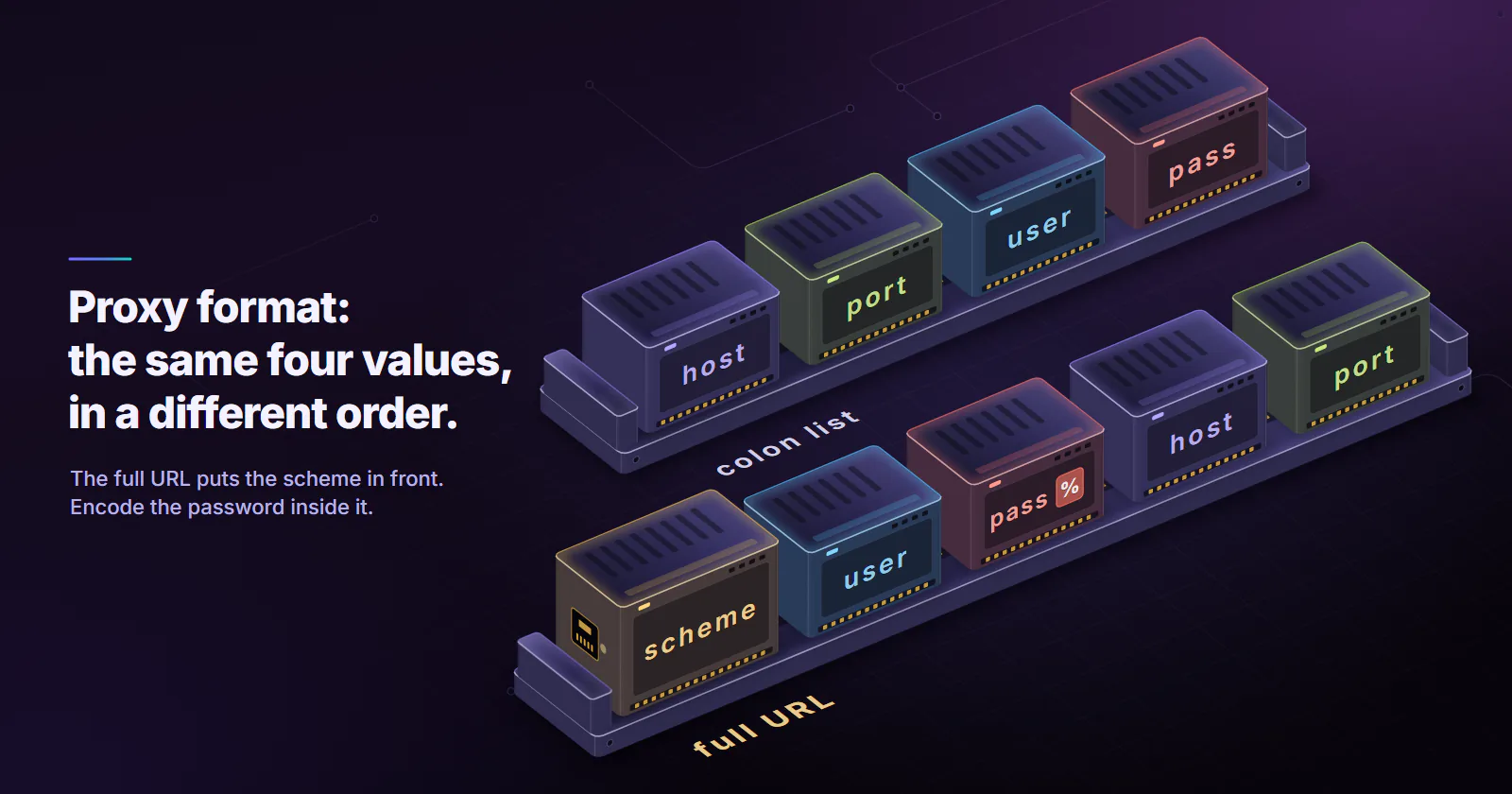
A proxy with a username and password is four values: host, port, username and password. Tools write them in four forms: the colon list host:port:user:pass, the authority user:pass@host:port, the full URL http://user:pass@host:port (or socks5h://), and separate server, username and password fields. The full URL is the one curl, Python and Node all accept.
A search for proxy format ip port username password usually starts with one line of text and a tool that rejects it. The values never change between forms. What changes is the order, the separators, the scheme in front, and whether the password needs encoding. Every common form maps to a tool below, with the exact syntax, plus the two parse failures that cost the most time: special characters in passwords and IPv6 hosts.
Proxy format: IP, port, username, password
The table maps each form to the tools that expect it and the input that breaks it. Separate fields are what browser automation and settings dialogs use.
The full URL is the most portable of the four. It names the protocol, it has a defined grammar in RFC 3986 (published January 2005), and every library that takes a proxy string parses it. The colon list is the most common export format, because it is easy to paste a thousand of them into a text file. Converting from the list to the URL is a one-line job, shown at the end.
The colon list form
Most proxy format ip port username password questions are about this form. The colon list has no standard. It is a convention, and providers ship it in several orders: host:port:user:pass, user:pass:host:port and host:port@user:pass, plus separator variants such as host:port user:pass (a space) and user:pass|host:port (a pipe). A tool that imports lists either guesses the order or asks for it, so the first step is to read the line.
Telling the host from the user
Read the line from the left. The host is the field that looks like an address: four dot-separated numbers, or a name with dots in it. The port is the field that is a whole number between 1 and 65535, and it sits next to the host. Usernames rarely contain dots, and passwords almost never form a valid port number. If the first field has dots and the second is numeric, the line is host:port:user:pass. If the last two fields have that shape, it is user:pass:host:port.
When the password contains a colon
A colon inside the password makes the line ambiguous. HOST:PORT:alice:pa:ss splits into five fields, and a naive split on every colon hands the tool the wrong password. A parser that knows the order can split on the first three colons only and keep the rest as the password, which works for host:port:user:pass and fails for user:pass:host:port. An IPv6 host, which is made of colons, cannot be written in this form at all without a separate convention. When either case applies, move to the URL form or separate fields.
The URL form and its schemes
A proxy URL is scheme://user:password@host:port. The userinfo is everything between // and the @ that comes before the host, and the first colon inside the userinfo splits the username from the password. RFC 3986 section 3.2.1 marks the user:password pattern as deprecated for web links, because it leaks secrets in logs and history, yet proxy configuration still runs on it. Treat any file or shell history holding these URLs as a secret.
The scheme tells the client which protocol to speak to the proxy:
- http:// means an HTTP proxy. The client sends plain requests for
http://targets and opens a CONNECT tunnel forhttps://targets, so the TLS session still runs end to end between the client and the site. - socks5:// means SOCKS5, with the client resolving the target hostname itself and sending the proxy an IP address.
- socks5h:// means SOCKS5 with the hostname sent to the proxy, so the DNS lookup happens on the proxy side. The curl manual (online edition, accessed October 2026) documents both schemes, and Python requests and most Node SOCKS agents follow the same naming.
Write the port every time. Default proxy ports differ between tools and between schemes, and a missing port produces a connection to the wrong place rather than a clear error. Never put https:// in front of the proxy itself unless the provider documents a TLS listener. An HTTP proxy URL already carries HTTPS sites through CONNECT.
socks5 or socks5h
The difference is where the target name is looked up. With socks5://, the client’s own resolver sees every hostname, and a site that varies content by resolver location can serve the wrong region. proxymint measured both schemes on its residential and mobile per GB gateway. Over CONNECT and socks5h:// the target name resolved on the proxy side, while plain socks5:// sent the lookup through the client’s resolver. The numbers and the method are in proxymint Lab #1, the gateway DNS and header test. For any job that depends on location, use an http:// proxy URL or socks5h://.
URL-encoding special characters in passwords
In the URL form, a handful of characters in a username or password break the parse. @ ends the userinfo early. /, ? and # end the authority. : in the username shifts the split, and % starts an escape sequence. The fix is percent-encoding: each unsafe byte becomes % plus two hex digits.
| Character | Encoded | Why it breaks |
|---|---|---|
@ | %40 | Read as the end of the credentials |
: | %3A | Read as the user and password separator |
/ | %2F | Read as the start of a path |
# | %23 | Read as the start of a fragment |
? | %3F | Read as the start of a query |
% | %25 | Read as the start of an escape |
| space | %20 | Not allowed in a URL |
Encode the username and password separately, never the whole URL. In Python that is urllib.parse.quote(value, safe=''); the safe='' matters, because the default leaves / unencoded. In JavaScript it is encodeURIComponent(value). A password of p@ss:w0rd/# becomes p%40ss%3Aw0rd%2F%23.
A local test on 2026-10-03 shows how differently parsers treat a raw, unencoded password. The test proxy logged the Proxy-Authorization header each client sent.
The lenient parsers are the dangerous ones. A script that works in Python with a raw @ fails the day the same string goes into curl, and a # breaks everything. Encode every time and the string works in all three.
curl’s -U flag sits in between. It takes user:password outside the URL, splits on the first colon, and on curl 8.5.0 it also decodes percent sequences, so a password that literally contains %40 has to be written as %2540 there.
IPv6 proxy addresses in brackets
An IPv6 address is full of colons, so a URL cannot tell where the address ends and the port begins. RFC 3986 section 3.2.2 puts the address inside [ and ], and the port follows the closing bracket.
http://USERNAME:PASSWORD@[2001:db8::1]:8080
socks5h://USERNAME:PASSWORD@[2001:db8::1]:1080
Without brackets, curl rejects 2001:db8::1:1080 with “Port number was not a decimal number”. With the brackets in place, Python’s urlsplit returns the bare address as the hostname and port 1080, and Node’s URL keeps the brackets in hostname and reads the same port. The colon list form has no bracket rule, so an IPv6 proxy belongs in a URL or in separate fields. In a separate server field, keep the brackets: http://[2001:db8::1]:8080.
Most proxy endpoints are reached on an IPv4 address or a hostname even when the exits are IPv6. The brackets matter when the endpoint itself is an IPv6 literal.
Code examples per tool
Each example uses placeholders. Replace HOST, PORT, USERNAME and PASSWORD with the values from the provider’s dashboard, and percent-encode the password wherever it sits inside a URL. How to use a proxy covers system-wide and browser settings; this section is for code.
curl
# URL form; percent-encode special characters in the password
curl -x "http://USERNAME:PASSWORD@HOST:PORT" https://ipinfo.io/json

# Credentials kept out of the URL
curl -x "http://HOST:PORT" -U "USERNAME:PASSWORD" https://ipinfo.io/json

# SOCKS5 with the hostname resolved on the proxy side
curl -x "socks5h://USERNAME:PASSWORD@HOST:PORT" https://ipinfo.io/json
-x with no scheme means an HTTP proxy. Quote the whole value so the shell does not touch &, ! or # in the password.
Environment variables
export http_proxy="http://USERNAME:PASSWORD@HOST:PORT"
export https_proxy="http://USERNAME:PASSWORD@HOST:PORT"
curl and Python requests read these without any proxy flag in the code, and the same percent-encoding rules apply. The https_proxy name refers to the target scheme, so it still holds an http:// proxy URL. Write the names in lowercase: curl ignores an uppercase HTTP_PROXY.
Python requests
from urllib.parse import quote
import requests

user = quote("USERNAME", safe="")
password = quote("PASSWORD", safe="")
proxy = f"http://{user}:{password}@HOST:PORT"

r = requests.get(
    "https://ipinfo.io/json",
    proxies={"http": proxy, "https": proxy},
    timeout=30,
)
print(r.json())
The https key names the target scheme, not the proxy scheme, which is why both keys point at the same http:// proxy. For SOCKS5, install the extra with pip install "requests[socks]" and change the scheme to socks5h://.
Node.js
Node’s fetch is built on undici, and the undici package adds a ProxyAgent for HTTP proxies:
import { ProxyAgent, fetch } from 'undici';

const user = encodeURIComponent(process.env.PROXY_USER);
const pass = encodeURIComponent(process.env.PROXY_PASS);
const dispatcher = new ProxyAgent(`http://${user}:${pass}@HOST:PORT`);

const res = await fetch('https://ipinfo.io/json', { dispatcher });
console.log(await res.json());
For SOCKS5 with the http and https modules, the socks-proxy-agent package takes the same URL form, socks5h:// included.
Scrapy
from urllib.parse import quote
import scrapy

PROXY = f"http://{quote('USERNAME', safe='')}:{quote('PASSWORD', safe='')}@HOST:PORT"


class IpSpider(scrapy.Spider):
    name = "ip"

    def start_requests(self):
        yield scrapy.Request("https://ipinfo.io/json", meta={"proxy": PROXY})

    def parse(self, response):
        yield response.json()
Scrapy’s HttpProxyMiddleware reads the URL from meta["proxy"], takes the credentials out of it and sends them as a Proxy-Authorization header. It has no SOCKS support, so point it at the provider’s HTTP endpoint.
Playwright
import { chromium } from 'playwright';

const browser = await chromium.launch({
  proxy: {
    server: 'http://HOST:PORT',
    username: 'USERNAME',
    password: 'PASSWORD', // raw value, no percent-encoding
  },
});
const page = await browser.newPage();
await page.goto('https://ipinfo.io/json');
console.log(await page.textContent('body'));
await browser.close();
Two traps sit in the Playwright proxy option (docs accessed October 2026, source checked in version 1.59.1). Credentials written inside server are dropped without an error, because Playwright keeps only the scheme and host from it. A socks5:// server with a username also throws “Browser does not support socks5 proxy authentication”. Authenticated browser sessions go through the http:// endpoint.
Puppeteer
import puppeteer from 'puppeteer';

const browser = await puppeteer.launch({
  args: ['--proxy-server=http://HOST:PORT'],
});
const page = await browser.newPage();
await page.authenticate({ username: 'USERNAME', password: 'PASSWORD' });
await page.goto('https://ipinfo.io/json');
console.log(await page.evaluate(() => document.body.innerText));
await browser.close();
Chrome’s --proxy-server flag takes a scheme, host and port, never credentials. page.authenticate answers the 407 challenge for each page, so call it before the first navigation on every new page.
Separate fields in browsers and profile tools
Browsers split the proxy into fields because they never accept credentials in the address. Chrome and Edge use the operating system’s proxy settings or the --proxy-server flag, and ask for the username and password in a dialog when the proxy returns 407. Firefox has its own connection settings with separate host and port boxes per protocol, and the same login prompt. A dialog that appears on every launch is normal for an authenticated proxy; scripted sessions answer it with Playwright’s fields or Puppeteer’s page.authenticate.
Browser profile tools are the main consumer of the colon list. Most import a pasted list and map each line to a profile, and most default to host:port:user:pass. Check the tool’s import order before pasting a list in another order, and check the protocol selector, since a list rarely says whether a line is HTTP or SOCKS5. When the tool asks for fields instead, paste the raw password, not the encoded one.
Session and geo parameters in usernames
Some providers encode targeting in the username itself: a country code, a session ID or a session lifetime appended to the base login with separators. The format string stays the same, only the username grows. Those flags are provider-specific syntax, and a username copied from one provider’s docs means nothing to another’s gateway.
proxymint does not use username flags. Every tier authenticates with a plain username and password. On rotating residential proxies and mobile per GB, rotation (a new IP on every request, a timer from 5 to 60 minutes, or sticky while the device stays online) and location (country, region and city) are set on the order and can be changed later; a rotation change keeps the same login and ports. One port accepts both HTTP and SOCKS5, so the same host, port and login work as http:// or socks5h://. On static ISP proxies and datacenter IPv4, each IP comes with its own username and password and its own HTTP and SOCKS5 port. Which category fits which job is mapped in types of proxies.
Converting between formats, and which to use
Converting a colon list into URLs is a short script. This one assumes host:port:user:pass, keeps any colons in the password, and encodes both credentials:
from urllib.parse import quote


def colon_line_to_url(line, scheme="http"):
    host, port, user, password = line.strip().split(":", 3)
    return f"{scheme}://{quote(user, safe='')}:{quote(password, safe='')}@{host}:{port}"


with open("proxies.txt") as f:
    for line in f:
        if line.strip():
            print(colon_line_to_url(line))
It does not handle IPv6 hosts or the user:pass:host:port order; swap the unpacking for those. When a converted string still fails, the error tells which layer broke. A parse error or curl exit 5 means the string itself is malformed, usually an unencoded character. A 407 means the proxy was reached and the credentials were wrong, often a double-encoded or truncated password. A refused connection or timeout means the host or port is wrong, or the scheme does not match the port.
Whatever proxy format ip port username password order a provider exports, store each proxy once as a full URL with an encoded password, and generate the other forms from that. Use separate fields for Playwright, Puppeteer and browsers, with the raw password. Use socks5h:// or http:// when location matters, and keep the colon list for tools that import lists and for nothing that has to parse a password with a colon in it.
Frequently asked questions
The most portable form is a URL: scheme://username:password@host:port, for example http://USERNAME:PASSWORD@HOST:PORT. Proxy lists often use the colon form host:port:username:password instead, and browser automation tools take the server, username and password as separate fields. All of them carry the same four values.
Put the four values on one line separated by colons, in that order: the IP or hostname, the port number, the username and the password. This colon list form is common in bulk exports and browser profile tools. It cannot carry a password that contains a colon or an IPv6 address safely, so use the URL form for those.
Split the line on its first three colons to get the host, port, username and password, percent-encode the username and password, and join them as scheme://user:pass@host:port. In Python, line.split(':', 3) keeps any colons in the password, and urllib.parse.quote(value, safe='') does the encoding.
socks5h:// tells the client to use SOCKS5 and send the target hostname to the proxy, so the DNS lookup happens on the proxy side. Plain socks5:// resolves the name on the client first and sends only an IP address. For location-sensitive jobs, socks5h:// keeps the lookup consistent with the exit.
Inside a URL, percent-encode the password: @ becomes %40, : becomes %3A, / becomes %2F, # becomes %23 and % becomes %25. Encode the username and password separately, not the whole URL. Fields that take the password on its own, such as Playwright's password option, need the raw value without encoding.
Wrap the address in square brackets and put the port after the closing bracket, for example http://USERNAME:PASSWORD@[2001:db8::1]:8080. Without brackets a parser cannot tell where the address ends and the port begins. The colon list form has no bracket rule, so IPv6 proxies belong in a URL or separate fields.
Not in the address. Chrome's --proxy-server flag and its system proxy settings take only the scheme, host and port, and Chrome asks for the username and password in a dialog when the proxy answers 407. Automated sessions answer that challenge with Puppeteer's page.authenticate or Playwright's username and password fields.
Researched and drafted with AI tools, then checked against our publishing rules before it went live: 3 outside links, 7 links to other proxymint pages, no prices and a fact-check pass against our product records. How we write.