Types of proxies: datacenter, residential, ISP and mobile compared
Types of proxies sorted by what the target sees: datacenter, residential, ISP and mobile, then by protocol, anonymity, rotation, access and billing.
Quick summary · TL;DR
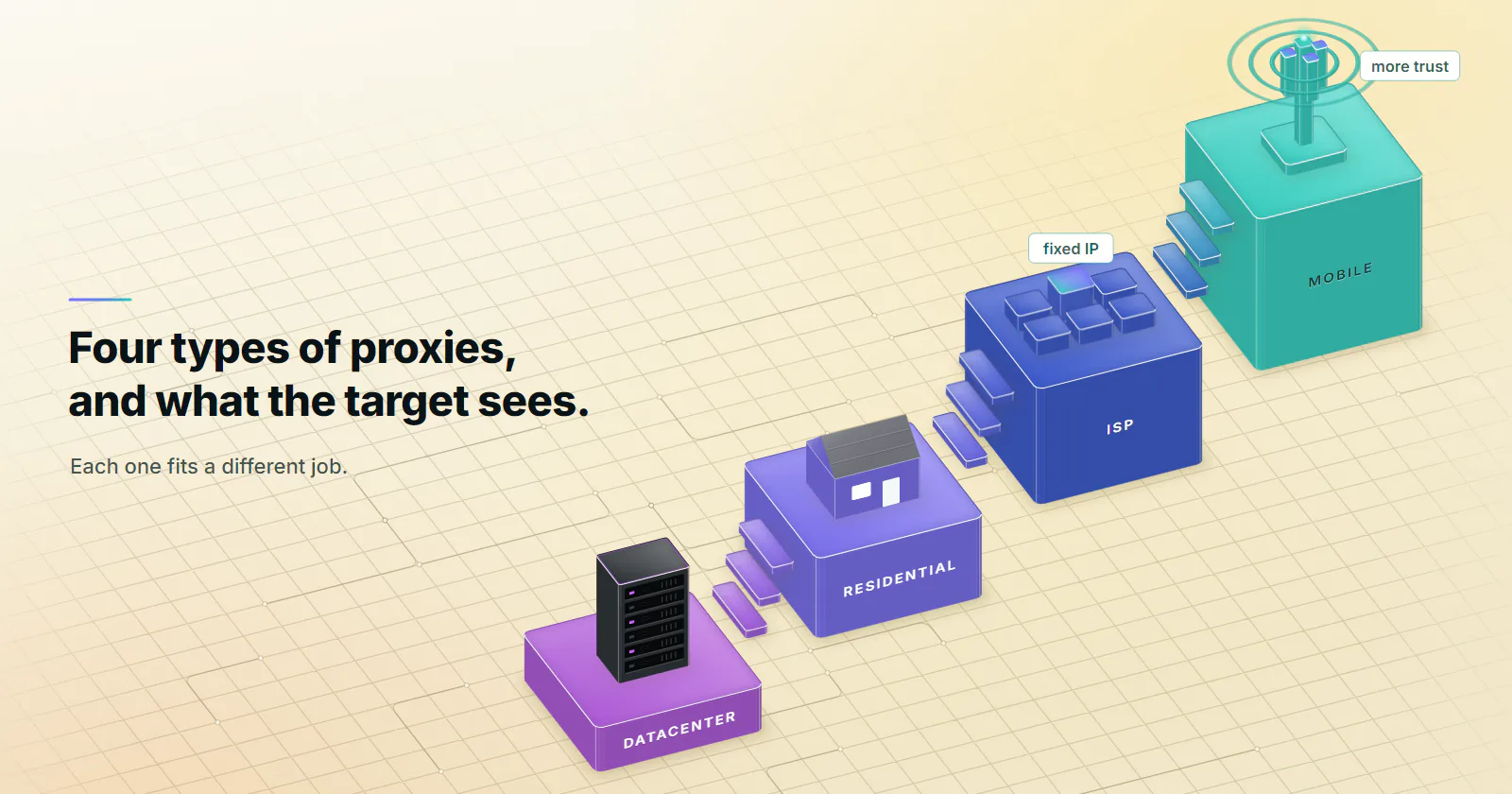
- The four main types of proxies are datacenter, residential, ISP and mobile. They differ in who announced the exit IP, and each step up carries more trust with the target, so the right one is the type whose trust matches what the target checks.
- The target reads the ASN before any header. IP intelligence data labels an exit as hosting, consumer broadband or cellular, and no proxy setting changes that label.
- Billing units differ by type. Datacenter IPv4 and ISP bill per address per month; residential and mobile bill per GB moved.
- Protocol, anonymity and direction only change setup. An elite SOCKS5 proxy on a hosting ASN is still a hosting ASN, and HTTPS through a CONNECT tunnel carries no proxy headers at all.
- Pick the rung by the job. A target that filters hosting ranges fits residential, a session that breaks when the IP changes fits ISP, a platform that checks for a mobile origin fits mobile. A block is a stop signal, not a cue to climb.
The main types of proxies are datacenter, residential, ISP (static) and mobile, sorted by who announced the exit IP: a hosting company, a home broadband provider, an ISP on a fixed address, or a mobile carrier. That is the axis the target reads first. Protocol, anonymity, direction, rotation, access and IP version sort proxies too, but none of them changes that label.
A proxy is a server that forwards a client’s requests, so the website sees the proxy’s IP address instead of the client’s. A plain example: a price monitor running in Frankfurt sends its requests through a residential exit in Chicago, and the store answers with the prices and stock a Chicago shopper would see.
Picking the wrong type costs results. One team runs a price scrape on a per-GB tier when a datacenter port would have handled it. Another runs logins through a rotating pool and meets a verification prompt on every session. Both started from a list that never said which type to try first.
The four go in order here, as a ladder where each rung carries more trust.
Types of proxies by IP source
Every public address belongs to an autonomous system (AS), and IP intelligence databases label each one. MaxMind’s connection type database (checked September 2026) sorts addresses into Cable/DSL, Cellular, Corporate and Satellite. IPinfo’s privacy detection data (checked September 2026) carries a hosting flag for hosting providers, cloud services and data centers, next to flags for VPN, proxy, Tor and relay.
A target can read those labels before it reads a single header. So the four types of proxies differ on four questions, three about the exit and one about the bill.
ASN type. Hosting company, consumer ISP or mobile carrier. No header or browser setting changes it.
Sharing. One customer’s traffic, a household’s as well, or a whole carrier cell behind one address. A shared address costs a target more to block, because the block lands on real people too.
Stability. A month, a session of a few minutes, or a single request.
Billing unit. Per address per month, or per GB moved. The unit decides which jobs suit a tier, often more than the headline rate does.
The four tiers proxymint sells:
The proxies overview has the four tiers side by side, and entry prices with volume bands are on the pricing page.
How websites detect proxies goes past the ASN: TLS fingerprints, pace and cookies all count. The ladder settles the IP layer, the only part a proxy changes.
Datacenter: the volume rung
What the target sees. An address announced by a hosting company, flagged as hosting on sight; the big clouds publish their ranges. The IPv4 datacenter ports proxymint sells are dedicated: one customer per port, fixed for the month.
How it is billed. Per port per month for IPv4, with no bandwidth cap, so heavy pages and repeated runs cost the same as light ones.
What it fits. Bulk collection from targets without anti-bot scoring. API polling, uptime checks and monitoring. SERP tooling on lenient engines and regions. Load testing from many addresses.
Where it fails. Social platforms, marketplaces behind anti-bot vendors and strict retail. They classify hosting ASNs on sight, and rotating to another address in the same class does not change the class. A block on the first request, at a human pace, is the signature.
Datacenter proxies are the default first test for any new target. The full breakdown is in what are datacenter proxies.
Residential: consumer ISP, rotating pool
What the target sees. An address announced by a consumer ISP on a real home connection. In MaxMind’s terms that is Cable/DSL traffic, the same class as the household next door. The pool rotates through many such connections, each shared with a household.
How it is billed. Per GB, one-off package. The bill follows page weight, so light HTML fetches go a long way and full browser renders use more.
What it fits. Price and stock monitoring across markets. Search and local SEO tracking by city. Ad verification on home networks. Brand protection. Any target that blocks datacenter ranges. The explainer on what a residential proxy is covers how pools are sourced.
Where it fails. Keeping one identity for days, because home devices go offline. Platforms that only trust mobile origins. High-volume jobs against lenient targets, where datacenter is built for volume.
Rotating residential proxies are the rung for targets that filter hosting ranges by policy. If the target is rejecting the client itself, a residential exit will not help.
ISP: one address that stays
What the target sees. An address registered to an ISP, assigned to your order for the whole billing term. It does not rotate; the address is the product.
The stability is why ISP sits above residential. A target that tracks login locations sees the same address every time, and it builds a history. ISP proxies are usually hosted on servers in a data center, so some IP databases label a range as hosting even though an ISP registered it. That label is the database’s call, so check the exit (method below).
How it is billed. Per IP per month, or 3 or 12 month terms billed at the start.
What it fits. Accounts tied to a consistent login location. Long sessions: seller dashboards, checkout flows, any cookie that breaks when the IP changes. A partner who needs one fixed address for their firewall. The trade against a sticky pool is laid out in ISP proxies vs rotating residential.
Where it fails. Broad scraping that needs thousands of IPs, where a fixed set of addresses burns out. Targets that insist on a mobile origin. Pure throughput on lenient targets.
ISP and datacenter both bill per address per month, so the choice comes down to one question: does the target care which ASN announced the address? If not, datacenter serves the job; if it does, the ISP-registered address is what the job needs. Static ISP proxies sell stability and an ISP-registered address. More in what are ISP proxies.
Mobile: carrier IPs behind CGNAT
What the target sees. An address announced by a mobile carrier, labelled Cellular in connection-type data. Carriers put many subscribers behind one public IPv4 address with carrier-grade NAT (CGNAT). Cloudflare wrote in October 2025 that one IPv4 address “may represent hundreds or even thousands of users”, and that CGNAT addresses were rate limited three times more often than other addresses despite bot scores that pointed to humans.
Blocking a carrier address blocks paying subscribers, which is why the top rung carries the most trust. A shared address also inherits its neighbours’ behaviour, so a mobile exit can meet a rate limit it did nothing to earn. The mechanics are in CGNAT explained for proxy buyers.
How it is billed. Per GB, one-off package, no renewal.
What it fits. Social platforms and account workflows that check for a mobile origin. Mobile ad verification: the creative a carrier user sees, in their market. App QA against real carrier routing. Targets that already block residential ranges.
Where it fails. Price monitoring and catalog scraping, which residential or datacenter clear. Bulk transfer from targets that do not check for a carrier origin. Anything that needs a fixed address for weeks.
Residential or mobile is a question of what the platform checks, and mobile or ISP splits on time: a carrier address moves, a static ISP address does not. Start from the job, then check whether mobile proxies are the only rung that clears it. How carrier addresses work is covered in what are mobile proxies.
Other ways to sort proxies
Most lists of the types of proxies mix the IP source in with six other axes, and they are not equal. Only the IP source changes how the target classifies the address. Rotation and access change how long an address lasts and who else has used it. Protocol, anonymity and direction change setup, and IP version decides whether the target answers at all.
By protocol: HTTP and SOCKS5
HTTP proxy. RFC 9110 (June 2022) defines a proxy as a message-forwarding agent the client chooses, usually through local configuration. For an https URL the client sends a CONNECT request, and the proxy turns into a blind tunnel that relays the TLS bytes without reading them.
SOCKS5. RFC 1928 (March 1996) relays TCP streams and UDP datagrams, negotiates a login method such as username and password, and can pass a hostname so DNS resolves at the proxy instead of on the client. In curl that is the socks5h:// scheme; with plain socks5:// your own machine looks the name up, and that lookup leaves from your network, not the exit’s. SOCKS4, the older version, carries IPv4 TCP only, with no password and no UDP.
“HTTPS”. Ambiguous: it can mean HTTPS traffic tunnelled through CONNECT, or a TLS connection to the proxy itself. Check which one a product means. On proxymint, HTTPS traffic runs through the proxy via CONNECT on every tier; the proxy itself speaks HTTP and SOCKS5, and both are included.
MASQUE. The newest kind, built on HTTP/3 and QUIC. RFC 9298 (August 2022) adds CONNECT-UDP, so an HTTP proxy can carry UDP the way CONNECT carries TCP. Apple’s iCloud Private Relay overview (December 2021) says the service proxies connections with CONNECT and CONNECT-UDP over HTTP/3. Proxy tiers sold for scraping and accounts, proxymint’s included, are HTTP and SOCKS5.
By anonymity: what an elite proxy hides
Transparent. The proxy passes the client’s real address to the target, usually in X-Forwarded-For or the standard Forwarded header, whose for= parameter RFC 7239 (June 2014) defined for exactly that.
Anonymous. The proxy hides the client address but still announces itself with a Via header, which RFC 9110 requires a proxy to send on each request it forwards.
Elite. Neither the client address nor a Via header. The request arrives looking like it came straight from the exit IP.
Distorting. A false client address in X-Forwarded-For, so the target sees a proxy and a made-up origin.
By direction: forward vs reverse
Everything on this page is a forward proxy: the client picks it to reach other servers. A reverse proxy, which RFC 9110 calls a gateway, answers as the origin server and forwards requests inward. CDNs, load balancers and web application firewalls are reverse proxies, and they are often the thing scoring the request on the other end.
A third kind is never chosen by the client: the intercepting proxy on corporate and ISP networks, which catches traffic without any client setting and, on company devices, often decrypts TLS with a root certificate the company installed.
By rotation: static, sticky, rotating
Static. One address for the whole term. Datacenter IPv4 ports and ISP addresses work this way.
Sticky. The same address for a set time. On the residential and mobile tiers that is a timer from 5 to 60 minutes, or for as long as the device stays online. Home devices and phones go offline, and a sticky session can end early when its device does.
Rotating. A new address on every request. It spreads a crawl across the pool and breaks anything that keeps state between requests, like a login or a cart.
Crawls rotate; sessions stay static or sticky.
By access: dedicated, shared, free
Dedicated. One customer per address for the term, so nobody else’s traffic lands on it while you hold it. The IPv4 datacenter ports above are dedicated; ISP addresses are assigned to your order for the whole billing term. An address can still carry history from before your term, so check it before relying on it.
Shared. Several customers on one address or pool. Each exit carries whatever the previous customer did with it. Rotating pools are usually shared by design.
Public and free. Open proxies from public lists. The operator can read and alter any plain HTTP request, sees the hostname of every site reached through a CONNECT tunnel, and can log any credential sent in clear. The addresses tend to be on block lists already, because anyone can find them.
By IP version: IPv4 vs IPv6
IPv4 addresses are scarce, which is why they sell per address. One standard IPv6 /64 subnet holds more addresses than the whole IPv4 space, so IPv6 pools are cheap per IP. Two catches. A target with no IPv6 address cannot be reached from an IPv6-only exit at all. And rate limiters that handle IPv6 can count a whole /64 as one client: Cloudflare’s previous rate limiting product blocks once “an individual IPv4 address or IPv6 /64 IP range” passes the threshold (checked September 2026), so a thousand addresses from one subnet can count as one.
How to choose between the types of proxies
Pick the rung by the job and what the target checks, before the first run.
Rule out the client first. Send the same requests at the same pace from a home connection with no proxy. If the target challenges that too, no rung fixes it: fix headers, cookies, pace or the browser fingerprint first.
Datacenter fits when the target is lenient: public pages, APIs and monitoring with no bot scoring. A few hundred requests at the real pace confirm the pages match what a home connection sees.
Residential fits when the target filters hosting ranges by policy, or the job needs prices, stock or rankings as a home connection in a given market sees them.
ISP fits when the job is a session rather than a crawl: logins, carts and accounts that expect the same IP. A partner asking for one fixed address for their firewall is the same requirement.
Mobile fits when the platform checks for a mobile origin. A carrier address sets the starting score, not the verdict: see what platforms check on mobile proxies.
A block is not a cue to climb. If a target blocks or challenges the job, slow down, read its terms or use its official route. Another rung does not change a no.
Size the job before ordering. A per-GB tier bills every image and script a full browser render pulls in, so estimate page weight times page count first. A job that clears on datacenter does not need residential trust. For scraping jobs by target type, see the best proxies for web scraping.
Check which proxy type you have
A seller’s label is a claim. The target reads the exit’s ASN, and one request through the proxy shows it:
curl -x http://HOST:PORT -U 'USERNAME:PASSWORD' https://ipinfo.io/jsonIn the response (fields checked September 2026), org carries the AS number and the network that owns it. A cloud or hosting company there means datacenter (or an ISP range hosted in one), a home broadband provider means residential or ISP, and a mobile carrier means mobile. Repeat it: a new ip on each call means per-request rotation, the same ip means static or sticky.
Frequently asked questions
A price monitor running on a server in Frankfurt that sends its requests through a residential proxy in Chicago is a typical example. The store sees a Chicago home broadband address instead of the Frankfurt server, and serves the prices and stock a local shopper would see. The web filter that every office laptop passes through is another example, and a CDN in front of a website is a reverse proxy.
A good proxy is the type that matches what the target checks. Datacenter proxies suit API polling, monitoring and bulk collection from lenient sites, rotating residential proxies suit price and search tracking on sites that block hosting ranges, static ISP proxies suit logins and long sessions, and mobile proxies suit platforms that check for a carrier origin. A trustworthy provider also states its billing unit and which workload each type is built for.
Start with datacenter proxies, because they are fast, built for volume, and many public pages do not filter hosting ranges. Rotating residential proxies fit targets that filter hosting ranges by policy, and jobs that need what a home connection in a given city sees. Mobile proxies are built for platforms that check for a carrier origin, which catalog and price scraping rarely do.
A static proxy keeps one IP address for the whole term, which suits logins, carts and partner firewalls that break when the address changes. A rotating proxy hands out a new IP on every request or after a timer, which spreads a crawl across many addresses. Sticky sessions sit in between, with the same pool address for a set number of minutes or until the device behind it goes offline.
Both exit from addresses registered to internet service providers. A residential proxy rotates through real home connections, with a new IP per request or sessions of minutes, and is billed per GB. An ISP proxy is one address held for the whole billing term, usually hosted on a server in a data center, and billed per IP per month, which suits logins and long sessions that break when the IP changes.
Mobile proxies carry more trust on platforms that check for a mobile origin, because carrier addresses sit behind CGNAT and are shared with real subscribers, so blocking one hurts paying users. Carrier networks are premium infrastructure to run. For price monitoring, search tracking and most scraping, the target does not check for a carrier origin and residential clears it.
Using a proxy is legal in most countries, and companies run them every day for security, caching and testing. The law and the target site's terms still apply to what is done through the proxy, so collecting data or running accounts through one is judged the same way as doing it without. This is general information, not legal advice for a specific job.
Researched and drafted with AI tools, then checked against our publishing rules before it went live: 9 outside links, 23 links to other proxymint pages, no prices and a fact-check pass against our product records. How we write.