ISP proxies vs rotating residential: which one the job actually needs
ISP vs residential proxies: one holds a static identity, the other spreads across a pool. Speed, location, detection and per-IP vs per-GB cost compared.
Quick summary · TL;DR
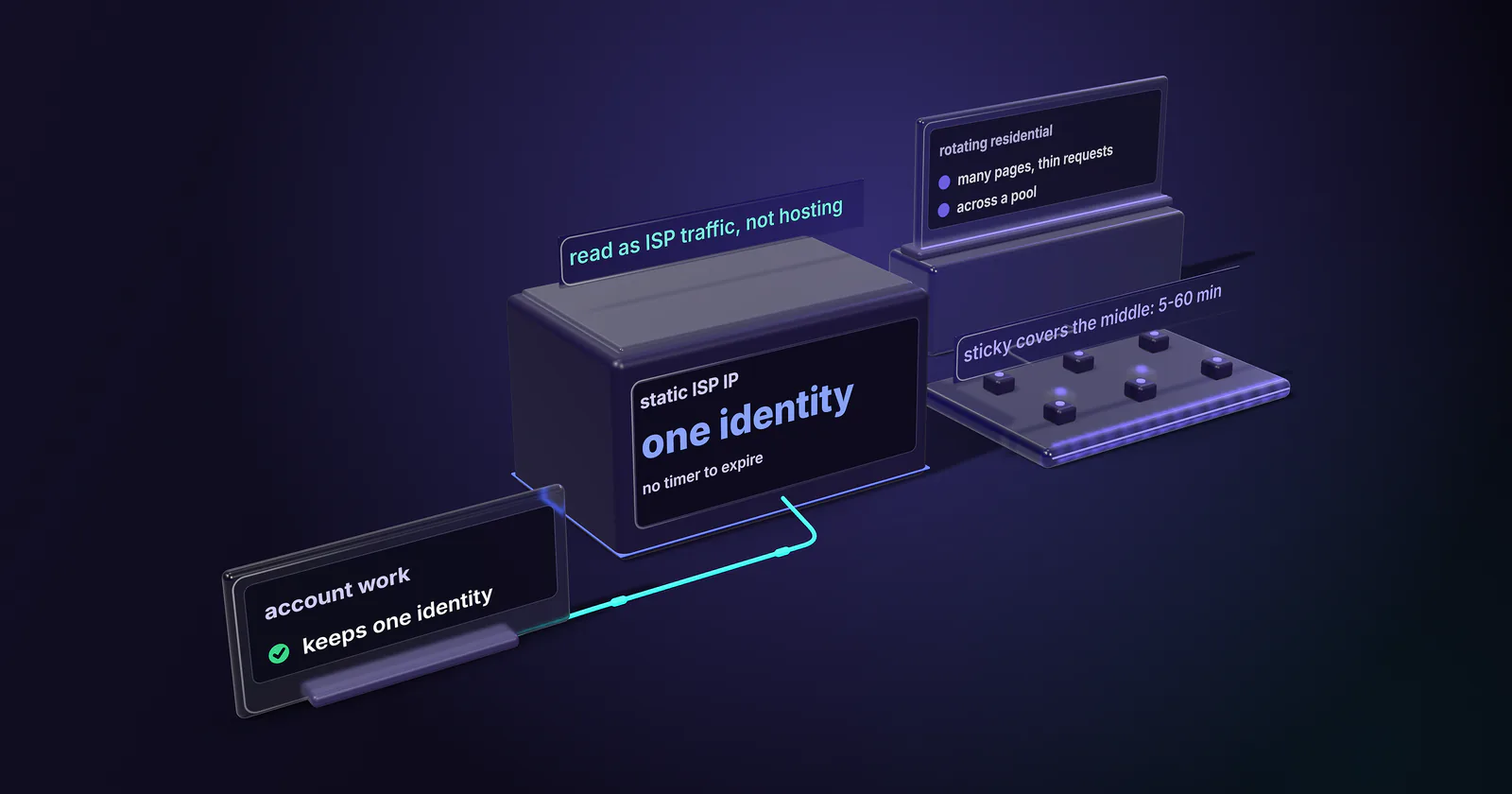
- Decide on the session model first. ISP proxies hold one static identity for account work; rotating residential spreads thin requests across a pool for breadth. Choosing on per-GB versus per-IP cost alone is how logged-in sessions die mid-task.
- ISP proxies are static IPs on an ISP-registered address. Datacenter-hosted for speed, but announced on an ISP-owned Autonomous System Number, so anti-bot systems read them as ISP traffic instead of hosting traffic.
- The ASN sets the first filter before a header is read. IP data vendors sort networks by type: IPinfo uses ISP, hosting, education, government and business. A rule that blocks hosting networks stops a datacenter IP and lets an ISP-type address through to the next check.
- Billing follows the session model. Rotating residential is usage-based per GB, so it scales with traffic; static ISP is billed per IP per month, so it scales with the number of identities. Cost per successful request matters more than either axis.
- Sticky sessions cover the middle. A rotating pool can hold one exit IP on a 5 to 60 minute timer, or for as long as the home device stays online, but only a static ISP IP holds an identity with no timer to expire.
ISP vs residential proxies comes down to one question: does the job hold an identity or cover ground? ISP proxies keep one static IP, an ISP-registered address, for the whole billing term. Rotating residential proxies spread requests across home devices that are online in the chosen location. Account work wants the first. Scraping and monitoring want the second. Where both sit among the other types of proxies is mapped in its own guide.
The order gets placed on the billing line. A per-GB rate and a per-IP rate look like competing numbers, and the buyer picks the one that fits the budget. Then the account work starts failing. A logged-in session on Amazon Seller Central drops mid-task. An Instagram account flags on the third rotation. A scrape that needed breadth burns a fixed pool of IPs in an hour. The session model should have decided the order.
What ISP proxies are
ISP proxies are static IPs on an ISP-registered address. The address lives on server infrastructure in a datacenter, announced to the internet on an Autonomous System Number that belongs to an ISP rather than a hosting provider.
A plain datacenter proxy egresses from an ASN owned by AWS, Google Cloud, or a hosting company. A residential proxy egresses from a real home connection on a consumer ISP like Comcast or AT&T. ISP proxies sit in between: datacenter-hosted for speed and uptime, but announced on an ISP’s ASN so anti-bot systems read them as ISP traffic rather than hosting.
Because the IP never changes, they hold a stable identity, where a rotating residential exit changes on a schedule or per request. Static ISP proxies exist for that job: the same IP showing up on the same account, day after day.
Where rotating residential IPs come from
Rotating residential proxies work the other way round. The exit is a real home connection, a device on a consumer ISP line in the location the order picked, so the address belongs to a household rather than a server. A gateway hands each request, or each session, to whichever device is online. The full mechanics are in proxymint’s guide to what a residential proxy is.
That pool moves. Devices join, sleep and drop off, so the exit that served a request an hour ago may be gone now. The churn is what makes breadth easy and long identity impossible.
It also raises a question the static tier does not: how did those devices join the pool? Before buying residential traffic from any provider, ask how devices joined the pool and whether owners can opt out.
Why the ASN sets the baseline
Many anti-bot and fraud systems read the network behind an IP before the request does anything. IP data vendors sell that classification. The IPinfo ASN database (updated October 28, 2025) puts every network into one of five types: ISP, hosting, education, government or business. Mobile carrier ranges carry extra weight for a separate reason, covered in proxymint’s guide to what platforms actually check on mobile proxies.
Sites act on that label directly. Cloudflare added ASN lists to its WAF in a November 15, 2023 post that names the use case: managing traffic from ISPs and cloud providers where bots might be hosted. A rule that blocks or challenges hosting networks catches a plain datacenter IP on the first request, and a clean browser fingerprint does not undo it.
Plain datacenter proxies hit that rule. The static tier avoids it because its addresses announce on an ISP-owned ASN instead of a hosting ASN. The same Cloudflare post warns that blocking the wrong ASN affects a large range of IPs, which is why an ISP network is rarely blocked wholesale.
Static ISP proxies inherit that network-level trust, and they can still be spotted, because some vendors profile the address as well as the network. MaxMind’s user context data (checked September 2026) tags IPs with a user type such as residential, hosting or cellular, and its Anonymous IP database (checked September 2026) flags suspected anonymizing IPs that belong to a residential ISP. A fixed IP hammering one site also builds a reputation of its own, on top of its network’s ASN reputation.
The session model decides the job
The split that decides the job is whether it needs one identity to persist or many IPs to spread the load.
Identity persistence. Rotating the exit IP mid-session on an authenticated account is itself a detectable anomaly. A logged-in Instagram account, a seller dashboard, a checkout flow with a session cookie: all expect the same IP for the life of the session. Rotate underneath them and the platform sees a session that teleported. Static ISP proxies hold one ISP-registered address, assigned to your order for the whole billing term.
Breadth work. Scraping, price monitoring, ad verification, and SERP collection want the opposite: many pages read once each, at a pace the target allows. That is what rotating residential proxies are built for, with residential proxy rotation set per request or on a timer.
Sticky sessions. On a rotating pool, a sticky session pins one exit IP for a set hold time, bridging the two models. On proxymint’s residential tier the hold is a timer from 5 to 60 minutes, or as long as the home device stays online, and devices do go offline. Sticky sessions cover medium-length tasks that need continuity but not a permanent address. For a permanent identity, static ISP IPs still beat sticky sessions, because there is no timer to expire. The rotation setting on a proxymint residential order can be changed later with the same logins and ports, so a job that starts on sticky sessions and turns out to need per-request rotation does not need a new order.
Speed, stability and location
Speed and stability. As a category, ISP proxies run on server infrastructure with datacenter uplinks. There is no home upstream in the path and no device that can drop offline. A rotating residential request takes extra hops, through the provider’s gateway and then out over a household connection whose upload speed, Wi-Fi and uptime nobody in the chain controls. So residential latency varies from exit to exit, while an ISP proxy tends to hold steady.
No honest multiplier fits every target. The useful number is your own: send 100 requests to the real target through each tier and compare the median and 95th percentile time to first byte. The slow tail times out a checkout or a scraper long before the average looks bad.
A static IP is still one address. Keep sustained load on each ISP IP under about 10 requests per second, and keep the pace to what the target allows.
Location targeting. The tiers split here too. On proxymint, static ISP IPs are chosen by country at order time, from the countries with ISP ranges available. Rotating residential goes down to country, region or city, picked from devices online at the moment of the order. A job that needs city-level results, such as local search rankings or store-level prices, points to residential. A job that needs one address to stay in one country for months points to ISP.
Client setup. Both tiers accept HTTP and SOCKS5 clients and authenticate with a username and password, so the client configuration does not decide the pick.
Pricing splits per-IP and per-GB
The two products bill on different axes, which is why comparing ISP vs residential proxies on a single price looks confusing.
Per-GB metering. Rotating residential proxies meter bandwidth. On proxymint they are sold as one-off packages, and unused GB carry over. Every gigabyte the scrape pulls is metered. That fits breadth work where request count is high but each response is small.
Per-IP billing. Static ISP proxies bill per address per month, with no bandwidth cap. The address is held for the term, and the cost is set by the number of IPs rather than the gigabytes. That fits account work where one identity runs continuously. Entry prices and volume bands for both are on the pricing page.
The two billing models follow the two session models, which is why the job decides. A fixed set of identities for a month and a spread of traffic across whatever home devices are online are different purchases for different work.
Compare tiers on cost per successful request, which is what was spent divided by the requests that came back usable. A job where 95% of requests succeed spends one gigabyte in twenty on failures. At 60% success, two in five go to failures and their retries, so success rate moves the real cost more than the rate card does.
Pool depth differs by design. A static order is a fixed set of addresses, so a broad scrape pushes all of its volume through those few IPs. A rotating residential pool draws from whichever home devices are online in the chosen country, region or city.
Picking ISP proxies by job type
The ISP vs residential proxies choice comes down to four questions.
Does the job hold an identity or cover ground? Identity means the static tier. Ground means a rotating pool.
How long must one IP persist? For months on an account means static ISP IPs. Minutes to hours means sticky sessions on a rotating pool. Never means full residential proxy rotation.
Is throughput high-volume or continuous? High-volume breadth fits per-GB rotating residential pools, which spread it across many exits. Continuous single-identity load fits the per-IP side, where the bill is set by addresses, not gigabytes.
What does a ban cost? A banned scraper IP is a rotation away from replaced. A banned account is weeks of warm-up gone, which is why account work pays for the stability of static ISP proxies.
Using both tiers together
Plenty of teams answer “both”, and split by task. The seller dashboard and the ad account log in through static ISP IPs, while the price monitor and the SERP tracker run on a rotating pool. The expensive mistake is pushing both kinds of job through one tier to keep the invoice simple. Breadth work then burns the fixed addresses, or account work rotates under a live login.
Frequently asked questions
ISP proxies keep one static IP, so a logged-in session or a managed account shows up from the same address every day. Rotating residential proxies change the exit IP on a schedule or per request to spread traffic across a large pool. One holds an identity and the other covers ground, which is why the choice depends on the job rather than the headline price.
No. An ISP proxy's address is registered to and announced by an ISP, so IP databases that sort networks by type read it as ISP rather than hosting. But the address runs on server infrastructure, not in a home, and it stays assigned to your order for the whole billing term. Residential proxies exit through home devices that come and go.
Usually steadier, and often faster. ISP proxies run on server infrastructure with datacenter uplinks, while a rotating residential request passes through a gateway and then a household connection whose speed and uptime vary by device. The gap depends on the target and the location, so the reliable answer is to send 100 requests through each tier and compare median and 95th percentile time to first byte.
Rotating residential, for most scraping. Broad collection reads many pages once each, which suits a pool that changes the exit, while a fixed set of ISP IPs suits repeat work on one target. ISP proxies fit scraping only when the job logs in, repeats against one target where a stable history helps, or needs one fixed address. Sticky sessions on a rotating pool cover jobs that need continuity for minutes, not months.
They bill on different axes, so it depends on the job. On proxymint, static ISP IPs are billed per IP per month, so the cost is set by the number of addresses. Rotating residential is billed per gigabyte in one-off packages, so cost scales with traffic. The number that matters is cost per successful request, since a pool with a lower success rate spends more of its traffic on retries.
Sometimes. Many anti-bot and fraud systems check what kind of network an IP belongs to first, and a rule that blocks hosting networks does not catch an address announced by an ISP. But some IP databases flag ISP addresses that look like proxies, and a fixed IP sending heavy traffic to one site builds its own signal.
Yes, and many workloads should. Route logged-in account work, seller dashboards and anything with a session cookie through static ISP IPs, and route price monitoring, SERP tracking and other breadth jobs through a rotating residential pool. Splitting by task keeps each job on the billing axis that fits it: per IP for identity, per GB for traffic.
Researched and drafted with AI tools, then checked against our publishing rules before it went live: 4 outside links, 10 links to other proxymint pages and no prices. How we write.