Rotating vs sticky proxies: what breaks under each mode
Rotating vs sticky proxies by job: per-request IPs, 5-60 minute timers or sticky while online, what breaks under the wrong mode, and a test to run.
Quick summary · TL;DR
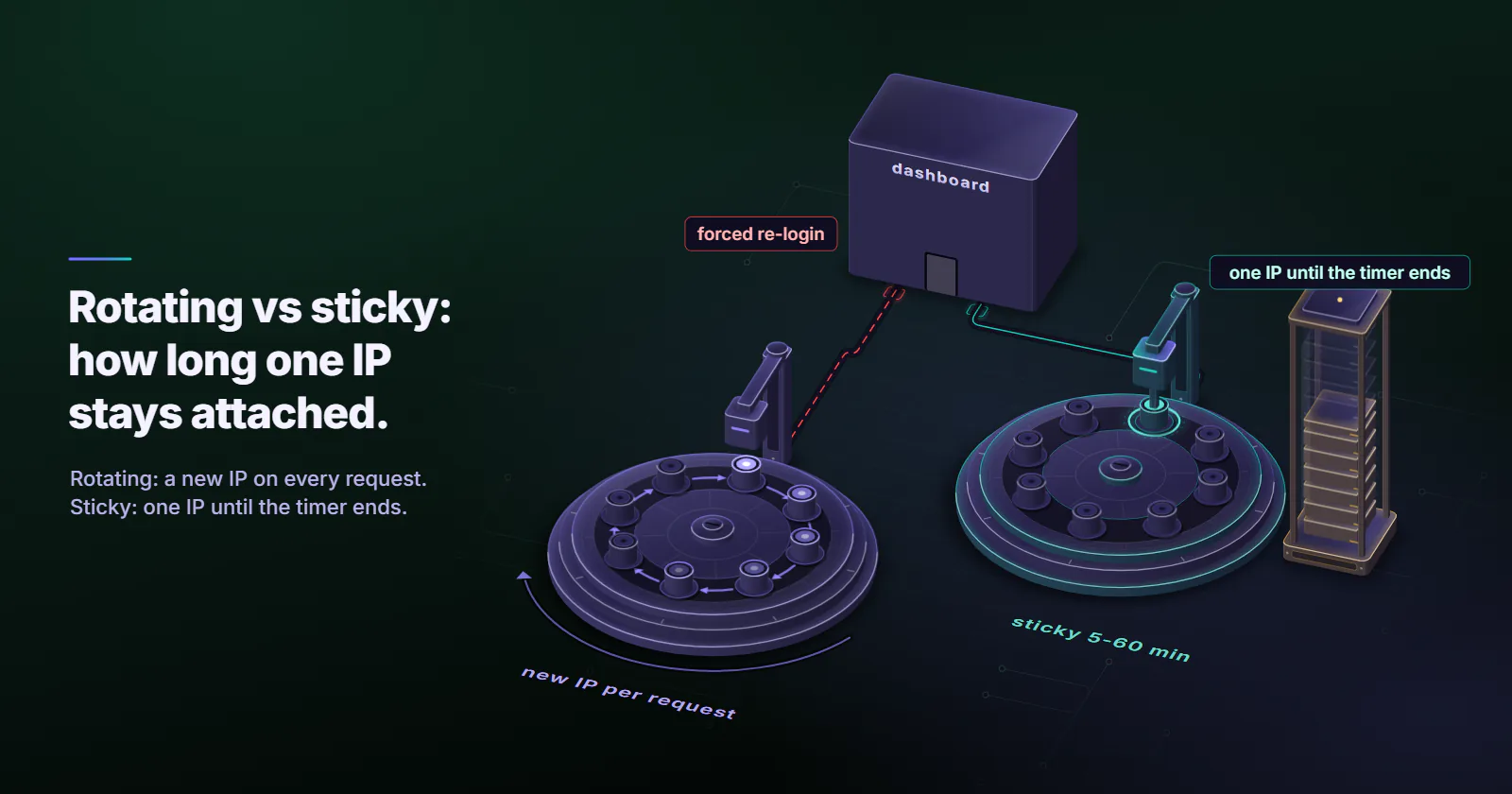
- The mode is a setting on one pool. Rotating gives a new exit IP per request or on a timer; sticky holds one IP for a window. Both run on the same pool at the same per-GB rate.
- Pick the mode from the job. Stateless public pages want per-request rotation. Logins, carts, multi-step forms and paginated results want one IP for the whole flow.
- A sticky session has two clocks. On proxymint it is a 5-60 minute timer or sticky while the device stays online. A timed session ends at the timer, and can end earlier if the device drops.
- The wrong mode costs extra traffic. Retries and re-logins show up as extra gigabytes at the same per-GB price.
Rotating vs sticky proxies is a choice about how long one exit IP stays attached to your traffic. Rotating mode gives each request a new exit, which suits stateless public pages. Sticky mode holds one exit for a timer of 5 to 60 minutes, or while the device stays online, which suits logins, carts and paginated results. On proxymint the mode is set per order.
The choice usually shows up as a bug: a price monitor stalling on one slow exit, a dashboard bouncing to the login page, a paginated search returning one product twice. Each is the right proxy in the wrong session mode.
How rotating and sticky proxies differ
Rotating means the gateway gives the connection a different exit IP on every request, or on a timer. Sticky means the gateway holds one exit IP for a window, so every request in a multi-step flow leaves from the same address. Both draw on the same pool at the same per-GB rate, and the mode is a setting on the list. Beyond that one-sentence definition, two details decide whether a job works: where the setting lives and what ends a session.
How the session is held
A gateway pins an exit IP to a session handle. Some providers put that handle in the username as a session tag. On proxymint’s rotating residential proxies and mobile proxies, a proxy list comes with many ports (up to 1,000 on residential, up to 100 on mobile), and the rotation choice applies to the whole list. Username session tags do not work there; use the login exactly as issued.
So run each parallel sticky session on its own port and confirm its exit IP before the step that matters, while one port under per-request rotation still spreads its calls across many IPs, as long as the client opens a new connection per call; a kept-alive HTTPS tunnel stays on one exit.
Speed and latency
Neither mode is faster by design, because speed belongs to the exit. A sticky port keeps one exit, fast or slow, until the window ends. Per-request rotation mixes exits, so latency varies call to call. On mobile exits the radio generation is part of that speed, covered in 4G vs 5G proxies.
Rotating vs sticky proxies by job
Each row describes a mechanism, not a measured failure rate.
| Job | Right mode | What breaks under the wrong mode | Fix |
|---|---|---|---|
| Catalog or price monitoring | Per-request | One long sticky port ties every call to one exit; when that device slows or drops, the whole run stalls | Per-request, at a pace the target allows |
| Logged-in dashboard you manage | Sticky | Per-request sends the session cookie from a new address each call; the site forces a re-login | A sticky session proxy port per login |
| QA of your own checkout or form | Long timer, or sticky | A short timer fires between cart and payment; the flow resumes from a new IP | A timer well above the whole flow |
| Paginated or cursor-based search | Sticky per query | Each page can exit from a different city, so results reorder, duplicate or skip | Stick within a query, rotate between queries |
| Long automation (hours) | Sticky while online | The device drops at an unknown point; the next call gets a new IP mid-task | IP checks between steps, resumable state |
When a rotating IP is good
Rotation wins where each request stands alone: catalog and price monitoring, SERP collection where the engine permits automated access, broad crawls of public pages (see proxies for web scraping). Rotation is not a way around a site’s limits: the job’s total pace still has to fit them. RFC 6585 (April 2012) defines 429 Too Many Requests for a client that sent too many requests in a given time, and lets the server add a Retry-After header. Both mean slow down.
So a rotating IP address is good for independent requests and bad for anything that carries a login.
When sticky wins
Sticky fits anything with state the site ties to the address: logged-in flows, carts and checkouts, multi-step forms, paginated or cursor-based results. The OWASP Session Management Cheat Sheet (checked 2026-09-29) tells developers they can bind a session ID to the client IP address, and calls a change in the middle of a session “a very good indicator” of hijacking. A site built that way reads per-request rotation under a live login as an attack.
Logins here mean accounts the reader owns or manages: client dashboards, QA test accounts, internal tools. Put the login on a list set to sticky or a timer.
How long a sticky session lasts
On proxymint residential and mobile, a sticky session is either a timer from 5 to 60 minutes in 5-minute steps, or sticky for as long as the home or carrier device stays online. No provider can promise how long a device stays online.
The timer and the device
A timed session runs on two clocks. The timer is one. The device carrying the exit is the other, because a session cannot outlive the connection it rides on. If that exit becomes unavailable, the port can move to a new IP before the timer ends. Whichever ends first ends the session. Sticky while online runs on the second clock alone.
A timer is a schedule
A 10-minute timer flips the IP when its window runs out, not when a task ends. A flow that starts 9 minutes into a window moves to a new IP one minute in. So the timer must cover the longest flow with room to spare, or the flow must restart cleanly.
Picking the proxy session length
Time the longest step that must share an IP: login to logout, cart to confirmation, first to last page of one query. Set the proxy session length well above it, in 5-minute steps. A 7-minute checkout QA run gets a 15-minute timer or longer, and still checks its exit IP before the payment step.
Sticky, static and mixed setups
Sticky vs static proxy
A sticky session is borrowed from a rotating pool and ends, on its timer or when the device goes offline. A static ISP address is assigned to your order for the whole billing term and never rotates. Identity that has to hold for days or weeks belongs on static ISP proxies; the tradeoffs are laid out in ISP vs rotating residential. For the sticky vs static proxy choice, a job that ends within the hour fits a sticky session, and an address that must match next week needs static.
Combine sticky and rotating ports
Mixing both modes in one workflow means rotating per request across listing pages, then giving each page behind a login its own sticky port. On proxymint the mode is set per list, so this takes one list per mode, or one list whose rotation changes between phases.
Change the mode after ordering
On proxymint per-GB residential and mobile, “Change location” in My proxies updates rotation and location in place. Logins and ports stay the same, and new connections pick up the change.
Which tiers support which mode
- Residential, per GB: per-request, a 5-60 minute timer, or sticky while online.
- Mobile, per GB: the same three options on mobile carrier networks.
- ISP: static. The address is the product and never rotates.
- Datacenter IPv4: a fixed address per port.
Pick the proxy type by what the target checks, then pick the mode by how long each exit must be held.
Where neither mode fits
Lenient bulk targets that do not score IP type are what datacenter proxies are built for. Mobile carriers commonly put many subscribers behind one public IPv4 address (CGNAT), and a per-GB mobile pool shares its exits by design, the split covered in dedicated vs shared proxies. Residential vs mobile is its own comparison.
Test your session before scaling
The fastest way to settle rotating vs sticky proxies for one target is to measure. The script runs three checks against an IP echo endpoint. Part (a) sends 20 requests through one per-request port and prints distinct IPs and repeats. Part (b) holds several sticky ports, polls each every 30 seconds, and logs when its exit changes. Part (c) logs every exit change on one timer port. Placeholders are in capitals, and the script percent-encodes the username and password with urllib.parse.quote, since a password that contains : or @ splits a proxy URL in the wrong place.
import statistics
import time
from urllib.parse import quote

import requests

ECHO = "https://api.ipify.org"
# Percent-encode the login: a password with : or @ would split the URL in the wrong place.
USER = quote("USERNAME", safe="")
PASS = quote("PASSWORD", safe="")


def proxies(port):
    url = f"http://{USER}:{PASS}@HOST:{port}"
    return {"http": url, "https": url}


def exit_ip(port):
    # No requests.Session: a fresh connection per call tests the gateway, not keep-alive.
    return requests.get(ECHO, proxies=proxies(port), timeout=20).text.strip()


# (a) rotation check: 20 calls through one per-request port
ips = [exit_ip(ROTATING_PORT) for _ in range(20)]
print(f"{len(set(ips))} distinct IPs in 20 calls, {20 - len(set(ips))} repeats")

# (b) session survival: poll several sticky ports
ports = [STICKY_PORT_1, STICKY_PORT_2, STICKY_PORT_3]
start = time.time()
first = {p: exit_ip(p) for p in ports}
changed = {}
while len(changed) < len(ports) and time.time() - start < 4 * 3600:
    time.sleep(30)
    for p in ports:
        if p in changed:
            continue
        try:
            ip = exit_ip(p)
        except requests.RequestException:
            continue  # log failures separately; a failed call is not an IP change
        if ip != first[p]:
            changed[p] = (time.time() - start) / 60
            print(f"port {p}: {first[p]} -> {ip} after {changed[p]:.1f} min")

if changed:
    mins = list(changed.values())
    print(f"median {statistics.median(mins):.1f} min, worst {min(mins):.1f} min")
print(f"{len(ports) - len(changed)} port(s) kept their IP until the cutoff")

# (c) timer check: log every change on one port of a list set to a 10-minute timer
last, flips = exit_ip(TIMER_PORT), []
start = time.time()
while len(flips) < 4 and time.time() - start < 3600:
    time.sleep(30)
    try:
        ip = exit_ip(TIMER_PORT)
    except requests.RequestException:
        continue
    if ip != last:
        flips.append((time.time() - start) / 60)
        print(f"timer port: {last} -> {ip} after {flips[-1]:.1f} min")
        last = ip
gaps = [b - a for a, b in zip(flips, flips[1:])]
print("gaps between changes:", ", ".join(f"{g:.1f} min" for g in gaps) or "fewer than two changes")
Some repeats in part (a) are normal on any pool. For a timer check, set the list to a 10-minute timer, log every change on one port, and confirm the gap between consecutive changes is close to 10 minutes. The method works on any provider, proxymint included.
Questions to ask a rotating proxy provider
Four questions to ask any provider:
- Does the provider state its timer values, or say “check the dashboard”?
- Does the provider say what happens to a sticky session when its exit goes offline?
- Can the mode change without new credentials?
- Is the per-GB rate the same in every mode?
Cost: same rate, different traffic
The mode does not change the per-GB rate: on pay as you go proxies every mode draws on the same balance at the same rate, and current rates are on the pricing page.
What changes the bill is the wrong mode. Scenario: per-request rotation forces a 2 MB re-login on every tenth of 10,000 calls. That adds 2 GB of traffic, so a job sized at 10 GB of residential needs 12 GB. The right mode keeps the traffic to the job itself.
Pick the mode per task
If each request stands alone, use per-request rotation. If a login, cart or query must hold one IP, use a sticky port with a timer longer than the flow, or sticky while online plus an IP check between steps. If the identity must hold for weeks, stop choosing a mode and use a static ISP address. Rotating vs sticky proxies is a per-list setting, so one job can run both on two lists.
Time the longest step that must share one IP, and the mode follows from that number.
Frequently asked questions
On proxymint residential and mobile proxies, a sticky session is either a timer from 5 to 60 minutes in 5-minute steps, or sticky for as long as the home or carrier device stays online. The device can drop before a timer ends, and no provider can promise how long a device stays online, so clients should handle an early IP change.
No. A sticky session is a window on a rotating pool and it ends, either on its timer or when the device carrying it goes offline. A static ISP proxy is one fixed address for the whole billing term and never rotates. Identity that must hold for days or weeks needs a static ISP address.
Yes, for accounts you own or manage, as long as the list that holds the login is set to sticky or to a timer longer than the session. Per-request rotation under a live login sends the session cookie from a new address on each call, which many sites treat as a hijacking signal and answer with a forced re-login.
Rotating proxies give the connection a new exit IP on every request or on a timer. Sticky proxies hold one exit IP for a window, so a multi-step flow such as a login or a checkout comes from one address. Both usually draw on the same pool at the same price, and the mode is a setting on the port or session.
Usually, for stateless public pages such as catalogs, prices and search results where each request stands alone. No request depends on the one before, so nothing ties the job to one address. It is the wrong mode for paginated or cursor-based results tied to a session and for anything behind a login, where one sticky IP per query or per login works better.
Yes, on proxymint per-GB residential and mobile proxies. The Change location action in My proxies updates rotation and location in place, logins and ports stay the same, and new connections pick up the new setting. So one list can switch between rotating and sticky as a job moves from one phase to the next.
Neither. On proxymint, within each tier, residential or mobile, the per-GB rate is the same in every mode, and it falls only as the package grows. What raises the bill is the wrong mode, because retries and forced re-logins add traffic that is billed as extra gigabytes.
Researched and drafted with AI tools, then checked against our publishing rules before it went live: 2 outside links, 12 links to other proxymint pages, no prices and a fact-check pass against our product records. How we write.