Dedicated vs shared proxies: who else uses your IP
Dedicated vs shared proxies compared: who else sends traffic from your IP, how each is billed, which tiers can be dedicated and when a pool wins.
Quick summary · TL;DR
- Dedicated means one customer per address for the term. Shared means other customers route through the same IP, at once or in turn, so their behaviour becomes part of your reputation.
- The billing unit mostly decides it. Products billed per IP or per port per month can be dedicated. Products billed per GB sell access to a pool, which is shared by design.
- Sharing has a measured cost. Cloudflare found that CGNAT addresses, each shared by many users, were rate limited about three times as often as other addresses.
- Dedicated is not the same as clean. A dedicated address carries its own history, including earlier tenants, so test it on the target before account work starts.
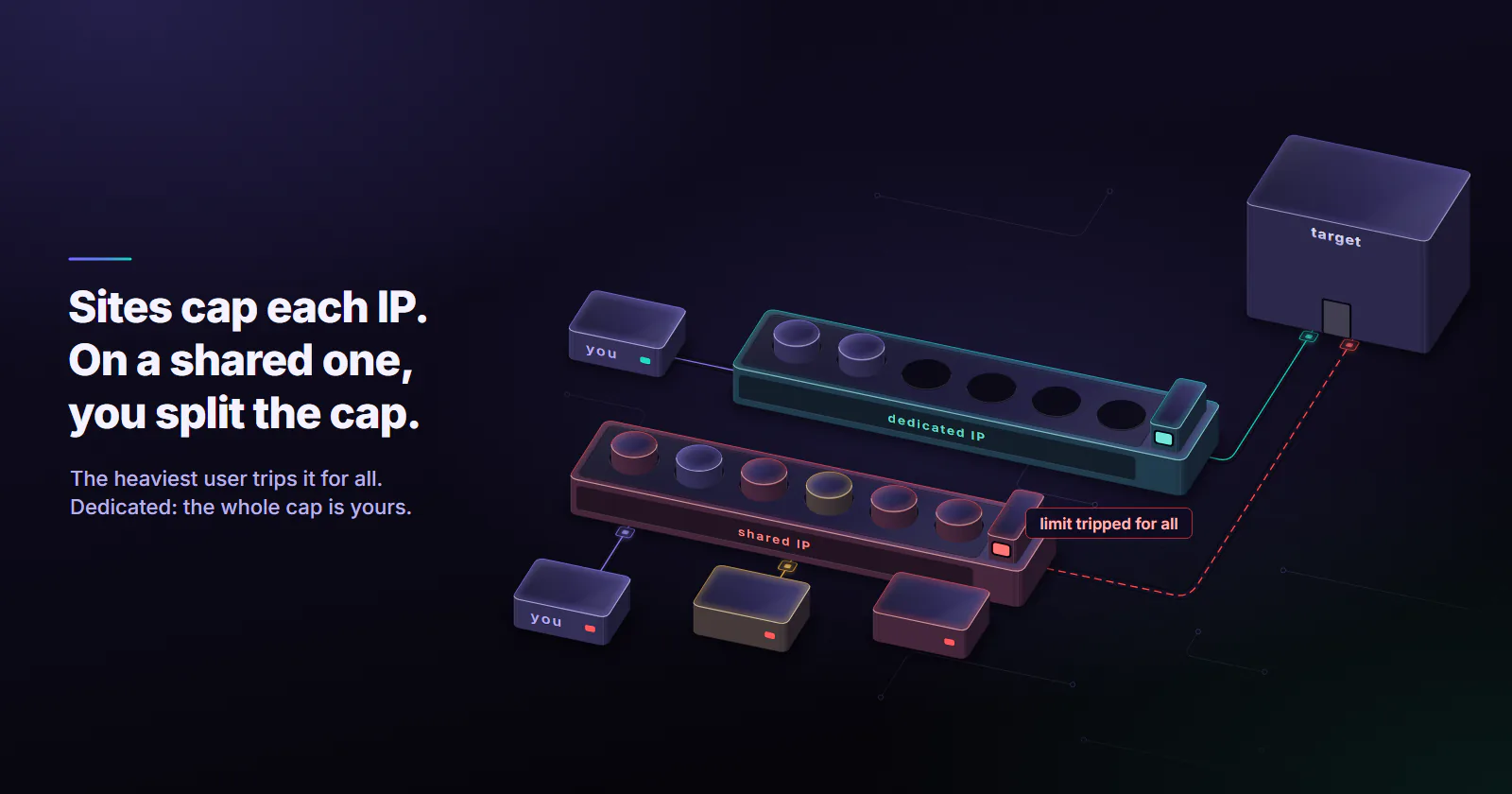
Dedicated vs shared proxies differ in who else sends traffic from the same IP. A dedicated proxy serves one buyer for the term, so the address’s reputation tracks that buyer’s traffic. A shared proxy carries several buyers at once, so one heavy user can get it flagged for all of them. Rotating residential and mobile pools share exits by design.
The listing said “private proxies”, and the first login from the new IP hit a CAPTCHA wall. A blocklist check showed the address had been flagged weeks before the order.
Dedicated vs shared proxies compared
Dedication is a separate axis from network type: a datacenter or an ISP address can be either. The types of proxies guide covers the network types themselves.
Private and semi dedicated proxies
Private proxies. A marketing word with no fixed definition. Sellers use it three ways: one customer per IP, two customers per IP, or simply “not a free public proxy”. The billing unit, and the sentence in the written product terms that says how many customers share each IP, say more than the word.
Semi dedicated proxies. An address split between a small, fixed group of customers, with the group size set by the seller. Cheaper than dedicated, but the buyer cannot see what the co-tenants do with it.
Dedicated and shared: pros and cons
Dedicated proxies
Pros
- From the first day of the term, only your traffic adds to the address’s reputation.
- The same IP every day, so logins, allowlists and long sessions hold.
- No co-tenant competes for bandwidth or for the target’s per-IP limits.
Cons
- Costs more per address, billed per month whether traffic runs or not.
- A small fixed set of addresses burns out on breadth jobs.
- The address arrives with its own history, which can include earlier tenants.
Shared proxies
Pros
- Lower price per address, or per GB on a pool.
- A pool spreads requests across many exits. With per-request rotation, the next request can leave from a different exit.
Cons
- A co-tenant’s spam, failed logins or aggressive scraping lands on your reputation.
- Rarely the same IP from one day to the next, which breaks location-tied logins.
Speed and bandwidth contention
On a shared IP, co-tenants compete for the same uplink and the same per-IP rate limits on the target, which sellers call the noisy neighbour problem. If a target allows a set number of requests per IP per minute, three customers on one address split that budget, and whoever sends most decides when the limit trips for everyone. A dedicated address removes both kinds of contention, but it still has a ceiling of its own: on proxymint’s static tiers, plan for under 10 requests per second per IP and spread heavier load across more addresses.
That does not make dedicated proxies faster by default. Network type and distance matter more: a datacenter port near the target usually answers sooner than a home connection on another continent, dedicated or not. Measure latency on the real route instead of trusting a label.
Security and privacy
Sharing an exit IP does not let co-tenants read each other’s traffic: each customer’s connection stays separate. The provider can see connection details on both models: for HTTPS sites, the destination hostname, but not the page contents. Free public proxies are a different risk, because nobody accountable runs them and the operator can watch or alter unencrypted traffic.
The reputation risk of sharing
The IETF documented the mechanism in RFC 6269 (June 2011), written about address sharing by ISPs. Section 13.1 covers how one user’s failed logins can trigger lockouts and penalty boxes that hit every user on the address. Section 13.3 covers how blocklisting a spam sender restricts everyone behind the same IP. A shared proxy is the same situation, with strangers instead of neighbours.
Cloudflare measured the cost. Its research on CGNAT (published October 29, 2025, updated July 15, 2026) notes that one IPv4 address can stand for hundreds or even thousands of users. It found that CGNAT addresses were rate limited three times as often as other addresses, even though the traffic behind them was no more bot-heavy: the median bot rate was nearly identical (4.8% against 4.7%) and the mean bot rate was lower (7% against 13.1%).
Email senders face the same tradeoff. Twilio’s SendGrid documentation on dedicated IPs (updated July 23, 2026) says that on a shared IP, anyone who breaks the inbox providers’ standards changes your reputation too, while on a dedicated IP your own practices set it. It suggests at least two dedicated IPs at 250,000 messages a month. For proxies the parallel is the reputation half: on a dedicated address, only your own traffic adds to it.
A dedicated address arrives with a history: earlier tenants, and the ASN reputation of the network it sits on, the first layer in how websites detect proxies. Test each address on the target before production.
Dedicated vs shared across proxy types
Check how a product is billed, per IP, per port or per GB, and whether it can be dedicated usually follows.
Per IP or per port, per month. The provider holds one address for one customer and charges for the time. This is the only model where dedication is a real promise, because the address is the product.
Per GB. The customer pays for traffic, not for an address. The exits behind a per-GB product are real home connections or phones, which their owners also use, and which other customers of the pool can land on minutes later. A “dedicated rotating residential” plan is close to a contradiction in terms.
Mobile adds a carrier layer. Carriers commonly run subscribers behind carrier-grade NAT. A per-GB mobile pool is never dedicated, and a mobile port sold as dedicated can still exit through the carrier’s NAT, where one public address can serve many subscribers. CGNAT proxies explained covers that layer in depth.
Which proxymint proxies are dedicated
Two proxymint tiers give fixed addresses billed per address, and the others are shared pools billed per GB. The tier guides what are ISP proxies and what are datacenter proxies cover each fixed-address option in depth.
So a buyer who needs a fixed address on proxymint has two options. Static ISP proxies give one fixed ISP-registered address per IP, assigned to your order for the whole billing term. Datacenter proxies give dedicated IPv4 ports on hosting ranges, built for volume and with no bandwidth cap under normal use.
Both bill per address per month, and the rate falls as the order grows; entry prices are on the pricing page.
When to use each
Dedicated wins where the address itself carries value:
- Accounts tied to a login location. A seller dashboard or social account the team owns or manages, which sees the same address every day.
- Allowlisted integrations. A partner firewall or API that only accepts listed IPs needs one fixed dedicated IP proxy.
- Long sessions. Checkout flows and anything with a cookie that breaks on an IP change.
- Lenient bulk jobs. API polling, uptime checks and scheduled monitoring on dedicated datacenter ports, where cost per request matters more than consumer trust.
Shared is the right call for breadth. Price monitoring, SERP collection and catalog crawls want many different IPs, each sending a few requests. The session-model side of this choice is covered in ISP proxies vs rotating residential.
Plenty of jobs need both: a rotating pool for discovery and public-page collection, and a small set of dedicated addresses for the logged-in steps and allowlisted integrations. Keep the two on separate credentials so a pool exit never touches an account.
Where a rotating pool fits better
Take a crawl of 100,000 product pages a month. On 20 static ISP IPs, every address sends 5,000 requests a month to the same target, and the target sees the same 20 IPs every day and learns them fast. The same job on rotating residential proxies spreads the requests over whatever home exits are online, so no single address carries the load. Dedicated addresses are built for identity and continuity; breadth work is what rotating pools are for.
Weekly jobs fit a pool too, since a job that runs once a week rarely needs the same address twice.
Test a dedicated IP first
Four steps, run on each new IP before it carries an account:
- Look up the ASN and network type. The AS name shows whether the address sits on an ISP or a hosting network, and whether that matches what the listing promised.
- Check public DNS blocklists. Reverse the octets and query the list’s zone. Read each list’s usage terms first: Spamhaus, for one, allows free queries only for low-volume, non-commercial use, so commercial checks need a key for its Data Query Service, and a query sent through a public resolver gets an error code or no answer instead of a result.
- Sample the real target. Send 50 to 100 low-stakes requests, spaced out, to pages the account would load anyway, and count challenges and blocks. Stay inside the target’s terms.
- Pull failures before account work. An address that is listed or challenged on day one stays out of account work.
The commands, with 203.0.113.10 (a documentation address from RFC 5737) standing in for the delivered IP:
# Step 1: AS number and AS name of the delivered address
whois -h whois.cymru.com " -v 203.0.113.10"

# Step 2: DNS blocklist check, octets reversed, then the list's zone
dig +short 10.113.0.203.zen.spamhaus.org
# through a public resolver (8.8.8.8, 1.1.1.1) the answer is an error code or nothing, so no answer proves nothing: query from your own resolver
# no answer (NXDOMAIN) from your own resolver = not listed
# 127.0.0.2 to 127.0.0.4, or 127.0.0.9 = an abuse listing (SBL, CSS, XBL, DROP): replace the IP
# 127.0.0.10 or 127.0.0.11 = PBL, a policy list of end-user ranges, not an abuse record
# 127.255.255.x = a query error, e.g. .254 when the query went through a public resolver

# Step 3: a slow sample against the real target, through the proxy
for i in $(seq 1 50); do
  curl -s -o /dev/null -w "%{http_code}\n" \
    -x http://USERNAME:PASSWORD@HOST:PORT https://TARGET/
  sleep 30
done | sort | uniq -c
An output of 50 200 is a pass. Any 403 or 429, or a 200 that serves a challenge page instead of content, is a flag. Repeat steps 2 and 3 after a week on addresses that carry important accounts.
Which one fits the job
Decide dedicated vs shared proxies by what a co-tenant could cost the job:
- If the job logs into accounts, needs an allowlisted address or holds long sessions, choose a fixed address. On a consumer-facing target, that means static ISP IPs. On a lenient target, dedicated datacenter IPv4 ports on hosting ranges, built for volume.
- If the job needs breadth, runs rarely or needs a carrier origin, choose a shared pool: rotating residential or mobile, billed per GB.
Frequently asked questions
On a proxy, a dedicated IP address carries one customer's traffic for the term, so its reputation and the target's per-IP rate limits follow that customer's own requests. A shared IP address carries several customers at once or in turn, so one heavy or abusive user can get it rate limited or blocklisted for everyone on it. Per-IP proxies can be dedicated; per-GB rotating pools share exits by design.
Usually, but not always. Private is a marketing term, and sellers use it three ways: one customer per IP, two customers per IP, or only 'not a free public proxy'. The billing unit and the written product terms say more than the word.
On a shared address, another customer's failed logins, spam or aggressive scraping can get the IP rate limited or blocklisted, and that block applies to everyone using it. The IETF documented this effect of address sharing in RFC 6269. Cloudflare's CGNAT research found that heavily shared addresses were rate limited three times as often as other addresses. For account work, a stranger's behaviour can flag your accounts.
A dedicated proxy gives one customer exclusive use of an IP address for the billing term. A shared proxy lets several customers route traffic through the same address, at the same time or in turn. The same split applies to a dedicated vs shared IP address in hosting and email: on a dedicated IP only your traffic adds to its reputation. Shared costs less, but other customers' behaviour affects the address.
No. Breadth jobs such as price monitoring, SERP collection and catalog crawls do better on a rotating shared pool, because they need many different IPs each sending a few requests. Jobs that run once a week also gain little, since they rarely need the same address twice. Dedicated wins when the address itself carries value, such as a login location, an allowlist entry or a long session.
Not by default. A dedicated IP removes contention: no co-tenant competes for the connection or for the target's per-IP rate limits. But network type, distance to the target and the provider's routing usually matter more for speed than whether the address is dedicated. Measure latency on the real route before choosing on speed.
Rotating residential and mobile proxies billed per GB are shared pools by design: the exits are real devices that other customers and the device owners also use. Mobile IPs are often shared at the carrier level through carrier-grade NAT, so a mobile port sold as dedicated can still exit on a carrier-shared address. For one fixed address on an ISP-registered range, static ISP proxies are the usual choice.
Researched and drafted with AI tools, then checked against our publishing rules before it went live: 3 outside links, 13 links to other proxymint pages, no prices and a fact-check pass against our product records. How we write.