What are ISP proxies? How they differ from residential
ISP proxies are ISP-registered IPs on servers, held for the term. How they differ from residential, pros and cons, billing, and a week-long test to verify one.
Quick summary · TL;DR
- An ISP proxy is an ISP-registered address on server hardware. The IP is registered to and announced by an internet provider, but the proxy runs on a server, not in a home. The address stays assigned to your order for the whole billing term.
- Targets score it as ISP traffic at the network layer. IP lookups type the network as ISP rather than hosting, and an address held for the whole term reads as stable in the user context data that vendors such as MaxMind publish.
- ISP versus residential comes down to one question. If the job needs the same address tomorrow, static ISP fits. If it spreads requests across thousands of pages, a rotating residential pool fits.
- The tier has clear limits. Country-level geo only, a fixed set that burns out on broad scraping, and IP-intelligence flags that can mark an ISP address as a proxy.
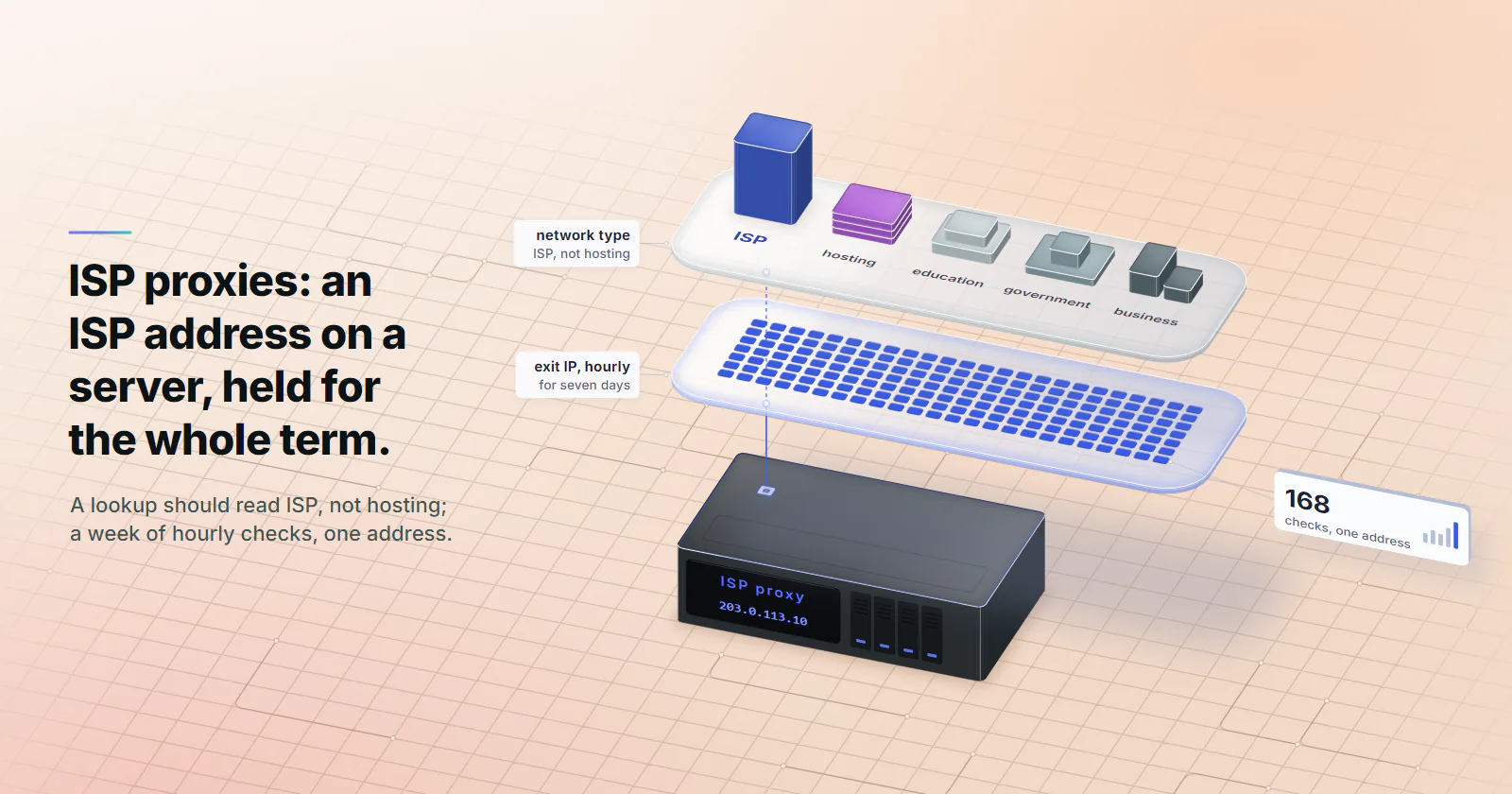
- A buyer can verify one in a week. Look up the announcing ASN and its type, then log the exit IP hourly for seven days: 168 checks should return one address.
What are ISP proxies? They are IP addresses registered to and announced by an internet provider, running on server hardware rather than in a home, and assigned to your order for the whole billing term. A target that looks the address up finds an ISP network, not a hosting company. The proxy behind it has server uptime and never rotates.
The label is where buyers get burned. One seller’s “ISP proxy” sits on a hosting company’s network, and another’s “static” address is a sticky session that expires after an hour. The week-long test at the end of this page catches both.
What are ISP proxies, exactly
Two facts define the tier: whose network announces the address, and how long it stays assigned to one order. Where the proxy runs is the third. The table sets all three against the two tiers buyers usually weigh it against.
Which is better, ISP or residential?
Neither, in general. The deciding question is whether the job needs the same address tomorrow. Accounts, long sessions and allowlists do, so static ISP fits. Wide crawls across thousands of pages do not, so rotating residential fits. The full comparison sits in ISP proxies vs rotating residential.
The definition, part by part
An ISP proxy is an IP registered to and announced by an ISP, running on server hardware, assigned to one order for the whole billing term. Each part of that sentence can be checked.
The ASN part. Every network announces its address blocks under an Autonomous System Number. RFC 1930 (March 1996) defines an Autonomous System as a connected group of IP prefixes run by one or more network operators with a single, clearly defined routing policy. For an ISP proxy, the announcing AS is an internet provider or telecom operator, not a cloud or hosting company.
The hosting part. The server does not sit behind a home router, and routing rules allow that: RIPE NCC’s RPKI documentation (checked October 2026) notes that the origin AS in a Route Origin Authorisation does not have to belong to the prefix holder. The registry record and the announcing network both point at an ISP, and no home device or home bandwidth carries the traffic.
The static part. One address, assigned to your order for the whole billing term, with no rotation timer and no session to expire. Static ISP proxies on proxymint follow this definition: one ISP-registered address per IP, each with its own username and password, HTTP and SOCKS5 both included, billed monthly.
How ISP proxies work
The client connects to the proxy host and authenticates with a username and password. The proxy opens the connection to the target from its ISP address, so the target never sees the client’s own IP. What it does see is an address it can look up, and that lookup is the reason the tier exists.
ASN type. IP data vendors sort networks into categories. The IPinfo ASN database (updated October 28, 2025) uses five types: ISP, hosting, education, government and business. A rule that blocks hosting networks is a type check, and an ISP-type network sits outside it. Datacenter proxies fail that check by design.
User type and stability. Some vendors profile the address itself. MaxMind’s user context data (checked October 2026) labels addresses with a user type such as residential, hosting, business or cellular. It gives a static IP score from 0 to 99.99, where residential broadband typically scores above 30 and cellular networks under 1.0, and a user count where 0 means one end-user at a time or an address not in use. An ISP address held for the whole billing term is a stable address in that model, though the label itself is the vendor’s call.
The ISP ASN clears the network-type check and nothing else. TLS fingerprints, headers, request rate and account history are scored separately, and a clean ISP address with a headless-browser fingerprint still reads as automation. More on network type and trust sits under ASN reputation.
IP databases also record their data per network block rather than per address: a MaxMind record covers a whole network, and a flag on it applies to every address inside. An order whose addresses share one prefix shares that prefix’s reputation too.
Speed and stability
A home connection adds three weak points: the household router, the last-mile consumer line, and a device that can go offline mid-session. An ISP proxy removes all three. The exit runs on a server uplink, so connections are typically steadier than on rotating residential, where each exit is only as good as the home behind it.
Speed still depends on the distance between client, gateway, exit and target, so measure it on the real route: time a few hundred requests through each candidate to one endpoint and compare the medians.
Are ISP proxies residential?
No. The address sits on an ISP network, so a network-type check reads it as ISP, but no home carries the traffic. Sellers use overlapping labels for the same product, and the axes above separate them.
One product, several names. Static residential, ISP and static ISP proxies usually name the same product: a server-hosted address on an ISP network that does not change. proxymint calls it static ISP, because no home device carries the traffic.
Rotating residential proxies. Residential usually means exits on real home devices, shared as a pool and billed per GB, with the exit changing per request or on a timer. A sticky session holds one exit for a while, on proxymint from 5 to 60 minutes or for as long as the device stays online. When the device drops off, the sticky session goes with it, while a static IP stays for the whole term. The tier is covered in what a residential proxy is.
“ISP” used loosely. Home connections also sit on ISP networks, so some listings use a loose version of the term and call any residential exit an “ISP proxy”. Two questions cut through it: does the address stay with one order for the term, and does it run on a server rather than a household device?
The same two axes map every other type of proxy too, from datacenter to mobile.
Pros and cons of ISP proxies
A fixed address drives both lists. It keeps logins and allowlist entries valid, and it wears out under broad scraping. Every item in this section can be checked on a sample address.
Pros
- ISP ASN. The address passes rules that block hosting networks.
- Fixed address. One IP for the term, dedicated to one order, so logins, cookies and allowlist entries stay valid.
- Server uptime. No home device to drop offline and no last-mile consumer line.
- Flat per-IP billing. Priced per IP per month rather than per GB, so the bill is known in advance.
Cons
- A fixed set burns out on broad scraping. Many requests from few addresses teach a target those addresses fast.
- Country-level geo only. No region or city targeting on this tier.
- Fewer locations than rotating pools. Countries are limited to those with ISP ranges available.
- Still detectable as a proxy. IP intelligence vendors flag suspected residential proxy ranges.
- Billed per address. Each IP is its own monthly line, which suits a few fixed identities; jobs that need many addresses and no ISP ASN fit datacenter ports.
- Shared blocks. Addresses in one order can sit in the same /24, and a target or an IP database can flag the whole block. A WHOIS lookup on each IP shows it.
Use cases that fit
In every good fit the address itself carries value, so changing it costs something.
Accounts tied to a login location. Seller dashboards, ad accounts and social profiles that a team owns, or manages for clients with permission, build a history of where they log in from. The platform’s own team or partner access comes first. A static ISP proxy then keeps the login on one address, one ISP network and one country.
Long sessions and checkout flows. Anything that ties a cookie or session token to the IP breaks when the IP changes. A checkout that starts on one address and finishes on another looks like a hijacked session.
Allowlisting. A partner API, a payment portal or a client’s firewall that only accepts listed addresses needs one IP that never changes. The ISP address goes on the list once and stays valid for the term.
Repeat access with a history. Checking the same small set of pages daily from one address builds a record the target recognises, as long as the request rate stays human.
Where another tier fits better
Four cases point to another tier.
Broad scraping. Price monitoring, catalog crawls and SERP collection read many pages once each. A crawl of 100,000 requests a day across 50 ISP IPs puts 100,000 / 50 = 2,000 requests on every address, every day, and the target learns those 50 addresses fast. Rotating residential proxies are built for collection that needs many different addresses.
Mobile-only targets. Some platforms trust carrier traffic more than any home connection. For those, use mobile proxies; what mobile proxies are covers how carrier addresses differ.
Lenient bulk work. API polling, uptime checks and load tests against targets that do not score network type gain nothing from an ISP ASN. When trust does not matter, datacenter proxies are built for that volume work.
A named ISP or carrier. ISP addresses on proxymint are picked by country at order time, with no ASN selection. A job that depends on one specific operator has an ASN requirement to settle before choosing a tier.
Check a static ISP proxy
Every claim on a proxy listing can be checked against public records in ten minutes, plus a week of logging. These five checks verify a sample address before an order scales. They include three lookups, a week-long log and one live test on the target, and none needs special access.
1. Look up the announcing ASN
Team Cymru’s public WHOIS service returns the AS number and name in one line:
whois -h whois.cymru.com " -v 203.0.113.10"The AS name should be an internet provider or telecom operator. A cloud platform or a hosting company means a datacenter IP with a new label. RIPEstat shows the prefix’s origin AS and route history for a second opinion.
2. Check the ASN type and user type
On IPinfo, the ASN type should read ISP, not hosting or business. On MaxMind, note the user type, the static IP score and any anonymous-IP flags. Record an anonymous-IP flag rather than reject the address over it: the flag shows what a careful target already sees.
On an order of several addresses, run both lookups on every IP and count the results: typed ISP, typed residential, flagged, or hosting.
3. Log the exit IP for a week
A static ISP proxy should return one address for the whole test. Log it hourly for seven days, which is 24 x 7 = 168 checks:
#!/usr/bin/env bash
# Log the exit IP once an hour for 7 days (168 checks)
for i in $(seq 1 168); do
  ip=$(curl -s --max-time 20 -x http://HOST:PORT -U 'USERNAME:PASSWORD' https://api.ipify.org)
  echo "$(date -u +%FT%TZ) ${ip:-FAILED}" >> exit-ip.log
  sleep 3600
done
awk '{print $2}' exit-ip.log | sort | uniq -c
The pass result is one line: 168 checks, one address. Two or more addresses mean a rotating or sticky exit sold as static. A handful of FAILED lines point to uptime, worth raising with the seller.
4. Check the geolocation
Look the address up in two geolocation databases and confirm the country matches the order. City labels often differ between databases, so judge on country.
5. Test on the real target
Before any account work, load the login page and a few public pages at a human pace. A CAPTCHA wall on the first visit means the address has a history: keep it off account work rather than let it cost an account.
Pricing and where to start
The job picks the tier. If it logs into accounts the team owns, holds long sessions or needs an allowlisted IP, use static ISP. If it spreads thin requests across many pages, rotating residential is built for it. If the target insists on carrier traffic, use mobile. If it does not score network type at all, use datacenter.
For the static ISP case, a starting configuration:
- Count. One address per account set that should share a login history, never unrelated accounts on one IP.
- Country. Where those accounts normally log in, chosen at order time.
- Protocol. Every IP includes both HTTP and SOCKS5, so it is a client setting. HTTP suits browsers and most clients, SOCKS5 suits tools that send other traffic.
- Term. Monthly first. Move to 3 or 12 months, billed at the start of the term, once the five checks pass.
Static ISP is billed per IP per month with no per-GB meter, and the per-IP rate falls at volume; every band is on the pricing page.
Start with two or three addresses, run the week-long log and the ASN lookup, and scale only after both come back clean.
Frequently asked questions
An ISP proxy is an IP address that belongs to an internet service provider but runs on a server instead of in someone's home. The address is registered to and announced by that provider's network, and it stays assigned to your order for the whole billing term. Targets that check network type see an ISP rather than a hosting company.
Neither is better in general; the job decides. ISP proxies fit work that needs the same address every day, such as owned accounts, long sessions and allowlists. Rotating residential proxies fit work that spreads requests across many pages, such as price monitoring and catalog crawls, because the pool changes the exit IP and spreads the load.
They are usually steadier, because the exit runs on a server uplink instead of a home router and a last-mile consumer line, and it never drops offline when a household device does. Actual speed still depends on the distance between the client, the proxy gateway, the exit and the target. The reliable way to compare is to time a few hundred requests through each option to the same endpoint and compare the medians.
Only for a small set of repeat targets, such as checking the same few pages every day at a human request rate. Broad scraping concentrates too many requests on a fixed set of addresses, and the target learns them quickly. A rotating residential pool, or datacenter proxies for lenient targets, fits wide crawls better.
Yes, some can. The ISP network passes checks that block hosting providers, but IP intelligence vendors track proxy ranges; MaxMind's Anonymous IP database flags suspected anonymizing addresses on ISP networks, and its definition leaves out peer-to-peer proxies, so server-hosted ISP ranges fall inside it. Browser fingerprints, request rate and account behaviour are scored separately and still need to look human.
The proxy provider sees which hosts the traffic goes to and the full content of any plain HTTP request, so the provider has to be trusted. Free and unknown proxies can log traffic or inject content, and a shared IP inherits whatever other users did with it. Targets can still flag the address as a proxy, and their terms of service apply no matter which IP the request comes from.
Static ISP proxies are billed per IP per month. The rate per IP drops at higher volumes, HTTP and SOCKS5 are both included, and every band is on the pricing page.
Researched and drafted with AI tools, then checked against our publishing rules before it went live: 5 outside links, 13 links to other proxymint pages, no prices and a fact-check pass against our product records. How we write.