SOCKS5 vs HTTP proxy: DNS, speed, security, which to use
SOCKS5 vs HTTP proxy compared: what each carries, where DNS resolves (socks5 vs socks5h), speed, auth, client support, and which one your job needs.
Quick summary · TL;DR
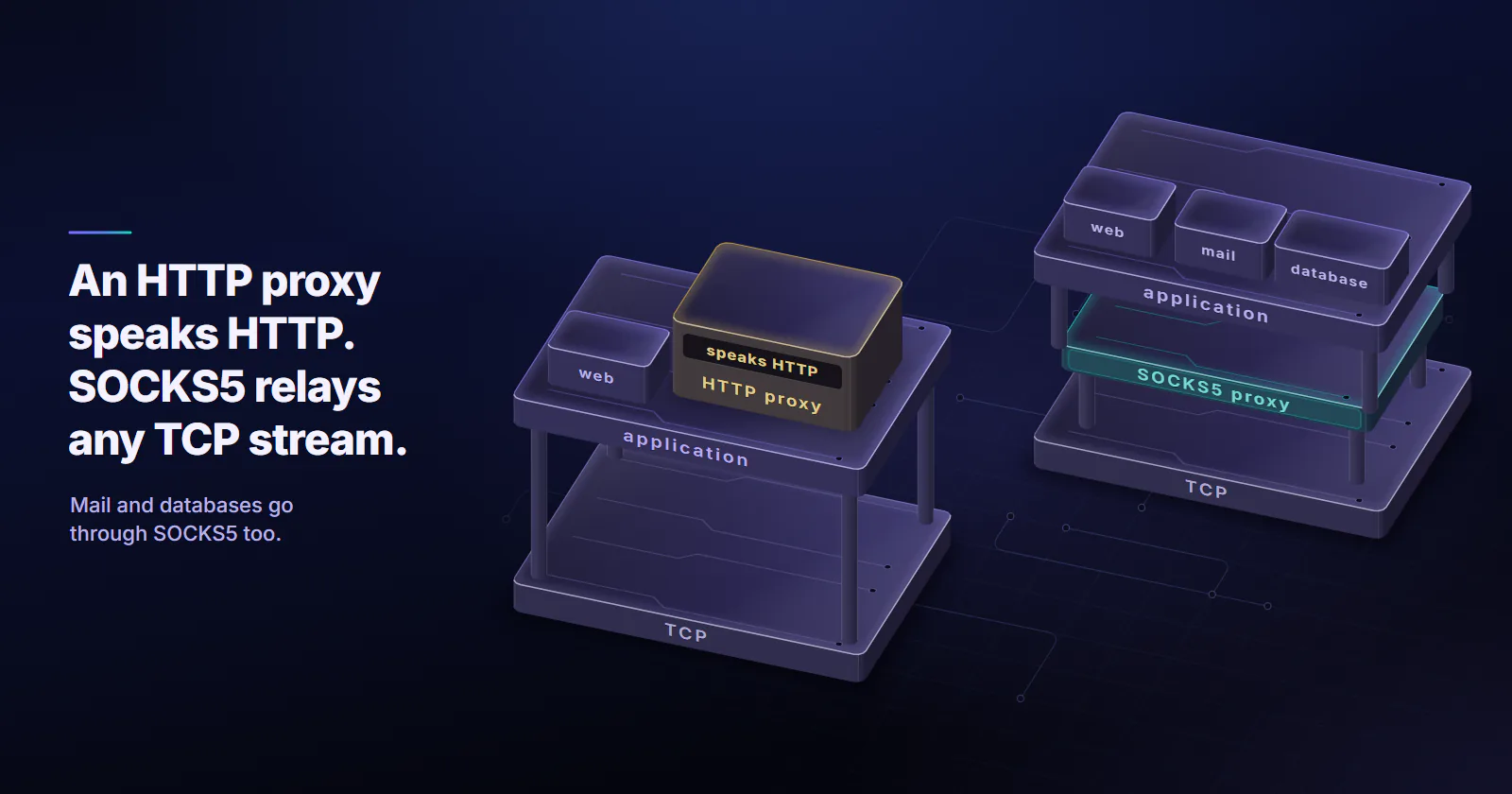
- An HTTP proxy speaks HTTP; a SOCKS5 proxy relays any TCP stream. For HTTPS sites both end up as a blind tunnel around the client's own TLS session.
- Neither protocol encrypts anything, credentials included. TLS protects the content inside either tunnel, while the proxy login crosses the first hop in plain text on both.
- DNS is the difference that bites. In curl and Python requests, socks5:// resolves hostnames locally and socks5h:// sends them to the proxy, while an HTTP CONNECT from curl, requests or a browser hands the hostname to the proxy.
- Client support often settles the choice. Chrome cannot log in to a SOCKS5 proxy, and Scrapy's default download handlers cannot use SOCKS at all.
An HTTP proxy speaks HTTP and tunnels HTTPS sites through the CONNECT method, while a SOCKS5 proxy relays any TCP stream (and UDP in the spec) without reading it. Neither encrypts anything. For web scraping and browser jobs, the SOCKS5 vs HTTP proxy choice comes down to two things: where DNS gets resolved, and which clients support each protocol.
The DNS part is where jobs go wrong. The exit IP geolocates to the right city and the target still serves the wrong regional content. Or a packet capture on the scraping box shows a DNS query for every target hostname going to the local resolver, while the traffic itself leaves through the proxy.
SOCKS5 vs HTTP proxy: the mechanics
HTTP proxy. The client speaks HTTP to the proxy, the forward setup explained in what a proxy server is. For a plain http:// URL it sends the whole request with the full URL, and the proxy forwards it, so the proxy can read and rewrite that request. For an https:// URL the client sends CONNECT example.com:443, the proxy opens a TCP connection to that host and port, and from then on it relays bytes. RFC 9110 (June 2022) describes that tunnel as a blind relay. TLS runs end to end inside it, so the proxy sees the hostname and port, not the content. If the proxy wants a login, it answers with a 407 and the client retries with a Proxy-Authorization header; curl sends Basic credentials with the first request when they are in the proxy URL.
SOCKS5 proxy. SOCKS5 is not tied to HTTP at all. RFC 1928 (March 1996) places it between the application layer and the transport layer. The client first agrees an authentication method with the proxy, logs in if required, then asks it to CONNECT to a destination given as an IPv4 address, an IPv6 address or a domain name. The spec also defines BIND and UDP ASSOCIATE. After the handshake, the proxy relays the stream without knowing what protocol runs inside.
SOCKS4 vs SOCKS5 vs HTTP
SOCKS4 is the older version and still turns up in tool settings. It carries TCP only: no UDP, no IPv6 and no password authentication, and the client must resolve the hostname itself because the request holds a 4-byte IPv4 address. SOCKS4a added hostnames, so the proxy can resolve them. Chrome supports no authentication on SOCKS4 and does not offer 4a, according to its proxy documentation (checked September 2026), so for anything new the choice is between SOCKS5 and HTTP.
What an “HTTPS proxy” means
“SOCKS5 vs HTTPS proxy” mixes up two different things. The common case is an HTTPS site reached through a plain HTTP proxy: the CONNECT tunnel carries the site’s TLS, and the client-to-proxy hop is not itself encrypted. A true HTTPS proxy wraps that first hop in TLS as well, so the CONNECT line, including the hostname and the credentials, is hidden from the local network. The Chromium proxy document describes this scheme too. When a provider lists “HTTPS” among its protocols, get a direct answer on which of the two it means before changing the scheme in the proxy URL. Every example in this post uses http:// to the proxy.
HTTP/2 fits through both, HTTP/3 through neither
An HTTP CONNECT tunnel and a SOCKS5 CONNECT are both TCP tunnels. HTTP/2 runs over TLS on TCP, so it passes through either one unchanged. HTTP/3 runs over QUIC, which is UDP, so neither TCP tunnel can carry it, and the client falls back to HTTP/2 or HTTP/1.1. The HTTP-side route for UDP is CONNECT-UDP, RFC 9298 (August 2022), an extended form of CONNECT that a classic CONNECT proxy does not speak; on the SOCKS side it is UDP ASSOCIATE, which providers may not support.
Where DNS gets resolved
For scraping and geo-targeted work, DNS is the difference that matters. A SOCKS5 request can carry either an IP address or a hostname, and the client decides which:
socks5://in curl and Python requests: the client resolves the hostname with its local DNS resolver, then sends the IP to the proxy. The requests advanced usage guide (checked September 2026) says so directly:socks5resolves DNS on the client,socks5hon the proxy.socks5h://: the client sends the hostname and the proxy resolves it. The curl project’s page on SOCKS proxies (checked September 2026) describessocks5hthe same way: no local name resolution.- HTTP proxy with CONNECT: the hostname travels inside the CONNECT line, so the proxy resolves it. No local lookup.
- Browsers: Chrome always resolves SOCKS5 names at the proxy and has no setting to change it, according to its proxy documentation. Firefox also resolves SOCKS5 names at the proxy by default, set by
network.proxy.socks5_remote_dns(the oldernetwork.proxy.socks_remote_dnsnow covers SOCKS4 only).
Two things go wrong with local resolution. The local resolver, or whoever runs it, sees every hostname the job touches. And the target’s DNS answers for the resolver’s location, not the exit’s. On a CDN-fronted site, the client can connect through a Frankfurt exit to an edge node picked for a resolver in Virginia. That is how “right IP, wrong regional content” happens.
We checked this on proxymint’s rotating gateway (residential and mobile per GB) in September 2026; the method is on the proxymint Lab page. HTTP CONNECT and socks5h:// both resolved target names on the proxy side, through public resolvers in the US for our US test exits. Plain socks5:// used the client machine’s own resolver, in a different country from the exit.
A DNS leak you can reproduce
A packet capture shows the difference in under a minute. Open two terminals on the machine that runs the client. In the first, watch port 53:
sudo tcpdump -n -i any port 53In the second, send the same request three ways through the same proxy. Use a hostname the machine has not resolved recently, or flush the local DNS cache first, so a cached answer does not hide the lookup.
# 1. HTTP proxy: curl sends CONNECT with the hostname, the proxy resolves it
curl -x http://USERNAME:PASSWORD@HOST:PORT https://example.com/ -o /dev/null -s -w "%{http_code}\n"

# 2. SOCKS5, local DNS: curl resolves example.com itself, then sends the IP
curl -x socks5://USERNAME:PASSWORD@HOST:PORT https://example.com/ -o /dev/null -s -w "%{http_code}\n"

# 3. SOCKS5 with remote DNS: curl sends the hostname, the proxy resolves it
curl -x socks5h://USERNAME:PASSWORD@HOST:PORT https://example.com/ -o /dev/null -s -w "%{http_code}\n"
Per the curl documentation, only the second command should put a query for the target hostname on the local wire. The first and third hand the name to the proxy. If the third command fails while the second works, the proxy does not accept hostnames in SOCKS5 requests.
The same switch in Python, where pip install "requests[socks]" adds SOCKS support:
import requests

# socks5h: the proxy resolves hostnames; socks5 would resolve them locally
proxy = "socks5h://USERNAME:PASSWORD@HOST:PORT"
proxies = {"http": proxy, "https": proxy}

r = requests.get("https://example.com/", proxies=proxies, timeout=30)
print(r.status_code)
Speed and security, without myths
Several ranking comparisons call SOCKS5 “faster and more secure”. The RFCs support neither half.
Speed: the handshake is the difference
An HTTP CONNECT costs one round trip to the proxy when the client sends credentials up front, as curl and requests do; a client that waits for the 407 challenge pays two. SOCKS5 with a username and password costs up to three: method negotiation, the login, then the connect request, following RFC 1928 and RFC 1929 (March 1996). So on connection setup SOCKS5 is, if anything, slightly slower. After setup both relay bytes, and on a long-lived connection with keep-alive or HTTP/2 the setup cost is paid once. The exit’s network and the target’s response time decide the rest.
Anyone can measure SOCKS5 vs HTTP proxy speed. Through one exit IP, send 200 requests each over http://, socks5:// and socks5h:// to one neutral endpoint from one machine, record curl’s time_connect, time_appconnect and time_starttransfer, and compare the median and p95 per scheme. The expected result is a gap of one or two proxy round trips at setup and none after it. A figure that claims SOCKS5 is a fixed percentage faster, with no method attached, is not a measurement.
Security: both send the login in the clear
Neither protocol encrypts the payload. TLS does, end to end, inside either tunnel. Neither protects the proxy login either. HTTP Basic auth is base64, which is an encoding and not encryption, and RFC 1929 notes in its security section that the SOCKS5 username and password method sends the password in cleartext. Anyone who can capture the client-to-proxy hop can read the proxy credentials on both. SOCKS5 is as secure as an HTTP proxy, and in both the TLS inside does all the work.
The same applies to switching a system-wide proxy on in an operating system (how to use a proxy covers each setting): turn it on only for a proxy you run or pay for, because the system setting routes every app through it.
What the target sees
The target sees the exit IP and the client’s own TLS and HTTP fingerprint. Neither protocol changes the ClientHello, the header order or the cookies. A request that gets blocked over HTTP gets blocked over SOCKS5 too. How websites detect proxies depends on the exit address and the client, whichever protocol carried the request.
Client support settles most jobs
The tool usually decides before any protocol argument does. Checked against each client’s own documentation in September 2026:
- curl. HTTP, SOCKS4, SOCKS4a, SOCKS5 and SOCKS5h are all built in, with credentials in the proxy URL.
- Python requests. HTTP proxies are built in, SOCKS needs
pip install "requests[socks]", and the scheme picks local or remote DNS. - Scrapy. The downloader middleware docs state that
HttpxDownloadHandlersupports SOCKS proxies while the other built-in handlers do not, so a default Scrapy project uses HTTP proxies. - Chrome. SOCKS5 works with DNS always at the proxy and TCP only, but “No authentication methods are supported for SOCKSv5 in Chrome” (Chromium proxy doc), while HTTP proxies support Basic, Digest, Negotiate and NTLM.
- Playwright. Its network guide (checked September 2026) accepts an HTTP(S) or SOCKSv5 proxy but documents a username and password for HTTP(S) proxies only, so test authenticated SOCKS5 per browser before relying on it.
SOCKS5 pros and cons
Most disadvantages of SOCKS5 are setup costs, and each one pairs with a fix: TLS inside the tunnel, connection reuse, an extra package, the HTTP scheme in browsers, socks5h://, or a check with the provider.
Pros of SOCKS5:
- Carries any TCP protocol: mail, databases, SSH tooling, custom services.
- Defines UDP relaying in the spec (UDP ASSOCIATE).
- Relays bytes without touching headers, so nothing is rewritten on plain HTTP either.
Cons of SOCKS5:
- No encryption, and the login crosses the first hop in plain text.
- Up to three round trips to set up with authentication, against one for HTTP CONNECT.
- Extra packages or handlers in many clients (requests, Scrapy).
- No authentication in Chrome, and undocumented authentication in Playwright.
- Local DNS by default in curl and requests unless the URL says
socks5h://. - UDP support varies by provider, so it cannot be assumed.
When SOCKS5 is the right call
Some jobs decide the protocol on their own.
Non-HTTP protocols. SMTP, IMAP, FTP, database drivers, custom TCP services and some game or messaging clients cannot speak through an HTTP proxy that only handles web requests. A SOCKS5 proxy relays them without caring what they are.
Tools that only speak SOCKS. Some desktop apps, SSH tooling and older clients support SOCKS and nothing else.
UDP. RFC 1928 defines UDP ASSOCIATE, but provider support varies. Confirm it before designing a job around UDP over a proxy.
The protocol is not a purchase decision on proxymint. Static ISP proxies include both HTTP and SOCKS5 on the same product at the same price, so the protocol follows the client. Rotating residential proxies, datacenter proxies and every other tier include the same two. Whether a fixed or rotating exit fits the job is a separate question from the protocol.
SOCKS5 vs HTTP proxy in practice
What the client speaks and where DNS should happen settle the protocol. For HTTP and HTTPS jobs on a client that supports HTTP proxies, an HTTP proxy is the default: DNS goes to the proxy, browsers can authenticate, and there is nothing extra to install.
A job that needs SOCKS5, for a non-HTTP protocol or a SOCKS-only tool, runs on a socks5h:// URL wherever the client supports it, with the three-command tcpdump check run once to confirm no lookups leak. A client that only offers SOCKS5 with local DNS leaves every hostname with the local resolver and may get CDN answers that do not match the exit city, so the fix there is a different client. In Chrome or Playwright with a username and password, the HTTP scheme is the one that logs in.
Frequently asked questions
An HTTP proxy speaks HTTP: it forwards plain http:// requests and tunnels HTTPS with the CONNECT method. A SOCKS5 proxy, defined in RFC 1928, relays any TCP connection and, in the spec, UDP datagrams, without understanding the protocol inside. Neither encrypts traffic. For web jobs the practical differences are where DNS is resolved and which clients support each one.
SOCKS5 does not encrypt traffic and sends its username and password in plain text. With authentication it needs up to three round trips before the tunnel opens, against one for an HTTP CONNECT. Many clients need an extra package to use it, Chrome cannot authenticate to it, and curl and Python requests resolve DNS locally unless the socks5h scheme is used. UDP support also varies by provider.
Not in a way that matters for most jobs. An HTTP CONNECT with credentials takes one round trip to set up, while SOCKS5 with a username and password takes up to three. After setup both relay bytes, so the exit network and the target's response time decide the speed, and on a reused connection the setup cost is paid only once.
No. Neither protocol encrypts the traffic it carries, and both send proxy credentials in the clear: HTTP Basic auth is only base64 encoded, and the SOCKS5 username and password method sends both as plain text. For HTTPS sites, TLS protects the content end to end inside either tunnel, and the proxy sees only the destination host and port.
A proxy. A SOCKS5 proxy relays the connections of the applications configured to use it and does not encrypt them. A VPN routes all of a device's traffic through a tunnel at the network layer, and that tunnel is usually encrypted. A SOCKS5 proxy changes the exit IP for one app; a VPN changes it for the whole machine.
It hides the client's IP address from the target site, which sees the proxy's exit IP instead. It does not hide it from the proxy operator, who sees both ends. With a socks5:// URL, curl and Python requests still send every target hostname to the local DNS resolver, and in a browser WebRTC can expose the real address over UDP, which Chrome does not send through a SOCKS5 proxy.
With socks5, the client resolves the hostname through its own DNS resolver and sends the IP address to the proxy. With socks5h, the client sends the hostname and the proxy resolves it. curl and Python requests both follow this convention, and socks5h keeps target hostnames away from the local resolver.
Researched and drafted with AI tools, then checked against our publishing rules before it went live: 9 outside links, 8 links to other proxymint pages, no prices and a fact-check pass against our product records. How we write.