Static vs dynamic IP: the difference and when you need one
Static vs dynamic IP explained: how DHCP leases and ISP renumbering change an address, how to check which you have, and when a fixed IP is worth it.
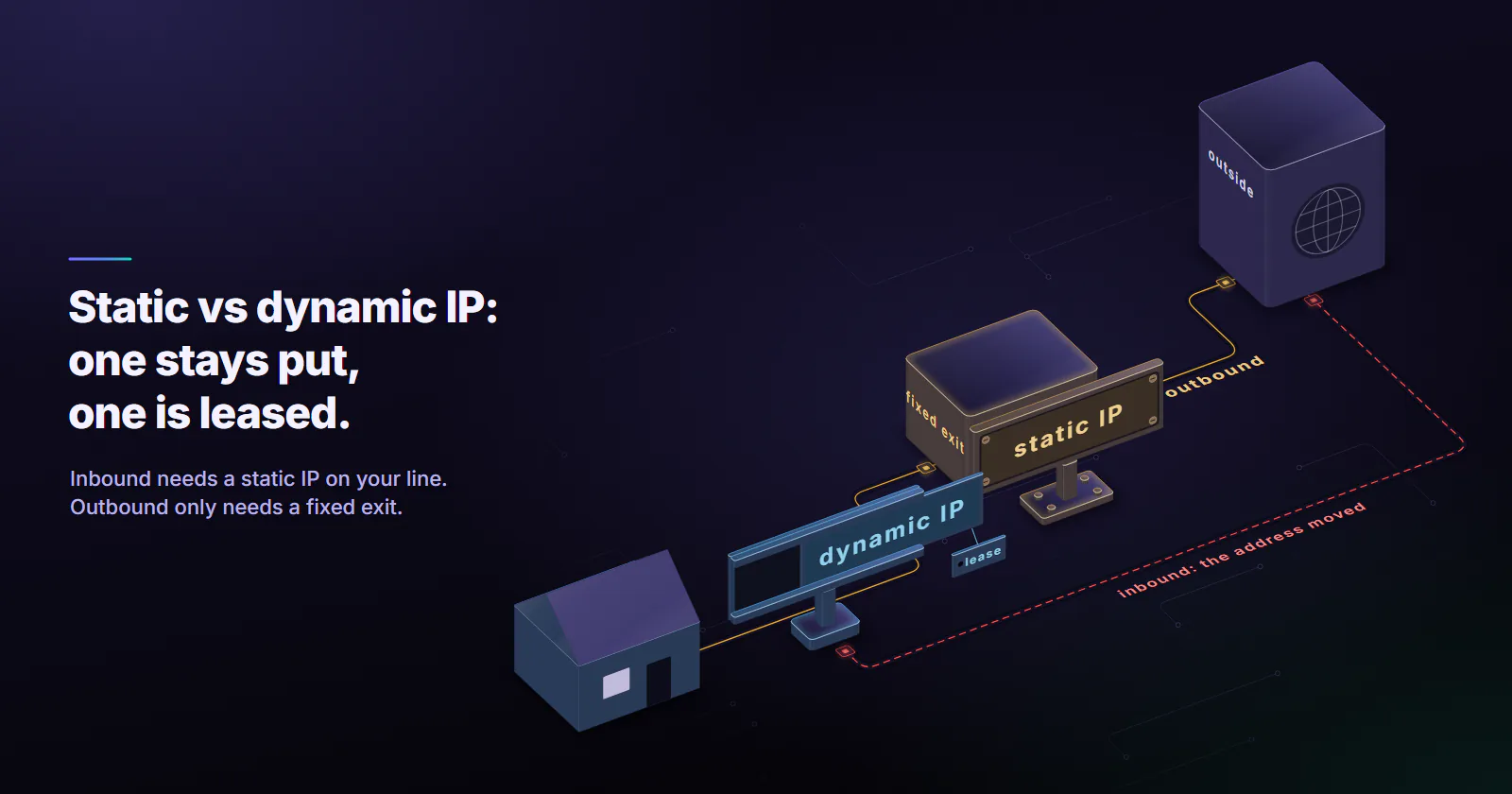
Quick summary · TL;DR
- A static IP stays put; a dynamic IP is leased and can change. DHCP hands out dynamic addresses for a set period, and the ISP decides how long that is and when to renumber.
- Dynamic addresses change on three clocks. The lease, fixed renumbering schedules (often every 24 hours at ISPs that do it) and outages long enough for the lease to lapse.
- Check two layers. "DHCP Enabled" describes the LAN address only; the public address needs a week of logging and a look at the router WAN address for CGNAT.
- Direction decides the fix. Inbound services need a static address on their own line; outbound traffic only needs a fixed exit, such as a VPN gateway, a cloud server or a static ISP proxy.
A static IP address stays the same every time a device or network connects. A dynamic IP address is leased for a limited time and can change on renewal, after a reboot or when the ISP renumbers its customers. Most homes get a dynamic address. A static one matters when something has to find you, or trust you, at one known address.
The static vs dynamic IP question usually shows up after something breaks. A partner’s firewall stops accepting requests after a router restart, a home camera vanishes from its app, or a remote desktop shortcut points at yesterday’s address.
The fix depends on two things: which address changed, the one inside your network or the public one your ISP assigns, and which direction the traffic flows.
Static vs dynamic IP explained
What a static IP address is
A static IP address is an address assigned once that stays the same across reboots and reconnects. On a local network that means an address typed into the device, or one reserved for it on the router. On the internet side it means a public address the ISP sets aside for one customer and does not hand to anyone else. ISPs usually sell it as an add-on or bundle it with business plans.
Because it never moves, other systems can point at it: a DNS record, a port forward, a firewall rule, a partner’s access list.
What a dynamic IP address is
A dynamic IP address is an address that a DHCP server leases to a device for a set period and can later hand to someone else. The client has to renew the lease to keep it. RFC 2131 (March 1997), the DHCP standard, sets the default renewal attempt at 50% of the lease (T1) and a broadcast to any DHCP server at 87.5% (T2). If renewal fails, or the server has reassigned the address, the client gets a different one.
Your router runs this process for the devices on your network. Your ISP runs it for your router, on its own schedule and its own lease lengths. Dynamic is the default on both layers for practical reasons: DHCP needs no setup on the device, and public IPv4 addresses are scarce, so an ISP leases them from a shared pool instead of reserving one for every customer.
Static vs dynamic IP comparison
How often a dynamic IP changes
There is no single answer, because three clocks run at once.
The lease. The ISP picks the lease length. A router that stays online renews at T1 and, on many networks, keeps the same address for weeks or months.
Policy renumbering. Some ISPs reassign addresses on a fixed schedule, whatever the lease says. A RIPE Labs study (November 2016) followed 3,038 RIPE Atlas probes in 156 countries through 2015 and found 20 ISPs that reassign addresses after a fixed period, typically 24 hours or a multiple of it.
Outages. The same study found address changes tied to network and power outages at the customer end. A power cut or a long modem reboot lets the lease lapse, and the router comes back on a new address.
So a “dynamic” address can hold for a year on one line and change every night on another. The only way to know yours is to measure it, which the check below does.
When you need a static IP
Split the requirement by direction first. It decides which fix works.
Inbound: something must reach you. Hosting a website, a game server or a VPN endpoint, reaching a NAS or an IP camera from outside, remote desktop into an office machine. The fixed address has to sit on the connection where the service runs. A static public IP from the ISP solves it. Dynamic DNS, a hostname that updates when the address changes, is the free workaround when the ISP gives you a real public address.
Outbound: someone must recognise you. A partner API that admits only listed source addresses, a SaaS admin panel locked to the office IP, a payroll portal that challenges logins from new locations. Here the address only has to be stable on the way out. It does not have to be the address of your own line.
Mail. A self-run mail server needs a static address with matching reverse DNS, and even that is not enough. The Spamhaus Policy Blocklist (page checked October 2026) lists end-user ranges, dynamic and static alike, that should not deliver mail straight to other servers. Mail from those ranges is expected to go through an authenticated relay.
Most households need none of this. Browsing, streaming, video calls and online games run fine on a dynamic address.
Security and privacy of each
Fixed addresses are fixed targets. Anyone who learns one can scan it again tomorrow, and services that see it repeatedly can link your sessions over months. That is a reason to keep exposed services patched and closed by default.
Changing addresses do not make anyone anonymous. The ISP keeps records of which customer held which address and when. Cookies, logins and browser fingerprints link sessions whatever the IP does. So a changing address is a minor obstacle to tracking, nothing more.
Static has one security advantage, in firewall rules. One rule that admits a single known source address is tighter than one that has to admit a whole ISP range because the address keeps moving.
How to check which one you have
Your LAN IP and public IP
Every device on a home or office network has two addresses in play. The LAN address, often 192.168.x.x or 10.x.x.x, comes from the router. The public address is the one websites see, and every device behind the router shares it.
On Windows, ipconfig /all shows “DHCP Enabled: Yes” for a dynamic LAN address. On macOS the network details panel shows “Using DHCP”. That answers the LAN question only. A static LAN address or a DHCP reservation on the router does nothing to the public one.
Check the public address over time
Open the router’s admin page and read its WAN address, then compare it with what an IP echo service reports.
If the two match, the router holds a public address of its own, and a week of logging tells you whether it moves. If the WAN address falls between 100.64.0.0 and 100.127.255.255, the line sits behind carrier-grade NAT.
CGNAT explained covers why shared carrier addresses behave this way. For a definitive answer on any line, log the public address every 15 minutes for a week:
import datetime, time
import requests

URL = "https://api.ipify.org"
PROXIES = None  # to test a proxy exit: {"http": "http://USERNAME:PASSWORD@HOST:PORT", "https": "http://USERNAME:PASSWORD@HOST:PORT"}

last = None
while True:
    try:
        ip = requests.get(URL, proxies=PROXIES, timeout=15).text.strip()
    except requests.RequestException as exc:
        ip = "error: " + exc.__class__.__name__
    stamp = datetime.datetime.now().isoformat(timespec="seconds")
    with open("ip-log.csv", "a") as f:
        f.write(f"{stamp},{ip}\n")
    if ip != last:
        print(stamp, "address now", ip)
        last = ip
    time.sleep(15 * 60)
No change across restarts and nights points to a static or long-lease address. A change at the same hour every day is policy renumbering. The ISP can confirm whether an address is reserved for your account.
How to get a static IP
From the ISP. Ask for a static public address. Many ISPs offer it only on business plans or as an add-on, and some plans behind CGNAT cannot get one at all.
A DHCP reservation for LAN devices. Tie a printer’s, NAS’s or camera’s MAC address to one LAN address in the router settings. It fixes internal access and port forwards and leaves the public address alone.
Dynamic DNS. A dynamic DNS hostname follows a changing public address. It works for inbound access when the line has a real public IP and does nothing behind CGNAT.
A cloud server or VPN gateway. Even a small server with a static public address can host the service itself, or act as the fixed exit for a team’s traffic.
A static proxy for outbound traffic. When the requirement is only that requests leave from one known address, route that traffic through a proxy with a fixed exit. The exit stays the same whatever your own line does.
IPv6 does not remove the question. Some ISPs delegate a prefix that can change on reconnect, and devices rotate temporary addresses on purpose for privacy under RFC 8981 (February 2021). A stable IPv6 setup needs a static prefix from the ISP and a fixed interface address on the host.
Static and dynamic IPs in proxies
The same split runs through proxy types. A proxy server forwards requests from its own exit address, so the question becomes whether that exit stays put.
Dynamic by design. Rotating residential proxies and mobile proxies hand out exits from home and carrier connections. On proxymint the rotation is set per order: a new IP on every request, a timer from 5 to 60 minutes, or sticky for as long as the device stays online. That suits jobs that want many addresses, such as price and stock monitoring across markets.
Static by design. Static ISP proxies give one ISP-registered address, assigned to your order for the whole billing term, with its own username and password and both HTTP and SOCKS5. The address does not rotate. Datacenter IPv4 ports are fixed addresses too, on hosting networks rather than ISP-registered ranges.
Static ISP proxies fit the outbound cases above: a partner who adds one IP to their firewall, an admin login that should keep one location, repeat access to the same service where a stable history helps. A proxy sets where requests come from, so hosting a service on your own line still calls for a static address on that line. What ISP proxies are explains how the category differs from home connections, and ISP proxies vs rotating residential compares the two models job by job.
The logging script above checks any proxy exit too: set PROXIES to the proxy’s host and port. With a static exit, the log shows one address for the whole run.
Which IP your setup needs
If nothing outside your network has to find or recognise you, keep the dynamic address.
If a service at home or in the office must be reachable from outside, check for CGNAT first, then get a static public IP from the ISP or move the service to a server that has one.
If only outgoing traffic has to come from one known address, a fixed exit does the job: a VPN gateway, a cloud server or a static ISP proxy. And if the job needs many changing addresses, a dynamic pool is the point, and the static vs dynamic IP choice flips the other way.
Frequently asked questions
A static IP address is assigned once and stays the same across reboots and reconnects. A dynamic IP address is leased by a DHCP server for a set time and can change when the lease ends, the router reconnects or the ISP renumbers its customers. Most home connections get dynamic addresses.
Neither is better in general. A static IP is the right choice when something has to reach or recognise one known address, such as a home server, remote access or a partner firewall rule. For browsing, streaming and gaming a dynamic IP works just as well and usually comes with the standard plan.
Not by itself. A static address is a fixed target and easier to link over time, while a dynamic one changes but still ties back to the customer in the ISP records. Security comes from patched devices, closed ports and firewall rules, and a fixed address makes tight firewall rules easier to write.
No. Speed and latency depend on the line, the ISP routing and the distance to the server, not on whether the address is fixed. Video and VoIP calls work the same on either. A static IP helps gamers only when they host a server that other players connect to.
Check two layers. "DHCP Enabled: Yes" in ipconfig, or "Using DHCP" on macOS, means the LAN address is dynamic. For the public address, log what an IP echo service reports for a week and compare it with the router WAN address; if it changes, it is dynamic, and the ISP can confirm whether a static one is reserved for the account.
It depends on the ISP. Some keep the same address for months while the router stays online and renews its lease, others reassign every 24 hours by policy, and outages long enough for the lease to lapse also trigger a change. A week of logging shows the pattern on a given line.
A static proxy gives outgoing requests one fixed exit address, which covers partner firewall rules and logins that should keep one location. It does not make devices on the customer line reachable from outside, so hosting a service still needs a static address from the ISP or a server that has one.
Researched and drafted with AI tools, then checked against our publishing rules before it went live: 5 outside links, 7 links to other proxymint pages, no prices and a fact-check pass against our product records. How we write.