Logging in to business accounts from abroad without lockouts
Log in to business accounts from abroad without lockouts: what login checks read, the platform route first, when a static ISP IP helps and what it cannot fix.
Quick summary · TL;DR
- A login from a new country is one of the first things risk engines score. Microsoft Entra lists new country, atypical travel, impossible travel and unfamiliar sign-in properties, including IP, ASN and location, as sign-in risk detections.
- The platform's own route comes first. A login for each person, an admin who knows the travel dates and a trusted location list solve most trips before any proxy is involved.
- A static ISP IP in the home country keeps the network signals steady. The account sees the same address, the same network and the same country on every login, wherever the team member is.
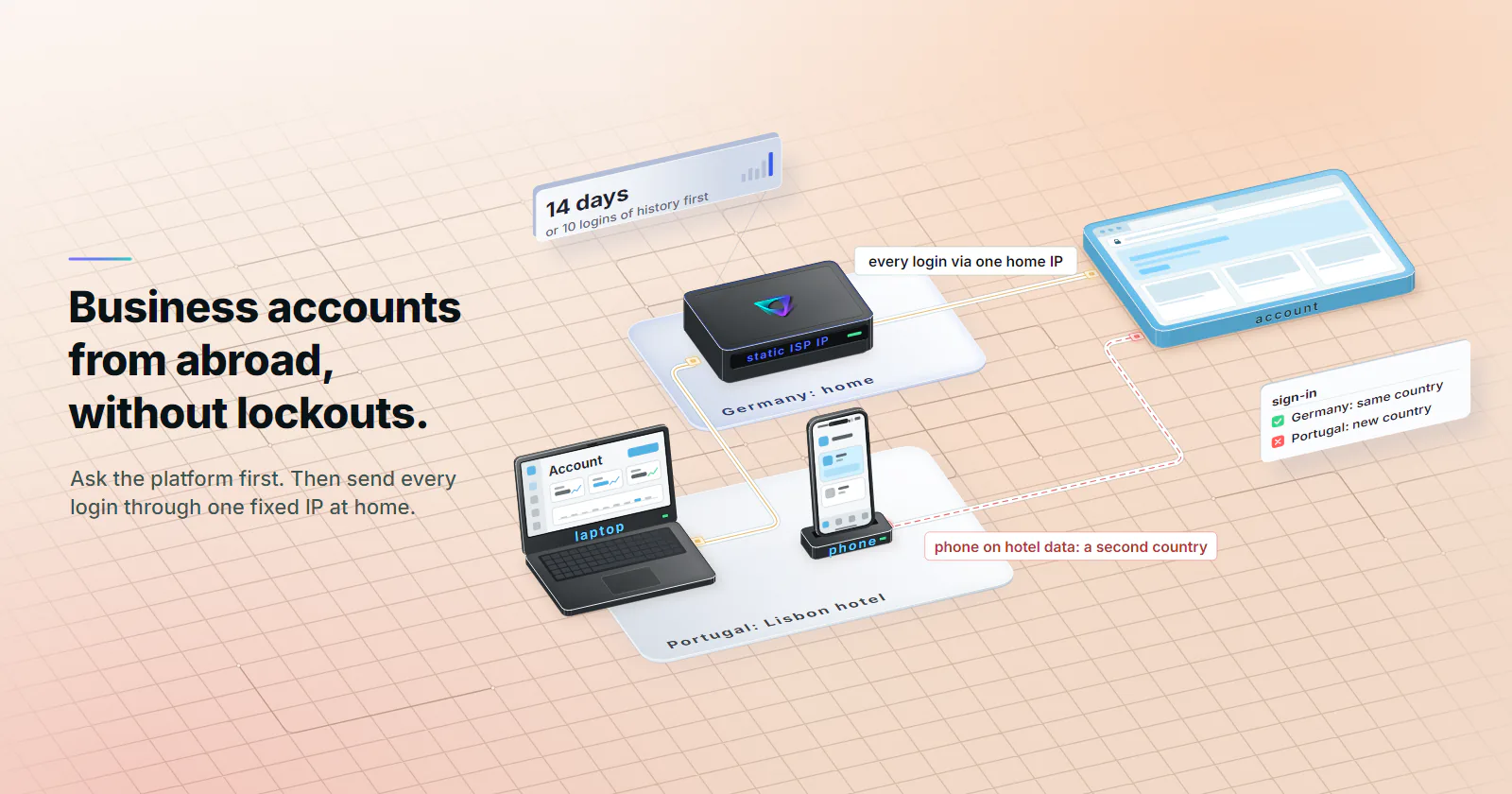
- Every login for the account has to take the same route. A laptop on the home IP while the phone signs in on hotel data shows two countries at once, which is exactly what travel detections look for.
- The IP does not touch the rest of the check. A new device, a 2FA prompt, GPS-based location policies, document checks and the platform's own country rules all still apply.
To log in to business accounts from abroad without a lockout, use the platform’s own route first: a login for each person, an admin who knows the travel dates and a second factor that works without a home SIM. If the accounts still score login location, one static ISP IP in the home country keeps the network signals steady. It does not answer 2FA, device or GPS checks.
A seller account manager lands in Lisbon and signs in to the company’s marketplace dashboard. The account has logged in from the same German city every weekday for two years. Now it sees Portugal, a hotel network and a new IP, asks for a code sent to a German SIM that is not roaming, and locks until someone at the office answers a support ticket.
Most of the account security travel advice that ranks for this says to use a VPN, which swaps one unfamiliar address for another that strangers share; proxy vs VPN covers where each tool fits. The steps below are for teams signing in to company tools and accounts they own while travelling, not for opening an account abroad.
Logging in from abroad: what the check reads
Microsoft and Google both publish the signals they score, and the two lists line up.
Microsoft Entra ID Protection’s risk detections (updated April 22, 2026) list several that fire on travel:
- Unfamiliar sign-in properties. Compares a login with past sign-ins on properties that can include IP, ASN, location, device, browser and tenant IP subnet.
- New country. Flags locations that are new or infrequent for the user, based on past activity.
- Atypical travel. Two sign-ins from distant locations, weighed against how long the trip would take. It ignores obvious false positives such as VPNs and locations used regularly by others in the organization, and it has a learning period of the earliest of 14 days or 10 logins.
- Impossible travel. Activity from distant locations inside a time shorter than the trip itself, in one session or several. Security teams know it as the impossible travel alert.
- Anonymous IP address. Sign-ins from anonymous IPs such as Tor or an anonymous VPN, described as addresses typically used to hide sign-in information.
- Suspicious MFA authentication approval. Compares the location of the device asking to sign in with the device approving the prompt in the Authenticator app.
Google describes the same pattern from the user’s side. Its Workspace page on suspicious login alerts (updated September 24, 2026) names a sign-in from an unusual location as suspicious, and says Google usually presents an extra challenge first and alerts the admin only if the challenge fails or is abandoned. The login challenge page (same date) lists the challenges, from a code by text, call or app to an employee ID or recovery email, and lets a super admin turn the challenge off for 10 minutes.
So a login from another country changes three network signals at once: the IP, the ASN and the country. It usually changes the device context too, because hotel and airport networks are new. The check is the sum.
Start with the platform’s own route
The platform and the admin have tools built for this. They settle most trips on their own, and they are what the platform’s rules expect.
One login per person. Marketplaces and payment platforms want each team member on their own credentials, not a shared password. Amazon Seller Central’s User Permissions let the primary account holder invite secondary users with limited rights, and Amazon’s guidance is not to share login credentials; whether one business may run multiple Amazon seller accounts is a separate policy question. Stripe works the same way: Stripe’s team settings (checked September 2026) add members by email with roles and recommend the lowest permission the job needs. A named user signing in from a trip has a history. A shared login used from three countries looks like a compromised account. The same one-login-per-person logic applies to agency teams on client profiles, covered in proxies for social media management.
The admin’s trusted list. Microsoft’s Conditional Access network documentation (updated April 1, 2026) lets admins define named locations by IPv4 or IPv6 range and mark them as trusted, and says sign-ins from trusted named locations improve the accuracy of ID Protection’s risk calculation. The same page notes that keeping an up-to-date list of a cloud proxy’s or VPN’s addresses is nearly impossible.
The company’s own VPN. If IT runs a VPN or zero-trust gateway back to the office, that is the route. The admins already trust its addresses, and no outside proxy is needed.
Country rules. Some services block access from certain countries outright. NAB (checked September 2026), for example, blocks online banking in Iran, North Korea, Russia, Belarus, Cuba and several occupied regions of Ukraine to meet its banking obligations, and points customers to telephone banking instead. A home-country IP does not make that access permitted.
A consistent login location, explained
Of the signals above, the network ones are the only ones a traveller can hold steady without carrying the office along. A static IP for travel means the login leaves from one fixed address in the home country, whatever network the laptop is on.
Static ISP proxies do that. Each is one ISP-registered address, assigned to your order for the whole billing term. From the account’s side, the login comes from the same address, the same network and the same country as last month. The person is in Lisbon; the consistent login location stays in Germany.
Three properties make it work where other options do not:
Assigned for the term. The address stays on the order for the whole billing term, so the sign-ins the platform records for it are the team’s, not a VPN server’s passing crowd. An address can carry history from before the term, so look it up and test one login before building on it.
Static. The address does not rotate. The platform’s record of past sign-ins keeps matching, month after month.
ISP-registered. The address is registered to an internet service provider’s network rather than a hosting provider’s. That is the ASN reputation signal, and it is the one shared VPN exits fail first.
Why a shared VPN exit is weaker
A commercial VPN server is one address shared by many subscribers at the same moment, often on a hosting network, and often listed by IP intelligence feeds. Microsoft names anonymous VPNs in its anonymous IP detection. Using one to log in to business accounts from abroad trades a new-country flag for an anonymous-IP flag.
A rotating residential pool avoids the hosting ASN but breaks consistency: every session leaves from a different home, often a different ISP. Rotating residential proxies are the right tool for broad collection across many pages, not for an account that should always come from one place. Mobile proxies have the same problem for most business logins: carrier addresses are often shared behind CGNAT and change by design. They fit only app-first accounts whose history is already a carrier connection, the split covered in mobile vs ISP proxies.
The pre-trip checklist
Most of the work happens before the flight. Run this a few weeks out:
- Tell the admin the dates and the destination. Ask whether the accounts use location policies, and whether the destination is blocked by the platform, the bank or the company.
- Get each traveller their own login on every platform that offers team access, with the lowest role the trip needs.
- Add the static IP to trusted locations, and to any partner allowlist a marketplace, payment portal or B2B tool offers for logins or API access.
- Build history before travel. Route the team’s logins through the static IP from the office for about two weeks. Microsoft’s learning period for atypical travel is 14 days or 10 logins, a reasonable minimum to plan around.
- Set up 2FA that works abroad. An authenticator app or a hardware security key works without a home signal. Google’s 2-Step Verification backup codes (checked September 2026) come in sets of 10, each usable once; print them and keep them apart from the laptop.
- Keep the same machine and browser profile. Set the proxy in one dedicated browser profile used only for the business accounts, over HTTP or SOCKS5 with username and password authentication. On a trip the laptop’s own IP changes at every hotel, so the login travels with the credentials, not the network.
- Test one full login through the static IP before leaving, including the 2FA step.
One route for every login
This is how a home-IP setup still trips an impossible travel alert. The laptop’s browser signs in from Germany. Meanwhile the same person’s phone app, desktop mail client or chat app refreshes its session on hotel Wi-Fi or roaming data in Portugal. The account now sees two countries within minutes.
Microsoft’s Conditional Access page says Entra issues tokens hourly by default, so for apps using modern authentication a change in network location is picked up within the hour. A phone left signed in abroad keeps reporting its real location all day. Entra’s MFA-approval detection goes further: it compares where the sign-in request came from with where the Authenticator app approved it.
The fix is plain. For the accounts that matter, keep every session on the same route: sign out of their phone and desktop apps for the trip and use them only in the proxied browser profile, or tell the admin that the phone will show the real location. Browser proxy settings do not cover other apps, and some apps ignore system proxy settings too.
What a static IP does not solve
The network is one part of the check. A static IP for travel keeps that part consistent and leaves everything else as it was.
Two-factor prompts. Platforms still ask for a second factor on new devices, sensitive actions and admin policy. An SMS code sent to a home SIM may not arrive abroad.
Device and browser checks. Unfamiliar sign-in properties include device and browser, not just the IP. A borrowed laptop or a fresh browser on the right IP is still a new login.
GPS and device location. Some policies skip the IP. Microsoft’s Conditional Access page describes named locations based on GPS coordinates from the Authenticator app, collected hourly, and says the app denies authentications where the location looks altered. On those accounts the right move is an approved exception from the admin.
Time and behaviour. A login at 3 a.m. home time reads differently from the usual 9 a.m. session.
Business account verification. If a platform asks for documents, a video check or a call, answer it. The static address only keeps the login location consistent.
Platform rules and law. Country restrictions for licensing, sanctions or regulatory reasons still apply, and so do the terms on accounts the team does not own.
Locked out abroad: what to do
A lockout abroad is solved by the recovery path prepared before the trip, and a new network makes it worse. Work through that path:
- Backup codes or a security key get past a 2FA prompt when the home SIM is out of reach.
- The authenticator on a device the account already trusts answers the challenge without a new-device flag.
- The admin. A Google Workspace super admin can lift the login challenge for 10 minutes. An Entra admin can review the flagged sign-in with the user.
- Platform support, through the route the team noted before leaving, not a helpdesk number found on hotel Wi-Fi.
What not to do: cycle through VPN servers or rotating addresses to retry. Each attempt adds a new country or an anonymous IP to the account’s recent history and makes the next check harder.
Static IP for travel: cost
Static ISP proxies bill per IP per month, with no per-GB meter. A team that shares one address across a small set of accounts needs one IP; a team that gives each of five travelling account managers their own address needs five. Terms run monthly, or 3 or 12 months billed at the start. Entry prices and volume bands are on the pricing page.
The country is chosen at order time from the countries with ISP ranges available, so the address sits in the market where the accounts normally log in. It cannot be set by city, carrier or ASN.
And sometimes the right amount to spend is zero. If the company VPN already covers the trip, if the admin can lift a challenge for a one-week visit, or if the accounts use GPS-based policies, a proxy adds nothing.
Deciding before the trip
If the team needs to log in to business accounts from abroad on accounts it owns, start with the platform: one login per person, an admin who knows the dates, a second factor that works without a home SIM. If the company runs its own VPN, use it.
If the accounts still score login location and there is no company route, a static ISP IP in the home country is the steadiest network signal available, marked trusted before anyone travels, with every session for those accounts kept on it.
If the account uses GPS-based policies, needs documents, or is blocked from the destination, no IP changes that: ask for an exception. And if the job is scraping or ad checks rather than logins, rotating residential is the better fit.
Frequently asked questions
Identity systems compare each sign-in with the account's history, and a new country is one of the strongest changes they see. Google Workspace presents a login challenge when a sign-in breaks the user's usual pattern, such as an unusual location. Microsoft Entra scores new country, atypical travel, impossible travel and unfamiliar IP, ASN and location as sign-in risk.
If the company runs its own VPN back to the office, use that: it is the route the admins already trust. A commercial VPN exit is shared by many customers and often sits on lists of anonymous IP addresses, which Microsoft Entra treats as a risk detection on its own. A static ISP IP is an ISP-registered address, assigned to your order for the whole billing term, so it is the steadier signal for accounts the team owns.
No. A static IP keeps the network signals consistent, but 2FA is triggered by the platform's own rules, a new device or browser, sensitive actions and admin policy. Teams travelling abroad should carry a second factor that works without a home SIM, such as an authenticator app, a hardware security key or printed backup codes.
Yes, on many platforms. Microsoft Entra lets admins define named locations by IP range and mark them as trusted, which it says improves the accuracy of its risk calculation. A single static address can be added this way; a shared VPN exit or a rotating residential pool cannot, because the address keeps changing or belongs to other people.
For desk-based business logins, usually not. Mobile carrier addresses are often shared behind CGNAT and change by design, so the login history never settles on one address, and an admin cannot write a carrier address into a trusted location list. Mobile fits app-first accounts whose history is already a carrier connection in the home market.
Most banks allow online banking abroad, but they read the same login signals, and some block access from sanctioned countries and regions to meet their legal obligations. Use the bank's own app, set up its travel notice if it offers one, and avoid public Wi-Fi for payments. A proxy or VPN is never a way around a bank's country block.
Use the recovery path prepared before the trip: backup codes, an authenticator on a device the account already trusts, or the account admin. A Google Workspace super admin can turn off the login challenge for 10 minutes so the user can sign in. Do not keep retrying through new VPN servers or rotating addresses, because every new country and anonymous IP adds risk to the next attempt.
Researched and drafted with AI tools, then checked against our publishing rules before it went live: 7 outside links, 8 links to other proxymint pages, no prices and a fact-check pass against our product records. How we write.