Mobile vs ISP proxies: moving mobile IPs or one fixed address
Mobile vs ISP proxies compared: shared moving IPs vs one fixed IP, detection, speed, and how each billing model fits one managed account.
Quick summary · TL;DR
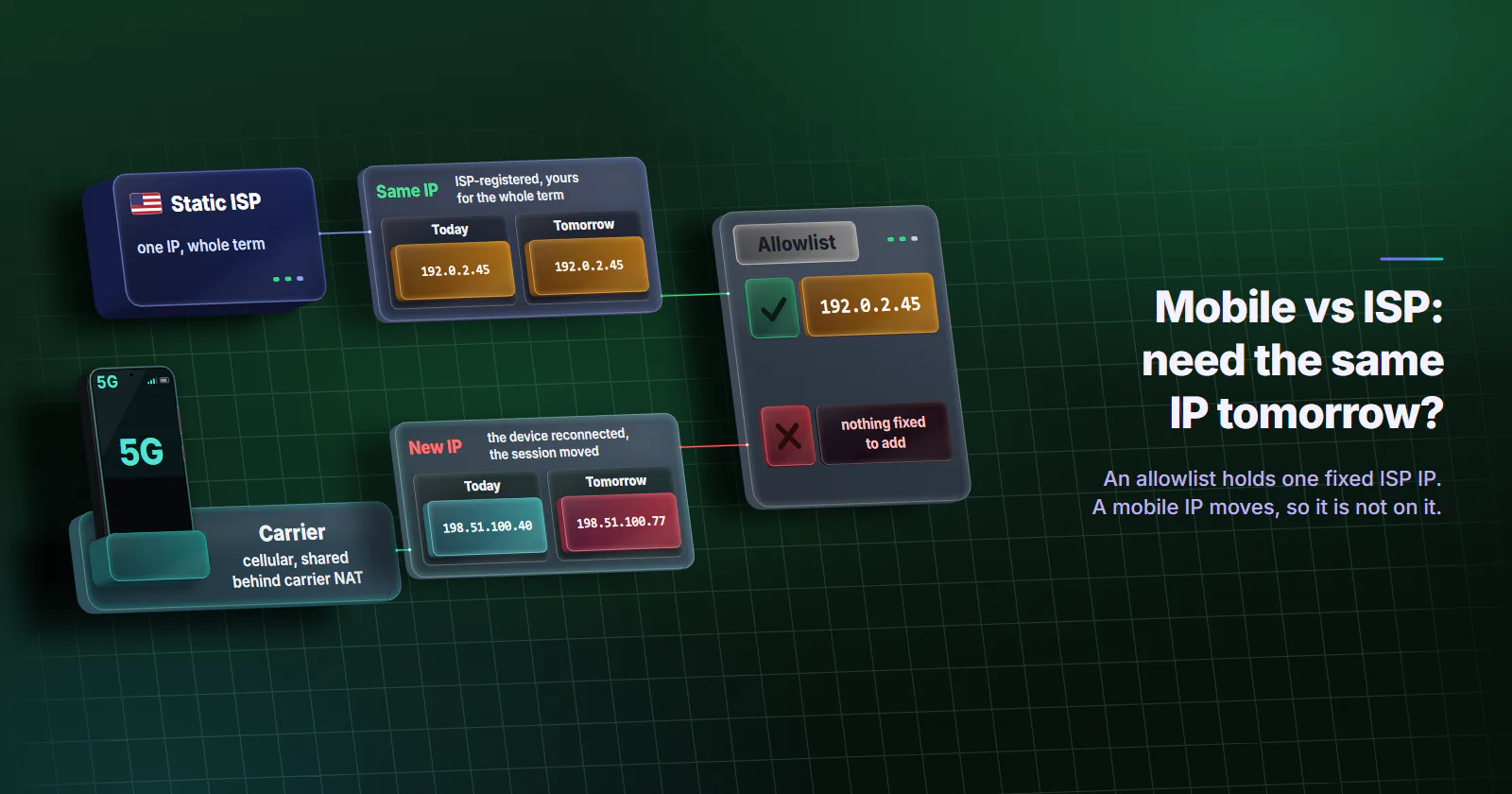
- One question decides it: the same IP tomorrow, or a carrier origin today. Jobs that need address continuity (allowlisted integrations, seller dashboards, long login histories) belong on a static ISP IP. Jobs that need a cellular-classified origin (app-first accounts, mobile ads, carrier QA) belong on mobile.
- The two tiers earn trust in opposite ways. A mobile exit sits on an address classified as cellular, usually shared with other subscribers behind carrier NAT, so blocking it can hurt real users. An ISP IP is ISP-registered and assigned to your order for the whole term, so the account sees one steady address.
- Neither tier is invisible. Proxy exits on both get observed and flagged. Cloudflare found CGNAT addresses were rate limited three times as often as other addresses, so a carrier IP gets challenged more, not waved through.
- The billing models follow the products. Mobile meters traffic per GB; ISP reserves one address per month, so steady daily use of one identity suits ISP and bursty app-first sessions suit mobile.
Mobile vs ISP proxies comes down to one question: does the job need the same IP tomorrow, or a carrier origin today? A mobile proxy exits through an address classified as cellular, usually shared with other subscribers behind carrier NAT, and it moves. A static ISP proxy is one ISP-registered IP, assigned to your order for the whole term.
A team managing a dozen brand accounts it owns can be right with either tier; the job decides which. The two earn trust in opposite ways and bill on different axes: mobile per GB of traffic, ISP per IP per month.
Mobile vs ISP proxies in one question
A mobile proxy routes traffic through phones and modems on mobile carrier networks, with exits classified as cellular by MaxMind; carrier-grade NAT (CGNAT) usually puts many subscribers behind one public IPv4 address that changes over time. An ISP proxy is one ISP-registered IP, assigned to your order for the whole term. One is shared and moving, the other is one fixed address. That split is why one question decides between them.
Same IP tomorrow. A seller dashboard that logs in every morning. A partner API that adds one address to its own firewall. An ad account whose login history should show one location for months. These jobs need continuity at the address level, and that is what a static ISP proxy sells.
Carrier origin today. A mobile-first app that expects its users on mobile networks. A mobile ad placement that serves differently to carrier traffic. An app QA run against carrier routing. The exact address matters less here, because real phones change addresses all the time.
Side by side, attribute by attribute:
Why each one is trusted
What makes a carrier IP trusted
Shared addresses. Mobile carriers put subscribers behind CGNAT, so one public IPv4 address fronts many phones at once. The practice is close to universal: a measurement study presented at ACM IMC found CGN deployed in more than 90% of cellular networks, against 17-18% of non-cellular eyeball networks (Richter et al., arXiv, September 2016). How that sharing works in practice is covered in CGNAT proxies explained.
The collateral cost of a block. The IETF’s analysis of address sharing, RFC 6269 (June 2011), warns that blocklists aimed at one abuser land on every subscriber behind the same address. So a platform that recognizes a carrier address tends to challenge or score the session rather than ban the IP outright.
Coarse location. The same RFC notes that a subscriber behind a CGN geolocates to wherever the CGN’s prefix appears, often a different city. City targeting picks where the device is. The public IP can still resolve to the carrier’s gateway region in an IP database.
So the carrier IP vs static IP trade cuts both ways. The carrier address is trusted because it is shared, and shared means its history is not the customer’s alone, the same trade-off as dedicated vs shared proxies.
What makes an ISP IP trusted
The network label. IP intelligence databases sort addresses by the kind of network behind them: MaxMind’s connection-type database returns Cable/DSL, Cellular, Corporate or Satellite for a range (MaxMind developer docs, data release notes covering May to August 2026, checked September 29, 2026). How those databases label an ISP-registered address hosted on servers varies, so check the label on the addresses you get.
Is an ISP proxy residential? Not in the home-line sense. Most ISP proxies, proxymint’s included, are ISP-registered addresses hosted on servers rather than a home line, which is why they stay online for months. The label describes the network and says nothing about the building, so ask any vendor where its ranges are hosted. The ISP proxies guide covers how those ranges come about.
One address for the term. On proxymint, each of the static ISP proxies is assigned to your order for the whole billing term. Over weeks the platform sees one IP, one ASN and one location for the account, which is what login risk systems learn from. Microsoft Entra lists unfamiliar sign-in properties, including IP, ASN and location, as a sign-in risk detection (Microsoft Learn, updated April 22, 2026).
How websites detect each one
Neither tier is invisible. IP intelligence services build proxy lists by watching proxy networks directly and recording the exits they see. IPinfo’s residential proxy data works this way: it names the service behind each flagged exit, tags mobile exits separately and refreshes daily (IPinfo residential proxy data, data updated September 28, 2026).
What differs is what a platform does with the flag. Cloudflare found CGNAT addresses were rate limited three times as often as other addresses, at a near-identical median bot rate of 4.8% against 4.7% (Cloudflare blog, October 29, 2025). So carrier IPs get slowed and challenged, not waved through.
And the IP is one signal among several. TLS fingerprint, device and timezone consistency and request pace are scored on top, on either tier. No honest source gives a universal detection or account survival rate for either tier. A page that quotes one is guessing.
Moving address versus fixed address
Mobile moves by design. RFC 6888 (April 2013) requires a CGN to use “paired” address pooling by default, so one device’s concurrent sessions leave through the same public address. Nothing in it holds that address across a reconnect. On proxymint’s mobile tier the IP changes on every request, on a timer from 5 to 60 minutes, or stays sticky for as long as the device is online. When the device drops, the next session gets another IP.
The carrier can change too. Mobile targeting on proxymint is by country, region and city, picked from devices online at order time, with no carrier selection. Two sessions for the same account can leave from different ASNs in the same city. That usually looks like ordinary phone behavior, but a team running a mobile proxy for accounts should log the ASN of each session rather than assume.
ISP never moves. The address is the product. It does not rotate, and it stays for the monthly, 3-month or 12-month term. The login history then shows one address on one ISP, where mobile shows many addresses across networks.
Speed and latency
A carrier path adds steps a fixed line does not have: the radio link, the carrier core and often a CGN. Throughput and round-trip time then vary with signal and cell load through the day. That is why a mobile proxy is rarely the faster of the two, and why the gap is not one fixed number.
Speed tables on proxy pages quote Mbps and millisecond ranges with no source. The number that counts is time to first byte to the target region, which the test below captures.
How the billing models differ
Mobile is billed per GB of traffic, as a one-off package with no renewal. ISP is billed per IP per month, with no per-GB meter. The two models follow the two products: mobile meters the bandwidth each session uses, and ISP reserves one address for the whole term, used or not. On proxymint, entry prices and volume bands for both are on the pricing page.
For one account, traffic is the useful number to know before choosing. What pushes it up is page weight, not logins. A dashboard that loads tables a few times a day moves little; an account that scrolls a video feed or uploads media all day moves a lot. Steady daily use of one identity suits a monthly address, and bursty, app-first sessions suit metered mobile traffic. The proxymint dashboard’s traffic counter over one normal week gives the figure.
Where each one fits
Mobile fits app-first platforms, mobile ad verification and app QA on carrier routing, where the target expects a phone on a carrier. It does not hold the same address next week, so a job that needs a firewall allowlist or a login history tied to one IP points to ISP. Catalog scraping and price monitoring do not check for a carrier origin; rotating residential proxies are built for that work, and mobile vs residential proxies sets those two side by side.
ISP fits accounts tied to one login location, seller dashboards and partner allowlists, where the same IP has to appear on every session. When the target expects a carrier origin (mobile ad verification, app QA on carrier routing, app-first platforms that treat a home broadband session differently from a phone), mobile is the requirement. A static ISP proxy for social media fits desktop dashboard work, the setup Instagram proxies walks through for one platform. Broad scraping needs many addresses, so it points to a rotating pool.
Test both before committing
Run a small test on the smallest order of each: 1 GB of mobile and one ISP IP, same country, with the mobile side set to sticky. Send the same requests through both.
# Run once per tier. Set PROXY to that tier's gateway as http://HOST:PORT and AUTH to
# USERNAME:PASSWORD. Percent-encode any @, : or % in the password (%40, %3A, %25):
# curl decodes % sequences in -U too.
for i in $(seq 1 30); do
  ip=$(curl -s -x "$PROXY" -U "$AUTH" https://api.ipify.org)
  res=$(curl -s -o /dev/null -x "$PROXY" -U "$AUTH" -w '%{http_code} %{time_starttransfer}' https://TARGET_URL/)
  asn=$(whois -h whois.cymru.com " -v $ip" | tail -1 | cut -d'|' -f1,7)
  echo "$(date +%H:%M) $ip $asn $res"
  sleep 120
done
Then read the two logs in this order:
- Exit ASN. The mobile exits should read Cellular in MaxMind’s connection type. Neither exit should sit on a hosting ASN.
- Address changes. Count how often the sticky mobile IP changes over the hour, and on which ASNs. The ISP IP should never change.
- TTFB spread. Compare the median and the slowest values, not the best one.
- Bytes per session. Browser devtools shows what one real session transfers. Multiplied out over a month, it shows whether the account is steady or bursty.
- Usable requests. Count the requests that came back as content rather than a challenge on each tier. On a target that challenges one network type more often, that share decides the fit.
Mobile vs ISP proxies: the decision
Before any proxy, use the platform’s own route. Team access, partner access and business manager roles let several people work one account without sharing a login, and they are how platforms expect agencies to work. A proxy only keeps the login origin consistent for accounts the team owns or manages with permission. No proxy tier changes a platform’s terms.
Then let the one question pick the tier:
- If the account must show the same IP tomorrow (a firewall allowlist, a seller dashboard, a login history built over months), use a static ISP IP.
- If the target needs a carrier origin today (an app-first account, mobile ad placements, carrier QA), use mobile proxies and budget per GB from the account’s measured traffic.
- If neither is true, neither tier is needed. Rotating residential or datacenter fits scraping and monitoring.
When the job does need a carrier origin, test the mobile tier per GB, with the exit ASN logged from the first session.
Frequently asked questions
Start with the platform's own team or partner access, which is the route platforms expect agencies to use. For the login origin itself, a static ISP proxy fits desk-based dashboard work where the same address every day matters. A mobile proxy fits app-first accounts that expect carrier traffic, as long as the team accepts that the address moves between sessions.
Not for long. Where a carrier uses carrier-grade NAT, it keeps one device's concurrent sessions on one public address, but the address can change when the device reconnects. On proxymint the mobile IP changes on every request, on a timer from 5 to 60 minutes, or stays sticky only while the device is online.
Only when the account lives in a phone app that expects mobile carrier traffic. Then a sticky mobile session, on an exit classified as cellular by MaxMind, matches the account's usual origin, as long as the team accepts that the address moves when the device drops. An account also run from a desktop dashboard, or one that needs the same IP every session, fits a static ISP IP. Use the platform's own team or partner access first.
A mobile proxy exits through an address classified as cellular, usually shared with other subscribers behind carrier NAT, and it moves. An ISP proxy is one ISP-registered IP, assigned to your order for the whole billing term. Mobile gives a shared, moving origin; ISP gives one fixed address for the whole term.
On proxymint, mobile is billed per GB as a one-off package with no renewal, and a static ISP IP per month, with no per-GB meter. Mobile cost follows the traffic an account moves; an ISP IP is a fixed monthly line for one address. Which fits depends on whether the target expects a carrier origin and whether the account needs the same IP every session.
Yes, both. IP intelligence services watch proxy networks and flag the exits they see, and platforms score TLS, device and pacing signals on top.
Usually not. A carrier path adds a radio link, the carrier core and often a CGN, and its throughput and latency vary with signal and cell load through the day. The honest answer for a given job is a measurement: time to first byte to the target region through each tier, taken during the hours the job runs.
Researched and drafted with AI tools, then checked against our publishing rules before it went live: 7 outside links, 9 links to other proxymint pages, no prices and a fact-check pass against our product records. How we write.