Mobile vs residential proxies: how carrier IPs differ
Mobile vs residential proxies compared: CGNAT and block risk, detection, speed, sessions, what drives traffic, and which workloads fit each type best.
Quick summary · TL;DR
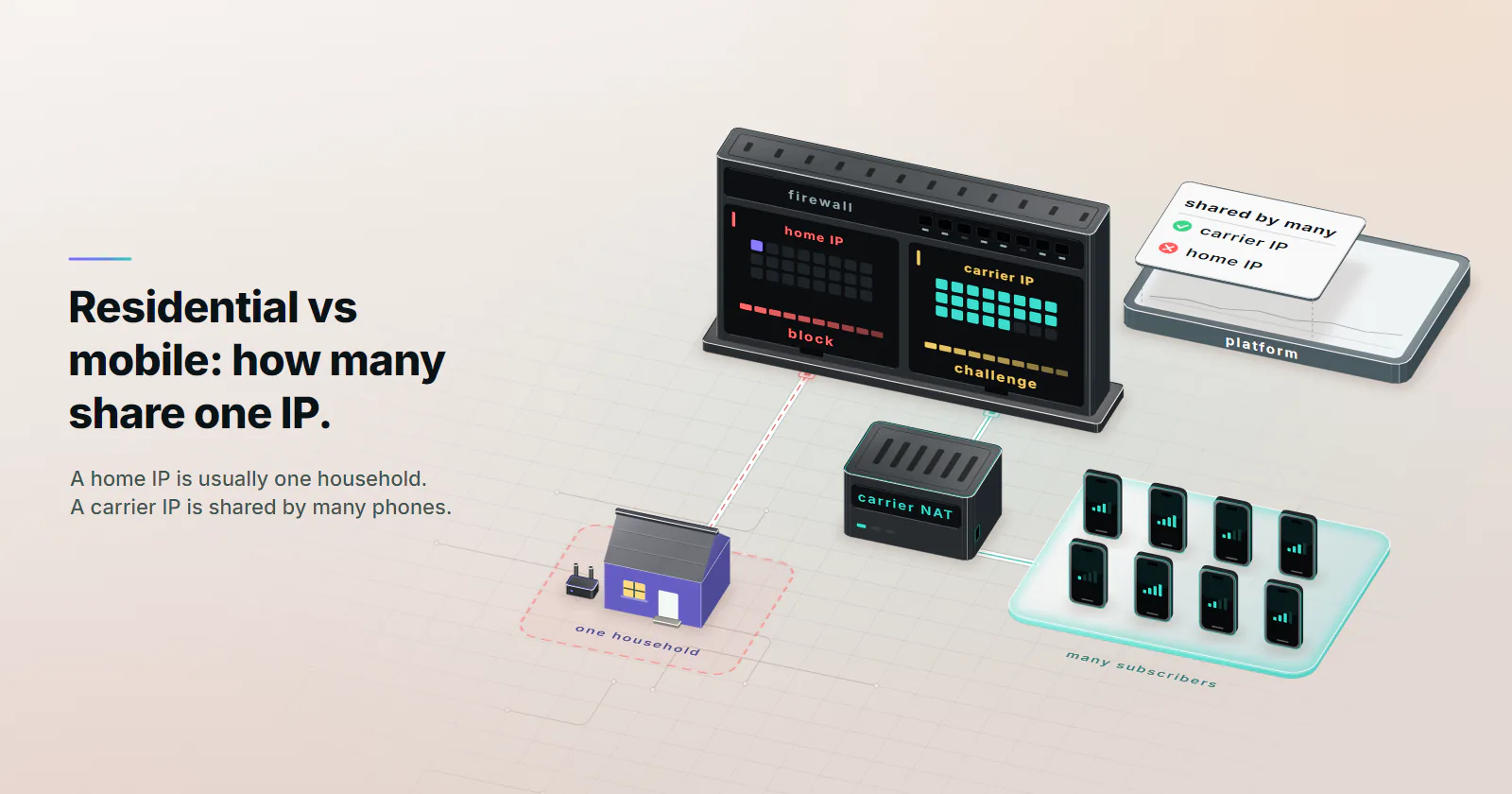
- The difference is head count, not realness. A residential IP usually maps to one household on a fixed-line ISP. A mobile IP sits behind carrier-grade NAT, where many subscribers share one public address at the same time.
- Carrier IPs are costly to ban, not impossible to throttle. Platforms that recognize CGNAT avoid hard bans because real customers share the address, but Cloudflare found CGNAT IPs were rate limited three times more often than other IPs in research published October 2025.
- Both bill by traffic. On proxymint residential and mobile are usage-based per GB, as one-off packages with no renewal. Page weight, retries and what a blocked request downloads decide how much traffic a job uses.
- The job decides the type. Residential fits monitoring, SERP tracking and catalog work on home IPs. Mobile fits app-first workflows, mobile ad checks and targets that flag residential proxy exits, or any job where one failure costs a session or a rerun.
Mobile vs residential proxies comes down to who shares the exit IP. A residential proxy exits through a home broadband line, usually one household per address. A mobile proxy exits on mobile carrier networks, where carriers often put many subscribers behind one address with carrier-grade NAT. That sharing makes a carrier IP costly for a site to ban, and it decides which workloads each type serves.
How mobile and residential proxies differ
A residential proxy exits through a home broadband connection on a fixed-line ISP, a mobile proxy exits through a phone or modem on a 4G or 5G carrier network, and the practical difference is how many subscribers share the exit IP.
Home IP. On most fixed-line ISPs one household sits behind one public IPv4 address, so a block stays inside one home. Not always, though. A measurement study presented at ACM IMC 2016 found carrier-grade NAT in more than 17% of eyeball networks (Richter et al., arXiv, 2016), so some “home IPs” are shared too.
Carrier IP. Mobile carriers put devices behind carrier-grade NAT (CGNAT) almost everywhere. The IETF set aside 100.64.0.0/10 as shared address space for this in RFC 6598 (April 2012), and the same IMC study found CGN in more than 90% of cellular networks. One carrier IP fronts many subscribers at once, and one subscriber can surface on another IP minutes later. More in CGNAT explained for proxy buyers.
Is a mobile proxy residential?
Loosely, yes, under the broad definition. Both are consumer IPs, as opposed to the hosting ASNs datacenter proxies exit from. The split is the announcing network, a fixed-line ISP or a mobile operator, and IP databases label the two differently, so a target tells them apart before reading a header. More on the fixed-line side in what a residential proxy is.
A mobile proxy is not a phone proxy
A mobile proxy rents exits on carrier connections. Setting a proxy on a phone routes that phone’s own traffic through any proxy: a device setting, unrelated to carrier IPs.
Why a block costs more on carriers
Blocking a home IP costs a platform one household. Blocking a carrier IP can cost it a neighborhood of paying customers. That asymmetry is all “mobile proxy trust” means.
Cloudflare measured it in its CGNAT detection research (October 29, 2025): one IPv4 address can represent hundreds or even thousands of users, and CGNAT IPs were rate limited three times more often than non-CGNAT IPs at a nearly identical median bot rate (4.8% vs 4.7%). It cuts both ways:
- Platforms that recognize CGNAT challenge or score the session instead of banning a carrier IP, because a ban lands on real customers. That tolerance is what a carrier exit adds.
- Naive rate limiters see one IP making many requests and throttle it, which Cloudflare attributes to shared IPs tripping per-IP rules, so carrier addresses were throttled more often, not less.
Can mobile proxies be detected? Yes. The IP class sets a starting score, then the session is scored on everything else: the TLS fingerprint the client sends (no proxy tier changes it), whether device, timezone and language match the carrier’s country, where DNS lookups resolve, and the pace of requests. On DNS, use HTTP CONNECT or socks5h://: both resolve names on the proxy side, while plain socks5:// lets the client’s own resolver look them up from its home country. A carrier IP in front of a desktop scraper still looks like a desktop scraper. See how websites detect proxies for every layer a site reads.
Speed, latency and sessions
Are mobile proxies faster than residential?
Usually not. A mobile request crosses a radio link, the carrier core and its CGN, and radio conditions shift with signal and cell load. That adds latency and, more often, variance: the median looks fine while the slow tail stretches.
A residential exit skips the radio hop, but the home peer’s upstream caps throughput: the response travels back up the household’s upload link, the slower direction on cable and DSL.
No universal speed figure holds for either tier, so measure time to first byte against the real target region (the test script below prints p50 and p95). When the radio generation matters, see 4G vs 5G proxies.
Do mobile proxies rotate differently?
Not on proxymint. Both tiers offer the same rotating vs sticky proxies choice: a new IP on every request, a timer from 5 to 60 minutes, or a sticky session for as long as the device stays online.
A “new IP” on mobile can still sit behind the same CGN. On residential, a sticky session depends on a household device that can go offline. Neither tier promises one identity for days; a fixed address belongs on ISP.
Can both tiers target the same cities?
Both target country, then region, then city, chosen on the order from places with devices online at that moment, and changeable later. Neither offers ZIP, ASN or carrier selection. Each tier has its own location list, built from its own devices online, so a city that shows residential devices may show none on mobile. Check both lists before sizing a job.
What drives traffic on a per-GB plan
Both tiers are usage-based: proxymint bills residential and mobile per GB as one-off packages with no renewal and no expiry set on the GB.
Per-GB billing counts the bytes that cross the proxy, so three things set a job’s traffic: page weight, the number of attempts, and what a failed attempt downloads. A headless browser that loads images, fonts and scripts can move several times the bytes of an HTTP client fetching the same HTML, so blocking media in the browser is often the simplest saving on either tier.
To size a job, multiply the pages needed by the weight per page, then add the failed attempts. Take 50,000 product pages at 2 MB each: 100 GB if every request clears. At 90% success the job takes about 55,600 attempts. If each block still loads the full page, that is about 111 GB; if a block returns a 20 KB error page, the job stays barely over 100 GB.
Page weight and volume set the traffic. Success rate and what a failure breaks decide which tier fits the job.
Success rate and what a failure breaks
What a job needs is successful requests. A common shortcut treats a blocked request as moving as many bytes as a successful one, a flawed assumption: a 403 body is kilobytes, a product page can be megabytes.
Traffic per success. Call k the bytes per failure divided by the bytes per success, and S the success rate. Then traffic per success = page weight x (1 + k x (1 - S) / S). With a small error page (k near 0.1), a 90% success rate adds about 1% to the traffic. With a headless browser that loads the full page before the block (k = 1), a 50% success rate doubles it.
What a failure breaks. On a stateless fetch, a failure is one more attempt. On a logged-in session, an app flow or an ad check tied to a carrier context, a failure can mean a lost session, a rerun or manual work. There the type that clears the target most reliably is the one that fits, and a carrier exit’s tolerance is what the job relies on. Where home IPs clear the target and a failure is a cheap retry, residential covers the work.
No honest vendor can quote a universal success rate for either tier; the direct way to get one is to test the reader’s own target.
Test both tiers on the target
The script sends identical requests through each tier and prints success rate, bytes per success and per failure (so k), p50 and p95 time to first byte, and GB of traffic per 1,000 successes. Run it only against a target whose terms allow automated access. It records challenges; it never tries to get past them.
import statistics
import time

import requests

TARGET = "https://TARGET_URL"
N, PACE = 200, 2.0  # requests per tier, seconds between them
TIERS = {  # tier: proxy URL
    "residential": "http://USERNAME:PASSWORD@HOST:PORT",
    "mobile": "http://USERNAME:PASSWORD@HOST:PORT",
}
MARKERS = ("captcha", "challenge", "access denied", "unusual traffic")

for tier, proxy in TIERS.items():
    ok, fail, ttfb = [], [], []
    for _ in range(N):
        try:
            r = requests.get(TARGET, proxies={"http": proxy, "https": proxy}, timeout=30)
            size = len(r.content) + sum(len(h) + len(v) for h, v in r.headers.items())
            ttfb.append(r.elapsed.total_seconds() * 1000)
            blocked = r.status_code != 200 or any(m in r.text[:20000].lower() for m in MARKERS)
            (fail if blocked else ok).append(size)
        except requests.RequestException:
            fail.append(0)
        time.sleep(PACE)
    b_ok = statistics.mean(ok) if ok else 0
    b_fail = statistics.mean(fail) if fail else 0
    k = b_fail / b_ok if b_ok else float("nan")
    gb = (sum(ok) + sum(fail)) / 1e9
    q = statistics.quantiles(ttfb, n=20) if len(ttfb) > 1 else [0] * 19
    print(f"{tier}: success {len(ok) / N:.1%}, bytes/success {b_ok:,.0f}, "
          f"bytes/failure {b_fail:,.0f}, k {k:.2f}, TTFB p50 {q[9]:.0f} ms, "
          f"p95 {q[18]:.0f} ms, GB per 1,000 successes {gb / max(len(ok), 1) * 1000:.3f}")
Bytes are counted after decompression, so treat k as a ratio and the provider’s traffic counter as the billed figure. Then check the exits:
# exit IP, network and connection type as an IP database classifies them
curl -s -U "USERNAME:PASSWORD" -x http://HOST:PORT \
  "http://ip-api.com/json/?fields=query,isp,as,mobile,hosting"
# AS number and operator for the same exit
whois -h whois.cymru.com " -v EXIT_IP"
The first command prints the exit IP the target sees, its ISP and AS, and two flags: mobile is true for a cellular connection, hosting for a data center range. The second prints the AS number and operator from Team Cymru’s IP-to-ASN service. Most mobile exits should resolve to a carrier ASN and most residential exits to a fixed-line ISP; check several exits per tier.
Choosing a provider
Skip ranked lists and check the smallest package: ASNs of sample exits, locations online now, rotation modes, the billing unit, and how residential supply is sourced and consented. proxymint’s residential exits come from device owners who opted in and can opt out.
Mobile vs residential proxies by job
Most decisions settle before any measurement, including where a carrier exit adds nothing the job needs.
Account work run from a desk differs. The platform’s own route (business manager, partner or team access) comes first; when a proxy is still needed, one fixed address on static ISP proxies fits better than either rotating tier. Mobile is for accounts that live in an app.
The mobile vs residential vs ISP proxies question has two more exits. Anything that needs one fixed address for weeks, such as a seller dashboard or a partner firewall, belongs on ISP: home devices go offline and carrier IPs move. Bulk collection from targets without anti-bot scoring suits datacenter proxies.
Which tier each target needs
Three checks settle mobile vs residential proxies for most jobs:
- If the target expects a mobile origin (an app-first platform, mobile ads, app QA), use mobile. Where the platform, ad or test depends on a carrier network, a home IP shows the wrong network path.
- If the target flags residential proxy exits, or one failure costs a session, a rerun or manual work, use mobile. Carrier tolerance is what keeps those jobs running.
- If neither is true, run rotating residential proxies. Monitoring, SERP tracking and catalog scraping clear on home IPs with city targeting.
When the checks leave it open, run the test script above on both tiers against the real target.
Frequently asked questions
A residential proxy exits through a home broadband connection, where one public IP usually maps to one household. A mobile proxy exits through a phone or modem on a 4G or 5G carrier network, where carrier-grade NAT puts many subscribers behind one public IP. Both look like consumers, but the carrier IP is shared by far more people.
Loosely, yes. Both exit from consumer IP addresses rather than the hosting ranges that datacenter proxies use. The difference is the network behind the address: a residential proxy sits on a fixed-line ISP, a mobile proxy on a mobile operator. IP databases label the two separately, so a target can tell a carrier exit from a home one.
They are harder to ban, not harder to detect. The carrier IP only sets a starting score, one platforms are slow to act on because real customers share it. Platforms then score the TLS fingerprint the client sends, whether device, timezone and language match the carrier's country, and the pace of requests. A mobile proxy behind a desktop scraper running at machine speed still reads as automation, so the client and the pacing matter as much as the IP.
Mobile proxies are harder to ban outright, because blocking a shared carrier IP also blocks the real customers behind it. That is tolerance rather than trust. Simple per-IP rate limiters still throttle carrier IPs, and Cloudflare research from October 2025 found CGNAT addresses were rate limited three times more often than other addresses.
It is worth it when the target expects a mobile origin, flags residential proxy exits, or when one failure costs a session, a rerun or manual work. Where home IPs clear the target reliably, residential covers the job. On proxymint mobile is billed per GB in one-off packages with no renewal; the [pricing page](/pricing/) lists every type.
Using a residential or mobile proxy is lawful in most jurisdictions. What decides the rest is what runs through it: the target's terms of service, the data collected and local law. Collecting public data at a reasonable pace is a different case from getting around a platform's limits. This is general information, not legal advice.
Yes, on targets whose terms allow automated access to public pages. Mobile exits fit scraping jobs that need what a carrier user sees, such as mobile ad checks, and targets that flag residential proxy exits. Most monitoring, SERP and catalog work clears on home IPs, so residential covers it. Either way a carrier IP still needs pacing, because per-IP rate limits throttle it.
Researched and drafted with AI tools, then checked against our publishing rules before it went live: 3 outside links, 12 links to other proxymint pages, no prices and a fact-check pass against our product records. How we write.