Multiple Facebook ad accounts: Meta's limits and setup
Meta allows several ad accounts in one business portfolio. The real limits, roles, agency access and spend controls, and where a steady login IP helps a team.
Quick summary · TL;DR
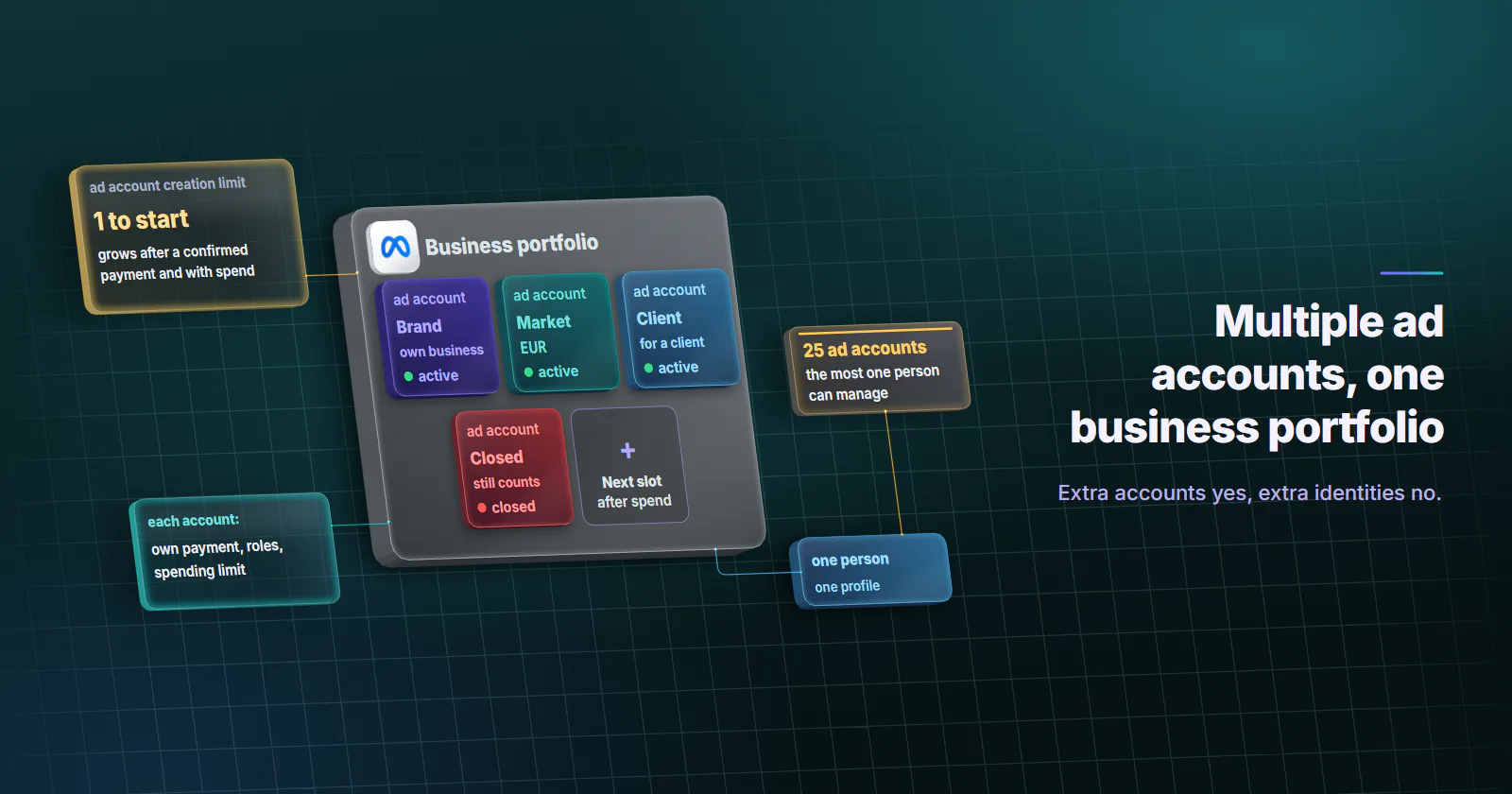
- Meta allows multiple ad accounts inside a business portfolio. One person can manage up to 25 ad accounts, and each ad account can have up to 25 people, per Meta's help pages checked September 2026.
- A new portfolio starts with a creation limit of 1. The limit grows after a confirmed payment and with spend history, closed accounts still count, and full-control holders see the current number under Business info.
- Multiple ad accounts are normal, multiple identities are not. Meta asks for one personal account per person and may restrict business assets tied to a disabled account or created to evade a removal.
- Agencies work in the client's account without owning it. Request to share, partner access and the on-behalf-of relationship keep ownership, billing and history with the client.
- Most teams need no proxy. A steady login IP only helps distributed staff keep a consistent login history, and it never raises a limit or lifts a restriction.
Yes, you can run multiple Facebook ad accounts. Meta lets one business portfolio hold several ad accounts, each with its own payment method, roles and spending limit, and the number allowed grows as the portfolio builds a payment and spend history. Agencies work in a client’s ad account through partner access instead of owning it, and every person signs in under their own login.
The accounts live inside a business portfolio, Meta’s current word for what used to be Business Manager. One person can manage up to 25 ad accounts. A new portfolio can create 1 ad account until it makes a confirmed payment, and the limit grows from there.
Below are the numbers in one table and the setup Meta supports: adding accounts, roles, agency access, spend limits, reporting and security. A steady login IP comes last, because most teams need none.
Multiple Facebook ad accounts: Meta’s rules
Meta’s help pages carry no dates, so every figure here is marked as checked September 2026. Meta changes limits without notice, so check the linked page before acting on a number.
What Meta’s rules say
One person, one profile. Meta’s Terms of Service (section 3, checked 2026-09-29) ask each person to use one personal account, keep their password to themselves, and not create a new account after Meta disables one without Meta’s permission.
Ad accounts are business assets. By Meta’s definition, an ad account sits inside a business portfolio as an asset, alongside Pages, Instagram accounts, datasets and catalogs. People get access to it through the portfolio, from their own profile.
Common ownership is visible and intended. Meta’s Account Integrity standard (change log last updated 2026-05-28) says Meta may restrict business assets owned by the same person or entity as an account that has been disabled, assets created or repurposed to evade an earlier removal, and assets with close linkage to a network of violating accounts.
Meta’s limits in one table
| Limit | Number | Source |
|---|---|---|
| Ad accounts one person can manage | 25 | Ad account limits |
| People per ad account | 25 | Ad account limits |
| Starting ad account creation limit | 1, until the portfolio makes a confirmed payment; grows with spend history, no published ceiling | Ad account limits |
| Closed ad accounts | Still count toward the limit and cannot be deleted from the portfolio | Ad account limits |
| Business portfolios one person can create | 2, with no limit on portfolios you can belong to | Create a business portfolio |
| Portfolios one business asset can belong to | 1 | Create a business portfolio |
Two rows change how teams plan. Closed accounts keep counting, so opening a test account and closing it a week later burns a slot for good. And the “5 ad accounts by default” figure some agency blogs repeat does not appear on Meta’s page.
Where to see your own limit. In Business Settings, open Business info and look for “Ad account creation limit” (Find your ad account limit, checked September 2026). Only people with full control of the portfolio see it.
How to create another ad account
Meta offers three routes to add an ad account to a business portfolio (Add an ad account to your business portfolio, checked September 2026). Each has one job.
| Route | What it is for | Who owns the account after |
|---|---|---|
| Create a new ad account | A new brand, market, currency or time zone inside your own business | Your portfolio |
| Claim an existing ad account | An account your business already owns that still sits outside a portfolio | Your portfolio |
| Request to share | An ad account owned by another business, usually a client | The other business |
The steps for the first route:
- Open Business Settings in the portfolio and go to Accounts, then Ad accounts.
- Choose Add, then Create a new ad account.
- Name it, set the time zone and currency, and add a payment method.
- Say whether the account is for your own business or for another business or client.
- Assign people and their access, then confirm.
Once an ad account sits in a portfolio, access to it is assigned only through that portfolio. Nobody is added to the account directly any more.
On a phone, the same accounts switch from the account menu in Meta’s Ads Manager and Meta Business Suite apps, both on the App Store and Google Play. More ads or ad sets inside one account is a creative-testing question and no reason to open a second ad account. A Page is its own asset in the portfolio, so ads for one Page can run from more than one ad account, as long as the people running them have access to both the Page and the account.
Roles and permissions for teams
Meta’s portfolio roles were renamed, and much of what ranks still uses the old names (Business portfolio and asset permissions, checked September 2026).
Full control (formerly admin). Manages everything in the portfolio: people, assets, partners and settings.
Partial access. Covers basic access (formerly employee) and apps and integrations access (formerly developer). Finance is an advanced option layered on top, for people who handle payment methods and invoices.
Asset-level access. On each ad account, a person gets full control or task access (for example, manage campaigns or view performance).
| Person on the team | Portfolio access | Ad account access |
|---|---|---|
| Owner or head of marketing | Full control | Full control on all accounts |
| Second owner (backup) | Full control | Full control on all accounts |
| Media buyer | Partial access (basic) | Task access: manage campaigns, on the accounts they run |
| Analyst or client reviewer | Partial access (basic) | Task access: view performance |
| Finance lead | Partial access with finance | Billing and payment methods, no campaign access needed |
| Freelancer or auditor | Partial access (basic) | Task access on one account |
| Developer wiring the API | Apps and integrations | Only what the integration needs |
Meta’s own security guidance asks for at least 2 people with full control and ideally 10 or fewer. One owner is a single point of failure, and every extra full-control holder is one more login to protect.
Agency and client setups
The clean default is that the client owns the ad account, in the client’s portfolio. The agency gets access and never takes ownership. That keeps billing, spend history and the pixel with the business that pays for them, and makes the end of a contract a click instead of a migration.
Request to share. The agency requests access to the client’s ad account from its own portfolio, and the client approves it. The account stays in the client’s portfolio.
Partner access. The client adds the agency as a partner from the client’s portfolio, using the agency’s portfolio ID, and chooses which assets and tasks it gets. The agency then assigns its own people.
On behalf of. When an agency’s ad account runs ads for a client, Meta’s “on behalf of” relationship names the client as the advertiser (About advertising on behalf of another business, checked September 2026). The client’s name shows in “Why am I seeing this ad?”, and the terms are accepted once for the relationship, not per campaign.
Business asset groups. Inside the agency portfolio, business asset groups bundle each client’s ad accounts, Pages and datasets, so one assignment gives a team member everything for that client and nothing else.
Each team member works through their own profile with assigned access. Nobody uses a shared login or a password the client hands over.
Spend controls per ad account
Three different limits govern how much one ad account spends in a day, and Meta explains them on three separate pages. Ads stop at whichever is lowest.
Sources: About daily spending limits set by Meta and About account spending limits, both checked September 2026.
For a team running several accounts, the account spending limit is the useful one. Set it on every client or test account as a ceiling, so a typo in a budget cannot spend a month’s money overnight.
Billing per ad account
Each ad account carries its own payment method, currency and invoices. The finance option lets a finance lead see and manage billing without touching campaigns, and a media buyer without it never sees the card.
Reporting and security across accounts
A portfolio with many ad accounts fails in two predictable places: nobody can see the numbers together, and too many people hold too much access.
Reporting across accounts
Ads Reporting builds cross-account reports inside one portfolio (Create cross-account reports, checked September 2026). A cross-account report covers up to 24 months of data, against 37 months for a single account. Custom conversions work at portfolio level. When accounts use different time zones, the report defaults to the portfolio’s time zone, so a day’s totals can differ slightly from each account’s own view.
Securing a multi-account portfolio
Meta’s best practices for making a business portfolio more secure (checked September 2026) read like a checklist:
- Passkeys or two-factor authentication on everyone with access.
- Remove people who no longer need access.
- Close ad accounts nobody uses.
- Remove people who sign in with a public email domain instead of a work address.
- Turn on peer approval, so a second person approves ads before they publish.
- Keep at least 2 people with full control, and ideally 10 or fewer.
Where a consistent login origin matters
Most teams that manage multiple Facebook ad accounts need no proxy at all. A team in one office, on one network, already signs in from the same place every day.
The narrower case is a distributed or travelling team, or an agency whose staff sign in to client portfolios from several countries, the distributed-staff case in proxies for social media management. There, a steady network origin keeps each person’s login history consistent, next to the things that matter more: the same device, the same browser and the same second factor.
| Setup | Fits when | Wrong when |
|---|---|---|
| No proxy | One office or one home network; staff sign in from the same place | Rarely wrong; this is the default |
| One static ISP IP per person | Staff work from several countries or move between networks and use the web | One owner trying to give each ad account its own address |
| Mobile, sticky session | The team works mainly in Meta’s phone apps | Anyone who needs the same address for weeks: mobile IPs move |
| Rotating residential | Not for logged-in account work | Home devices go offline, so one address cannot hold for weeks |
| Datacenter | Not for logged-in account work | Built for collection and API work, not account logins |
Static ISP proxies are the default fit: one fixed address registered to an internet provider rather than a hosting company, assigned to your order for the whole term, with username and password authentication. What ISP proxies are explains the difference from a home connection. Instagram profiles in the same portfolio follow their own partner-access route, set out in Instagram proxies. Mobile proxies fit only app-first teams, and the address changes when the device drops, because carrier IPs move.
How many IPs a team needs
Static ISP is billed per IP per month. An agency with 5 staff who sign in from 3 countries takes one static ISP IP per person in the agency’s home country: 5 IPs. That is one IP per person, not one per ad account or per client.
Mobile is billed per GB. Whether a monthly IP or metered mobile traffic fits the team depends on how much traffic an Ads Manager workday moves. To estimate it for your own team, run an ordinary 60-minute session (open Ads Manager, switch between 3 ad accounts, edit a campaign, build a cross-account report, check billing) on desktop and in the app, log the bytes, and multiply by the hours your team works in a month.
Managing multiple Facebook ad accounts: what to do
Start with the structure. Put every ad account in a business portfolio, give each person their own access, set an account spending limit on each account, and keep 2 full-control owners.
- One brand, one team, one office: a business portfolio, the roles table above and peer approval. No proxy.
- An agency with client accounts: request to share or partner access from the client’s portfolio, business asset groups per client, “on behalf of” where the agency’s account runs the ads. No proxy for staff in one office.
- A distributed team or staff in several countries: the same structure, plus one static ISP IP per person used every session, next to the same device, browser and second factor.
- App-first staff who rarely use a desktop: a sticky mobile session per person, accepting that the address moves.
- A restricted or disabled account: Account Quality and a review request. A new account or a new IP does not reopen it.
Frequently asked questions
Yes. Meta supports several ad accounts inside a business portfolio, formerly called Business Manager. One person can manage up to 25 ad accounts and each ad account can have up to 25 people, according to Meta's Ad account limits page checked in September 2026.
In Business Settings, open Accounts, then Ad accounts, choose Add and then Create a new ad account. Name it, set the time zone and currency, add a payment method, say whether it is for your own business or a client, and assign people and their access. The new account counts toward the portfolio's ad account creation limit, which starts at 1 until the portfolio makes a confirmed payment.
It can. Meta's Account Integrity standard says Meta may restrict business assets owned by the same person or entity as a disabled account, or assets created to evade an earlier removal. The route is Account Quality and a review request, not a new ad account or a new login.
A new business portfolio can create 1 ad account until it makes a confirmed payment, and Meta raises the limit with spend and payment history without publishing a fixed ceiling. Closed ad accounts still count toward the limit. People with full control can see the current number in Business Settings under Business info, "Ad account creation limit".
One person can create up to 2 business portfolios, according to Meta's help page on creating a business portfolio checked in September 2026. There is no limit on the number of portfolios a person can belong to. Each business asset, such as an ad account, belongs to exactly 1 portfolio.
Yes. The agency can request to share the client's ad account, or the client can give the agency partner access from the client's own portfolio, so the client keeps ownership and billing. When an agency's own ad account runs ads for a client, Meta's on-behalf-of relationship names the client as the advertiser.
Usually not. A team in one office already signs in from the same place every day. A static IP helps only a distributed team or an agency with staff in several countries keep each person's login history consistent, and it never raises a limit, lifts a restriction or makes a second identity acceptable.
Researched and drafted with AI tools, then checked against our publishing rules before it went live: 12 outside links, 5 links to other proxymint pages, no prices and a fact-check pass against our product records. How we write.