Proxies for social media management: one client, one origin
Proxies for social media management, inside the rules: when Meta, TikTok and LinkedIn access tools do the job, and when one origin per client helps.
Quick summary · TL;DR
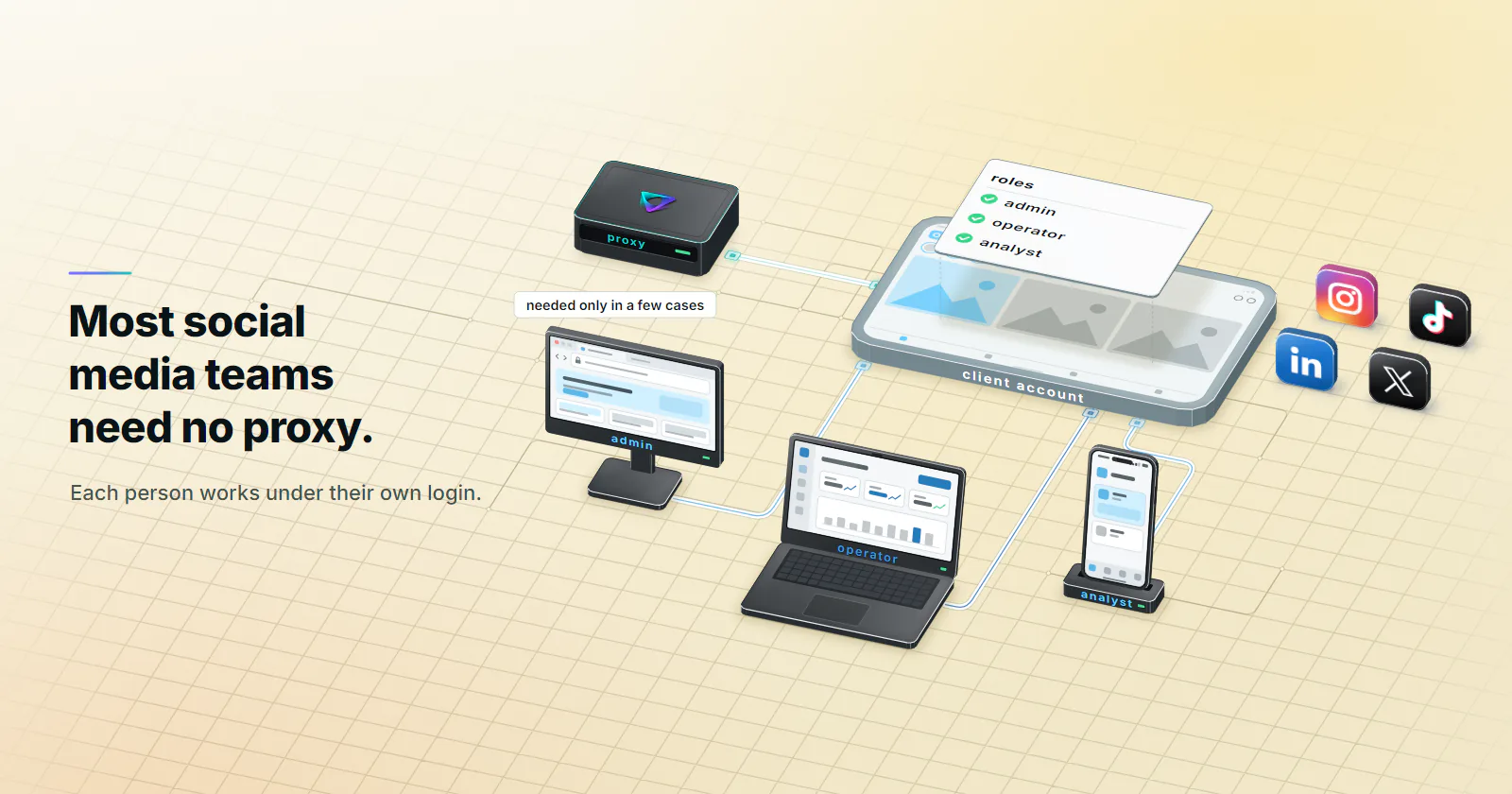
- Most social media teams need no proxy. Meta business portfolio partner access, TikTok Business Center, LinkedIn Page roles and X Delegate let each person work in a client account under their own login.
- A proxy changes the network origin, nothing else. It moves the IP, the ASN and the approximate location; it does not change the device, the account's history, its permissions or the platform's rules.
- One origin per account helps in four cases. A shared brand login the terms allow, an app-first account on a team phone, distributed staff on the agency portfolio, and market QA.
- Static ISP is the steady fit for one client, one origin. One ISP-registered address holds for the whole term; mobile fits accounts whose history is a phone on a carrier.
Most teams shopping for proxies for social media management do not need one. Meta, TikTok, LinkedIn and X all have delegation tools that let each team member work in a client’s account under their own login, from their own normal location. A proxy helps in four narrow cases, and there the right setup is one account, one fixed origin, kept for months.
It usually starts with a login prompt. A community manager in Lisbon signs in to a client account that normally sees Berlin, hits a security check, and someone suggests “a proxy per client”.
Proxies for social media management, defined
A proxy changes the network origin a platform sees when a team member signs in and works in an account: the IP address, the network (ASN) that owns it and the approximate location; it does not change the device, the browser, the account’s history, its permissions or the platform’s rules.
That is all social media management proxies do. Everything else a platform scores, from device and cookies to two-factor status and action pace, stays as it was.
Under that definition, the first thing to check is whether an account has an expected origin that the team’s traffic misses. For most agency work the direct answer is no, because nobody signs in as the client.
Official access tools come first
Every major platform has a way for an agency to work in a client’s account without the client handing over a password. Each person signs in as themselves, gets a role, and the client can remove that role in one click. The table below uses only each platform’s own help pages, checked September 2026.
| Platform | Official way to give an agency access | Roles | Does a proxy help? |
|---|---|---|---|
| Facebook and Instagram | Meta business portfolio: the client adds the agency as a partner by business ID and shares Pages, Instagram accounts and ad accounts (Meta Business Help Center) | Asset permissions per person or partner | No for delegated work. Only for market QA |
| TikTok | TikTok Business Center: the client adds the agency’s Business Center as a partner and shares accounts and assets (TikTok Business Center help, updated March 2026) | Admin, Operator, Analyst on each shared account (asset-level permissions, updated March 2026) | No for delegated work. Only for app-first accounts or market QA |
| Page admin roles, assigned to each person’s own LinkedIn account (LinkedIn Help) | Super admin, content admin, analyst, plus paid media roles | No. A Page has no login of its own | |
| X | X Delegate: invite a member by username (X Help) | Admin, contributor, with no password shared | No for delegated work. Only for market QA |
With these tools the client never shares a password, two-factor stays on every personal account, and each staff member signs in from where they normally work. That is the expected pattern. Routing it through the client’s city is what looks new.
Scheduling tools need no proxy
Scheduling and publishing tools post through the platforms’ official APIs from the tool’s own servers. The team’s browser never carries the post, so a proxy on the team’s side changes nothing.
What the platform rules say
None of the terms below ban proxies as a network tool. They govern who uses an account and how, and that decides which proxy cases are even open.
- Meta. The Meta Terms of Service, last revised 2025-01-01, section 3.1: use one personal account, do not share your password, do not give others access to your account and do not transfer it. Section 3.2 bars collecting data by automated means without permission. The only place the word appears, it is a verb about credentials: users may not “proxy, request, or collect” Meta usernames or passwords.
- Instagram. The Instagram Terms of Use, effective 2025-01-01 bar creating accounts or collecting information in unauthorized or automated ways, and bar collecting or using other users’ login credentials.
- TikTok. The TikTok Terms of Service, updated 2026-07-15: keep the password confidential, do not give others access to the account or transfer it without TikTok’s permission, and no automated extraction of data.
- LinkedIn. The LinkedIn User Agreement, effective 2025-11-03, section 2.1: one account, in your real name. Section 2.2: do not share or transfer it. Section 8.2: no bots or unauthorized automated methods to message, post, comment or like, and no bypassing access controls or use limits.
In practice, a shared login on a personal profile is off the table, proxy or not. For agency access, delegation is the route the terms expect.
How platforms read login location
A sign-in from a new device, browser or location is scored, and it can trigger a login alert or a security check. Meta asks for a login code when someone reaches a business portfolio from a new computer or phone, and it lets a business turn on a two-factor authentication requirement for admins only or for everyone in its portfolio.
The IP is one signal next to device, cookies, two-factor status and behavior, and the network type behind it (consumer broadband, mobile carrier or hosting) counts too.
A login location raises a flag when it is new for that account, so a steady origin matters more than any particular one.
When one origin per account matters
A consistent origin helps in four cases. Outside them, the delegation tools do the job with no proxy.
- Case 1: a shared brand login the terms allow. A brand account that is not a personal profile, shared with the client’s consent on an account type with no delegation tool, since the terms above close this for personal profiles on Meta, Instagram, TikTok and LinkedIn; where the terms cannot be confirmed to allow it, use delegation.
- Case 2: an app-first account run from a team phone. An in-house team runs the brand’s own TikTok or Instagram from a company phone, so the account’s history is a carrier connection in that market and a cellular-classified exit in the same region keeps that pattern.
- Case 3: distributed staff on the agency’s own business portfolio. Staff in several countries sign in to the agency’s own portfolio, and staff who change networks every day keep one origin for their own login.
- Case 4: market QA. Checking how a country-restricted Page, a localized post, an ad or a link-in-bio page appears from the target market is viewing, not logging in.
The staff-login trap
A delegated staff login and a shared brand login want opposite origins.
A staff account that signs in from twelve client cities in one day is itself the unusual pattern. Delegated logins stay home.
Which proxy type fits which case
“Mobile for Instagram and TikTok” is the usual answer; the guides to Instagram proxies and TikTok proxies go platform by platform. What decides the fit is what each type holds constant and what it lets change.
| Type | What stays constant | What changes | Fits | Does not fit | Billing |
|---|---|---|---|---|---|
| Static ISP | One ISP-registered address, assigned to your order for the whole term | Nothing, until the term ends | Cases 1 and 3: one fixed origin per login | Accounts whose history is a phone on a carrier | Per IP per month |
| Mobile | Region and a cellular-classified exit, while the device stays online | The IP, once the device drops or the timer ends | Case 2: app-first accounts on team phones | Anything that needs one address for weeks | Per GB |
| Rotating residential | Country, region or city | The home connection, per request or per session | Case 4: market QA and viewing | Logins: home devices go offline, so one address cannot hold for weeks | Per GB |
| Datacenter | The address | Nothing | Not a social login job | Social logins: built for collection and API work | Per port per month |
Mobile semantics. A sticky mobile session holds its exit only while the device stays online, then it changes. So mobile keeps a region and a cellular-classified exit consistent, not an address. The guide to mobile proxies explains why carrier addresses move.
ISP semantics. For one client, one origin over months, a static ISP address is steadier and flat-priced per month; ISP proxies vs rotating residential covers the trade-offs. For desk teams on the web, one fixed ISP address matches the need; mobile fits accounts whose history is a phone.
Setup, checks and cost
A setup that respects the platform is mostly bookkeeping.
- One account, one origin. Record it in a shared sheet: account, proxy type, address or region, and who uses it.
- Sticky sessions only. Never per-request rotation for a logged-in session.
- One browser profile or one device per origin.
- Two-factor on everything. An authenticator app or a security key, not SMS to a phone that may be abroad.
- Human pace. No bulk actions, no automation the terms bar.
Authentication on every proxymint tier is a username and password. Use http:// in a browser profile, since Chrome and Chromium take no username and password on SOCKS5, and socks5h:// where a client supports SOCKS5 with a login.
The check. After one week, open each platform’s login activity or active sessions page for every account on a proxy. Every sign-in should show the one expected location. Anything else is a gap in the sheet, a device on the wrong profile or a session that rotated.
Check the exits too. Look each one up in the IP geolocation database the platform is likely to use and expect the ordered country there (and region or city, on the per-GB tiers); databases can disagree, so a different answer from another one does not mean a faulty IP. The ASN should belong to an ISP or carrier rather than a hosting network, and for mobile, poll one sticky exit for a few days to see how long it holds.
Cost per client
An agency budgets in clients per month, not GB. Static ISP proxies are billed per IP per month, one IP per client account on a shared brand login. Three- and 12-month terms are billed at the start of the term. Entry prices and volume rates are on the pricing page.
Mobile is billed on traffic, not clients, per GB. Traffic per account swings with video and image uploads, so meter one real week per account before choosing a package. For market QA, rotating residential is the tool built for it.
Free proxies for social media accounts
For account logins, this is the one hard no. A free proxy’s operator is unknown, every password and session cookie passes through their server, and the exit is shared with strangers whose history the platform already scores.
What a proxy will not fix
A proxy changes the network origin, nothing more. It does not change automation limits or rate limits, content and ad policies, identity verification requests, the one-personal-account rule, or any restriction already on an account.
A proxy is also the wrong tool for delegated access, scheduling tools, creating accounts (not a use proxymint supports) and bulk actions the terms bar. Market QA at scale belongs on rotating residential proxies.
For proxies for social media management, the decision follows the account. Where the platform has a delegation tool for the work, use it and buy nothing. A brand account whose terms allow a shared login, or staff who change networks every day on the agency’s own portfolio, get one address per login from static ISP proxies, kept for months. An account that lives on a company phone takes a sticky mobile session from mobile proxies in the account’s region. Viewing a market needs only rotating residential.
A proxy settles where a login comes from; the account’s behavior and the platform’s rules settle everything else.
Frequently asked questions
Usually not. Meta partner access, TikTok Business Center, LinkedIn Page roles and X Delegate let each manager sign in as themselves from their normal location. A fixed origin per account helps only for shared brand logins the terms allow, app-first accounts on team phones, remote or travelling staff on the agency portfolio, and market QA.
A proxy is a lawful network tool in most jurisdictions. What decides the rest is each platform's terms and what is done through the proxy: Meta, TikTok and LinkedIn terms bar sharing or transferring personal accounts and unauthorized automation. This is not legal advice; read each platform's own terms before setting anything up.
No. Each person signs in with their own account and gets permissions on the client's assets, so their own usual location is the expected one. Routing a staff login through a client's city can itself look like the unusual sign-in that triggers a security check.
It depends on the case. Static ISP fits a fixed address per client account, mobile fits app-first accounts run from phones, and rotating residential fits market QA where nobody logs in. Datacenter proxies are built for collection and API work, not social logins.
Where a shared brand login is used, yes: one account to one fixed origin, kept for months, recorded in a shared sheet. For delegated access, no: the staff member signs in as themselves, and their own normal origin is the right one for their login.
Not for logins. The setup that holds is one account, one origin: each shared brand login gets its own fixed address, recorded in a shared sheet with the account and the people who use it, and keeps it for months. Delegated staff need no client proxy at all, because they sign in as themselves from their usual location.
No. Restrictions follow the account's behavior and the platform's rules, and a proxy does not reset an account's history. Using a proxy to get back into a restricted account breaks the terms; the route back is the platform's own appeal process.
Researched and drafted with AI tools, then checked against our publishing rules before it went live: 10 outside links, 8 links to other proxymint pages, no prices and a fact-check pass against our product records. How we write.