Pay as you go proxies: per-GB billing, no subscription
Pay as you go proxies bill per GB with no renewal. How to estimate GB, how per-GB rates scale, whether GB expire, and when a per-IP subscription fits better.
Quick summary · TL;DR
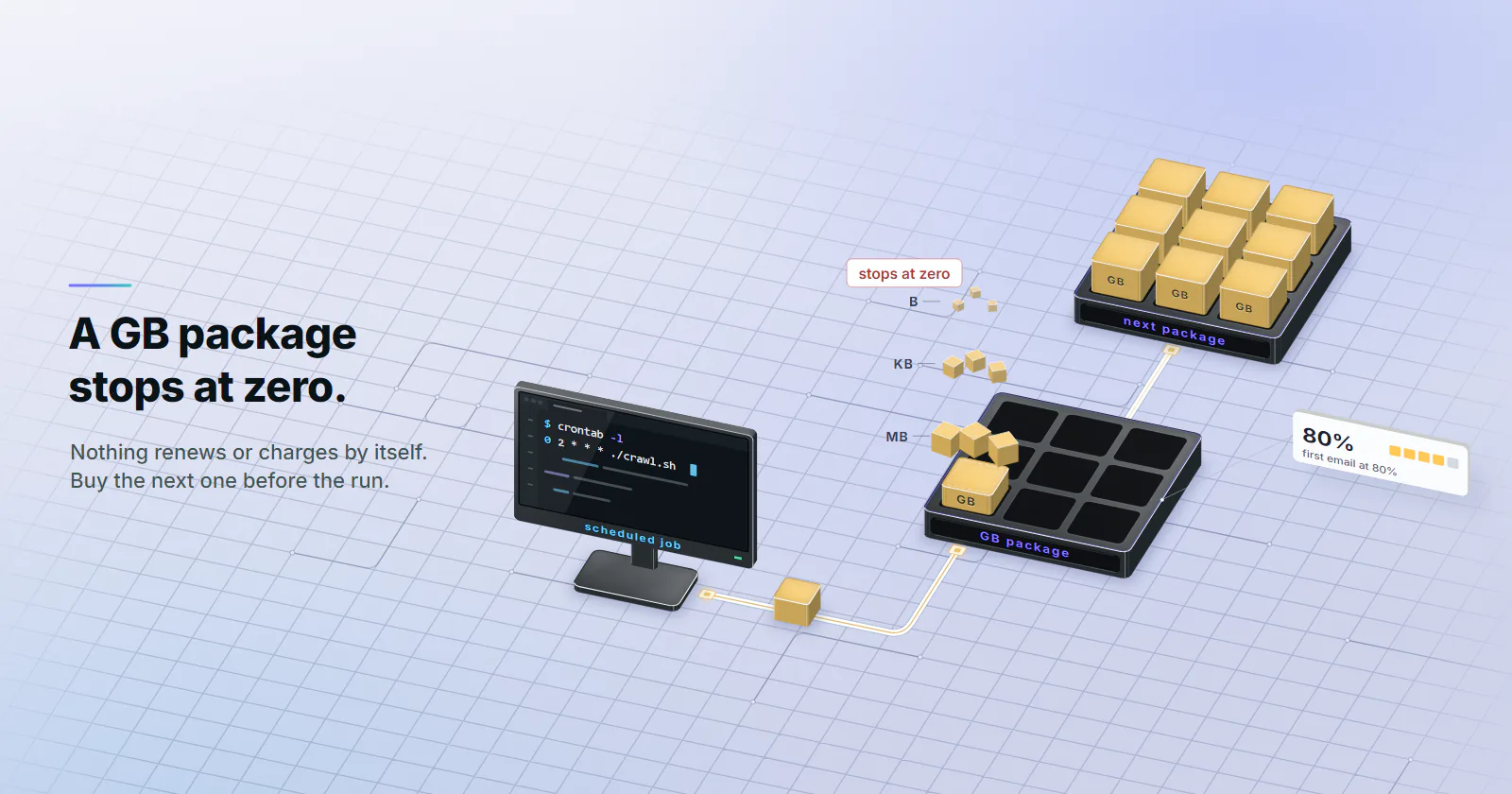
- Pay as you go means a one-off package of GB with no monthly plan. The balance counts down as traffic moves and nothing renews or charges by itself.
- Fetch method sets the bill. 100,000 pages at the 22 KB median HTML size is about 2.2 GB; at the 2,164 KB median full mobile page it is about 216 GB.
- Size one package per job. A package sized from a 20-page sample plus headroom covers the whole run, with nothing renewing in between.
- Usage-based pricing scales with volume. The rate per GB falls as the package grows, so a job-sized package stays economical at scale.
- Steady load or a fixed address suits per-IP billing. Datacenter ports per month and static ISP per IP fit predictable traffic or an address that must hold.
Pay as you go proxies bill per gigabyte of traffic, bought as a one-off package with no monthly renewal. The buyer pays for the data the job moves, the balance counts down as requests go through, and nothing is charged again until someone buys another package. It suits irregular, test-stage or bursty work. Steady load on lenient targets, and jobs that need one fixed address, fit a monthly per-IP plan.
A rate card quotes a price per GB, and often an expiry rule. Two other things decide how a package works out: how many GB the job needs, and what happens at 2 a.m. when the balance hits zero.
What pay as you go proxies are
The billing unit is traffic. A per-GB package meters the bytes that pass through the proxy for the customer. The number of IPs, ports or requests does not change the price. A thousand small API calls and one large page download cost the same if they move the same bytes.
The package is one-off. On proxymint, rotating residential proxies and mobile proxies are sold as per-GB packages with no renewal. The customer picks a quantity in whole GB, pays once, and the balance carries over, with no expiry set on the GB.
Rotation does not change the rate. Per-request rotation, a 5 to 60 minute timer and a sticky session all draw on the same balance at the same rate. The mode only decides how many IPs a job touches.
Pay as you go proxies vs a subscription
A subscription sells a monthly allowance or a monthly set of addresses. A pay-as-you-go package sells a fixed amount of traffic with no clock on it. The main difference is what happens to capacity the job did not use.
A monthly allowance is paid for whether the job uses it or not, so the less of it a job uses, the more each gigabyte it did use really costs. Last quarter’s actual usage, set against the allowance, shows which side of that line a job sits on.
Which proxy types sell per GB
The model follows the product. A rotating pool hands each customer a share of many exits, so the fair meter is traffic. A dedicated address is rented whole, so the meter is the address and the month.
On proxymint that splits cleanly:
- Residential and mobile are per GB, one-off packages.
- Static ISP and datacenter IPv4 are per IP, billed monthly or for a 3 or 12 month term. The address is the product, and IPv4 ports carry no bandwidth cap under normal use.
So “pay as you go or subscription” is often really “rotating pool or fixed address”. The ISP proxies vs rotating residential comparison covers that choice by job.
What to check on any pay-as-you-go offer
“Pay as you go” means different rules at different providers. Five lines on the terms page decide whether an offer is what the banner says:
- Expiry clock. Does unused traffic last indefinitely, for a fixed window, or only until the account moves to a plan?
- Automatic top-ups. Some pay-as-you-go setups buy more traffic from a stored wallet when usage crosses a threshold. The job keeps running, but the top-up works as a recurring charge. Check whether it is on by default and how to switch it off.
- Minimum package, purchase caps and volume pricing. The smallest package sets the cost of a test; the rate at large volumes sets the cost of a big job. Some pay-as-you-go offers also cap how much traffic can be bought per month, which matters before a large run.
- What gets metered. A per-GB meter counts bytes, so check whether block pages, failed requests and retries count toward the balance.
- Add-ons and refunds. Whether targeting or protocols cost extra, and when a refund window lapses after some use.
On proxymint, no expiry is set on GB, nothing tops up by itself, the minimum is 1 GB, and rotation, country to city targeting and both HTTP and SOCKS5 come inside the same per-GB rate.
Estimate GB before buying
A package that is too small stops the job. One that is far too large ties up money. The estimate is pages times bytes per page, plus headroom.
The HTTP Archive Web Almanac 2025 page weight chapter (published January 15, 2026) gives two starting points: a median of 22 KB of HTML on home pages and a median full mobile page of 2,164 KB.
With 20-30% headroom, the HTML-only job fits a 3 GB package and the full-render job needs about 260 to 280 GB. On a per-GB meter the bill follows the traffic.
The target’s own pages can be much lighter or heavier than the median, so a sample of the real target beats any average:
- Sample. Pick 20 pages that represent the job: listings, detail pages, whatever the crawl will hit.
- Fetch. Run them through the same client, headers and render settings the job will use.
- Measure. Sum the bytes on the wire. For plain HTTP fetches, curl prints them per URL; for a headless browser, add up the transfer sizes in its network log.
- Size. Divide by 20, multiply by the page count, and add 20-30% headroom for retries, redirects, TLS overhead and pages that are heavier than the sample.
# bytes received per page (headers + compressed body), one URL per line in urls.txt
while read -r url; do
  curl -s -o /dev/null --compressed -x "$PROXY" \
    -w '%{size_header} %{size_download}\n' "$url"
done < urls.txt | awk '{ total += $1 + $2 } END { printf "%.0f bytes per page\n", total / NR }'
Here $PROXY holds the proxy URL with its login, in the http://user:pass@host:port form.
Cut GB use per page
Every byte the client does not request is a byte the package does not pay for.
- Ask for compression. Send
Accept-Encoding: gzip, br, defined in RFC 9110 section 12.5.3 (June 2022). Text compresses well, and the proxy meters the compressed bytes. - Skip the browser when the data is in the HTML. Rendering pulls scripts, fonts and images the parser never reads.
- Find the JSON. Many pages load their data from an endpoint that returns a few KB of JSON. Fetch that, where the site’s terms allow it.
- Block heavy assets in a headless browser when a render is unavoidable: images, media and fonts first.
- Do not retry blindly. A 429 or a challenge page repeated 10 times is 10 pages of traffic and no data. Back off, and treat a block as a reason to stop. The best proxies for web scraping guide covers matching the tier to the target so fewer requests fail in the first place.
How per-GB price bands work
On proxymint, residential and mobile are both sold per GB in one-off packages, in whole GB from 1 GB up. Pricing is usage-based in volume bands, and the rate per GB falls as the package grows; the pricing page lists the rates.
Buy the whole job as one package. A package sized for the full run means one order, one balance to watch, and a rate that matches the job’s volume.
What the rate includes, and refunds
Per-request rotation, a timed or sticky session, country to city targeting and both HTTP and SOCKS5 come with every residential and mobile package, and rotation and location can be changed later on a live package.
The proxymint terms set a 7-day money-back window on a first purchase, which lapses once more than 10% of the data or 1 GB, whichever is larger, has been used.
Expiry, run-outs and top-ups
Do unused GB expire
The market splits. Some providers keep pay-as-you-go traffic on the balance indefinitely; others expire it after a set period or when the customer moves to a subscription. The rule lives on the terms page; read it before buying a large package for a job months away, and before switching proxy providers with a balance left.
On proxymint, no expiry is set on GB. A per-GB package has no end date set by proxymint, so a package bought for a quarterly job carries over to the next run.
When the package runs out
On proxymint, the account gets an email when a package passes 80% of its GB. At 100% the traffic stops and a second email says the package is used up. Nothing renews by itself and nothing is charged by itself.
A new package is a new order. For any scheduled job, read the usage counter before each run, compare it with the run’s estimated GB, and buy the next package while there is still a margin. A job that dies halfway through a crawl costs more in re-runs than the idle GB would have.
When a per-IP subscription fits
Pay as you go fits uneven work. Where load swings less, two common cases fit a monthly per-IP subscription instead.
Steady, heavy traffic on a lenient target. Bulk collection from targets without anti-bot scoring, API polling and uptime checks move a lot of bytes and need no residential trust. Datacenter proxies are sold per port per month, with no bandwidth cap under normal use, so a 200 GB monthly crawl runs on the same port bill as a 2 GB one, if the target serves datacenter addresses.
One address held for weeks. Logged-in dashboards, account work and partner systems that expect a fixed IP want the same exit every day. Static ISP proxies are billed per IP per month. A rotating per-GB pool cannot promise one address for that long.
Last month’s usage settles it. If it was steady and high, price a monthly plan. If it swung between zero and a spike, per GB fits.
Pick the billing model by job
- Testing a new target or a new tier: the smallest per-GB package, 1 GB of residential.
- Irregular or seasonal crawls: pay as you go proxies on residential, sized from a 20-page sample plus headroom, bought as one package per run.
- Bursty work on targets that expect a mobile origin: per-GB mobile proxies.
- Steady heavy load on lenient targets: datacenter ports per month.
- One address for weeks: static ISP per month.
Frequently asked questions
It depends on the provider: some keep pay-as-you-go traffic indefinitely and others expire it after a set period, so the terms page is the place to check. proxymint does not set an expiry date on its per-GB residential and mobile packages.
Multiply the number of pages by the bytes per page and add 20-30% headroom for retries. The 2025 HTTP Archive Web Almanac puts median HTML at 22 KB and a median full mobile page at 2,164 KB, so 100,000 pages is about 2.2 GB as HTML and about 216 GB as full renders. A 20-page sample through the real client gives a better figure.
On a per-GB package the traffic stops at zero, so a job still running at that point loses its connection through the proxy. Some providers auto-buy more traffic from a stored wallet at a threshold, so check that setting. On proxymint an email goes out at 80% of the package and another when it is used up, nothing renews or charges automatically, and a new package is a new order.
Pay as you go proxies are billed per gigabyte of traffic, bought as a one-off package with no monthly renewal. The balance counts down as requests pass through the proxy and carries over, with no expiry set on the GB. The number of IPs or requests does not change the price; only the bytes moved do.
It fits irregular, bursty or test-stage work, because unused traffic is not lost at a renewal date. A monthly plan pays off only when the job uses most of its allowance every month. Comparing last month's actual usage with a plan's allowance shows how much of it a job would really use.
On proxymint, rotation, country to city targeting and both HTTP and SOCKS5 are included in the per-GB rate, nothing renews, no expiry is set on the GB, and checkout shows the full amount before you pay. At other providers, check the terms for automatic top-ups from a stored wallet, expiry windows and paid add-ons such as city targeting.
The proxymint terms give a 7-day money-back window on a first purchase, which no longer applies once more than 10% of the data or 1 GB, whichever is larger, has been used. After 7 days purchases are non-refundable.
Researched and drafted with AI tools, then checked against our publishing rules before it went live: 2 outside links, 12 links to other proxymint pages, no prices and a fact-check pass against our product records. How we write.