Proxy rotation strategy: sessions, pace and retries
A proxy rotation strategy decides when a job changes exit IP, how fast it hits each target and which failures it retries, with a failure table and Python code.
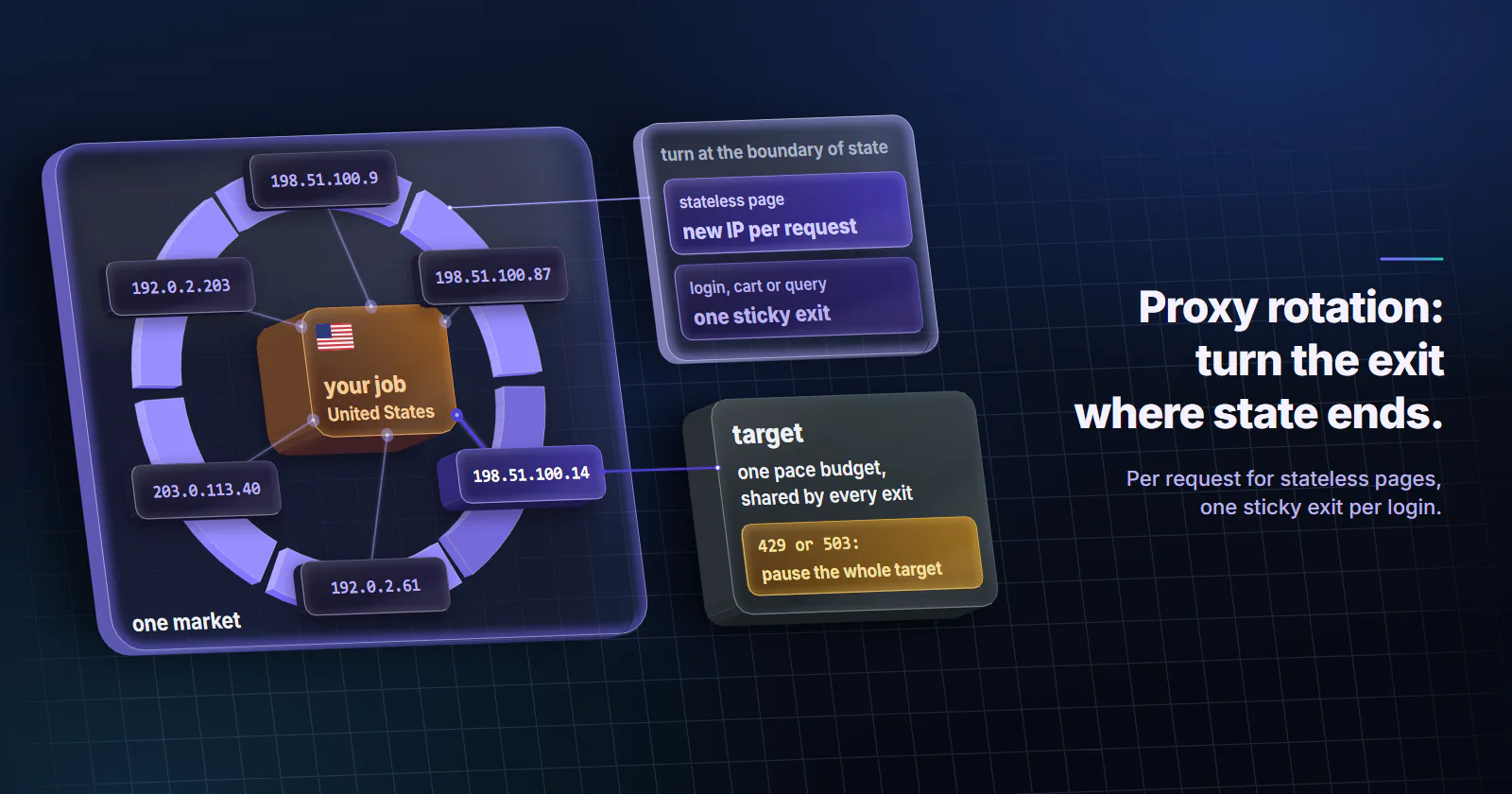
Quick summary · TL;DR
- A proxy rotation strategy makes four decisions. The rotation unit, the trigger that ends an exit's turn, the pace per target, and how each kind of failure is handled.
- Rotate at the boundary of state. Stateless pages take per-request rotation; a login, cart or search query keeps one sticky exit until it ends.
- Rotation does not raise a target's limit. Limits can key on the IP, the account or a cookie, so pace is one budget per target shared by every exit.
- Retry only what the proxy broke. Connect timeouts and gateway errors get a new exit; 429, 503 and challenge pages mean back off or stop.
A proxy rotation strategy is the set of rules for when a job changes its exit IP, how fast it sends requests, and what it does when a request fails. Rotate per request for stateless pages, keep one sticky exit per login or query, pace each target as one budget, and retry on a new exit only when the proxy failed.
Rotation problems surface as symptoms. A price monitor that turns into a wall of 429s after a week. A logged-in report that bounces to the login page every few calls. A retry loop that burns through gigabytes on pages that were never going to load.
Each of those is a rotation policy problem, and each has a mechanical fix.
What a proxy rotation strategy decides
Changing the IP is the easy part, and any gateway does it for you. A proxy rotation strategy answers four questions the gateway cannot:
Rotation unit. What one exit IP is allowed to carry: one request, one search query, one login, one account. The unit follows the state the target keeps.
Trigger. What ends an exit’s turn: every request, a timer, the end of a flow, or a failure the proxy caused.
Pace. How many requests per second the whole job sends to one target, regardless of how many exits it spreads them over.
Failure handling. Which errors get a retry on another exit, which ones mean slow down, and which ones mean the page is simply gone.
Get the unit and the trigger right and sessions hold. Get the pace and the failure handling right and the job stays welcome on the target and inside its traffic budget.
Match rotation to session state
Rotate once per unit of state. A site that keeps no state between requests does not care which exit sends the next one. Sites that tie a cookie, a cart or a paginated cursor to the address they first saw do care, and the OWASP Session Management Cheat Sheet (checked 2026-10-04) recommends that applications bind the session ID to the client IP and treat a mid-session change as a sign of hijacking.
To a site built that way, per-request rotation under a live login looks like an attack.
How each mode holds a session, and how long a sticky one lasts, is laid out in rotating vs sticky proxies.
Rotation methods compared
Three rotation methods cover almost every job, and static addresses cover the rest.
Identity that has to stay the same for days or weeks is outside rotation altogether. That job belongs on static ISP proxies, one address held for the billing term; the tradeoff is laid out in ISP proxies vs rotating residential.
Pool size and concurrency
Size the proxy pool by parallel sessions, not by a target rate. Ten logged-in reports running at once need ten sticky exits, one per session. For a stateless crawl at a pace of two requests per second, one per-request list is enough, because the pool behind the gateway supplies the variety.
On proxymint’s rotating residential proxies and mobile proxies, a list comes with many ports and the rotation setting applies to the whole list. Use a separate port for each parallel sticky session, and use the login exactly as issued, with no session tags added to the username.
The ceiling on concurrency comes from the target, never from the port count. More exits spread the same traffic thinner; they do not raise what the target accepts.
Geo-targeted rotation
Rotate inside one market. A price or search check that draws exits from several cities can return a different currency, stock level or ranking on each call, and the job reads noise as change. On proxymint the location (country, region or city) is set on the order from places with devices online and can be changed later, so a job that watches three markets runs one list per market and compares like with like.
Keep the client consistent
An exit IP is one signal among several. A session that keeps its cookies but changes its User-Agent, language or timezone at the same moment it changes IP reads as a different client. Keep client headers fixed for the life of a session, and match Accept-Language to the market the list targets, so a location-dependent page returns what a local visitor would see.
Rotation triggers and timing
Per-request rotation is the default for stateless collection, and rotating proxies for web scraping of public pages rarely need anything else. The interesting triggers are the other three.
Set the timer above the longest flow
A timer flips the exit when its window runs out, not when your task ends, so set the rotation interval well above the longest flow that must share one IP and check the exit before the step that matters. On proxymint residential and mobile, the timer runs from 5 to 60 minutes in 5-minute steps.
Device drops end sessions early
A sticky session cannot outlive the home or carrier connection carrying it, so write the client so an IP change between steps becomes a resumed task, not a failed run.
Connection reuse pins the exit
An HTTPS request through an HTTP proxy rides a CONNECT tunnel. Per MDN’s CONNECT reference (checked 2026-10-04), the proxy relays data in both directions “until the tunnel is closed”. Nothing inside that tunnel can switch exits, so a client that keeps one connection alive keeps one exit, whatever the rotation setting says. If the job needs per-request rotation, let each request open its own connection, then confirm it by counting distinct exits per 100 requests.
Changing the trigger mid-job
On proxymint per-GB residential and mobile, rotation and location change in place from the dashboard, and logins and ports stay the same. One job can crawl listing pages per request, then switch the list to a timer for a logged-in phase.
Rate limits and request pacing
Rotation spreads load. It does not raise the rate a target allows, and a strategy that treats it as a way past rate limits is the one that ends in blocks.
MDN’s 429 reference (checked 2026-10-04) notes that rate limits are typically keyed on the client IP but can be specific to users or applications when requests are authenticated or carry a cookie. So a logged-in job that rotates IPs still counts against the same account limit, and per-request rotation gives it nothing but extra re-logins.
Set pace per target, as one budget shared by every exit:
- Start below the pace the target documents, or below what a person browsing would send if it documents nothing.
- Read
Retry-After. MDN (checked 2026-10-04) documents it on 429 and 503 responses, as either seconds or an HTTP date. - Add jitter to every delay so parallel workers do not fire in lockstep.
- Respect the target’s terms and
robots.txt, and stop on a challenge page.
Retries and ban handling
The common rotation loop treats every failure the same way and retries it on a new exit. That turns a target’s “slow down” into more traffic from more exits, which is exactly what its defenses watch for. The scrapy-rotating-proxies README (release 0.6.2, 2019-05-25) puts the principle plainly: a failed request and a bad proxy need different actions, and every ban detected wrongly costs live proxies.
| Signal | Who failed | Action |
|---|---|---|
| Connect timeout, tunnel refused, 502 or 504 from the proxy | The exit or the route | Retry once on a new exit, count it against that exit |
| 407 Proxy Authentication Required | The client’s login | Stop and fix the credentials; retries change nothing |
429, or 503 with Retry-After | The pace | Pause the whole target for the stated time, then lower pace |
| Challenge page, 403 on pages that used to load | The pace or the access route | Stop that target and review rate, terms and access route |
| 404, 410 or a parse error | The page | Log it, never retry on a new exit |
Some proxies label their own errors. RFC 9209 (June 2022) defines a Proxy-Status response header that names the failure, such as error=connection_timeout or error=destination_unavailable, and a received-status parameter that carries the status the proxy got from the next hop. Where a proxy sends it, log it next to the status code, because it says who failed.
The scrapy-rotating-proxies library also ships with sane defaults worth borrowing.
On a gateway, “dead proxy” means one port’s current exit. Five tries per page is generous for stateless pages and too many for a login, where one failed step should end the flow and restart it cleanly.
Python rotation example
How to rotate proxies in code comes down to four habits. The client below keeps a per-target pace, rotates through a list of ports, honours Retry-After, and retries on a new port only for proxy-side faults. Placeholders are in capitals. The username and password are percent-encoded because a : or @ in a password splits a proxy URL in the wrong place.
import random
import time
from datetime import datetime, timezone
from email.utils import parsedate_to_datetime
from urllib.parse import quote

import requests

USER = quote("USERNAME", safe="")
PASS = quote("PASSWORD", safe="")
PORTS = [PORT_1, PORT_2, PORT_3]   # one list set to per-request rotation
MIN_GAP = 2.0                      # seconds between requests to this target
PROXY_FAULTS = (requests.exceptions.ProxyError,
                requests.exceptions.ConnectTimeout)

next_slot = 0.0


def retry_after(value, default=60.0):
    """Retry-After is either delay-seconds or an HTTP-date (RFC 9110)."""
    if value and value.isdigit():
        return float(value)
    try:
        when = parsedate_to_datetime(value)
    except (TypeError, ValueError):
        return default
    if when.tzinfo is None:
        when = when.replace(tzinfo=timezone.utc)
    return max((when - datetime.now(timezone.utc)).total_seconds(), 0.0)


def pace(extra=0.0):
    """One budget per target, shared by every port."""
    global next_slot
    now = time.monotonic()
    wait = max(next_slot - now, 0) + extra
    time.sleep(wait + random.uniform(0, 0.5))
    next_slot = time.monotonic() + MIN_GAP


def fetch(url, tries=3):
    for _ in range(tries):
        port = random.choice(PORTS)
        proxy = f"http://{USER}:{PASS}@HOST:{port}"
        pace()
        try:
            # No requests.Session: a fresh connection lets the exit change.
            r = requests.get(url, proxies={"http": proxy, "https": proxy},
                             timeout=(10, 30))
        except PROXY_FAULTS as e:
            if "407" in str(e):          # HTTPS tunnels raise 407 here
                raise SystemExit("407: fix the proxy credentials")
            continue                      # proxy fault: new port, same page
        if r.status_code in (502, 504):
            continue                      # gateway error on plain HTTP: new port
        if r.status_code in (429, 503):
            # slow-down: sleep out Retry-After before this target's next request
            pace(extra=retry_after(r.headers.get("Retry-After")))
            return None
        if r.status_code == 407:
            raise SystemExit("407: fix the proxy credentials")
        return r                          # 2xx, 404, 403: hand to the caller
    return None
The caller decides what a 403 or a challenge page means for its target, and the client never answers one with more traffic from more exits.
Monitor rotation health
Until the logs back it up, a proxy rotation strategy is a hypothesis. Record, per target and per day:
- Retries per successful page. If it climbs toward one, the failure table is misclassifying something.
- Share of 429 and 503 responses. Rising means the pace is too high, whatever the exit count.
- Distinct exits per 100 requests on a per-request list. Run 100 requests to an IP echo endpoint with a fresh connection each; some repeats are normal on any pool.
- Session survival against the longest flow. Poll a sticky port every 30 seconds and log when its exit changes. The longest flow must fit inside the typical survival, or the client must resume cleanly.
- Gigabytes per successful page. Retries and forced re-logins show up here first, because per-GB plans bill every byte of them.
Run these checks against any provider, proxymint included, before a job scales.
Choose your proxy rotation strategy
If each request stands alone, rotate per request, open a fresh connection per call, and enforce one pace per target. If a login, cart or search query has to hold one IP, give each one its own sticky port with a timer longer than the flow, and check the exit before the step that matters. If the identity must survive for weeks, stop rotating and hold a static address.
Then start below the target’s limit, log the five numbers above for a day, and raise the pace only while the 429 share stays flat.
Frequently asked questions
A proxy rotation strategy is the set of rules that decides when a job changes its exit IP, how fast it sends requests to each target, and what it does when a request fails. A working one rotates at the boundary of the state the target keeps, paces each target as one budget, and retries on a new exit only when the proxy failed.
Rotate at the boundary of the state the target keeps. Stateless pages such as catalogs and public listings can change exit on every request. A login, cart or paginated query should keep one exit until it ends, using a timer set well above the longest flow or a session that holds while the device stays online.
Only when each request stands alone. Per-request rotation suits price, catalog and public page collection, where no request depends on the one before. Under a live login it sends the session cookie from a new address on each call, which many sites treat as hijacking and answer with a forced re-login.
Rotation spreads load across many addresses, but it does not raise the rate a target allows. Rate limits can key on the account or a cookie as well as the IP, and a site that sees a slow-down signal ignored from many exits tends to tighten its defenses. Pacing each target and stopping on 429 or challenge pages keeps a job welcome.
Count parallel sessions, not requests. A stateless crawl on a per-request list can draw from the whole pool behind one gateway, while each logged-in session or search query that runs at the same time should use its own sticky port. The target's own limits, not the number of ports, set how much concurrency the job can use.
Back off the whole target, not just that exit. A 429 Too Many Requests response means the job is sending too fast, and it may carry a Retry-After header with the seconds or the date to wait. Pause for that time, lower the pace, and never retry the same page on a new exit straight away.
Researched and drafted with AI tools, then checked against our publishing rules before it went live: 6 outside links, 5 links to other proxymint pages, no prices and a fact-check pass against our product records. How we write.