Backconnect proxy: one gateway, many exit IPs, how to test
A backconnect proxy is one gateway address that routes your traffic to exit IPs from a pool. Gateway vs exit, rotation, proxy lists, and how to test one.
Quick summary · TL;DR
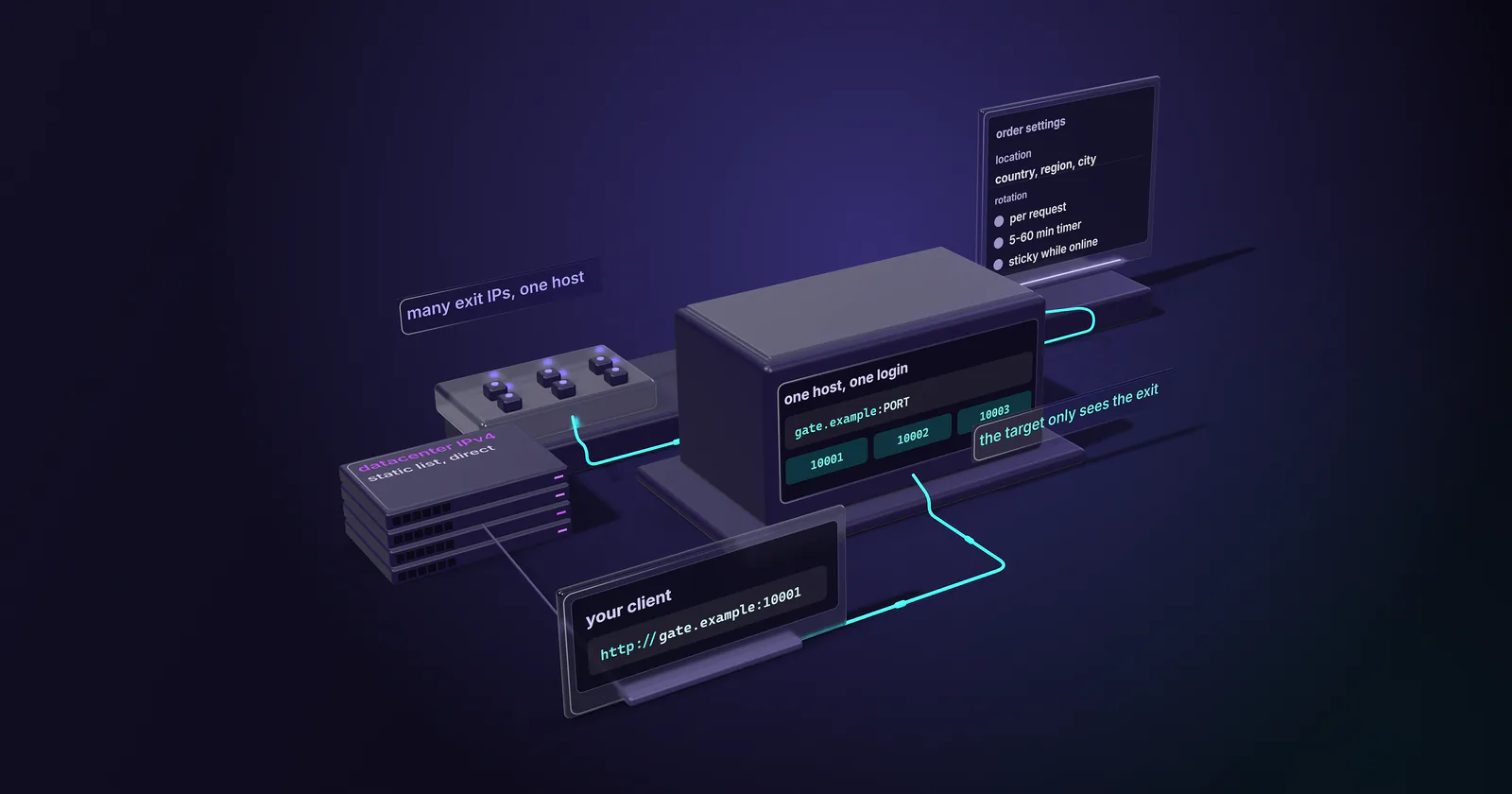
- A backconnect proxy is one gateway address with a pool of exit IPs behind it. Your client configures the gateway, and the target only ever sees the exit.
- The port is the unit you work with. On a list-based gateway every line shares one host and one login and differs by port, so parallel sessions mean more ports, not more logins.
- Rotation is a setting, not a different product. The same gateway rotates per request, on a 5-60 minute timer, or holds an exit while the device stays online.
- Test before you scale. A short script shows whether rotation follows requests or connections, how ports spread over exits, and how long sticky ports hold.
A backconnect proxy is a forward proxy with one fixed entry point. Your client connects and logs in to a single gateway address, and the provider sends each request out through an exit IP drawn from a pool of residential or mobile devices. The address in your config is never the address the target sees, and the exit can change without any change on your side.
Buyers see a “proxy list” in a dashboard, expect a list of IPs, and find the same hostname repeated with a different port on every line. Rotation looks broken when it is working, or works when it should hold still. The short Python script at the end tests any backconnect proxy before real traffic goes through it.
What a backconnect proxy is
A backconnect proxy is a forward proxy where you connect to one fixed gateway address and the provider routes your traffic out through exit IPs drawn from a pool, so the address you configure is never the address the target sees. Beyond that definition, the open questions are which pool sits behind the gateway and how the gateway picks an exit.
The word “backconnect” describes the route. Your request goes forward to the gateway. The devices in the pool keep a connection open back to the provider, and the gateway sends your request out through one of them; the response returns the same way.
Not a reverse proxy
The name suggests “reverse”, but the two sit on opposite sides. HTTP Semantics defines a proxy as an agent “chosen by the client”, and a gateway, also known as a reverse proxy, as an intermediary that acts as an origin server and forwards requests inbound to other servers (RFC 9110, June 2022).
So a reverse proxy sits in front of a website and works for the site owner. A backconnect gateway sits in front of an IP pool and works for the client. The forward proxy basics are in what a proxy server is, and the types of proxies explainer covers forward vs reverse in more depth.
Gateway, port and exit IP
A backconnect setup has three named parts, and the middle one, the port, is what a buyer works with day to day.
The gateway. The host:port your client connects to and authenticates against. On proxymint’s residential and mobile per-GB products it is one gateway hostname for the whole order, with one username and password per list.
The port. On a list-based gateway, the dashboard hands out many lines that share the host and the login and differ only by port. A proxymint residential or mobile list carries 1,000 of them. Treat each port as a session slot: the unit that holds a current exit. Ten parallel identities means ten ports, not ten logins. The port spread test below shows how a given gateway maps ports to exits.
The exit. The residential or mobile IP the target sees. You do not pick it and you do not see it before connecting. You learn it by asking an IP echo service through the port.
Many providers control sessions and geo with tags inside the username, such as a session ID or a country code appended to the login. proxymint list logins do not use username parameters. Rotation and location are set on the order, and the port is what you vary in code.
Choose the exit country and city
On residential and mobile, location is country, region and city, picked from locations that have devices online when you order. It is set on the order, not per request, and it can be changed later from the dashboard. There is no ZIP, ASN or carrier selection on any proxymint tier. A job that needs 12 cities needs 12 orders, one location each.
One caveat applies to every provider. The ordered location is where the device is, and IP geolocation databases sometimes place the exit elsewhere. Mobile addresses can be shared by many subscribers behind carrier-grade NAT, which numbers the link between the NAT and the subscriber from a reserved internal block (RFC 6598, April 2012), so city-level labels for them disagree more often.
Rotation behind one endpoint
The gateway address never changes. What changes is the exit behind each port, on a schedule you set per list at order time:
- New IP every request. Each request can leave through a different exit.
- A timer. Every 5 to 60 minutes, in 5-minute steps.
- Sticky while online. The port keeps its exit for as long as the device stays online.
You can change the mode later in the dashboard without new credentials: same logins, same ports, new behaviour. Which mode a job needs is covered in rotating vs sticky proxies.
Two clocks behind one port
A timed session has two clocks. One is the timer you chose. The other is the device: a home router reboots, a phone leaves coverage. The session ends at whichever comes first, so a 30-minute timer can end early. “Sticky while online” only has the second clock.
So size the mode to the job. A login followed by three page loads needs a few minutes on one exit. A crawl of public product pages needs no session at all.
Playwright or Puppeteer on a gateway
The gateway works with both. Give each browser context its own port, set that list to a timer or sticky mode, and keep per-request rotation away from live pages: a page that loads 80 assets over rotating exits looks like 80 visitors. The Playwright proxy guide shows the per-context setup in code.
Backconnect gateway vs proxy list
A static proxy list is a set of assigned addresses. You connect straight to each one, and the IP you configure is the IP the target sees. A backconnect gateway inverts that.
Location control on the gateway is country, region and city; on ISP and datacenter IPv4 it is country only, fixed at order time. Many short identities belong on a gateway, and one long identity belongs on an address.
What a backconnect proxy list is
A backconnect proxy list looks like any other proxy list, but every line is the same gateway host with a different port. Each line is a session slot on the pool, not a distinct IP. Two lines can exit through the same IP at the same moment, and one line on per-request rotation exits through many IPs over a minute.
A proxymint buyer sees the same under My proxies: one hostname, a block of ports, one login. Counting lines tells you how many parallel sessions you can run, not how many IPs you own.
Is backconnect the same as rotating
No. Backconnect is the architecture: one gateway with a pool behind it. Rotating is one behaviour that architecture can run, and the same gateway also runs timed and sticky sessions. A list of static IPs that you cycle through in your own code is rotation without backconnect.
Which proxy types use a gateway
At proxymint, residential and mobile per-GB products are backconnect: one gateway hostname, a block of ports, rotation set on the order. ISP and datacenter IPv4 are assigned addresses you connect to directly, so they are static lists, not backconnect. Some vendors put datacenter pools behind a gateway too.
HTTP and SOCKS5 are both included on every tier. HTTPS sites run through either one as an end-to-end tunnel, using the CONNECT method (RFC 9110, June 2022) for HTTP or the SOCKS5 handshake (RFC 1928, March 1996).
Where names resolve depends on the client. proxymint measured its residential and mobile gateway in September 2026: with HTTP CONNECT or socks5h://, the target hostname resolves on the proxy side, through a public resolver (US resolvers for our US test exits) rather than the home or carrier ISP’s own. With plain socks5:// your machine resolves the name first, and the lookup goes to your local resolver. The gateway added no Via or Forwarded header toward the target, and inside a CONNECT tunnel it only relays encrypted bytes, so it cannot add X-Forwarded-For either. A plain http:// target gets a redirect to its https:// URL, so point tests at HTTPS.
What it costs per GB
Backconnect traffic bills per GB, one-off, with no monthly renewal.
The rate per GB falls as volume grows; rates are on the pricing page. The mode does not change the rate. What changes the GB you burn is retries on dead exits and repeated logins under the wrong mode.
When a static address fits better
A gateway trades a fixed address for reach, and three things follow on any provider’s gateway:
- You do not pick the exit. You learn it only by asking an IP echo service through the port.
- Exits can change early. Home and mobile devices go offline, which can end a session before its timer.
- Every request takes an extra hop. Client to gateway to device to target adds latency that a direct static IP does not have.
Test through the port, and retry a dead or timed-out exit on another port. A 403 or a block is a stop signal, not a retry. But some jobs should not be on a gateway at all. Identity that must hold for days belongs on static ISP proxies, an ISP-registered address assigned to your order for the whole billing term. Bulk collection from lenient targets belongs on datacenter proxies, with no bandwidth cap under normal use.
Is a backconnect proxy legal
A backconnect proxy is a routing tool, and using one is legal in most places. What you send through it is judged by the law and the target’s terms; proxymint’s acceptable-use terms set what its network may carry, and we act on abuse reports. This is not legal advice.
Test a backconnect proxy
Run this before scaling. It needs Python with requests (and requests[socks] for SOCKS5), a list of ports from one order, and any public IP echo endpoint.
import time
from concurrent.futures import ThreadPoolExecutor
from urllib.parse import quote
import requests

HOST, USER, PASS = "HOST", "USERNAME", "PASSWORD"
PORTS = [10001, 10002, 10003]  # replace with ports from your list
ECHO = "https://api.ipify.org"

def proxy(port):
    url = f"http://{quote(USER, safe='')}:{quote(PASS, safe='')}@{HOST}:{port}"  # or socks5h://
    return {"http": url, "https": url}

def exit_ip(port, session=None):
    get = session.get if session else requests.get
    return get(ECHO, proxies=proxy(port), timeout=20).text.strip()

# 1. Rotation check on one per-request port
fresh = [exit_ip(PORTS[0]) for _ in range(20)]         # new connection each time
with requests.Session() as s:
    pooled = [exit_ip(PORTS[0], s) for _ in range(20)]  # one keep-alive connection
print("fresh:", len(set(fresh)), "distinct / pooled:", len(set(pooled)), "distinct")

# 2. Port spread: one request per port, all at once
with ThreadPoolExecutor(max_workers=20) as pool:
    ips = list(pool.map(exit_ip, PORTS[:20]))
print("ports:", len(ips), "exits:", len(set(ips)),
      "/24s:", len({ip.rsplit(".", 1)[0] for ip in ips}))

# 3. Session hold: sticky ports, one request every 30 s for 30 min
last = {}
for tick in range(60):
    for port in PORTS[:5]:
        ip = exit_ip(port)
        if last.get(port) not in (None, ip):
            print(f"minute {tick / 2:.1f}: port {port} changed exit")
        last[port] = ip
    time.sleep(30)
Rotation check. If the pooled run shows far fewer distinct IPs than the fresh run, the gateway rotates per connection, not per HTTP request, and your client’s connection pooling decides rotation. When rotation seems not to work, check this first. The test is valid either way and tells you which one you have.
Port spread. Shows what a list of ports on one gateway means in practice: how many distinct exits and /24 blocks 20 ports land on at once.
Session hold. Logs when each sticky port’s exit changes, which is the second clock made visible.
Geo check. Look up each exit in two IP geolocation databases and compare with the ordered location. Disagreement on mobile exits is normal. MaxMind classifies proxymint’s mobile exits as cellular; other checkers may label some of them differently.
The whole run moves a few megabytes, well under 50 MB, so a 1 GB residential test package covers it many times over. The same run works as a check on any provider before a larger order, because rotation behaviour, port spread and hold time are the numbers a vendor page does not show.
When a backconnect proxy fits
- Many short sessions on public pages: a backconnect proxy on rotating residential proxies, per-request for collection, a timer or sticky for short signed-in steps.
- Pages that serve mobile networks differently: the same gateway model on mobile proxies, whose exits are classified as cellular by MaxMind.
- One identity for days, or a partner who needs one fixed IP: skip the gateway and use an ISP address.
Frequently asked questions
No. Backconnect is the architecture: one gateway with a pool of exits behind it. Rotating is one behaviour that gateway can run, and the same gateway can also hold an exit on a timer or while the device stays online. A list of static IPs cycled in code is rotation without backconnect.
No. A reverse proxy, which RFC 9110 calls a gateway, sits in front of a website and works for the site owner. A backconnect gateway sits in front of an IP pool and works for the client that configured it. The shared word gateway is where the confusion starts.
Per GB. On proxymint the residential and mobile gateways are sold as one-off per-GB packages with no monthly subscription, the rate per GB falls as the package grows, and there is no expiry set on the GB. Per-IP billing belongs to static lists: ISP addresses and datacenter IPv4 ports are billed per IP or port per month.
A backconnect proxy is a forward proxy where the client connects to one fixed gateway address and the provider routes traffic out through exit IPs drawn from a residential or mobile pool. The address in the client config is never the address the target sees, and the exit can change without any change in the client.
It is a list where every line is the same gateway host with a different port. Each line is a session slot on the pool, not a distinct IP. Two lines can exit through the same IP, and one line on per-request rotation can exit through many IPs, so line count means parallel sessions, not owned addresses.
Yes, for a window. On proxymint residential and mobile a port can hold its exit on a timer of 5 to 60 minutes or for as long as the device stays online. It is not built for days. An identity that must hold for days belongs on a static ISP address.
The target sees the exit IP, not the client. But the provider's gateway sees the connecting IP and the account, and its privacy policy says what it logs. A proxy is a routing tool, not anonymity, and abuse reports reach the account holder through the provider.
Researched and drafted with AI tools, then checked against our publishing rules before it went live: 3 outside links, 9 links to other proxymint pages, no prices and a fact-check pass against our product records. How we write.