JA3 vs JA4 TLS fingerprinting, and what a proxy changes
JA3 vs JA4 TLS fingerprints compared field by field: why Chrome's extension shuffle broke JA3, how JA4 stays stable, and what a proxy changes.
Quick summary · TL;DR
- JA3 and JA4 both fingerprint the TLS ClientHello. JA3 hashes five fields in the order sent with MD5, while JA4 sorts ciphers and extensions into a readable a_b_c string.
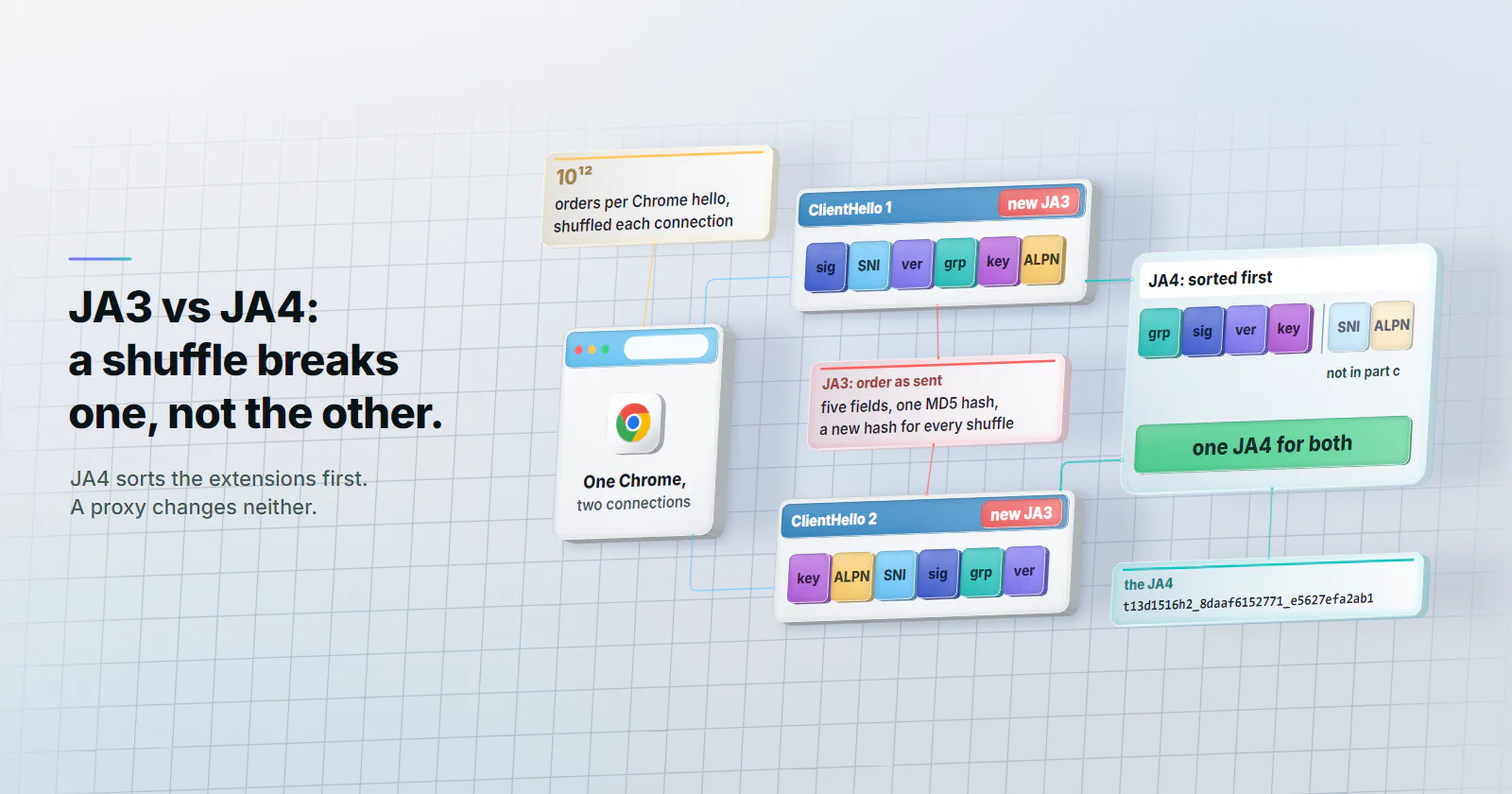
- Chrome's extension shuffle broke JA3 for browsers. Since January 2023 Chrome has randomized extension order on each connection, about 10^12 orderings, so practically every connection gets its own JA3.
- JA4 is more stable, not strictly better. JA3 still gives one stable hash for clients that send a fixed order, and a match on either fingerprint is evidence, not proof of who is connecting.
- A tunnelling proxy leaves the TLS fingerprint alone. The client's TLS library builds the ClientHello, and the proxy exit owns only the IP, the ASN and the TCP fingerprint.
JA3 vs JA4 TLS fingerprinting comes down to one design choice. Both identify a TLS client from its ClientHello, the first message it sends. JA3 hashes five fields in the order sent with MD5. JA4 sorts the ciphers and extensions, adds ALPN and SNI, and prints a readable a_b_c string, so it stays stable when Chrome shuffles its extensions.
That difference reaches anyone running traffic through proxies. A scraper moves from datacenter to mobile proxies, gets a carrier IP, and still meets a challenge on the first request, a pattern that why proxies trigger captchas traces to the client. The handshake had already told the target what software was connecting, and the proxy never touched it.
JA3 vs JA4, field by field
Both methods read the same message and both ignore GREASE, the random placeholder values that clients such as Chrome insert to keep servers tolerant of unknown values. They differ in which fields they keep, whether the order survives, and how the result is hashed.
JA3: five fields, one MD5
JA3 was created at Salesforce in 2017, per the JA3 repository (checked September 2026), which Salesforce no longer actively maintains. It concatenates five ClientHello fields in a fixed order: TLS version, cipher suites, extensions, elliptic curves and elliptic curve point formats. Values inside each field are joined with hyphens, fields with commas, and the whole string is hashed with MD5 into 32 characters. The authors’ January 2019 write-up gives the method and a worked example.
JA4: a readable a_b_c string
JA4 splits the fingerprint into three parts. Per the published JA4 specification (checked September 2026):
- Part a is readable: the transport (
tfor TLS over TCP,qfor QUIC,dfor DTLS), the TLS version,dorifor whether SNI names a domain or the target is a bare IP, the count of ciphers, the count of extensions, and the first and last characters of the first ALPN value. - Part b is a SHA-256 hash of the cipher suites, sorted, truncated to 12 characters.
- Part c is a truncated SHA-256 hash of the extensions, sorted, followed by the signature algorithms in the order sent. SNI and ALPN are left out, so the same client produces the same part c whether it connects to a domain or an IP.
The spec also defines raw forms. JA4_r prints the sorted values unhashed, and JA4_o keeps the original order for anyone who still wants order information.
JA3 string:  769,47-53-5-10-49161-49162-49171-49172-50-56-19-4,0-10-11,23-24-25,0
JA3 hash:    ada70206e40642a3e4461f35503241d5

JA4:         t13d1516h2_8daaf6152771_e5627efa2ab1
             t13 = TLS 1.3 over TCP, d = SNI present, 15 ciphers, 16 extensions, h2 = ALPN
Both examples come from the sources above: the JA3 pair from the Salesforce write-up, the JA4 string from the FoxIO specification.
Why JA4 took over from JA3 for browsers
JA3 hashes extensions in the order the client sends them, and in early 2023 Chrome started shuffling that order on every connection.
Fastly’s security research team documented the change in February 2023. The permutation was slated for Chrome 110 but showed up in versions 108 and 109 as well, and from January 20, 2023 the most common Chrome JA3 hash dropped off sharply. With close to 15 extensions to shuffle, the number of possible orderings is near 15 factorial, about 10^12, so each Chrome connection practically gets its own JA3.
A fingerprint that changes on every connection cannot group anything. JA4, which FoxIO released in September 2023, sorts the extensions and ciphers before hashing, so the shuffle no longer moves the result. Cloudflare, which exposes both fingerprints to its bot management customers, described the gap in an August 2024 post on JA4 signals: randomized extension order made JA3 unreliable, and JA4 also adds ALPN, which JA3 never captured.
Is JA4 better than JA3?
For browsers the direct answer is yes. Firefox, through its NSS library, also supports extension permutation. For other clients it depends on the job. JA4 is stable when extensions are shuffled, its part a can be read without a lookup, and it covers QUIC and DTLS as well as TCP. Splitting the hash also lets an analyst hold two parts still while one moves. FoxIO’s README gives the example of an internet scanner that keeps changing a single cipher: that produces a flood of different JA3 hashes, but only part b of its JA4 changes, so parts a and c still track it.
JA3 has not stopped working, though. A client that does not shuffle its extensions still produces one stable JA3, and years of JA3 hashes sit in security tools and threat feeds. Sorting also throws information away: two clients that differ only in order look the same to JA4, which is why JA4_o exists. Licensing is not a reason to stay on JA3. JA4 is open source under the BSD 3-Clause licence, the same as JA3.
The bigger caveat applies to both. Cloudflare’s JA4 signals post says plainly that fingerprints can be easily spoofed and change frequently, which is why it aggregates them across traffic instead of trusting one value. FoxIO’s own README warns that JA4 fingerprints change as TLS libraries are updated, about once a year.
A match on either fingerprint is one input to a score. It is evidence that two connections share a TLS stack, not proof of the same software or the same operator.
The JA4+ fingerprint family
JA4 is the TLS client method in a larger suite FoxIO calls JA4+. The JA4+ repository (checked September 2026) lists, among others:
- JA4S: the server’s response to the ClientHello.
- JA4H: the HTTP client, built from the request’s method, version, headers and cookies.
- JA4X: X.509 certificates.
- JA4T: the TCP client, read from the SYN packet: window size, TCP options, MSS and window scale.
- JA4L and JA4SSH: latency between client and server, and SSH traffic. Newer methods cover DHCP (JA4D) and NTP (JA4N).
The licensing splits the family. JA4 is BSD 3-Clause. JA4S, JA4H, JA4X, JA4T and the rest use the FoxIO License 1.1, which allows internal and academic use but requires an OEM licence from FoxIO to sell them as part of a product.
JA4T matters most for proxy traffic, because it reads the TCP layer, and that layer belongs to the proxy exit, one of the layers in how websites detect proxies. JA4L moves too, since the extra hop adds latency.
Where JA3 and JA4 are used
The common uses are rate limiting, blocklisting, threat hunting and bot scoring. Cloudflare’s JA3/JA4 fingerprint docs (updated May 6, 2026) make both available to Enterprise customers who have purchased Bot Management. On AWS, CloudFront began passing a JA4 header in October 2024, and AWS WAF added JA4 matching plus JA3 and JA4 keys for rate-based rules in March 2025. FoxIO’s adopter list names Wireshark, Zeek, Arkime, VirusTotal, Akamai and Google Cloud Armor among the tools that read JA4.
Capture your own JA3 and JA4
Public echo pages will show a fingerprint, but they also receive the traffic. A capture on a server you control shows exactly what a target sees and sends nothing to anyone. The ClientHello travels unencrypted, so no keys are needed to read it.
# On a server you control that answers HTTPS on port 443
sudo tcpdump -i any -w hello.pcap 'tcp port 443'

# From the test machine: open https://HOST/ once in the browser, then once from the script
curl -s -o /dev/null https://HOST/

# Back on the server (Wireshark 4.2 or later): JA3 and JA4 for every ClientHello
tshark -r hello.pcap -Y 'tls.handshake.type == 1' -T fields -e ip.src -e tls.handshake.ja3 -e tls.handshake.ja4

# Or FoxIO's ja4 tool, which also prints JA4T and the raw forms
ja4 --with-raw hello.pcap
The tls.handshake.ja3 and tls.handshake.ja4 fields ship in Wireshark itself, per its display filter reference (checked September 2026). FoxIO’s ja4 tool and its Wireshark and Zeek plugins live in the JA4+ repository.
Then look the JA4 up in ja4db.com, the fingerprint database FoxIO maintains. For a JA3 fingerprint lookup, the most useful reference is the same capture: compare your script’s JA3 and JA4 with your browser’s JA4 from the same capture. After that, repeat the run through each proxy tier and compare. JA4 should stay put, and JA3 too for clients that do not shuffle, while the source IP and JA4T change with the exit.
Which layers a proxy changes
HTTPS through a proxy runs inside a CONNECT tunnel, and RFC 9110 (June 2022) defines a tunnel as a blind relay that passes bytes through without changing them. SOCKS5 works the same way at the connection level, as SOCKS5 vs HTTP proxy explains. So the ClientHello that reaches the target is built by the client’s TLS library, and the target computes JA3 and JA4 from that.
The exit does own the layer underneath. The target’s TCP connection starts at the proxy exit, not at the client, so the IP, the ASN and the TCP fingerprint belong to the exit. The split looks like this:
- From the client: JA3, JA4, JA4H, HTTP/2 settings, header order and the User-Agent.
- From the proxy exit: the IP address, its ASN and geolocation, and JA4T.
We measured the header side on the proxymint gateway in September 2026: the gateway added no Via or Forwarded header, and through a CONNECT tunnel to an https:// site a proxy only relays encrypted bytes, so it cannot add any header and JA4H stays your client’s. JA4T is different: it is read from the exit’s own network stack, not from your machine, so on residential and mobile exits it reflects a real consumer connection rather than your server.
A carrier IP with a Python TLS stack still looks like a script. The IP says “phone on a mobile network”, the handshake says “HTTP library”, and the mismatch is itself a signal. Moving from datacenter to residential to mobile changes the IP, ASN and TCP layers. It leaves the TLS layer exactly where it was.
Mobile proxies fit platforms that check for a mobile origin, and the checks platforms run on mobile proxies cover that layer. But when the rejection comes from the handshake, a consistent client beats a mismatched one on any tier.
What to change in the client
Whichever fingerprint a target runs, the goal is consistency: the handshake should match what the rest of the request claims to be.
- Capture your own fingerprint. Use the method above and compare the script with a real browser on the same machine.
- Match the claim to the stack. If the User-Agent says Chrome, the TLS, HTTP/2 settings and header order all have to be Chrome’s. For targets that expect browser traffic, drive a real browser engine rather than labelling a script as one.
- Or stop claiming. For APIs and sites that accept automated clients, an honest User-Agent on a script’s handshake is consistent, and consistent traffic is easier to allow.
- Keep the client current. Browsers change their ClientHello between releases, so a pinned old browser build drifts away from what real users send.
None of this is about defeating a check. A target that forbids automation should be respected. A legitimate client, doing QA, research or permitted collection, should not be flagged by an accidental mismatch it could fix.
Decision order: fix the handshake before the IP
- If the target challenges the same client from a home connection with no proxy, the TLS layer is a likely cause. Fix the client first.
- If the client’s JA4 matches a real browser and the target refuses datacenter ranges for a job it permits, the IP layer is next: rotating residential proxies.
- If the target is a social or app platform that checks for a mobile origin, and the handshake is already consistent, mobile proxies are the right tier.
- If a script sends an honest User-Agent to a target that accepts automation, the fingerprint is not the problem at all; pace and volume are.
The order matters. A script that is challenged on every tier, from datacenter proxies to carrier IPs, because of its handshake needs a client fix; the proxy tier is chosen for the target’s network checks.
Frequently asked questions
JA3 and JA4 are methods for identifying the software behind a TLS connection from its ClientHello, the first message a client sends. JA3, created at Salesforce in 2017, joins five fields in the order sent and hashes them with MD5. JA4, released by FoxIO in 2023, records a readable prefix and hashes the sorted ciphers and extensions, so it stays stable when a browser shuffles its extensions.
JA4 is more useful for modern browsers, because sorting keeps Chrome's shuffled extensions from changing the result, and its readable prefix shows the TLS version, SNI, counts and ALPN without a lookup. It is not strictly better: JA3 still gives one stable hash for clients that send a fixed order, and years of JA3 hashes sit in security tools. Either fingerprint is one signal, not proof of the same software or operator.
In early 2023 Chrome began randomizing the order of its TLS extensions on every connection. Because JA3 hashes extensions in the order they are sent, the same Chrome browser started producing a different JA3 hash on almost every connection. JA3 still works for clients that send a fixed order.
JA4+ is FoxIO's family of network fingerprints built around JA4, including JA4S for the server response, JA4H for HTTP clients, JA4X for certificates, JA4T for TCP and JA4SSH for SSH traffic. JA4 itself is open source under the BSD 3-Clause licence, like JA3. The other methods use the FoxIO License 1.1, which allows internal and academic use but requires an OEM licence to sell them as part of a product.
Capture it from your own traffic first: record the handshake on a server you control and read the JA3 and JA4 values with Wireshark, tshark or FoxIO's ja4 tool. Then look the JA4 value up in ja4db.com, the fingerprint database FoxIO maintains. Compare the result with the value a real browser on the same machine produces.
Not a tunnelling proxy. HTTPS through an HTTP CONNECT or SOCKS5 proxy runs inside a tunnel that relays the encrypted connection unchanged, so the target reads the ClientHello built by the client's TLS library. The proxy exit changes the IP, the ASN and the TCP fingerprint, but not JA3 or JA4. A mobile proxy therefore gives a carrier IP, and a script's handshake on that IP still looks like a script.
Bot detection systems compare the TLS fingerprint with what the request claims to be. A request whose User-Agent says Chrome but whose handshake matches an HTTP library is a strong mismatch signal. Vendors also track how often a fingerprint appears, across how many IPs and user agents, and use it for rate limits and blocklists.
Researched and drafted with AI tools, then checked against our publishing rules before it went live: 13 outside links, 7 links to other proxymint pages, no prices and a fact-check pass against our product records. How we write.