Why proxies trigger captchas, and what reduces them
Why proxies trigger captchas: the risk score behind each challenge, the inputs your proxy tier changes, and what a legitimate client can fix first.
Quick summary · TL;DR
- It's a score, and every site picks its own cut-off. reCAPTCHA v3 hands the site a number from 0.0 to 1.0 and suggests 0.5 as a starting threshold, so the same pool can pass on one site and get a checkbox on the next. Annoying, but it also means nobody can honestly give you a universal "requests before a captcha" number.
- Your proxy owns the IP half, and only that half. ASN class, the address's shared history and how many requests it carries come from the tier. That's what a different pool can change.
- The rest travels with your code on every tier. Pace, cookies, the TLS stack, the browser checks and Accept-Language are yours. A script that throws away
cf_clearanceafter each page is the classic way to meet a checkbox on every load. - Per-request rotation can make it worse. Each new address starts without the history the last one built, so a multi-page flow usually does better on a sticky session or a 5 to 60 minute timer.
- Some captchas mean stop. If a site challenges every automated request on logins or search, that's a policy, and the honest route is its API, a data licence or slower access it allows.
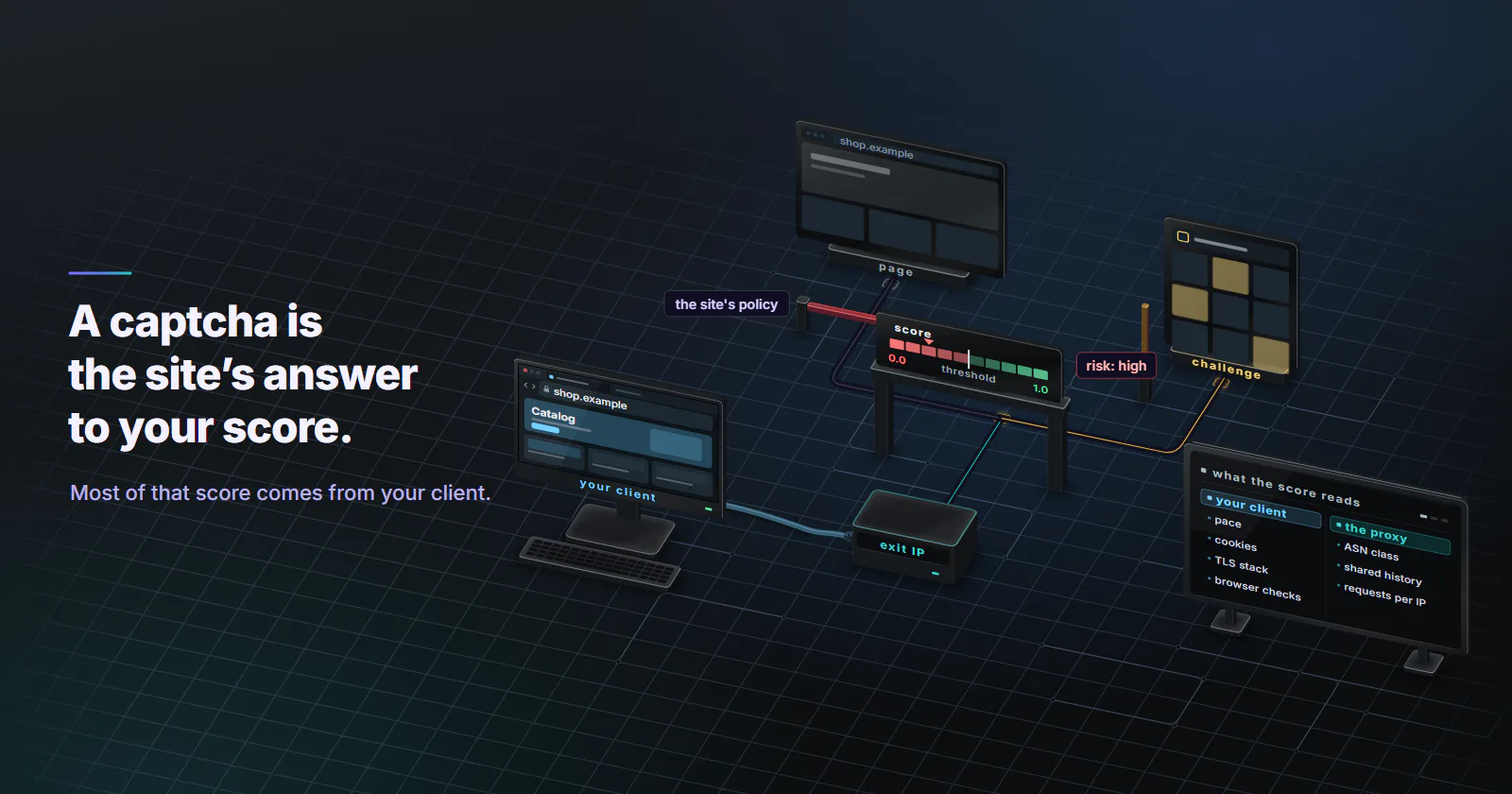
Why proxies trigger captchas comes down to a risk score. A captcha is the action a site takes when a request’s risk score falls below its threshold. The proxy supplies the IP inputs to that score: the ASN class, the shared history of the address and how many requests it carries. The client supplies the rest: pace, cookies, the TLS stack, the browser checks and the locale.
If you landed here, the ticket probably reads “too many captchas, the proxy is bad”, and the next idea on the list is another pool. Sometimes that’s right. Often the checkbox comes back on the new pool too, because half of what the site scores never touched the proxy.
Most pages ranking for “proxy captcha” sell a captcha proxy or end in a solver. You won’t find solving here, or any way around a challenge. What you will find is each input split by who controls it, so you can fix your own side before you look at a different tier.
Why proxies trigger captchas
A captcha is a policy action taken on a score, and each site writes its own policy. The full scoring model is in how anti-bot systems work; this page stays with the captcha you are looking at.
How the challenge decision works
The score. Google’s reCAPTCHA v3 documentation (updated July 2024) returns a score for every request, where 1.0 is very likely a good interaction and 0.0 is very likely a bot, and suggests 0.5 as a starting threshold. The same page says reCAPTCHA learns from the real traffic on each site, so staging and production score differently. The site owner decides what happens under the threshold: a checkbox, a second factor or a block.
The challenge. Cloudflare’s Turnstile documentation (updated August 2026) lists what runs behind its widget: proof-of-work, proof-of-space, probing for web APIs, and checks for browser quirks and human behaviour. In managed mode Turnstile picks between a non-interactive check and a checkbox based on the visitor’s risk. So a visible challenge means the invisible checks did not settle the question.
The threshold is local. Every site sets its own threshold and its own action. No honest “requests before a captcha” figure exists across sites, and a page that prints one is describing one target on one day. Worth remembering the next time a forum post promises you a magic number.
The IP-side signals
Three inputs to the score are tied to the address, so they change with the proxy, the same IP layer covered in how websites detect proxies. A fourth depends on whether the proxy announces itself.
Shared history. A proxy IP has been used before, by someone else, for something else. Google’s unusual traffic help page (checked October 2026) says the message can appear when a network seems to be sending automated traffic, and it names shared networks, VPNs and other customers of the same internet provider among the causes. Every proxy pool is a shared network in that sense.
ASN class. Hosting ranges read as servers. Consumer ISP ranges read as homes. Carrier ranges read as phones, usually behind carrier-grade NAT, where hundreds of subscribers can share one of those addresses.
Concentration. Many requests from one address in a short window look like one machine. That holds on every tier, and it’s the one people underestimate when a job “only” runs a few workers.
Forwarding headers. A proxy that adds Via, X-Forwarded-For or Forwarded tells the site it is a proxy before any score runs. In proxymint Lab #1 on 28 September 2026, the per-GB gateway added no Via or Forwarded header over CONNECT. To an https:// site a CONNECT proxy only relays encrypted bytes, so it cannot add any header to the request. Headers the client itself sends still pass through, so a script that sets X-Forwarded-For announces the proxy on its own.
Proxy inputs vs client inputs
Here is each input mapped to who controls it.
The proxy tier owns the first two rows and shares two more. The TLS fingerprint, the cookies and the browser checks belong to the client on any IP. A CONNECT tunnel relays the TLS bytes as they are, so the handshake the site reads is the client’s, whichever exit carries it; JA3 vs JA4 TLS fingerprinting shows what that handshake gives away.
Read the challenge you got
The kind of challenge is a clue to which row fired, and reading it first saves a lot of guessing.
- A block page with no challenge, such as an HTTP 403, an access denied page or a proxy detected error, usually means a rule rather than a score: an IP range, a country or an ASN the site refuses. A block page is the site saying no to that traffic. Stop, and check its terms, its API, or ask for access.
- A check that clears on its own means the score was borderline and the browser passed the in-page tests. Nothing is broken; the setup sits near the threshold.
- A checkbox or puzzle on every page means the client is not keeping what the last pass earned, or its score drops again after each pass. Look at cookies and pace before the pool.
- A challenge only after a run of pages is behavioural. The session crossed a rate the site treats as automated, whatever the IP.
The widget itself says which system is scoring:
- reCAPTCHA v2 shows the “I’m not a robot” checkbox and, when the risk looks higher, an image grid to click through.
- reCAPTCHA v3 shows no challenge, only a small badge. It hands the site a score, and the site decides what to do with it.
- hCaptcha works like the v2 checkbox, with image challenges when the risk looks higher.
- Turnstile usually passes without any interaction and falls back to a checkbox when the risk looks higher.
What each proxy tier changes
Tier choice is the part of the problem a proxy can change, and only that part. Each tier moves the first rows of the table differently, and none of them rescues a client that fails the rest. A product sold as a “captcha proxy” is one of these types of proxies under another label: it moves the IP rows of the score and leaves the client rows where they were.
Datacenter. Datacenter proxies exit from hosting ASNs. On sites with a challenge provider in front of forms, search or checkout, that alone often decides the score, so challenges arrive early. On lenient targets with no provider in front, datacenter works and is usually the fastest tier; datacenter vs residential proxies covers testing a target before choosing.
Rotating residential. Rotating residential proxies exit from consumer ISP ranges, which removes the hosting signal (the basics are in what is a residential proxy). The shared history stays: the address may have carried someone else’s traffic an hour ago. That, plus the rotation cost covered below, is the usual story behind a residential proxy captcha.
Static ISP. Static ISP proxies hold one ISP-registered address for the whole billing term. That suits logged-in flows on accounts you own, where a stable history helps. But a fixed set of addresses concentrates volume, so a job that hammers a few IPs builds its own bad history; keep each address at a pace a real user could produce. Check a new static IP against the target at low volume before loading it.
Mobile. Carrier IPs sit behind CGNAT, where many real subscribers share one public address, so a hard block on it hits real customers directly. Sites read the class from IP databases, and proxymint’s mobile per-GB exits are classified as cellular by MaxMind. That is why challenges tend to be rarer on platforms that expect phone traffic, as covered in what platforms check on mobile proxies. The rate is not zero: Google names other customers of the same internet provider as one cause of its unusual traffic message, and a carrier address is exactly that.
None of the four tiers touches the client rows of the first table.
What the client controls
This is the half no proxy upgrade touches, and the half where a legitimate client has the most room to cut its challenge rate. Start here if you can.
Session consistency and clearance cookies
Cloudflare’s Challenge Passage documentation (updated May 2026) says a solved challenge sets a cf_clearance cookie, and the visitor does not face repeat challenges while it is valid. The default lifetime is 30 minutes, Cloudflare recommends 15 to 45, and the site owner sets the value, so 30 minutes is only the default.
A client that discards cookies throws that pass away and meets the next challenge on the next request. Rotation does the same at the IP layer. A session that hops addresses mid-flow loses the history it built, and consistency is part of what the score reads.
Pacing and locale
Pace. Set a request rate per session that the target’s own users could produce. Spreading requests across many IPs does not hide a per-session rate that no person reaches, and it’s usually the first thing a site’s rate rules catch.
Locale. Pick the exit country, region or city for the market the job is about, and set Accept-Language to the market whose pages the job needs, so the site serves the right locale. On proxymint the location is set on the order, while the header lives in your client, so a change to one rarely updates the other. Check both whenever a job moves to a new market.
TLS stack and browser checks
The TLS fingerprint. A script library behind a browser User-Agent is a mismatch on every tier, because the handshake passes through the proxy tunnel unchanged. Send an honest User-Agent that matches the library, or run a real browser.
The browser. Turnstile’s checks run JavaScript and probe web APIs. A client without a real JavaScript engine fails them by design, whatever the IP. Where a job needs pages behind those checks, a real browser engine is the honest client.
Captchas everywhere, even without a proxy
Plenty of people who ask why they are suddenly getting captchas on every site have no proxy in the path at all. Google’s unusual traffic help page (checked October 2026) lists the usual causes: malware on the machine sending automated requests, a shared network such as a school or office, a VPN, an IPv6 tunnel service, other customers of the same internet provider, and tools such as rank checkers and scrapers.
The same list explains Google’s “unusual traffic from your computer network” message. In Google’s own words, “search scrapers” and rank-checking software count as the automated traffic behind it, so a better proxy does not make scraping Google acceptable. It only changes where the traffic comes from. For rank data, proxies for SERP tracking covers the routes that hold up, starting with Search Console.
The fixes involve no proxy upgrade. Scan the machine for malware. Switch off the VPN and reload. On a shared network, ask the network admin; on a home line, ask the ISP whether the address is shared. If the challenges stop, the cause was the machine or the network.
When a captcha means stop
Some challenges are a score that a better client clears. Others are the site saying no to automated access. Logins, checkout limits and search pages often sit in the second group, and a site that challenges every automated request there is stating a policy about automated access.
So the answer there is the site’s official API, a data licence, or slower access that the site’s terms allow. Getting around a challenge usually breaks those terms, and depending on the country and the target it can create legal exposure too.
Fix list, in order, simplest first
Measure first, with a test any reader can run in an afternoon, then work down the list.
Measure your captcha rate first
- Use a page you control. Put reCAPTCHA v3 or Turnstile on a test page on a domain you own. reCAPTCHA v3 returns a score for every request, which gives a number rather than a pass or fail, and the test stays on a site you own instead of someone else’s.
- Fix everything but the tier. Same browser client (headless is fine), same headers, same pace, for example one request every few seconds per IP. reCAPTCHA v3 and Turnstile only return a token when the page’s JavaScript runs, so a client that runs no JavaScript records “no token”, not a score.
- Run 100 requests per tier. Record the score distribution, or the number of interactive challenges per 100 requests.
- Then change one client input. In the same browser, keep cookies between requests where the first run dropped them, and run the best tier again.
If the counts barely move between tiers but move a lot when the client changes, the problem is the client. A fresh test domain will not score like a busy production site, because reCAPTCHA learns per site, so read the results as relative movement, not absolutes.
Then work down the list
- Rule out the client. A client that meets challenges from an office or home connection with no proxy needs fixing first: pace, cookies, User-Agent, a real browser. A proxy change will not fix this.
- Check the ASN. Challenges that start only through a datacenter exit mean the ASN is deciding, and datacenter does not fit that target. Rotating residential fits public catalogue and listing pages whose terms allow automated access.
- Hold the session. Challenges that rise with per-request rotation call for a sticky session or a 5 to 60 minute timer, with the cookies kept; rotating vs sticky proxies covers which mode fits which flow.
- Hold one address. A logged-in flow that keeps getting challenged on changing IPs needs one address, held on a static ISP proxy.
- Match the origin. Where the platform expects phone traffic, use mobile proxies. They are built for the targets where the mobile origin matters.
- Stop. When the site challenges every automated request whatever the setup, stop and use its API, or ask.
A different tier changes only the IP rows of the score, which is the part of why proxies trigger captchas that a pool can fix. The client rows stay with whoever writes the client.
Frequently asked questions
A captcha appears when a request's risk score falls below the threshold a site sets, and a proxy changes some of that score's inputs. A proxy IP may carry a poor history from earlier users, may belong to a hosting ASN that sites treat as automated, or may carry too many requests. The client adds its own signals through its pace, cookies, TLS stack, browser environment and locale.
Google's help page on unusual traffic lists the usual causes: malware sending automated requests, a shared network such as a school or office, a VPN, an IPv6 tunnel service, or other customers of the same internet provider. A proxy is not the fix. Scan the machine for malware, switch off the VPN, and ask the network admin or the ISP if the challenges continue.
Google shows the message when requests from a network look automated. Its help page names malware, shared networks, VPNs, IPv6 tunnel services and other customers of the same provider as causes, and it counts rank checkers and scrapers as automated traffic. Sending that traffic through a different proxy does not make it acceptable to Google.
A residential proxy removes the hosting ASN signal but not the others. The address may have carried someone else's traffic recently, per-request rotation throws away the session history a flow has built, and the client's TLS stack, cookies and pacing are scored on any IP. Any of these can push the score below the site's threshold.
Often, on platforms that expect phone traffic. Carrier IPs sit behind CGNAT, where many real subscribers share one address, so blocking them outright hits real customers. They still attract challenges when the shared address carries automated volume or when the client itself looks automated, so the rate is lower in those cases, not zero.
Not always. Rotation spreads requests across addresses, but it does not change the total pace a site sees from one job. Each new address starts without the session history of the last one, so multi-page flows often see more challenges with per-request rotation than with a sticky session that keeps one address and its cookies.
A captcha is the site's own access control, so getting around it usually breaks the site's terms of service, and depending on the country and the target it can also create legal exposure. This is not legal advice, and a lawyer in the relevant country can answer for a specific case. The practical answer is to slow down, use the site's official API or a data licence, or ask the site for access.
Researched and drafted with AI tools, then checked against our publishing rules before it went live: 4 outside links, 16 links to other proxymint pages, no prices and a fact-check pass against our product records. How we write.