Datacenter vs residential proxies: which fits the target
Datacenter vs residential proxies compared on ASN, speed, location and billing model, with a 100,000-request job sized in GB and a test to pick per target.
Quick summary · TL;DR
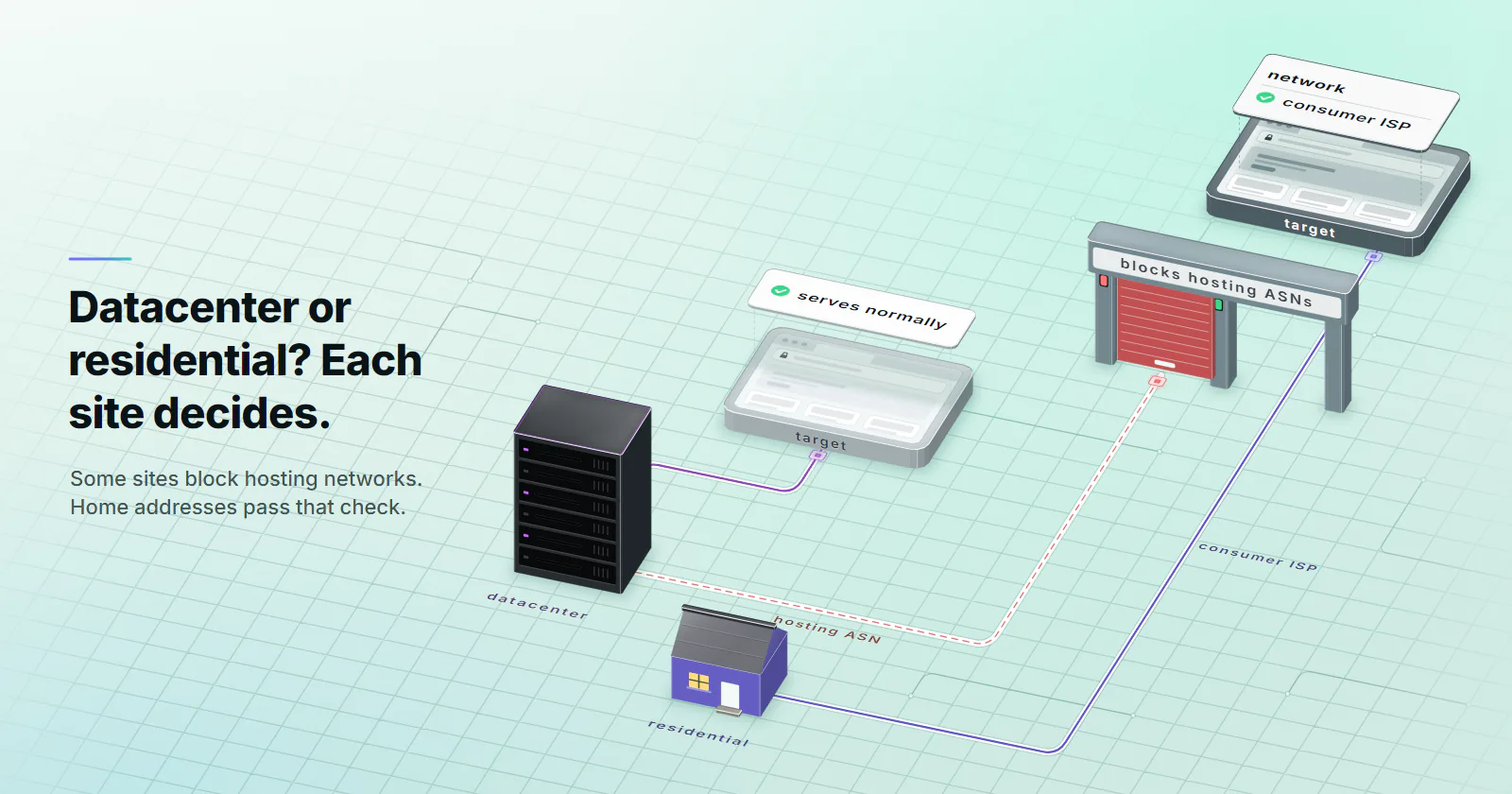
- The ASN is the difference the target sees first. A datacenter IP is announced by a hosting company, often from published ranges; a residential IP is announced by a consumer ISP on a real home connection.
- Test the target before picking a tier. A sample of a few hundred requests at the real pace shows whether the target serves normally, blocks, challenges or serves different content.
- Residential is usage-based, so page weight sets the traffic. 100,000 HTML-only requests at 22 KB move 2.2 GB; the same requests as full 2,164 KB renders move 216.4 GB.
- Datacenter fits repeating or heavy jobs on lenient targets. A dedicated IPv4 port is billed per month with no bandwidth cap under normal use, so pace sets the limit rather than GB.
- Datacenter is usually faster, but measure it. Server uplinks beat home lines on latency, while residential latency varies by exit; compare p50 and p95 time to first byte on the real target.
Datacenter vs residential proxies differ in who announced the exit IP. A datacenter proxy exits from a hosting company’s address range; a residential proxy exits from a consumer ISP’s address on a home connection. Datacenter is fast, billed per port and suits targets that accept hosting ranges. Residential is billed per GB and clears targets that filter servers. Pick per target, after a test.
A scrape that ran clean for a month starts returning 403s. Or it never ran clean: the first hundred requests from a datacenter range came back as challenge pages. The usual reaction is to move the whole job to residential bandwidth, whether or not every target needs it. A test per target and a sized job settle it.
Datacenter vs residential proxies, the difference
Datacenter exits sit on IPs announced by hosting companies, and residential exits sit on IPs announced by consumer ISPs for home connections. The target reads that ASN class before it reads a single header, and block rate, speed and billing all follow from it.
Datacenter proxies. The exit IP belongs to a hosting company: a cloud, a colocation provider, a server host. It is announced by that company’s ASN, and the ranges are often public. AWS publishes its current ranges as a JSON file so others can identify its traffic, per its VPC documentation on AWS IP address ranges (checked 2026-09-29). The pillar on what datacenter proxies are covers the tier on its own.
Residential proxies. The exit IP belongs to a consumer ISP and sits on a real home connection. More in the explainer on what a residential proxy is.
The two also scale differently: a hosting company adds servers in bulk, while a residential pool grows one home connection at a time.
How targets tell them apart
A target reads the class directly from the IP, with four inputs, three of them before any page loads; how websites detect proxies covers the layers that come after it.
- The ASN. Every routed address is announced by an autonomous system, and its owner reads as hosting, consumer ISP, mobile or business.
- Published cloud ranges. Clouds publish their ranges, and any firewall can load the same list.
- Commercial IP-type data. IP intelligence databases label addresses as hosting, ISP, mobile or business.
- Bot scores. Cloudflare’s bot score runs from 1 (automated) to 99 (human), and its bot score documentation (updated 2026-08-26) lists heuristics, machine learning and JavaScript detections among the engines behind it. The IP is one input among several.
Datacenter vs residential vs ISP proxies
Static ISP, one ISP-registered address held for the whole term, often joins the comparison, and so does the dedicated vs shared proxies question. The datacenter vs residential proxies pros and cons, with ISP added:
Test a target before choosing
Let the target’s responses, rather than a vendor’s word, make the datacenter vs residential proxies choice:
- Sample on datacenter first. Send a few hundred requests at the job’s real pace, on a target whose terms allow automated access.
- Load a home control. Fetch the same URLs from a home connection with no proxy, so the content can be compared.
- Sort the responses. File each one under one of the four outcomes below.
- Pick the tier per outcome. The table after the outcomes maps each one to datacenter or residential.
It serves normally. Status 200, and the content matches what a browser on a home connection sees. Stay on datacenter.
It blocks. 403s from the first requests, or connection resets. At a pace a person could produce, it most likely points to an ASN filter rather than a rate limit, once the home-connection control passes, and it is the clearest sign that datacenter does not fit this target.
It challenges. A JavaScript check or a captcha page instead of content. A residential IP may clear it, unless the challenge is about the client.
It serves different content. The worst outcome, because it looks like success: status 200, but prices, stock or rankings differ from what a home connection gets. Spot-check a handful of responses against the same URLs loaded from a home network before trusting a single row.
Rule out the client first
Many datacenter blocks turn out to be a default library user agent, no cookie handling, or a burst of concurrent requests from one port.
The test is cheap: the same requests, client and pace, from a home or office connection with no proxy. If the target challenges that too, the proxy was never the problem, and both tiers will fail the same way.
Speed and latency
Datacenter proxies are usually faster than residential ones, for physical reasons. A datacenter exit sits on a server uplink with a short path to the major networks, and no consumer line sits between the proxy and the target.
A residential request takes an extra leg: client to gateway, gateway to a home device, then out through that household’s connection. Home upstream is usually slower and shared with everyone in the house. Devices sleep or drop off the pool, so latency varies by exit, even inside one city.
No single multiplier covers every target, so measure. Send the same 100 requests through each tier with the same client, record time to first byte, and compare the median (p50) and the 95th percentile (p95). Residential variance shows up in the p95.
for i in $(seq 1 100); do
  curl -s -o /dev/null -w "%{time_starttransfer}\n" \
    -x http://USERNAME:PASSWORD@HOST:PORT TARGET_URL
done | sort -n | awk '{a[NR]=$1} END {print "p50", a[int(NR*0.5)], "p95", a[int(NR*0.95)]}'
Run it once per tier against an https:// target URL, with the residential exit in the target’s country, and drop any line where curl failed.
Billing models and bandwidth
The two tiers bill on different axes, and each axis suits a different job shape. proxymint’s dedicated IPv4 datacenter ports are billed per port per month, with no bandwidth cap under normal use: a busy port is billed the same as an idle one. Residential is usage-based per GB, in whole-GB packages from 1 GB, with no expiry set on the GB. What a job moves depends on page weight and on how often it runs.
The job: 100,000 requests at two page weights, both medians from the HTTP Archive Web Almanac 2025 page weight chapter (published January 15, 2026): an HTML-only fetch at the median 22 KB of HTML on home pages, and a full browser render at the median full mobile page of 2,164 KB. The arithmetic uses 1 GB = 1,000,000 KB.
HTML only, residential. 100,000 × 22 KB = 2.2 GB. Packages are whole GB, so the job buys 3 GB. The unused 0.8 GB carries over to the next run; proxymint sets no expiry on GB.
Full render, residential. 100,000 × 2,164 KB = 216.4 GB, so the job buys a 217 GB package.
Datacenter, either weight. Assume the target tolerates the job’s pace spread over 10 dedicated IPv4 ports. The month’s port bill is the same whether the job moves 2.2 GB or 216.4 GB.
The billing model follows the job’s shape. Per-GB residential scales with what a job actually moves, which suits targets that need a home IP at any volume. Per-port datacenter keeps heavy or repeating traffic unmetered on targets that accept hosting ranges.
Metered bytes are not page bytes. Per-GB billing counts everything that crosses the proxy: headers, the TLS handshake on every new connection, redirects and retries. On a 22 KB fetch with a fresh connection per rotation, that overhead is a real share of the metered traffic. Send 100 requests, read the bytes from the usage counter, and divide.
Valid records, not requests. Count only the responses that match the home control. A datacenter run with half its 100,000 responses blocked or different delivers 50,000 valid records, and the failed half still has to be fetched on a tier that works.
The full-render job pushes about 21.6 GB per port in the month. Volume is not the limit on a port; pace is. Keep each port under roughly 10 requests per second, and fewer for heavy pages: at about 2 MB per render, a typical 100 Mbps per IP carries 5 to 6 a second. Add ports for more.
When to use datacenter proxies
If the target does not score traffic by ASN, datacenter is the answer.
- Bulk collection from targets with no anti-bot vendor in front of them.
- API polling, uptime checks and monitoring, where the endpoint expects machine traffic anyway.
- SEO and SERP tooling on lenient engines and regions.
- Performance checks of your own sites from other countries.
- Anything heavy and repeating, where unmetered ports carry the volume.
That last point is where datacenter proxies earn their place: a daily full-render crawl moves a lot of traffic, and on IPv4 ports it is not metered per GB under normal use.
Datacenter does not fit social platforms, marketplaces running anti-bot vendors and strict retail. They classify hosting ASNs on sight. A block on the very first request, at a slow pace, points to that filter, and another IP in the same class rarely helps, so check the target’s own rules before buying more ports.
When residential is worth it
Rotating residential proxies fit when the sample run shows an ASN filter, different content, or a location requirement finer than country, on a target whose terms allow automated access. Price and stock monitoring across markets, local search tracking by city and ad verification on home networks all land here.
Residential is not a clean pass, though. Cloudflare described a machine learning model built for residential proxy traffic in a June 2024 engineering post. It scores each request on latency and behaviour rather than blocking IPs, because on the networks it studied four out of five requests came from ordinary home users. Pace, headers and client fingerprint still count.
Residential also has a limit on identity. Keeping one identity for days is a poor fit, because home devices go offline; static ISP proxies hold one address for the whole term.
Legality and sourcing
Using either tier is legal in most jurisdictions. The risk sits in two places: what the job does, such as breaking a site’s terms or collecting personal data, and how the residential pool was built.
On May 29, 2024 the US Department of Justice announced the takedown of 911 S5, a residential proxy service built from malware on home Windows computers, associated with more than 19 million unique IP addresses and spread through VPN programs and pay-per-install bundles. Ask any residential provider how devices joined its pool and on what terms. proxymint’s residential exits come from device owners who opted in and can opt out. Datacenter sourcing is simpler: a hosting company announces its own ranges. None of this is legal advice.
Routing per target: the switch rule
Settle the tier per target: mixed routing is the normal end state, with one job config and several tiers.
- If the target serves normally on datacenter and spot checks match a home connection, stay on datacenter.
- If it blocks hosting ranges from the first request at a human pace, or serves different content, and its terms allow automated access, route that target to residential.
- If it challenges the same client from a home connection too, fix the client first; the tier is not the issue.
- If the job needs one address for days, use ISP; if the target only trusts mobile origins, use mobile (mobile vs residential proxies covers that split).
Put the tier in the job config next to each target, and revisit it when the target changes. The proxies overview lists each product.
Frequently asked questions
A datacenter proxy exits from an IP address announced by a hosting company, such as a cloud or server provider. A residential proxy exits from an IP address announced by a consumer ISP on a real home connection. Targets can see the difference from the ASN before they read any header, which is why residential clears filters that screen hosting ranges.
Sorted by where the exit IP comes from, the two main classes are datacenter proxies, on addresses announced by hosting companies, and residential proxies, on addresses announced by consumer ISPs for home connections. ISP proxies, which hold one ISP-registered address on a server for a fixed term, and mobile proxies, which exit through carrier networks, are the other two sources.
Usually, yes. A datacenter exit sits on a server uplink with few hops to the target, while a residential exit adds a home connection whose upstream speed and stability vary by household and device. The size of the gap depends on the target and the exit location, so measure median and 95th percentile time to first byte with the same client on both tiers before deciding.
It depends on how they are billed. proxymint's dedicated IPv4 datacenter ports are billed per port per month with no bandwidth cap under normal use, so a heavy page costs the same as a light one. The practical limit is pace: plan on roughly 10 requests per second per port and spread heavier load across more ports. Residential proxies are metered per GB instead.
Yes, and most jobs that span several targets end up that way. Test each target first, then route it to the tier its sample run supports: datacenter where it serves normally and spot checks match a home connection, residential where it needs a home IP or city-level location and its terms allow automated access. Keep the tier in the job config next to each target and revisit it when the target changes.
If the block arrives on the first requests at a slow, human pace, the target is most likely filtering hosting ASNs, and rotating to another datacenter IP rarely helps. If the block only appears at high request rates, it is a rate limit: slow the pace and honour Retry-After. If the same client is also blocked from a home connection with no proxy, the client itself is the problem.
It depends on the job, because the two bill on different axes. Residential is usage-based per GB, so light HTML fetches move little traffic. Datacenter ports are billed per port per month with no bandwidth cap under normal use, which suits heavy and repeating jobs. On proxymint both rates fall as the order grows, and the [pricing page](/pricing/) lists the volume bands for each.
Researched and drafted with AI tools, then checked against our publishing rules before it went live: 5 outside links, 11 links to other proxymint pages, no prices and a fact-check pass against our product records. How we write.