Proxy pricing: per GB, per IP or per port for your job
Proxy pricing per GB, per IP and per port only compares once the job is fixed. How to size a job in GB, which unit fits it, and what else moves a bill.
Quick summary · TL;DR
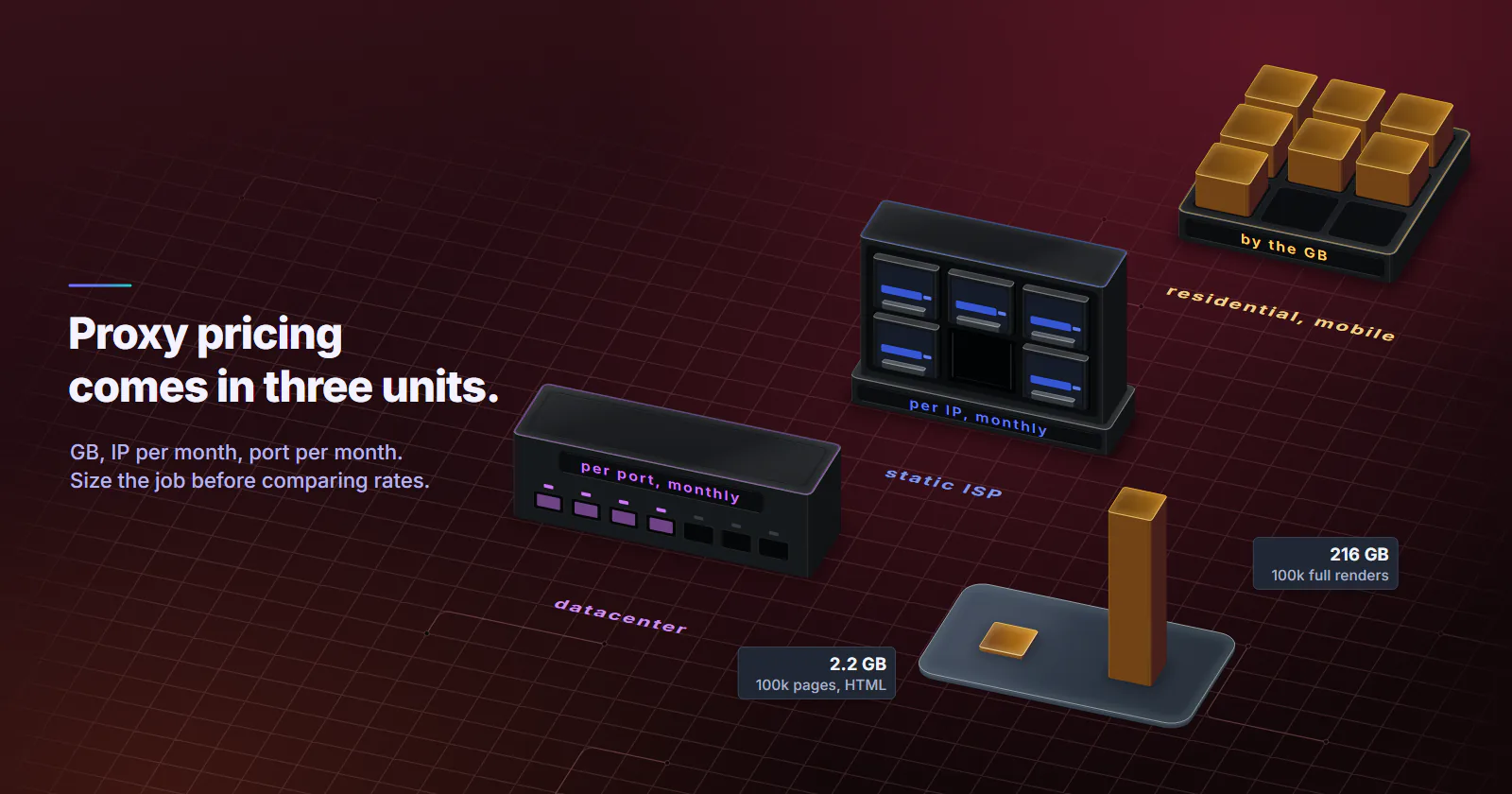
- Proxy pricing comes in three units. Residential and mobile bill per GB, static ISP per IP per month, datacenter IPv4 per port per month. On proxymint every tier is priced in volume bands, with a lower rate per unit at higher quantity.
- A rate only compares once the job is fixed. 100,000 pages a month are about 2.2 GB as HTML and about 216 GB as full renders, so the fetch mode decides between per GB and a flat address.
- Small jobs start at the minimum unit. 1,000 HTML fetches move about 22 MB; the smallest package is 1 GB, with no expiry set on the GB, and the smallest flat unit is one month.
- Location, rotation and protocol do not change the rate. On proxymint, city targeting, every rotation mode and both HTTP and SOCKS5 come inside the same price.
Proxy pricing comes in three units. Residential and mobile proxies bill per GB of traffic, static ISP proxies bill per IP per month, and datacenter proxies bill per port per month. On proxymint every tier is priced in volume bands, with lower rates at higher volume. Which unit fits depends on the job.
A rate per GB next to a rate per IP does not compare on its own. A gigabyte and a month of one address are different goods, and the bill only makes sense once the job is fixed: how many pages, how heavy each page is, and how strict the target is. So the job gets a size first, then the size picks the unit, and idle capacity and retries come last.
Proxy pricing comes in three units
Each tier sells in the unit that matches what it delivers. The types of proxies guide covers how the tiers differ beyond price.
Per GB. Residential and mobile proxies route traffic through a rotating pool of consumer and carrier connections. The scarce thing is bandwidth on those connections, so the meter counts bytes. The number of IPs touched and the number of requests sent do not change the price; only the traffic does. A package is one-off, with no renewal, the model behind pay as you go proxies.
Per IP per month. Static ISP proxies rent one ISP-registered address, assigned to your order for the whole billing term. The address is the product. It is not metered per GB, and the price is the same whether it carries one request or a million.
Per port per month. Datacenter IPv4 proxies rent a dedicated address on hosting infrastructure. Ports carry no bandwidth cap, so a busy port is billed the same as an idle one.
Two consequences follow. On a per-GB meter, page weight drives the bill. On per-IP and per-port pricing, the number of addresses and months drives it, whatever the traffic.
Proxy prices on every proxymint tier are set in volume bands, with a lower rate per unit at higher quantity; the pricing page lists them. Per-GB packages are one-off and do not renew, and a first purchase comes with a 7-day money-back window under the terms.
Size the job before comparing
In proxy pricing, a rate per GB means nothing until the job has a size in GB. The estimate is pages times bytes per page, plus headroom for retries.
The starting figures come from the HTTP Archive Web Almanac 2025 page weight chapter (published 2026-01-15): the median mobile page transfers 2,164 KB, and the median mobile home page carries 22 KB of HTML. That is a gap of roughly 98x between fetching the HTML and rendering the full page with images, scripts and fonts.
HTML only. 1,000 pages at 22 KB is about 22 MB. 100,000 pages is about 2.2 GB.
Full render. 1,000 pages at 2,164 KB is about 2.2 GB. 100,000 pages is about 216 GB.
Real targets vary, so a sample beats a median:
- Fetch 20 representative pages with the client the job will actually use.
- Sum the transfer sizes from its own logs or a HAR file, and divide by 20.
- Multiply that average by the page count.
- Add 20-30% for retries and redirects.
Asking for compressed responses with the Accept-Encoding header, defined in RFC 9110 section 12.5.3 (2022-06), keeps the HTML figure near the median instead of well above it.
Proxy pricing on three fixed jobs
With the job sized in GB, the proxy cost comparison comes down to one question: does the job spend more on bytes or on addresses? A per-GB bill grows with traffic. A flat bill grows with the number of addresses and months.
A flat address suits steady traffic through a few addresses on a target that accepts them. Per GB suits traffic that is light, bursty or spread over many exits.
| Job | Traffic | Unit that fits |
|---|---|---|
| 1,000 HTML fetches, once | about 22 MB | Per GB (the 1 GB minimum covers it) |
| 1,000 full renders, once | about 2.2 GB | Per GB for a one-off run |
| 100,000 HTML fetches a month | about 2.2 GB | Per GB on strict targets |
| 100,000 full renders a month | about 216 GB | Per port on lenient targets, per GB on strict ones |
| One endpoint every minute, 30 days | about 0.4 GB | Per GB |
| One endpoint every 10 seconds, 30 days | about 2.6 GB | One port or one ISP IP |
Job 1: 1,000 page fetches
At this size the minimum unit sets the price. 1,000 HTML fetches move about 22 MB, roughly 2% of the smallest 1 GB package, so the job starts with a full gigabyte on any per-GB tier. proxymint sets no expiry on GB, so the rest of the package stays on the balance for the next run.
Full renders move about 2.2 GB, which needs a 3 GB package. The flat units run for a month either way, and a one-off job leaves most of that month idle. For a single run, per GB fits; for the same run every week, a flat unit becomes an option.
Job 2: 100,000 pages a month
This is where the units split apart. As HTML, the job is about 2.2 GB, well inside a small per-GB package. As full renders it is about 216 GB, almost a hundred times the traffic, and the per-GB bill follows it up.
The flat tiers need a number of addresses, not a number of bytes. Spreading 100,000 pages over 10 addresses is 10,000 each a month, about 14 an hour, and 10 ports are billed the same for HTML and for full renders. That makes flat ports economical for heavy pages on a lenient target. On a target that classifies hosting ranges, residential per GB is the unit that fits, chosen before the job runs.
Fixed ISP addresses serve a different job: holding one identity over weeks, which broad collection does not need.
Job 3: one endpoint, polled all month
Polling one endpoint is byte-light. Assume 10 KB on the wire per request, response plus headers; measure the real figure with a few requests. Once a minute for 30 days is 43,200 requests, about 0.4 GB. Every 10 seconds is 259,200 requests, about 2.6 GB.
Here per GB and flat pricing both work. Once a minute fits the smallest per-GB package with room to spare. At every 10 seconds the traffic is steady and comes from one place, and polling rarely needs a fresh address per request, so a flat unit fits the job well: a datacenter port if the endpoint accepts hosting ranges, an ISP IP if it expects one consistent ISP-registered address.
Hidden costs
The rate is only part of the total. Volume and idle capacity change what a job really costs; location, rotation and protocol do not.
Volume bands
Proxy pricing on every tier drops per unit as the quantity grows, and checkout prices the whole package at the rate for its size. Size the package from the job estimate plus headroom, then read the rate for that quantity on the pricing page.
Unused capacity
Every unit carries the same trap: paying for capacity the job never uses. The honest per-unit cost is the bill divided by what was actually used. The same ports carrying 100,000 requests a month instead of 1,000 spread their bill over a hundred times as many requests. For scraping, divide by successful pages rather than requests sent: on a per-GB tier a blocked request still spends bytes, and on a flat tier it still spends the address. The formula works on any quote a reader already holds.
What does not change the price
On proxymint, location does not change the rate: country, region and city targeting on the per-GB tiers bill the same. Neither does rotation, which is set per order as a new IP on every request, a timer from 5 to 60 minutes, or sticky while the device stays online. HTTP and SOCKS5 are both included on every tier, and HTTPS sites run through either one via the CONNECT method described in RFC 9110 section 9.3.6.
Cheapest proxy type by target
The cheapest proxy type is the one the target accepts. A blocked request returns no data at any rate, so proxy pricing per unit comes second.
Lenient target, heavy pages. Datacenter proxies fit, because a port is billed the same at 2 GB or 200 GB. Targets that classify hosting ASNs call for a consumer address instead, chosen before the run; datacenter vs residential proxies compares the two.
Strict target, light pages. Rotating residential proxies fit: consumer addresses, billed only for bytes moved. Fetching HTML or JSON instead of rendering keeps the bill small.
One address that must hold. Static ISP proxies carry an ISP-registered address, assigned to your order for the whole billing term, billed per IP per month. Long logged-in sessions and partner firewalls that need one fixed IP belong here. How it differs from a datacenter port, which also holds one IP, is covered in ISP vs datacenter proxies.
Mobile origin required. Mobile proxies are billed per GB and exit from mobile carrier networks, classified as cellular by MaxMind, which app-first platforms and mobile ad checks expect. Price monitoring and catalog scraping usually clear on residential.
Units differ between tiers because supply differs. Datacenter addresses sit in hosting ranges run in bulk, so they are rented per address. Residential and mobile exits sit on home and carrier connections, where upstream bandwidth is limited, so their traffic is metered per GB.
Proxy pricing unit by job
Proxy pricing only compares once the job is fixed, so fix it first: page count, bytes per page from a 20-page sample, and whether the target accepts hosting ranges.
- If the target is lenient and pages are heavy, price datacenter ports; heavy, steady traffic sits well on a flat port.
- If the target blocks hosting ranges, price residential per GB, and fetch HTML or JSON rather than rendering. 100,000 HTML fetches fit in 3 GB.
- If one address must hold for weeks, price static ISP per IP per month.
- If the platform expects a carrier origin, price mobile per GB for the part of the job that needs it.
- Size one package per job from the estimate, and read the rate for that volume on the pricing page.
Frequently asked questions
It depends on the unit and the tier. On proxymint, residential and mobile are billed per GB in one-off packages, static ISP per IP per month and datacenter IPv4 per port per month. Every tier has a lower rate per unit at higher volume, and the current numbers are on the pricing page.
They run on different infrastructure. Datacenter addresses sit in hosting ranges run in bulk, so they are rented per address with no bandwidth cap. Residential exits sit on consumer connections with limited upstream bandwidth, so the traffic is metered per GB. Datacenter suits lenient targets and heavy pages; residential suits targets that screen hosting ranges.
Per GB fits byte-light work and jobs that need many different addresses, because the price follows traffic only. Per IP or per port fits heavy pages and steady traffic through a few addresses, because the price stays flat however many bytes move. Estimating the job in GB first shows which unit matches it.
The cheapest type is the one the target accepts, because a blocked request returns no data at any rate. On targets that accept hosting ranges, datacenter ports billed per port per month, with no bandwidth cap, carry heavy traffic on a flat bill. On targets that screen hosting ranges, rotating residential proxies billed per GB are the economical choice, picked before the job runs.
Hidden costs usually come from the job rather than the rate card: retries and blocked requests on a per-GB meter, idle addresses on a monthly plan, and paid add-ons for city targeting at some providers. On proxymint, location, rotation settings and protocol carry no surcharge, and no expiry is set on per-GB packages.
It depends on page weight and the target. Byte-light HTML or JSON fetches on strict targets fit residential per GB, because the bill follows traffic only and 100,000 HTML pages come to about 2.2 GB. Heavy full renders on targets that accept hosting ranges fit datacenter ports billed per port per month, which carry any volume of traffic on a flat bill. Sizing a 20-page sample in GB first shows which side a job falls on.
Per IP per month. An account that signs in from the same place every day needs one address that holds, and static ISP proxies give one ISP-registered address, assigned to the order for the whole billing term, billed per IP per month. Logged-in work moves little traffic, so the address count, one per login location, sets the bill. App-first accounts that expect a mobile carrier origin are the exception and run on mobile per GB.
Researched and drafted with AI tools, then checked against our publishing rules before it went live: 2 outside links, 9 links to other proxymint pages, no prices and a fact-check pass against our product records. How we write.