How anti-bot systems work, and where a proxy tier fits
How anti-bot systems work, from vendor docs: IP reputation, TLS fingerprints, browser checks and behaviour feed one score, then a policy picks the challenge.
Quick summary · TL;DR
- Anti-bot systems turn many signals into one score. Cloudflare scores requests from 1 (automated) to 99 (human); Akamai scores from 0 (human) to 100 (bot). The site owner's policy decides what each score triggers.
- The inputs are IP, network fingerprints, browser checks and behaviour. Vendors combine heuristics, machine learning and in-page JavaScript checks, then track the same client over time through cookies and fingerprint statistics.
- A challenge is the policy acting on the score. Most real visitors pass invisible checks without seeing anything; a visible challenge or a block means earlier inputs already pushed the request into the risky range.
- The proxy tier changes the IP, the ASN and the TCP stack. The TLS handshake runs end to end through the tunnel, and the browser and the pacing come from the client on every tier.
- Automation a site accepts has a declared route. Verified bots identify themselves through published IP ranges, reverse DNS or signed requests, and they obey robots.txt.
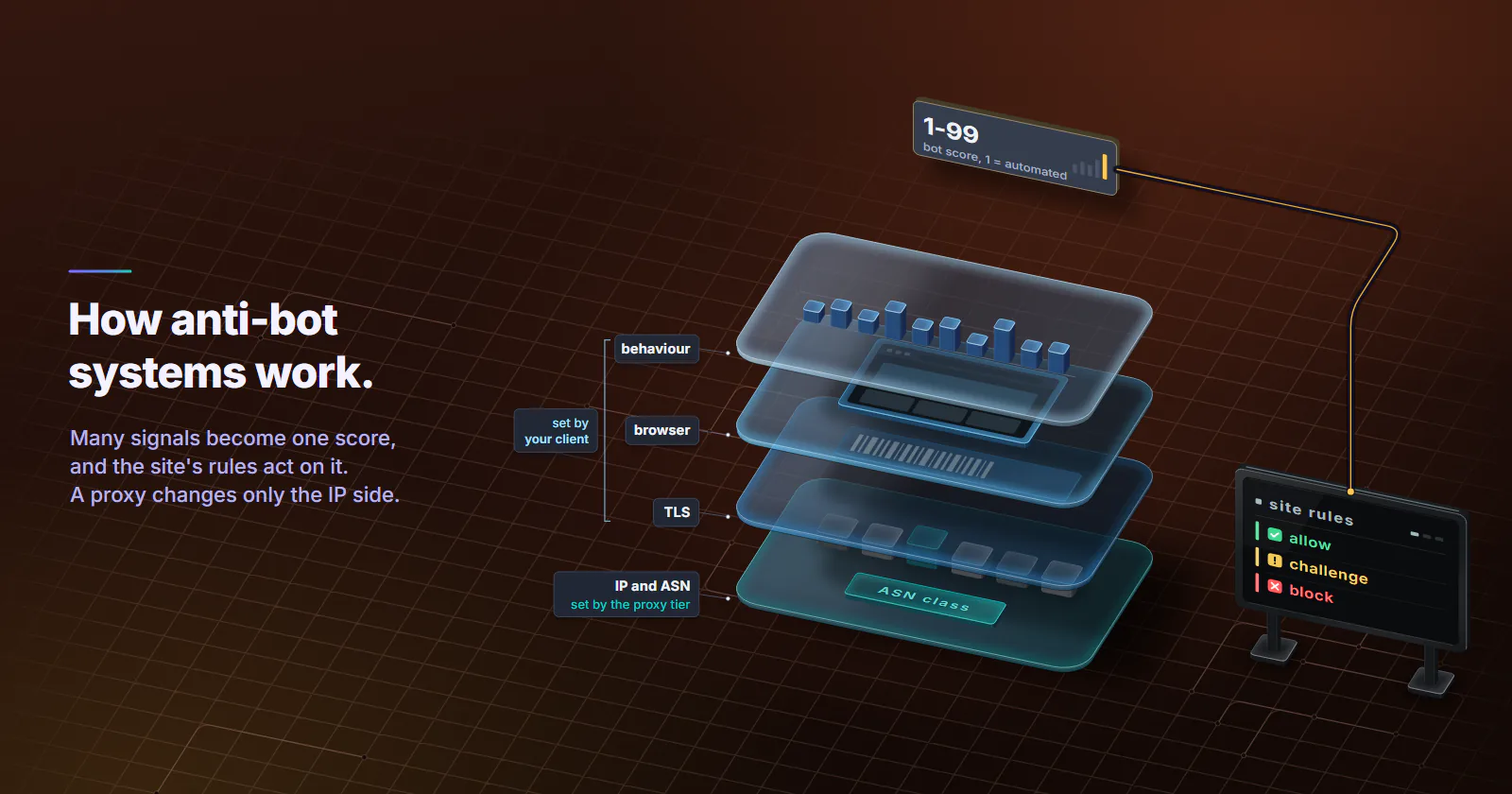
Anti-bot systems score every request. They collect signals (the IP’s reputation and network, the TLS and HTTP/2 fingerprint, JavaScript checks in the browser and behaviour across a session), combine them with heuristics and machine learning into one bot score, and pass that score to rules the site owner writes: allow, challenge or block. A proxy changes only the IP-side inputs.
That is how anti-bot systems work in outline, and the IP is one input out of several. This guide lays out the shared model from the vendors’ own public documentation, then maps each input to what a proxy tier can and cannot change.
How anti-bot systems work
The major bot management products share one shape. They collect signals on every request, combine them into a single bot score, and hand that score to a policy the site owner writes.
The score. Cloudflare’s bot score documentation (updated August 2026) describes a scale from 1 to 99. A score of 1 means Cloudflare is quite certain the request was automated, 2 to 29 is likely automated, and 30 to 99 is likely human. Akamai runs its scale the other way round. Its Bot Manager documentation (checked October 2026) defines a bot score from 0 to 100, where 0 is a human and 100 is a bot, and splits the range into cautious, strict and aggressive response segments that the customer tunes.
The engines. Several detectors feed that one number. Cloudflare’s documentation names a heuristics engine that pattern-matches requests against known malicious fingerprints, a machine learning engine trained on request features from traffic across its network, and JavaScript detections that catch headless browsers. Akamai describes transparent detection, active detection that confirms a real browser, and behavioral detection on its Premier tier.
The policy. Bot management is a scoring service plus rules the customer writes, and Cloudflare’s page says bot scores can be used in WAF custom rules to block, challenge or allow requests. A site owner decides that a login form challenges below one threshold while a product page only logs. So the same client can pass on one site and be stopped on another protected by the same vendor.
Many inputs, one score and a policy per site is how anti-bot systems work at each vendor documented here. The sections below take the inputs in the order a request meets them.
Why sites run anti-bot systems
Automated traffic is now the majority. The Imperva Bad Bot Report 2026 (April 2026) puts automated traffic at more than 53% of all web traffic in 2025, up from 51% the year before.
Not all of it is unwelcome. Search crawlers, uptime monitors and link previews are automation a site wants. The rest is what bot management is bought for: credential stuffing against login forms, fake account creation, card testing at checkout, and scraping that costs the site bandwidth or undercuts its prices.
The vendor’s job is to separate the automation a site owner accepts from the automation the owner has not agreed to, without stopping real customers. That is why the output is a score and a policy rather than a yes or no.
IP reputation and ASN
Reputation. The source address is the easiest thing to score. It is known before the TLS handshake finishes, and a vendor that sees traffic across its whole customer base holds history for it: past abuse, recent request volume, membership in known proxy or VPN ranges.
ASN class. Every IP is announced by an Autonomous System, and the owner of that ASN is public record. A hosting ASN tells the target the request left a server. A consumer ISP ASN says home connection. A carrier ASN says phone, usually behind CGNAT, where many subscribers share one public address and blocking it hits real customers too.
This is the one input a proxy tier changes outright, one of the layers laid out in how websites detect proxies. Datacenter proxies exit from hosting ASNs, which many anti-bot policies score lower than consumer networks. Residential proxies exit from consumer ISPs. Mobile proxies exit from addresses classified as cellular by MaxMind. Reputation is scored per address and changes with how the address is used.
Forwarding headers. A proxy can also announce itself before any score runs, by adding Via, X-Forwarded-For or Forwarded to the request. When we checked our own per-GB gateway on 28 September 2026, the target saw no Via or Forwarded header, and over CONNECT the proxy only relays encrypted bytes, so it cannot add X-Forwarded-For either. Headers the client sends itself still pass through untouched, so a script that sets one gives the proxy away on its own.
TLS and HTTP/2 fingerprints
Before any HTTP header arrives, the TLS handshake identifies the software making the connection. The ClientHello lists cipher suites, extensions and ALPN values in a pattern each TLS library produces differently, and methods like JA3 and JA4 turn that pattern into a fingerprint; JA3 vs JA4 compares the two field by field. The HTTP/2 layer adds a second one: the SETTINGS values, window sizes and frame order a client sends are just as library-specific.
Header order and header set. Once the request is inside the tunnel, the HTTP headers follow the same pattern. Each library sends its own default set in its own order, and a missing or unusual header is as library-specific as a cipher list. Those headers stay with the client on every tier too.
What makes the fingerprint a scoring input rather than a lookup is aggregation. Cloudflare’s JA4 Signals documentation (updated August 2026) lists statistics it keeps for each JA4 fingerprint over the last hour, across its whole network:
- the share of requests over HTTP/2 or HTTP/3
- the share that carried a browser User-Agent
- the share already flagged by heuristics
- how many distinct IPs, user agents and paths the fingerprint appeared with, ranked against every other fingerprint
A fingerprint that shows up from a large number of IPs, with few user agents and a high heuristic flag rate, looks like a fleet no matter which addresses carry it.
Through an HTTP CONNECT or SOCKS5 proxy, the TLS session runs end to end between the client and the target. The proxy relays bytes; it does not rebuild the handshake. So this input belongs to the client on every tier. Spreading the same script across more IPs can even make its fingerprint statistics look more like a fleet, because the IP count per fingerprint grows while nothing else changes.
The TCP layer is the exception. The target’s TCP connection ends at the proxy exit, so the SYN packet reflects the exit device’s operating system. The proxy tier sets that part, and on a pool of consumer devices it varies from exit to exit.
Browser and automation checks
If the page runs JavaScript, the vendor gets a second and much richer look.
Automation markers. Browsers driven by automation frameworks expose tells. The W3C WebDriver specification (Working Draft, July 2026) defines navigator.webdriver, which returns true when the browser is under remote control. Headless modes add their own: missing plugins, default window sizes, rendering that differs from a desktop GPU. Cloudflare’s JavaScript detections exist to catch exactly this kind of headless browser detection from inside the page.
Device checks. DataDome’s Device Check documentation (updated July 2026) describes a check that runs on the visitor’s device with no interaction. It collects screen properties, codecs, the browser version and hardware details such as CPUs and GPUs, then runs JavaScript tests of whether those values are consistent with each other. The same page says Device Check applies only to suspicious requests, and a verified visitor is remembered and not checked again.
Two points follow. First, these checks read the browser, not the network, so the proxy tier plays no part in them. Second, a device check is a consequence of the score. A request reaches one because earlier inputs already pushed it into the grey zone.
Behaviour and session history
Behavioral bot detection ignores any single request. It scores sequences: how fast one IP, cookie or fingerprint sends requests, the order it walks pages in, whether it loads the assets a page references, and, where a script runs, how the pointer and keyboard move.
Session state carries the history. Cloudflare’s bot score page notes that it uses the __cf_bm cookie to smooth the bot score and reduce false positives for real user sessions. So a client that keeps its cookies gives the model a history to average over, and a client that drops them on every request starts from nothing each time.
Here the proxy and the client split control. Rotation is set on the proxy: a new IP per request, a timer from 5 to 60 minutes, or a sticky session. Pace, cookie handling and navigation order belong to the client. A logged-in session that changes IP on every request looks wrong however clean each IP is. A sticky carrier IP sending dozens of requests a second looks wrong however trusted the carrier is. And because behavioral bot detection scores the sequence, no single clean request earns the session a pass.
Challenges, CAPTCHAs and false positives
The policy has more options than allow and block. In rising order of friction: log the request, run an invisible check, show a challenge, block. Vendors push most of the work into the invisible end. Cloudflare’s challenges documentation (updated April 2026) says it does not use CAPTCHA puzzles and that most visitors pass challenges automatically without interaction. Google’s reCAPTCHA v3 returns a third bot score scale, 0.0 to 1.0, with no puzzle at all, and suggests sites start with a threshold of 0.5.
So a visible challenge carries information. The invisible checks already ran and did not clear the request. Solving the puzzle does not change the inputs that put it there, and the next request meets the same score. The proxy side of this is covered in why proxies trigger captchas.
False positives. Real people get flagged too. Carrier CGNAT and VPN exits put many users behind one address, so one abuser taints everyone sharing it. Privacy extensions that block scripts leave a device check with nothing to read. That is why vendors challenge in the grey zone instead of blocking, remember visitors who passed, and smooth scores over a session.
Where the proxy tier fits
Put the inputs side by side and the proxy’s role gets small and specific.
Read it by column. The proxy tier owns the first three rows and part of the last two. None of the vendors above publishes how much weight the IP carries in the final bot score, and the answer would differ by site policy anyway. The structure is plain enough. If the handshake, the browser and the pacing each say automation, an IP upgrade changes one input and leaves the rest where they were.
What to do when challenged
When a job starts failing, work through it in this order:
- Ask whether the site wants this traffic at all. A declared route or the site’s own API comes first, and a site that does not permit automation has already answered.
- Isolate the input that decides. Only for permitted work, hold everything constant except one input at a time.
- Change that input, or stop. The diagnosis picks the fix, and changing the IP to get past a challenge is never it.
Verified bots and declared automation
A site owner who accepts a crawler has a route for it. Cloudflare’s verified bots documentation (updated July 2026) describes bots that declare who they are and obey robots.txt, confirmed through cryptographic signatures (Web Bot Auth), published IP lists or reverse DNS. For a partner feed, a price-comparison crawler the retailer agreed to, or monitoring of your own properties, that route and the site’s own API come before any proxy. If a site does not permit automated access, a block is its answer, and the right move is to stop.
Isolate the deciding input
For permitted work that still gets challenged, check your own client first. Each check below holds everything constant except one input.
- No-proxy baseline. Run the same client, at the same pace, from an ordinary home connection. If it is challenged there, the client is the problem and no proxy fixes it.
- Honest identification. Capture your client’s JA4 against a server you control. If a script library’s handshake travels with a User-Agent that claims Chrome, the request contradicts itself. Send a User-Agent that names the tool, or use a real browser for pages that need one.
- Cookie persistence. Log whether cookies set by the target come back on the next request. A client that discards them never builds session history.
If the site answers with a message instead of a challenge, the proxy detected error guide covers what each one means.
Then change that input, or stop
The decision frame follows from the diagnosis:
- If the client is challenged with no proxy at all, fix the client: its identification, its JavaScript support, its pace. Stop buying IPs.
- If a permitted job is still challenged, ask the site for its API, an allowlist or its verified-bot route; changing the IP to get past a challenge is not the fix.
- If challenges start only after some minutes of a session, look at behaviour: pace, cookie handling and whether the IP changes mid-session.
- If the challenge persists after all of that on a site with a stated no-automation policy, stop. That is the site’s decision.
- If the target runs no anti-bot vendor at all, datacenter is the fit for machine-facing work.
Frequently asked questions
Anti-bot systems collect signals on every request, including IP reputation and ASN, TCP and TLS fingerprints, JavaScript browser checks and behaviour over time. Heuristics and machine learning models combine those signals into one bot score. The site owner's policy then decides whether a given score is allowed, challenged or blocked.
A bot score is a vendor's estimate of how likely a request is to be automated. Cloudflare uses 1 to 99, where 1 is almost certainly automated and 30 to 99 is likely human. Akamai uses 0 to 100 in the other direction, where 100 is a bot, and Google reCAPTCHA v3 returns 0.0 to 1.0, where 1.0 is very likely a good interaction. Sites set their own thresholds for challenging or blocking.
No. A residential or mobile proxy changes the inputs tied to the IP: its reputation, the ASN class and the TCP stack the target sees. The TLS handshake, the browser environment and the request pacing still come from the client, and reputation is scored per address and changes with how the address is used. A client that looks automated on those inputs is still scored as automated.
Yes, often. In-page JavaScript can read automation markers such as navigator.webdriver, which the W3C WebDriver specification defines as true when the browser is under remote control, and it can check whether screen, codec, hardware and timezone values are consistent with each other. Vendors such as Cloudflare run JavaScript detections aimed specifically at headless browsers.
A web application firewall matches rules against individual requests, such as attack payloads or blocked addresses. Bot management estimates whether the client itself is automated, using fingerprints, browser checks and behaviour across many requests. The two often work together: Cloudflare's documentation says bot scores can be used in WAF custom rules to block, challenge or allow requests.
Yes. False positives come from shared addresses such as carrier CGNAT and VPN exits, privacy extensions that block the scripts a check needs, and unusual but human browsing patterns. Vendors reduce them by challenging instead of blocking in the grey zone, by remembering visitors who already passed, and by smoothing scores over a session with cookies.
Behavioral bot detection scores sequences of requests rather than single ones. It looks at request rate per IP, cookie or fingerprint, the order pages are visited, whether page assets load, and pointer and keyboard movement where a script runs in the browser. It is the input most affected by pacing and session handling.
Researched and drafted with AI tools, then checked against our publishing rules before it went live: 9 outside links, 6 links to other proxymint pages, no prices and a fact-check pass against our product records. How we write.