HTTP/2 fingerprinting: the frames and what a proxy changes
HTTP2 fingerprinting reads the SETTINGS, WINDOW_UPDATE, PRIORITY and pseudo-header order a client sends first. Real values from Chrome, Firefox and Go.
Quick summary · TL;DR
- HTTP/2 fingerprinting reads how a connection opens. The server records the client's SETTINGS values and order, its first WINDOW_UPDATE, any PRIORITY frames and the pseudo-header order, and turns them into one string.
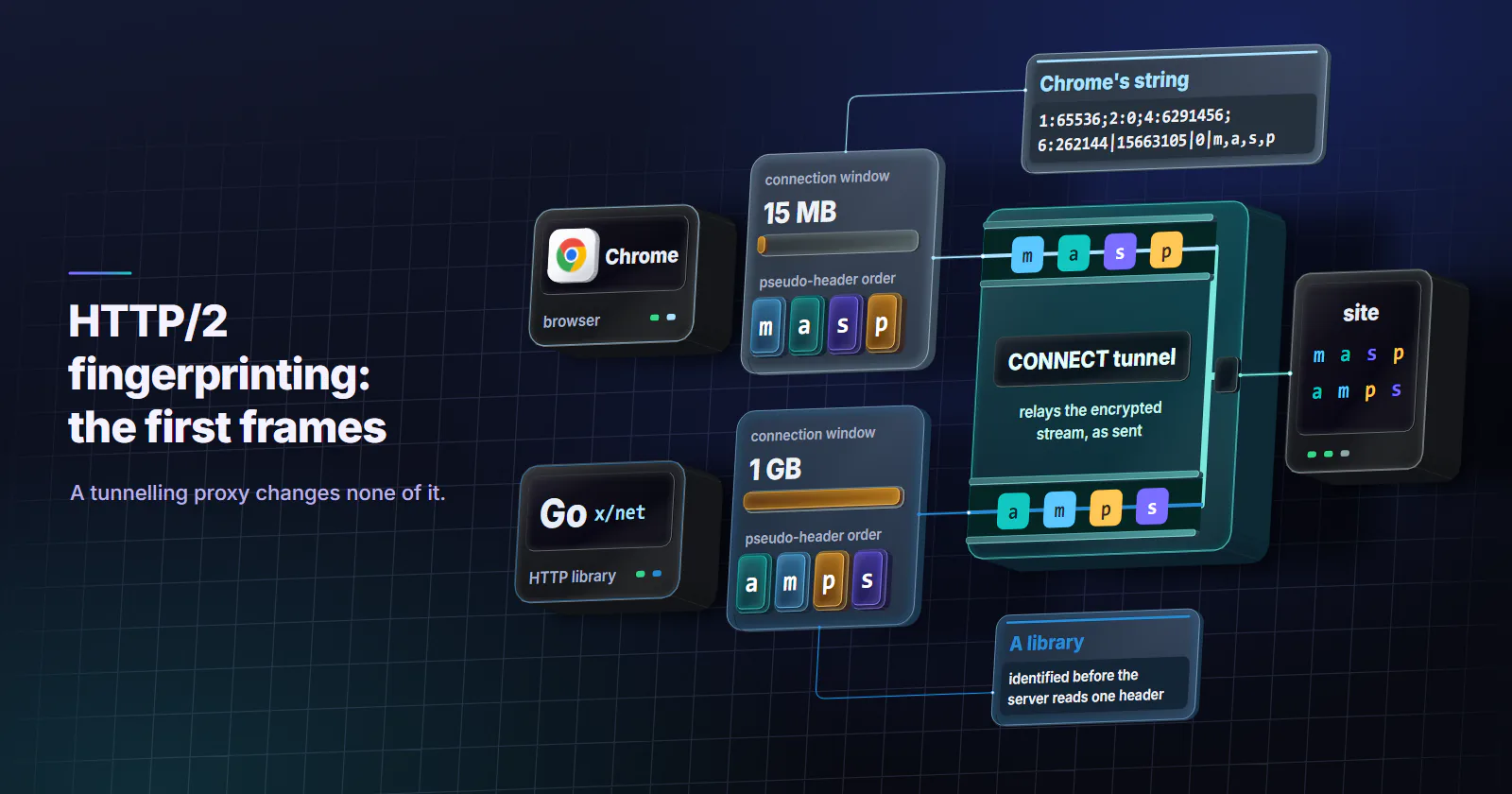
- Each client library sends different values. Chrome opens a 15 MB connection window and orders pseudo-headers m, a, s, p; Firefox opens 12 MB with m, p, a, s; Go's x/net transport opens 1 GB with a, m, p, s.
- It works together with the TLS fingerprint. ALPN in the handshake, the HTTP/2 frames, the header order and the User-Agent all have to agree; a script claiming to be Chrome fails on the first mismatch.
- A tunnelling proxy changes none of it. CONNECT and SOCKS5 relay the encrypted stream, so the HTTP/2 frames are the client's; the exit changes the IP, the network and the TCP stack.
HTTP2 fingerprinting identifies the software behind a connection from the first frames it sends after the HTTP/2 preface: the SETTINGS values and their order, the first WINDOW_UPDATE, any PRIORITY frames, and the order of the pseudo-headers in the first request. Chrome, Firefox and Go’s HTTP library each produce a different string. It names the client library, not the person.
That explains a common failure. A script sends a perfect Chrome User-Agent, rotates through clean IPs, and still gets challenged on the first request. From how the connection was opened, the server had identified a library before it read a single header.
What HTTP2 fingerprinting reads
An HTTP/2 connection over TLS starts with ALPN choosing h2 inside the TLS handshake. Then the client sends a fixed 24-byte preface, PRI * HTTP/2.0, followed by a SETTINGS frame, which RFC 9113 (June 2022) requires. The values in that frame, and the frames after it, are left to the implementation, and those choices are the fingerprint.
SETTINGS. A list of id:value pairs. The spec defines defaults for each, such as a 4,096-byte header table, a 65,535-byte initial window and a 16,384-byte maximum frame. Clients send only the settings they change, in an order their code chooses.
WINDOW_UPDATE. RFC 9113 says outright that it “does not stipulate” when a receiver sends this frame or what value it sends. Most clients open the connection-level flow-control window immediately, by an amount their authors picked.
PRIORITY. RFC 7540 let clients build a tree of stream dependencies with PRIORITY frames. RFC 9113 deprecated that scheme because it “was not successful”, and RFC 9218 (June 2022) replaced it with a priority header. Some clients still send the old frames, others send none, and either choice is visible.
Pseudo-header order. Every request starts with :method, :authority, :scheme and :path. They must come before regular headers, but no order among them is set. Each library picks one.
Akamai researchers turned these four into a string in Passive Fingerprinting of HTTP/2 Clients, presented at Black Hat Europe in December 2017. Its format joins the fields with a pipe: SETTINGS|WINDOW_UPDATE|PRIORITY|PSEUDO_HEADER_ORDER, with the pseudo-headers written as single letters (m, a, s, p). That format is still what most tools print as the “Akamai fingerprint”.
Real values from Chrome, Firefox and Go
Every value below was read from each project’s public source code on 2026-10-03.
Chrome. Chromium’s network session code sets a 64 KB header table, disables server push, sets a 6 MB stream window and a 256 KB header list limit. It also sets a 15 MB connection window, so its first WINDOW_UPDATE adds 15,728,640 minus the default 65,535: 15,663,105. Chrome’s request code adds :method, :authority, :scheme, :path in that order. Written as an Akamai string, that is 1:65536;2:0;4:6291456;6:262144|15663105|0|m,a,s,p.
Firefox. Firefox’s Http2Session sends a 64 KB header table, push off, a 128 KB initial window and an explicit 16,384-byte maximum frame size, which Chrome’s defaults leave out. Firefox opens its connection window to 12 MB, so the WINDOW_UPDATE is 12,517,377. Pseudo-headers go :method, :path, :authority, :scheme. Code for the old RFC 7540 priority tree is still there, behind a preference that ships switched off.
Go. The golang.org/x/net HTTP/2 transport starts its SETTINGS with push (id 2) rather than the header table, sets a 4 MB stream window and a 1 MB maximum frame size, and opens the connection window by 1 GB (1,073,741,824). Pseudo-headers go :authority, :method, :path, :scheme.
And Python? The requests library negotiates HTTP/1.1 by default; urllib3, underneath it, offers HTTP/2 only as an opt-in module. httpx supports HTTP/2 but leaves it off unless the client is created with http2=True. So a default Python script never produces an HTTP/2 fingerprint at all. Its TLS handshake offers http/1.1, which is a signal of its own when the User-Agent claims a current browser.
Values move between releases, so one browser can show several strings across versions. Treat the table as a dated snapshot, and capture your own before relying on any number.
HTTP/2 and TLS fingerprints together
HTTP2 fingerprinting is rarely read alone. It sits on top of the TLS fingerprint, and the two have to tell the same story.
ALPN links them. In the JA4 specification, part a of the fingerprint records the first and last characters of the first ALPN value: h2 for a client that offers HTTP/2 first, h1 for one that offers http/1.1. Any JA4 whose first section ends in h1 next to a User-Agent for a current Chrome release is already a contradiction, before any HTTP/2 frame is read. FoxIO’s JA4H method then fingerprints the request headers themselves: their count, their order, cookies and the language header.
So a detection system can hold four views of one request: the TLS fingerprint, the HTTP/2 string, the header order and the User-Agent. Real browsers produce four that agree. Scripts that copy one of them produce three that disagree with it.
HTTP/3 carries its own fingerprint
HTTP/3 replaces the TCP and TLS pair with QUIC over UDP, and the same idea carries over. JA4 marks a QUIC handshake with q as its first character instead of t, QUIC carries transport parameters that each implementation sets its own way, and HTTP/3 has a SETTINGS frame of its own. A browser that reaches a site over HTTP/3 direct and over HTTP/2 through a proxy presents two transports for the same software.
Where HTTP/2 fingerprints are used
Akamai researchers published the method for HTTP2 fingerprinting in 2017. Cloudflare documents a related signal for Bot Management customers: its JA4 Signals include h2h3_ratio_1h, the share of requests over HTTP/2 and HTTP/3 for each JA4 fingerprint across its network in the last hour. Any JA4 that travels with browser User-Agents but arrives almost entirely over HTTP/1.1 stands out in that ratio.
Uses mirror those of TLS fingerprints: bot scoring, rate limiting by client type, and blocking a known bad tool. Each match is evidence about software. It does not prove who is behind the connection, and two programs built on the same library share the same string.
How to check your HTTP2 fingerprint
Public checker pages show a fingerprint, but your request goes to them too. A cleaner method runs on a server you control, so you see exactly what a target sees and send nothing to anyone else.
nghttp2’s nghttpd server has a verbose mode that prints every frame it receives. Point a hostname at the server, get a certificate for it, then:
# on your server: print every received HTTP/2 frame
nghttpd -v 8443 server.key server.crt

# from the client machine: one request from a script
curl --http2 https://YOUR_SERVER:8443/

# the same request through a proxy, over CONNECT
curl --http2 -x http://USERNAME:PASSWORD@HOST:PORT https://YOUR_SERVER:8443/
Then open the same URL in Chrome and in Firefox. For each connection, nghttpd prints the received SETTINGS frame with each setting by name and value, the WINDOW_UPDATE increment, any PRIORITY frames, and the HEADERS frame with the pseudo-headers in the order they arrived. Write each one out as SETTINGS|WINDOW_UPDATE|PRIORITY|ORDER and compare.
For a passive view instead, Wireshark decodes HTTP/2 when the client writes its TLS keys to a file named in the SSLKEYLOGFILE environment variable; Chrome, Firefox and most curl builds support it.
What a proxy changes in the HTTP/2 fingerprint
An HTTP proxy carries HTTPS with the CONNECT method, which RFC 9110 (June 2022) defines as a tunnel: after the 200 response, the proxy relays bytes in both directions without reading them. SOCKS5 does the same at the TCP level. Everything inside, from the TLS handshake and the ALPN choice to every HTTP/2 frame, comes from the client and arrives at the target unchanged.
Measurement on the proxymint residential and mobile gateway shows the same tunnel behaviour. In proxymint Lab #1 (measured 2026-09-28), no Via or Forwarded header reached the target over CONNECT, because the gateway relays the encrypted connection without touching what is inside.
Other layers belong to the exit. Targets see the exit’s IP address, its network (ASN), and the TCP/IP stack of the machine that opens the final connection, the signals covered in how websites detect proxies. Those are what separate rotating residential proxies from datacenter or mobile exits, and the types of proxies guide compares the categories on exactly those signals.
There is one protocol effect. HTTP/3 runs over QUIC on UDP, and a classic HTTP CONNECT proxy carries TCP only. So a browser sending traffic through one reaches the target over HTTP/2 or HTTP/1.1, whatever it would use direct.
Fix the client, then pick the exit
HTTP2 fingerprinting sorts traffic by software, so the fix starts with the software.
- If the target expects a browser, drive a real browser engine. Its TLS, ALPN, HTTP/2 frames and header order then agree with its User-Agent, because they all come from the same code.
- If you run a script, send an honest User-Agent that names your tool. Official APIs and lenient targets accept declared automation, and a library claiming to be Chrome is the mismatch that HTTP/2 checks catch.
- Check your own fingerprint with the capture above, direct and through your proxy. Through a tunnelling proxy the string should be identical.
- Then choose the egress category by what the target checks on the IP side: datacenter where hosting networks are accepted, residential where the target expects a home connection, mobile where a carrier origin is the expected one.
None of this is about defeating a check. Where a target forbids automation in its terms, respect that.
Frequently asked questions
HTTP/2 fingerprinting identifies the software behind a connection from the first frames it sends: the SETTINGS values and their order, the first WINDOW_UPDATE increment, any PRIORITY frames and the order of the pseudo-headers in the first request. Browsers and HTTP libraries choose these differently, so the combination names the client. It identifies the library, not the person.
It is the string format Akamai researchers presented at Black Hat Europe in December 2017. Four fields are joined with a pipe: the SETTINGS id:value pairs, the WINDOW_UPDATE increment, the PRIORITY frames and the pseudo-header order as letters. Chrome's comes out as 1:65536;2:0;4:6291456;6:262144|15663105|0|m,a,s,p.
TLS fingerprinting, with methods such as JA3 and JA4, reads the ClientHello of the encrypted handshake. HTTP/2 fingerprinting reads the frames sent after the handshake inside the encrypted connection, so the server sees them only after decrypting. The two are linked by ALPN: a client that offers http/1.1 in its handshake cannot also present a browser's HTTP/2 frames.
No, not a tunnelling proxy. An HTTP proxy using CONNECT, or a SOCKS5 proxy, relays the encrypted connection without reading it, so the SETTINGS, WINDOW_UPDATE and header frames reach the target exactly as the client sent them. The proxy changes the IP address, the network and the TCP stack the target sees. Through a classic HTTP CONNECT proxy, which carries TCP only, the connection also cannot use HTTP/3.
Run the nghttpd server from nghttp2 with the -v flag on a server you control and send requests to it from your browser and from your script. It prints each received SETTINGS frame, the WINDOW_UPDATE increment, PRIORITY frames and the pseudo-header order. Repeat the request through your proxy to confirm the string does not change.
Yes. HTTP/3 runs over QUIC, and the QUIC transport parameters and HTTP/3 settings differ between clients in the same way. Cloudflare also tracks the share of HTTP/2 and HTTP/3 requests per JA4 fingerprint. Traffic through a classic HTTP CONNECT proxy, which carries TCP only, reaches the target over HTTP/2 or HTTP/1.1 instead.
The requests library speaks HTTP/1.1 by default and offers only http/1.1 in its TLS handshake. When the same request carries a current Chrome User-Agent, the protocol contradicts the claim before any page loads. httpx can use HTTP/2 with http2=True, but its frames still match its own stack, not a browser's.
Researched and drafted with AI tools, then checked against our publishing rules before it went live: 11 outside links, 4 links to other proxymint pages, no prices and a fact-check pass against our product records. How we write.