CDP detection: how sites spot Chrome DevTools automation
How CDP detection spots Puppeteer, Playwright and Selenium through the Chrome DevTools Protocol, what the 2025 V8 change broke, and what a proxy changes.
Quick summary · TL;DR
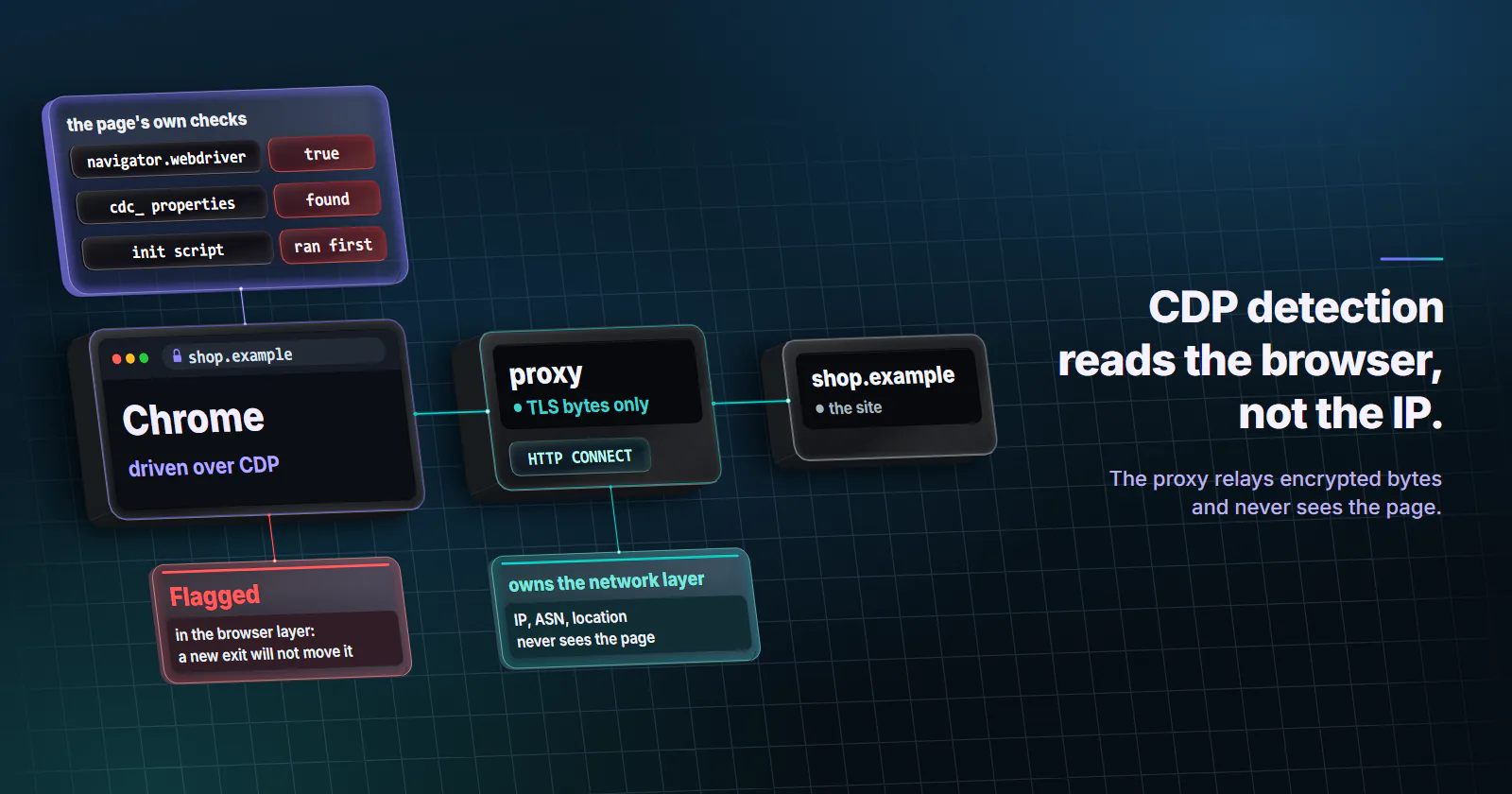
- CDP detection targets the automation channel, not the fingerprint. Since Chrome 112, headless Chrome shares the regular Chrome code, so detection moved to side effects of the Chrome DevTools Protocol that Puppeteer, Playwright and ChromeDriver all use.
- The classic Runtime.enable probe went quiet in 2025. Two V8 commits in May 2025 stopped error previews from running user-defined getters, and Castle reports the error-getter check no longer fires on current Chrome.
- Other signals still fire. navigator.webdriver, ChromeDriver cdc_ residue, Playwright bindings, init scripts, launch defaults and behaviour remain readable from page JavaScript.
- A proxy cannot touch any of it. Over HTTP CONNECT the proxy relays encrypted bytes and never sees the page; it owns the IP, ASN, geolocation and network layer only.
CDP detection is the set of checks a website runs to tell whether Chrome is being driven through the Chrome DevTools Protocol, the remote-control channel behind Puppeteer, Playwright and Selenium’s ChromeDriver. It looks for side effects of that channel and for residue the automation framework leaves in the page. A proxy does not change any of it.
In a common failure, a Playwright job gets a challenge page, the team swaps datacenter exits for residential ones, and the challenge stays. The address was never the problem; the browser was announcing itself.
What CDP detection looks for
Chrome exposes the DevTools Protocol as a JSON-over-WebSocket interface for debugging, and its own DevTools panel runs on it. So does almost every Chromium automation tool: Puppeteer speaks it directly, Playwright drives Chromium through it, and Selenium reaches Chrome through ChromeDriver, which talks to the browser over the same protocol.
CDP detection does not see the WebSocket, because a site has no access to it. What it can see is everything the protocol changes inside the page: objects that get read when they normally would not, globals a framework injects, scripts that run before the page’s own code, flags set at launch.
| Signal | Where it comes from | What the page observes |
|---|---|---|
| Runtime domain side effects | The client enabling Runtime events | Logged objects read during console serialization |
navigator.webdriver | W3C WebDriver flag, set under remote control | true instead of false |
| ChromeDriver residue | ChromeDriver helper objects | Properties named with a cdc_ prefix on document or window |
| Playwright and Puppeteer residue | Bindings and exposed functions | Extra functions on window, unusual toString() output |
| Init scripts | Page.addScriptToEvaluateOnNewDocument | Code that ran before the page’s first script |
| Launch flags and defaults | Automation switches, headless defaults | Window size, missing permissions, automation infobar state |
Vendors treat each row as one piece of evidence and combine it with network and behaviour data into a single score.
Why detection moved to the protocol
For years, headless Chrome was easy to spot from its fingerprint alone, since old headless mode was a separate implementation with its own gaps: missing plugins, odd navigator values, a tell-tale user agent.
That changed in 2023. Chrome’s developer blog records that the new headless mode arrived in Chrome 112, built on the same code as regular Chrome, and that the old mode was removed from the Chrome binary in Chrome 132 and shipped separately as chrome-headless-shell. A headless browser now renders, reports and fingerprints almost exactly like a headed one.
With the fingerprint gap closed, detection teams went after the thing every automated session shares. DataDome’s research write-up (updated 13 June 2024) made the case directly: new headless and Chrome share a codebase, so a check aimed at the automation protocol catches Puppeteer, Playwright and unknown frameworks alike, including ones built to look clean.
How the Runtime.enable signal works
Runtime.enable. The Runtime domain documentation says the command turns on reporting of execution contexts through the executionContextCreated event. Automation clients send it on nearly every page, because they need those contexts to run scripts and to receive consoleAPICalled events.
Serialization. Once Runtime events are on, Chrome forwards console calls to the client. To send a logged object across the protocol, the inspector has to build a preview of it, and building a preview means reading its properties.
The side effect. If a page logs an object whose property is a getter, a normal browser with DevTools closed never reads it. A browser with a CDP client listening reads it while building the preview. So the getter runs, the page records that it ran, and the session is flagged. A popular variant used an Error object with a getter on its stack property.
Detection teams liked it because it was framework-agnostic: it did not care which library sent Runtime.enable, or how clean the fingerprint looked. It also had a cost. A person with DevTools open trips the same side effect, because the DevTools front end is itself a CDP client, so a site that blocked on this check alone would flag its own curious visitors.
What the 2025 V8 change broke
In May 2025, two commits landed in V8 that changed how the inspector previews error objects: user-defined getters no longer run during a preview. Castle’s analysis traces the change to those two commits, on 7 and 9 May 2025, after which the error-getter probe stopped firing on current Chrome.
That does not make CDP invisible. A March 2026 write-up by the researcher Sveba describes variants that reach a getter through the prototype chain instead of the error’s own property, which the patch does not guard, and older Chrome builds still carry the original behaviour. So the signal is narrower and version-dependent now. Automation projects responded too, with builds that avoid enabling the Runtime domain or send fewer CDP commands, and detection vendors shifted weight to the other rows in the table above: residue, flags and behaviour.
Signals that still expose CDP automation
The WebDriver flag. The W3C WebDriver specification defines a webdriver-active flag that is true “when the user agent is under remote control”, and navigator.webdriver returns it. Selenium sessions set it by design. Puppeteer passes Chrome’s --enable-automation switch, and Chrome also sets the flag when it is driven over a remote-debugging pipe, which Playwright uses.
Framework residue. ChromeDriver has historically left helper properties with a cdc_ prefix on document. When a test calls exposeBinding or exposeFunction, Playwright installs binding functions on window so the page can call back into the test runner, and Puppeteer adds a wrapper function for every exposed function. Default sessions that expose nothing do not carry these. A script that enumerates window and reads function sources can find them.
Init scripts. Frameworks inject code with Page.addScriptToEvaluateOnNewDocument, which runs in the page before the site’s own scripts. Code injected this way can leave changed prototypes, wrapped native functions and timing gaps that a careful detector measures.
Launch defaults. Automation launches tend to share a profile: a fresh user data directory, a default window size, permission states nobody has touched. Since Chrome 136 (announced 17 March 2025), branded Chrome ignores the remote debugging switches on the default profile, which pushes automation onto separate profiles without the history of a real one. Chrome for Testing keeps the old behaviour.
Behaviour. Synthetic input arrives with perfect timing, no pointer movement between clicks, and navigation faster than reading. This layer sits outside the protocol, but detection systems score it next to CDP signals.
Test your own browser for CDP signals
A page on your own server makes the cleanest check. You see exactly what a target’s script can see, and nothing leaves your infrastructure.
- Serve one HTML page from a server you own, with a small script that collects signals and posts them back.
- Load it from each client you run: headed Chrome by hand, new headless Chrome, Puppeteer default, Playwright default, Selenium default.
- Load it again from the same clients through each proxy exit you use.
- Compare the logs per client and per path.
// Runs in the page. Reports what a site's own script can read.
const report = {
  webdriver: navigator.webdriver,
  documentKeys: Object.keys(document).filter((k) => /cdc_/i.test(k)),
  windowKeys: Object.keys(window).filter((k) => /playwright|puppeteer|cdc_/i.test(k)),
  userAgent: navigator.userAgent,
  viewport: [window.innerWidth, window.innerHeight],
};
fetch('/log', { method: 'POST', body: JSON.stringify(report) });
Expect the browser-side fields to differ by client and to stay identical across proxy paths. Only the IP, location and network fields in your server log should change when the exit changes.
What a proxy changes for CDP detection
A proxy sits on the network path. For an https:// site, the client opens a tunnel with HTTP CONNECT, and RFC 9110 describes the proxy from then on as a blind relay of bytes. It never sees the page, so it cannot add, remove or change a JavaScript global. proxymint Lab #1 measured the same thing at the header level on proxymint’s residential and mobile gateway on 28 September 2026: no Via or Forwarded header reached the target through the CONNECT tunnel.
So a CDP detection flag is a browser-layer problem, and changing exits does not move it. Our guide to how websites detect proxies covers the network-side checks an exit does answer for. Proxy category matters for the rows the exit owns. Rotating residential proxies give a home-network origin for pages that show consumers different content than hosting networks, such as regional price checks and ad verification. Datacenter proxies serve targets that accept hosting networks, at speed and volume. The types of proxies overview maps each category to the requirement it serves.
WebDriver BiDi and what comes next
WebDriver BiDi is the W3C’s bidirectional successor to classic WebDriver, built to give every browser CDP-style events. Firefox deprecated its partial CDP support in Firefox 129, per Mozilla’s announcement (May 2024), and removed it in Firefox 141 (announced June 2025). Puppeteer, Selenium and Cypress now drive Firefox over BiDi.
In Chrome, BiDi does not replace the protocol underneath. The chromium-bidi README describes it as a layer that translates between BiDi and CDP inside a Chrome tab. Switching a script to BiDi changes the client API while Chrome stays remote-controlled, and navigator.webdriver stays true under either protocol.
When CDP detection should change your plan
Use the layer to pick the fix:
- The challenge persists on every exit type. The flag is in the browser. Check the client against the self-test above, and confirm the site permits automated access before going further.
- The site offers an API, a feed or verified bot access. Use it. It is stable, documented and does not depend on how a browser fingerprints.
- You test your own site or a partner’s. Ask the site operator to exempt your test traffic from bot scoring, so the test measures your site and not the detector.
- The browser is clean and the IP is the issue. Your log shows browser fields matching a normal Chrome and blocks that track the exit’s network type. That is the one case a proxy category changes, and the choice follows the target: residential for consumer-origin pages, datacenter for lenient targets at volume.
Frequently asked questions
CDP detection is the set of checks a website runs to tell whether Chrome is being remote-controlled through the Chrome DevTools Protocol. The site cannot see the protocol connection itself, so it looks for side effects inside the page: objects read during console serialization, automation flags, injected functions and scripts that ran before the page's own code.
Yes, in their default configuration. Both drive Chromium over the Chrome DevTools Protocol, and both launch Chrome under remote control, which sets navigator.webdriver to true. When a script calls exposeFunction or exposeBinding, they also add helper functions to the page that a script can enumerate. Detection vendors combine these signals with IP and behaviour data into one score rather than blocking on a single check.
Runtime.enable is a Chrome DevTools Protocol command that turns on reporting of JavaScript execution contexts and lets the client receive console events. Automation tools send it on almost every page. With it on, Chrome serializes logged objects for the client, which is the side effect the classic CDP detection probe measured.
The best-known form is largely dead on current Chrome. Two V8 commits in May 2025 stopped the inspector from running user-defined getters when it previews error objects, so the error-stack getter no longer fires. Variants through the prototype chain have been reported since, and older Chrome builds keep the original behaviour.
Selenium controls Chrome through ChromeDriver, which talks to the browser over the Chrome DevTools Protocol, and Selenium 4 also exposes CDP commands directly. Selenium sessions set navigator.webdriver to true by design under the W3C WebDriver standard, and ChromeDriver has historically left properties with a cdc_ prefix on the document.
No. For https sites the proxy relays an encrypted tunnel opened with HTTP CONNECT and never sees the page's JavaScript, so it cannot change any CDP signal. A proxy controls the IP address, ASN, geolocation and network layer, which matter for different checks.
Not in Chrome. Chrome implements WebDriver BiDi through chromium-bidi, a layer that translates BiDi commands into CDP inside the browser, so the protocol underneath is the same. Under either protocol the browser is under remote control and navigator.webdriver reports true.
Researched and drafted with AI tools, then checked against our publishing rules before it went live: 11 outside links, 5 links to other proxymint pages, no prices and a fact-check pass against our product records. How we write.