How to choose a residential proxy provider: a buyer's checklist
How to choose a residential proxy provider: sourcing and consent, pool depth where you need it, sessions, geo accuracy, real cost per GB and a test plan.
Quick summary · TL;DR
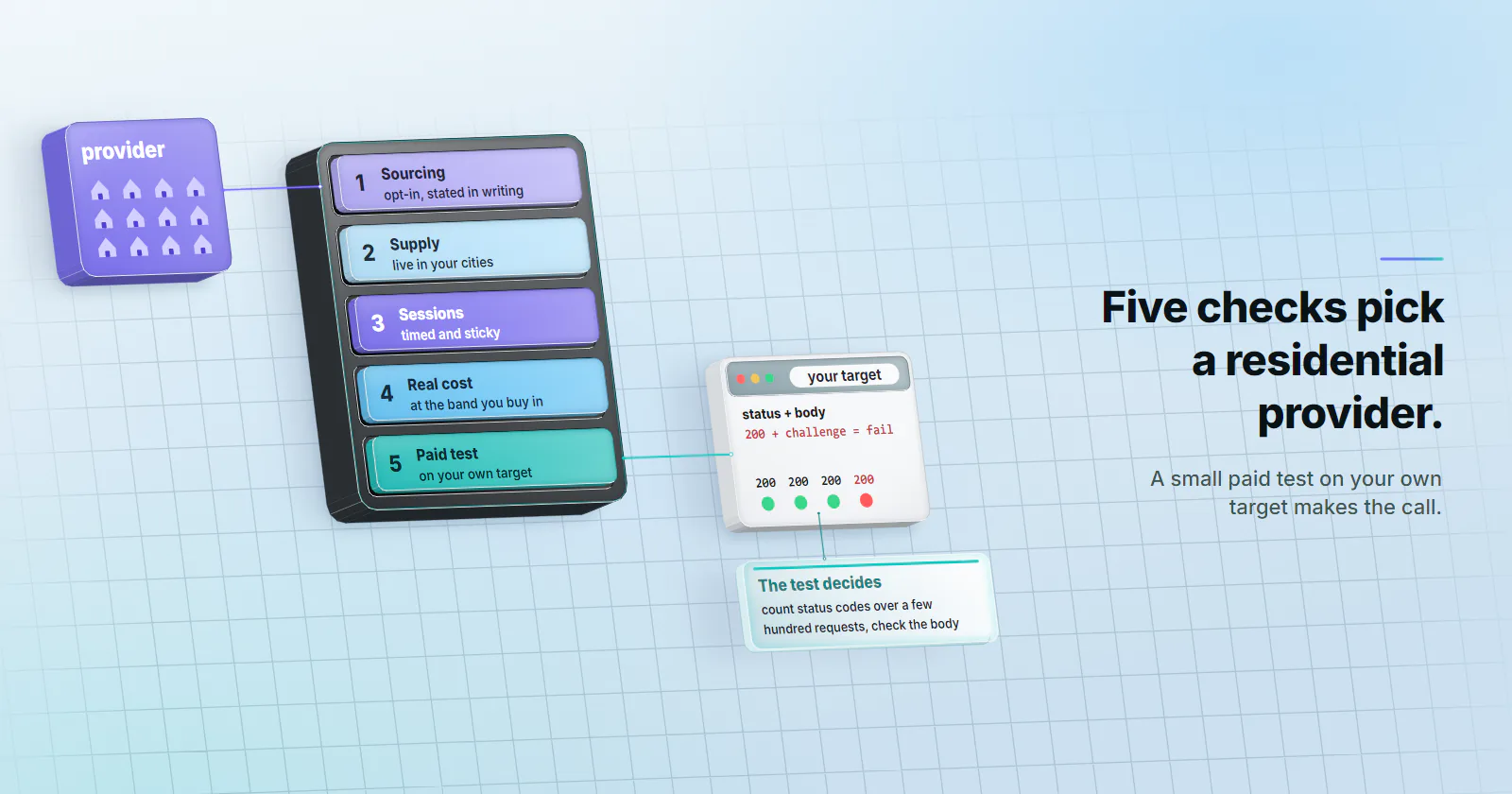
- Five checks decide a residential proxy provider. Sourcing and consent, live supply in your cities, session controls, the real cost at your band, and a small paid test on your own target.
- Consent needs a statement, not a badge. Ask how devices joined the pool, whether owners agreed, and whether they can leave.
- City targeting is only as good as the target's IP database. MaxMind states about 66% accuracy for US cities within 50 km, against about 99.8% at country level.
How to choose a residential proxy provider comes down to five checks: where the exits come from and who consented, live supply in the exact cities the job needs, session controls that match the workflow, the real cost at the band you will buy in, and a small paid test on your own target before any larger order.
Most pages ranking for this question are ranked lists. They quote a pool size, a “from” price and a success rate nobody can check, and they end with an affiliate link. None of that tells a buyer whether a pool will hold a 20-minute session in Leeds at 2 a.m., or how many requests succeed on the buyer’s own target.
Each section below says what to ask, what a strong answer looks like and where a weak one hides. It ends with proxymint answering the same checklist for its own residential tier, and with the jobs another tier fits better.
How to choose residential proxy providers
A residential proxy routes requests through an IP address that a consumer ISP assigned to a home connection. The residential proxy guide covers the mechanism. The buying question is narrower: which network gives this job the addresses it needs, legally sourced, at a unit that fits the volume.
Start with the job
The first step in how to choose a residential proxy provider happens before any pricing page opens: write the job down. Four lines are enough:
- Targets. Which sites, and how strict they are. A retail catalog, a search engine results page and a signed-in dashboard behave very differently.
- Places. Countries, and the regions or cities that matter. “Germany” and “Munich” are different purchases.
- Session length. One request per IP, a 10-minute flow, or one identity held for hours.
- Volume. Monthly GB, from page weight times page count. A 400 KB page fetched 60,000 times is about 24 GB before retries.
That brief decides everything below. The provider that carries a high-volume catalog crawl well can be the wrong one for a single city-level price feed, and the reverse.
Sourcing and consent
Sourcing is the check listicles skip.
IP sourcing and consent evidence
Residential exits are other people’s connections. The question is how a device joined the pool, whether its owner agreed, and whether the owner can leave. Ask for that in writing, the same way a proxy provider security review collects its answers. A badge that says “ethically sourced” is not an answer.
Legality follows from the same facts. Whether a residential proxy is lawful to use turns on how its exits were enrolled and what the buyer does with them, which is why the sourcing answer belongs in writing.
Pool depth and geo accuracy
A headline pool of tens of millions of IPs says little about the addresses a job will touch.
Pool depth where you need it
What matters is live supply in the reader’s countries and cities, at the hour the job runs. A pool can be huge in total and thin in Lyon at night, when home devices sleep and exits churn.
Ask for supply by city, not by country, and ask whether the list is live (devices online now) or static (every address ever seen). Then check it in the test, because the only depth figure that counts is how many distinct exits a job sees in a day.
Geo-targeting granularity and accuracy
Two questions settle geo. Which levels are offered (country, region, city, anything finer)? Is location set per order or per request? The guide to geo targeted proxies covers how each level is set and checked.
Then remember that the target decides the location, not the vendor. Sites read the exit IP through a geolocation database. MaxMind, one of the largest, states about 99.8% accuracy at country level but about 66% for US cities within a 50 km radius (MaxMind support, read 2026-09-28). A “city-level” exit can honestly read as the next city over. Test with the database the target uses, or with the target’s own location display.
Sessions, protocols and setup
Session control decides whether a workflow survives an IP change. The trade-off between the modes is laid out in rotating vs sticky proxies.
Session and rotation controls
Per-request rotation. A new IP on every request. Right for broad collection where no state carries over.
Timed sessions. The same IP for a set window, for example 10 or 30 minutes. Right for short flows: a search, a few pages, a cart.
Sticky sessions. One IP held as long as the home device stays online. Home connections drop, so no residential vendor can promise a sticky IP for days. For that, a static ISP address is the better fit.
Ask how rotation is set (on the order, per port, or in the username), whether it can change later without new credentials, and what ends a sticky session early.
Protocols, authentication and setup
Expect HTTP and SOCKS5 on the same product. HTTPS sites do not need a separate proxy protocol: the client opens a CONNECT tunnel through the proxy and TLS runs end to end to the target (RFC 9110, 2022-06). Use http:// or socks5:// as the scheme to the proxy itself.
Authentication is usually a username and password. A one-line check confirms the credentials and the exit before any code is written:
curl -x "http://HOST:PORT" -U "USERNAME:PASSWORD" "https://ECHO_ENDPOINT"Point it at an endpoint the team controls that returns the caller’s IP and headers. It shows the exit IP the target sees and the headers that arrive with the request.
Pricing model and real cost
Residential is almost always sold per GB, in volume bands. The rate on the banner is the rate at the top band. A team that buys 25 GB a month pays the rate for 25 GB.
Three things turn a rate into a real cost:
- The band you will buy in. Price your actual monthly GB, not the volume that unlocks the banner rate.
- Expiry. Some plans reset unused GB each month; others keep it. A team with uneven months loses the unused GB on a reset.
- Refund terms. What a first purchase can be returned for, and what happens if the pool degrades.
proxymint’s rotating residential proxies are sold per GB, with no expiry set on the balance. How the per-GB rate is built is covered in residential proxy pricing.
The number to compare across vendors is successful requests per GB: the requests that returned the page you wanted, retries included, divided by the GB they used. A pool that needs three attempts per page uses three times the GB for the same pages, and the test plan below produces both numbers.
Test plan before committing
A questionnaire tells you what a vendor says. A small paid package tells you what the pool does. Buy the smallest package that covers a real sample, and run it against a target you are permitted to access, at the concurrency the job will use.
Measure five things:
- Success rate on the real target. Count status codes over a few hundred requests. A 200 with a challenge page is a failure, so check the body too.
- Behaviour at concurrency. Run the same test at the thread count the job will use. Pools that pass one request at a time can fail at 50.
- Geo accuracy. Check each exit against the target’s own location display or its geolocation database.
- Exit reuse and spread. Log exit IPs over 1,000 requests and count distinct ones, then distinct /24 blocks and ASNs. Heavy repeats on per-request rotation mean a thin pool in that place, and many exits in a few blocks share one reputation.
- Latency. Record the total time per request next to the status code. Residential exits run over home lines, so compare the spread across vendors on the same target, not against datacenter speeds.
A minimal status and timing log (count the codes, then sort the times):
for i in $(seq 1 200); do
  curl -s -o /dev/null -w "%{http_code} %{time_total}\n" \
    -x "http://HOST:PORT" -U "USERNAME:PASSWORD" "https://TARGET_URL"
done > results.txt
cut -d" " -f1 results.txt | sort | uniq -c
If the target answers with blocks or challenges, stop there. That result is the answer for that target.
Support, terms and red flags
Read the acceptable-use terms before the pricing page. A vendor that bans nothing shares its pool with anyone, and those customers burn the same exits you rent. Look for named bans and an abuse contact. Then read the refund and degradation terms, and ask one technical question through support to see who answers and how.
Red flags that should end a shortlist: sourcing claims with no consent statement, and terms with no named bans.
The checklist, answered by proxymint
Here is proxymint’s residential tier against the same checklist, from its product page, privacy policy and terms.
| Check | proxymint residential |
|---|---|
| Sourcing and consent | Residential exits come from device owners who opted in and can opt out. |
| Geo | Country, region and city, from locations with devices online when you order. Set on the order and changeable later. |
| Rotation | A new IP every request, a 5-60 minute timer, or sticky while the device stays online. Changeable later with the same credentials. |
| Protocols and login | HTTP and SOCKS5, both included. Username and password. |
| Price | Per GB in volume bands, one-off packages with no renewal. proxymint does not set an expiry on GB. |
| Refunds | 7-day money-back on a first purchase if under 10% of the data or 1 GB is used, whichever is larger. Refund or credit within 24 hours of confirming a degraded pool. |
Which provider fits your job
In practice, how to choose a residential proxy provider comes down to three moves: shortlist on written sourcing answers, price at your real monthly GB, then let a small paid test on your own target make the decision.
And check that residential is the right tier at all:
- Lenient targets and high volume: datacenter proxies fit, with fast server uplinks and billing per port.
- One identity for days, or a login tied to one place: a static ISP address holds where a home device drops.
- Platforms that only trust mobile origins: mobile carrier IPs, not residential.
- Geo-specific collection, price monitoring and ad checks on home networks: residential, with city targeting and the rotation mode matched to the flow.
Frequently asked questions
Start by writing down the targets, the cities, the session length and the monthly GB the job needs. Then ask each provider in writing how its exits are sourced, price your real monthly GB including expiry, and run a small paid test on your own target before a larger order.
No. A global pool total says little about live supply in the city a job needs at the hour it runs. The useful measure is how many distinct exits a test sees on your target, in your location, over a day.
Residential proxies are sold per GB in volume bands, so the banner rate is usually the top-volume rate. Compare providers at the GB you will actually buy each month, and check whether unused GB expire. On proxymint residential is sold in one-off per-GB packages whose rate falls as the package grows, with every band on the [pricing page](/pricing/).
Ask, in writing, how devices joined the pool and whether their owners can leave; which cities have devices online at the hours the job runs; how rotation is set and whether it can change later without new credentials; whether the band table, GB expiry and refund terms are published; and whether a small paid package is available to test on your own target.
Rotating proxies give a new IP on every request and suit broad collection where no state carries over. Timed or sticky sessions keep one IP for a short flow such as a search or a cart. Home devices go offline, so for one identity held for days a static ISP proxy is the better fit.
Yes, and it is the most reliable check. Buy the smallest package that covers a real sample, run it on a target you are permitted to access at your real concurrency, and measure success rate, geo accuracy and exit reuse. If the target blocks or challenges the traffic, treat that as the answer for that target.
Ask, in writing, how devices joined the pool, whether their owners agreed, and whether they can leave. A provider that only says its pool is ethically sourced has not answered the question. proxymint's answer: residential exits come from device owners who opted in and can opt out.
Researched and drafted with AI tools, then checked against our publishing rules before it went live: 2 outside links, 7 links to other proxymint pages, no prices and a fact-check pass against our product records. How we write.