
Scrapy proxy setup: middleware, rotation and retry rules
Set a Scrapy proxy with meta or a middleware, then fix what breaks: tunnels that pin one exit, 407 TunnelErrors, per-domain concurrency and retries.
Quick summary · TL;DR
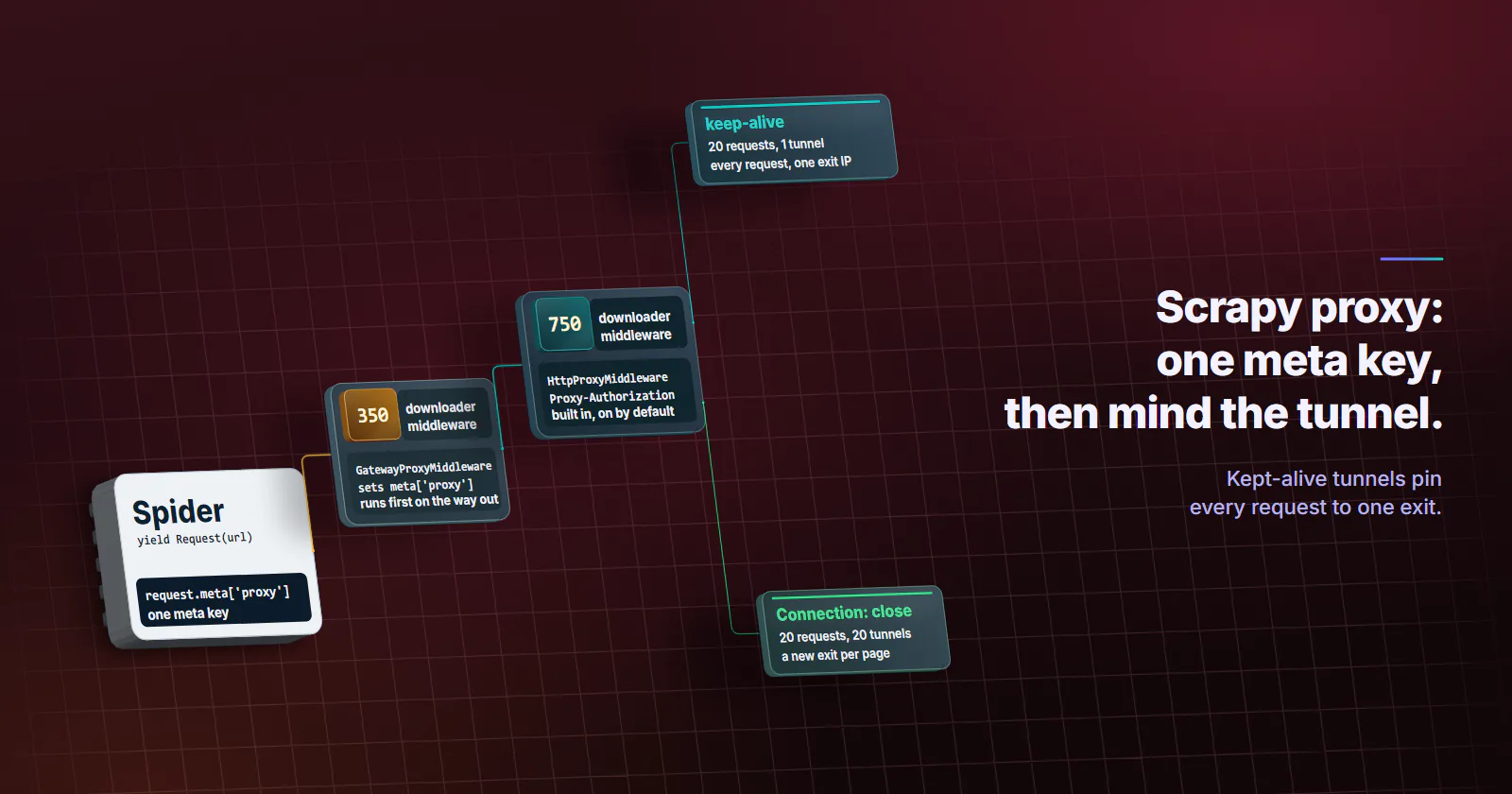
- A Scrapy proxy is one meta key. Set request.meta["proxy"] to http://USERNAME:PASSWORD@HOST:PORT, or set it on every request from a downloader middleware at priority 350. The built-in HttpProxyMiddleware does the rest.
- Kept-alive tunnels pin the exit. Scrapy reuses CONNECT tunnels for HTTPS, and every request inside one tunnel leaves from the same IP. In a local lab, 20 requests at template settings used 1 tunnel; a Connection: close header gave 20.
- A 407 on an HTTPS page is a TunnelError, retried twice. TunnelError is in the default retry list, so bad credentials cost three attempts per URL. On a plain http:// page the 407 is a response that is dropped after one attempt.
- CONCURRENT_REQUESTS_PER_IP is deprecated and never meant the proxy. It keyed limits on the target's resolved IP. Scrapy 2.14.0 deprecated it; per-domain limits and AutoThrottle are what protect the site.
- Scrapy retries 429 at once and ignores Retry-After. A small middleware that raises the domain's delay and retries once turns rate-limit responses into a slower crawl instead of extra traffic.
To set a Scrapy proxy, put the proxy URL in the request’s meta["proxy"] key, as http://USERNAME:PASSWORD@HOST:PORT. Scrapy’s built-in HttpProxyMiddleware, enabled by default, reads it, turns the credentials into a Proxy-Authorization header, and opens a CONNECT tunnel for HTTPS pages. For a whole project, a small downloader middleware sets the same key on every request.
The problems come after that line. An order set to a new IP on every request can still show one exit for a whole run, because Scrapy reuses its tunnels. Wrong credentials show up as a TunnelError that Scrapy retries twice. A setting copied from an old tutorial, CONCURRENT_REQUESTS_PER_IP, has been deprecated since January 2026 and never measured the proxy anyway. And on a per-GB plan, retries are traffic. Every claim below was checked against Scrapy 2.19.0 (released 2026-09-10) and a local lab run.
Scrapy proxy setup: three ways
Per request, with meta. The fastest Scrapy proxy setup is one key on the request:
yield scrapy.Request(
    "https://example.com/catalog",
    meta={"proxy": "http://USERNAME:PASSWORD@HOST:PORT"},
)
From the environment. HttpProxyMiddleware also reads http_proxy, https_proxy and no_proxy, like Python’s urllib. That suits a container where the proxy is part of the deployment rather than the code:
export https_proxy="http://USERNAME:PASSWORD@HOST:PORT"
export http_proxy="$https_proxy"
scrapy crawl catalog
From a middleware. For a project, a downloader middleware that sets meta["proxy"] on every request keeps the spider code clean. The next section has one.
Precedence matters when two of these meet. The Scrapy downloader middleware docs (2.19, checked 2026-10-08) state that a meta["proxy"] value wins over the environment variables and ignores no_proxy. Setting meta["proxy"] to None sends one request direct.
The scheme of the proxy URL should be http:// in every case, for http:// and https:// pages alike. Scrapy’s default download handler sends CONNECT host:443 through an http:// proxy and runs TLS end to end with the site. An https:// proxy URL for an HTTPS page raises NotImplementedError in the default handler; the same docs say it supports HTTPS proxies only for HTTP destinations. The proxy format guide covers turning a host:port:user:pass line from a dashboard into this URL shape.
Scrapy proxy middleware for every request
A Scrapy proxy middleware only has to set one meta key before HttpProxyMiddleware runs. Built-in downloader middlewares are ordered by number, and HttpProxyMiddleware sits at 750, so a custom one at 350 runs first on the way out:
# middlewares.py
import os
from urllib.parse import quote


class GatewayProxyMiddleware:
    """Route every request through one gateway, credentials from the environment."""

    def __init__(self, proxy_url, new_exit_per_request):
        self.proxy_url = proxy_url
        self.new_exit_per_request = new_exit_per_request

    @classmethod
    def from_crawler(cls, crawler):
        user = quote(os.environ["PROXY_USER"], safe="")
        password = quote(os.environ["PROXY_PASS"], safe="")
        url = f"http://{user}:{password}@{os.environ['PROXY_HOST']}:{os.environ['PROXY_PORT']}"
        return cls(url, crawler.settings.getbool("PROXY_NEW_EXIT_PER_REQUEST"))

    def process_request(self, request, spider=None):
        request.meta.setdefault("proxy", self.proxy_url)
        if self.new_exit_per_request:
            # Close the tunnel after this response, so the next request opens a new one.
            request.headers.setdefault("Connection", "close")
# settings.py
DOWNLOADER_MIDDLEWARES = {
"myproject.middlewares.GatewayProxyMiddleware": 350, # before HttpProxyMiddleware (750)
}
PROXY_NEW_EXIT_PER_REQUEST = Falsesetdefault leaves a request alone if the spider already chose a proxy, or chose None. The spider=None parameter keeps the method working on releases that still pass the spider and on 2.19, which no longer needs it. The Connection switch is explained in the rotation section below.
Proxy authentication and the percent sign
HttpProxyMiddleware splits the credentials out of the URL, runs unquote on the username and on the password, and encodes them as latin-1 (the HTTPPROXY_AUTH_ENCODING default) into Proxy-Authorization: Basic ....
A raw @ or : in a password happens to parse. In the lab, p@ss:word pasted unencoded still authenticated, because Python’s parser splits at the last @. A raw %41 in a password does not survive, because it is decoded to A before the header is built. So encode both parts with quote(value, safe=""), as the middleware above does, and reserved characters such as @, :, / and % arrive intact. Characters outside latin-1 are a separate limit: they fail with a UnicodeEncodeError before any request is sent, unless HTTPPROXY_AUTH_ENCODING is changed to an encoding the proxy also accepts.
The header travels differently by target. For an https:// page it goes once, on the CONNECT request, and Scrapy strips it from the request inside the tunnel, so the site never sees it. For a plain http:// page it rides on every request to the proxy.
Rotation code should put the credentials in the URL and never set Proxy-Authorization by hand. HttpProxyMiddleware binds a hand-set header to the proxy URL it first saw and deletes it when a later attempt carries a different URL, so a retry through another endpoint goes out with no credentials and comes back as a 407.
Proxy authentication errors: 407 and TunnelError
A 407 means the proxy refused the credentials before a single byte reached the site. Scrapy reports it in two different ways, depending on the scheme of the page.
For an https:// page the 407 answers the CONNECT, no tunnel is built, and the download handler raises TunnelError. That exception is in the default RETRY_EXCEPTIONS list. In the lab, one request with a wrong password produced three CONNECT attempts and this log line:
ERROR: Gave up retrying <GET https://localhost:8443/?i=0> (failed 3 times):
Could not open CONNECT tunnel with proxy 127.0.0.1:8899 [{'status': 407, 'reason': b'Proxy Authentication Required'}]
For an http:// page the proxy answers the request itself, so Scrapy gets a normal response with status 407. 407 is not in RETRY_HTTP_CODES, so HttpErrorMiddleware drops it with Ignoring response <407 ...>: HTTP status code is not handled or not allowed after a single attempt.
Neither error is worth retrying. A burst of 407s points at configuration, meaning the credentials, their encoding, or an order that is no longer active. One curl -x call with the same URL outside Scrapy settles which.
Scrapy rotating proxy: gateway or list
There are two ways to rotate, and they need different code.
A rotating gateway is one host and port. The provider picks the exit for each connection or request, so the Scrapy side is the single-URL middleware above and nothing else. On proxymint’s rotating residential proxies the rotation mode is set on the order: a new IP on every request, a timer from 5 to 60 minutes, or sticky for as long as the device stays online. It can be changed later with the same credentials, and nothing goes in the username. The rotating vs sticky proxies guide covers which mode suits which job.
A list of fixed addresses needs a rotation middleware. The common one is scrapy-rotating-proxies (latest release 0.6.2, 2019-05-25). It still ran on Scrapy 2.19.0 in the lab, with deprecation warnings about the spider argument. Its README documents three behaviours worth knowing before using it: requests that already carry meta["proxy"] are skipped, concurrency settings such as CONCURRENT_REQUESTS_PER_DOMAIN become per proxy, and by default any status other than 200, 301 or 302, an empty 200 body or an exception marks a proxy dead and sends it into a backoff that starts at up to 5 minutes and caps at 60. The setup for a file of static ISP or datacenter addresses, one URL per line:
# settings.py, for a list of fixed IPs (not for a single gateway)
ROTATING_PROXY_LIST_PATH = "proxies.txt"  # http://USERNAME:PASSWORD@HOST:PORT per line
DOWNLOADER_MIDDLEWARES = {
    "rotating_proxies.middlewares.RotatingProxyMiddleware": 610,
    "rotating_proxies.middlewares.BanDetectionMiddleware": 620,
}
Its default heuristic counts a 403 as a dead proxy. A ROTATING_PROXY_BAN_POLICY class can narrow that to proxy faults (connection errors, 407, 502), so a site’s refusal stays a page failure and stops the page instead of burning through the list.
Never stack the two. A list rotator in front of a single gateway URL treats the gateway as one proxy, and a few non-200 pages mark that one proxy dead, which leaves the crawl nothing to rotate to.
Why the IP does not change
Scrapy keeps connections alive. For HTTPS through a proxy, its HTTP/1.1 handler pools each CONNECT tunnel under a key built from the target host, the proxy host and port, and the Proxy-Authorization value, and the next request to the same site reuses a free tunnel. A tunnel is one TCP connection from the exit to the site, so every request inside it leaves from the same IP. That holds for any proxy, whatever the rotation mode says.
The lab put numbers on it. A local authenticating proxy counted CONNECT requests while Scrapy 2.19.0 (Twisted 26.4.0, Python 3.11) fetched a local HTTPS page, three runs per setting, on 2026-10-08:
| Settings | Requests | CONNECT tunnels |
|---|---|---|
1 per domain, DOWNLOAD_DELAY = 1 (the startproject template) | 20 | 1 (3 of 3 runs) |
Same, with a Connection: close request header | 20 | 20 (3 of 3 runs) |
| 16 per domain, no delay | 100 | 16 (3 of 3 runs) |
| 8 per domain, no delay | 100 | 15, 17, 25 |
How long a tunnel lives on the open internet depends on the keep-alive timeout of the site’s server. Until it closes, the exit is fixed per tunnel.
To force a new tunnel per request, set PROXY_NEW_EXIT_PER_REQUEST = True in the middleware above. The Connection: close header makes the site close the connection after each response, so Scrapy opens a fresh tunnel for the next one. A new tunnel gives the gateway the chance to assign a new exit; whether it does depends on the order’s rotation mode, which the exit check below confirms. The cost is a TCP, CONNECT and TLS handshake per page, a few kilobytes of certificate each time, which counts on a per-GB plan. For multi-step flows on one site, such as a paginated search that carries a session cookie, the reverse is the goal, and the default reuse plus a timer or sticky order keeps one exit.
Check the exit, do not assume it
A 20-request spider against an IP echo endpoint shows what a given gateway and setting produce:
# spiders/exitcheck.py
import json

import scrapy


class ExitCheckSpider(scrapy.Spider):
    """20 requests to an IP echo endpoint; count distinct exits afterwards."""

    name = "exitcheck"
    custom_settings = {"CONCURRENT_REQUESTS_PER_DOMAIN": 1, "DOWNLOAD_DELAY": 1}
    url = "https://api.ipify.org?format=json"

    async def start(self):
        for n in range(20):
            yield scrapy.Request(f"{self.url}&n={n}", cb_kwargs={"n": n}, dont_filter=True)

    def parse(self, response, n):
        yield {"n": n, "ip": json.loads(response.text)["ip"]}
scrapy crawl exitcheck -O keepalive.jsonl
scrapy crawl exitcheck -s PROXY_NEW_EXIT_PER_REQUEST=1 -O fresh.jsonl
python -c "import json,sys; [print(f, len({json.loads(l)['ip'] for l in open(f)})) for f in sys.argv[1:]]" keepalive.jsonl fresh.jsonlIn the lab, with the echo page returning the connection’s source address, the first run printed 1 distinct value and the second 20. The async def start() form needs Scrapy 2.13 or later. Use the https:// echo URL, because the proxymint gateway measurements found that plain http:// targets get a 301 to their https:// address, which Scrapy follows, at the cost of one extra round trip per page.
Concurrent requests per IP and per domain
CONCURRENT_REQUESTS_PER_IP reads like a per-proxy limit. It never was one. In Scrapy’s downloader, the setting swapped the download slot key from the target’s hostname to the target’s resolved IP address, so several domains on one server shared a limit. The proxy exit never entered the calculation. The Scrapy 2.14.0 release notes (2026-01-05) deprecated it in favour of CONCURRENT_REQUESTS_PER_DOMAIN, and 2.19.0 logs a warning when it is set.
The limits that apply behind a proxy:
CONCURRENT_REQUESTS, default 16: requests in flight across the crawl.CONCURRENT_REQUESTS_PER_DOMAIN, default 8: requests in flight per download slot, which is per hostname. Thescrapy startprojecttemplate sets it to 1 andDOWNLOAD_DELAYto 1, a polite starting point.DOWNLOAD_SLOTS: per-domain overrides for concurrency, delay and jitter, for the one site that needs a gentler pace.
With a rotating gateway, the per-domain limit is the one that protects the site. Spreading requests over many exits does not change the load on the site’s servers, so the per-domain limit and delay are what keep a crawl within what the site can take.
AutoThrottle behind a proxy
AutoThrottle sets each slot’s delay from latency, measured from sending the request to receiving the response headers. Behind a proxy that latency includes the hop through the gateway and the exit, so a slow exit slows the slot, which is the safe direction. The docs add that non-200 latencies may raise the delay but never lower it, and that AutoThrottle never goes below DOWNLOAD_DELAY or above AUTOTHROTTLE_MAX_DELAY (default 60 seconds).
Retry middleware and traffic
Scrapy’s RetryMiddleware defaults suit a direct connection better than a metered proxy. RETRY_TIMES is 2, so a failing URL costs up to three downloads. RETRY_HTTP_CODES is [500, 502, 503, 504, 522, 524, 408, 429]. The retry is queued straight away, with lower priority but no wait, and Scrapy reads no Retry-After header. A 429 means the site wants fewer requests; RFC 6585 (April 2012) defines it as “too many requests” in a given time and allows a Retry-After header saying how long to wait. An immediate retry sends the next request at the moment the site asked for fewer.
A slow-down middleware handles 429 and 503 at the domain level instead:
# middlewares.py (continued)
from datetime import datetime, timezone
from email.utils import parsedate_to_datetime

from scrapy.downloadermiddlewares.retry import get_retry_request


class SlowDownMiddleware:
    """On 429 or 503: raise the domain's delay (Retry-After if given), retry once."""

    def __init__(self, crawler):
        self.crawler = crawler
        self.max_delay = crawler.settings.getfloat("AUTOTHROTTLE_MAX_DELAY", 60.0)

    @classmethod
    def from_crawler(cls, crawler):
        return cls(crawler)

    def process_response(self, request, response, spider=None):
        if response.status not in (429, 503):
            return response
        raw = response.headers.get(b"Retry-After", b"0").decode()
        try:
            wait = float(raw)
        except ValueError:
            try:  # Retry-After as an HTTP date: wait until then
                wait = (parsedate_to_datetime(raw) - datetime.now(timezone.utc)).total_seconds()
            except (TypeError, ValueError):
                wait = 0.0  # unreadable: fall back to doubling
        slot = self.crawler.engine.downloader.slots.get(request.meta.get("download_slot"))
        if slot is not None:
            slot.delay = min(max(wait, slot.delay * 2, 1.0), self.max_delay)
        retry = get_retry_request(
            request,
            spider=self.crawler.spider,
            reason=f"slow down {response.status}",
            max_retry_times=1,
        )
        return retry or response
Against a local page that answered 429 with Retry-After: 2 twice, the two retries went out 4 to 6 seconds later instead of at once, and the domain’s slot kept the higher delay for the requests after them. With AutoThrottle on, that delay drifts back down as normal responses return.
The settings that go with it:
# settings.py
DOWNLOADER_MIDDLEWARES = {
    "myproject.middlewares.GatewayProxyMiddleware": 350,
    "myproject.middlewares.SlowDownMiddleware": 560,  # sees responses before RetryMiddleware (550)
}

CONCURRENT_REQUESTS = 16
CONCURRENT_REQUESTS_PER_DOMAIN = 4
DOWNLOAD_DELAY = 0.5
DOWNLOAD_TIMEOUT = 45  # default is 180 seconds

AUTOTHROTTLE_ENABLED = True
AUTOTHROTTLE_START_DELAY = 2.0
AUTOTHROTTLE_MAX_DELAY = 60.0
AUTOTHROTTLE_TARGET_CONCURRENCY = 2.0

RETRY_TIMES = 2
RETRY_HTTP_CODES = [500, 502, 504, 522, 524, 408]  # 429 and 503 go to SlowDownMiddleware

ROBOTSTXT_OBEY = True
A 403, a login wall or a challenge page is a different signal. It means the site has decided against the crawl, and the right response is to stop and read its terms or look for its API, not to retry from another address. Keep those statuses out of every retry list.
Measure traffic per item. Scrapy’s stats include downloader/response_bytes. DownloaderStats sits at 850, closer to the network than HttpCompressionMiddleware at 590, so it counts bodies before decompression, which comes close to what crossed the wire, minus TLS handshakes and the CONNECT exchange. Divide it by item_scraped_count and multiply by 1,000 to get MB per 1,000 items, then compare runs before and after a settings change. During development, HTTPCACHE_ENABLED = True serves repeat runs from disk and moves no proxy traffic at all.
SOCKS5 in Scrapy
Older forum answers say Scrapy has no SOCKS support. That changed in Scrapy 2.17.0 (2026-07-07), which added SOCKS proxies to the httpx download handler. The handler is documented as experimental and is not the default, so it has to be switched on:
pip install "scrapy[httpx]" # the httpx extra exists since 2.18.0# settings.py
DOWNLOAD_HANDLERS = {
"http": "scrapy.core.downloader.handlers._httpx.HttpxDownloadHandler",
"https": "scrapy.core.downloader.handlers._httpx.HttpxDownloadHandler",
}
# then meta["proxy"] = "socks5://USERNAME:PASSWORD@HOST:PORT"The download handler docs note that this handler keeps a separate connection pool per proxy URL, which costs memory when a list rotator cycles through many URLs. For most crawls the default handler with an http:// proxy URL is the simpler path: HTTPS sites still run end to end through CONNECT, and the hostname is resolved on the proxy side. Every proxymint tier includes both HTTP and SOCKS5, and the SOCKS5 vs HTTP proxy guide covers where the difference matters.
Scrapy proxy errors, read in order
Read the log message, find the layer, act on that layer. All messages below are from Scrapy 2.19.0 in the lab.
| Log message | Layer | What to do |
|---|---|---|
DNS lookup failed: address 'HOST' not found | Proxy hostname | Fix the proxy host in the URL or environment |
Connection was refused by other side: 111 | Proxy port | Check the port and that the proxy is reachable from the server |
User timeout caused connection failure | Network to the proxy | Firewall or routing; lower DOWNLOAD_TIMEOUT so it fails fast |
Could not open CONNECT tunnel ... 'status': 407 | Proxy credentials, HTTPS page | Fix credentials or encoding; do not retry |
Ignoring response <407 ...> | Proxy credentials, HTTP page | Same fix; it fails once, not three times |
NotImplementedError from the HTTP/1.1 handler | Proxy URL scheme | Use http:// for the proxy, not https:// |
Ignoring response <429 ...> or many retries on 429 | Site rate limit | Lower per-domain concurrency; honour Retry-After |
Ignoring response <403 ...> or a challenge page | Site policy | Stop and review; no retry, no rotation |
The first three fail before the proxy has authenticated anything, and Scrapy retries each of them twice by default, which is wasted time but no traffic. The 407 rows are configuration. The last two come from the site, and no proxy setting changes what they mean.
Choosing a Scrapy proxy setup
Start with the target. If the site serves the same pages to hosting networks and does not score IP type, datacenter proxies carry volume fastest, and a list rotator over IPv4 ports fits there. If the pages differ for home users or the site classifies hosting ASNs, rotating residential is the category built for it, through one gateway URL and the middleware above. If the crawl must come from one fixed address for days, for example a partner feed that allowlists the IP, static ISP proxies hold one address for the whole term.
Then set the rotation where it lives. On a gateway it is the order’s mode plus Scrapy’s connection reuse. Default reuse suits sessions, and Connection: close with a per-request rotation order suits jobs where every page needs its own exit. Keep per-domain concurrency low, let AutoThrottle and the slow-down middleware set the pace, and stop on a 403.
Frequently asked questions
Set the proxy key in the request's meta to a URL such as http://USERNAME:PASSWORD@HOST:PORT. Scrapy's built-in HttpProxyMiddleware, enabled by default, applies it and adds the Proxy-Authorization header. For a whole project, a downloader middleware with a priority below 750 can set the same key on every request, and the http_proxy and https_proxy environment variables also work.
With a rotating gateway, point every request at the one gateway URL and choose the rotation mode with the provider. With a list of fixed IPs, use a rotation middleware such as scrapy-rotating-proxies, which assigns a list entry per request and backs off from failing ones. Do not combine a list rotator with a single gateway URL, because it treats the gateway as one proxy.
Scrapy keeps CONNECT tunnels alive and reuses them for later HTTPS requests to the same site, and every request inside one tunnel leaves from the same exit. Adding a Connection: close request header makes the site close the connection after each response, so the next request opens a new tunnel. A 20-request test against an IP echo endpoint shows which behaviour a setup produces.
Put them in the proxy URL as http://USERNAME:PASSWORD@HOST:PORT. HttpProxyMiddleware percent-decodes both parts before building the Basic header, so encode them with urllib.parse.quote and safe set to an empty string. That keeps characters such as @, : and % intact.
The proxy rejected the credentials on the CONNECT request for an HTTPS page, so no tunnel was built. Scrapy retries TunnelError by default, so the log shows three failed attempts. Check the username, password and their encoding, and confirm the proxy order is active, with one curl -x request outside Scrapy.
Yes, since Scrapy 2.17.0, through the experimental httpx download handler. Install the httpx extra, set DOWNLOAD_HANDLERS for http and https to that handler, and use a socks5:// proxy URL. The default HTTP/1.1 handler supports HTTP proxies only.
It was deprecated in Scrapy 2.14.0 in favour of CONCURRENT_REQUESTS_PER_DOMAIN, and 2.19.0 warns when it is set. It never limited requests per proxy exit: it grouped requests by the target's resolved IP address. Behind a proxy, use per-domain limits, DOWNLOAD_SLOTS for exceptions and AutoThrottle.
Researched and drafted with AI tools, then checked against our publishing rules before it went live: 7 outside links, 7 links to other proxymint pages, no prices and a fact-check pass against our product records. How we write.