Proxy timeout: connect, read or 504, and which side to fix
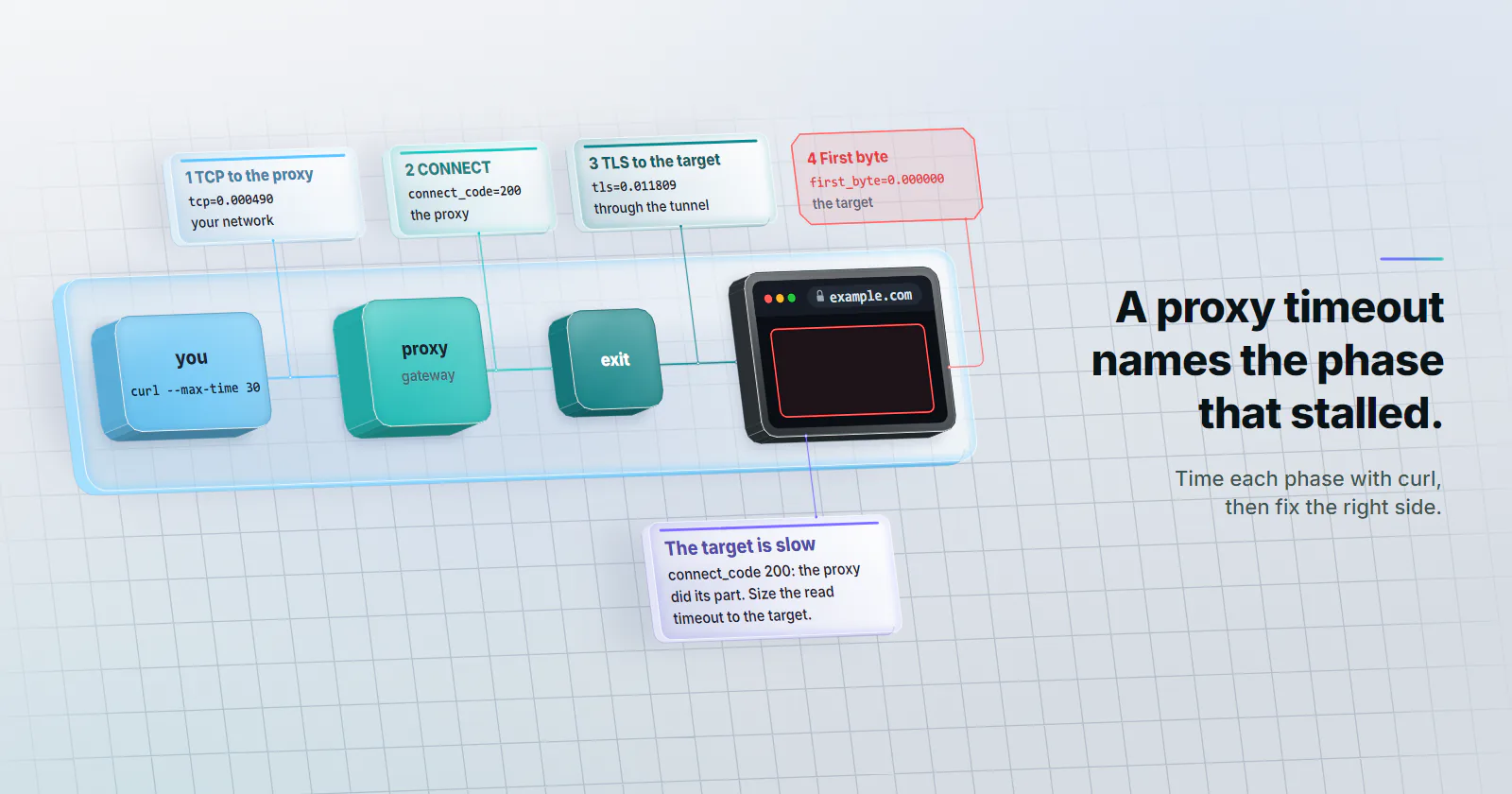
A proxy timeout names the phase that stalled: connect, the CONNECT tunnel, TLS or first byte. Read the error, time each phase with curl, fix the right side.
Quick summary · TL;DR
- A proxy timeout names the phase that stalled. A proxied HTTPS request has four phases: TCP to the proxy, the CONNECT tunnel, TLS with the target and the first byte. Each one stalls for different reasons.
- One curl command shows which phase stalled. time_connect, http_connect, time_appconnect and time_starttransfer split the request; an http_connect of 200 means the proxy opened the tunnel.
- Clients file the same stall under different names. In a 2026-10-07 lab run, requests reported a proxy stuck on CONNECT as a ReadTimeout against the target host, httpx as a ReadTimeout after its read timer, and curl as "Proxy CONNECT aborted due to timeout".
- A 504 is a status, so a server sent it. A 504 in answer to CONNECT came from the proxy; a 504 inside a completed tunnel came from the site's own gateway.
A proxy timeout means one hop gave up waiting for the next: your client waiting on the proxy, or the proxy waiting on the target site. A connect timeout usually points at your network or the proxy gateway; a read timeout or a 504 usually points at the exit or the target. Time each phase with one curl command before changing anything.
Most proxy timeout reports start the same way. A scrape that ran for weeks starts failing with ReadTimeout, someone doubles every timeout, and the job gets slower without getting healthier. Doubling the number treats every timeout as one problem, and a proxied request has four separate phases that can each stall for different reasons.
Each phase has its own owner and its own error string. The tables below come from a local lab run on 2026-10-07 that made every phase stall on purpose, so every error string is copied from curl, requests, httpx and undici output.
What a proxy timeout means
A timeout is a client-side or proxy-side decision: a timer ran out before the next hop answered. Nothing on the wire says “timeout”. So the useful question is which phase the timer was watching when it fired.
The four phases of a proxied request
For an HTTPS target behind an HTTP proxy, the client opens a TCP connection to the proxy, sends CONNECT target:443, waits for the proxy to open its own connection to the target and answer 200, runs a TLS handshake with the target through that tunnel, and only then sends the request and waits for the first byte. For a plain http:// target the CONNECT and TLS steps disappear: the proxy receives the full request and forwards it.
| Phase | What happens | Who owns a stall | curl variable |
|---|---|---|---|
| 1. TCP to the proxy | SYN to the gateway host and port | Your network, firewall, wrong host or port, the gateway | time_connect |
| 2. CONNECT | The proxy resolves the target, picks an exit, opens a connection, answers 200 | The proxy, the exit, DNS on the proxy side | http_connect (the proxy’s reply code) |
| 3. TLS through the tunnel | Handshake with the target, end to end | The exit’s link, the target’s TLS front | time_appconnect |
| 4. Request to first byte | The target builds the response | The target, its rate limits, a slow exit | time_starttransfer |
Phase 2 is where most of a proxy’s own work happens. On a rotating gateway it includes choosing the exit, so a slow or offline exit shows up there, not in phase 1. The proxymint Lab DNS test shows the same split for name resolution: with an http:// proxy and CONNECT, the hostname is resolved on the proxy side.
Time each phase with curl
One command names the stalled phase. Use placeholders for your own gateway and credentials:
curl -sS -o /dev/null -x http://USERNAME:PASSWORD@HOST:PORT \
  --connect-timeout 10 --max-time 30 \
  -w 'tcp=%{time_connect} connect_code=%{http_connect} tls=%{time_appconnect} first_byte=%{time_starttransfer} total=%{time_total} code=%{http_code}\n' \
  https://example.com/
Each time is cumulative seconds from the start, and a phase that never finished prints 0.000000. In the lab run, a healthy request through a local forwarding proxy printed tcp=0.000490 connect_code=200 tls=0.011809 first_byte=0.016655 code=200. How to read a failure:
- tcp is 0 and the run hit the connect timeout. Either the proxy’s hostname never resolved or the SYN to the proxy was never answered. curl counts the DNS lookup inside the connect timeout, so add
dns=%{time_namelookup}to the write-out: if it is also 0, check the resolver; if it is set, check the host, the port, the firewall and outbound rules. - tcp is set, connect_code is 000. The proxy accepted the connection but never answered the CONNECT. The gateway or its exit is the slow party.
- connect_code is 200, tls is 0. The tunnel opened but TLS with the target never completed: an exit that dropped, or a target that does not answer TLS from that address.
- tls is set, first_byte is 0. Everything up to the request worked. The target is slow, or is holding the connection on purpose.
- connect_code is 502 or 504. The proxy answered and said its own wait on the target failed.
%{http_connect} settles the “proxy or site” argument on HTTPS: a 200 there means the proxy opened the tunnel and did its part. The curl write-out documentation (checked 2026-10-07) lists the variables. For proxy string syntax in that command, see proxy formats.
Proxy connect timeout vs read timeout
Every client splits the wait into at least two timers, but they do not agree on where the CONNECT and TLS phases belong. That is why the same stall reads as a connect timeout in one tool and a read timeout in another.
- curl.
--connect-timeoutcovers everything up to an established connection: TCP to the proxy, the CONNECT reply and TLS. Its built-in default is 300 seconds (CURLOPT_CONNECTTIMEOUT, checked 2026-10-07).--max-timecaps the whole transfer. - Python requests.
timeout=(connect, read). There is no timeout unless one is passed (requests docs, checked 2026-10-07). Through a proxy, the CONNECT and TLS waits run under the connect value but surface asReadTimeout. - httpx. Separate connect, read, write and pool timers, all 5 seconds by default (httpx timeouts, checked 2026-10-07). The wait for the proxy’s CONNECT reply runs on the read timer; the TLS handshake through the tunnel runs on the connect timer.
- Node undici.
ProxyAgenttakesconnect: { timeout }for the socket, plusheadersTimeoutandbodyTimeout. In the lab run, none of them covered a proxy that accepted the connection and never answered the CONNECT; only anAbortSignaldeadline ended it.
What each client prints
The table below comes from a local lab on 2026-10-07: a forwarding proxy on 127.0.0.1 with five failure modes, a TLS target with a slow path, and a non-routable address for the unreachable proxy. Clients got a 5 second connect timeout and an 8 second read timeout (curl: --connect-timeout 5 --max-time 10). Versions: curl 8.5.0, requests 2.34.2 on urllib3 2.8.0, httpx 0.28.1, undici 7.30.0 on Node 22.22.0. The timings show which timer fired, not network latency.
| What stalled | curl | requests | httpx | undici |
|---|---|---|---|---|
| Proxy unreachable (no SYN reply) | (28) Failed to connect to HOST port PORT after 5002 ms: Timeout was reached | ProxyError: “Unable to connect to proxy”, ConnectTimeoutError ... (connect timeout=5) | ConnectTimeout, 5 s | UND_ERR_CONNECT_TIMEOUT, 5 s |
| Proxy port closed | (7) ... Couldn't connect to server, instant | ProxyError: “Connection refused”, instant | ConnectError, instant | not run |
| Proxy accepts, never answers CONNECT | (28) Proxy CONNECT aborted due to timeout, 5 s | ReadTimeout: “HTTPSConnectionPool(host=‘TARGET’…): Read timed out. (read timeout=5)”, 5 s | ReadTimeout, 8 s | no timer fired; the 20 s AbortSignal ended it |
| Tunnel open, TLS never completes | (28) SSL connection timeout, 5 s | ReadTimeout ... (read timeout=5), 5 s | ConnectTimeout: “The handshake operation timed out”, 5 s | UND_ERR_CONNECT_TIMEOUT naming the target’s address |
| Target slow to first byte | (28) Operation timed out after 10002 milliseconds with 0 bytes received, http_connect 200 | ReadTimeout ... (read timeout=8), 8 s | ReadTimeout, 8 s | UND_ERR_HEADERS_TIMEOUT, 8 s |
| Proxy answers 504 to CONNECT | (56) CONNECT tunnel failed, response 504 (exit 7 from curl 8.20.0) | ProxyError: “Tunnel connection failed: 504 Gateway Timeout” | ProxyError: 504 Gateway Timeout | fetch failed, cause “Request was cancelled.”, no status |
Proxy answers 504 on an http:// target | HTTP 504, exit code 0 | a normal response, status_code 504 | a normal response, 504 | fetch failed, “Request was cancelled.” |
With no timeout at all, curl and requests both waited 134 seconds on the unreachable proxy before failing. That number came from the Linux kernel, not the client: tcp_syn_retries defaults to 6, which the tcp(7) man page (checked 2026-10-07) puts at about 127 seconds of SYN retries.
Two requests traps
An unreachable proxy is not a Timeout. requests wraps it in ProxyError, which inherits from ConnectionError and not from requests.exceptions.Timeout. Code that catches only Timeout lets a dead gateway crash the worker, or worse, lets a broad except Exception swallow it as a “slow site”.
The hostname in the message is the target. Every ReadTimeout above names the target host, including the ones where the target was never contacted. Read the timeout value and the phase, not the hostname.
504 gateway timeout through a proxy
A 504 is a status code, so a server sent it. RFC 9110, section 15.6.5 (June 2022) defines it as a gateway or proxy that “did not receive a timely response from an upstream server”. Through a forward proxy there are two candidates for that gateway, and the shape of the error tells them apart:
- On an HTTPS target, the 504 answers the CONNECT. The client never reaches the site, so there is no response object: curl prints
CONNECT tunnel failed, response 504, requests raisesProxyErrorwith “Tunnel connection failed: 504”. Your proxy gave up on the exit or the target. - On a plain HTTP target, the proxy’s 504 arrives as a normal response. Check its headers and body. A proxy-generated 504 is usually short and carries the proxy’s own headers.
- A 504 inside an established tunnel came from the site. If
http_connectis 200, TLS completed and the response code is 504, the proxy is not involved: the site’s own CDN or load balancer timed out on its backend. Changing proxies will not fix it.
A 502 Bad Gateway means the upstream answered with something invalid or refused the connection, which is faster than a timeout and points at the exit or the target refusing. A 408 Request Timeout comes from the target and means it gave up waiting for your request, often an idle kept-alive connection. A 407 is credentials, never a timeout, and is never worth retrying. Some proxies send unofficial codes instead of a 504: 599 for a connect timeout toward the upstream and 598 for a read timeout (http.dev, checked 2026-10-07). Neither is in RFC 9110, so read them as a 504 from the proxy.
Proxy timeout causes, by phase
Wrong host, port or scheme. A typo in the port or an https:// scheme pointed at a proxy that speaks plain HTTP either refuses at once or hangs in phase 1. A proxy URL starts with http:// or socks5h://; HTTPS sites still work through it via CONNECT.
Egress blocked on your side. Corporate networks, cloud security groups and some CI runners drop outbound traffic to unusual ports. The SYN goes unanswered, and the client reports a proxy connect timeout that no proxy setting can fix. Test the same command from another network.
Exit offline or slow. On a residential or mobile gateway, each exit is a device on a home or carrier link. One that just dropped stalls phase 2 or 3 until the gateway or your timer gives up. A retry on a fresh connection usually reaches a different exit. A narrow location filter has the same effect from the other direction: fewer exits online that match, so picking one takes longer.
Exit far from the target. A proxied HTTPS request crosses client to gateway, gateway to exit and exit to target, and each handshake round trip pays all three. An exit on another continent from the target can add whole seconds before the first byte, on every new connection.
Idle connection closed upstream. Gateways and targets close kept-alive connections after a quiet spell. A pooled connection that died while idle fails on its next use with a reset or a read timeout instead of a clean error; turning on the client’s retry for idempotent requests, or a shorter pool idle time, removes it.
Slow or protective target. Heavy pages, overloaded origins and rate limits all land in phase 4. Some targets hold a suspected bot’s connection open without answering instead of sending a block page, so a cluster of read timeouts on one site after a burst of requests is a rate signal: slow down rather than raise the timer. How websites detect proxies covers the signals behind that decision.
No timeout at all. A worker with no timer waits for the kernel (134 seconds in the lab run) or forever on a connection that opened and then went silent.
Timeout values that hold up
Three settings cover nearly every client:
- A short connect timeout. 5-10 seconds is enough to reach a healthy gateway from almost anywhere, and a longer one only delays the retry.
- A read timeout sized to the target. Measure the target’s slow responses with the curl command above and set the read timer a little above its 95th percentile. 15-30 seconds suits most HTML pages; reports and search endpoints may need more.
- A total deadline. Per-phase timers reset on every chunk, so a response that trickles one byte a second never trips a read timeout. Cap the whole request.
import time
import httpx

proxy = "http://USERNAME:PASSWORD@HOST:PORT"
timeout = httpx.Timeout(20.0, connect=8.0)  # read, write, pool 20 s; connect 8 s
deadline = time.monotonic() + 60  # total budget for the whole request

with httpx.Client(proxy=proxy, timeout=timeout) as client:
    with client.stream("GET", "https://example.com/") as r:
        body = bytearray()
        for chunk in r.iter_bytes():
            body.extend(chunk)
            if time.monotonic() > deadline:
                raise TimeoutError("total deadline exceeded")
The httpx Timeout values are per operation, not a wall clock (httpx timeouts, checked 2026-10-07), so the deadline lives in the read loop and can overshoot by at most one read timeout. In requests the same split is timeout=(8, 20), and the total needs the same loop over stream=True and iter_content(). curl’s --max-time is already a true total. Between failures, reuse connections: a fresh HTTPS connection through a proxy pays the TCP, CONNECT and TLS round trips before the first byte, and that time comes out of the same budget. Since httpx files the CONNECT wait under read, keep its read value comfortably above what a busy gateway needs to pick an exit.
Proxy type changes the budget. Exits on rotating residential proxies and mobile proxies sit on home and carrier links, so their latency varies more from one request to the next than a datacenter port in a hosting network. Give them a slightly longer connect and read budget and lean on retries instead of very long timers. The types of proxies guide covers which category fits which job.
Retrying after a proxy timeout
Retry by the phase that failed:
- Proxy unreachable (connect timeout): retry once on a fresh connection, then alert. A dead gateway does not recover in a loop.
- Proxy refused the connection: a setup error. Stop and check the host, port and scheme.
- CONNECT stall, TLS stall, 502 or 504 from the proxy: retry once after a short backoff on a new connection, so a rotating gateway can pick another exit.
- Read timeout on the target: back off longer, and lower the request rate if timeouts cluster on one site.
- 407: never retry. Fix the credentials.
import time
import requests

PROXY = "http://USERNAME:PASSWORD@HOST:PORT"
PROXIES = {"http": PROXY, "https": PROXY}

def fetch(url, attempts=2):               # first try plus one retry
    for attempt in range(attempts):
        try:
            r = requests.get(url, proxies=PROXIES, timeout=(8, 20))
        except requests.exceptions.ProxyError as e:
            if "407" in str(e) or "refused" in str(e):
                raise                     # credentials or wrong host/port: fix, do not retry
            time.sleep(1)                 # proxy unreachable, or 502/504 on CONNECT
            continue
        except requests.exceptions.Timeout:
            time.sleep(2 ** attempt)      # CONNECT, TLS or target stall
            continue
        if r.status_code in (502, 504):
            time.sleep(2 ** attempt)
            continue
        return r
    raise RuntimeError(f"{url}: no response after {attempts} attempts")
requests.get() without a session opens a new connection per call, which is what a retry through a rotating gateway needs. Rotation decides what that retry reaches. With a new IP on every request, the retry goes out through a different exit. With a sticky session, it goes back to the same exit, so a slow exit stays slow for the life of the session. On proxymint, rotation is set per order (every request, a timer from 5 to 60 minutes, or sticky while the device stays online) and can be changed later on the same logins; rotating vs sticky proxies covers which mode fits which job.
Server-side proxy timeouts: nginx, Apache
A reverse proxy in front of your own app has proxy timeouts too, and when one fires, visitors see a 504.
nginx. Three directives in ngx_http_proxy_module (checked 2026-10-07): proxy_connect_timeout (default 60 s, and the docs note it usually cannot exceed 75 s), proxy_send_timeout and proxy_read_timeout (both 60 s by default, measured between two successive reads or writes, not for the whole response). A 504 from nginx means proxy_read_timeout or proxy_connect_timeout fired against your backend, and the error log names which: upstream timed out (110: Connection timed out) while reading response header from upstream is the read timer, while connecting to upstream the connect timer.
location /reports/ {
    proxy_pass http://app_backend;
    proxy_connect_timeout 5s;
    proxy_read_timeout 120s;   # this route renders slowly by design
}
Apache. ProxyTimeout in mod_proxy (checked 2026-10-07) sets the wait for proxied requests. Set it explicitly: the documented default (the server’s Timeout) and the behaviour of some 2.4 releases have disagreed (Apache bug 60990, reported in 2017 against 2.4.6: a 60-second default instead of Timeout).
On the server side, raise a timeout only for the route that is slow by design. A global 300-second read timeout keeps workers tied up on every stuck backend call, and the slow query behind the 504 is still there.
Which side to fix
Run the curl command once and follow the first phase that failed:
- tcp never set: fix your side. Host, port, scheme, firewall, egress rules. Raising the timeout will not help.
- tcp set, no CONNECT reply, or a 502/504 to CONNECT: the proxy or its exit. Retry on a fresh connection; if it persists across exits, check the gateway’s status and your rotation and location settings.
- CONNECT 200, TLS never completes: the exit’s link or the target’s TLS front. Retry on a new exit.
- TLS done, no first byte: the target. Size the read timeout from its real response times, add a total deadline, and slow down if timeouts cluster.
- A 504 after a completed tunnel: the site’s own gateway. Nothing on the proxy side will change it.
Frequently asked questions
First find the phase that stalled by running curl through the proxy with a write-out of time_connect, http_connect, time_appconnect and time_starttransfer. If the TCP connection never completes, check the proxy host, port, scheme and your firewall. If the proxy accepts but never answers CONNECT, or answers 502 or 504, retry on a fresh connection. If everything works up to the first byte, the target is slow, so size the read timeout to it and lower the request rate.
A connect timeout limits how long a client waits to establish a connection, and a read timeout limits how long it waits for data once connected. Through a proxy the CONNECT and TLS phases sit in between, and clients disagree on where they belong: curl counts them under its connect timeout, requests runs them on the connect value but raises ReadTimeout, and httpx waits for the CONNECT reply on its read timer.
A 504 means a gateway or proxy did not get a timely response from the server behind it, as defined in RFC 9110. If the 504 answers the CONNECT request, the proxy gave up on its exit or the target. If the tunnel opened and TLS completed before the 504 arrived, the site's own CDN or load balancer timed out on its backend, and changing proxies will not help.
A connect timeout of 5 to 10 seconds reaches a healthy proxy gateway from almost anywhere. Set the read timeout a little above the target's slowest normal responses, which is 15 to 30 seconds for most HTML pages, and add a total deadline for the whole request. Residential and mobile exits vary more than datacenter ports, so give them a slightly longer budget and rely on retries.
It depends on the phase. A connection to the proxy that never completes is usually your network, firewall or proxy address. A stalled CONNECT, a TLS handshake that never finishes or a 504 to CONNECT points at the proxy or its exit. A timeout after TLS completed, while waiting for the first byte, belongs to the website.
Yes, by phase and with limits. Retry an unreachable proxy once on a fresh connection, retry CONNECT stalls and 502 or 504 answers once after a short backoff so a rotating gateway can pick another exit, and back off longer on read timeouts from the target. A refused connection to the proxy and a 407 are setup errors: stop and fix the host, port or credentials instead of retrying.
Residential exits are devices on home connections, so their latency varies more and an exit can go offline between requests, while datacenter ports sit in hosting networks with steadier links. On a rotating residential gateway a retry on a fresh connection usually reaches a different exit. Give residential and mobile proxies a slightly longer connect and read budget than datacenter ports.
Researched and drafted with AI tools, then checked against our publishing rules before it went live: 10 outside links, 6 links to other proxymint pages, no prices and a fact-check pass against our product records. How we write.