502 Bad Gateway proxy error: find who sent it, then fix it
A 502 through a proxy comes from the proxy or from the target's own gateway. How to tell them apart in one command, what causes each, and when to retry.
Quick summary · TL;DR
- A 502 always comes from a server in the middle. RFC 9110 defines it as a gateway or proxy that got an invalid answer, or none, from the next server, so the job is finding which middle server sent it.
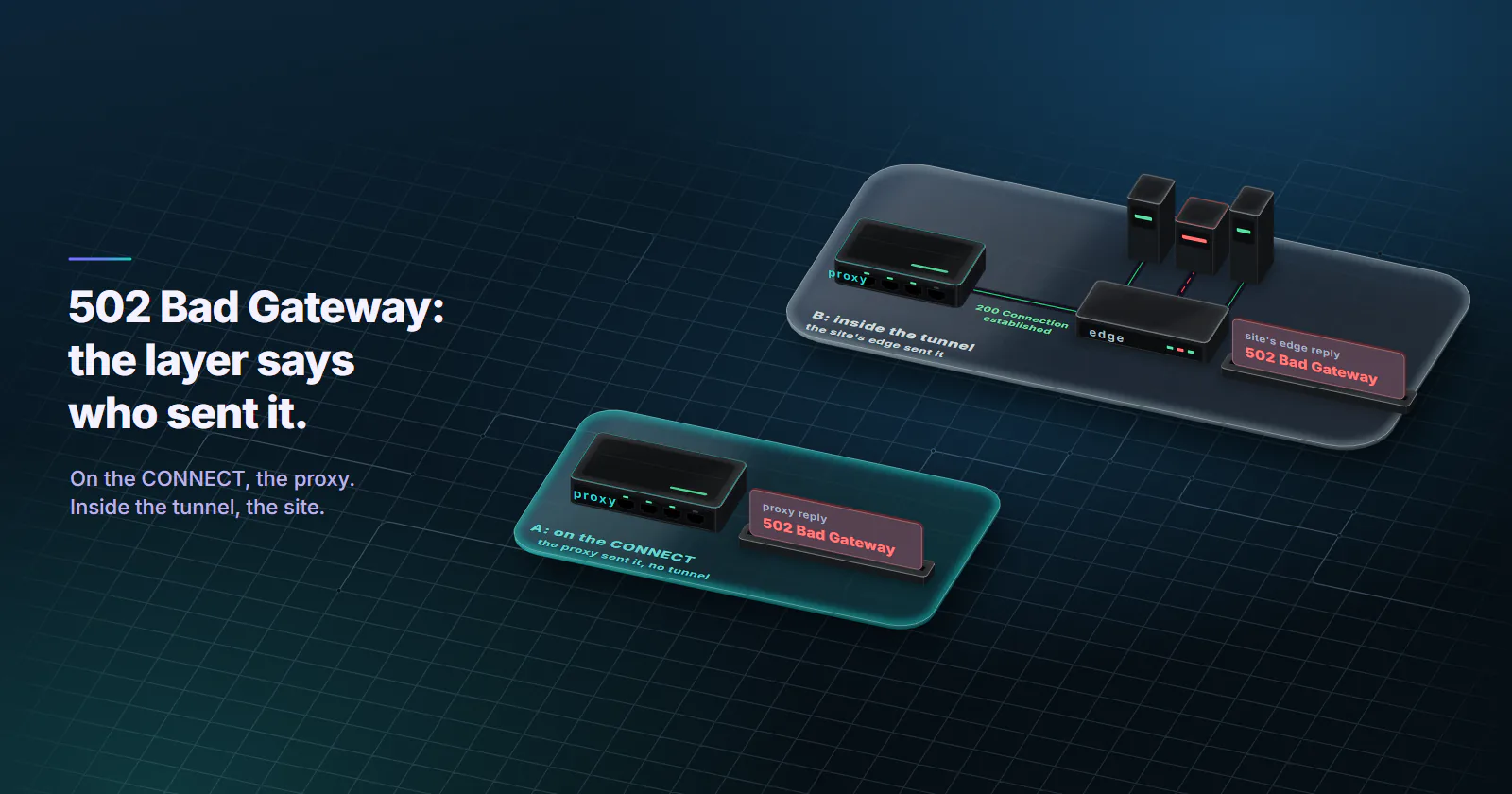
- The CONNECT layer tells you who. On an https:// target, a 502 that answers the CONNECT came from the proxy and the site never saw the request. A 502 that arrives inside the open tunnel came from the site's CDN or load balancer.
- Clients report a CONNECT 502 as an error string. curl says CONNECT tunnel failed, response 502; Python says Tunnel connection failed: 502; Chromium shows ERR_TUNNEL_CONNECTION_FAILED and hides the code.
- Retry depends on the layer. A CONNECT 502 is safe to retry for any method through another exit; a 502 from the site is retried only for idempotent methods, with backoff.
A 502 Bad Gateway proxy error means a server in the middle tried to reach the next hop and got nothing usable back, such as a failed DNS lookup, a dropped connection or a reply that breaks HTTP. That server is either your proxy or a gateway in front of the website, and which one sent it decides the fix and whether a retry helps.
A log line that only stores the status code makes both cases look the same. A 502 from the proxy usually means one exit or one route failed, and the next request through another exit goes through. A 502 from the target’s CDN or load balancer means the site’s own backend is failing, and no proxy setting changes that.
502 Bad Gateway through a proxy
RFC 9110 (June 2022), section 15.6.3, defines 502 as the answer of a server that, “while acting as a gateway or proxy, received an invalid response from an inbound server it accessed while attempting to fulfill the request.” By definition the code belongs to an intermediary, not to the application that owns the page. And “invalid” covers more than garbage bytes: a refused connection, a connection closed halfway and a reply with broken framing all qualify.
MDN’s 502 reference (checked October 2026) draws the line with the neighbours. When the origin sends a valid error, the gateway should pass that error on instead of a 502. When the gateway gets no response in time, it sends 504.
Who sent the 502?
Start with the layer, because a 502 Bad Gateway proxy response can come from two places. When the target is an https:// URL and the client uses an HTTP proxy, the client first sends CONNECT example.com:443 to the proxy and waits for a 200 before any TLS starts. That tunnel step, covered in what a proxy server is, splits every 502 into two kinds.
A 502 on the CONNECT. The proxy answered the tunnel request with 502. The tunnel never opened, the target never received a byte of the request, and the client raises an error instead of returning a response. The proxy sent this one.
A 502 inside the tunnel. The tunnel opened, TLS completed against the target’s own certificate, and then the response said 502. A proxy that relays an encrypted tunnel cannot write a response into it without failing that certificate check, unless it intercepts TLS with its own trusted certificate, as some corporate proxies do. So the target’s side sent this one: its CDN, load balancer or reverse proxy.
One command shows which layer failed:
curl -v -x http://USERNAME:PASSWORD@HOST:PORT https://example.com/ -o /dev/nullRead the lines that start with <. A < HTTP/1.1 502 right after the > CONNECT line, then “CONNECT tunnel failed, response 502”, is the proxy. TLS handshake lines followed by a 502 status are the target.
Plain http:// targets skip the tunnel. The proxy forwards the request itself and can produce any status, so only the tells below apply. proxymint Lab #1 measured a 301 to https:// for plain http:// requests on the residential and mobile gateway, so point health checks at https:// URLs.
Header and body tells
The status line helps too. Apache’s mod_proxy labels its own errors 502 Proxy Error instead of 502 Bad Gateway, with the body “The proxy server received an invalid response from an upstream server”, so that page came from an Apache reverse proxy, usually the site’s own. A Proxy-Status header helps as well, but only read with its layer: a CDN or gateway on the site’s side may add one too. Check the intermediary name it carries against your proxy’s host, and whether it arrived on the CONNECT reply (your proxy) or inside the tunnel (the site’s side).
CONNECT tunnel failed, response 502
In code, a 502 on the CONNECT surfaces as an exception string instead of a response. Each client words the CONNECT failure differently. The text below comes from each project’s source, checked on 2026-10-06; the undici rows were run against a local proxy answering 502 on 2026-10-07 (undici 8.10.1, Node 24.15.0).
| Client | What it prints for a 502 on CONNECT |
|---|---|
| curl | CONNECT tunnel failed, response 502 |
| Python requests (urllib3) | ProxyError('Unable to connect to proxy', OSError('Tunnel connection failed: 502 Bad Gateway')) |
| Python http.client | OSError: Tunnel connection failed: 502 Bad Gateway |
Node.js undici ProxyAgent with request() | AbortError: Proxy response (502) !== 200 when HTTP Tunneling |
Node.js undici ProxyAgent with fetch() | TypeError: fetch failed, cause “Request was cancelled.”, no status |
| Chrome, Edge, Playwright and Puppeteer on Chromium | net::ERR_TUNNEL_CONNECTION_FAILED |
The words after the number in the Python strings are the proxy’s own reason phrase, so another gateway may print different text there. undici’s fetch() does not expose the status, so code that needs it should use request() or test the proxy with curl. curl’s message comes from lib/cf-h1-proxy.c. From curl 8.20.0 (released April 29, 2026) it exits with code 7 (couldn’t connect); older builds exited with 56, so match on the message text.
Why a proxy returns 502
RFC 9209 (June 2022) gives proxies a vocabulary of error types, each with a recommended status code. The causes below use its names, so a log or a Proxy-Status header maps straight onto them.
DNS failed at the proxy. The exit or the gateway could not resolve the hostname: dns_error, recommended 502 (a DNS timeout is dns_timeout, 504). Typos, internal hostnames that resolve only inside an office network, and domains that have expired all land here.
The target refused or dropped the connection. connection_refused and connection_terminated both recommend 502. A closed port, a firewall that resets connections from some networks, or a backend that hangs up halfway through the response.
The exit went away. Rotating residential and mobile exits are real devices on home and carrier lines. A device that drops offline mid-request leaves the gateway holding a dead connection, which RFC 9209 files under connection_terminated, recommended 502. Intermittent 502s spread across unrelated targets, which clear on the next request, fit this pattern.
TLS toward the target failed. This applies only to proxies that make their own TLS connection to the target, such as TLS-inspecting corporate proxies or reverse proxies with an https:// upstream: tls_protocol_error and tls_certificate_error, both 502. A plain CONNECT proxy never sees the TLS.
The reply broke HTTP. An incomplete response, an oversized header section or a bad transfer coding: http_response_incomplete, http_response_header_section_size and http_protocol_error, all 502.
The proxy looped. A request that comes back to the same proxy is proxy_loop_detected, also 502. Chained corporate proxies with overlapping rules produce it.
The same scheme sends timeouts to 504 (connection_timeout, connection_read_timeout, http_response_timeout) and a connection limit to 503 (connection_limit_reached). nginx follows the same split in ngx_http_upstream.c: upstream connect errors and bad headers become 502, timeouts become 504. The RFC makes the codes a recommendation (SHOULD), so a gateway may still answer a timeout with 502. Treat 502, 503 and 504 from a proxy as one family and read the details.
Read the Proxy-Status header
Proxy-Status names the intermediary and the error type in one line:
HTTP/1.1 502 Bad Gateway
Proxy-Status: gw.example.net; error=dns_error; rcode="NXDOMAIN"
Each proxy in a chain appends its own entry, so the header also shows which hop failed. It is optional, and many gateways send nothing. When it is there, curl -v prints it with the other response headers, CONNECT reply included.
SOCKS5 has no 502
SOCKS5 does not speak HTTP while it opens a connection, so there is no status code to read. RFC 1928 (March 1996) defines reply codes instead: 01 general failure, 02 not allowed by ruleset, 03 network unreachable, 04 host unreachable, 05 connection refused, 06 TTL expired. Current curl prints cannot complete SOCKS5 connection to example.com. (4), with the code in brackets.
So the failure an HTTP proxy reports as 502 usually arrives over SOCKS5 as code 04 or 05, or 01 for a general failure. The SOCKS5 vs HTTP proxy guide covers when each protocol fits. And a 502 status seen through a SOCKS5 proxy came from the target’s side, because the connection was already open when the response arrived.
When to retry a 502
The layer test also decides the retry rule for a 502 Bad Gateway proxy failure.
A 502 on the CONNECT is safe to retry for any method, POST included. The tunnel never opened, so the target never received the request body. With a Retry configured, urllib3 counts the tunnel error against the total budget whatever the method, as its retry code shows.
A 502 inside the tunnel may have reached the backend. The target’s gateway may have forwarded a POST that the backend processed before it crashed. RFC 9110 section 9.2.2 says a client should not automatically retry a non-idempotent request unless it knows the request is safe to repeat. Retry GET, HEAD, OPTIONS, PUT and DELETE; hand POST and PATCH to logic that can check whether the first attempt landed. urllib3’s default retry methods follow the same list and leave POST out.
import requests
from requests.adapters import HTTPAdapter
from urllib3.util.retry import Retry

retry = Retry(
    total=3,
    backoff_factor=1,
    backoff_jitter=0.5,  # urllib3 2.x
    status_forcelist=[502, 503, 504],
    respect_retry_after_header=True,
)
session = requests.Session()
session.mount("https://", HTTPAdapter(max_retries=retry))
session.proxies = {"https": "http://USERNAME:PASSWORD@HOST:PORT"}
Rotation decides what a retry changes. With a new IP on every request, the retry leaves through a different exit by default, so a dead device costs one attempt. On a sticky session the retry goes back to the same exit, and a run of 502s on one session while others work points at that exit. proxymint sets rotation on the order: a new IP on every request, a timer from 5 to 60 minutes, or sticky for as long as the device stays online. Rotating vs sticky proxies covers which mode fits which job. Rotating residential proxies spread a job across many home exits, which is why one failed exit shows up as an isolated 502 instead of an outage.
A fixed address changes the reading. On static ISP proxies the exit is the same ISP-registered IP for the whole term, so exit churn is off the list and a repeated 502 points at the target, its DNS or the route to it.
Stop when the 502 follows the host. If one hostname returns 502 through every exit for several minutes, or the 502 arrives inside the tunnel with the site’s branded page, the site is failing. Back off for minutes, not seconds, and keep the retry budget for transient errors.
502 behind your own reverse proxy
The same code shows up for site owners whose own nginx or Apache sits in front of an app. The nginx error log names the cause:
connect() failed (111: Connection refused) while connecting to upstream: nothing listens on the address inproxy_passorfastcgi_pass. The app server (PHP-FPM, Gunicorn, a Node process) crashed, has not started, or listens on another port or socket.systemctl statuson the app’s service answers it in one line.upstream prematurely closed connection while reading response header from upstream: the app accepted the request and died or was killed before answering, often by a worker timeout or the out-of-memory killer.upstream sent too big header while reading response header from upstream: the response headers, usually large cookies, exceedproxy_buffer_size. Raise it andproxy_buffers.no live upstreams while connecting to upstream: every server in theupstreamblock is marked failed undermax_failsandfail_timeout.
A slow app produces “upstream timed out” and a 504, not a 502. If the log shows timeouts, fix the app’s latency or raise proxy_read_timeout; if it shows refusals, fix the process.
Apache behind the same symptom shows a page titled “502 Proxy Error” with “Reason: Error reading from remote server”, which mod_proxy_http raises when reading the backend’s response fails. The same checks apply: confirm the backend is up on the address in ProxyPass, then look at ProxyTimeout or the timeout= parameter on ProxyPass if the backend is merely slow.
Fixes for a browser 502
For a visitor in a browser, the first check is whether every site fails or only one.
If every site shows a 502 or ERR_TUNNEL_CONNECTION_FAILED, the browser’s proxy or VPN is the cause. Turn the proxy off in the system settings, as described in how to use a proxy, reload, and then check the proxy address, port and login before turning it back on. If one site shows its own branded 502 page, the site is down. Reload after a few minutes; nothing on the visitor’s side fixes a failing backend. Opening the page from another network, such as a phone on mobile data, confirms which case it is in under a minute.
Which 502, which next step
Read the layer first, then act:
- “CONNECT tunnel failed, response 502” or ERR_TUNNEL_CONNECTION_FAILED: the proxy sent it. Retry through another exit, any method. If one host fails on every exit, check that its name resolves publicly and its port is open.
- A 502 response with the site’s page or CDN headers: the target sent it. Retry idempotent methods with backoff, and back off for minutes if it persists.
- SOCKS5 reply 04 or 05: the same as a proxy 502. Retry through another exit.
- Your own nginx or Apache: read the error log line before touching the config.
To place the next 502 Bad Gateway proxy error in seconds, log the layer (CONNECT or response), the exit IP and the target host next to the status code.
Frequently asked questions
It means a server acting as a gateway or proxy tried to reach the next server and got an invalid response or none it could use, such as a refused connection, a failed DNS lookup or a reply that breaks HTTP. Through a forward proxy, the 502 comes either from the proxy itself or from a gateway on the website's side. A 502 that answers the CONNECT request came from the proxy.
Usually not. A 502 is generated by an intermediary, so the cause sits between the client and the website: the proxy, the website's CDN or its backend. It points to the client's side only when every site fails at once, which means the browser's proxy or VPN settings are wrong or the proxy itself cannot reach anything.
Yes. A proxy returns 502 when it cannot resolve the target, the target refuses or drops the connection, or the exit it routes through goes offline mid-request. In a browser this often shows as ERR_TUNNEL_CONNECTION_FAILED instead of a 502 page. Turning the proxy or VPN off and reloading shows whether it is the cause.
A 502 means the gateway got an invalid response or a failed connection from the next server. A 504 means it got no response in time. RFC 9209 recommends 502 for errors such as refused connections and DNS failures and 504 for connect and read timeouts, so a 504 points at slowness and a 502 at a broken route or reply.
A 502 caused by one failed proxy exit lasts one request: the next request through another exit usually succeeds. A 502 caused by the website's backend lasts until the site's operators fix it, which can take minutes or hours. If one site returns 502 through every exit for several minutes, the outage is on the site's side.
Yes, with limits. A 502 on the CONNECT request is safe to retry for any method because the request never reached the site. A 502 from the site itself should be retried automatically only for idempotent methods such as GET, with exponential backoff and a cap of a few attempts, and the job should back off for minutes when one host keeps failing on every exit.
curl sent a CONNECT request to the HTTP proxy to open a tunnel to an https:// site, and the proxy answered with 502 instead of 200. The tunnel never opened and the site never received the request. Common causes are a hostname the proxy cannot resolve, a closed port on the target, or an exit that dropped offline, and a retry through another exit usually clears the last one.
Researched and drafted with AI tools, then checked against our publishing rules before it went live: 8 outside links, 7 links to other proxymint pages, no prices and a fact-check pass against our product records. How we write.