Python requests proxy: auth, sessions, SOCKS5 and rotation
Set a proxy in Python requests the right way: the proxies dict and its https key, auth encoding, sessions, SOCKS5, rotation, retries and the silent bypass.
Quick summary · TL;DR
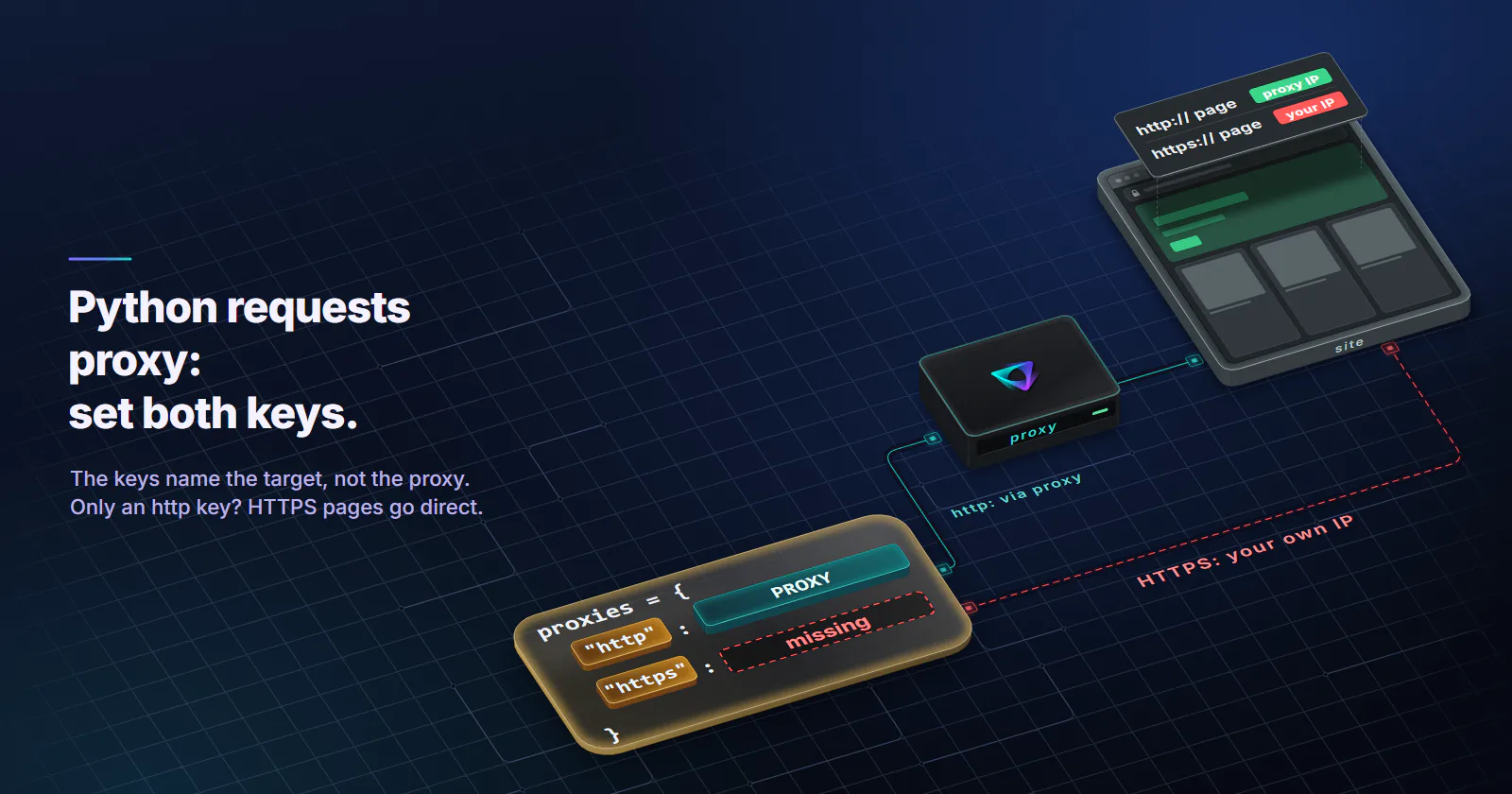
- The proxies dict keys name the target, not the proxy. requests picks the http or https entry by the scheme of the URL being fetched. A dict with only an http key sends every HTTPS page from your own IP, with no error.
- Both values should be http:// URLs. For HTTPS sites requests sends CONNECT through an http:// proxy and TLS runs end to end with the site. An https:// proxy URL means TLS to the proxy itself, a different setup that urllib3 added in 1.26.0.
- A 407 on an HTTPS page raises ProxyError. The refusal answers the CONNECT, so no response object exists and a status_code check never fires. Only plain http:// pages return a 407 response.
- Sessions reuse connections, and that can pin the exit. If a gateway picks the exit when a connection opens, every call on one kept-alive tunnel leaves from the same address. A short test shows what a given gateway does.
- Environment proxies overwrite session.proxies. HTTP_PROXY and HTTPS_PROXY on a CI runner can silently reroute traffic. Setting trust_env to False on the session makes the dict the only source.
To use a Python requests proxy, pass a proxies dict with an http key and an https key, both pointing at the proxy’s http:// URL, and add a timeout. The key is the scheme of the site you are fetching, not of the proxy. Credentials go in the URL, percent-encoded. For many calls, set the dict once on a Session.
Most tutorials get that far. The bugs come after it: an exit IP that never changes although the order says “new IP every request”, a 407 check that never fires, a script that uses the proxy on a laptop and goes direct in CI because of one environment variable, and a retry loop that adds a third to the traffic on a per-GB plan. Each one has a fix and a test below.
Python requests proxy setup
The minimal working version:
import requests

PROXY = "http://USERNAME:PASSWORD@HOST:PORT"
proxies = {"http": PROXY, "https": PROXY}

r = requests.get("https://api.ipify.org?format=json", proxies=proxies, timeout=(5, 30))
print(r.json())  # should print the proxy's exit IP, not yours
The keys name the target’s scheme. requests picks the proxy by the scheme of the URL you request: http:// pages use the http entry, https:// pages use the https entry. An all key covers both. A dict with only http sends every HTTPS request straight from your own address, with no error. Keys are matched in lowercase, so "HTTPS" is silently ignored too.
The missing key also bites on plain http:// URLs. proxymint’s per-GB gateway answers every plain-HTTP request with a 301 to the https:// address (measured 2026-09-28), and requests follows redirects by default. The follow-up request is HTTPS, so it uses the https key, and with no https key it leaves from your own IP.
The timeout is not optional. The requests advanced usage docs (release 2.34.2, 2026-05-14) state that requests do not time out unless you set one, and a stuck proxy connection can hang for minutes. timeout=(5, 30) is 5 seconds to connect and 30 seconds between bytes.
Per-host keys exist. A key like "https://api.example.com" routes only that host through a given proxy, and it wins over the plain https key. The docs also note that proxy URLs must include a scheme.
The https key and proxy scheme
The most copied line in Python requests proxy code is "https": "https://HOST:PORT". It looks symmetrical, and it means something else.
With http:// as the proxy URL, requests connects to the proxy in plain TCP and, for an HTTPS page, sends CONNECT target:443. The proxy resolves the hostname on its own side, opens a tunnel, and TLS runs end to end between your script and the site. The proxy never sees the page content. On proxymint’s gateway the site sees only the headers your script sent: our measurement found no Via or Forwarded header at the target, and inside a CONNECT tunnel the gateway relays encrypted bytes it cannot add an X-Forwarded-For to.
With https:// as the proxy URL, requests first opens TLS to the proxy itself, then tunnels TLS to the target inside it. urllib3, the library under requests, added this in 1.26.0 on 2020-11-10. Many of the snippets that still show it predate that change. On a current install, the https:// form only works if the provider runs a TLS listener with a certificate your machine trusts.
For a Python HTTPS proxy setup, put http:// in both values and keep the site’s own https:// in the URL you fetch.
Proxy authentication and special characters
requests reads credentials from the proxy URL and turns them into a Proxy-Authorization header. The URL format breaks as soon as a password contains @, :, / or #, because those characters end the username, the password or the host. Percent-encode both parts, and keep them out of the source file:
import os
from urllib.parse import quote

user = quote(os.environ["PROXY_USER"], safe="")
password = quote(os.environ["PROXY_PASS"], safe="")
PROXY = f"http://{user}:{password}@{os.environ['PROXY_HOST']}:{os.environ['PROXY_PORT']}"
proxies = {"http": PROXY, "https": PROXY}
requests decodes the percent-encoding before building the header, so the proxy receives the real password.
A 407 on an HTTPS page is an exception, not a status code. For an http:// page, the proxy answers the request itself and r.status_code is 407. For an https:// page, the 407 arrives as the answer to CONNECT, the tunnel is never built, and requests raises ProxyError before any response object exists. Code that checks status_code == 407 never sees it:
from requests.exceptions import ProxyError

try:
    r = requests.get("https://example.com/", proxies=proxies, timeout=(5, 30))
except ProxyError as e:
    # HTTPS target: a refused CONNECT (407 and friends) lands here
    print("proxy refused the tunnel:", e)
else:
    if r.status_code == 407:  # only reachable for http:// targets
        print("proxy wants credentials")
A 407 with credentials you know are right usually means an encoding problem, a stray newline in an environment variable, or a package that has run out or lapsed. The 407 Proxy Authentication Required guide has the fix for each client.
Sessions and connection reuse
A requests.Session keeps cookies, headers and the proxy config across calls, and it reuses connections through urllib3’s pool. The docs call keep-alive “100% automatic within a session”. It saves a handshake per call, and it is also why rotation can look broken.
import requests

s = requests.Session()
s.trust_env = False                    # ignore proxy environment variables
s.proxies = {"http": PROXY, "https": PROXY}

r = s.get("https://example.com/", timeout=(5, 30))
Connection reuse can pin the exit. For an HTTPS site, the session opens one CONNECT tunnel and keeps sending requests through it. If a gateway picks the exit when a connection opens, every call on that live tunnel leaves from the same address, even when the order is set to a new IP on every request. Whether a given gateway rotates per HTTP request or per new connection is a property of the provider, and the only reliable answer is a test (below). Sticky work, like a signed-in flow, wants exactly this reuse. Independent page fetches may not.
To force a fresh connection per call, either send Connection: close in the session headers, or skip the session and call requests.get() directly, which builds and closes a session every time. Both cost a new TCP and TLS handshake per request, a cost the proxy performance guide measures.
Environment variables and NO_PROXY
requests also reads HTTP_PROXY, HTTPS_PROXY, ALL_PROXY and NO_PROXY, in upper or lower case. Two traps come from that.
Environment proxies overwrite session.proxies. The docs carry a warning: values set on session.proxies can be replaced by proxies from the environment, and they point to issue #2018. A CI runner or a corporate laptop with HTTPS_PROXY set sends your traffic to its proxy, not yours. Proxies passed per call with proxies= still win.
trust_env = False turns all of it off. The requests API reference describes trust_env as trusting environment settings for proxy configuration, default authentication and similar. Set it to False on the session and only your dict applies. It also stops requests reading .netrc and REQUESTS_CA_BUNDLE, so set verify yourself if you relied on that.
NO_PROXY lists hosts that skip the environment proxies. Since 2.34.0 (2026-05-11), requests no longer matches no_proxy domains greedily, per the release history, so a pattern that used to catch more hosts than intended may now catch fewer.
SOCKS5 with requests
SOCKS support is an optional extra:
python -m pip install "requests[socks]"PROXY = "socks5h://USERNAME:PASSWORD@HOST:PORT"
proxies = {"http": PROXY, "https": PROXY}socks5 vs socks5h. Per the docs, socks5:// resolves the hostname on your machine and sends the proxy an IP, and socks5h:// sends the hostname and lets the proxy resolve it. With socks5://, your local resolver sees every domain the script visits, and a geo-targeted exit can land on a CDN node picked for your location instead of the exit’s. On proxymint’s per-GB gateway socks5h:// works and names resolve on the proxy side, in the exit country; with plain socks5:// our own test saw the client’s resolver do the lookup. Other providers do not all accept socks5h, so check with one request.
SOCKS5 still needs both keys. The https key decides whether HTTPS pages use the SOCKS proxy at all, the same as with HTTP proxies. HTTPS sites run through SOCKS5 end to end, as they do through CONNECT.
For most requests jobs, the HTTP proxy URL is the simpler choice and needs no extra dependency, and it already resolves DNS on the proxy side. SOCKS5 earns its place when a tool in the same pipeline speaks only SOCKS; the wider comparison is in SOCKS5 vs HTTP proxy. proxymint includes HTTP and SOCKS5 on every tier, with no protocol to pick at checkout.
Rotating proxies in Python
There are two ways to rotate proxies in Python, and most Python requests proxy tutorials show only the second.
A rotating gateway. One proxy URL; the provider changes the exit behind it. On proxymint’s rotating residential proxies, rotation is set on the order: a new IP on every request, a timer from 5 to 60 minutes, or sticky for as long as the device stays online, and it can be changed later without new credentials. Your Python code stays the same five lines. What changes is how you use sessions: one session per sticky identity, and fresh connections when you want the gateway to pick again.
A list you cycle yourself. Several endpoints, one session each, handed out round-robin:
import itertools
import requests

ENDPOINTS = [
    "http://USERNAME:PASSWORD@HOST:PORT_A",
    "http://USERNAME:PASSWORD@HOST:PORT_B",
    "http://USERNAME:PASSWORD@HOST:PORT_C",
]

def make_session(url):
    s = requests.Session()
    s.trust_env = False
    s.proxies = {"http": url, "https": url}
    return s

pool = itertools.cycle([make_session(u) for u in ENDPOINTS])

for page in ["https://example.com/a", "https://example.com/b"]:
    r = next(pool).get(page, timeout=(5, 30))
One session per endpoint keeps each endpoint’s cookies apart and keeps its connections warm. Picking a random proxy per call with a single shared session, which is what most snippets do, mixes cookies from several exits into one jar. A site that ties a cookie to an address sees that immediately.
Verify the exit IP
Never assume the proxy is in the path. Check it at startup, and on a sample of calls during the run:
import requests

ECHO = "https://api.ipify.org?format=json"

direct_ip = requests.get(ECHO, timeout=(5, 30)).json()["ip"]

def new_session():
    s = requests.Session()
    s.trust_env = False
    s.proxies = {"http": PROXY, "https": PROXY}
    return s

shared = new_session()
reused = [shared.get(ECHO, timeout=(5, 30)).json()["ip"] for _ in range(5)]

fresh = []
for _ in range(5):
    with new_session() as s:
        fresh.append(s.get(ECHO, timeout=(5, 30)).json()["ip"])

assert direct_ip not in reused + fresh, "a call left from your own IP"
print("one session:   ", reused)
print("fresh sessions:", fresh)
The assertion catches a silent bypass. The two lists show what the gateway does with connection reuse: if reused repeats one address while fresh changes, rotation follows new connections. Any IP echo endpoint that returns JSON works. Use https:// echo URLs: on a gateway that redirects plain HTTP, an http:// echo URL only tests the redirect.
A silent bypass has four usual causes: only an http key in the dict; an environment proxy replacing session.proxies; a redirect from an http:// URL to https:// with no https key, which on a gateway that redirects plain HTTP happens on every http:// call; and a third-party SDK that builds its own session and never sees your dict.
Retries, timeouts and cost
requests does not retry failed connections by default. The docs show the standard fix, a urllib3 Retry mounted on the session:
from requests.adapters import HTTPAdapter
from urllib3.util import Retry

retry = Retry(
    total=3,
    backoff_factor=1,
    status_forcelist=[429, 502, 503, 504],
    respect_retry_after_header=True,
)
adapter = HTTPAdapter(max_retries=retry)
s.mount("http://", adapter)
s.mount("https://", adapter)
Do not retry what a retry cannot fix. A 407 is a credentials problem. A 403 or a challenge page from the site is a refusal, and the right response is to stop and look, not to try again through another address. Keep both out of status_forcelist. A 429 means the site wants fewer requests; honour Retry-After and lower the rate.
On a per-GB plan, retries are a line item. Every retry is a full request and response through the proxy. Say a collection job moves 20 GB of pages when nothing fails. If a third of the pages need one retry each and the error pages are full-size, the same job moves about 27 GB. On usage-based residential proxies, those extra 7 GB are traffic that fetched nothing new. Backing off, capping retries and logging the reason for each one costs less than the traffic.
Proxy types that work with requests
The code is identical for every tier. The target decides the tier.
- The target blocks hosting ranges (retail catalogs, search results, marketplaces): residential. Per-request rotation for independent page fetches, sticky for flows that carry a cookie.
- The target is lenient, or it is an API you are allowed to poll: datacenter proxies. Ports billed per IP per month with no bandwidth cap, so retries do not add per-GB traffic. Datacenter is built for most monitoring jobs.
- One login has to hold for days: a static ISP address. Rotating residential is the wrong tool when the session must survive a device going offline.
- Mobile: mobile origins matter to app-first platforms, and a requests script is not an app, so it rarely needs one.
- Free proxy lists: fine for a five-minute demo against a test page. Wrong for anything with a password in it, because the operator of an open proxy sees every non-TLS request and every CONNECT destination, as are free proxies safe sets out.
If the Python requests proxy setup above passes the exit check, the remaining decision is the rotation mode: every request for breadth, a timer for short multi-step flows, sticky for sessions.
The same proxy URL works outside requests too; the guide to the best language for web scraping covers proxy support in other languages and clients.
Frequently asked questions
Pass a proxies dict to the request: {"http": "http://USERNAME:PASSWORD@HOST:PORT", "https": "http://USERNAME:PASSWORD@HOST:PORT"}, together with a timeout. The http and https keys refer to the scheme of the page being fetched. For many calls, set the same dict on a requests.Session and set trust_env to False so environment variables cannot override it.
Use http:// for almost every provider. requests then sends a CONNECT request through the proxy and TLS runs end to end between the script and the site. An https:// proxy URL tells urllib3 to open TLS to the proxy itself, which only works if the provider runs a TLS proxy port with a certificate the machine trusts.
Put them in the proxy URL as http://USERNAME:PASSWORD@HOST:PORT. If either contains @, :, / or #, percent-encode it first with urllib.parse.quote and safe set to an empty string. requests decodes it and sends a Proxy-Authorization header. Load the values from environment variables rather than committing them to source.
The most common cause is a proxies dict with only an http key, which sends HTTPS pages direct. Other causes are uppercase keys such as HTTPS, an HTTPS_PROXY environment variable replacing session.proxies, a redirect to a scheme with no key, and third-party SDKs that build their own session. Checking the exit IP against an IP echo endpoint catches all of them.
Yes, after installing the optional extra with pip install requests[socks]. Use socks5:// to resolve hostnames on the local machine or socks5h:// to let the proxy resolve them, and set both the http and https keys. Check with one request that the provider accepts the socks5h scheme.
Either use a rotating gateway, where one proxy URL gets a new exit per request or on a timer, or cycle through a list of endpoints with one session per endpoint. With a gateway, connection reuse inside a session can keep one exit, so fresh connections are needed when every call should get a new IP. With a list, one session per endpoint keeps cookies from different exits apart.
Create a session, set its trust_env attribute to False, and make the call through it. That stops requests reading HTTP_PROXY, HTTPS_PROXY, ALL_PROXY and NO_PROXY, as well as .netrc and REQUESTS_CA_BUNDLE. Adding the host to NO_PROXY also works, but only for proxies that come from the environment.
Researched and drafted with AI tools, then checked against our publishing rules before it went live: 5 outside links, 8 links to other proxymint pages, no prices and a fact-check pass against our product records. How we write.