curl proxy: -x, auth, SOCKS5, timing and exit codes
Run curl through a proxy with -x: credentials and encoding, socks5 vs socks5h, env vars, --noproxy, timing with -w, and what exit codes 5, 7 and 97 mean.
Quick summary · TL;DR
- curl takes a proxy with -x. The form is -x scheme://host:port; no scheme means an HTTP proxy, and socks4, socks4a, socks5 and socks5h pick a SOCKS version.
- Write the port every time. The manual says a proxy without a port is on 1080, but curl 8.21.0 dialled port 80 for an http:// proxy with no port in a local test.
- HTTPS sites go through a CONNECT tunnel. The proxy URL stays http://, curl sends CONNECT host:443, and TLS runs end to end with the site inside the tunnel.
- socks5h resolves at the proxy, socks5 does not. With socks5:// the DNS lookup leaves from your own machine; with socks5h:// the proxy resolves the hostname.
- %{remote_ip} is the proxy, not the exit. Confirm the exit with an IP echo endpoint through the proxy, and compare the country, not just the address.
To send a request through a curl proxy, add -x with the proxy URL: curl -x http://HOST:PORT -U 'USERNAME:PASSWORD' https://example.com. No scheme means an HTTP proxy. Use socks5h:// for SOCKS5 with the hostname resolved at the proxy. Write the port every time, keep credentials in -U or percent-encode them, and HTTPS sites still travel end to end through a CONNECT tunnel.
That line covers most jobs. When it does not, the failure is usually a 407 on a password that looks right, an exit code 97 with no explanation, or a proxy that seems to work while every request goes direct. curl is the fastest way to prove a proxy works before any code gets written, because every layer of the connection shows up in its output.
The transcripts below come from a local test proxy on curl 8.21.0, with hosts and credentials replaced by placeholders. The gateway behaviour quoted for proxymint was measured on its per-GB gateway on 2026-09-28.
curl proxy setup with -x
The general form is -x [scheme://][user:password@]host[:port], also spelled --proxy. The curl manual (online edition, accessed October 2026; latest release curl 8.22.0, 2 September 2026) lists the schemes: no prefix or http:// means an HTTP proxy, and socks4://, socks4a://, socks5:// and socks5h:// pick a SOCKS version. An unknown scheme is an error, not a guess.
# HTTP proxy, credentials in their own flag
curl -x http://HOST:PORT -U 'USERNAME:PASSWORD' https://example.com

# SOCKS5, hostname resolved by the proxy
curl -x socks5h://HOST:PORT -U 'USERNAME:PASSWORD' https://example.com
Write the port every time. The manual says a proxy string without a port is assumed to be on 1080. In a local test on curl 8.21.0 (Windows build), -x http://127.0.0.1 dialled port 80, while socks5h://127.0.0.1 dialled 1080. The default depends on the scheme and the build, so leaving the port out is a guess.
Quote the URL. Shells treat &, ?, ! and $ as syntax. Single quotes around the proxy string and the target URL stop a password or a query string from being cut in half before curl sees it.
Proxy authentication: -U or the URL
For curl proxy authentication, credentials go in one of two places. -U 'USERNAME:PASSWORD' (long form --proxy-user) keeps them separate from the host. The URL form, http://USERNAME:PASSWORD@HOST:PORT, works too, and it is the form environment variables and config files need.
In the URL form, reserved characters break parsing. A password containing @ or : has to be percent-encoded: @ becomes %40, : becomes %3A. Left raw, curl 8.21.0 stops before sending anything:
curl: (5) Unsupported proxy syntax in 'http://USERNAME:p@ss:word@HOST:PORT':
Port number was not a decimal number between 0 and 65535
curl URL-decodes the user and password in the proxy string, which is what the manual documents. In the same test it decoded -U values as well: -U 'USERNAME:p%40ss%3Aword' authenticated as p@ss:word. So a literal %41 inside a password reaches the proxy as A either way. Encode the % itself as %25 when a password contains one.
curl sends Basic authentication to proxies by default. --proxy-anyauth lets it read the challenge and pick a scheme, at the cost of one extra round trip. --proxy-digest, --proxy-ntlm and --proxy-negotiate force a specific one, which matters mainly behind corporate proxies. Proxy providers, proxymint included, use a username and password.
HTTPS targets and CONNECT tunnels
For an http:// target, curl sends the whole request to the proxy with the full URL in the request line, GET http://site/path HTTP/1.1. The proxy reads it, fetches it and relays the answer.
For an https:// target, curl first asks the proxy to open a tunnel with CONNECT host:443, a method defined in RFC 9110 (June 2022), section 9.3.6. Once the proxy answers 200, curl runs TLS to the site inside that tunnel. The proxy sees the hostname and port, and nothing of the request, headers or body. Here is the annotated transcript of a successful run:
*   Trying HOST:PORT...                              <- TCP to the proxy
* Proxy auth using Basic with user 'USERNAME'
* Establishing HTTP proxy tunnel to example.com:443
> CONNECT example.com:443 HTTP/1.1                   <- tunnel request
> Host: example.com:443
> Proxy-Authorization: Basic VVNFUk5BTUU6UEFTU1dPUkQ=  <- credentials, base64
> User-Agent: curl/8.21.0
> Proxy-Connection: Keep-Alive
>
< HTTP/1.1 200 Connection established                <- proxy says yes
* CONNECT phase completed for HTTP proxy
* CONNECT tunnel established, response 200
* ALPN: curl offers http/1.1                         <- TLS to the site starts
* schannel: connection hostname (example.com) validated against certificate name (example.com)
> GET / HTTP/1.1                                     <- the real request, encrypted
> Host: example.com
< HTTP/1.1 200 OK                                    <- the site answers
200 Connection established proves the proxy accepted the credentials and could reach the target. The certificate line proves TLS ran with the site, not with the proxy. If the tunnel is refused, the transcript stops at the CONNECT answer, typically a 407 or a 403.
With CONNECT, the proxy resolves the target hostname, so the DNS lookup happens on the proxy side and not on your machine. On proxymint’s per-GB gateway the target sees only the headers curl itself sent inside the tunnel: we measured no Via or Forwarded header, and because CONNECT relays encrypted bytes, the gateway cannot add X-Forwarded-For to an HTTPS request.
-p (--proxytunnel) forces a CONNECT tunnel for plain http:// targets too. It is rarely needed, but it makes an HTTP target behave like the HTTPS path, which helps when a proxy treats the two differently.
So for “curl proxy https”, the proxy URL stays http://HOST:PORT and the target keeps its https://. Every proxymint tier includes HTTP and SOCKS5, and HTTPS sites run through either one.
SOCKS5 and socks5h in curl
SOCKS5 carries raw TCP, so curl does not send an HTTP request to the proxy at all. It opens a connection, authenticates, and asks the proxy to connect to a host and port. The protocol is RFC 1928 (March 1996); username and password authentication is a separate sub-negotiation.
The difference between the two schemes is who resolves the target’s hostname:
socks5://resolves the hostname on your machine and sends the proxy an IP address. The DNS lookup leaves from your own network.socks5h://sends the hostname to the proxy, which resolves it.--socks5-hostname HOST:PORTis the older flag for the same thing.
The local test showed it directly. A hostname only the proxy could resolve failed with socks5:// and worked with socks5h://, and the SOCKS server logged a domain name in one case and an IPv4 address in the other:
$ curl -x socks5://USERNAME:PASSWORD@HOST:PORT https://internal.example
curl: (6) Could not resolve host: internal.example

$ curl -x socks5h://USERNAME:PASSWORD@HOST:PORT https://internal.example
{"ip":"203.0.113.7"}A SOCKS login failure never produces a 407, because there is no HTTP between curl and the proxy. A wrong password prints curl: (97) User was rejected by the SOCKS5 server (1 1). and no credentials at all prints curl: (97) No authentication method was acceptable.
On proxymint’s per-GB gateway, socks5h:// works and names resolve on the proxy side (in our test of US exits, through US public resolvers). Plain socks5:// works too, but the lookup then goes through your own resolver, in your own country, while the request exits somewhere else: a proxy DNS leak. A geo-targeted job can then get DNS answers picked for your location instead of the exit’s. Other providers do not all support socks5h; if a hostname fails under socks5h and works under http://, the proxy is the reason.
Environment variables and .curlrc
curl reads proxy settings from the environment. The manual’s ENVIRONMENT section sets these rules:
http_proxyworks only in lowercase. The uppercaseHTTP_PROXYis ignored.HTTPS_PROXY(orhttps_proxy) covershttps://targets. The lowercase version wins when both are set.ALL_PROXYapplies when no protocol-specific variable is set.NO_PROXYlists hosts that skip the proxy, and it applies even when-xis on the command line.- Windows does not tell upper and lower case apart, so these distinctions vanish there.
export https_proxy='http://USERNAME:PASSWORD@HOST:PORT'   # encoded credentials
export NO_PROXY='localhost,127.0.0.1,.internal.example'
curl https://example.com
Two setups break quietly on Linux and macOS. A script that sets HTTP_PROXY in capitals sends every http:// request direct. A shell with https_proxy set and http_proxy unset sends HTTPS calls through the proxy and plain HTTP calls around it.
For a permanent curl proxy, put it in a config file instead of the shell profile. curl reads .curlrc from the home directory on Linux and macOS, and on Windows it checks %USERPROFILE% and %APPDATA% for .curlrc or _curlrc:
proxy = "http://HOST:PORT"
proxy-user = "USERNAME:PASSWORD"
A config file applies to every curl call, including the ones other tools make on your behalf. -q as the very first argument skips it for one run, and -K file loads a specific file instead, which keeps a test proxy out of the default config. A shell alias does the same job with less reach: alias pcurl='curl -K ~/.proxy-test.conf' sends only the commands you prefix with pcurl through the proxy.
Skipping the proxy with —noproxy
--noproxy takes a comma-separated list of hosts that go direct. A name matches itself and its subdomains: example.com matches www.example.com but not notexample.com. * alone matches everything, and IP ranges in CIDR notation work since curl 7.86.0. --noproxy overrides NO_PROXY from the environment.
To drop an environment proxy for a single call, pass an empty proxy: curl -x '' https://example.com. To prove which path a request took, print %{proxy_used} (curl 8.7.0 and later): 1 means the proxy carried it, 0 means it went direct.
The five-command proxy test
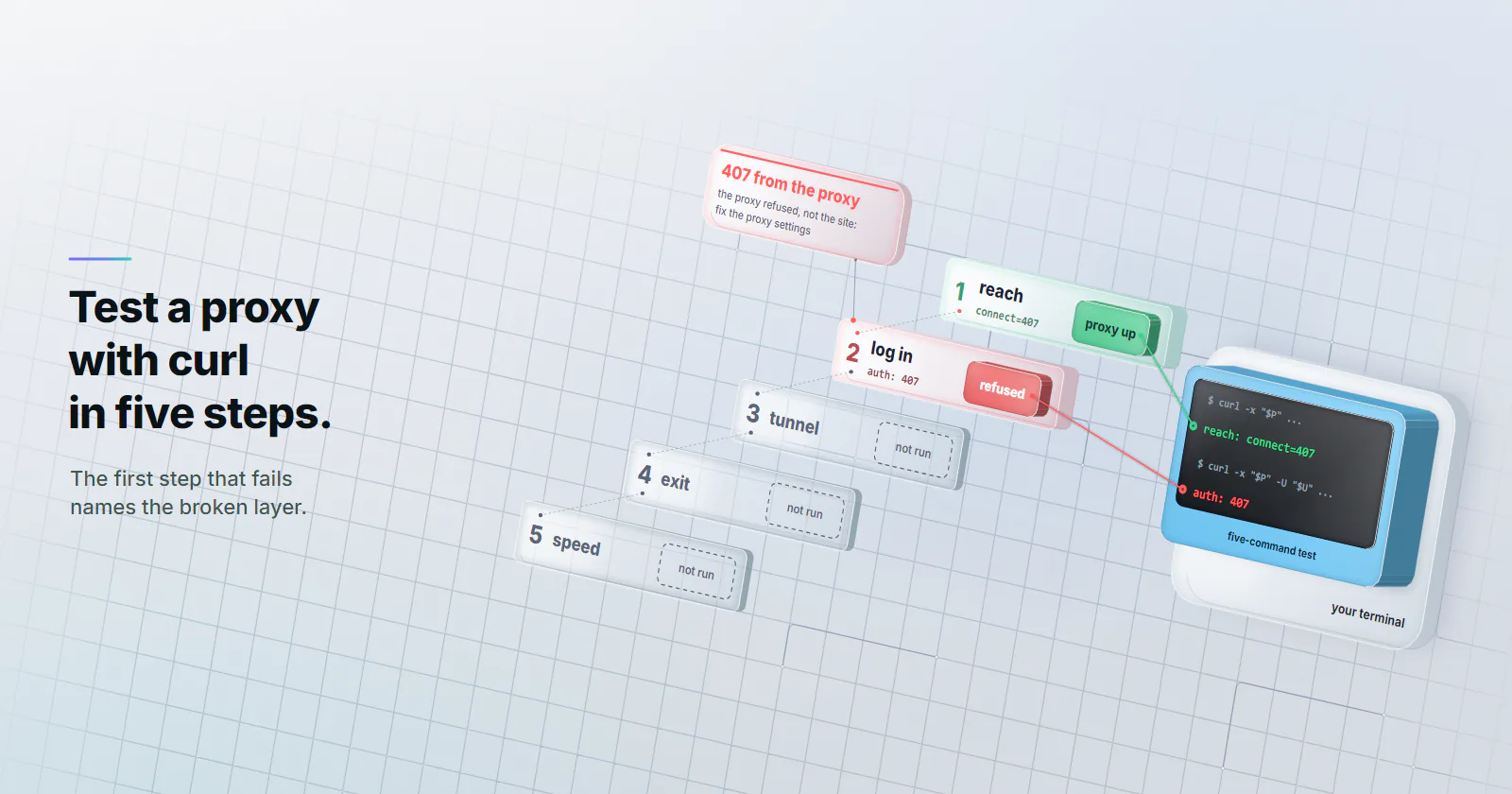
Every curl proxy problem lives in one layer: reaching the proxy, authenticating, opening the tunnel, the exit itself, or speed. Testing them in that order means the first failure names the broken layer. Save this as a script and run it before writing any client code:
P='http://HOST:PORT'; U='USERNAME:PASSWORD'

# 1. Can we reach the proxy at all? Expect connect=407, not connect=000.
curl -s -o /dev/null -w 'reach: connect=%{http_connect}\n' -x "$P" https://example.com

# 2. Do the credentials work? Expect 200, or a 301 to https:// on gateways that redirect plain HTTP.
curl -s -o /dev/null -w 'auth: %{http_code}\n' -x "$P" -U "$U" http://example.com

# 3. Does the HTTPS tunnel open? Expect connect=200 code=200.
curl -s -o /dev/null -w 'tunnel: connect=%{http_connect} code=%{http_code}\n' -x "$P" -U "$U" https://example.com

# 4. Which exit do we get? Compare with the same call without -x.
curl -s -x "$P" -U "$U" https://ipinfo.io/json

# 5. How long does each phase take?
curl -s -o /dev/null -w '@timing.txt' -x "$P" -U "$U" https://example.com- Reach the proxy, unauthenticated on purpose. curl exits 7 either way, so read the
http_connectfield: 407 means the proxy is up, listening on that port and asking for a login. 000 means nothing answered, and no credential change will help. - Log in on a plain
http://page. Some gateways answer every plain-HTTP request with a 301 to thehttps://address instead of forwarding it, and proxymint’s per-GB gateway does this for every target. A 301 here still proves the login worked, because a wrong password gets a 407. - Open the HTTPS tunnel.
connect=200 code=200is the real traffic test. - Check the exit against the same call without the proxy, as described below.
- Time each phase, also below, and read medians rather than single runs.
Check the exit IP
Step 4 uses an IP echo endpoint. ipinfo.io/json is one example; any service that returns the caller’s address and country works. Run it once with the proxy and once without. The two addresses should differ, and the country should match what the order asked for. An exit in the wrong country passes a check that only compares addresses, then skews every geo-dependent result later.
Do not use %{remote_ip} for this. It reports the address curl connected to, which is the proxy, not the exit the target sees. The same goes for time_connect: it measures the TCP handshake to the proxy.
Time each phase with -w
curl’s -w (--write-out) prints timers after the transfer. Put the format in a file so it can be reused. connect is the TCP handshake with the proxy, and tls ends when the TLS handshake with the site, through the tunnel, completes:
dns:      %{time_namelookup}s
connect:  %{time_connect}s
tls:      %{time_appconnect}s
ttfb:     %{time_starttransfer}s
total:    %{time_total}s
proxy:    %{http_connect} / used %{proxy_used} / new conns %{num_connects}\n
Each value is cumulative from the start. So tls minus connect covers the CONNECT round trip plus the TLS handshake through the exit, and ttfb minus tls is mostly the target thinking. A slow connect points at the path to the proxy. A slow tls with a fast connect points at the exit or the route beyond it.
A single run is noise. Run the same command 20 times through the proxy and 20 times direct, and compare the medians, not the best or worst run. The proxy performance guide covers what to change once the slow phase is known. Residential and mobile exits sit on home and carrier connections, so their spread is usually wider than datacenter’s.
Sticky vs rotating from the shell
curl reuses connections inside one command. Two URLs in a single call went through one tunnel in the local test: the second transfer reported num_connects 0 and no new CONNECT. So a rotation test has to run separate invocations:
for i in 1 2 3 4 5; do
  curl -s -x http://HOST:PORT -U 'USERNAME:PASSWORD' https://ipinfo.io/ip; echo
done
With rotation set to every request, the addresses should change between runs; with a sticky session, they should hold. On proxymint’s per-GB tiers, rotation is chosen on the order: a new IP on every request, a timer from 5 to 60 minutes, or sticky for as long as the device stays online, and it can be changed later with the same credentials. Whether a provider also rotates inside one kept-alive tunnel varies, which is one more reason to test with separate calls.
Reading curl proxy errors
curl’s exit code names the layer that failed. The strings below are from curl 8.21.0; the numbers are listed in the manual’s EXIT CODES section.
| Exit or status | What curl printed | Layer | What to check |
|---|---|---|---|
| 5 | Could not resolve proxy: HOST | Proxy hostname | Typo in the host, DNS on your side |
| 7 | Failed to connect to ... over proxy HOST | TCP to the proxy | Wrong port, firewall, proxy down |
| 7 | CONNECT tunnel failed, response 407 | Proxy auth, HTTPS target | Credentials, encoding, account state |
| 0 with status 407 | Nothing, the body is empty | Proxy auth, HTTP target | Same as above; add -f to make it fail |
| 28 | Connection timed out after 3014 milliseconds | Path to the proxy | Firewall dropping packets, wrong host |
| 56 | Recv failure: Connection was reset | Mid-transfer | Exit dropped, proxy closed the tunnel |
| 97 | No authentication method was acceptable | SOCKS handshake | Credentials missing for a SOCKS proxy |
| 97 | User was rejected by the SOCKS5 server | SOCKS auth | Wrong username or password |
| 6 | Could not resolve host: TARGET | DNS for the target | Used socks5:// where socks5h:// was needed |
The plain-HTTP 407 is the row that slips through scripts. For an http:// target the 407 is an ordinary response, so curl exits 0 and a script that only checks the exit code carries on. Add -f (--fail) and curl exits 22 instead, or check %{http_code} explicitly. The 407 status itself means the proxy, not the site, refused the request, so the fix is always in the proxy settings. The 407 Proxy Authentication Required guide walks through those fixes client by client.
Which tier to test with
curl does not care which proxy tier sits behind the URL, but the target does.
Testing your own API or a lenient endpoint: datacenter proxies are the right call. IPv4 ports are billed per port per month, with no per-GB meter, so a loop of curl checks adds no traffic cost.
Testing what a consumer in a given city sees: use rotating residential proxies, because targets that score IP type answer a home connection differently from a hosting range. A curl proxy test moves kilobytes, so the smallest package goes a long way.
Testing a login that must keep one address for weeks: static ISP proxies keep one ISP-registered address, assigned to your order for the whole billing term, so step 4 returns the same address every time by design.
One limit applies to every tier. A proxy changes the IP; it does not change curl’s TLS handshake or headers. A target that fingerprints the client treats curl as curl through any exit, so a curl pass proves the proxy works, not that a browser-based job will be treated the same way.
What to run first
If the proxy is new, run the five-command test before anything else, and stop at the first step that fails. A tunnel code of 000 is the network, a 407 or exit 97 is the login, and a wrong country is the order.
If curl passes and the application still fails, the fault is in how the application hands the proxy to its HTTP client; the Python requests proxy guide covers the usual traps in one such client. Compare the application’s settings with the curl proxy command that worked, field by field.
If DNS privacy matters, use socks5h:// or an HTTP proxy, never plain socks5:// with hostnames. And if the job needs one address for weeks, skip rotation tests entirely and move to an ISP address.
Frequently asked questions
Add -x followed by the proxy URL, for example curl -x http://HOST:PORT -U USERNAME:PASSWORD https://example.com. A proxy string without a scheme is treated as an HTTP proxy, and socks5h:// selects SOCKS5 with the hostname resolved by the proxy. Always include the port.
Use -U USERNAME:PASSWORD, or put them in the proxy URL as http://USERNAME:PASSWORD@HOST:PORT. In the URL form, reserved characters in the password must be percent-encoded, so @ becomes %40 and : becomes %3A. curl decodes percent sequences in both forms, so a literal percent sign is written as %25.
The curl manual says a proxy without a port is assumed to be on port 1080. In a test on curl 8.21.0, an http:// proxy without a port was dialled on port 80 while a SOCKS proxy used 1080. Writing the port explicitly avoids both surprises.
With socks5:// curl resolves the target hostname on the local machine and sends the proxy an IP address, so the lookup leaves from the local network. With socks5h:// curl sends the hostname and the proxy resolves it. Use socks5h:// when DNS should not leave from your own network or when only the proxy can resolve the host.
Pass --noproxy with a comma-separated list of hosts, for example --noproxy localhost,internal.example, or set the NO_PROXY environment variable. A name matches itself and its subdomains, and CIDR ranges work in curl 7.86.0 and later. To drop an environment proxy for a single call, pass -x with an empty string.
Add proxy and proxy-user lines to a .curlrc file in the home directory, or to .curlrc or _curlrc in the user profile or AppData folder on Windows. The https_proxy and ALL_PROXY environment variables work too, but http_proxy is only read in lowercase. Starting a command with -q skips the config file for that run.
A 407 means the proxy refused the request because the credentials were missing, wrong or badly encoded, and the site never saw it. For an HTTPS target curl prints CONNECT tunnel failed, response 407 and exits 7. For a plain HTTP target it exits 0 with status 407 unless -f is set, so check the status code in scripts.
Researched and drafted with AI tools, then checked against our publishing rules before it went live: 3 outside links, 7 links to other proxymint pages, no prices and a fact-check pass against our product records. How we write.