Proxy performance tuning: concurrency, reuse and timeouts
Proxy performance is mostly decided on the client. Tune connection reuse, concurrency and timeouts in order, then measure each phase with curl.
Quick summary · TL;DR
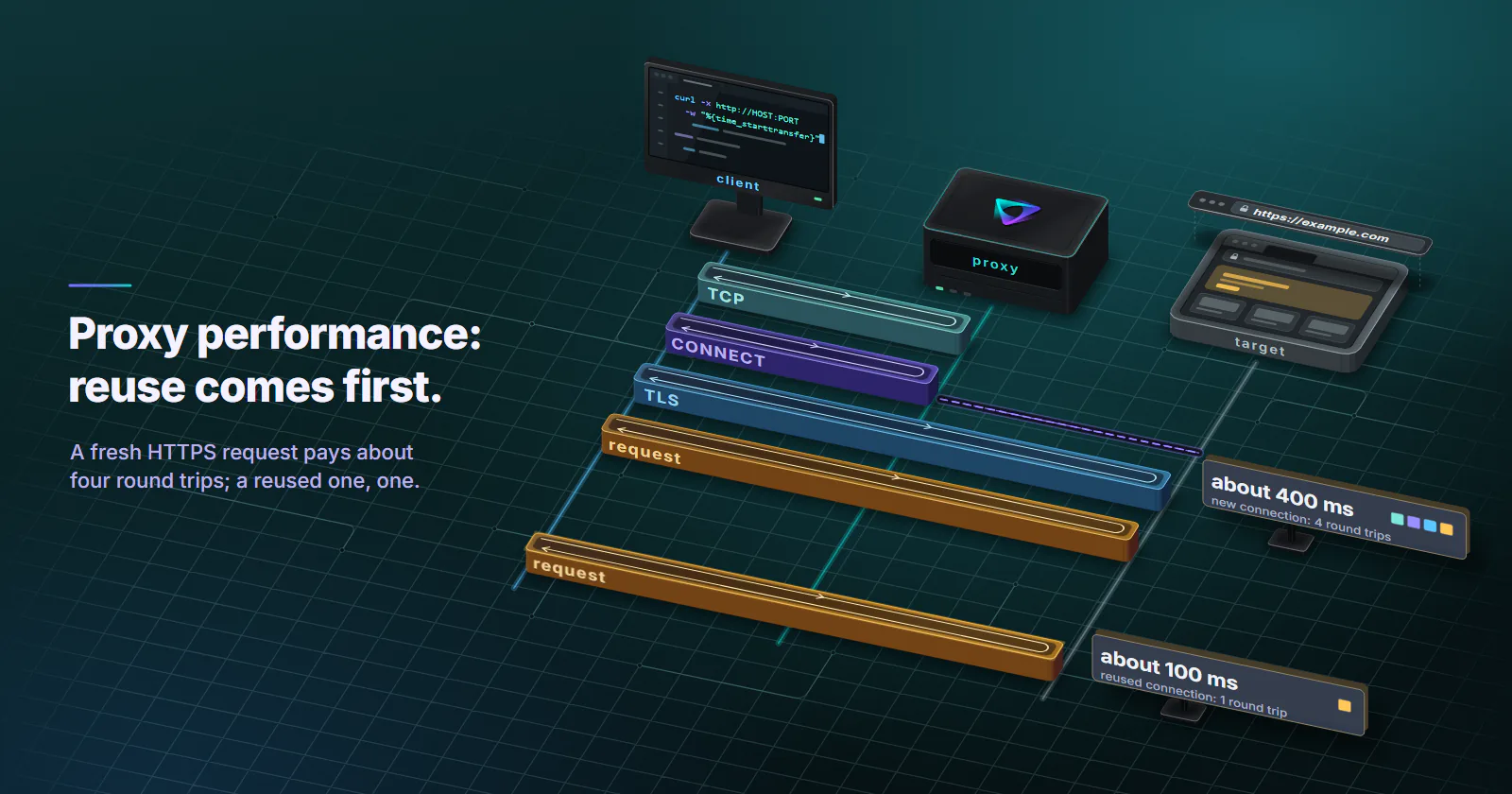
- A fresh HTTPS request through a proxy costs about four round trips before the first byte. TCP to the proxy, the CONNECT tunnel, the TLS 1.3 handshake and the request itself. A reused connection costs one.
- Connection reuse is usually the largest single win. Use one session or client per worker pool, size the pool at or above concurrency, and read and close every response body.
- Concurrency has a ceiling set by arithmetic. Requests in flight equal throughput times latency; past that, extra concurrency only lengthens the queue and raises 429s.
- Every client needs explicit timeouts. requests and Go's http.Client do not time out by default, and aiohttp waits up to 300 seconds. Set short connect, sensible read and a total deadline.
- curl's timing variables split the phases. time_connect, time_appconnect and time_starttransfer separate TCP to the proxy, tunnel plus TLS, and the target's first byte, so a slow proxy complaint names a phase.
Proxy performance is mostly decided on the client. A fresh HTTPS request through a proxy pays about four round trips before the first byte, and a reused connection pays one. So connection reuse, bounded concurrency and explicit timeouts usually move proxy speed more than switching provider, and curl’s timing variables show which phase is slow.
The proxy is “slow”. Each request takes most of a second, the job misses its window, and the first instinct is to switch providers. Then someone opens the client code and finds a fresh requests.get() per URL, 400 coroutines fired at once, and no timeout at all.
The subject here is forward proxies carrying scraping, monitoring and automation traffic, and the curl method at the end settles the next “the proxy is slow” with numbers.
Where proxy performance goes
Latency, throughput and success rate
Three numbers describe proxy performance, and tuning moves them differently.
Latency. The time from sending a request to the first byte of the response. It is what a single slow page feels like, and it is where handshakes and distance show up.
Throughput. Completed requests or bytes per second across the whole job. It follows from latency and concurrency: more requests in flight at the same latency means more per second, up to the limit of the pool, the proxy and the target.
Success rate. The share of requests that return a usable response without a timeout, a 407, a 429 or a block page; why proxies trigger captchas covers the challenge side. A fast request that fails costs a retry, so a lower success rate is slower in practice even when the median latency looks fine.
The handshake stack
A fresh HTTPS request through an HTTP proxy pays for several round trips before the target sees a single header:
- TCP to the proxy. One round trip between the client and the proxy.
- CONNECT. The client asks the proxy for a tunnel to
target:443. The proxy opens its own TCP connection to the target, then answers200. One round trip from the client’s side, plus the proxy’s leg to the target. - TLS with the target. Through the tunnel, end to end. TLS 1.3 needs one round trip for a full handshake, per RFC 8446 (August 2018); TLS 1.2 needs two.
- The request itself. One more round trip, plus whatever time the target spends building the response.
So a fresh connection costs about four round trips before the first byte under TLS 1.3, and a reused one costs one. If each round trip through the proxy took 100 ms, that is roughly 400 ms against 100 ms, before the target’s own processing. The provider cannot fix that ratio. The client configuration can.
That sets the order for tuning: fix connection reuse first, then bound concurrency, then set timeouts, and only then look at distance, proxy type and protocol.
Connection reuse comes first
Connection reuse is the setting with the largest effect on proxy performance in most setups.
Keep connections alive. In Python requests, keep-alive only works inside a Session. The requests advanced guide (checked September 2026) says keep-alive is automatic within a session, and that a connection only returns to the pool once the body has been read. A bare requests.get() per URL builds a new session each time and pays the full handshake stack on every call.
Size the pool to the concurrency. A pool smaller than the number of workers means connections get opened, used once and thrown away. requests’ HTTPAdapter keeps 10 connections per pool by default (DEFAULT_POOLSIZE = 10 in the adapter source). Go’s http.Transport keeps only 2 idle connections per host unless MaxIdleConnsPerHost is raised, per the net/http transport documentation (checked September 2026). httpx keeps up to 20 keep-alive connections and expires them after 5 seconds idle, per its resource limits page (checked September 2026).
Read and close every body. Go’s client documentation says a connection may not be reused unless the body is read to EOF and closed. requests has the same rule with stream=True. A scraper that reads the first 2 KB and drops the response sends the next request back through the full handshake stack.
A Python session sized for 32 threads through one proxy:
import requests
from requests.adapters import HTTPAdapter

proxy = "http://USERNAME:PASSWORD@HOST:PORT"
proxies = {"http": proxy, "https": proxy}

session = requests.Session()
adapter = HTTPAdapter(pool_connections=10, pool_maxsize=32)
session.mount("http://", adapter)
session.mount("https://", adapter)

# connect timeout, read timeout
r = session.get("https://example.com/", proxies=proxies, timeout=(3.05, 20))
print(r.status_code, len(r.content))
The same in Go, starting from a clone of the default transport so its handshake and idle timeouts are kept:
// imports: io, net/http, net/url, time
proxyURL, _ := url.Parse("http://USERNAME:PASSWORD@HOST:PORT")

t := http.DefaultTransport.(*http.Transport).Clone()
t.Proxy = http.ProxyURL(proxyURL)
t.MaxIdleConnsPerHost = 64
t.MaxConnsPerHost = 64
t.ResponseHeaderTimeout = 15 * time.Second

client := &http.Client{Transport: t, Timeout: 30 * time.Second}

resp, err := client.Get("https://example.com/")
if err == nil {
	io.Copy(io.Discard, resp.Body) // drain so the connection returns to the pool
	resp.Body.Close()
}
Reuse versus per-request rotation
Reuse and per-request rotation pull against each other. Every request on a kept-alive CONNECT tunnel leaves from the exit the tunnel was opened on, so a kept-alive connection keeps its IP. A job that must change IP on every request needs a new connection per request, and pays the handshake stack every time.
Rotating residential proxies offer a new IP on every request, a timer from 5 to 60 minutes, or sticky for as long as the device stays online. Jobs that can live with a sticky session for a few minutes get the reuse for free. Per-request rotation is worth its latency only when the job needs a different exit for each request.
Bound concurrency to the pool
More concurrency is not more proxy speed past a point. Every request in flight holds a connection, and when the pool or the target’s rate limit is full, extra requests just wait in a queue that the timing numbers hide.
Size it with arithmetic. Requests in flight equal throughput times latency. A job that needs 20 requests per second at 1.5 s per request needs about 20 × 1.5 = 30 in flight. Set concurrency near that, and set the connection pool to match. Going to 300 does not make the target answer faster; it makes the queue longer and the 429s more frequent.
Mind the per-IP ceiling on static IPs. A static datacenter or ISP address handles about 10 to 20 requests a second and around 100 Mbps. A job that needs more than that spreads its concurrency across several IPs instead of stacking it on one port.
Cap it in one place. In asyncio, a semaphore and the client’s connection limit should agree. aiohttp’s TCPConnector defaults to 100 total connections and no per-host limit, per the aiohttp client reference (checked September 2026). So 1,000 tasks against one target open up to 100 connections and queue the rest silently.
import asyncio
import httpx

limits = httpx.Limits(max_connections=30, max_keepalive_connections=30, keepalive_expiry=30)
timeout = httpx.Timeout(20.0, connect=5.0)

async def main(urls):
    sem = asyncio.Semaphore(30)  # same number as the pool, so no task waits on the pool timeout
    async with httpx.AsyncClient(proxy="http://USERNAME:PASSWORD@HOST:PORT",
                                 limits=limits, timeout=timeout) as client:
        async def fetch(url):
            async with sem:
                r = await client.get(url)
                return r.status_code
        return await asyncio.gather(*(fetch(u) for u in urls))

# asyncio.run(main(["https://example.com/"] * 100))
Watch the error mix while raising concurrency. When 429s, 403s or connect timeouts start to climb, the ceiling is the target or the pool, not the client, and the rate goes back down.
Timeouts that fail fast
Timeouts do not make the median request faster. They decide proxy performance at the tail, where one stuck request can hold a worker longer than a hundred good ones.
Always set one. requests does not time out unless a value is passed, and its documentation warns that a request without one can hang for minutes or more. aiohttp’s default total timeout is 300 seconds, and Go’s http.Client has no timeout at all unless Timeout is set. One dead exit then holds a worker for as long as the operating system lets it.
Split connect from read. A connect timeout covers reaching the proxy, and it should be short: the requests docs suggest slightly more than a multiple of 3 seconds, which is where 3.05 in the example comes from. The read timeout covers the target’s response through the tunnel, and should sit a little above the target’s normal slow responses, not at a round minute.
Add a total deadline. Per-phase timeouts do not cap a response that trickles bytes forever. Go’s Client.Timeout, httpx’s overall timeout and aiohttp’s total do.
Retry on a new connection. A connect timeout through a rotating gateway usually means one exit was slow or offline. Retrying on a fresh connection, and on residential or mobile tiers a fresh session, picks a different exit. Retrying on the same kept-alive connection does not.
Distance, proxy type and protocol
Once the client is clean, three things set the floor: how far the packets travel, what network the exit sits on, and how many round trips the proxy protocol adds.
Exit location and distance
A proxied request crosses three legs: client to proxy gateway, gateway to exit, exit to target. On a fresh HTTPS connection, the CONNECT and TLS round trips cross those legs again and again. A client in Frankfurt using a US exit to reach a US target pays a transatlantic round trip for every step of the handshake, and a German exit reaching a US target pays it on the exit’s side instead.
Put the exit near the target when the job does not need a specific country. Put the client near the gateway when the infrastructure allows it. And keep connections open, so distance is paid once per connection instead of four times per request.
Proxy type and speed
Datacenter. Ports on hosting networks with short, stable paths. Built for throughput on targets that accept hosting ranges; targets that score hosting ranges call for residential.
Residential. Exits on home connections. Home devices go offline and home links vary, so latency spreads wider and a sticky session can end when the device drops.
Mobile. Exits on mobile carrier networks, classified as cellular by MaxMind, with the most variance of the three. The radio generation changes throughput and latency but not how a platform scores the address, covered in 4G vs 5G proxies.
Page-one guides quote millisecond and Mbps ranges per tier with no source. No honest universal figure exists, because every number depends on the client’s location, the exit’s location and the target. The tier also moves the success rate, so it is chosen by what the target accepts before any speed is tuned: a fast port on a target that refuses hosting ranges delivers no usable pages at all.
SOCKS5 vs HTTP CONNECT
The protocol changes how many round trips a new connection pays before any data flows. An HTTP proxy carries the credentials in a Proxy-Authorization header inside the single CONNECT request: one round trip. SOCKS5 with username and password needs three: the method negotiation in RFC 1928 (March 1996), the username and password exchange in RFC 1929 (March 1996), then the connect request.
That is about two extra round trips per new connection, before TLS starts. With connection reuse the cost is paid once and disappears into the noise. So SOCKS5 is not faster than HTTP, and not much slower either on a well-pooled client; the wider comparison is in SOCKS5 vs HTTP proxy. Pick it when the client or the traffic needs it (non-HTTP protocols, tools that only speak SOCKS), not for speed.
Where the name gets resolved. With plain socks5:// the client looks the hostname up itself before connecting, which adds a local DNS lookup and shows the target the client’s resolver, a proxy DNS leak. With socks5h:// or HTTP CONNECT the proxy resolves it. On proxymint’s per-GB gateway both resolved on the proxy side in a September 2026 measurement (our US test exits used US public resolvers).
Plain http:// targets cost a redirect. The same measurement found the per-GB gateway answering every plain http:// request with a 301 to the https:// URL and Connection: close. Each such request pays an extra round trip and a fresh connection, so a crawler should request https:// URLs directly.
HTTP/2 through the tunnel. Inside a CONNECT tunnel, the client and the target negotiate HTTP/2 during the TLS handshake. One tunnel then carries many concurrent requests to the same host, which means fewer handshakes for the same concurrency. curl built with HTTP/2 support tries it by default on HTTPS, and httpx needs http2=True. The tradeoff is the same as keep-alive: every stream on that tunnel shares one exit IP.
Measure proxy performance with curl
A proxy speed complaint is only useful once it names a phase. The curl write-out variables separate each one. The curl man page (current release 8.22.0, checked October 2026) defines them: time_connect ends when the TCP connection to the remote host or proxy completes, time_appconnect when the TLS handshake with the remote host completes, and time_starttransfer at the first byte received. http_connect holds the proxy’s answer to CONNECT, and num_connects counts new connections.
Through an HTTP proxy to an HTTPS target, that maps to:
time_connect: TCP to the proxy.time_appconnectminustime_connect: the CONNECT exchange, including the proxy’s connection to the target, plus the TLS handshake with the target.time_starttransferminustime_appconnect: request out, target thinking time, first byte back.
Save the format once:
cat > timing.txt <<'EOF'
 CONNECT code:   %{http_connect}\n
 TCP to proxy:   %{time_connect}s\n
 tunnel + TLS:   %{time_appconnect}s\n
 first byte:     %{time_starttransfer}s\n
 total:          %{time_total}s\n
 new connects:   %{num_connects}\n
EOF

curl -s -o /dev/null -w @timing.txt \
  -x http://USERNAME:PASSWORD@HOST:PORT https://example.com/
To split CONNECT from TLS, add -v --trace-time and read the timestamp on the CONNECT tunnel established line.
Then check that reuse works. Two URLs in one curl command share a connection when possible, so the second transfer should report new connects: 0 and a much smaller first-byte time:
curl -s -w @timing.txt -o /dev/null -o /dev/null \
  -x http://USERNAME:PASSWORD@HOST:PORT \
  https://example.com/ https://example.com/
One sample says little. Run 50 and read the median and the 95th percentile of first-byte time:
for i in $(seq 1 50); do
  curl -s -o /dev/null -x http://USERNAME:PASSWORD@HOST:PORT \
    -w '%{time_connect} %{time_appconnect} %{time_starttransfer}\n' \
    https://example.com/
done > runs.txt

sort -n -k3 runs.txt | awk '{t[NR]=$3} END {print "p50 ttfb:", t[int(NR*0.5)], " p95 ttfb:", t[int(NR*0.95)]}'
Run the same loop without -x from the same machine. The gap between direct and proxied numbers is the proxy’s share. The rest belongs to the target and to the distance between the client, the proxy and the target.
When the provider is the problem
Switch providers only after the client-side numbers are clean. Then the evidence is specific:
- A large, steady gap between direct and proxied first-byte time on reused connections, across 50 runs and at quiet hours too.
- Connect time that swings from one exit to the next on the same country, which points at the gateway or the exits rather than the target.
- CONNECT codes other than 200 in
http_connect: a407means the proxy rejected the credentials (a suspended or lapsed package can answer the same way), while502and503answers from the proxy mean it could not reach or open the upstream.
Send the provider the curl output, the exit country, the timestamps and num_connects. By then the numbers say exactly which phase is slow, and the comparison is fair.
Frequently asked questions
In most setups the client opens a new TCP connection, CONNECT tunnel and TLS handshake for every request, which costs several round trips before the target answers. Unbounded concurrency and missing timeouts add queueing and stalled workers. A proxy always adds at least one extra network leg, but reusing connections, bounding concurrency and setting timeouts usually improve proxy speed more than changing provider. The provider is the likely cause only when a clean client still shows a large, steady gap against a direct run.
Use curl with the -x option and a write-out format that prints time_connect, time_appconnect, time_starttransfer and num_connects. Through an HTTP proxy, time_connect is the TCP connection to the proxy, the gap to time_appconnect is the CONNECT tunnel plus the TLS handshake, and the gap to time_starttransfer is the target's response. Run it around 50 times and compare the median and 95th percentile with a direct run from the same machine.
There is no universal number, because latency depends on the distance between the client, the proxy exit and the target, and on the proxy type. A more useful test is the gap between direct and proxied runs to the same target over about 50 samples, on reused connections, plus the 95th percentile. A small, steady gap is good; a large or erratic one points at distance, the exit or the provider.
Yes. A proxied request crosses three legs: client to gateway, gateway to exit, and exit to target. A fresh HTTPS connection crosses them again for each handshake round trip, so an exit far from the target, or a client far from the gateway, pays that distance about four times per new connection. Pick an exit near the target when the job does not need a specific country, and keep connections open so the distance is paid once.
Yes. An HTTPS connection through an HTTP proxy is a CONNECT tunnel, and clients such as requests sessions, httpx, Go's net/http and curl keep it open for further requests to the same host. The tradeoff is that a kept-alive tunnel keeps its exit IP, so a job that needs a new IP on every request has to open a new connection each time and pays the full handshake again.
Use a short connect timeout of a few seconds, a read timeout a little above the target's normal slow responses, and a total deadline for the whole request. The requests documentation suggests a connect timeout slightly above a multiple of 3 seconds. Residential and mobile exits vary more, so pair a slightly longer connect timeout with a retry on a fresh connection.
Start from throughput times latency: a job that needs 20 requests per second at about 1.5 seconds per request needs roughly 30 requests in flight. Set the connection pool to the same number. Raise it only while throughput grows and 429s, 403s and timeouts stay flat; a rising 429 or 403 rate means the target wants fewer requests.
Researched and drafted with AI tools, then checked against our publishing rules before it went live: 8 outside links, 6 links to other proxymint pages, no prices and a fact-check pass against our product records. How we write.