Java proxy setup: HttpClient, Authenticator and SOCKS5
Java proxy setup that works: system properties, java.net.Proxy, HttpClient, a scoped Authenticator, the 407 fix for Basic over CONNECT, SOCKS5, OkHttp, Apache.
Quick summary · TL;DR
- Java has three places to set a proxy. JVM-wide system properties (https.proxyHost, http.proxyHost and their ports), a java.net.Proxy passed to one connection, or a ProxySelector on a java.net.http.HttpClient. Each one overrides the level above it for the code it touches.
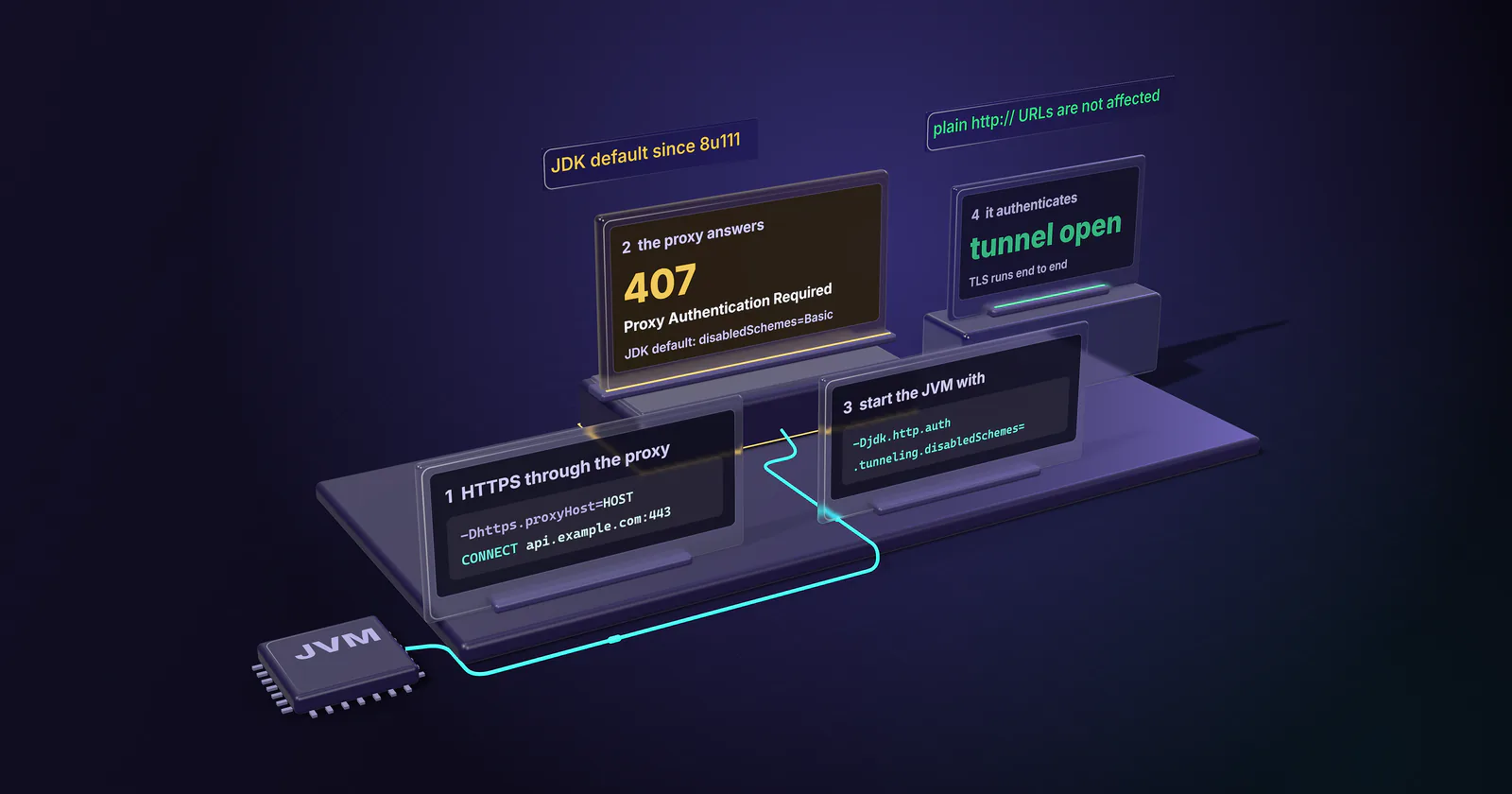
- A 407 on HTTPS with correct credentials is the tunneling flag. Since Java 8u111 the JDK disables Basic authentication on CONNECT tunnels by default. Starting the JVM with -Djdk.http.auth.tunneling.disabledSchemes= (empty) fixes HttpURLConnection and HttpClient alike.
- Scope the Authenticator to the proxy. Return credentials only for requestor type PROXY or protocol SOCKS5, and only for the proxy host and port, so a website that sends a 401 never receives the proxy password.
- HttpClient cannot use SOCKS. A SOCKS proxy from its selector is skipped and the request goes direct without an error. SOCKS5 in Java means HttpURLConnection or sockets, with credentials from the default Authenticator.
A Java proxy setup has three levels: JVM-wide system properties (-Dhttps.proxyHost and -Dhttps.proxyPort, plus the http. pair), a java.net.Proxy passed to one connection, or HttpClient.newBuilder().proxy(ProxySelector.of(...)) for the Java 11+ client. Credentials go in a scoped Authenticator. For HTTPS through a Basic-auth proxy, also start the JVM with -Djdk.http.auth.tunneling.disabledSchemes=.
Missing that flag produces the most confusing Java proxy failure. The host and port are right, the username and password are right, a curl test from the same machine works, and the Java call still fails with 407 Proxy Authentication Required. Since 2016 the JDK has refused by default to send Basic credentials on an HTTPS tunnel, and the error message does not say so.
Every level below comes with code that compiles on JDK 21. So do the parts that fail quietly: an Authenticator that hands proxy passwords to any server that asks, SOCKS5 credentials that never reach the proxy, a HttpClient that drops a SOCKS proxy and connects direct, and connection reuse that keeps one exit IP for a whole burst.
Java proxy setup: pick the level
Each level overrides the one above it for the code it touches. System properties feed the JVM’s default ProxySelector, so anything that asks the default selector (HttpURLConnection, HttpClient without its own selector, many libraries) picks them up. Pass a java.net.Proxy to openConnection and that one connection ignores the properties and the bypass list. An explicit ProxySelector on a HttpClient replaces the default selector for that client only.
JVM-wide proxy properties
OpenJDK documents them on its networking properties page (JDK 21, checked October 10, 2026). Each name carries the scheme of the target URL, not of the proxy:
java -Dhttps.proxyHost=HOST -Dhttps.proxyPort=PORT \
     -Dhttp.proxyHost=HOST -Dhttp.proxyPort=PORT \
     -Dhttp.nonProxyHosts="localhost|127.*|*.internal.example" \
     -Djdk.http.auth.tunneling.disabledSchemes= \
     -jar app.jar
Set both pairs. https.proxyHost covers https:// URLs and http.proxyHost covers http:// URLs. With only the https. pair set, every plain HTTP call goes direct from the server’s own address, with no error.
Write the port. Without it the JDK assumes 80 for http.proxyPort and 443 for https.proxyPort, and few proxy gateways listen there.
Host only, no scheme. http.proxyHost takes a hostname or an IP address. Java reads a value like http://HOST as a hostname, and the lookup fails.
One bypass list for both schemes. http.nonProxyHosts is a |-separated list with * wildcards, and the HTTPS handler reads it too. Its documented default is localhost|127.*|[::1], and on JDK 21 the selector appends localhost|127.*|[::1]|0.0.0.0|[::0] to any non-empty list you set, so local calls never hit the proxy. Quote the value on the command line, because the shell treats | as a pipe.
SOCKS is its own pair. socksProxyHost and socksProxyPort (default 1080) send every TCP connection through a SOCKS server unless an HTTP proxy matches first. socksNonProxyHosts is its bypass list.
java.net.useSystemProxies=true reads the operating system’s proxy settings on Windows, macOS and GNOME. It defaults to false, is checked once at startup, and loses to any explicit http.proxyHost.
For build tools and launchers whose command line is not yours to edit, the JVM reads the JAVA_TOOL_OPTIONS environment variable and prints Picked up JAVA_TOOL_OPTIONS when it does. That message in a log is also the first thing to look for when a JVM uses a proxy nobody configured. Oracle’s java.com help page on proxy settings covers the Java Control Panel’s “Use Browser Settings” option, which applied to applets and Web Start on Java 8; server code reads the properties above.
Setting the properties in code
The default selector reads these properties again on every lookup, as the DefaultProxySelector source shows, so System.setProperty works at runtime too. The change applies to connections opened after the call, in every thread of the JVM, and System.clearProperty switches the proxy off again. For one call that must skip the proxy whatever the properties say, pass Proxy.NO_PROXY to openConnection:
import java.net.HttpURLConnection;
import java.net.Proxy;
import java.net.URI;

public class PropsDemo {
    public static void main(String[] args) throws Exception {
        System.setProperty("jdk.http.auth.tunneling.disabledSchemes", "");
        String host = System.getenv("PROXY_HOST");
        String port = System.getenv("PROXY_PORT");
        System.setProperty("https.proxyHost", host);
        System.setProperty("https.proxyPort", port);
        System.setProperty("http.proxyHost", host);
        System.setProperty("http.proxyPort", port);

        HttpURLConnection viaProxy = (HttpURLConnection) URI.create("https://api.ipify.org")
                .toURL().openConnection();
        System.out.println(viaProxy.getResponseCode());

        HttpURLConnection direct = (HttpURLConnection) URI.create("https://intranet.example")
                .toURL().openConnection(Proxy.NO_PROXY);
        System.out.println(direct.getResponseCode());
    }
}
The proxy login still needs an Authenticator, covered next.
Proxy authentication with Authenticator
No JDK property called http.proxyUser or http.proxyPassword exists. Pages that show them pair them with a custom Authenticator that reads them back; on their own they do nothing. Credentials come from a java.net.Authenticator, and the one most examples show is too generous: it returns the proxy password for every request, including a 401 from any website the code visits.
This version answers only the proxy it was built for:
import java.net.Authenticator;
import java.net.PasswordAuthentication;

public final class ProxyAuth extends Authenticator {
    private final String host;
    private final int port;
    private final String user;
    private final char[] pass;

    public ProxyAuth(String host, int port, String user, String pass) {
        this.host = host;
        this.port = port;
        this.user = user;
        this.pass = pass.toCharArray();
    }

    @Override
    protected PasswordAuthentication getPasswordAuthentication() {
        boolean httpProxy = getRequestorType() == RequestorType.PROXY;
        boolean socksProxy = "SOCKS5".equals(getRequestingProtocol());
        if ((httpProxy || socksProxy)
                && host.equalsIgnoreCase(getRequestingHost())
                && port == getRequestingPort()) {
            return new PasswordAuthentication(user, pass);
        }
        return null; // never hand proxy credentials to a target site
    }
}
OpenJDK’s SOCKS code asks for credentials with requestor type SERVER and protocol "SOCKS5", as the SocksSocketImpl source shows, so an Authenticator that checks only for PROXY returns nothing to a SOCKS proxy. That is why ProxyAuth also matches the protocol.
With HttpURLConnection, pass the proxy and the authenticator per connection. setAuthenticator exists since Java 9 and keeps credentials out of the JVM-wide default:
import java.net.HttpURLConnection;
import java.net.InetSocketAddress;
import java.net.Proxy;
import java.net.URI;

public class UrlConnDemo {
    public static void main(String[] args) throws Exception {
        String host = System.getenv("PROXY_HOST");
        int port = Integer.parseInt(System.getenv("PROXY_PORT"));
        Proxy proxy = new Proxy(Proxy.Type.HTTP, new InetSocketAddress(host, port));

        HttpURLConnection conn = (HttpURLConnection) URI.create("https://api.ipify.org")
                .toURL().openConnection(proxy);
        conn.setAuthenticator(new ProxyAuth(host, port,
                System.getenv("PROXY_USER"), System.getenv("PROXY_PASS")));
        conn.setConnectTimeout(10_000);
        conn.setReadTimeout(30_000);

        System.out.println(conn.getResponseCode());
        System.out.println(new String(conn.getInputStream().readAllBytes()));
    }
}
Two shortcuts from older answers do not work for HTTPS targets. setRequestProperty("Proxy-Authorization", ...) does nothing for them, because HttpURLConnection builds the CONNECT request from a fresh, empty header set, so a header set on the connection never reaches the proxy. Credentials typed into the proxy host string fail too, because Java reads them as part of the hostname. To split a host:port:user:pass line into the four values these constructors take, see the proxy string formats guide.
Basic auth over HTTPS CONNECT
For an https:// URL, Java does not send the request to the proxy. It sends CONNECT api.example.com:443, the proxy opens a TCP tunnel, and TLS runs end to end between the JVM and the site. Authentication happens on the CONNECT, and that is where the JDK holds back. (For the same 407 in curl, Python, Node and browsers, see 407 Proxy Authentication Required; this section is the Java-specific cause.)
Since Java 8u111, released October 18, 2016 (Oracle release notes, JDK-8158993), the JDK ships with jdk.http.auth.tunneling.disabledSchemes=Basic in its net.properties file. That line is still in the OpenJDK net.properties on the main branch (checked October 10, 2026). With Basic disabled for tunnels, the JDK receives the proxy’s 407, treats Basic as unsupported, and never calls the Authenticator. HttpURLConnection.getResponseCode() returns 407 and reading the body throws IOException: Unable to tunnel through proxy. Proxy returns "HTTP/1.1 407 Proxy Authentication Required".
Three details decide whether the fix sticks:
- Both JDK clients read it.
java.net.http.HttpClientchecks the same property before it answers a 407 on a CONNECT, through a filter in its internalUtilsclass, so the 407 is identical there. - Set it before networking starts. On the command line, a
-Dflag always works.System.setProperty("jdk.http.auth.tunneling.disabledSchemes", "")also works as the first line ofmain, before any HTTP class loads; set later, it can be too late. - Plain HTTP has its own flag.
jdk.http.auth.proxying.disabledSchemescovershttp://URLs sent through the proxy, and it is empty by default, which is why those calls authenticate fine.
Basic is off by default because it sends the password base64-encoded, readable to anyone on the path between the JVM and the proxy. Traffic to an HTTP proxy port is plain TCP, so clearing the flag accepts that exposure on that hop. On a trusted network or a short hop it is the normal setup; across the open internet, keep the proxy credentials dedicated to the proxy and rotate them like any other secret.
Java HttpClient proxy
java.net.http.HttpClient, standard since Java 11, takes a ProxySelector and an Authenticator on its builder:
import java.net.InetSocketAddress;
import java.net.ProxySelector;
import java.net.URI;
import java.net.http.HttpClient;
import java.net.http.HttpRequest;
import java.net.http.HttpResponse;
import java.time.Duration;

public class HttpClientDemo {
    public static void main(String[] args) throws Exception {
        String host = System.getenv("PROXY_HOST");
        int port = Integer.parseInt(System.getenv("PROXY_PORT"));

        HttpClient client = HttpClient.newBuilder()
                .proxy(ProxySelector.of(new InetSocketAddress(host, port)))
                .authenticator(new ProxyAuth(host, port,
                        System.getenv("PROXY_USER"), System.getenv("PROXY_PASS")))
                .connectTimeout(Duration.ofSeconds(10))
                .build();

        HttpRequest request = HttpRequest.newBuilder(URI.create("https://api.ipify.org"))
                .timeout(Duration.ofSeconds(30))
                .build();

        HttpResponse<String> response = client.send(request, HttpResponse.BodyHandlers.ofString());
        System.out.println(response.statusCode() + " " + response.body());
    }
}
Run it with the tunneling flag cleared, as above. Four more rules apply, from the HttpClient Javadoc and the JDK 21 AuthenticationFilter that implements them:
No .proxy() call means the default selector. Without one, a client follows the JVM’s http.proxyHost and https.proxyHost properties. .proxy(HttpClient.Builder.NO_PROXY) turns that off for one client.
Basic only. Only HTTP Basic is implemented, so a proxy that asks only for Digest or NTLM needs another client.
Manual headers switch the authenticator off. When a request carries its own Proxy-Authorization header, the client sends it and does not retry with the Authenticator on a 407.
Redirects are off by default. Unless set with .followRedirects(...), the redirect policy is NEVER, so a 301 comes back as a 301.
ProxySelector.of sends every request to one proxy and has no bypass list. To add a bypass, subclass ProxySelector and return Proxy.NO_PROXY for internal hosts.
SOCKS5 proxies in Java
SOCKS5 works at the TCP level, and Java supports it through Proxy.Type.SOCKS on sockets and on HttpURLConnection. Whether SOCKS5 is the better protocol for a job is a separate question, covered in the SOCKS5 vs HTTP proxy guide. In Java it has three traps.
Credentials come only from the default Authenticator. HttpURLConnection.setAuthenticator is not consulted for the SOCKS handshake; the SOCKS code calls the static Authenticator.requestPasswordAuthentication, which uses the JVM-wide default. OpenJDK documents java.net.socks.username and java.net.socks.password, but the JDK 21 SocksSocketImpl never reads them. Without a default Authenticator, it sends the operating system’s user name and an empty password, and the proxy rejects the login.
import java.net.Authenticator;
import java.net.HttpURLConnection;
import java.net.InetSocketAddress;
import java.net.Proxy;
import java.net.URI;

public class SocksDemo {
    public static void main(String[] args) throws Exception {
        String host = System.getenv("PROXY_HOST");
        int port = Integer.parseInt(System.getenv("SOCKS_PORT"));

        // SOCKS5 credentials come only from the JVM-wide default Authenticator
        Authenticator.setDefault(new ProxyAuth(host, port,
                System.getenv("PROXY_USER"), System.getenv("PROXY_PASS")));

        Proxy socks = new Proxy(Proxy.Type.SOCKS, new InetSocketAddress(host, port));
        HttpURLConnection conn = (HttpURLConnection) URI.create("https://api.ipify.org")
                .toURL().openConnection(socks);
        conn.setConnectTimeout(10_000);
        conn.setReadTimeout(30_000);
        System.out.println(conn.getResponseCode());
    }
}
Setting a JVM-wide default is safe here because the scoped ProxyAuth from above still answers only the SOCKS proxy’s host and port.
HttpClient has no SOCKS support. It takes the first proxy its selector returns and uses it only if the type is HTTP (HttpRequestImpl source). When the selector returns a SOCKS proxy, the client skips it and connects direct, with no exception. Point the Java 11+ client at the provider’s HTTP port instead.
DNS resolves on the client. HttpURLConnection builds a resolved InetSocketAddress for the target before it talks to the SOCKS server, so the JVM’s own resolver looks up the hostname and the proxy receives an IP address. That is the plain socks5:// behaviour, and the lookup reveals the target to the client’s network and resolves it from the client’s location. Only an address built with InetSocketAddress.createUnresolved(host, port) on a raw Socket sends the hostname to the proxy. An HTTP proxy avoids the question, because a CONNECT request carries the hostname and the proxy resolves it. proxymint Lab #1 measured this on proxymint’s gateway on September 28, 2026, and found CONNECT and socks5h lookups resolved on the proxy side and plain socks5 lookups on the client.
OkHttp and Apache HttpClient
Both libraries answer the CONNECT 407 themselves, so the JDK tunneling flag does not apply to them.
OkHttp takes a java.net.Proxy and a proxyAuthenticator that is called when the proxy answers 407:
import java.net.InetSocketAddress;
import java.net.Proxy;
import java.time.Duration;
import okhttp3.Credentials;
import okhttp3.OkHttpClient;
import okhttp3.Request;
import okhttp3.Response;

public class OkHttpDemo {
    public static void main(String[] args) throws Exception {
        String host = System.getenv("PROXY_HOST");
        int port = Integer.parseInt(System.getenv("PROXY_PORT"));
        String credential = Credentials.basic(System.getenv("PROXY_USER"), System.getenv("PROXY_PASS"));

        OkHttpClient client = new OkHttpClient.Builder()
                .proxy(new Proxy(Proxy.Type.HTTP, new InetSocketAddress(host, port)))
                .proxyAuthenticator((route, response) -> {
                    if (response.request().header("Proxy-Authorization") != null) {
                        return null; // already tried: wrong credentials, stop
                    }
                    return response.request().newBuilder()
                            .header("Proxy-Authorization", credential)
                            .build();
                })
                .connectTimeout(Duration.ofSeconds(10))
                .readTimeout(Duration.ofSeconds(30))
                .build();

        Request request = new Request.Builder().url("https://api.ipify.org").build();
        try (Response response = client.newCall(request).execute()) {
            System.out.println(response.code() + " " + response.body().string());
        }
    }
}
Keep the guard in the lambda. Without it, wrong credentials send OkHttp back to the proxy until its own attempt limit stops it, and each retry is another failed login in the provider’s logs.
Apache HttpClient 5 binds credentials to the proxy’s host and port through an AuthScope:
import org.apache.hc.client5.http.auth.AuthScope;
import org.apache.hc.client5.http.auth.UsernamePasswordCredentials;
import org.apache.hc.client5.http.classic.methods.HttpGet;
import org.apache.hc.client5.http.impl.auth.BasicCredentialsProvider;
import org.apache.hc.client5.http.impl.classic.CloseableHttpClient;
import org.apache.hc.client5.http.impl.classic.HttpClients;
import org.apache.hc.core5.http.HttpHost;
import org.apache.hc.core5.http.io.entity.EntityUtils;

public class ApacheDemo {
    public static void main(String[] args) throws Exception {
        HttpHost proxy = new HttpHost("http", System.getenv("PROXY_HOST"),
                Integer.parseInt(System.getenv("PROXY_PORT")));

        BasicCredentialsProvider credentials = new BasicCredentialsProvider();
        credentials.setCredentials(new AuthScope(proxy),
                new UsernamePasswordCredentials(System.getenv("PROXY_USER"),
                        System.getenv("PROXY_PASS").toCharArray()));

        try (CloseableHttpClient client = HttpClients.custom()
                .setProxy(proxy)
                .setDefaultCredentialsProvider(credentials)
                .build()) {
            String body = client.execute(new HttpGet("https://api.ipify.org"),
                    response -> response.getCode() + " " + EntityUtils.toString(response.getEntity()));
            System.out.println(body);
        }
    }
}
In new HttpHost("http", ...), the "http" is the scheme of the connection to the proxy, and it stays http for HTTPS targets because the client tunnels with CONNECT. On the JVM properties, the two libraries differ. OkHttp without a .proxy() call asks ProxySelector.getDefault(), so it follows -Dhttps.proxyHost. Apache HttpClient 5 ignores the properties unless the client is built with HttpClients.custom().useSystemProperties(), which is why one flag can route one part of an application and not another.
Verify the proxy exit IP in Java
A Java proxy setup is done when a request through it returns the proxy’s exit address, not the server’s. Call an IP echo endpoint over https:// through the configured client and compare it with a direct call. Use an https:// URL for the check: proxymint’s gateway answers plain http:// requests with a 301 to the https:// address (Lab #1), and neither JDK client follows it by default. HttpURLConnection does not follow a redirect that changes protocol, and HttpClient follows none unless told to.
Rotation and connection reuse
Rotation needs a second check, because Java clients reuse connections. HttpClient keeps an idle connection for 30 seconds on JDK 21 (jdk.httpclient.keepalive.timeout, per the java.net.http module docs), and for HTTPS that connection is one CONNECT tunnel. Every request inside one tunnel travels over the same TCP connection to the site, so it leaves from the same exit IP, whatever rotation the proxy applies to new connections. This loop shows what a given setup does:
import java.net.InetSocketAddress;
import java.net.ProxySelector;
import java.net.URI;
import java.net.http.HttpClient;
import java.net.http.HttpRequest;
import java.net.http.HttpResponse;
import java.util.ArrayList;
import java.util.List;

public class ExitCheck {
    static final URI ECHO = URI.create("https://api.ipify.org");

    static HttpClient client(String host, int port) {
        return HttpClient.newBuilder()
                .proxy(ProxySelector.of(new InetSocketAddress(host, port)))
                .authenticator(new ProxyAuth(host, port,
                        System.getenv("PROXY_USER"), System.getenv("PROXY_PASS")))
                .build();
    }

    static String ip(HttpClient c) throws Exception {
        return c.send(HttpRequest.newBuilder(ECHO).build(),
                HttpResponse.BodyHandlers.ofString()).body().trim();
    }

    public static void main(String[] args) throws Exception {
        String host = System.getenv("PROXY_HOST");
        int port = Integer.parseInt(System.getenv("PROXY_PORT"));

        String direct = ip(HttpClient.newBuilder().proxy(HttpClient.Builder.NO_PROXY).build());
        HttpClient shared = client(host, port);
        List<String> reused = new ArrayList<>();
        List<String> fresh = new ArrayList<>();
        for (int i = 0; i < 5; i++) {
            reused.add(ip(shared));
            fresh.add(ip(client(host, port)));
        }
        if (reused.contains(direct) || fresh.contains(direct)) {
            throw new IllegalStateException("A request left from the direct IP " + direct);
        }
        System.out.println("direct " + direct);
        System.out.println("reused " + reused);
        System.out.println("fresh  " + fresh);
    }
}
A direct IP in either list means a silent bypass, and the program stops. Comparing the two lists shows whether new exits arrive with new connections. When reused repeats one address while fresh changes, rotation is following connections. On proxymint, rotation is set on the order: a new IP on every request, a timer from 5 to 60 minutes, or sticky while the device stays online, and it can be changed later with the same credentials. Session parameters in the username do not apply. A login flow or a checkout test wants the reuse; broad collection wants a fresh client per identity. Rotating vs sticky proxies compares the modes job by job.
Which proxy type for which Java job
Choosing the proxy type
Client code stays the same for every proxy category; the target decides the category. Residential, static ISP and datacenter all take username and password over HTTP and SOCKS5, so the Java side does not change when the category does.
- Collection from consumer-facing sites (prices, stock, search results by location, ad checks) points to rotating residential proxies: home-connection exits with country, region and city targeting, per-request or timed rotation, sticky sessions when a flow needs one address. Our residential proxy guide explains why those targets treat home networks differently.
- API polling, monitoring and volume work on targets that accept hosting networks points to datacenter proxies, where throughput matters more than IP origin.
- One stable identity over days, such as a partner API that expects one fixed address or a long logged-in session, points to static ISP proxies: one ISP-registered address for the whole term.
For any collection job, use the site’s official API or data feed first, collect public data only, and treat a block as a signal to stop.
Checks before the first run
Before the first production run, go through the Java proxy setup in this order. If every call is HTTPS through an authenticated HTTP proxy, set -Djdk.http.auth.tunneling.disabledSchemes= first and expect the 407 to disappear. If third-party code has to follow the proxy, set both the https. and http. property pairs and a bypass list; if one component needs its own route, give it a java.net.Proxy or its own HttpClient selector instead. If the provider hands out SOCKS5 and the code uses HttpClient, switch to the HTTP port, because that client cannot speak SOCKS. Where SOCKS5 is a hard requirement, use HttpURLConnection or raw sockets with a scoped default Authenticator, and expect DNS to resolve on the client. Then run the exit check: no direct IP in either list, and a reused and fresh pattern that matches the rotation the job was designed for.
Frequently asked questions
For the whole JVM, start it with -Dhttps.proxyHost=HOST -Dhttps.proxyPort=PORT and the matching http.proxyHost and http.proxyPort, or set the same names with System.setProperty before the first request. For one connection, pass a java.net.Proxy to URL.openConnection. For the Java 11+ client, call HttpClient.newBuilder().proxy(ProxySelector.of(new InetSocketAddress(HOST, PORT))).
Use a java.net.Authenticator that returns a PasswordAuthentication when the requestor type is PROXY and the requesting host and port match the proxy. Attach it with HttpURLConnection.setAuthenticator, HttpClient.Builder.authenticator or Authenticator.setDefault. The JDK has no http.proxyUser or http.proxyPassword property.
Since Java 8u111 the JDK lists Basic in jdk.http.auth.tunneling.disabledSchemes, so it refuses to send Basic credentials on the CONNECT request that opens an HTTPS tunnel. Plain http:// URLs are not affected. Starting the JVM with -Djdk.http.auth.tunneling.disabledSchemes= set to an empty value lets the Authenticator answer the 407.
Create new Proxy(Proxy.Type.SOCKS, new InetSocketAddress(HOST, PORT)) and pass it to URL.openConnection or to a Socket, or set socksProxyHost and socksProxyPort for the whole JVM. Credentials must come from Authenticator.setDefault, because the SOCKS code ignores a per-connection authenticator. The java.net.http.HttpClient does not support SOCKS proxies.
Yes, when the builder has no proxy call: the client then uses ProxySelector.getDefault, which reads http.proxyHost, https.proxyHost and the nonProxyHosts list. Calling proxy with HttpClient.Builder.NO_PROXY turns that off for one client. Operating system proxy settings apply only when java.net.useSystemProxies is true at startup.
List them in http.nonProxyHosts, separated by the pipe character, with as a wildcard, for example localhost|127.|*.internal.example. The HTTPS handler reads the same list. Passing Proxy.NO_PROXY to openConnection sends one connection direct. A java.net.Proxy passed to one connection ignores the list, and ProxySelector.of has none, so those need a custom ProxySelector that returns Proxy.NO_PROXY.
Request an https:// IP echo endpoint through the configured client and compare the answer with a direct request; the two addresses must differ. Use an https:// URL, because some gateways redirect plain http:// requests and neither JDK client follows that redirect by default. Repeat the check with one shared client and with fresh clients to see how rotation behaves.
Researched and drafted with AI tools, then checked against our publishing rules before it went live: 10 outside links, 10 links to other proxymint pages, no prices and a fact-check pass against our product records. How we write.