Web scraping architecture: components, patterns and proxies
Web scraping architecture splits a scraper into scheduler, fetcher, parser, storage and monitoring layers. How it changes with scale, and where proxies belong.
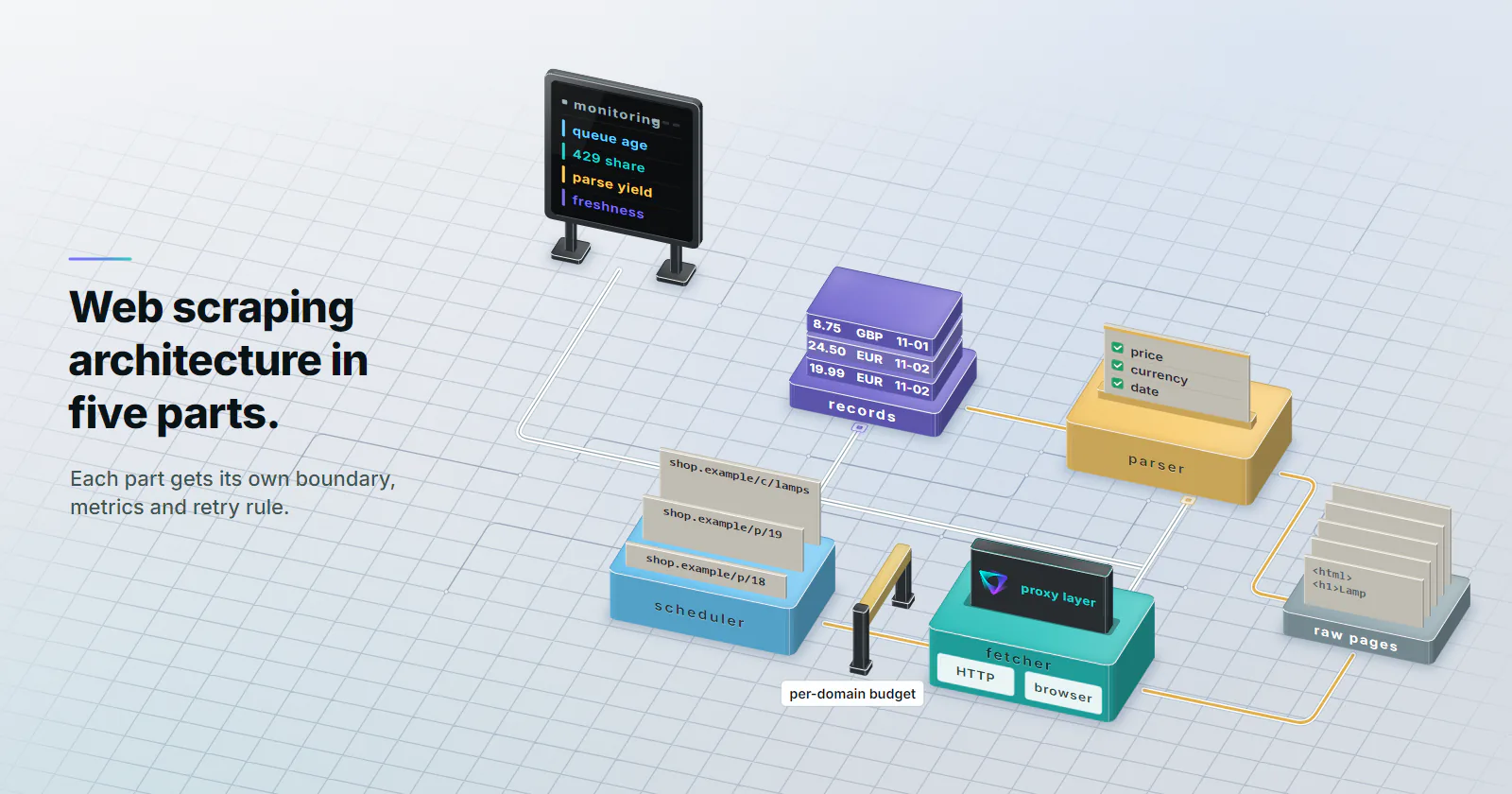
Quick summary · TL;DR
- Five components, five failure modes. A scraping system splits into a scheduler and queue, a fetcher with its proxy layer, a parser with validation, storage, and monitoring. Each one gets its own metrics and retry rule.
- Rate limits live in the scheduler. A concurrency budget per target domain, enforced centrally, keeps every worker inside it. Adding exit IPs never raises that budget.
- The proxy layer is an interface, not a loop. Workers ask for an egress by job type and country; rotation is chosen per job shape and DNS resolves at the proxy with CONNECT or socks5h.
- Some errors mean stop. A 429 means wait as long as Retry-After says; a 403 or challenge page means the job for that target stops and a person reviews access.
Web scraping architecture is the layout of the parts that turn a list of URLs into clean, stored data: a scheduler and queue, a fetcher with its proxy layer, a parser that validates output, storage, and monitoring across all of them. Each part fails in its own way, so each gets its own boundary, metrics and retry rule.
Most scrapers start as one script with a loop. That holds until the job runs every night against 40 domains, one target starts answering 429, a selector silently returns empty strings, and a crash at page 3,000 means starting again from page one.
Fixing that is structural work. Every one of those failures belongs to one layer, and a layer with its own boundary can be watched, throttled and repaired without touching the rest.
Web scraping architecture, defined
Every scraping system has one job: produce a correct, fresh dataset from public pages without overloading the sites it reads. Everything else is a means to that end. Good web scraping architecture separates what to fetch (scheduling), how to fetch it (network and rendering), what it means (parsing), and where it goes (storage), with monitoring watching the seams between them.
That separation pays off in three ways. Parsers can be fixed and rerun over stored raw pages without refetching anything. Fetch rates for one domain can drop without touching the others. And when a target changes its markup, the alert fires in the parser, not as a mystery gap in a dashboard two weeks later.
Before any of this, check whether the data has an official route. Many sites publish an API, a data export or a feed for exactly the fields a scraper would extract. An API call is cheaper to run, stable across redesigns and comes with terms that say what is allowed. Scraping is the fallback for public pages where no such route exists.
The five core components
Every production scraping pipeline, whatever the framework, ends up with the same five scraper components. Scrapy names them engine, scheduler, downloader, spiders and item pipelines; a home-grown system uses different words for the same boundaries.
Scheduler and URL queue
The scheduler decides what gets fetched and when. It holds the URL queue, removes duplicates by fingerprinting each request, assigns priorities (fresh product pages before archive pages), and persists state so a crash resumes where it stopped.
URL discovery. Seed the queue from the site’s XML sitemaps before following links. Many sites list them on a Sitemap: line in robots.txt, and a sitemap often carries a last-modified date the recrawl policy can use.
Recrawl policy. Price pages might need a daily visit, category listings a weekly one. Store the last-fetched time per URL and let the scheduler release work by age, not by rerunning the whole list.
Per-domain budgets. Request rates per target live in the scheduler too; the rate control section below covers them. Putting them here, before the fetcher, means no worker can exceed them by accident.
Fetcher: HTTP client or browser
The fetcher turns a URL into a response. It owns timeouts, connection reuse, headers, cookies and the proxy connection.
Start with an HTTP client. If the data is in the first HTML response, a browser adds nothing but memory and seconds. Many pages that look dynamic load their data from a JSON endpoint the page itself calls; the browser’s network panel shows it, and fetching that endpoint directly is lighter for both sides, provided the site’s terms allow it.
Render only what needs rendering. Keep a headless browser pool for pages that build their content client-side and return an empty shell to a plain request. Mixing both in one run is normal: catalogue pages over HTTP, a few detail pages in a browser.
Parser and validation
The parser extracts fields; validation decides whether they are right. Check each record against a schema: required fields present, prices numeric, currencies from a known list, dates parseable.
Pages without stable markup are where model-based extraction (an LLM or a trained extractor) earns its place. Its output goes through the same schema checks, since a model fills a missing price with a plausible guess where a selector would return nothing.
Store the raw response before parsing. When a selector breaks, the fix is a parser change and a replay over stored pages, with zero new requests to the target.
Storage and delivery
Two stores work better than one. Raw pages (compressed HTML or JSON, keyed by URL and fetch time) support replays and audits. Structured records (a database table or a data lake partition) serve the people and systems that consume the data: a warehouse table for analysts, an export or API for the pricing tool, a document store for a retrieval pipeline.
Make writes idempotent: the same URL and fetch time written twice produces one row. Retries happen, and duplicate rows are harder to clean than to prevent.
Monitoring and alerting
Each layer gets its own numbers. Queue depth and age for the scheduler. Status codes per target domain and median latency for the fetcher. Parse yield (records out per page in) for the parser. Freshness (age of the newest row per source) for storage. Tag every request with a job ID that travels through queue, fetch, parse and storage, so a bad row traces back to the response that produced it.
Alert on change, not on absolutes. Parse yield that falls from 48 records per page to 0 overnight is a markup change; a 429 share that climbs on one domain means the budget for that domain is too high. Health checks that go through a proxy should request an https:// URL. proxymint Lab #1 (2026-09-28) found that our per-GB gateway answers plain http:// targets with a 301 to https://, which a naive check reads as a failure.
Architecture patterns by scale
The right web scraping architecture depends on volume and on how many targets the system reads. Moving up a level adds moving parts, so move only when the current level fails a real requirement.
Distributed web scraping is mostly a coordination problem. Ten workers each obeying “two requests at a time” still send twenty to the same domain unless they share one limiter. That shared state is what separates a cluster from ten copies of a script.
What makes a scalable web scraper is components that scale apart: more HTTP workers when the queue grows, more browser capacity when rendered pages pile up, and neither touching the per-domain budget.
The proxy layer in the architecture
Proxies sit inside the fetcher, at the point where a request leaves the system. Treat that as a layer with an interface: workers ask for an egress by job type and target country, and the proxy layer returns a configured client. No worker should build proxy URLs or hold credentials itself.
Per job, the proxy layer answers three questions: which network type the target expects, which country the page should be seen from, and how long one identity has to last.
Match rotation to the job
Independent page fetches. Product pages, search result pages or listings that do not depend on each other suit a new IP on every request. No fetch depends on another, and no cookie has to survive.
Paginated or multi-step flows. A paginated category or a filter that sets a cookie needs the same exit for the length of the flow. Timed sessions (proxymint offers timers from 5 to 60 minutes) keep one exit for that window.
Long sessions on accounts the team owns. A seller dashboard or partner portal the team logs into wants one address for days. That is a static address, not a rotation setting.
On proxymint, rotation is set per order (every request, a 5 to 60 minute timer, or sticky while the device stays online) and can be changed later with the same credentials. In the architecture that means one egress profile per job shape, not a rotation switch inside worker code.
Pick the network by target
Network type is a fit question. Datacenter proxies suit APIs, feeds and targets that serve hosting networks the same page as anyone else; they are built for volume and steady throughput. Rotating residential proxies suit consumer-facing public pages and localised views, where a home connection in the right city sees what a local shopper sees. Static ISP proxies fit the long-session case above. Mobile exits fit app-first targets and rarely belong in a catalogue pipeline. Matching proxy type to scraping job has its own guide.
DNS, protocol and credentials
Resolve names at the proxy. With an HTTP proxy (CONNECT) or socks5h://, the target hostname goes to the proxy and resolves there. With plain socks5:// in curl or Python requests, the client resolves it locally, so a geo-targeted job looks up names through the client’s own network; how the two protocols differ beyond DNS is in SOCKS5 vs HTTP proxies. proxymint Lab #1 measured exactly that on 2026-09-28: CONNECT and socks5h resolved on the proxy side, plain socks5 leaked the lookup to the client.
Keep credentials out of URLs in code. Read them from the environment and percent-encode them, since a password containing @ or : breaks a proxy URL.
import os
from datetime import datetime, timezone
from email.utils import parsedate_to_datetime
from urllib.parse import quote

import requests


class BackOff(Exception):
    """Target asked the scraper to slow down; requeue later."""


class StopTarget(Exception):
    """Target refused access; stop the job for this domain."""


def retry_after(value: str | None, default: float = 300.0) -> float:
    """Retry-After is either delay-seconds or an HTTP-date (RFC 9110)."""
    if value and value.isdigit():
        return float(value)
    try:
        when = parsedate_to_datetime(value)
    except (TypeError, ValueError):
        return default
    if when.tzinfo is None:
        when = when.replace(tzinfo=timezone.utc)
    return max((when - datetime.now(timezone.utc)).total_seconds(), 0.0)


def egress(scheme: str = "http") -> dict:
    user = quote(os.environ["PROXY_USER"], safe="")
    password = quote(os.environ["PROXY_PASS"], safe="")
    url = f"{scheme}://{user}:{password}@{os.environ['PROXY_HOST']}:{os.environ['PROXY_PORT']}"
    return {"http": url, "https": url}


def fetch(session: requests.Session, url: str, proxies: dict) -> requests.Response:
    r = session.get(url, proxies=proxies, timeout=30)
    if r.status_code in (429, 503):
        raise BackOff(retry_after(r.headers.get("Retry-After")))
    if r.status_code == 403:
        raise StopTarget(url)
    r.raise_for_status()
    return r
egress("socks5h") needs requests[socks] installed. A requests.Session keeps connections alive, and a kept-alive CONNECT tunnel stays on one exit, so share one Session only on a timed or static profile; on a per-request profile, give each fetch a fresh Session. Both exceptions hand control back to the scheduler, which owns the decision to wait or to stop; the fetcher never loops on its own. A 503 with no Retry-After, or one whose body is a challenge page, should raise StopTarget instead: a challenge means stop, not wait.
Rate control and robots.txt
Rate control belongs to the architecture because only the scheduler sees every request to a domain. Set a concurrency budget per target domain and enforce it centrally. Exit IP count has no bearing on that budget: the site’s capacity is the same however many addresses the requests come from.
Read robots.txt first. RFC 9309 (September 2022) standardised the Robots Exclusion Protocol. It says crawlers should not use a cached robots.txt for more than 24 hours, must parse at least the first 500 KiB, and must treat a robots.txt that is unreachable because of server or network errors as a complete disallow. Fetch it per host, cache it with that expiry, and check every URL against it in the scheduler before it enters the queue.
Honour 429 and Retry-After. RFC 6585 (April 2012) defines 429 Too Many Requests and lets the server add a Retry-After header; RFC 9110 (June 2022) defines that header as seconds or an HTTP date. On seeing it, a scraper should pause the whole domain, not only the one URL.
Throttle on latency. Scrapy’s AutoThrottle (docs checked 2026-10-04) aims for a target number of concurrent requests per site, 1.0 by default, by setting the delay to latency divided by that target. It never lets error responses shorten the delay, because errors often come back faster than pages, and a crawler held only by a small delay and a concurrency cap would then send faster exactly when the server is struggling.
Identify the crawler where it helps. A descriptive User-Agent with a contact URL lets a site operator reach the team instead of blocking it. For crawlers that want verifiable identity, the IETF webbotauth working group’s draft HTTP Message Signatures for automated traffic (September 2026) lets a client sign each request so the server can check who sent it. Being a draft, it is something to watch, not a dependency.
Failures, retries and blocks
A common failure in a web scraping architecture is treating every error the same way: retry three times, then log. Each failure has an owner layer and a correct response, and some of them mean stop.
Retries also need a ceiling across the system, not only per request. Pick a threshold, for example a fifth of one domain’s requests failing, at which the scheduler stops releasing work for that domain until someone looks.
Choosing a scraping architecture
Start from the requirement, not the diagram.
If the job reads a few thousand pages from a handful of sites, a single script with a saved checkpoint, a robots.txt check and a per-domain delay is enough. When it runs on a schedule, reads dozens of targets or must resume after crashes, put a queue in front of workers and move rate limits into the scheduler. If the volume runs to millions of pages a day, split HTTP and browser workers, share one limiter, and give monitoring its own owner.
For the proxy layer: if the targets are APIs and pages that serve hosting networks normally, datacenter exits fit. If they are consumer-facing pages that differ by city or by network type, rotating residential exits fit, with rotation chosen per job shape. Where the job holds a login on an account the team owns for days, a static ISP address fits. Whichever web scraping architecture comes out of this, the order stays the same: official route first, public data only, robots.txt and the domain budget before speed.
Frequently asked questions
Web scraping architecture is the layout of the parts that turn a list of URLs into stored, validated data: a scheduler and URL queue, a fetcher with its proxy layer, a parser with validation, storage, and monitoring. Separating them lets each part scale, fail and be fixed on its own.
A production scraper has five: a scheduler that holds and deduplicates the URL queue, a fetcher that makes requests through an HTTP client or headless browser, a parser that extracts and validates fields, storage for raw pages and structured records, and monitoring for each of them. Frameworks such as Scrapy use their own names for the same boundaries.
Put a persistent queue in front of stateless workers, keep per-domain rate limits in one shared limiter, and scale HTTP workers and browser workers separately. Store raw responses so parsers can be rerun without refetching, and add per-layer monitoring before adding more machines.
Only for pages that build their content in the browser and return an empty shell to a plain request. If the data is in the first HTML response or in a JSON endpoint the page calls, an HTTP client is lighter and faster. Most pipelines use both, with the browser reserved for the pages that need it.
Proxies sit in the fetcher, where requests leave the system, behind one interface that returns a configured client per job type and country. Rotation is chosen per job shape: a new IP per request for independent pages, a timed session for paginated flows, a static address for long sessions on accounts the team owns.
Pause the whole domain for the time in the Retry-After header, then lower that domain's concurrency budget. Errors should never shorten the delay between requests. The budget is set per target domain and does not grow with the number of exit IPs.
Yes. RFC 9309 standardised robots.txt in September 2022: fetch it per host, cache it for no more than 24 hours, and treat it as a full disallow when server or network errors make it unreachable. Check every URL against it before it enters the queue.
Researched and drafted with AI tools, then checked against our publishing rules before it went live: 5 outside links, 6 links to other proxymint pages, no prices and a fact-check pass against our product records. How we write.