Proxy DNS leak test: check and fix it in your own client
A proxy DNS leak test you run through your own client: where curl, requests, httpx, Playwright and Node resolve names, what a leak exposes, and each fix.
Quick summary · TL;DR
- A proxy carries the connection, and the DNS lookup can still happen locally. When the client resolves the target hostname itself and hands the proxy an IP, that lookup leaves through the local network.
- HTTP proxies resolve at the proxy by construction. The CONNECT request carries the hostname, so curl, requests, Chromium and Go make no local lookup for the target.
- SOCKS5 depends on the client. curl, Python requests and Node socks-proxy-agent resolve locally for socks5:// and at the proxy for socks5h://, while httpx, Chromium and Go send the hostname for both.
- A leak rarely throws an error. It leaks the target list to the local resolver, returns CDN answers for the wrong city and shows a resolver that does not match the exit.
- There are two halves to test. A local capture shows whether the client sends names; a far-side test shows where the provider resolves them, which only the provider can change.
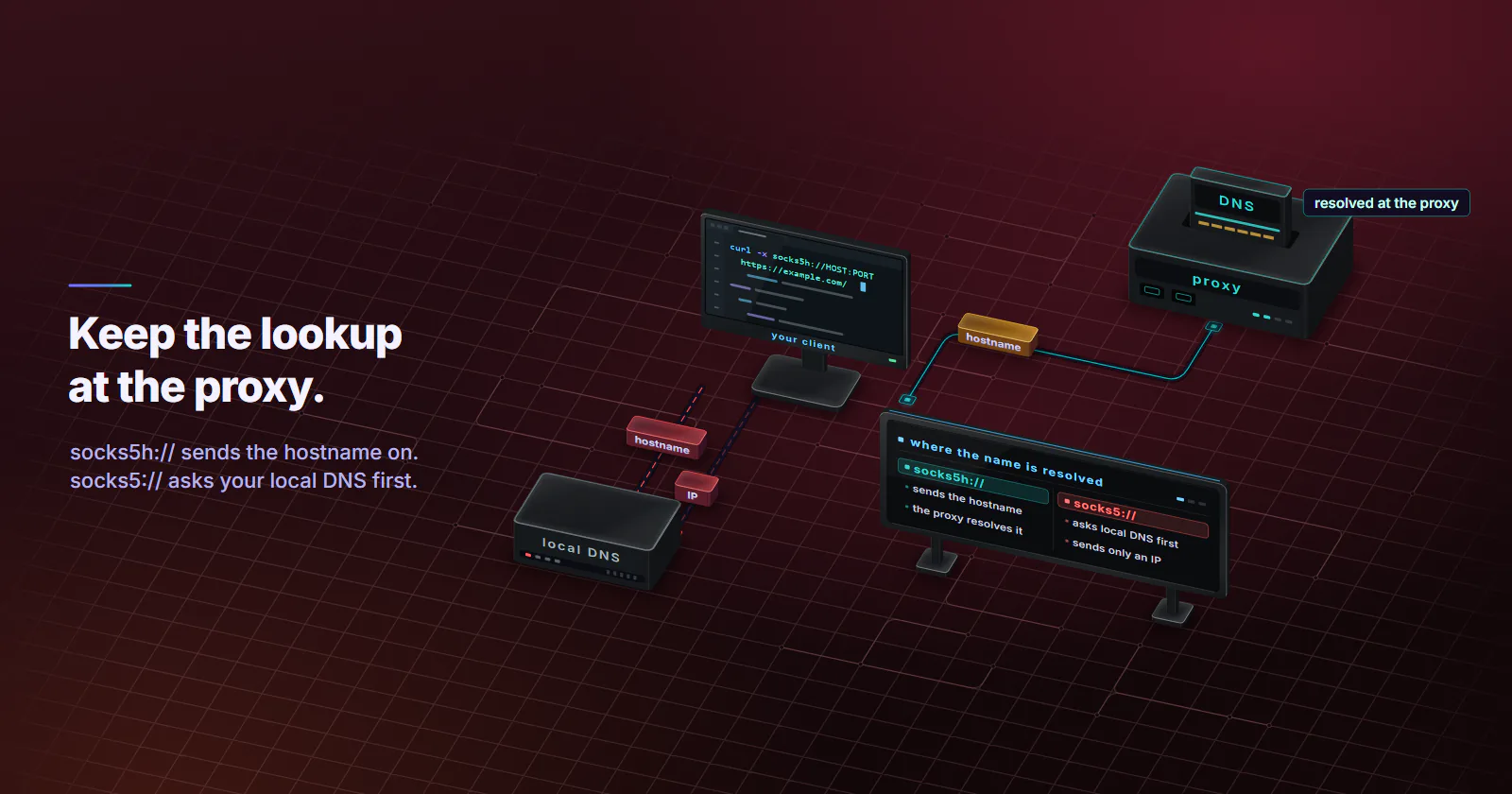
A proxy DNS leak is when the client resolves the target hostname with its own resolver and hands the proxy only an IP. The connection exits through the proxy, but the lookup leaves through the local network. HTTP proxies avoid it by construction. With SOCKS5 it depends on the client and one letter in the proxy URL.
It shows up as an exit in São Paulo and a target that still serves the US page. Or as an office resolver log that lists every hostname a scraping job touched. Browser test pages cannot catch it for a script, because a curl, requests or Node job never runs their JavaScript. Two terminals can:
# terminal 1: every DNS lookup that leaves this machine
sudo tcpdump -n -i any port 53
# terminal 2: one request through the proxy, with the exact URL the job uses
curl -sS -o /dev/null -x "$PROXY_URL" https://example.com/
A lookup for the proxy’s own hostname is expected. A lookup for example.com is the leak.
With curl there is a check that needs no root. Add -v --trace-config all (curl 8.16 and later print the SOCKS line only with tracing on; older builds show it with -v alone, and builds before 8.3 reject the flag) and read the SOCKS line: curl prints SOCKS5 connect to followed by an IP address and (locally resolved) when it looked the name up itself, and SOCKS5 connect to example.com:443 (remotely resolved) when the proxy did.
How a proxy DNS leak happens
Something has to turn example.com into an address, and a proxy setup has two candidates: the client machine, or the proxy.
Local resolution. The client asks its own resolver for the address, gets an IP, and hands only that IP to the proxy. The connection leaves through the exit, but the lookup went out through the client’s own network. That lookup is the leak.
Remote resolution. The client hands the hostname itself to the proxy, and the proxy resolves it. Nothing about the target touches the local resolver.
Which one happens is decided by the protocol and the client:
- HTTP proxy. For an
https://URL the client sendsCONNECT example.com:443, and for a plainhttp://URL it sends the full URL, so the name travels to the proxy either way. Chromium’s proxy documentation (accessed September 2026) states that with an HTTP proxy, name resolution is always deferred to the proxy. - SOCKS5. The SOCKS5 specification, RFC 1928, lets a request carry an IPv4 address, an IPv6 address or a domain name. The protocol allows both, so the client picks.
- SOCKS4. The original SOCKS4 request only carries an IPv4 address, so the client must resolve locally. SOCKS4a added hostname support.
The socks5h convention. curl, Python requests and socks-proxy-agent read socks5:// as “resolve here, send an IP” and socks5h:// as “send the hostname”. That single letter is what “socks5h DNS” means in practice. Other clients ignore the convention and always send the name, so the scheme alone does not tell you what a client does; the per-client table below does. The wider protocol choice is covered in the SOCKS5 vs HTTP proxy guide.
Test your own client first
The capture at the top of this page is the whole proxy DNS leak test for a script. A few details make it reliable.
Pick a hostname the machine has not resolved in the last few minutes, or the answer may come from a local cache without a packet on the wire. Use the exact proxy URL, library and version the job uses. One query for the proxy’s hostname is fine, since the client has to find the proxy. Point the client at the proxy by IP address instead and a clean setup goes completely silent.
Windows
Flush the cache, run the request, then list what the system resolver looked up:
ipconfig /flushdns
# run the request through the proxy here
Get-DnsClientCache | Select-Object Entry
This catches lookups that go through the Windows DNS client, which is what Python, curl and Node use by default. On Windows, a packet capture with pktmon is the stricter check.
The DoH blind spot
A port 53 capture only sees classic DNS. A client or browser with its own DNS over HTTPS resolver sends lookups on port 443, and DNS over TLS uses port 853, so it can leak while the capture stays quiet. For those, the Python hook below catches lookups made through Python’s socket module, and Chromium’s NetLog (chrome://net-export, or the --log-net-log flag) records every host resolution the browser makes.
Find the line that leaks
A hook shows which line causes the leak. Wrap the resolver functions before the client runs:
import socket
import requests

_getaddrinfo = socket.getaddrinfo
_gethostbyname = socket.gethostbyname

def log_getaddrinfo(host, *args, **kwargs):
    print("LOCAL LOOKUP:", host)
    return _getaddrinfo(host, *args, **kwargs)

def log_gethostbyname(host):
    print("LOCAL LOOKUP:", host)
    return _gethostbyname(host)

socket.getaddrinfo = log_getaddrinfo
socket.gethostbyname = log_gethostbyname

proxy = "socks5h://USERNAME:PASSWORD@HOST:PORT"
requests.get("https://example.com/", proxies={"http": proxy, "https": proxy}, timeout=30)
With socks5h, the only line printed should be HOST, the proxy itself (on macOS or Windows, an unpatched older Python can also show the target from its proxy-bypass check; update Python). Change the scheme to socks5 and example.com appears as well. A client built on a C library such as pycurl resolves outside Python’s socket module, so use the capture for those.
How bad is a DNS leak?
A proxy DNS leak causes three separate problems, and they hit different teams.
The local resolver sees the target list. Whoever runs the client’s resolver, whether an office network, a cloud provider’s default resolver or an ISP, gets a log of every hostname the job touches. For competitive price monitoring or brand protection work, that list is the sensitive part.
The DNS answer matches the wrong location. CDNs and geo-routed services answer DNS based on where the query appears to come from. RFC 7871 (May 2016), which defines the EDNS Client Subnet option, exists so authoritative servers can tailor answers to the client’s network rather than the resolver’s. A lookup made in Frankfurt returns a Frankfurt edge, and the request then leaves through a São Paulo exit and connects to that edge. Most CDNs pick content by the connecting IP, which is the exit, but sites that route countries by DNS can still send the job to the wrong regional site.
For a price-monitoring or SERP job, this is the costly one. Nothing errors, and the data stays wrong for as long as the job runs.
The resolver contradicts the exit IP. A page can learn which resolver looked up its hostnames: it loads a resource from a unique random subdomain, and its own authoritative nameserver records which resolver asked. When traffic exits in Brazil but its lookups arrive from a resolver in Germany, anyone who runs the check sees the mismatch, and it is one of the client-side causes behind a proxy detected error. For permitted work such as ad verification, that is a consistency problem between two signals the reader’s own setup produces.
Library defaults, client by client
Each row below comes from the client’s own documentation or source code, checked September 2026.
curl. socks5:// resolves locally; socks5h:// or --socks5-hostname sends the name to the proxy. The curl project’s SOCKS chapter (accessed September 2026) says socks5h means no name resolving is done by curl locally.
Python requests. Same convention. The requests advanced guide (checked September 2026) says the socks5 scheme resolves DNS on the client, in line with curl, and socks5h resolves on the proxy.
Python httpx. Different default. httpx runs SOCKS through httpcore and socksio, which pass the target host as a name and encode anything that is not an IP as a SOCKS5 domain-name address. So both schemes send the name. socks5h was only accepted from httpx 0.28.0 (28 November 2024); older versions reject it.
Playwright with Chromium. The Chromium documentation cited above says that with a SOCKSv5 proxy, name resolution is always done proxy side. It also states Chromium supports no SOCKS5 authentication, so a username and password proxy goes in as an http:// URL.
Playwright with Firefox. The Firefox source (StaticPrefList.yaml, checked September 2026) controls SOCKS5 remote DNS with network.proxy.socks5_remote_dns, default true. The similar network.proxy.socks_remote_dns is the SOCKS4 switch. Playwright’s Firefox applies the proxy with a flag that makes the proxy resolve the host, so remote DNS holds whatever the pref says; confirm it with the capture.
Node.js socks-proxy-agent. The package source (checked September 2026) resolves locally for socks5: and socks4:, and remotely for socks5h:, socks4a: and a bare socks:.
Go net/http. The Transport source (checked September 2026) documents that “socks5” is treated the same as “socks5h”, and the bundled SOCKS dialer sends any hostname as a domain name. socks5h is accepted from Go 1.23.
Two leaks sit outside the table. Code that resolves a hostname itself, for logging, IP pinning or a pre-flight health check, leaks no matter what the proxy URL says. And a client that ignores the proxy settings leaks everything, not only DNS. A runtime that does not read HTTP_PROXY or HTTPS_PROXY by default sends the whole request direct, so confirm the exit IP from inside the job.
Test the far side
Remote resolution means someone else’s resolver does the lookup, and which one depends on the provider. Some networks resolve at the exit device, so the resolver sits in the same country and network as the exit IP. Others resolve at a gateway, which can sit in a different country from the residential or mobile device the traffic leaves from.
Is a DNS leak test legit?
Yes, as a measurement. Pages such as browserleaks.com/dns, ipleak.net and dnsleaktest.com make the browser resolve unique random subdomains of a domain they control, and their own authoritative nameserver logs which resolvers asked. browserleaks, for example, uses 50 names, half IPv4-only and half IPv6-only. The limit is scope: the page tests only the browser that loads it, never a script.
The browser method. Run it once per provider and per target country:
- Launch a browser through the proxy and load an IP lookup page. Record the exit IP and its country.
- In the same session, load a DNS leak test page and note the resolvers it reports.
- Compare. A resolver in the exit’s country is consistent. It sits in the exit’s own network only when the provider resolves at the exit device; a gateway that resolves through a public resolver shows Google or Cloudflare, located near wherever that lookup is made. A resolver in another country is the mismatch a target can see.
- Repeat with a few sessions. On rotating pools the exit changes per session, and the resolver should follow it.
The script version
A script can run the same test without a browser, given a domain whose authoritative nameserver logs its queries, or a DNS logging canary the team runs. Use a sticky session so the exit stays fixed, then fetch a handful of unique subdomains through the proxy:
import uuid
import requests

PROBE_DOMAIN = "PROBE_DOMAIN"  # a zone whose nameserver logs every query
proxy = "http://USERNAME:PASSWORD@HOST:PORT"
proxies = {"http": proxy, "https": proxy}

print("exit:", requests.get("https://ipinfo.io/json", proxies=proxies, timeout=30).text)
for _ in range(8):
    name = f"{uuid.uuid4().hex[:12]}.{PROBE_DOMAIN}"
    try:
        requests.get(f"https://{name}/", proxies=proxies, timeout=15)  # CONNECT makes the proxy resolve
    except requests.RequestException:
        pass  # the lookup already happened; the response does not matter
    print("probe:", name)
The probes use https:// on purpose: CONNECT forces the proxy to resolve the name before it can open the tunnel, while some gateways answer a plain http:// request with a redirect to https:// without connecting anywhere. Then search the nameserver log for those names. The source IP of each query is the resolver the proxy used. Look up its country and compare it with the exit country. A public resolver such as Google or Cloudflare carries its own network number, so compare countries, not networks. A mismatch on every probe is a property of the provider’s network.
What the page reports that is not DNS
A WebRTC result is a browser IP leak: the browser reveals a local or public address through a peer connection, whatever the resolver does. An IPv6 result means the machine has an IPv6 route the proxy may not carry. Both need different fixes from anything in this post, and WebRTC is covered in the guide on how websites detect proxies.
If the resolver never matches the exit, no client setting fixes it. Run the test on any provider, proxymint included, before a geo-sensitive job depends on it. We ran it on ourselves on 28 September 2026, on US residential and mobile per-GB exits through the same gateway customers use, with a resolver-echo domain that names the resolver behind each lookup. Over HTTP CONNECT and socks5h, names resolved on the proxy side in the US, the exit’s country. Plain socks5 used our own client’s resolver. The client-side leak is the same on a free proxy as on a paid one. The far side of a free proxy is unknown by definition, since nobody publishes who runs its resolver.
Copy-paste fixes per client
Most fixes are one line. The one that works everywhere is an http:// proxy URL for HTTP and HTTPS jobs: the hostname travels in the request, in every client in the table.
- curl:
curl -x socks5h://USERNAME:PASSWORD@HOST:PORT URL, or--socks5-hostname HOST:PORTwith--proxy-user USERNAME:PASSWORD. - Python requests:
proxy = "socks5h://USERNAME:PASSWORD@HOST:PORT", withpip install "requests[socks]". - Python httpx:
pip install "httpx[socks]>=0.28.0"if the codebase sharessocks5h://strings with requests; the default already sends names. - Playwright with Chromium: nothing to change for DNS. With a username and password proxy, use
proxy={"server": "http://HOST:PORT", "username": "USERNAME", "password": "PASSWORD"}. - Playwright with Firefox: nothing to change for DNS; Playwright applies the proxy so that the proxy resolves the host. Run the capture to confirm.
- Node socks-proxy-agent:
new SocksProxyAgent("socks5h://USERNAME:PASSWORD@HOST:PORT"). - Go net/http: Go 1.23 or later accepts either SOCKS5 scheme and sends names for both; older releases need
socks5://. - A copied connection string: SOCKS strings copied from a dashboard usually start with
socks5://. In curl, requests or socks-proxy-agent, change the scheme tosocks5h://or use thehttp://form. - Job code: remove resolver calls for target hostnames from logging, health checks and IP pinning, and pass the proxy explicitly instead of trusting environment variables.
After each change, run the capture again. The fix is done when only the proxy’s hostname appears.
Rerun the capture or the Python hook after every library upgrade too. For a geo-sensitive job, such as regional price monitoring, SERP tracking or ad verification, run the far-side test as well and confirm the resolver country matches the exit country. When it never does, no client setting changes it, so ask the provider where its proxy side resolves names.
Changing DNS servers does not help
VPN guides tell readers to switch to 8.8.8.8 or a DNS over HTTPS resolver. For a proxy DNS leak that only changes who logs the target list, because the lookup still happens on the client. And Google Public DNS (page updated 3 September 2024) sends EDNS Client Subnet data to authoritative servers it detects as supporting it, so the CDN can still see the client’s network. A VPN running underneath the proxy client moves local lookups to the VPN’s resolver, so the VPN operator gets the target list instead.
On proxymint, rotating residential proxies accept both HTTP and SOCKS5, as do static ISP proxies and datacenter proxies, so any client in the table can run over an http:// URL and skip the SOCKS question.
Frequently asked questions
A proxy DNS leak happens when the client resolves the target hostname with its own resolver and sends the proxy only the resulting IP address. The connection still exits through the proxy, but the lookup goes out through the local network, so the local resolver sees every hostname and the DNS answer matches the local location instead of the exit.
Run a packet capture on port 53 on the client machine, for example sudo tcpdump -n -i any port 53, and send one request through the proxy to a hostname the machine has not resolved recently. A lookup for the proxy's own hostname is expected, and a lookup for the target hostname is a leak. To see where the proxy resolves, fetch a few unique random subdomains of a domain whose nameserver logs its queries, through the proxy, and compare the resolvers that asked with the exit IP.
Use an http:// proxy URL for HTTP and HTTPS jobs, or socks5h:// in clients that follow that convention, such as curl, Python requests and the Node socks-proxy-agent package. Remove any code in the job that resolves target hostnames itself for logging or health checks. Then run the port 53 capture again and confirm that only the proxy's hostname is looked up.
As a resolver, Google Public DNS is a normal choice. As a fix for a proxy DNS leak it does nothing, because the lookup still happens on the client and only the party that logs the hostnames changes. Google Public DNS also forwards EDNS Client Subnet data to authoritative servers that support it, so a CDN can still see the client's network.
Not for standard clients. For HTTPS the client sends a CONNECT request that contains the hostname, and for plain HTTP it sends the full URL, so the proxy does the lookup. A leak can still come from application code that resolves hostnames itself, or from a runtime that ignores the proxy settings and sends the whole request direct.
curl, Python requests and the Node socks-proxy-agent package resolve the hostname locally for socks5:// and only send it to the proxy for socks5h://. Python httpx, Chromium and Go net/http send the hostname for socks5:// as well. Firefox follows its network.proxy.socks5_remote_dns preference, which defaults to remote resolution in the Firefox source.
With Chromium, no: the Chromium documentation states that name resolution is always done proxy side for SOCKSv5. Chromium also supports no SOCKS5 authentication, so a username and password proxy goes in as an http:// URL, which resolves at the proxy too. With Firefox, Playwright applies the proxy with a flag that makes the proxy resolve the host, whatever the remote DNS preference says; confirm with a packet capture.
Researched and drafted with AI tools, then checked against our publishing rules before it went live: 9 outside links, 7 links to other proxymint pages, no prices and a fact-check pass against our product records. How we write.