
Mobile proxy farm: what running 4G and 5G modems takes
What a mobile proxy farm is made of, why modems drop off USB under load, how rotation behaves on real SIMs, what carrier terms say, and what breaks first.
Quick summary · TL;DR
- The proxy software is the easy part of a farm. Policy routing with one table per modem gets a curl --interface working in an afternoon; power, USB, heat and SIM contracts are where the weeks go.
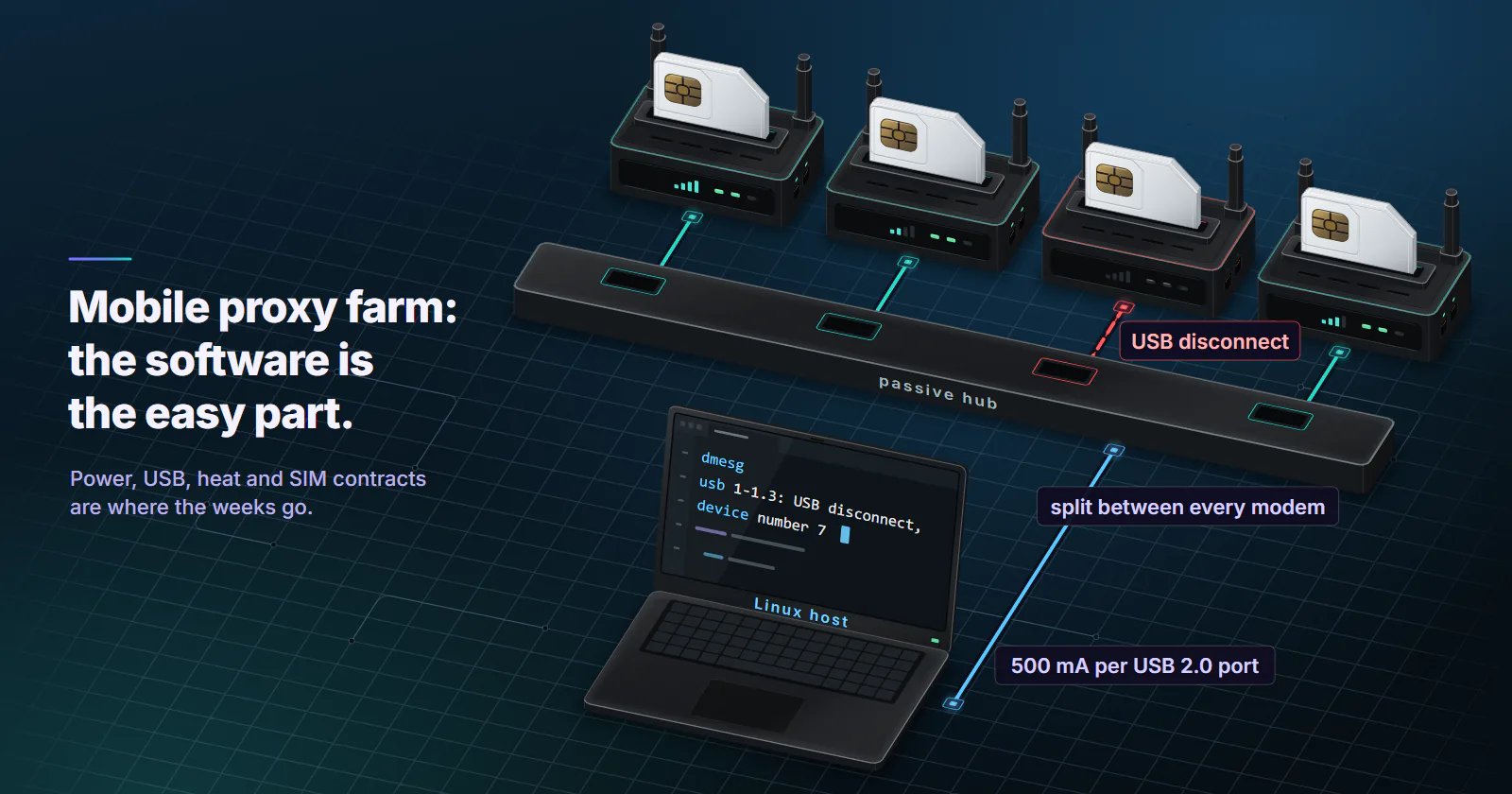
- A modem that keeps vanishing is usually the hub. USB 2.0 ports are held to 500 mA and transmit bursts brown modems out, which shows in dmesg as a USB disconnect and a fresh device number.
- Reconnecting does not promise a new IP. The carrier's NAT picks the public address and tends to keep a subscriber on one, so log 50 reconnects per SIM before you trust your rotation.
- The target sees the carrier and your host, not the modem. The ASN is the carrier's, the TCP stack is whatever runs the proxy, and the 4G or 5G radio is invisible.
A mobile proxy farm is a host computer, a set of 4G or 5G modems with SIM cards in them, and proxy software that sends each connection out through one modem’s carrier session, so the target sees a carrier IP. Getting the software running is the easy part. Most of the work sits in power, USB bandwidth, heat, carrier terms and modems that keep handing back the same address.
If you have three dongles on a desk and one keeps vanishing from ip link, you are in the normal place. Every guide shows the routing script, and the routing script works. What it does not show is the week after, when the farm grows from two modems to twelve.
The parts won’t be what hurts. The hours go into modems dropping off the bus, rotation that hands back the same IP, and a carrier contract nobody read before buying twenty SIMs. That time decides whether a 4G proxy farm beats renting exits.
Inside a mobile proxy farm
The host. A Linux box, a mini PC or a Raspberry Pi runs the proxy server and owns the routing. Each modem shows up as its own network interface (wwan0, usb0, an enx... name), and the host’s whole job is to make a connection that arrives on one proxy port leave through one modem and nowhere else. That is policy routing, and it is less scary than it sounds: one routing table per modem, plus a rule that sends traffic from that modem’s address to its table.
# modem 1 holds MODEM1_IP on wwan0 (carrier-assigned, it changes on reattach)
ip route add default dev wwan0 table 101
ip rule add from MODEM1_IP table 101
# check the exit before you point any proxy port at it
curl --interface wwan0 https://IP-ECHO-HOST/
Look at the comment on the first line. That address comes from the carrier, and it changes every time the modem reconnects, so the rule has to be rewritten by a script on every reconnect. Forget that and the port quietly falls back to whatever default route the host has, which is usually your home line.
The modems. USB dongles, M.2 modules on adapter boards, or whole mobile routers. How each one presents itself to the host decides how much control you get: a stick in HiLink mode is a small router with its own NAT and web page, while a stick in modem mode hands the host the carrier session directly. Which to pick for a farm is its own topic, covered in HiLink vs stick mode. Most farms settle on one model and one firmware, because a mixed shelf turns every script into a list of special cases.
The SIMs. One per modem, and each one is a separate subscriber line with its own contract, data allowance and carrier-side history. People tend to treat SIMs as consumables. The carrier does not.
Management. The part nobody budgets time for. Something has to map ports to modems, notice a dead modem, trigger rotation, rewrite routes and log which public IP each modem held at what time. On Linux, ModemManager talks to the modem over QMI, MBIM or AT commands, and its mmcli tool is what most people end up scripting (ModemManager documentation, freedesktop.org, 2024). Building a mobile proxy server on top of it is mostly glue code, and the glue is where the bugs live.
Power, USB and heat
This is where a mobile proxy farm that ran fine with two modems falls over at twelve.
Power spikes, not average draw
Each modem sips current while idle and then pulls a burst when its radio transmits. USB budgets are smaller than people assume: a USB 2.0 port is held to 500 mA, and a USB 3.x SuperSpeed port to 900 mA, figures restated in a Linux kernel USB patch posted on 2 March 2020. Passive hubs split their one upstream port’s budget between every modem plugged into them.
When the bursts line up, a modem browns out and drops off the bus. In dmesg that reads as usb 1-1.3: USB disconnect, device number 7, and then the same modem enumerating again a few seconds later with a new device number. It looks like a flaky modem. It is almost always the hub. Use externally powered hubs and size the supply for the modems’ transmit peaks, not their idle draw.
Shared bus bandwidth
High-speed USB 2.0 runs at 480 Mbit/s raw, and the Linux kernel’s EHCI documentation (written in December 2002 and still shipped with the kernel docs) points out that aggregate throughput across several devices lands below that. Every modem behind one USB 2.0 controller shares that one bus, whatever the hub’s box says.
lsusb -t shows which root hub each modem hangs off. If all twelve sit under one controller, you have built a single 480 Mbit/s pipe with twelve SIMs in it. Spread them across controllers, or add a USB 3 card.
5G makes this sharper. Quectel lists its RM520N series, M.2 modules with USB and PCIe drivers, at up to 3.4 Gbps downlink on NSA (product page, checked 2 November 2026). Those are radio maximums, and on a USB 2.0 port the module becomes an expensive 480 Mbit/s modem that runs hot.
Heat is the one found last
Modems packed in a row heat each other, and sustained uploads heat them more than downloads do. 5G modules run hotter again and throttle when they get there, which shows up as speed that sags after the first hour while every quick test still passes. That is why heat gets found last. Space the modems, move air across them, and put a heatsink on any M.2 module before you blame the carrier.
SIMs, plans and carrier terms
Each SIM is a contract written for a phone in a pocket, and a 4G proxy farm is the use case most consumer plans were written to exclude. Verizon’s prepaid terms, read on 2 November 2026, bar “server devices or host computer applications that are broadcast to multiple servers or recipients” in their prohibited uses, while allowing hotspot and tethering as a way to give other devices connectivity (Verizon prepaid legal terms). Other carriers word it differently, and business and IoT plans carry their own rules, so read the plan you are actually buying before you buy twenty of it.
Day-to-day limits follow from the contract. Plans throttle or deprioritise after a usage threshold, hotspot allowances are often smaller than the headline data, and some countries require each SIM to be registered to a person or business. APN settings matter too: it decides whether the modem gets IPv4, IPv6 or both, which comes back to bite in the rotation section below.
How rotation behaves on real modems
Modem IP rotation means one thing underneath: the modem drops its data session and attaches again, and the carrier builds a new one. There are a few ways to trigger it, from gentle to brutal:
- Radio off and on with
AT+CFUN=4and thenAT+CFUN=1, the standard AT commands for disabling and restoring the radio. - A clean session restart through ModemManager, shown below.
- The data toggle in a HiLink stick’s web API.
- A power cycle of the modem, which works and is slow, and which some modems answer by coming back on a different USB path.
mmcli -m 0 --simple-disconnect
sleep 10
mmcli -m 0 --simple-connect="apn=YOUR_APN"
curl --interface wwan0 https://IP-ECHO-HOST/
Why the same IP comes back
This is the complaint that fills every farm thread, and the modem is innocent. After a reattach the modem gets a new internal address from the carrier, but the public IPv4 the target sees is picked by the carrier’s NAT, and RFC 6888 has that NAT keep one subscriber on one public address for as long as the mapping lives. The CGNAT guide for proxy buyers walks through that mechanism. Reconnect too quickly and you land on the same mapping. Waiting longer between disconnect and connect gives the old mapping time to expire, which is why most rotation scripts sleep, and how long is enough is carrier-specific.
So measure it. Run 50 reconnect cycles per SIM and log three things each time: the public IPv4, the IPv6 prefix and the seconds until curl --interface succeeds. Distinct IPv4s in that log are the real rotation pool for that SIM on that cell at that time of day, and it is usually smaller than people expect.
IPv6 changes the picture
On IPv6 the prefix tends to change on every reattach, which is the opposite of the IPv4 behaviour above. And on carriers that run IPv6-only APNs with 464XLAT, a phone reaches IPv4 sites because Android ships a CLAT translator. Linux hosts with a bare modem do not, so IPv6 targets load and IPv4-only targets fail. Fix it with a dual-stack APN (IPV4V6) where the carrier offers one, or a CLAT running on the host. Easy to lose a day on before anyone thinks to check the APN type.
Timers, sticky sessions and carrier-driven changes are covered in the guide to what mobile proxies are. A farm gives you the trigger. The carrier still decides the address.
What breaks first
Failure modes in a mobile proxy farm are boring, and they repeat. Read the table below as a triage order, and the right column is the first thing worth checking before anything else gets touched.
Monitoring follows the same layers. Check that the device is on the bus (lsusb), the interface exists (ip link), the bearer is connected (mmcli), the route works (curl --interface) and the target answers. Alert on the first layer that fails, not the last one, or every alert reads “proxy down” and tells you nothing.
What the target sees
The carrier ASN. Seen from the target, a mobile proxy farm announces from the carrier’s network, the same autonomous system its phones use, and that is the whole reason to build a mobile proxy in the first place.
The host’s TCP stack. Whatever terminates the proxy connection is the target’s TCP peer, and in a farm that is the Linux host. So the SYN carries Linux defaults, with a maximum segment size shaped by the modem interface, whatever user agent the client sends. A Windows browser profile riding a Linux TCP stack is a mismatch that mobile proxy detection can score. Run the proxy app on a phone and the stack is Android’s instead, which is the main reason some operators run phones and put up with the batteries.
The neighbourhood. Twenty SIMs from one carrier in one room attach to the same cell and often leave through the same NAT pool. Any target that looks across many sessions sees one small patch of the carrier’s address space, busy at all hours. That is worth knowing before you plan a job that spreads across many accounts or regions.
Not the box. Nothing tells the target whether the radio is 4G or 5G, a dongle or a router. It sees an address, an ASN, a TCP stack and what the client sends on top.
Build a farm or rent exits
A mobile proxy farm makes sense when the job is local and hands-on: one city you are in, one or two carriers you can buy SIMs from, app QA against your own carrier’s routing, and a person who will look after hardware when a hub dies on a Sunday. You get the radio itself, band and signal included, and you own every failure in the table above.
Renting exits makes sense when the job is wide or changes shape: many countries or cities, rotation on a schedule without maintaining scripts, volume that moves from week to week, and no shelf of modems to keep cool. A USB modem proxy on your desk cannot be in Manchester and Madrid on the same afternoon.
That second case is what mobile proxies from proxymint are for. Exits run on mobile carrier networks and are classified as cellular by MaxMind, location is chosen by country, region and city from places with devices online when you order, and rotation is set per order: a new IP on every request, a timer from 5 to 60 minutes, or sticky for as long as the device stays online. It is billed per GB, so you pay for the traffic you move, not for hardware sitting on a shelf.
Frequently asked questions
A host computer runs proxy software and routes each proxy port out through one 4G or 5G modem, using one routing table per modem. Each modem holds a SIM card's data session, so requests leave on the carrier's public IP. A management layer handles rotation, health checks and rewriting routes when a modem reconnects with a new address.
The limit is usually USB topology and power rather than CPU. Every modem behind one USB 2.0 controller shares a 480 Mbit/s bus, and a USB 2.0 port is held to 500 mA, so passive hubs make modems drop out under load. Count your controllers with lsusb -t and use externally powered hubs before adding modems.
For most operators it is first a contract question: many consumer data plans bar server-style use, and breaking the terms can get lines suspended. Changing a modem's IMEI is different, because it is a criminal offence in the UK under the Mobile Telephones (Re-programming) Act 2002. Check your carrier's terms and local law for your country; this is not legal advice.
They make the modem drop its data session and attach again, by switching the radio off and on with AT+CFUN, restarting the connection through ModemManager, or toggling data on a HiLink stick. The carrier then builds a new session, and its NAT picks the public address. That address may or may not be new, so rotation has to be measured per SIM.
The public IPv4 is chosen by the carrier's NAT, not by the modem, and RFC 6888 has that NAT keep one subscriber on one public address while the mapping lives. A quick reconnect can land back on the same mapping. A longer gap between disconnect and connect gives the old mapping time to expire, and the right gap differs by carrier.
Most consumer plans are written for a phone, and many restrict server-style use. Verizon's prepaid terms, for example, bar server devices or host computer applications broadcast to multiple servers or recipients, while allowing hotspot use within the plan. Business and IoT plans carry different rules, so read the specific plan before you put it in a modem.
Only when the job moves real volume and the host can feed it. 5G modules are built for USB 3 or PCIe hosts, run hotter and throttle when they overheat, and on a USB 2.0 port they top out at 480 Mbit/s like any other modem. Targets cannot see the radio generation, so 5G buys throughput, not trust.
Researched and drafted with AI tools, then checked against our publishing rules before it went live: 6 outside links, 5 links to other proxymint pages, no prices and a fact-check pass against our product records. How we write.