Proxies for SERP tracking: location, device and pacing
Why rank data drifts when the location parameter and exit IP disagree, how to set city-level exits, which proxy type fits, and what Google's rules say.
Quick summary · TL;DR
- The exit IP is part of the measurement. Search engines read the IP's location on every request, so where the proxy exits changes the results a tracker records.
- A location parameter is a hint, not a relocation. Google documents its gl parameter as a boost for results from that country; when it disagrees with the exit IP, rankings drift between runs.
- Local rankings need city-level exits. Map packs follow the searcher's position, but city geolocation is far less certain than country, so verify the location each results page reports.
- Read the engine's terms first. Google's spam policies, updated August 28, 2026, name rank-checking scrapes without permission as machine-generated traffic.
Proxies for SERP tracking give a rank tracker an exit in the place it measures, because search engines read the connection’s IP as a location signal. Local rankings need city-level exits, national rankings need country-level ones, and the location parameter must match the exit. The engine’s terms come first: Google’s spam policies prohibit rank-checking scrapes without permission.
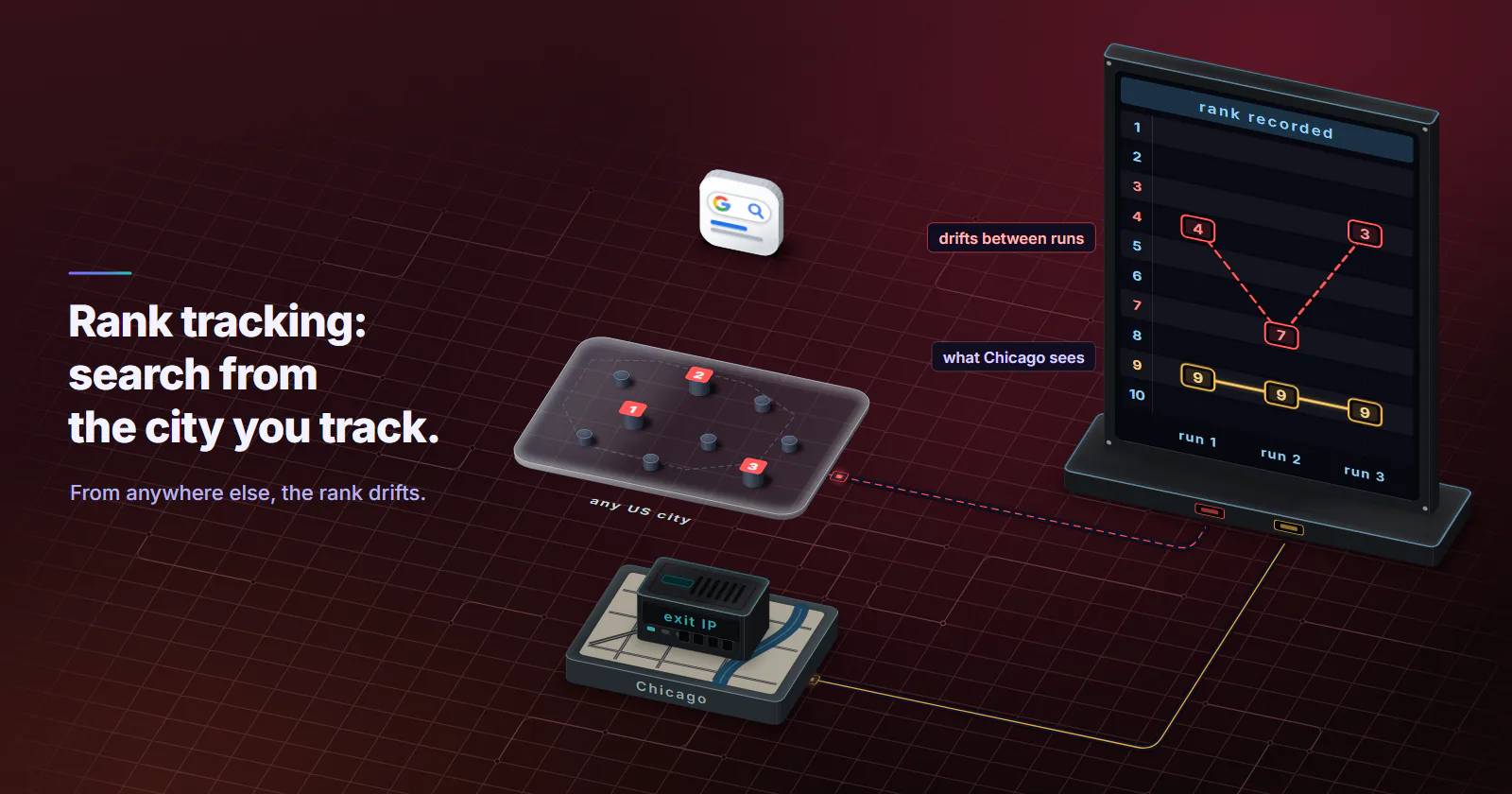
The rank tracker says position 4 in Chicago. The client in Chicago searches and sees position 9. Next week the tracker says 7, then 3, and nothing on the site changed. Usually the tracker told the engine one location in the request, the exit IP told it another, and the engine blended the two differently on each run.
Where proxies for SERP tracking fit
A results page is computed from the query plus signals about the searcher. Google’s help page on location in Search (checked September 2026) lists four location sources: device location, home or work addresses saved to the account, previous activity, and the IP address of the connection, which it describes as roughly based on geography. When the IP was used, the location line at the bottom of the results page says “From your internet address”. The same page notes that a device location can be stored in a cookie that expires after 6 hours.
Rank tracking wants a view with as few of those signals as possible: no account, no history, a fresh cookie jar, a fixed language and device, and a controlled location. Among the four sources, the network location is the one a clean browser still sends, and it is the one proxies control.
The cookie trap. A location cached in a cookie outlives the proxy that set it. A tracker that reuses one browser profile across cities can carry Denver’s location into a Boston check for hours. Start every city with an empty cookie jar.
Google’s spam policy on rank checking
Before choosing proxies for SERP tracking, check whether the engine allows the collection at all. For Google, the short answer is no, unless it has given permission.
That leaves three routes that hold up. Your own site: Search Console reports average position by query, country and device, with Google’s blessing and no proxy at all. It has no city view and no competitor view. Licensed data: rank-tracking tools and results-data vendors sell positions by location; ask what permission the vendor holds before building on it. Engines and markets that permit automated access: read each engine’s terms, and collect only what they allow.
Google’s own results API, parsing and pagination belong to a separate guide on how to scrape Google search results. The location layer below applies whatever the source: licensed data, a permitted engine or a manual check in a clean browser.
Location parameter vs exit IP
Most SERP scraping setups control location in two places and never check that they agree.
The location parameter. Sent in the request: a country code, a language, sometimes an encoded city. It is documented for some official APIs, and the documentation is candid about its limits. In Google’s Custom Search JSON API reference (updated August 21, 2024), the gl parameter “boosts search results whose country of origin matches the parameter value”. A boost is a ranking hint, and the searcher stays wherever the other signals put them. That API is also on its way out: its overview (updated February 18, 2026) says it is closed to new customers and will be discontinued on January 1, 2027.
The exit IP. Read by the engine on every request and geolocated with the engine’s own database. It is the signal a real local searcher sends without thinking about it, and the only thing a Google SERP proxy changes.
When the two agree, the result is stable. When they disagree, the engine has to weigh a national hint against a local network signal, and the answer can change between runs as a rotating pool lands in different cities. That is the drift in the Chicago example above.
The fix is boring. Set the parameter and the exit to the same place, log the exit IP and its city on every check, and flag any check where the page’s own location line disagrees with the target city. That one habit makes the rank data auditable.
City targeting for local rank tracking
National rankings tolerate a country-level exit. Local rank tracking does not. Map packs and “near me” results are built around the searcher’s position, so a Chicago check needs an exit the engine places in Chicago.
Two limits apply. Geolocation is weaker at city level, the main caveat of geo targeted proxies: MaxMind’s accuracy notes (checked September 2026) estimate 66% of US IPs are placed within 50 km of the true city, against 99.8% accuracy at country level. And a city pool is smaller than a country pool, so per-request rotation repeats IPs faster.
On proxymint, residential location is set on the order (country, then region, then city) from places with devices online at that moment, and it can be changed later without new credentials. It is not set per request, so a three-city tracker runs three orders, one per city, and each order’s exits stay in its city.
Verify the exit as well as the order. Engines that print the location they used, as Google does at the bottom of its results page, make this checkable: read it on every check and drop results where it names the wrong city.
Same query, three cities
The test that shows whether city-level exits are needed is simple to run. Take 20 queries, mixing local intent (“dentist”, “hardware store”) with informational ones. Check each from three cities with an empty cookie jar, the same language and the same device, on an engine that permits it or by hand in a clean browser per city. Count how many of the top 10 results differ between each pair of cities.
The hypothesis worth checking is that differences concentrate in local-intent queries and shrink for informational ones. If a keyword set shows almost no difference across cities, country-level exits are enough for it and city targeting adds nothing.
Device, sessions and pacing
Device is set by the browser
Mobile and desktop results differ in layout and often in order. The device is signalled by the browser: user agent, client hints and viewport. A mobile SERP check needs a mobile browser profile, not a mobile network, and rank tracking proxies on home connections serve it fine. Mobile proxies only fit when the job is specifically to see results on carrier networks.
Rotating or sticky sessions
Two session modes fit rank tracking, and the choice is about what the measurement should represent. Per-request rotation gives every check its own exit, which suits keyword sets where each query stands alone. A timed session per city keeps a short batch of queries on one exit, so the batch reads as one searcher in one place, which suits local packs where the location has to hold still. On proxymint, residential rotation is set per order: every request, a timer from 5 to 60 minutes, or sticky while the device stays online. The modes are compared in more depth in the posts tagged rotating proxies.
Neither mode raises what an engine allows.
Pacing, blocks and data quality
Pace checks to the published limits of whatever supplies the results: the engine’s terms or API quota, or the data provider’s plan. Spread a daily run over the day rather than firing it in one burst, which also keeps a slow check from timing out the next.
A block is a stop. A captcha, a consent wall or an “unusual traffic” page is the engine saying no. Record it as no data, pause that job, and find out why before running it again; why proxies trigger captchas covers the usual causes. Do not retry it through a fresh exit to get past it. SERP scraping jobs that write a blocked page as position zero produce the sudden drops that send teams chasing penalties that never happened.
Residential, datacenter or ISP
Choosing proxies for SERP tracking turns on how precisely the exit has to sit in a place. The three proxymint tiers compare as SEO proxies like this.
Datacenter proxies fit SERP tooling on lenient engines and regions, country-level tracking where the engine does not treat hosting networks differently, and internal tools hitting sanctioned APIs. Where an engine does treat hosting ranges differently, a datacenter check is not the view a local searcher gets, so rotating residential proxies are chosen for that market before the run starts. A challenge during a run is still a stop, whatever the tier.
Static ISP is the odd one out. One fixed address per market gives a steady national baseline, but it is country-only, so it never sees a local pack, and that one address carries every check for its market, so the engine’s limits cap it quickly.
How many IPs a tracker needs
The IP count people ask about only exists on fixed ports. On a per-GB residential pool the order sets the location and the session mode, and the pool supplies exits; nothing is bought per IP. With datacenter or ISP ports, the count is the number of locations times the parallel sessions run in each. Three countries with two parallel sessions each is 6 ports. How many checks each session may run comes from the engine’s or data provider’s limits, not from a vendor’s rule of thumb.
Sizing a three-city setup
Sizing starts from page count. Assumptions stated: 500 keywords, 3 cities, checked daily for 30 days is 500 x 3 x 30 = 45,000 results pages. If a results page moves around 200 KB (an assumption; measure your own, and expect a full browser render with scripts to move more than the HTML alone), the month moves 45,000 x 0.2 MB = 9,000 MB, about 9 GB, or 3 GB per city order.
At that size, the job fits a 9 GB residential package. Datacenter ports and static ISP IPs are billed per address per month instead, and both stay country-level, so neither sees a local pack. Entry prices for every tier are on the pricing page.
Set location in both places
For a local keyword set, the right SEO proxies are city-level residential exits, with the location parameter set to the same city, cookies cleared per city and any check dropped whose page location line disagrees. National keywords run on country-level exits, and datacenter works where the engine tolerates hosting traffic. Mobile rankings change with the browser profile, not the network. Data about your own site comes from Search Console, with no proxy at all.
Frequently asked questions
A rank tracker that checks results for other cities or countries needs its requests to come from those places, because search engines use the connection's IP address as a location signal. Proxies provide exits in the target locations. Check each search engine's terms first, since some, including Google, restrict automated rank-checking.
Yes, for your own site. Google Search Console reports the average position of your pages by query, country and device, with Google's permission and no proxy. It does not report city-level positions or competitors' rankings, which is where teams turn to licensed rank-tracking data or their own collection on engines that permit it.
No, not without express permission. Google's spam policies, updated August 28, 2026, list scraping results for rank-checking purposes as machine-generated traffic. Search Console is Google's permitted route for your own site's data, and teams buying results data should ask the vendor what permission it holds.
Datacenter proxies work for country-level tracking on engines and regions that do not treat hosting networks differently, and they are billed per port with no per-GB meter. Residential proxies are needed for city-level local rankings, because they exit from home connections in the target city.
Use a timed session per city when a batch of queries should come from one consistent searcher, and per-request rotation when each check stands alone. Choose for consistency of the measurement, not to spread volume past an engine's limits. Whatever the mode, log the exit IP and city of every check.
On a per-GB residential pool the count of IPs is not what you buy; the pool supplies exits and you choose the location and session mode. With fixed ports, the count is the number of locations times the parallel sessions you run in each. The check rate per session comes from the engine's or data provider's published limits, not from a rule of thumb.
Usually not. Search engines decide between mobile and desktop results from the browser's user agent, client hints and viewport, not from the network. Mobile proxies only matter when the goal is to see results specifically as a carrier network user would.
Researched and drafted with AI tools, then checked against our publishing rules before it went live: 5 outside links, 8 links to other proxymint pages, no prices and a fact-check pass against our product records. How we write.