Scrape Google search results: API, parsing, pacing
How to scrape Google search results in 2026: the Custom Search JSON API and its limits, what Google's terms say, parsing, pacing and setting location.
Quick summary · TL;DR
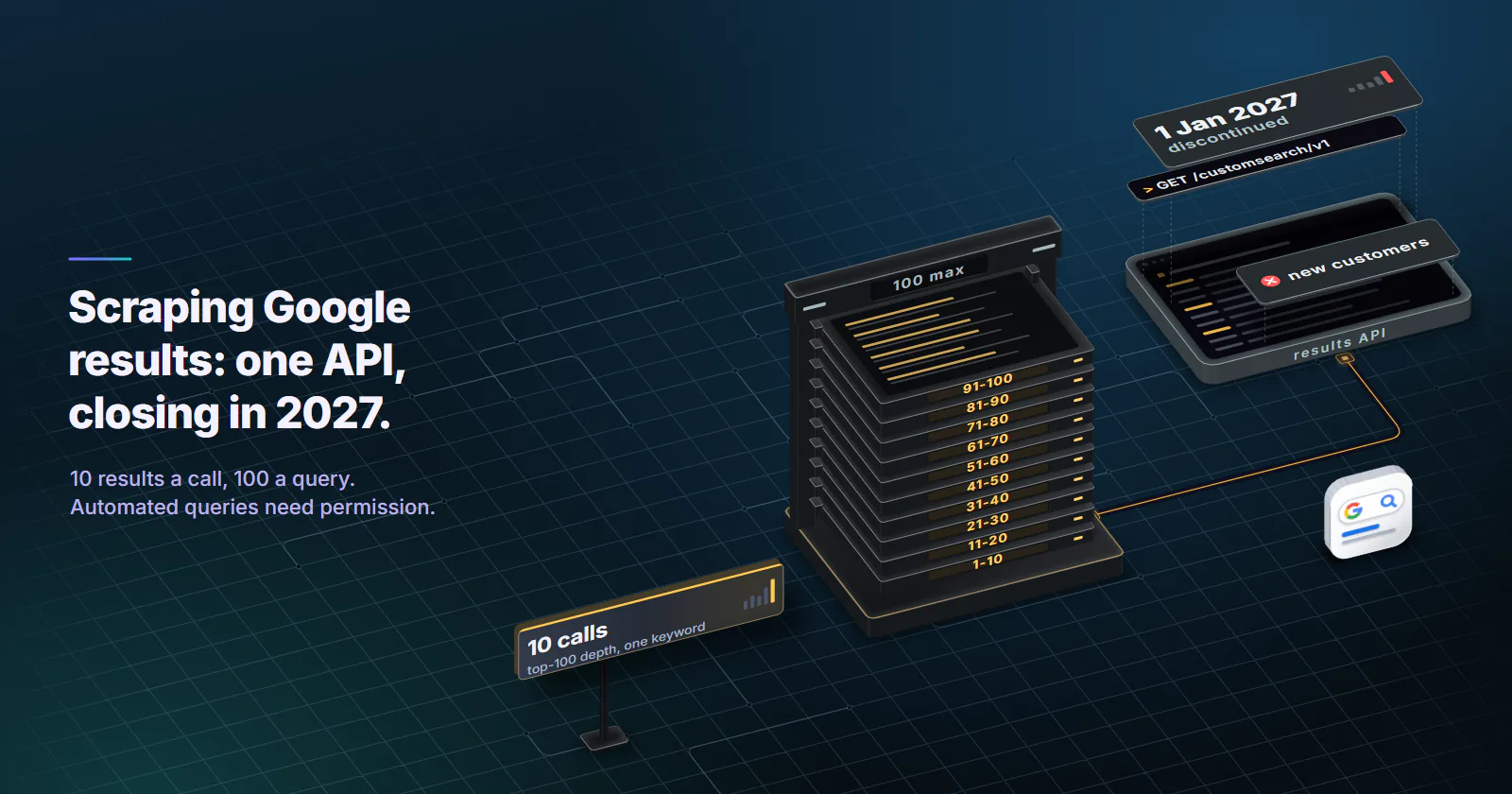
- Google has one official results API, and it is closing. The Custom Search JSON API is closed to new customers and is discontinued on January 1, 2027, per Google's overview page updated February 18, 2026.
- The API caps depth at 100 results per query. Each call returns at most 10 results, so top-100 depth for one keyword takes 10 billable calls.
- Google's rules prohibit automated queries without permission. The spam policies name rank-checking scrapes as machine-generated traffic, the Terms of Service bar automated access against robots.txt, and robots.txt disallows /search.
- Own-site ranking data needs no scraping. The Search Console API returns query, page, country and device rows, up to 25,000 per request, with Google's permission.
Google offers one official programmatic route to its results, the Custom Search JSON API, which is closed to new customers and ends on January 1, 2027. Google’s spam policies and terms prohibit automated queries without permission. So the practical way to scrape Google search results is the API while it lasts, Search Console for your own site, and parsing and pacing only for data you may collect.
Most tutorials skip that short answer. The pages ranking for this keyword mostly jump to a Python script, a list of CSS class names and a section on getting past blocks. None of that changes what Google’s rules say, and the class names change without notice.
Scrape Google search results via API
The Custom Search JSON API returns Google results as JSON from a Programmable Search Engine. It is the only route Google documents for programmatic results, and its limits are hard numbers.
Status. Google’s Custom Search JSON API overview (updated February 18, 2026) says the API is closed to new customers, and existing customers have until January 1, 2027 to move off it. If a team has no key today, it cannot get one.
Setup. Two values go into every request: a Programmable Search Engine ID (cx) and an API key from the Cloud console. The engine can be scoped to a set of sites; the full-web option is what most rank questions need.
The request. One method, cse.list, one GET request:
import requests

API_KEY = "API_KEY"
ENGINE_ID = "SEARCH_ENGINE_ID"

def search(q, gl="us", hl="en", start=1, num=10):
    r = requests.get(
        "https://www.googleapis.com/customsearch/v1",
        params={"key": API_KEY, "cx": ENGINE_ID, "q": q,
                "gl": gl, "hl": hl, "num": num, "start": start},
        timeout=20,
    )
    r.raise_for_status()
    return r.json()

data = search("rotating residential proxies")
for i, item in enumerate(data.get("items", []), start=1):
    print(i, item["title"], item["link"], item.get("snippet", ""))
The JSON shape. Results sit in items[]. Each item carries title, link and snippet, plus displayLink and optional pagemap metadata. A query with no results has no items key at all, so code must treat a missing key as zero results, not as an error.
The limits, as numbers. The cse.list reference (updated August 21, 2024) sets num between 1 and 10, and says the API will never return more than 100 results for a query, so start + num cannot pass 100. The overview sets the billing: 100 queries a day free, then billed per 1,000 queries, up to 10,000 queries a day; current rates are on that overview page.
The billing model. At 1,000 queries a day, 100 are free and 900 are billed, per 1,000. At the 10,000-a-day cap, 9,900 are billed. There is no higher tier to buy.
What Google offers instead. The same overview points to Vertex AI Search, which can search up to 50 domains, and asks teams that need full-web search to contact Google. For a site-restricted job (a competitor set, a catalog of publishers) Vertex AI Search is the documented path. For full-web results at scale, there is no self-serve replacement announced on that page.
What the API does not return. The JSON carries organic-style results only. There are no ads, no People Also Ask questions, no related searches and no local pack in items, and the ranking comes from a Programmable Search Engine, not from the results page a person sees. So the API answers “which pages does Google return for this query” well, and “what does a searcher in Denver see on page 1” less well.
How close the API is to the live page. None of the ranking tutorials measures it, and it is cheap to measure by hand. Take 20 queries, 10 with local intent and 10 informational. Pull the top 10 from the API with gl=us. The same day, record the top 10 a person sees in a clean browser profile in one US location, by hand. For each query, count how many of the API’s 10 urls appear in the live top 10, and how many sit in the same position. The live side is manual browsing, so it stays inside Google’s rules, and the overlap tells a team how far to trust API positions before it builds reports on them.
Google’s terms on automated queries
Most page 1 tutorials for this keyword call scraping Google legal, or mention the terms in one line, and move on. Google’s own pages are more specific, and they apply to anyone collecting results.
Four checks cover what Google allows:
- Spam policies. The machine-generated traffic paragraph defines it as sending automated queries to Google, and it covers “other types of automated access to Google Search conducted without express permission” as well as rank-checking scrapes.
- Terms of Service. The Google Terms of Service (effective July 30, 2026) list, under abuse of the services, using automated means to access content in violation of the machine-readable instructions on Google’s pages, and name robots.txt as the example.
- robots.txt.
https://www.google.com/robots.txt(fetched September 29, 2026) setsDisallow: /searchfor every user agent, with narrow allows such as/search/aboutand/search/howsearchworks, so the results page is the disallowed path. - Enforcement. On December 19, 2025, Google announced a lawsuit against a company that resold scraped results, alleging it got around Google’s security measures to collect them.
Whether collecting public data is lawful where the reader works is a separate question: it depends on jurisdiction and use, and nothing here is legal advice. The US and EU case law is summarised in how to scrape Amazon. But the terms question has a plain answer. Without express permission, automated queries to Google Search are against Google’s rules. Maps data sits under its own no-scraping clause, covered in how to scrape Google Maps.
Your own site: Search Console
A large share of “scrape Google” jobs are really “what does my site rank for, and where”. Google answers that directly, with permission and without a proxy.
The Search Console API method searchanalytics.query (updated August 11, 2026) returns clicks, impressions, CTR and average position, grouped by dimensions that include query, page, country, device, date and searchAppearance. One request returns up to 25,000 rows (rowLimit, default 1,000), and startRow pages past that.
body = {
    "startDate": "2026-09-01",
    "endDate": "2026-09-30",
    "dimensions": ["query", "page", "country", "device"],
    "rowLimit": 25000,
    "startRow": 0,
}
# service = googleapiclient.discovery.build("searchconsole", "v1", credentials=CREDS)
rows = service.searchanalytics().query(siteUrl="sc-domain:example.com", body=body).execute().get("rows", [])
The tradeoff is scope. Search Console reports average position for the verified property only, by country rather than city, and it shows no competitor positions. For a site owner tracking their own pages, that covers most of the need, and it is the one source that is both free and fully inside Google’s rules.
Why Google now needs a browser
In January 2025 Google began requiring JavaScript to use Search. TechCrunch reported on January 17, 2025 that Google said the change helps protect its services from bots and evolving forms of abuse and spam, and that fewer than 0.1% of searches came from people with JavaScript turned off.
The consequence for anyone trying to scrape Google search results as HTML is mechanical. A plain HTTP client that fetches the results page gets a JavaScript gate instead of results. Getting rendered results means a real browser, which means a far heavier page load per query, more CPU per worker and higher bandwidth per result than an API call.
Google put the gate there as a protection measure, and the rules above apply to it. proxymint’s own acceptable-use terms tell customers not to defeat a site’s access controls or rate limits where the law requires them to respect them.
Parsing results that survive changes
Parsing is where most scrapers break first. The goal is code that keeps working, or fails loudly, when the source changes.
Parse the API JSON first
The API is the easy case, because its shape is documented and stable. Map items to rows and keep the rank explicit:
from datetime import datetime, timezone

def to_rows(q, data, gl, hl, start=1):
    now = datetime.now(timezone.utc).isoformat()
    return [
        {"query": q, "position": start + i, "url": it["link"],
         "title": it.get("title", ""), "snippet": it.get("snippet", ""),
         "gl": gl, "hl": hl, "ts": now, "source": "api"}
        for i, it in enumerate(data.get("items", []))
    ]
Parse permitted HTML by structure
For HTML the reader is permitted to process (a saved page used as a fixture, raw HTML delivered by a licensed data vendor, or results from an engine whose terms allow automated access), parse by structure, not by class names. Tutorials that hardcode obfuscated classes such as tF2Cxc or LC20lb break when those names rotate, and they rotate without notice.
A structural rule holds longer: an organic result is a link (a[href]) that contains an h3, and the snippet is the nearby block of text that is not a heading.
from bs4 import BeautifulSoup
from urllib.parse import urlparse

def parse_organic(html):
    soup = BeautifulSoup(html, "html.parser")
    out, seen = [], set()
    for a in soup.select("a[href]"):
        h3 = a.find("h3")
        href = a.get("href", "")
        if not h3 or not urlparse(href).scheme.startswith("http"):
            continue
        if href in seen:
            continue
        seen.add(href)
        block = a.find_parent(["div", "li"]) or a
        text = [t for t in block.stripped_strings if t != h3.get_text(strip=True)]
        out.append({"title": h3.get_text(strip=True), "url": href,
                    "snippet": " ".join(text)[:300]})
    return out
That is the core of a BeautifulSoup parser for Google-shaped results pages. The same approach applies to any results page with headings inside links.
Result types to handle
A results page mixes several block types, and a parser that treats it as a flat list of ten links records wrong positions.
- Organic results: the heading-in-link blocks above, numbered in page order.
- People Also Ask: question text in an expandable block; store the question, not a position.
- Related searches: query suggestions near the foot of the page; store them as queries.
- Sitelinks: extra links nested under one organic result; attach them to that parent result, and do not give them their own positions.
- Ads: marked as sponsored; store them separately, and never count them toward organic positions.
- AI Overview, featured snippet, knowledge panel, local pack: blocks above or beside the organic list; store them as features of the query with their own type, never as position 1.
A fixture test that fails loudly
Save one results page per layout the parser has seen, check it into the repository, and assert on it. When the source changes, the test fails in CI instead of quietly writing empty rows for a week.
def test_parser_on_fixture():
    html = open("fixtures/results_2026_09.html", encoding="utf-8").read()
    rows = parse_organic(html)
    assert 8 <= len(rows) <= 12
    assert all(r["url"].startswith("http") for r in rows)
    assert len({r["url"] for r in rows}) == len(rows)
One Python run, end to end
Put together, a small job that uses the API to scrape Google search results with Python for a keyword list is four steps: fetch each page of results, convert to rows, validate, write. The functions search, to_rows and call_with_backoff are the ones shown in this guide.
import csv

KEYWORDS = ["rotating residential proxies", "static isp proxies"]
DEPTH = 20  # results per keyword; each 10 is one billable call

rows = []
for q in KEYWORDS:
    for start in range(1, DEPTH + 1, 10):
        data = call_with_backoff(search, q, gl="us", hl="en", start=start)
        page = to_rows(q, data, "us", "en", start=start)
        rows.extend(page)
        if len(page) < 10:
            break  # fewer results than asked: no next page

if rows:
    with open("serp_rows.csv", "w", newline="", encoding="utf-8") as f:
        w = csv.DictWriter(f, fieldnames=list(rows[0].keys()))
        w.writeheader()
        w.writerows(rows)
Two keywords at depth 20 cost 4 calls. The same loop at depth 100 costs 20 calls, so set depth before anything else.
Pagination, depth and pacing
Pagination and depth
On the API, start moves in steps of 10: start=1, 11, 21, up to start=91 with num=10, which ends at result 100. Each of those is one billable call. So top-100 depth for one keyword costs 10 calls, and 100 keywords tracked to depth 100 every day is 1,000 calls a day, 900 of them billed, as in the billing example above.
Most jobs do not need depth 100. Top 10 or top 20 answers “are we on page 1” with a tenth or a fifth of the calls. For HTML sources, do not assume a page-size parameter exists or will keep working; read pagination from the page itself and stop when there is no next page.
Pacing: quotas and backoff
For the API, the quotas are the pacing: 100 free queries a day, a hard ceiling of 10,000 a day. Inside that, retry only on 429 and 5xx, with exponential backoff and a cap:
import random, time

def call_with_backoff(fn, *args, tries=5, **kw):
    for n in range(tries):
        try:
            return fn(*args, **kw)
        except requests.HTTPError as e:
            code = e.response.status_code
            if code not in (429, 500, 502, 503, 504) or n == tries - 1:
                raise
            time.sleep(min(60, 2 ** n) + random.random())
Pacing: stop signals
For any HTML collection, some responses are not errors to retry. A captcha, a /sorry/ interstitial, a consent wall or an “unusual traffic” page is the site saying stop. Record the query as no data, back off, and do not retry through a new exit address to get past it. That is the policy answer and the better engineering. Why proxies trigger captchas covers what those pages react to.
A block logged as “not ranking” turns into a false drop in someone’s report. Logged as missing, it is visible and fixable.
Location and language
On the API, four parameters shape results. gl is a two-letter country code, and Google’s reference says it boosts results from that country; it does not relocate the searcher. hl sets the interface language. lr restricts results to documents in a language, and cr restricts them to documents from a country. None of them gives city-level results.
In a browser, the location signals are different: the exit IP’s location, the account and its settings, and cookies carried between sessions. A clean profile per location and a known exit location are what make two measurements comparable. City targeting, the cookie trap and rank drift between locations are topics for a dedicated rank-tracking setup.
Need proxies to scrape Google?
For the API, no. It is a keyed call to googleapis.com, and Google meters the key, not the IP. Sending it through a per-GB proxy adds latency and metered bytes to a JSON response and changes nothing Google counts. For browser-based collection on engines that permit it, the exit’s location matters more than its type: a residential proxy in the right city gives location-accurate results; a mobile exit only matters when the job is carrier-network results, and the device type is set by the browser, not the IP.
No proxy tier changes what Google permits. A proxy changes where a request comes from, and the spam policies ask for express permission, which only Google can give.
Storing and validating the output
Whatever the source, store one row per result with the same fields:
| Field | Example | Why it is there |
|---|---|---|
| query | rotating residential proxies | The unit of analysis |
| position | 3 | Organic rank, ads excluded |
| url | https://example.com/page/ | Dedupe key per query |
| title, snippet | as returned | Detects rewritten snippets |
| gl, hl | us, en | Location and language context |
| timestamp | 2026-10-08T09:00:00Z | Makes runs comparable |
| source | api or page | Keeps sources apart in analysis |
Then validate each run before it lands in a report:
- Dedupe by url per query. A url that appears twice in one result set is a parsing bug or a sitelink counted as a result.
- Check the position sequence. Positions should run 1, 2, 3 without gaps. A gap means a result block the parser skipped.
- Check the result count. A top-10 pull that returns 3 rows needs a flag, not a silent insert.
- Log failures as missing, never as position 0. A null position with a reason (
blocked,timeout,parse_error) keeps averages honest.
Build, API or buy
| Route | Cost | Depth limit | Location control | Permission |
|---|---|---|---|---|
| Custom Search JSON API | 100 free a day, then billed per 1,000 | 100 results per query | Country boost (gl), language | Google’s API, existing customers only, ends January 1, 2027 |
| Search Console API | Free | Up to 25,000 rows per request | Country, device | Google’s API, your own verified site only |
| Vertex AI Search | Google Cloud pricing | Up to 50 domains | Per Google Cloud docs | Google’s product |
| Licensed SERP data from a vendor | Vendor pricing | Vendor-defined | Vendor-defined | Ask the vendor what permission it holds from Google |
| Your own collector | Infrastructure, browsers and upkeep | Whatever the parser handles | Exit location and profile | Against Google’s terms without express permission |
For a question about your own site, use the Search Console API and stop there. With a Custom Search key, use it until January 1, 2027, and plan the move now. For up to 50 known domains, look at Vertex AI Search. For full-web Google results at scale, contact Google or buy licensed data, and ask the vendor in writing what permission sits behind it.
Building a collector is the right call only against engines and markets whose terms allow automated access. There, the engineering in this guide applies unchanged: structural parsing, fixture tests, backoff, stop signals and validated rows. Teams that want to scrape Google search results specifically are left with the API, Search Console or licensed data.
Where location-accurate collection is permitted, the exit’s city decides whether results match what a local searcher sees, and rotating residential proxies are set per order to a country, region or city. Every tier is compared on the proxies overview.
On Google, permission picks the route, and the code only decides how well that route runs.
Frequently asked questions
Legality depends on the jurisdiction and the use, and this is not legal advice. Separately, Google's spam policies and Terms of Service prohibit automated queries to Search without express permission, and Google's robots.txt disallows the /search path. Google also sued a results-scraping company in December 2025, so enforcement is active.
Google's Custom Search JSON API returns results as JSON, but it is closed to new customers and ends on January 1, 2027, and it never returns more than 100 results per query. Google points to Vertex AI Search for searching up to 50 domains. For ranking data on your own site, the Search Console API is the documented route.
The only sanctioned free route is the Custom Search JSON API's 100 free queries a day, for existing customers. The Search Console API is also free for data about your own verified site. Checking results by hand in a browser is manual research, not scraping.
It is billed per 1,000 queries, with 100 queries a day free and a ceiling of 10,000 queries a day. At 1,000 queries a day, 900 are billed. Current rates are on Google's Custom Search JSON API overview page. Only existing customers can still use it.
Each Custom Search JSON API call returns at most 10 results, set by the num parameter. The API never returns more than 100 results for one query, so start plus num cannot pass 100. Reaching result 100 takes 10 calls, and each call is billed.
Start with the API: requests fetches the JSON and each item in items maps to a row with title, link and snippet. For HTML you are permitted to process, BeautifulSoup can find links that contain an h3 heading instead of relying on obfuscated class names. A saved fixture page and a test make layout changes fail loudly.
Google detects automated traffic, and its spam policies prohibit automated queries without express permission. A captcha, a /sorry/ page or an unusual traffic notice is a stop signal. Log the query as no data, back off, and move the job to the API, Search Console or licensed data.
Researched and drafted with AI tools, then checked against our publishing rules before it went live: 7 outside links, 6 links to other proxymint pages, no prices and a fact-check pass against our product records. How we write.