Ad verification proxies: checking ads market by market
How to verify ad placements, creatives and landing redirect chains per market from a consumer origin, which proxy tier fits, and how to size a setup.
Quick summary · TL;DR
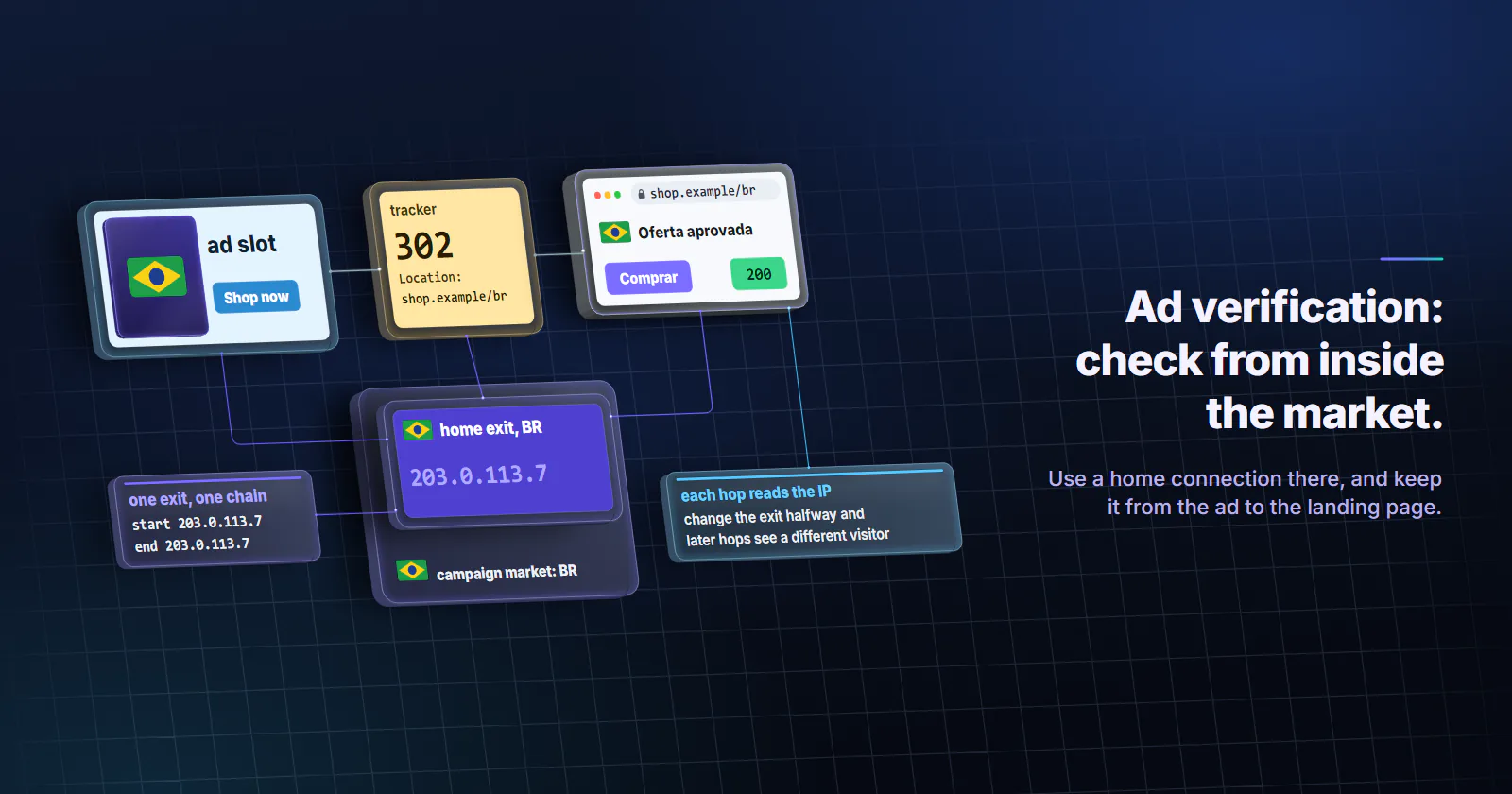
- Verification needs three things. An exit the target places inside the campaign's market, a consumer network rather than a hosting one, and one origin held through the whole redirect chain.
- Platform tools come first. Google's Ad preview and diagnosis tool, the Ads Transparency Center and the Meta Ad Library show an advertiser's own ads by location for free. A proxy check starts where they stop: third-party placements and the landing page a visitor actually gets.
- Hosting IPs see a different ad world. The MRC's 2020 invalid traffic standard has accredited measurers filter invalid data-center traffic from AWS, Google and Microsoft, and cloakers key on hosting networks too.
- Log the chain hop by hop. Follow 301, 302, 303, 307 and 308 redirects manually, record the exit IP at start and end, and rerun client-side hops in a headless browser.
- Match the origin to the audience. Residential sticky sessions for desktop and home placements, mobile exits for carrier campaigns, one fixed ISP IP per market for daily audits.
Ad verification proxies are proxy exits that let a team load its ads, placements and landing pages from a consumer connection inside each market a campaign targets. The check then sees what a visitor there sees. That takes three things: a matching location, a home or carrier network rather than a hosting one, and one origin held through the whole redirect chain.
A campaign runs in eight markets and the ad server reports delivery everywhere. Then a partner in Brazil sends a screenshot: the click lands on a different offer than the one approved. From the office in Berlin, the same link looks fine. The office sees the office’s market.
What ad verification proxies do
Ad verification checks that an ad ran where it was bought, in front of the audience it was bought for, and led where it should. In practice that means five questions per market: did the ad deliver in this geography, on which placements, with which creative, to which landing page, and did anything in the path behave differently for a checker than for a customer.
Ad verification proxies answer the “per market” part. Three requirements decide whether a check is worth anything.
The right market. Ad servers, affiliate networks and landing pages all read the visitor’s IP geolocation. A campaign targeted at Lisbon serves nothing, or something else, to a visitor the database places in Madrid. Geo ad checking starts with an exit the target’s own lookup places inside the campaign’s area, at country level for national campaigns and at city level for radius targeting.
A consumer origin. Home broadband and carrier networks are where the audience is. Hosting networks are where bots are, and ad systems treat them that way: they read the network behind an IP, the axis ASN targeting selects on, as closely as its location.
One origin through the chain. A click on a display ad typically passes through the ad server, one or more trackers, sometimes an affiliate network, then the landing page. Each hop can read the IP. If the exit changes halfway, the later hops see a different visitor than the earlier ones, and the chain the check records may not be the chain a real user gets.
Why office and datacenter checks fail
A check from the office network fails on the first requirement: it sees one market, the office’s own. A check from a cloud server fails on the second. The Media Rating Council’s invalid traffic standards addendum (June 2020 update) classes known invalid data-center traffic as general invalid traffic and requires accredited measurers to filter invalid data-center traffic from the three largest hosting entities, Amazon AWS, Google and Microsoft. A verification request from a cloud server may be filtered, served a default creative, or shown a clean page.
The clean page is the bigger problem. Google’s circumventing systems policy (checked September 2026) defines cloaking as showing different content to different people, or to Google, to hide things that break its ad rules, and suspends accounts on detection without prior warning. The same policy allows different languages, offers or geographic adjustments as long as the promoted product is the same for everyone. A check from inside the market, on a consumer IP, is how an advertiser or compliance team sees which side of that line a landing page is on.
Start with the platform tools
The ad platforms already show an advertiser part of this for free, without touching live stats, so they come before any proxy.
Google Ad preview and diagnosis. Google’s help page on finding your own ads (undated, checked 29 September 2026) warns that searching Google for your own ads accumulates impressions without clicks, which can lower clickthrough rate, and points advertisers to the Ad preview and diagnosis tool instead. The tool previews a Search results page for a chosen location, language and device. It does not cover third-party display placements.
Google Ads Transparency Center. Anyone can look up an advertiser’s ads across Google’s surfaces and filter by region, date and format. It confirms that a creative exists and where it was shown, not what a visitor lands on.
Meta Ad Library. Filtered by country, it lists the ads a page is running on Meta’s apps. It shows creatives and dates, not the landing page a click reaches in that market.
None of the three loads a third-party publisher page in Porto to see which ad actually rendered in the slot, and none follows the click through trackers to the page a visitor in that market gets. Those two checks need an origin in the market.
What each check should capture
Ad verification proxies only fix the origin. A useful check still records the same fields in every market, so markets can be diffed line by line:
- Creative. A screenshot plus the creative ID or asset URL, so a wrong-language or outdated creative is provable.
- Placement. The page URL and slot where the ad rendered, to verify ad placements against the site list the campaign was sold on.
- Redirect chain. Every hop from the click URL to the final page, with status code, Location header and timestamp.
- Final landing page. URL, HTTP status, a screenshot, and the offer or price shown.
- Exit facts. The exit IP at the start and the end of the check, with its country, city and network type from a lookup.
Without the last field, a divergent chain cannot be separated from a proxy that rotated mid-check or landed in the wrong city.
Capturing the redirect chain
HTTP redirects are defined in RFC 9110 (June 2022): status codes 301, 302, 303, 307 and 308, each with a Location header pointing at the next URL. A landing page redirect check follows those hops manually instead of letting the client follow them silently, so every hop is logged.
The script below traces one URL on one sticky session and records the exit IP before and after, so a rotation mid-chain shows up in the log.
import requests
from urllib.parse import quote, urljoin

USER, PASS = quote("USERNAME", safe=""), quote("PASSWORD", safe="")
PROXY = f"http://{USER}:{PASS}@gw.proxymint.com:PORT"  # market and sticky rotation are set on the order
UA = "Mozilla/5.0 (Windows NT 10.0; Win64; x64)"

def exit_ip(s):
    return s.get("https://api.ipify.org", timeout=20).text

def trace(url, max_hops=15):
    s = requests.Session()
    s.proxies = {"http": PROXY, "https": PROXY}
    s.headers["User-Agent"] = UA
    ip_start = exit_ip(s)
    hops = []
    for _ in range(max_hops):
        r = s.get(url, allow_redirects=False, timeout=30)
        loc = r.headers.get("Location")
        # a scheme-only upgrade may come from the proxy gateway, not the site
        upgrade = url.startswith("http://") and loc == "https://" + url[7:]
        hops.append((r.status_code, url, loc, upgrade))
        if r.status_code in (301, 302, 303, 307, 308) and loc:
            url = urljoin(url, loc)
        else:
            break
    return {"ip_start": ip_start, "ip_end": exit_ip(s), "hops": hops}
Plain http:// hops need one flag. On proxymint’s per-GB gateway (measured 28 September 2026), a plain http:// request never reaches the target: the gateway itself answers 301 to the same URL on https://. The trace records that as a hop, so the script marks any redirect that only swaps the scheme. Treat a flagged hop as unknown, and if a split between markets hinges on one, confirm it from an origin without a proxy.
Client-side hops
Not every redirect is an HTTP status code. Meta refresh tags and JavaScript location changes only fire in a browser, so a landing page redirect check that stops at HTTP codes misses them. When the last hop returns 200 with a near-empty page, rerun the URL in a headless browser on the same proxy and log every navigation event.
Spotting cloaking and ad fraud
The proxy supplies the origin. The finding is always a difference between two runs, so run the same URL list from three or more countries and align the hops side by side.
A split by market. The first hop where chains diverge is the finding: an ad server choosing a market creative, a tracker routing by country, or a landing page swapping the offer. A different language or price is allowed under Google’s policy; a different product is not.
A split by network. Run the same URL in one market from a consumer exit and from a hosting exit. If the hosting side gets a tidy page and the consumer side gets something else, that is the cloaking signature. Datacenter proxies earn their place here as the control.
Hops nobody approved. An extra tracker, a domain the approved URL never mentioned, or a final page on a different registrable domain from the one in the ad all go into the report, with the hop number.
Delivery outside the buy. Loading a publisher page from a market the campaign did not target, and still seeing the creative, is a geo-targeting leak worth a ticket to the ad server.
A resolver in the wrong country. A geo-sensitive page can also read which DNS resolver looked up its hostname. With plain socks5:// the client resolves names itself, so the office’s resolver shows up behind a foreign exit, a proxy DNS leak. On proxymint’s per-GB tiers, HTTP CONNECT and socks5h:// resolve on the proxy side (our US test exits used US public resolvers, measured September 2026), not on the exit network’s own resolver. Run a resolver test through the same session before trusting a geo result in any market.
Headers that give the check away. The same measurement found no Via or Forwarded header added toward the target, and HTTPS hops run through CONNECT, which relays encrypted bytes, so no X-Forwarded-For can be added to them. A page that treats the checker differently is reacting to the network or the client. Anything the script sets itself, such as its User-Agent, still reaches the page, which is why every market run should send identical headers.
The exit facts from the start and end of each chain show whether a split came from the market or from the proxy.
Which proxies fit which placement
The origin should match the audience the placement targets. Ad verification proxies come in three useful shapes, and a fourth that serves only as a control.
Residential as the default. Rotating residential proxies with a sticky or timed session are the default for desktop and home-network placements, and city targeting lets geo ad checking match a radius campaign’s own area. How far city-level targeting can be trusted is covered in geo targeted proxies.
Mobile when the audience is on carriers. Mobile web and in-app campaigns can be targeted by connection type or carrier, and a home broadband exit never sees those placements, the core split in mobile vs residential proxies. Mobile proxies show the creative a carrier user sees in that market.
ISP for fixed daily audits. A compliance team that checks the same URL list every morning from each country can hold one static ISP proxy per market. The history stays consistent, and a fixed address is easy to recognise in internal logs and to declare to a measurement vendor. The limits are country-only targeting and an address that may carry history from before the term, so run one baseline check on day one.
Datacenter as the control. A datacenter exit is fine for uptime and status checks on landing pages the team controls, and it is the hosting-side run in a cloaking test. It is not the origin for checks of what a customer sees.
Sticky sessions versus rotation
Per-request rotation is the wrong mode for ad verification proxies: every hop of a chain gets a new visitor, and the recorded path is one no real user takes. Set the session to a timer or to sticky. A 10 to 30 minute timer is longer than any sane redirect chain and short enough that the next chain gets a fresh exit.
The tradeoff of sticky sessions on home and carrier devices is that a device can go offline mid-chain. The start and end IP log catches that; rerun the chain instead of trusting it.
A sized multi-market setup
A worked example, with every assumption stated. A brand audits 200 click URLs in 8 markets once a day, 30 days a month: 200 x 8 x 30 = 48,000 checks.
Chain traces only. Header-only hops move little data. If a traced chain averages 20 to 50 KB (measure your own), the month is roughly 1 to 2.4 GB, a small residential package.
Full-page captures. Screenshots of the landing page load every asset. If a capture averages around 2 MB (pages vary widely, so measure), the month is 48,000 x 2 MB = 96,000 MB, about 96 GB. GB are sold in whole packages, so that is a 100 GB residential package.
Adding mobile for two markets. If two of the eight markets are mobile-first, their share of the full-page month is about 24 GB on a mobile package, and the other six markets need about 72 GB of residential.
Fixed ISP audits instead. One ISP IP per market means eight fixed IPs, billed per IP per month. The ISP address is chosen for its fixed history and for an IP the team can declare to the ad platform.
How many IPs per market. On per-GB residential and mobile the count is not a purchase decision: each sticky session gets its own exit, and the number of parallel sessions per market sets how many exits are in use at once. A few parallel sessions per market cover a few hundred daily chains. On ISP, one address per market is enough for a daily list at this volume; a static IP handles about 10 to 20 requests a second, far above one audit pass.
Test one market first. Run a single market’s list for a day on a small package, read the GB used from the dashboard, then multiply by markets and days. That replaces the two assumptions above with the team’s own numbers. Current rates are on the pricing page.
Rules for verification traffic
Verification traffic runs on live campaigns and live placements, so it follows rules of its own.
- Own or contracted URLs only. Trace click URLs from campaigns the team runs or is contracted to audit.
- Competitors through the libraries. Other advertisers’ creatives belong in the Transparency Center and the Ad Library, not in the trace list.
- Low, steady volumes. One pass per URL per market per day is an audit. Hundreds of passes an hour is traffic someone has to filter.
- Keep the log. Section 4.3 of the MRC addendum has measurers segregate internal test and site-governance activity, and names dedicated IPs and campaign IDs as ways to exclude it. A fixed ISP address can be declared outright; for rotating exits, a record of exit IPs and timestamps lets the team’s analytics and its measurement vendor exclude the checks.
Pick the origin the audience uses
Start with the platform tools; they are free and show a Search ad by location without touching the stats. Then choose ad verification proxies by who the campaign targets. If the placement runs on desktop and home networks, verify ad placements with residential exits on a sticky session, with city targeting where the campaign uses a radius. If it runs on mobile web or in apps, use mobile exits in that market. If the job is the same URL list every day and country level is enough, a fixed ISP IP per market gives the most consistent origin.
Frequently asked questions
Ad verification proxies are proxy exits used to load ads and landing pages from inside a campaign's target market, on a consumer network, so the check sees what a real visitor sees. Teams use them to confirm creatives, placements and landing pages per country or city. Residential and mobile exits are the usual origins because hosting IPs are often filtered or shown different content.
It depends on the audience the placement targets. Residential exits with a sticky session fit desktop and home-network placements and allow city-level checks. Mobile exits fit mobile web and in-app campaigns on carrier traffic. A fixed ISP IP per market fits a daily audit of the same URL list where country level is enough.
Only for checks where nobody filters or cloaks against them, such as uptime checks on landing pages the team controls. The Media Rating Council's 2020 invalid traffic standard requires accredited measurers to filter invalid data-center traffic from the largest hosting providers, and cloaked landing pages often show a clean page to hosting networks. A datacenter exit is still useful as a control origin next to a consumer one.
Proxies supply the origin; the detection is the comparison. Running the same click URL from several markets, and from a consumer and a hosting exit in one market, shows where redirect chains split and whether a landing page changes by network. A final page that differs only for hosting or reviewer origins is the usual sign of cloaking.
Use a sticky or timed session for each chain. If the exit IP changes between hops, later trackers see a different visitor, and the recorded chain may not match what a real user gets. A session of 10 to 30 minutes covers any normal redirect chain, and logging the exit IP at the start and end catches a mid-chain change.
Request the click URL with automatic redirects turned off, record the status code and Location header, then request the next URL, repeating until a non-redirect response. Keep the same proxy session for every hop and log the exit IP before and after. If the last page is nearly empty, rerun it in a headless browser to catch meta refresh and JavaScript redirects.
It depends mostly on whether checks capture full pages or only redirect headers. 200 URLs in 8 markets checked daily is 48,000 checks a month. At about 2 MB per full-page capture that is roughly 96 GB, a 100 GB residential package. Header-only traces at 20 to 50 KB each come to 1 to 2.4 GB. Per-GB plans need no IP count; a fixed-IP audit needs one ISP address per market.
Researched and drafted with AI tools, then checked against our publishing rules before it went live: 5 outside links, 10 links to other proxymint pages, no prices and a fact-check pass against our product records. How we write.