
Passive OS fingerprinting: the SYN, p0f and proxy mismatch
Passive OS fingerprinting reads TTL, window size and TCP options in a SYN to name the sender's OS. Why a proxy exit can contradict your User-Agent.
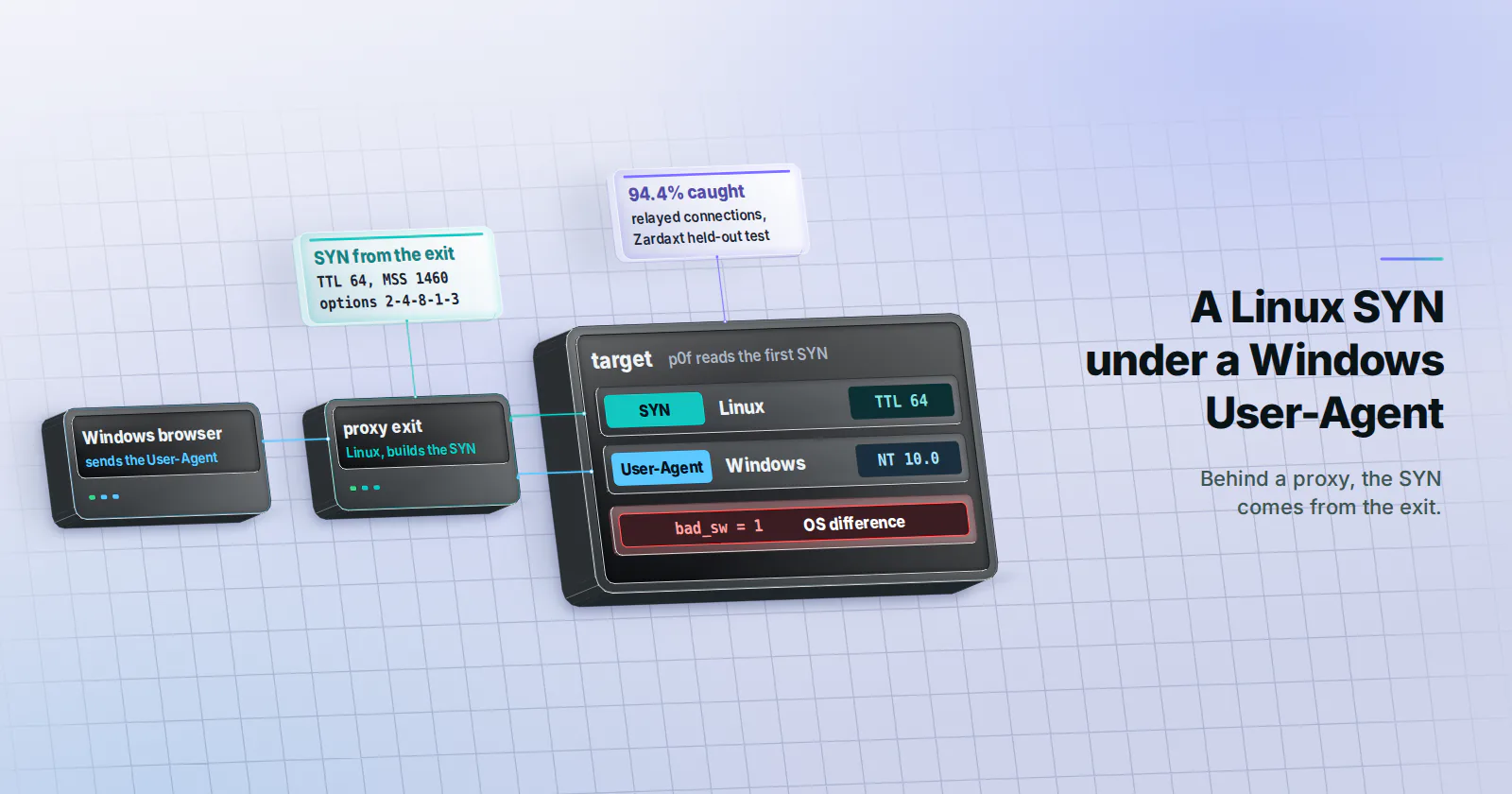
Quick summary · TL;DR
- Passive OS fingerprinting reads the first SYN. The initial TTL, window size, MSS and TCP option order differ between Windows, Linux and Apple stacks, so a server can name the sender's OS without sending a probe.
- Option order carries the most signal. Linux sends MSS, SACK, timestamp, NOP, window scale; Windows sends no timestamp at all; Android shares the Linux layout because it runs a Linux kernel.
- Behind a relay proxy the SYN is the exit's. HTTP CONNECT and SOCKS5 open a new TCP connection from the exit, so the target sees the exit's OS next to your TLS handshake and User-Agent.
- Spotting a mismatch is easier than naming an OS. The open-source Zardaxt model caught 94.4% of relayed connections in its 2026-09-21 held-out test, and 74% when the browser claimed Android or Linux.
Passive OS fingerprinting identifies a host’s operating system from packets it sends anyway, usually the first TCP SYN of a connection, without sending it a single probe. The initial TTL, the window size, the maximum segment size and the order of the TCP options differ between Windows, Linux and Apple stacks. Behind a proxy, that SYN comes from the exit, not from the client.
That explains a common report. A real browser on a Windows laptop, routed through a proxy, gets challenged on the first page. The site read a Linux SYN under a Windows User-Agent before it saw a cookie.
Nothing was wrong with the browser. One hop in the path built the SYN, another sent the User-Agent, and the two disagreed about the operating system.
What passive OS fingerprinting reads
Every TCP connection opens with a SYN packet. TCP and IP standards leave many of its values to the implementer, so each operating system ships its own defaults. A server, a network sensor or even a switch can match those defaults against a database of known stacks. Nothing is sent to the client, which is what makes the method passive.
Security teams run it for routine network monitoring and to spot unauthorized devices on a network. p0f’s README also lists penetration-test reconnaissance, forensics and signals for abuse-prevention tools, and that last use is where websites and anti-bot systems come in.
Initial TTL. Linux sets its default TTL to 64 (IPDEFTTL in include/uapi/linux/ip.h, read 2026-10-15). The p0f signature database lists 128 for Windows and 64 for macOS, iOS and FreeBSD. Each router on the path lowers the TTL by one, so the observer rounds up: a packet that arrives with TTL 120 most likely started at 128 and crossed 8 hops, which p0f prints as 120+8.
Window size and scale. The receive window offered in the SYN, and the window scale option next to it, are set by the kernel. Some stacks use a fixed value, others a multiple of the MSS.
Maximum segment size. An MSS of 1460 implies a 1500-byte MTU, which p0f labels “Ethernet or modem”. MTUs between 1300 and 1460 get the label “generic tunnel or VPN”, because the tunnel’s headers eat into the packet.
TCP option order. Linux sends MSS, SACK permitted, timestamp, NOP, window scale. Windows sends MSS, NOP, window scale, NOP, NOP, SACK permitted, and no timestamp at all. In a factor analysis published with the open-source Zardaxt fingerprinting tool (README updated 2026-09-21), option layout scored 0.991 on a scale where 0.36 meant no predictive value, the highest of any field.
IP flags, ID and ECN. Don’t-fragment, IP identification and ECN add more. Zardaxt’s 2026 data shows ECN set on the SYN by 74% of iOS and 56% of macOS stacks against 1% of Windows, and a zero IP ID on 98% of iOS SYNs against 1.5% of Windows.
Current SYN signatures per OS
This table uses FoxIO’s JA4T format (window, option kinds, MSS, window scale) from its public ja4plus-mapping.csv, read 2026-10-15. Option kinds are numbered: 2 is MSS, 1 is NOP, 3 is window scale, 4 is SACK permitted, 8 is timestamp and 0 is end of options.
Android shares the Linux column. It runs a Linux kernel, so its SYN has the Linux option layout and TTL 64. p0f files Android under Linux with its own window multiple, and Zardaxt merges Android and Chrome OS into one Linux class: same kernel, same SYN.
Passive vs active OS fingerprinting
Active fingerprinting sends probes. Nmap fires crafted packets at open and closed ports and reads how the stack answers malformed or unusual input. It is precise, but it needs a reachable target, takes time and can show up in intrusion detection logs.
Passive OS fingerprinting only listens. It sees every client that connects and costs nothing extra, but it is limited to what the client chose to send. That is why websites use the passive form: a site cannot scan its visitors, yet every visitor hands over a SYN.
So the two answer different questions. Active methods ask “what is this host I am pointing at?” Passive methods ask “what sent this connection, and does that agree with what it says it is?”
p0f, JA4T and Zardaxt
p0f. Michal Zalewski’s tool fingerprints the client SYN and the server SYN+ACK, and it also reads HTTP header order. Its README lists “detection of dishonest clients / servers that forge declarative statements such as X-Mailer or User-Agent”. Its API carries a bad_sw value where 1 means “OS difference (possibly due to proxying)” and 2 an outright mismatch. The last release, 3.09b, is dated 2016-05-30 in the project repository, and its database has not moved since. The newest Windows label is “7 or 8”, so a Windows 11 SYN lands on a generic “NT kernel” signature.
JA4T. FoxIO published JA4T on April 23, 2024 as the TCP member of the JA4+ suite. It turns the SYN into a short readable string, as in the table above, and ships with plugins for Wireshark and Zeek. A JA4T string sits next to the JA4 TLS fingerprint from the same connection, which makes cross-layer comparison cheap.
Zardaxt. An open-source passive TCP/IP fingerprinting server. It answers two questions per connection: which OS sent this SYN, and, given the User-Agent, how likely it is that a relay such as an HTTP or SOCKS proxy made the connection on the browser’s behalf. Its 2026-09-21 database holds 1,453 fingerprints from about 23,000 labelled sessions.
Why proxies cause an OS mismatch
An HTTP proxy using CONNECT, or a SOCKS5 proxy, relays bytes between two separate TCP connections. Your client opens one to the proxy. The exit opens a new one to the target. The target’s SYN is therefore built by the exit’s kernel, while the TLS handshake, the HTTP/2 frames and the User-Agent inside the tunnel are still yours. The SOCKS5 vs HTTP proxy comparison covers how each protocol relays the stream; on the TCP layer they behave the same.
A tunnel VPN works differently. It carries your own IP packets inside its tunnel, so the SYN the target sees is your OS’s, only with a smaller MSS. Zardaxt’s README says its relay model does not catch tunnel VPNs for exactly that reason.
| Path to the target | Who builds the SYN | What passive OS fingerprinting sees |
|---|---|---|
| Direct | Your device | Your OS, consistent with your User-Agent |
| HTTP CONNECT or SOCKS5 proxy | The proxy exit | The exit’s OS next to your TLS and User-Agent |
| Tunnel VPN | Your device | Your OS, with a reduced MSS |
So a Windows browser behind a Linux-based exit shows TTL 64 and the Linux option layout under a Windows User-Agent. p0f would set bad_sw; Zardaxt would raise its relay probability.
Which stack the exit presents depends on the proxy category. Datacenter proxies exit from servers, so the SYN carries a server operating system’s stack. Residential and mobile exits are consumer devices, and the SYN comes from whatever operating system that device runs, a home computer or a phone rather than a server image. The wider picture of what each layer reveals, from ASN to browser leaks, is in how websites detect proxies.
How accurate passive OS fingerprinting is
Accuracy depends on the question. Naming the exact OS version from one SYN is unreliable. Spotting that the SYN and the User-Agent disagree is much easier.
The weak spot follows from the method. A Linux-family User-Agent over a Linux-family SYN is no contradiction, so the model has less to work with. The same README reports that its database names the OS correctly for 82-84% of held-out clients, and that macOS versus iOS is a coin toss because Apple ships one stack for both.
Academic work points the same way. A 2023 survey in Computer Networks by Laštovička and colleagues at Masaryk University found that stack-only methods are ageing: network-stack differences were once the main source, and encryption pushes the field toward behavioural analysis and machine learning combined with them.
Noise comes from the path too. Carrier-grade NAT, corporate firewalls and load balancers can rewrite or normalise fields, and p0f’s own documentation treats TTLs and MTUs that change subtly for one address as a sign of NAT. So detectors weigh repeated SYNs from one address together with the TLS fingerprint and behaviour before they act.
Check your own TCP fingerprint
Measure on a server you control, so you see exactly what a target sees. p0f reads plain HTTP on port 80, which lets it compare the SYN with the User-Agent in one pass.
# On your own server, with any web server listening on port 80
sudo p0f -i eth0 -o p0f.log 'tcp port 80'

# From your machine: once direct, then through the proxy
curl -A "Mozilla/5.0 (Windows NT 10.0; Win64; x64)" http://YOUR_SERVER/
curl -x socks5h://USERNAME:PASSWORD@HOST:PORT \
     -A "Mozilla/5.0 (Windows NT 10.0; Win64; x64)" http://YOUR_SERVER/
Read the SYN record first. Its os line is the stack p0f matched, and raw_sig shows the observed TTL plus the hop distance, the MSS, the window and the option layout. The HTTP record’s params line reads dishonest when the header pattern belongs to a different client than the User-Agent names, and p0f can log a host change with the reason ua_vs_os when the User-Agent points to another OS than the SYN. Then repeat the test from a real browser with the proxy set in its network settings, because p0f’s HTTP signatures for curl and browsers are as dated as its TCP ones.
Run the direct curl request from a Linux machine and the SYN already disagrees with the Windows User-Agent. The mismatch comes from the claim, not only from the proxy.
For JA4T, capture with sudo tcpdump -i eth0 -w syn.pcap 'tcp port 443' and open the file in Wireshark with FoxIO’s JA4 plugin. The plugin adds a JA4T value to each SYN, next to the JA4 of the ClientHello that follows.
To profile an exit category rather than one exit, take 25 exits per category, capture each SYN the same way, and count OS classes, MSS values and TTL distances. That distribution is the stack profile a target sees from the category.
Match the exit stack to the client
Start with the claim your client makes, because that half is fully in your hands.
- A script on a server. Send an honest User-Agent, or the library’s default. A Python script on Linux that claims Chrome on Windows creates the OS mismatch itself, with or without a proxy. Where the target accepts hosting networks, a server-stack exit and an honest script tell one consistent story.
- A real browser on a home-network target. Use exits that are consumer devices. Rotating residential proxies put a home computer or phone’s own stack on the SYN instead of a server default. A relay is visible to models like Zardaxt whatever the exit, so stay inside the target’s rules.
- An app-first platform that expects a phone. Use mobile proxies, where the exit sits on a carrier network, and keep the client’s claim consistent with a mobile device.
- A test that depends on your own OS stack reaching the target. No relay proxy can carry it, because the exit always opens the connection. Run that test directly from the device.
Fix the claim first, then choose the exit category for what the target checks on the network side.
Frequently asked questions
Passive OS fingerprinting identifies a host's operating system from traffic it sends anyway, mostly the first TCP SYN packet, without sending it any probe. The observer compares fields such as the initial TTL, window size, maximum segment size and TCP option order with a database of known stacks. Tools such as p0f, JA4T and Zardaxt work this way.
Active fingerprinting, as Nmap does it, sends crafted probes to a host and reads how its stack answers, which is precise but noisy and needs a reachable target. Passive fingerprinting only observes packets the host sends on its own, so it sees every client that connects and leaves no trace. Websites use the passive form because they cannot scan their visitors.
Each operating system starts its packets with a default time to live: 64 for Linux, Android, macOS and iOS, and 128 for Windows. Every router on the path lowers the value by one, so an observer rounds up to the nearest default. A packet arriving with TTL 120 most likely came from a Windows host 8 hops away.
p0f is a passive fingerprinting tool that reads TCP SYN and SYN+ACK packets and HTTP headers to identify operating systems and software. It is used in network monitoring, penetration testing, forensics and abuse prevention, and it flags clients whose User-Agent points to another OS than their TCP stack. Its last release, 3.09b, dates from May 2016, and its newest Windows signature is labelled Windows 7 or 8.
Yes, an HTTP CONNECT or SOCKS5 proxy does. The exit opens its own TCP connection to the target, so the SYN the target reads carries the exit device's operating system, not yours. Your TLS handshake, HTTP/2 frames and User-Agent pass through unchanged, which is how an OS mismatch appears.
A tunnel VPN mostly does not. It carries your own IP packets inside the tunnel, so the target still sees your operating system's SYN, but with a smaller maximum segment size because the tunnel's headers take up room. That reduced MSS is itself a sign of a tunnel.
JA4T is the TCP client fingerprint in FoxIO's JA4+ suite, published in April 2024. It writes the SYN as window size, TCP option kinds, MSS and window scale, for example 64240_2-1-3-1-1-4_1460_8 for Windows 10 and 11. It can be captured with FoxIO's Wireshark and Zeek plugins next to the JA4 TLS fingerprint.
Researched and drafted with AI tools, then checked against our publishing rules before it went live: 7 outside links, 5 links to other proxymint pages, no prices and a fact-check pass against our product records. How we write.