Detect AI browser agents: signals, signatures and tests
How to detect AI browser agents: declared identity, Web Bot Auth signatures, browser and behaviour signals, why IP checks fail, and a test you can run.
Quick summary · TL;DR
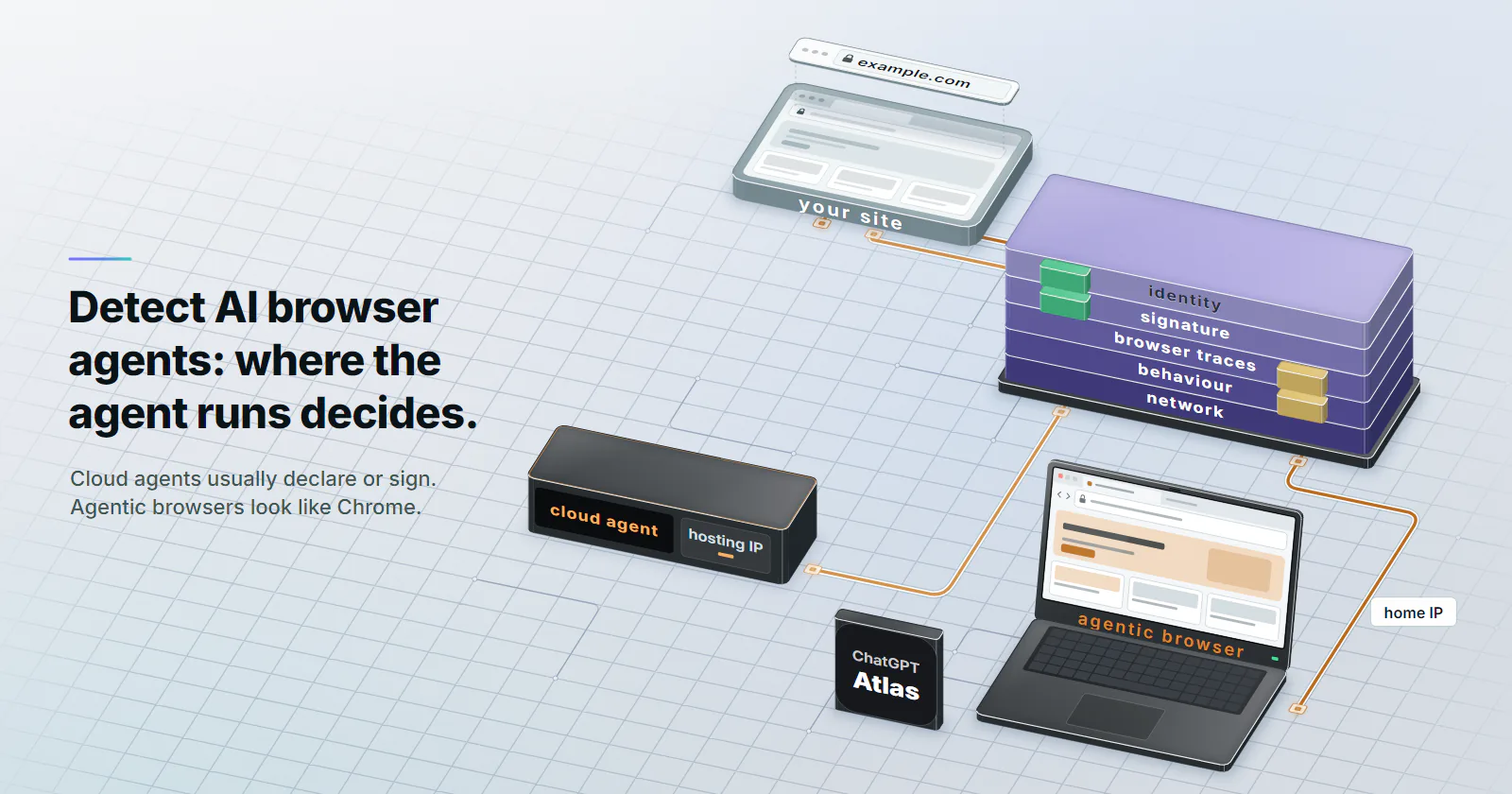
- Where the agent runs decides what a site can see. Cloud-hosted agents come from hosting IPs and often declare or sign; agentic browsers such as ChatGPT Atlas run on the person's own device and look like Chrome on a home connection.
- Identity first, then signatures. Google publishes the IP ranges for Google-Agent, OpenAI publishes one IP file per user agent, and ChatGPT agent signs every request with Web Bot Auth, which a site can verify against a public key directory.
- Browser traces and behaviour catch the rest. navigator.webdriver, framework residue, direct deep-link navigation and machine-speed input separate unsigned agents from people.
- IP rules catch customers. An agentic browser uses the customer's own IP, and a self-built agent can exit on a residential connection, so IP type is one input and never the verdict.
To detect AI browser agents, check five layers: declared identity (user agent and the vendor’s published IP list), a Web Bot Auth signature, browser automation traces, on-page behaviour, and the network. Cloud-hosted agents usually declare themselves or sign. Agentic browsers on a person’s laptop look like Chrome on a home connection, so only browser and behaviour signals catch them.
The problem shows up in the funnel before it shows up in security tools. A retailer sees a rise in direct sessions that go straight to a product page, fill the cart in four seconds and leave. The user agent says Chrome on macOS. The IP belongs to a cable ISP. Nothing in the WAF fired.
Some of that is an AI agent doing a real customer’s shopping, and turning it away loses a sale. Some of it is a script built to look like that agent. Telling the two apart starts with where the agent’s browser runs.
How to detect AI browser agents
Each layer answers a different question, and each one fails on a different kind of agent.
Declared identity. The request names itself in the User-Agent header, and the vendor publishes the IP ranges it sends from. It is cheap to check and catches only agents that choose to declare.
Cryptographic identity. The agent signs each request with HTTP Message Signatures (RFC 9421) under the Web Bot Auth profile. A valid signature proves the operator. It cannot be faked by copying a header.
Browser traces. Automation frameworks leave marks inside the page: navigator.webdriver, framework globals, helper extensions, and on older Chrome builds DevTools Protocol side effects.
Behaviour. Agents navigate, read and type in patterns people rarely produce: straight to a deep URL, action seconds after load with no scroll, form fields filled at machine speed.
Network. The IP, its ASN and its reputation. Strong against agents in a vendor’s cloud, weak against everything else, for reasons covered below.
The checks run in two places. A CDN or WAF bot-management layer sees identity, signatures, TLS and IP on every request. A script on the page sees browser traces and behaviour. A useful setup joins both on the session ID, because neither sees the whole picture alone.
| Layer | What it checks | Catches | Misses |
|---|---|---|---|
| Declared identity | User agent, published IP file, reverse DNS | Google-Agent and other declared cloud agents | Agentic browsers that send a stock Chrome user agent |
| Signature | Web Bot Auth headers against the operator’s key directory | Agents whose operator signs | Anything unsigned, which is most agents today |
| Browser traces | webdriver flag, framework residue, helper extensions | Self-built Playwright or Puppeteer agents, some hosted agents | Agents driving a real, unmodified browser |
| Behaviour | Navigation path, input timing, read patterns | Most agents, given enough events | Short sessions with one or two actions |
| Network | IP type, ASN, reputation | Agents in a vendor or developer cloud | Agents on the person’s own connection or on residential exits |
Types of AI browser agents
Three classes of agent reach a site today, and the class decides which of the layers above can see it.
Cloud-hosted agents. The model drives a browser in the vendor’s data centre. ChatGPT agent works this way, and so does Google-Agent, which Google describes as the user agent for “agents hosted on Google infrastructure to navigate the web and perform actions upon user request.” These agents come from hosting IP ranges, and the larger vendors declare them and publish the ranges.
Agentic browsers and extensions. The browser runs on the person’s own laptop: ChatGPT Atlas, Perplexity Comet, Claude in Chrome. Requests leave from the person’s home or office connection. HUMAN Security documented that Atlas sends a user agent string identical to current Chrome on macOS (profile page, checked 2026-09-30), so a user-agent rule sees a regular Chrome visitor.
Self-built agents. A developer wires a model to Playwright, Puppeteer or Browser Use and runs it anywhere: a laptop, a cloud VM, a CI runner. The user agent is whatever the script sets. The exit IP is whatever the host has, and some route through a residential proxy for location testing or regional content, which puts their traffic on consumer IP addresses too.
HUMAN’s 2026 State of AI Traffic report (March 2026) counted traffic from AI agents and agentic browsers up 7,851% year over year, with 2.3% of agentic activity on checkout pages.
Verifying declared AI agents
User agents and published IP lists
Start with the agents that want to be recognised, because they are the easiest to allow on purpose.
Google-Agent. Google added it to its list of user-triggered fetchers on 2026-03-20 (page checked 2026-10-07). The user agent carries the token Google-Agent and a link to that page. Its addresses come from a separate file, user-triggered-agents.json, and not from the older fetcher lists, so an allowlist built before March misses it.
ChatGPT agent. OpenAI publishes one IP file per user agent on its crawler and user agent page (checked 2026-10-07), including chatgpt-user.json for ChatGPT-User, the fetcher that visits a page when a person asks ChatGPT a question. None of those files is documented as covering ChatGPT agent’s cloud browser, so the check to rely on is the signature in the next section. Fetch any IP file you do use on a schedule.
Reverse and forward DNS. For Google traffic, resolve the IP to a hostname, confirm the hostname sits under a Google domain, then resolve the hostname forward and confirm it returns the same IP. Google documents the steps and masks on its verification page (checked 2026-10-07).
# Verify a request that claims to be Google-Agent (IP from your access log)
host 203.0.113.10          # reverse lookup: expect a google.com or googleusercontent.com name
host NAME_FROM_ABOVE       # forward lookup: expect the same IP back
A matching user agent from an IP outside the vendor’s file is a claim, and a false one. Treat it as unknown automation, whatever the name says.
Web Bot Auth signatures
A signature is the only identity check that survives copying. The agent holds a private key, publishes the public half in a key directory at /.well-known/http-message-signatures-directory, and signs each request.
OpenAI’s allowlisting article (checked 2026-10-07) now calls the product ChatGPT Work’s Cloud browser, while Akamai and Cloudflare still list it as ChatGPT Agent. It names what arrives on every signed request:
Signature-Agent: "https://chatgpt.com", quotes includedSignature-Input, naming the covered components, the key ID and the validity windowSignature, the signature itself
Verification takes three steps: confirm Signature-Agent matches exactly, fetch the key from https://chatgpt.com/.well-known/http-message-signatures-directory, and check the signature as RFC 9421 defines. Cache the directory and respect the expires time in Signature-Input, so a replayed header fails.
Google runs the same protocol as an experiment. Its Web Bot Auth page (checked 2026-09-30) names the identity https://agent.bot.goog, says only some agents on Google infrastructure sign, and tells sites to keep using IP ranges, reverse DNS and user agents during the rollout.
At the CDN. Cloudflare opened signed agents on 2025-08-28 with ChatGPT agent, Goose, Browserbase and Anchor Browser in the first cohort. On 2026-07-01 it folded that class into verified bots with a new field: Direct for a bot one operator runs, Intermediary for an agent service that many end users drive. A rule can allow a signed Intermediary agent to browse and still ask for a login before checkout.
Few agents sign yet. The MIT 2025 AI Agent Index (published February 2026) found one of 30 agents, ChatGPT agent, using cryptographic request signing. An unsigned request proves nothing about who sent it.
Browser and behaviour signals
Browser automation signals
When the browser runs somewhere the site cannot verify, the page itself becomes the sensor. These checks run in JavaScript on the page and report to the server.
navigator.webdriver. The WebDriver standard sets it to true when automation controls the browser. Default Playwright, Puppeteer and Selenium sessions expose it. Agents that drive a person’s own browser through an extension do not trip it, because no WebDriver session exists.
CDP side effects. Frameworks that talk to Chrome over the DevTools Protocol enable domains such as Runtime. The classic probe logged an error object with a getter and watched whether the getter fired. Two V8 changes in May 2025 stopped that probe on current Chrome, as Castle’s analysis shows, so only prototype-chain variants and older builds remain.
Framework residue. The steadier tells sit in the page itself. ChromeDriver has historically left properties with a cdc_ prefix on document, and Playwright installs binding functions on window when a script exposes a function to the page.
Helper extensions. Agent products that work inside an existing browser often ship a helper extension. Its content scripts, injected elements or messaging leave traces a page can see.
Small API divergences. HUMAN’s Atlas profile notes that Atlas does not expose Chrome’s Google text-to-speech voices through speechSynthesis the way stock Chrome does. One divergence is a weak signal. Several together, on a browser that claims to be current Chrome, add up.
Behaviour signals and isTrusted
Behaviour catches the agents that pass every browser check, because the model still has to act through the page.
- Navigation. Sessions that start on a deep URL with no referrer, skip the listing page and go straight to the form.
- Reading. The first click or keystroke lands seconds after load with no scroll or pointer movement before it. The agent read the page without scrolling it, and the page only sees that gap.
- Input. Fields filled at a constant speed, pointer paths that run in straight lines, clicks at the exact centre of elements.
- Timing. Long pauses between actions (the model thinking) followed by bursts of input.
isTrusted and userActivation. Script-dispatched events carry isTrusted: false, so a check on that flag catches naive automation. Input sent through the DevTools Protocol with Input.dispatchMouseEvent enters at the browser level and arrives as trusted. The same goes for navigator.userActivation: a CDP click grants activation. The flags catch naive scripts, and timing and path shape catch the rest.
Behaviour needs events to work with. A one-click agent session gives the model almost nothing, so pair behaviour with the other layers and score the session, never a single event.
IP and ASN checks for AI agents
An IP address says where a request left the internet. It does not say who drove the browser, and proxy operators see that gap from the other side every day.
For cloud-hosted agents, the hosting ASN is a strong clue: consumers do not browse from an AWS or Google Cloud range. Datacenter IP addresses are classed as hosting on sight, and that is fine here, because the declared cloud agents publish those ranges anyway.
For the other two classes, the network layer points the wrong way. An agentic browser uses the person’s own connection, so its IP is the customer’s IP. A self-built agent can send its traffic through a residential proxy exit, which is a real home connection. A rule that blocks residential addresses to stop agents blocks the customers who use those same ISPs.
TLS and HTTP/2 fingerprints. One network signal does survive a home IP. An agent that drives real Chrome presents Chrome’s TLS handshake, while a self-built agent that fetches pages with an HTTP library presents that library’s JA4 fingerprint and HTTP/2 settings. A library fingerprint under a Chrome user agent is a mismatch no person produces. It does not flag an agentic browser, which runs real Chrome.
IP reputation still belongs in the score, built from the ASN and feed data that how websites detect proxies walks through. Treat it as one input that raises or lowers suspicion, weighted by what the session is trying to do, and never as the verdict on its own.
AI agent traffic in analytics
Tag-based analytics sees an agent that renders the page as a visitor. Agent sessions that open a URL directly land in “direct” traffic, and a Chrome user agent puts them in the same segment as people.
Separating the two takes server data:
- Log
User-Agent,Signature-Agentand the verified-bot result from the CDN on every request, next to the session ID. - Tag sessions whose IP falls in a published agent file (Google’s
user-triggered-agents.json, OpenAI’s per-user-agent files). - Send the page-side automation signals from the previous sections to the same store as the analytics events.
- Build two segments: declared agents (identity or signature) and suspected agents (browser and behaviour score above a threshold). Report conversion for each apart from human sessions.
The declared segment is exact. The suspected segment is an estimate, and it should be labelled that way in any report that goes to the business.
Allow, verify, challenge or block
Blocking every agent is the wrong default for most commerce sites, because many agent sessions carry a real buyer. The useful policy sets a rule per action.
| Action on the site | Declared and signed agent | Unverified agent |
|---|---|---|
| Read product and content pages | Allow | Allow, rate-limit |
| Search, compare, check stock | Allow | Allow, rate-limit |
| Add to cart | Allow | Challenge on volume |
| Log in, change account details | Require the person’s own login | Challenge or block |
| Checkout and payment | Allow with the person’s confirmation step | Challenge or block |
| Bulk price or inventory reads | Per your terms | Block |
robots.txt does not decide any of this. User-triggered agents and fetchers generally do not follow it, since the vendors treat them as acting for a person. The controls sit in the CDN, the WAF and the application’s own login and confirmation flows.
Test your agent detection
Rules that nobody has tested catch the wrong traffic. Before shipping a rule meant to detect AI browser agents, run the same agent task against a staging copy of your own site from three places and write down which layer fires.
- Cloud origin. A Playwright script with a model, on a cloud VM. Expect the network layer and browser traces to fire. IPv4 datacenter proxies give the same hosting-ASN view from chosen countries.
- Home origin. The same script from a home connection, or through a residential exit in the market the site serves. Expect browser traces and behaviour to fire, and the network layer to stay quiet. If the IP rule fires here, it will fire on customers.
- Vendor agent. The same task run by an agentic browser and by a signed cloud agent. Expect the signature or identity check for the cloud agent, and behaviour for the local one.
- A person. Complete the task by hand from the same home connection. Nothing should fire.
Record the layer, the score and the action taken for each run, and repeat after every rule change. The fourth run shows whether the rules will stop real customers.
Choosing what to do next
If the agent traffic in the logs comes from published IP ranges or carries a valid signature, allow it by identity and set per-action limits. If it looks like Chrome on home connections, build the browser-trace and behaviour score first, because the network layer cannot see it. If a rule leans on IP type or ASN, run the home-origin test before shipping it. And if the site sells to people who use AI agents to shop, give each agent the access its action allows.
Frequently asked questions
Check five layers: the declared user agent and the vendor's published IP list, a Web Bot Auth signature, browser automation traces such as navigator.webdriver, behaviour on the page, and the network the request came from. Combine them into one session score. Cloud agents are caught by identity and signatures, while agentic browsers on a person's device need browser and behaviour signals.
Yes, with limits. Declared and signed agents are easy to identify exactly. Agentic browsers that run on the person's own device send a normal Chrome user agent from a home IP, so a site only sees them through page-level automation traces and behaviour, which gives a probability rather than a certainty.
HUMAN Security documented that ChatGPT Atlas sends a user agent string identical to current Google Chrome on macOS. A user-agent rule therefore cannot separate Atlas browsing from a regular Chrome visitor. Small differences inside the browser, such as how it exposes speech synthesis voices, are weak signals that help only in combination.
Yes. OpenAI states that ChatGPT agent, which its help center now calls ChatGPT Work's Cloud browser, signs its requests with Web Bot Auth, sending Signature, Signature-Input and a Signature-Agent header set to https://chatgpt.com. Sites verify the signature against the public keys at chatgpt.com/.well-known/http-message-signatures-directory. OpenAI's published IP files are per user agent, so the signature is the check to rely on for the agent.
Usually not. Vendors treat user-triggered agents and fetchers as acting for a person, Google says its user-triggered fetchers generally ignore robots.txt rules, and the MIT 2025 AI Agent Index found that browser-based agents often ignore it. Control over agents belongs in the CDN, WAF and the application's own login and confirmation steps.
Blocking all of them turns away customers who shop through an agent. A better policy allows verified agents to read, search and compare, rate-limits unverified ones, and keeps account changes and payment behind the person's own login and confirmation. Bulk price or inventory reads can be blocked according to the site's terms.
Tag-based analytics counts agents that render pages as visitors, often as direct traffic. Log the user agent, Signature-Agent header, CDN verified-bot result and page-side automation signals next to the session ID, then report declared agents, suspected agents and humans as separate segments.
Researched and drafted with AI tools, then checked against our publishing rules before it went live: 14 outside links, 5 links to other proxymint pages, no prices and a fact-check pass against our product records. How we write.