Web Bot Auth explained: signed requests, keys and proxies
Web Bot Auth lets bots sign HTTP requests with a published key. How the three headers work, who verifies them in 2026, and what a proxy changes.
Quick summary · TL;DR
- Web Bot Auth lets a bot sign its requests. The agent signs each HTTP request with a private key and names the HTTPS URL where its public keys live, so a site can check the signature instead of trusting an IP list or a user agent.
- Three headers carry it. Signature-Agent points to the key directory, Signature-Input lists what was signed with created, expires, keyid and tag="web-bot-auth", and Signature holds the bytes.
- It is a draft with real deployments. The IETF working group draft dates from September 2026, while Cloudflare, AWS WAF on CloudFront and an experimental Google program already verify or send signatures.
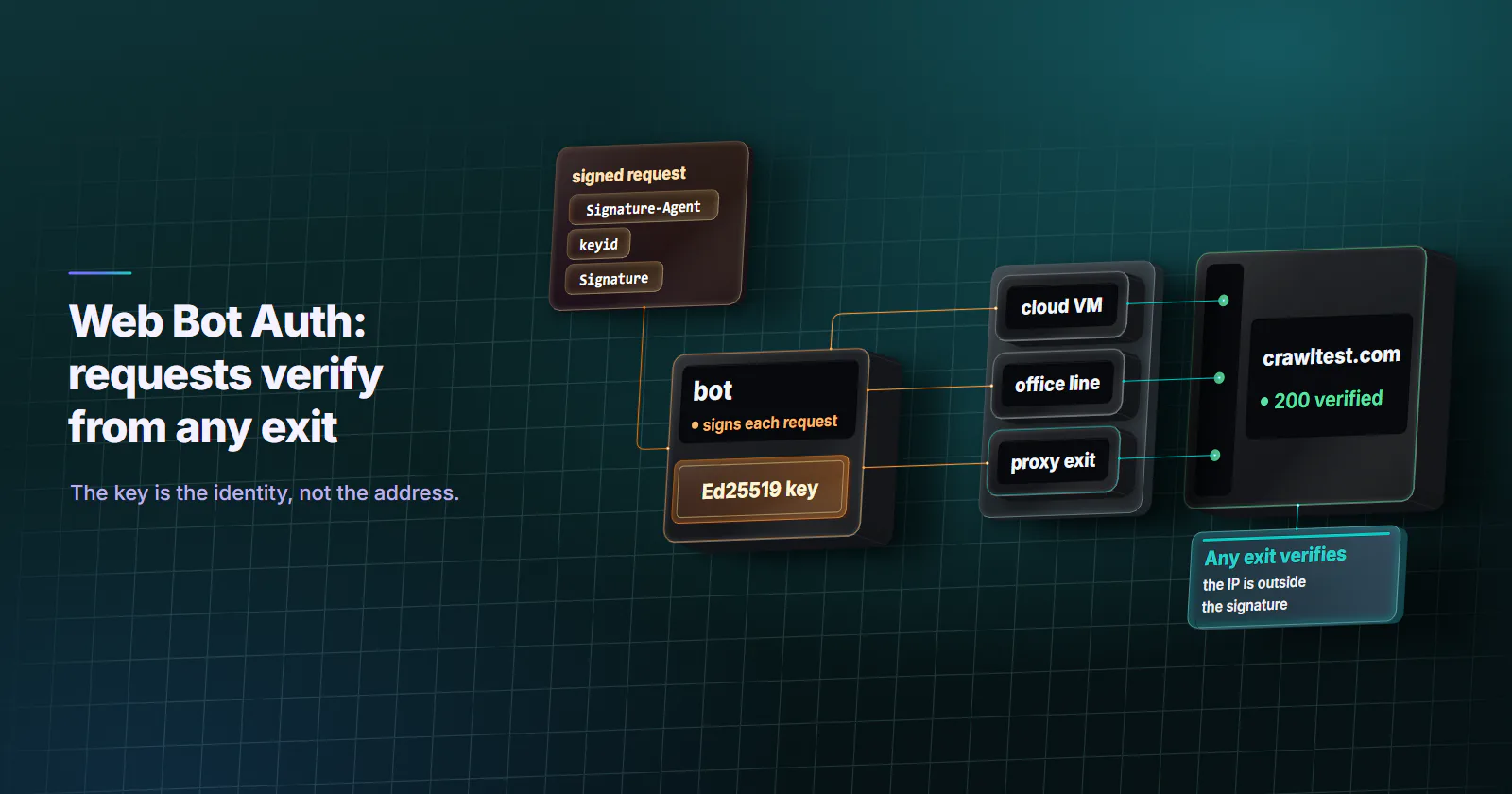
- The IP address is outside the signature. A signed request verifies from any exit, and a tunnelling proxy passes it through untouched. A hop that terminates TLS and rewrites headers breaks it.
Web Bot Auth is a draft IETF protocol that lets a bot or AI agent sign every HTTP request with a private key. The request names an HTTPS URL where the matching public keys are published, and the site verifies the signature against them. Identity then rests on a key the operator holds, not on an IP list or a user agent anyone can copy.
The problem it answers is old. A crawler that wants to be recognised has had two tools: a user agent string, which any script can send, and a published IP range, which breaks the day the operator moves clouds or sends traffic through a shared egress. Site owners have been left to guess from the signals covered in how anti-bot systems work, and legitimate agents get challenged next to the scrapers pretending to be them.
A signature changes that. It also raises new questions for anyone who sends agent traffic through an egress layer, because the draft and the live verifiers do not yet agree on every detail.
What Web Bot Auth is
Web Bot Auth is a thin profile of RFC 9421, HTTP Message Signatures (February 2024). RFC 9421 already defines how to sign parts of an HTTP message. The profile fixes which parts a bot must sign, which parameters it must send, and how a site finds the public key without any prior contact.
The identifier is a URL. The working group’s editor’s copy (checked September 29, 2026) says the agent’s identity is the HTTPS URL it publishes keys at. Sites can log, rate limit, allow or block that URL the way they treat an IP address today. Keys can rotate under it without the identity changing.
Standard status and draft versions
Cloudflare proposed it in Forget IPs: using cryptography to verify bot and agent traffic (May 15, 2025). The IETF formed a Web Bot Auth working group with a charter approved on October 23, 2025, and the protocol is now a working group draft, draft-ietf-webbotauth-httpsig-protocol-00 (September 2026), written by Thibault Meunier of Cloudflare and Sandor Major of Google. Deployed verifiers lag behind it: Cloudflare’s documentation still implements the earlier individual drafts, draft-meunier-web-bot-auth-architecture and draft-meunier-http-message-signatures-directory, and the gap shows in the format of the Signature-Agent header.
How Web Bot Auth works
A signed request carries three headers.
- Signature-Agent names the HTTPS URL of the key directory.
- Signature-Input lists the signed components and the parameters.
- Signature carries the signature bytes.
The draft requires the agent to cover at least @authority (the host it is talking to) or @target-uri, plus its own Signature-Agent member. The parameters are fixed: created and expires as Unix timestamps, keyid as the base64url JWK SHA-256 thumbprint of the key, and tag="web-bot-auth". The draft recommends an expiry of no more than 24 hours. Cloudflare’s documentation (checked September 29, 2026) recommends short windows and says a minute is often enough.
A signed request looks like this. The values are illustrative, not a working signature.
GET /catalog HTTP/1.1
Host: shop.example.com
Signature-Agent: sig1="https://bot.example.net"
Signature-Input: sig1=("@authority" "signature-agent";key="sig1");created=1790000000;expires=1790000060;keyid="THUMBPRINT";tag="web-bot-auth"
Signature: sig1=:SIGNATURE_BYTES:
Covering only @authority leaves the signature broad. It then verifies for any method, path or body sent to that host until it expires, so anyone who sees one request can replay it. Adding @method and @path narrows it to one resource. No component covers the body; an agent that needs that must send and sign a Content-Digest header.
The key directory
The public keys live in a JSON Web Key Set. At the well-known path, /.well-known/http-message-signatures-directory, it must be served over HTTPS with the media type application/http-message-signatures-directory+json. The draft tells verifiers to treat any status other than 200 as a failure and never to follow a redirect, so a directory behind a redirect does not resolve.
Cloudflare adds one requirement for its registry: the directory response must itself be signed, one signature per key, with tag="http-message-signatures-directory". That stops a third party from mirroring someone else’s directory and registering it as their own.
Signing a request step by step
The setup takes four steps, and only the last one touches the bot’s request path.
- Generate an Ed25519 key pair, the algorithm Cloudflare supports.
- Convert the public key to a JWK and compute its thumbprint.
- Host the key set at the well-known path on a domain the operator controls, over HTTPS.
- Sign each outbound request and attach the three headers.
openssl genpkey -algorithm ed25519 -out private-key.pem
openssl pkey -in private-key.pem -pubout -out public-key.pem
For code, Cloudflare Research publishes web-bot-auth (Apache 2.0), with TypeScript and Rust packages for signing and verifying, a Caddy plugin and a browser extension. Its TypeScript sign() takes a signer built from a JWK, a created and expires pair and a nonce, and returns the Signature and Signature-Input values to attach next to your Signature-Agent.
import { generateNonce, sign } from "web-bot-auth";
import { signerFromJWK } from "web-bot-auth/crypto";

const agent = 'sig1="https://BOT_DOMAIN"';
const request = new Request("https://TARGET_HOST/", {
  headers: { "Signature-Agent": agent },
});

const now = new Date();
const fields = await sign(request, {
  signer: await signerFromJWK(PRIVATE_JWK), // your own Ed25519 key, loaded from a secret store
  created: now,
  expires: new Date(now.getTime() + 60_000), // one minute
  nonce: generateNonce(),
});

const signed = new Request("https://TARGET_HOST/", {
  headers: {
    "Signature-Agent": agent,
    "Signature-Input": fields.signatureInput,
    Signature: fields.signature,
  },
});
The snippet follows the package README and sends the dictionary form of Signature-Agent that the draft requires. Cloudflare’s verifier expects the older quoted-string form, "https://BOT_DOMAIN", instead.
Testing and verifying signatures
Two public endpoints show whether a signature holds. Cloudflare’s https://crawltest.com/cdn-cgi/web-bot-auth answers 401 when the message is well formed but the key is unknown, 200 when the key is known and the signature verifies, and 400 for anything else. Cloudflare Research also runs a debug server at http-message-signatures-example.research.cloudflare.com, whose code is in the same repository.
On the site side, verification follows RFC 9421 with a few extra rules from the draft. Look keys up by the pair of URL and key, never by keyid alone, or a request can be attributed to the wrong operator. Keep a replay cache if nonces matter to you: Cloudflare’s docs say it does not validate nonces today and relies on short expiry instead. A site can also ask an unsigned client for a signature with a 403 and an Accept-Signature header.
Most failures are mechanical. These are the common ones, taken from the draft and Cloudflare’s docs.
| Symptom | Cause | Fix |
|---|---|---|
| Verification fails on some requests only | Clock skew pushes created into the future or past expires | Sync the clock with NTP and keep a short, but not zero, window |
| 400 from the verifier | Signature-Agent is not an https:// URL, or is not in the covered components | Use HTTPS and cover "signature-agent" in Signature-Input |
| Works on one verifier, fails on another | Dictionary form versus quoted-string form of Signature-Agent | Match the form each verifier documents |
| Key never resolves | Directory served over http, behind a redirect, or with the wrong content type | Serve it at the exact URL with a 200 and the directory media type |
| Fails on Cloudflare with valid crypto | Unsupported parameters such as req, sf, bs, key, or @query-param | Sign @query for the whole query and drop those parameters |
| Fails after passing through a middlebox | A hop terminated TLS and rewrote Host or stripped the signature headers | Keep TLS end to end from the signer to the site |
Who supports Web Bot Auth today
Support is real but uneven: each deployment is either a program with its own rules or an experiment.
- Cloudflare. Signatures are one of two validation methods for its verified bots (checked September 29, 2026), next to IP validation. The signed agents cohort (August 28, 2025) started with ChatGPT agent, Goose from Block, Browserbase and Anchor Browser. Since July 1, 2026 Cloudflare labels each verified bot Direct (one operator) or Intermediary (a service many end users drive).
- Google. Its documentation for signed requests (last updated May 4, 2026) is marked experimental. Some Google-Agent requests are signed as
https://agent.bot.goog; not every request is signed, and Google tells site owners to keep verifying with IP addresses, reverse DNS and user agents. - AWS. AWS WAF added signature verification on November 21, 2025, for web ACLs protecting CloudFront distributions, and allows verified agents by default.
- OpenAI. Its agent allowlisting page (checked September 29, 2026) says the cloud browser signs requests with
Signature-Agentset tohttps://chatgpt.com, with keys at that domain’s well-known path.
Web Bot Auth vs IP lists
The older methods still run everywhere, and Google keeps them in place. The difference is what each one can prove and what breaks it.
IP validation keeps a real job. Cloudflare’s verified bot policy treats adding IPs that the verified service does not use alone as a breach, so a crawler that relies on an IP list needs fixed, sole-use addresses. That is the work datacenter proxies do well: dedicated ports that can be published as a list and kept for one crawler. The guide to proxies for AI training data sizes that kind of crawl.
What a signature does not prove
A valid signature proves that whoever holds a key published at that URL signed the covered parts of the request. The draft stops there. It says nothing about who operates the agent, whether it is benign, or whether the request is authorized. Those remain the site’s policy.
Three more limits matter in production. There is no revocation: a removed key keeps verifying at each site until its cached copy of the directory expires. An operator can abandon a URL and start a new one, and the protocol does not try to stop that; it targets honest clients that want to be recognised. And identity does not grant access. A site that blocks a signed agent has made its choice with full knowledge of who is asking, and the right response is to stop.
How a proxy handles signed requests
The IP is not in the signature. The protocol works only at the HTTP layer. The draft chose that on purpose so the signature travels with the message through intermediaries. A signed request verifies the same way from a cloud VM, an office line or a proxy exit in another country.
A tunnelling proxy passes it through untouched. With HTTPS through an HTTP CONNECT or SOCKS5 proxy, the proxy relays encrypted bytes and never sees the headers, so it cannot alter Host, Signature or Signature-Agent. proxymint’s residential and mobile gateways relay CONNECT traffic that way: our measurement found no Via or Forwarded header at the target, and inside the tunnel there is no plaintext request to add an X-Forwarded-For to.
A TLS-terminating hop can break it. A corporate inspection proxy or any middlebox that decrypts and rebuilds requests may rewrite Host or drop unknown headers, and either fails verification. A rewritten query fails only when the signature covers it through @target-uri or @query; the minimal profile above signs @authority and Signature-Agent only, so it does not. Cloudflare’s docs add a specific warning: do not sign Content-Digest if the message crosses an unencrypted, proxied leg on its way to Cloudflare.
Rotation does not split identity. A site attributes signed requests to the Signature-Agent URL, whatever address they come from. Rate limits and blocks follow the operator across every exit. A declared agent that needs a market-local view, such as a localized price page or an ad in one country, can send through a geo-targeted exit and still carry its identity, provided the site permits that traffic. Which exit fits which agent job is covered in proxies for AI agents.
To confirm this on your own stack, sign one request and send it to the crawltest endpoint directly, then through each egress path you use, over both CONNECT and SOCKS5. Every path should return the same status. A path that returns 400 or 401 while direct returns 200 has a hop that touches the headers.
Should you adopt Web Bot Auth now
If you operate a crawler or agent that sites should be able to recognise, sign now. The cost is a key pair, a static JSON file and a few lines in the request path, and it already counts with Cloudflare, AWS WAF on CloudFront and anyone running the open source verifiers. Keep your IP list and reverse DNS in place too: Google still relies on them, and many sites verify nothing else.
If you run a site, verify signatures but attach policy to the resolved URL, not to the presence of a signature. Treat signed and unsigned traffic from the same operator as one party.
If your egress runs through proxies, keep TLS end to end so the signature survives, and choose the category by the job: fixed datacenter ports for a declared crawler that also needs an IP list, and a geo-targeted exit only where a signed agent needs a local view the site allows.
Frequently asked questions
Web Bot Auth is a draft IETF protocol built on RFC 9421 HTTP Message Signatures. A bot or AI agent signs each request with a private key and names an HTTPS URL where its public keys are published, so the site can verify who sent the request. It replaces guesswork based on user agents and IP ranges with a check against a key the operator controls.
The agent adds three headers: Signature-Agent with the URL of its key directory, Signature-Input with the signed components and the created, expires, keyid and tag parameters, and Signature with the signature itself. The site fetches the JSON Web Key Set from that URL, usually the well-known path http-message-signatures-directory, and verifies the signature with the key the keyid selects. Keys are cached, so later requests verify without another fetch.
Not yet. The IETF chartered a Web Bot Auth working group on October 23, 2025, and the protocol became a working group draft in September 2026. The signature format underneath it, RFC 9421, is a published standard from February 2024, and several large verifiers already run the draft in production.
Google runs it as an experiment. Its documentation, published in May 2026, says some Google-Agent requests are signed with the identity https://agent.bot.goog, but not every request is signed and not every Google user agent takes part. Google tells site owners to keep verifying its crawlers with IP ranges, reverse DNS and user agents.
It adds to them rather than replacing them for now. A signature survives a change of IP address and cannot be forged without the private key, which IP lists and reverse DNS cannot offer. But support is still partial, so operators keep publishing IP ranges and sites keep checking them.
Yes, when the proxy tunnels HTTPS. The signature covers the host and selected headers, not the client IP, so it verifies from any exit, and a CONNECT or SOCKS5 proxy relays the encrypted request without touching the headers. On the proxy path it fails only when a hop decrypts the traffic and rewrites the Host header or strips the signature headers.
Send a signed request to Cloudflare's test endpoint at crawltest.com/cdn-cgi/web-bot-auth. It returns 200 when the key is known and the signature verifies, 401 when the message is well formed but the key is unknown or verification fails, and 400 when the message is malformed. Cloudflare Research also runs a public debug server with open source code you can run locally.
Researched and drafted with AI tools, then checked against our publishing rules before it went live: 12 outside links, 4 links to other proxymint pages, no prices and a fact-check pass against our product records. How we write.