Proxies for AI agents: giving an agent reliable web access
Proxies for AI agents give a cloud-hosted agent a home or ISP origin. Which jobs need one, which type and rotation fit, and how to wire Playwright and MCP.
Quick summary · TL;DR
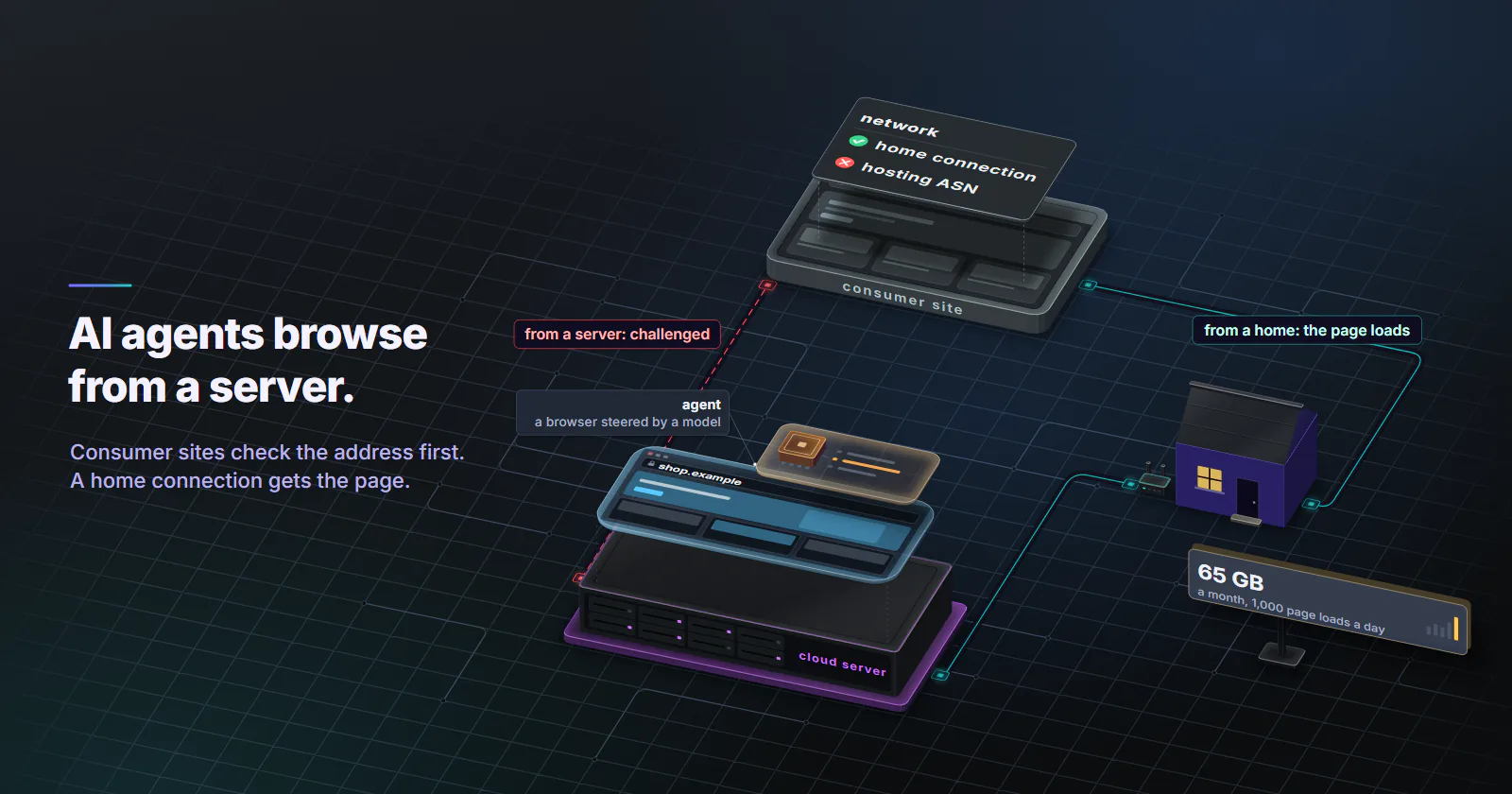
- An agent on a cloud server browses from a hosting IP. Consumer sites that score networks read a datacenter ASN on the first request and often treat it as automated, so the exit type is chosen before the agent runs.
- The proxy type follows the agent's job. Agents that read APIs and docs need none or a flat-rate datacenter port, browser agents on consumer sites need residential, and recurring logged-in work needs a static ISP address.
- Rotation mode should follow the task, not the product default. One-shot lookups can take a new IP per request over plain HTTP, multi-step tasks need a timed session for their whole length, and each concurrent task needs its own session.
- Browser agents are heavy on bandwidth. At 2,164 KB, the Web Almanac's median across all mobile pages, 1,000 page loads a day is about 65 GB a month, and per-GB tiers meter every byte.
- A proxy is not a way around a site's choice. Cloudflare now blocks its Agent traffic category by default on ad pages of new domains, and a public agent product should identify itself instead of hiding in residential pools.
Proxies for AI agents give an agent’s browser a network origin consumer sites accept. An agent on a cloud VM browses from a hosting ASN, which network-scoring sites treat as automated on sight. Residential exits suit bounded browsing tasks, a static ISP address suits recurring logged-in work, and agents that only read APIs and docs need no proxy.
The failure looks like a model problem. The agent opens a retail page, reads a challenge instead of the product, reports that the site is down, and the task fails. Nothing in the prompt can change it, because the site decided on the network before it read a single header, and the place to decide the network is before the task starts, not after the challenge.
Why proxies for AI agents matter
AI agent web browsing is a browser session steered by a model. The site cannot see the model. It sees the network, the TLS handshake, the headers, the cookies and the pace, the inputs how anti-bot systems work walks through. Of those, the network is the one an agent operator cannot fix in code: a VM in a cloud region exits from that provider’s ASN, and many consumer sites classify hosting ASNs on sight.
Where the network matters. Retail and travel sites, marketplaces and local listings, which often treat hosting ranges differently from home connections. These are exactly the targets people ask agents to work on, because they are the ones without an API. Prices and stock also render by location, so an agent in a Virginia data center sees the US page even when the task is about Germany.
Where it is not. Documentation, public data portals, most news and blog content, and APIs. An agent that reads those can run from its own server. Proxies for AI agents only earn their cost when the target scores the network or gates content by country.
User actions versus crawling. Operators draw this line themselves. OpenAI’s crawler documentation (checked October 7, 2026) separates GPTBot, the training crawler that follows robots.txt, from ChatGPT-User, which fetches pages for specific user actions and to which robots.txt rules may not apply. An agent doing a task for a person behaves like the second kind. It should still act like a person: a handful of pages per task, not a sweep of the whole site. An agent that starts looping over a catalog has turned into LLM agent scraping, which belongs in a scraper with a proper rate limit, not in a model’s tool loop, and collecting a corpus is the separate job of proxies for AI training data.
Proxy type by agent job
Every agent tool has a job, and the job picks the proxy type. The split is between reading (fetching pages and data, mostly stateless) and acting (logging in, filling forms, holding a session over days). A residential proxy is the default for the first on consumer sites. It is the wrong default for the second.
Datacenter and no proxy. An agent that calls APIs or reads docs gains nothing from a home IP. If it needs a fixed egress address or a second country, IPv4 datacenter proxies are billed per port per month, with no per-GB metering.
Mobile. Exits on mobile carrier networks, classified as cellular by MaxMind, built for app-first targets that expect a carrier origin.
Matching rotation to agent tasks
Many failures with proxies for AI agents are sessions that end halfway through a task, rather than blocks. The rotation modes on rotating residential proxies are the same three a scraper gets: a new IP on every request, a timer from 5 to 60 minutes, or sticky for as long as the device stays online. The mode is set on the order. For a browser agent proxy, the right mode depends on how many steps the task has and whether it is logged in.
Lookups. An agent tool that fetches one URL and returns the text does not need a browser, and it can take a new IP per request. But a browser page load is dozens of requests: HTML, scripts, XHR calls, images. If each one leaves from a different home connection, some sites break tokens tied to the first IP. In a browser, even a one-page lookup should hold a short timed session.
Multi-step tasks. A task that searches, filters, adds to a cart and reads a price is one session to the site. The timer has to outlast the task. Set it to the longest the task normally takes plus a margin, typically 10 to 30 minutes, and start a fresh session for the next task rather than reusing a warm one.
Logged-in tasks. Sticky sessions hold until the home device goes offline, which can be minutes or hours. For a one-off login inside a task that is usually enough. For an account the team logs into every day, a rotating pool puts that account in a different home on every run. Static ISP proxies keep one ISP-registered address, assigned to your order for the whole billing term, which is what a login history expects.
Concurrency: how many proxies
Count concurrent tasks, not agents. One agent that runs ten tasks in parallel needs ten sessions, because two tasks sharing one exit also share its reputation and its rate. Per-GB residential and mobile packages bill traffic, not sessions, so the session count changes the setup, not the bill. Static ISP is the opposite: one IP per account, billed per IP per month.
Wiring proxies into agent frameworks
Most browser agents drive Chromium through Playwright, directly or through a framework, so the Playwright proxy settings carry over. Playwright’s network docs (checked October 7, 2026) say a proxy can be set globally for the whole browser or for each browser context, over HTTP(S) or SOCKSv5, with a username and password for HTTP(S) proxies.
Whatever the framework, the wiring runs in the same order:
- Store the proxy credentials in the runtime config or a secrets manager, never in the prompt.
- Scope the proxy to the browser and the fetch tools, not to the whole process, so LLM calls go direct.
- Open one browser context per task and set the proxy on that context.
- Log the exit IP at the start of each task, and again at each step of a long one.
- Close the context when the task ends, so the next task starts with clean cookies and a fresh session.
The rule for agent web access: one browser context per task, with the proxy set on the context. Each task then gets its own exit, its own cookies and its own storage, and a stuck task never leaks state into the next.
from playwright.sync_api import sync_playwright

# One session credential per concurrent task; the rotation mode is set on the order.
PROXY = {
    "server": "http://HOST:PORT",
    "username": "USERNAME",
    "password": "PASSWORD",
}

def run_task(task_id, agent_step):
    with sync_playwright() as p:
        browser = p.chromium.launch(headless=True)
        context = browser.new_context(
            proxy=PROXY,
            locale="de-DE",              # language of the market whose pages the task reads
            viewport={"width": 1366, "height": 768},
        )
        page = context.new_page()
        page.goto("https://api.ipify.org")
        print(task_id, "exit IP:", page.inner_text("body"))

        agent_step(page)                 # hand the page to the agent's tool layer

        context.storage_state(path=f"{task_id}.json")  # keep cookies if the task resumes
        context.close()
        browser.close()
The IP check gives the agent’s log a record of which exit ran the task. The locale asks for the market’s language, so the site serves pages in it. The saved storage state lets a task resume after a human approval step without logging in again.
Browser Use and fetch tools
Browser Use’s parameter reference (checked October 7, 2026) takes a ProxySettings object with server, bypass, username and password on the browser:
from browser_use import Agent, Browser, ProxySettings

browser = Browser(
    headless=True,
    proxy=ProxySettings(server="http://HOST:PORT", username="USERNAME", password="PASSWORD"),
)
agent = Agent(task="Compare the price of one product in two shops", llm=llm, browser=browser)
A plain fetch tool needs no browser at all. Give the proxy to that tool’s own HTTP client, so nothing else in the process inherits it:
import os
import httpx

# Scoped to this tool: the LLM client never goes through the proxy.
fetch_client = httpx.Client(proxy=os.environ["AGENT_PROXY_URL"], timeout=30)

def fetch_page(url: str) -> str:
    """Agent tool: fetch one URL and return its text."""
    r = fetch_client.get(url, follow_redirects=True)
    r.raise_for_status()
    return r.text
Hosted browsers. Managed agent browsers take the proxy per session. Amazon’s AgentCore Browser post (February 13, 2026) passes a proxyConfiguration when the session starts, reads basic-auth credentials from AWS Secrets Manager, and routes by domain pattern with a bypass list. The secrets-manager part is the pattern worth copying anywhere. Hosted browsers and managed scraping APIs bill per browser minute, request or credit rather than per GB, so price them on the same sample of tasks before comparing them with a raw proxy.
HTTP or SOCKS5 for agents
The protocol choice follows the client. Playwright documents username and password authentication for HTTP proxies, so an authenticated browser setup should use the HTTP endpoint. SOCKS5 suits non-browser clients and non-HTTP traffic. Every proxymint tier includes both HTTP and SOCKS5, so there is nothing to pick at checkout. Point the client at the proxy with http://, not https://.
An MCP proxy setup
“MCP proxy” gets used for two things: an MCP gateway that fronts other MCP servers, and a network proxy for the browser an MCP server drives, which is the kind set up here. The Playwright MCP README (checked October 7, 2026) lists a --proxy-server flag, for example http://myproxy:3128, a --proxy-bypass list, and an --isolated flag that keeps the browser profile in memory.
The flag takes a server address, not credentials. For a proxy with a username and password, the README’s config file passes Playwright launch options straight through, and those accept a proxy object:
{
  "browser": {
    "browserName": "chromium",
    "launchOptions": {
      "headless": true,
      "proxy": {
        "server": "http://HOST:PORT",
        "username": "USERNAME",
        "password": "PASSWORD"
      }
    }
  }
}
The MCP client then starts the server with that file:
{
  "mcpServers": {
    "playwright": {
      "command": "npx",
      "args": ["@playwright/mcp@latest", "--config", "/path/to/proxy-config.json", "--isolated"]
    }
  }
}
Keep that config file outside anything the model can read. The agent calls browser tools; it never needs the proxy password.
What agent browsing costs
Page weight sets the bill for proxies for AI agents more than task count does. A browser agent loads full pages, and full pages are heavy. The HTTP Archive Web Almanac 2025 page weight chapter (published January 15, 2026) puts the median across all mobile pages at 2,164 KB, and across desktop pages at 2,412 KB. Per-GB tiers bill every one of those bytes.
1,000 page loads a day for 30 days is 30,000 loads, and 30,000 loads of 2,164 KB come to about 65 GB. On usage-based residential, billed per GB, bytes are what the meter counts, so page weight is the number to control. Mobile proxies are billed the same way, for targets that only trust carrier origins.
Cutting bytes. Blocking images, media and fonts with a Playwright route handler cuts a large share of that, because images are the largest byte category in the same Web Almanac chapter. Vision-based agents pay for the saving, since an agent that reads screenshots needs the images to understand the page. A text-only agent reading the DOM does not.
The static option. A recurring logged-in agent on one static ISP IP is billed per IP per month, with no per-GB metering, and five agents on five accounts need five IPs. The pricing page lists the rate for every volume.
Common agent proxy mistakes
Per-request rotation copied from a scraper. It works for a fetch tool and breaks a browser task. Size the session to the task.
A global proxy variable. Setting HTTPS_PROXY for the whole process sends the LLM API calls, the vector store and the logging through the residential exit too. That adds latency to every model call and bills its bytes per GB. Scope the proxy to the browser and the fetch tools, as in the code above.
Credentials in the model’s context. A proxy password in the system prompt, in a tool description or in a page the agent can read is one prompt injection away from leaking. Keep it in the runtime config or a secrets store.
Treating the proxy as a safety layer. A proxy changes where requests come from. It does nothing about what a page tells the model. Domain limits, spend caps and a human approval step for anything irreversible are separate controls.
When proxies are the wrong fix
A residential exit changes one signal, the network. A site that still challenges the agent is reading something else, such as a headless browser that announces itself, a pace no person keeps, or 400 product pages in a minute. Bring the pace down to what the task needs, and if the challenge stays, stop. If the same agent is challenged from a home connection with no proxy, the proxy was never the problem. The usual causes are laid out in why proxies trigger captchas.
Some sites now block agents on purpose. Cloudflare’s AI traffic post (July 1, 2026) defines an Agent category for automated traffic acting on a person’s behalf, including browser-use agents driving Chrome, and from September 15, 2026 blocks Training and Agent traffic by default on the ad pages of new domains. A block the site owner chose means stop. Rotating to a new exit to get past it is exactly the traffic these settings exist to refuse.
A public agent product has a better path than hiding in residential pools. Cloudflare’s verified bots documentation (updated July 1, 2026) describes a bot that declares who it is through a Web Bot Auth signature, a published IP list with a stable user agent, or reverse DNS, and it treats listing IPs not used solely by the verified service as a policy breach. Shared residential exits cannot be declared that way.
Which agent jobs need which proxy
The direct answer depends on the target. If the agent reads APIs, docs and lenient sites, skip the proxy or use flat-rate datacenter ports. If it browses consumer sites that challenge cloud IPs, use residential with a timed session sized to the longest task and one browser context per task. If it logs into the same accounts every day, give each account a static ISP address, so its agent web access always comes from one place. If the target expects a carrier origin, use mobile.
Before buying proxies for AI agents at scale, run 50 real tasks, log exit IP per step, transferred bytes and challenge rates per task, and price the month from those numbers.
Frequently asked questions
An agent that runs on a cloud server browses from a datacenter IP, and consumer sites that score IP reputation often treat it as automated on the first request. A residential proxy routes the agent's browser through a home connection in the country the task is about, the origin those consumer pages are built for. Agents that only call APIs or read documentation and lenient sites do not need one. A site that still challenges or blocks the agent has answered, and the task stops there.
It depends on the agent's job. Browser agents working on consumer sites fit rotating residential, recurring work in accounts the team owns fits a static ISP address, and agents that read APIs and docs can use flat-rate datacenter ports or no proxy at all. Mobile fits targets that expect a carrier origin, such as app-first platforms.
Match it to the task. Single lookups over a plain HTTP fetch tool can use a new IP per request. A multi-step task in a browser, such as a search, compare and fill flow, should hold one IP for the whole task with a timed session of 10 to 30 minutes. Recurring work in an account the team owns fits a static ISP address better than any rotating pool.
Count concurrent tasks, not agents. Each task that runs at the same time needs its own session, so ten parallel browser tasks need ten separate sessions on a rotating pool. For logged-in work, each account needs its own static address, so five accounts need five static ISP IPs.
For agent web access it means a network proxy set on the browser an MCP server drives, such as Playwright MCP's --proxy-server flag, which is a different layer from an MCP gateway that routes calls between servers.
The most common cause is a hosting ASN: the agent browses from the cloud server it runs on, and anti-bot systems score that network as automated before reading anything else. Headless browser signals, fast unnatural pacing and missing cookies add to the score. Some sites also block agent traffic on purpose, for example through Cloudflare's AI traffic settings, and in that case the right response is to stop, not to switch IPs.
A browser agent loads full pages, including images and scripts, so it moves far more data than an HTML scraper. The HTTP Archive's 2025 Web Almanac puts the median weight across all mobile pages at 2,164 KB, so 1,000 page loads a day comes to about 65 GB a month. Blocking images and media in the browser cuts that, at the cost of what a vision-based agent can see.
Researched and drafted with AI tools, then checked against our publishing rules before it went live: 8 outside links, 9 links to other proxymint pages, no prices and a fact-check pass against our product records. How we write.