
Docker proxy settings: daemon, build and container
Docker proxy settings live in three places: daemon.json for pulls, build args for builds, config.json for containers. Tested traps, leaks and fixes.
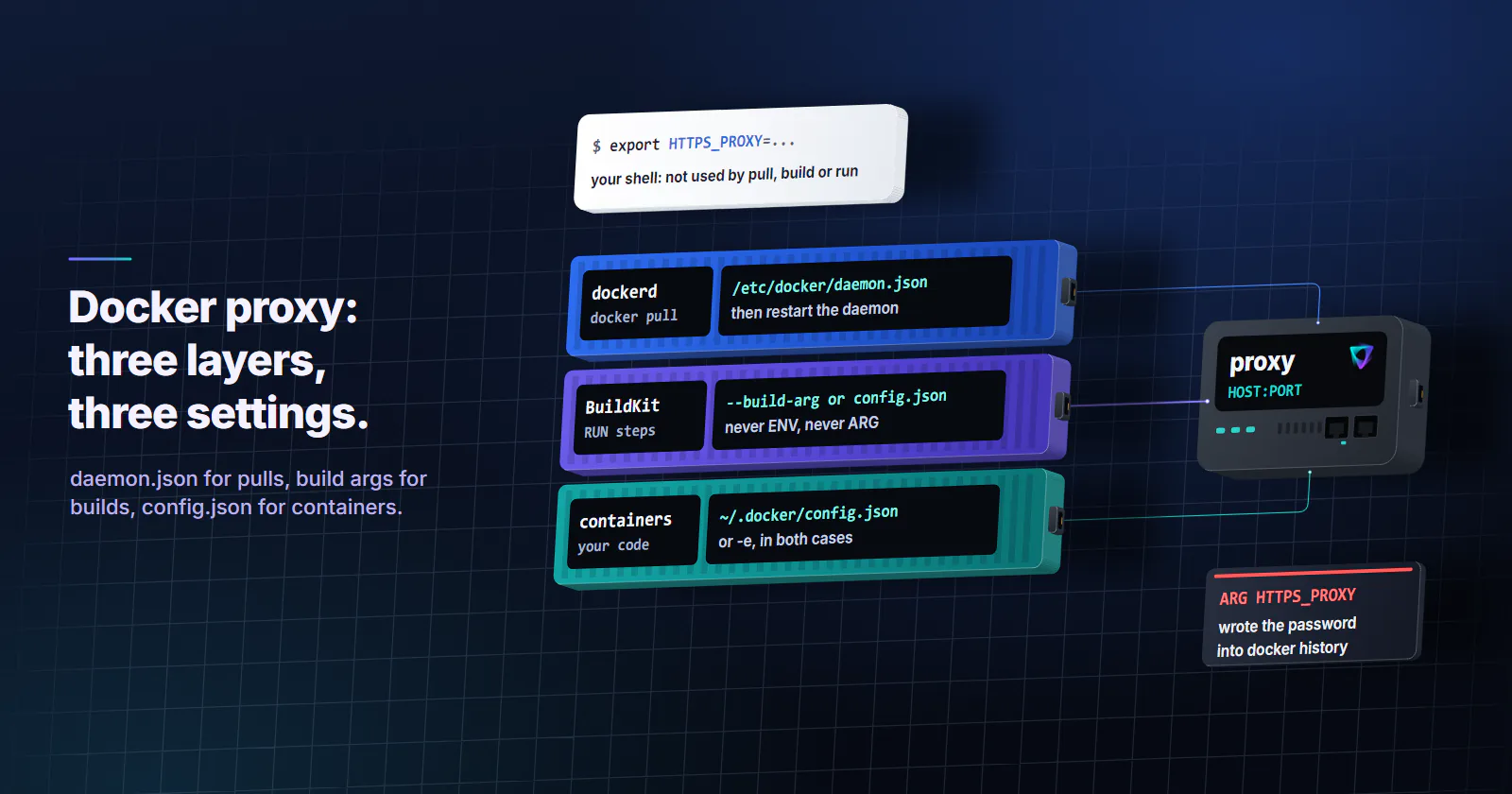
Quick summary · TL;DR
- Your shell's HTTPS_PROXY does nothing for docker pull. The daemon does the pull, so the proxy goes in /etc/docker/daemon.json under proxies, then a restart; docker info | grep -i proxy tells you whether it took.
- Containers don't inherit the daemon's proxy. Put a proxies block in ~/.docker/config.json and every new container and build gets HTTP_PROXY, HTTPS_PROXY and NO_PROXY in both cases, which is the part people forget after fixing pulls.
- Don't put the proxy in ENV or ARG in a Dockerfile. Plain --build-arg HTTPS_PROXY stays out of docker history, but an ARG HTTPS_PROXY line wrote the password into the history in the test, even with no step using it.
- -e HTTPS_PROXY only replaces the uppercase copy. With config.json set, the lowercase https_proxy keeps the old value, and curl and Python read that one, so pass both cases or edit config.json instead.
Docker proxy settings live in three separate places, and each one covers a different job. /etc/docker/daemon.json (or a systemd drop-in) is for docker pull. Build args or ~/.docker/config.json cover the RUN steps in a build. And config.json or -e sets the environment of the containers you start. Setting one does nothing for the other two.
Most Docker proxy tickets run the same way. You export HTTPS_PROXY in your shell, docker pull still times out, so you add a systemd drop-in, the pull works, and then pip install inside the build hangs. Then the build passes and the scraper inside the container goes straight out without the proxy. Each fix was right for one layer and silent about the rest, which is what makes this one so tiring.
Everything here was tested on Docker Engine 29.9.1 on 2026-10-22, with a logging proxy on the host recording every request: which setting reached which layer, where a proxy password ends up in plain text, and the traps that cost the most time.
Docker proxy settings, layer by layer
Think of it as three processes that each read their own config. The daemon (dockerd) pulls images and talks to registries. BuildKit runs your RUN steps in throwaway containers. Your containers run your code. The client you type into, docker, mostly just sends requests to the daemon, so the proxy in your shell matters less than you would expect.
The method, so you can rerun it. Two small proxies ran on the host, one open and one that demanded a username and password, and both logged the request line and the decoded Proxy-Authorization header before relaying. Containers on the default bridge had no direct DNS, so a request either showed up in the proxy log or failed. Images were alpine:3.20, alpine:latest (3.24.3), curlimages/curl:8.17.0 and python:3.13-slim, with Docker Compose 5.6.0 and buildx 0.38.0.
Daemon proxy for docker pull
docker pull is done by the daemon, not by the command you typed. In the test, a client shell with HTTPS_PROXY exported pulled an image and the logging proxy saw nothing. If your pulls time out behind a corporate proxy, the daemon is the place to look, and the shell is a red herring.
On Docker Engine 23.0 and later, the cleanest option is a proxies block in /etc/docker/daemon.json, per Docker’s daemon proxy page (checked 2026-10-22):
{
  "proxies": {
    "http-proxy": "http://USERNAME:PASSWORD@HOST:PORT",
    "https-proxy": "http://USERNAME:PASSWORD@HOST:PORT",
    "no-proxy": "localhost,127.0.0.1,registry.internal.example"
  }
}
Then sudo systemctl restart docker. The keys use hyphens here and camelCase in the client file, which is easy to get wrong when you copy between the two.
The systemd drop-in still works. Older hosts and plenty of guides use /etc/systemd/system/docker.service.d/http-proxy.conf with Environment="HTTPS_PROXY=http://HOST:PORT" lines, then systemctl daemon-reload and a restart. If both exist, daemon.json wins, and Docker’s daemon page says so too: configuring the daemon directly takes precedence over environment variables. With the daemon started on HTTPS_PROXY pointing at one proxy and daemon.json at the other, every pull in the test went to the daemon.json one. If you migrated and the old drop-in is still there, delete it, because the next person to debug the host will edit the file that does nothing. Rootless Docker is the odd one out: the drop-in goes in ~/.config/systemd/user/docker.service.d/, and you run systemctl --user without sudo.
Allow three hosts, not one. A pull from Docker Hub opened CONNECT tunnels to registry-1.docker.io, auth.docker.io and production.cloudfront.docker.com, the last one carrying the layer blobs. If your corporate proxy runs an allowlist with only the registry on it, the manifest resolves and the layer download stalls, which looks like a network problem and is really a missing hostname.
Check what the daemon loaded
docker info | grep -i proxy
sudo systemctl show --property=Environment docker
docker info masks credentials, so a configured password shows as http://xxxxx:xxxxx@HOST:PORT. You know the value was parsed, though the mask also means you cannot eyeball a typo in the password from there.
Corporate proxies that inspect TLS
If the pull fails with x509: certificate signed by unknown authority instead of a timeout, the proxy is answering but re-signing traffic with your company’s own root certificate, and the daemon does not trust it. On Linux, Docker merges any custom root CAs with the host’s system set, so the usual fix is to add the corporate root to the host trust store and restart the daemon; for a single registry, Docker’s certificates page (checked 2026-10-22) uses /etc/docker/certs.d/REGISTRY_HOST/ca.crt. Those fixes cover pulls only. Containers and build RUN steps carry their own trust store, so Docker’s Zscaler guide copies the root into the image under /usr/local/share/ca-certificates/ and runs update-ca-certificates at build time.
Docker Desktop proxy settings
Docker Desktop ignores the proxies block in daemon.json, per Docker’s daemon proxy page. Set the proxy under Settings, Resources, Proxies instead. The screen has two entries, a Docker Desktop proxy for Desktop’s own traffic and a Containers proxy, and Docker’s settings page says every docker pull goes through the Containers one, with the Desktop proxy as a fallback only when Containers is empty. So the Containers field is the one to fill when pulls fail.
Proxy settings for containers
Containers do not inherit the daemon’s proxy. With daemon.json set and nothing else, docker run --rm alpine env | grep -i _proxy printed nothing, which surprises people who assume “Docker has a proxy now”.
The client file ~/.docker/config.json fixes that for every new container and build:
{
  "proxies": {
    "default": {
      "httpProxy": "http://USERNAME:PASSWORD@HOST:PORT",
      "httpsProxy": "http://USERNAME:PASSWORD@HOST:PORT",
      "noProxy": "localhost,127.0.0.1,.internal.example"
    }
  }
}
Each started container then gets six variables, HTTP_PROXY, http_proxy, HTTPS_PROXY, https_proxy, NO_PROXY and no_proxy, which matches Docker’s CLI proxy page (checked 2026-10-22). docker compose run and docker compose up got the same six in the test. No restart is needed, but containers that already exist keep their old environment until you recreate them, the classic “I changed it and nothing happened”. The same page lists ftpProxy and allProxy keys too, and lets you add a block keyed by a daemon address such as tcp://docker-daemon1.example.com next to default when one remote daemon needs a different proxy.
Keep the value http:// even under httpsProxy. Docker’s own example on that page uses an https:// URL there, and it only works if your proxy itself speaks TLS. The same mistake in daemon.json is easy to reproduce: with https-proxy set to https:// in front of a plain HTTP proxy, the daemon tried a TLS handshake with the proxy and the pull failed with proxyconnect tcp: net/http: TLS handshake timeout. HTTPS sites still get end to end TLS through the CONNECT tunnel when the scheme is http://.
NO_PROXY and Compose service names
This one bites Compose users the day after they fix the proxy. With config.json set and noProxy left at localhost,127.0.0.1, a curl http://web:8000/ from one Compose service to another never reached the web container. It went to the proxy as GET http://web:8000/, password attached, and came back with an error from the proxy instead of the page, because web only resolves on the Compose network and the proxy has never heard of it. Once web went into NO_PROXY, the same call got a straight 200.
So list every name your containers use to call each other:
"noProxy": "localhost,127.0.0.1,web,db,redis,.internal.example"docker compose build got the same six variables in its RUN steps, so one config.json covers Compose builds and services alike. If you would rather keep the setting in the project, put the variables under each service’s environment: in both cases, service names included in NO_PROXY, and repeat them under build: args: for the build, because environment: never reaches the RUN steps.
On syntax, Docker’s daemon page says a plain domain matches itself and its subdomains, a leading dot matches subdomains only, and * switches the proxy off. Past that, tools disagree, as GitLab’s NO_PROXY write-up (2021-01-27, linked from Docker’s CLI page) shows, so test a CIDR range with the client you actually run before you rely on it.
The -e override trap
This is the easiest one to lose an afternoon to, and it is not in Docker’s docs. With config.json pointing at proxy B, docker run -e HTTPS_PROXY=http://A... replaced only the uppercase variable. The container ended up with HTTPS_PROXY set to A and https_proxy still set to B. curl 8.17.0 and Python 3.13’s urllib both read the lowercase one first, so both went to B, and the proxy you passed on the command line was ignored without a word.
The fix is boring. Pass both cases, -e HTTPS_PROXY=... -e https_proxy=..., or change config.json instead of overriding it. The proxy string formats guide covers how to build the URL itself.
127.0.0.1 is the container itself
If the proxy runs on the host, http://127.0.0.1:PORT inside a container points at the container’s own loopback. busybox wget failed with can't connect to remote host (127.0.0.1): Connection refused. Three ways out, all tested:
- the bridge gateway IP (
172.17.0.1on a default install), with the proxy listening on that interface, not only on loopback; host.docker.internalplus--add-host=host.docker.internal:host-gatewayon Linux. Without the flag, curl stops atCould not resolve proxy: host.docker.internal;--network host, where 127.0.0.1 really is the host, at the cost of network isolation.
busybox wget does not tunnel HTTPS
Alpine images ship busybox wget, and that one is easy to miss. On Alpine 3.20 (BusyBox 1.36.1) and 3.24 (BusyBox 1.37.0), it sent GET https://example.com/ HTTP/1.1 to the proxy instead of opening a CONNECT tunnel, and printed wget: error getting response. A proxy that tunnels HTTPS through CONNECT, which is most of them, cannot serve that request. Install curl in the image or use your language’s HTTP client for HTTPS. apk itself did open a CONNECT tunnel in the same container.
Build-time proxy settings
Build RUN steps need their own proxy, and Docker gives you two clean ways. config.json works automatically: the RUN step saw all six variables and curl went through the proxy. Or pass build args on the command line, which needs no Dockerfile change at all:
docker build \
  --build-arg HTTPS_PROXY=http://USERNAME:PASSWORD@HOST:PORT \
  --build-arg https_proxy=http://USERNAME:PASSWORD@HOST:PORT \
-t myapp .HTTP_PROXY, HTTPS_PROXY, FTP_PROXY, NO_PROXY and ALL_PROXY are predefined build args, and Docker’s build variables page (checked 2026-10-22) says they stay out of the build cache and docker history unless you reference them. In the test, a Dockerfile with no proxy lines plus --build-arg came out clean: no password in docker history --no-trunc, nothing in the image config.
That is stricter than the docs suggest. Docker’s page warns about referencing the argument; in the test, an ARG HTTPS_PROXY line that no step used still put ARG HTTPS_PROXY=http://labuser:s3cr%40t@... into the history. Delete the line and let the predefined arg do its job.
ENV is worse. ENV HTTPS_PROXY=... in a Dockerfile bakes the URL into the image config. Every container started from that image inherits it, docker image inspect prints it, and the image now tries to reach your build proxy in production, where it may not exist. Docker’s CLI proxy page says plainly not to use ENV for proxy settings, and on this point the docs are right.
Credentials and where they leak
Put the username and password in the proxy URL and percent-encode special characters: @ becomes %40, : becomes %3A. In the test, s3cr%40t arrived at the proxy as s3cr@t from the daemon, from BuildKit and from containers. In a systemd drop-in, every % must be doubled to %%, so %40 becomes %%40, which Docker’s daemon page also calls out and which is easy to miss when you paste the URL straight from config.json.
Then look at where the value sits. config.json injects it into each container, and docker inspect CONTAINER shows it in Config.Env in plain text to anyone with access to the Docker socket. That is fine on a laptop and worth a second thought on a shared CI runner. If a 407 shows up anyway, the 407 proxy authentication guide walks through the usual causes, and an encoding mistake is the first one to rule out.
Debugging docker proxy settings
Work through the layers in order, because a failure in one layer of your docker proxy settings hides the others:
- Pull:
docker info | grep -i proxy. Nothing there means the daemon has no proxy, whatever your shell says. - Build:
docker build --no-cache --progress=plain .with a temporaryRUN env | grep -i _proxystep. No lines means neither config.json nor--build-argreached it. - Run:
docker run --rm IMAGE env | grep -i _proxy. Two different values in the two cases is the-etrap, and a service name missing fromNO_PROXYexplains calls between containers that show up in the proxy log. - Proof: point the setting at a logging proxy for one run. A ten-line listener that prints the request line shows whether the client sent CONNECT, a plain GET, or nothing at all, and that ends the guessing faster than any config review.
proxyconnect tcp in a pull error means the daemon reached for the proxy and that first conversation failed, usually because of the https:// scheme or a host and port the daemon cannot reach. Could not resolve proxy inside a container is almost always a host name that only exists on the host.
Set docker proxy settings per layer
The decision is short. Pulls failing: daemon.json, restart, docker info. Builds failing: --build-arg or config.json, never ENV or ARG. Container traffic: config.json, or -e in both cases, and a host address the container can actually reach.
Which proxy goes behind it
The proxy for pulls and package installs is usually your company’s egress proxy or nothing. The interesting case is a scraper or monitoring job that runs inside the container and needs its target traffic to leave from a consumer address, for price and stock checks or ad verification. That traffic is the container’s runtime environment, so it belongs in -e or config.json, never in daemon.json.
For that job, rotating residential proxies are the usual fit: a new home IP on every request, a 5 to 60 minute timer, or sticky for as long as the device stays online, set per order, with username and password authentication and HTTP and SOCKS5 both included. The rotating vs sticky guide helps pick the session mode. If the targets accept hosting networks and the job is mostly volume, datacenter proxies are built for that.
Frequently asked questions
Add a proxies block with http-proxy, https-proxy and no-proxy to /etc/docker/daemon.json on Docker Engine 23.0 or later, or set HTTP_PROXY and HTTPS_PROXY in a systemd drop-in for the docker service. Restart the daemon afterwards. Run docker info | grep -i proxy to confirm it loaded the values.
Because the pull is done by the Docker daemon, not by the docker command in your shell. The daemon only reads the proxy from daemon.json, its dockerd flags or its own start-up environment, such as a systemd drop-in. Variables exported in your terminal never reach it.
Pass it as a build argument, for example docker build --build-arg HTTPS_PROXY=http://HOST:PORT ., or set a proxies block in ~/.docker/config.json, which fills those build arguments automatically. Both keep the value out of docker history as long as the Dockerfile does not declare ARG HTTPS_PROXY. Avoid ENV, which bakes the proxy into the image.
Use the proxies block in ~/.docker/config.json, which sets HTTP_PROXY, HTTPS_PROXY and NO_PROXY in both upper and lower case for every new container, or pass them with -e. When you use -e, set both cases, because many tools read the lowercase name first. Docker Compose containers pick up the config.json values too, so add every service name they call each other by to noProxy, or those calls go to the proxy and fail.
There are two. /etc/docker/daemon.json holds the daemon's proxy for pulls and pushes, and ~/.docker/config.json holds the client's proxy for builds and containers. Older setups keep the daemon proxy in /etc/systemd/system/docker.service.d/http-proxy.conf instead.
Open Settings, then Resources, then Proxies. Fill in the Containers proxy, which Docker Desktop uses for every docker pull, as well as the Docker Desktop proxy for its own traffic. Desktop ignores the proxies block in daemon.json, so editing that file has no effect there.
Write them into the proxy URL as http://USERNAME:PASSWORD@HOST:PORT and percent-encode special characters, so @ becomes %40. In a systemd drop-in, double every percent sign, so %40 becomes %%40. The value is visible in docker inspect for containers that receive it, so keep it off shared hosts where others can reach the Docker socket.
Researched and drafted with AI tools, then checked against our publishing rules before it went live: 6 outside links, 5 links to other proxymint pages, no prices and a fact-check pass against our product records. How we write.