PHP cURL proxy: CURLOPT_PROXY, auth, SOCKS5 and errors
PHP cURL proxy setup that works: CURLOPT_PROXY and PROXYUSERPWD, special characters, SOCKS5 and socks5h, env variables, reuse, rotation and the 407 errors.
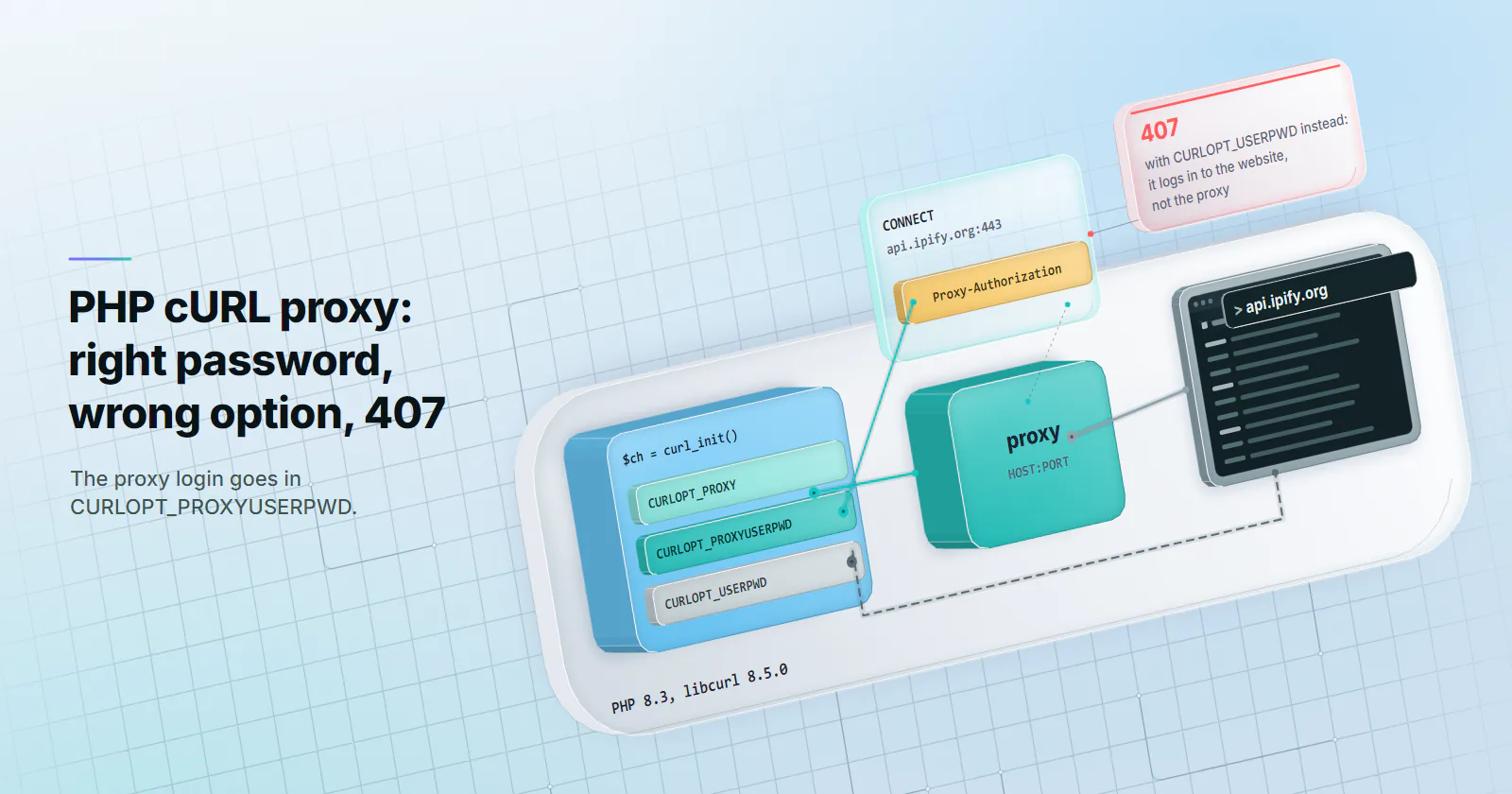
Quick summary · TL;DR
- Two options do the setup. Set CURLOPT_PROXY to http://HOST:PORT and CURLOPT_PROXYUSERPWD to USERNAME:PASSWORD. HTTPS URLs then go through a CONNECT tunnel without any other option.
- CURLOPT_USERPWD is the wrong option. It logs in to the website, not the proxy, so the proxy answers 407 even with the right password.
- Special characters need care. In the proxy URL, percent-encode the login with rawurlencode(). CURLOPT_PROXYUSERPWD takes it raw, but libcurl decodes %XX sequences there too.
- Use socks5h:// for SOCKS5. With socks5:// PHP resolves the website's name on its own server; with socks5h:// the proxy does the lookup.
To use a proxy with PHP cURL, pass the proxy address with its scheme and port to CURLOPT_PROXY, for example http://HOST:PORT, and the login to CURLOPT_PROXYUSERPWD as USERNAME:PASSWORD. HTTPS URLs then go through a CONNECT tunnel on their own, so no extra option is needed. For SOCKS5, write socks5h://HOST:PORT instead and keep the same login option.
Most failures in a PHP cURL proxy setup come after those lines. A password with an @ in it breaks the proxy URL, a 407 arrives with the right credentials, curl_exec() returns a proxy error page as if it were the answer, and a rotating proxy hands back the same IP for a whole run.
Each one traces back to what libcurl puts on the wire or hands back to PHP, and the sections below show both. All snippets run on PHP 8.3 with libcurl 8.5.0, and the option behaviour matches the libcurl documentation (checked October 12, 2026).
PHP cURL proxy setup in code
Here is the working minimum, with the connection details read from environment variables so they stay out of source control:
<?php
$ch = curl_init('https://api.ipify.org');

curl_setopt_array($ch, [
    CURLOPT_PROXY          => 'http://' . getenv('PROXY_HOST') . ':' . getenv('PROXY_PORT'),
    CURLOPT_PROXYUSERPWD   => getenv('PROXY_USER') . ':' . getenv('PROXY_PASS'),
    CURLOPT_RETURNTRANSFER => true,
    CURLOPT_CONNECTTIMEOUT => 10,
    CURLOPT_TIMEOUT        => 30,
]);

$body = curl_exec($ch);
if ($body === false) {
    throw new RuntimeException(curl_error($ch), curl_errno($ch));
}
echo $body, PHP_EOL;
What prints is the proxy’s exit address. For an https:// URL, libcurl sends CONNECT api.ipify.org:443 to the proxy, gets 200 Connection established back and runs TLS to the site inside that tunnel. The proxy sees the hostname and port, never the path, headers or body. A plain http:// URL goes differently: libcurl sends the whole request to the proxy, which forwards it.
The cURL extension ships with most PHP builds; php -m | grep curl confirms it, and on Debian or Ubuntu the package is php8.3-curl.
These are the options that touch the proxy, and the job each one does:
Write the port every time
A proxy address without a port does not fall back to 8080 or 80. In libcurl 8.5.0, both http://HOST and socks5://HOST dialled port 1080, the documented default, so an HTTP proxy listening on 8080 sees nothing and the request fails with errno 7, Failed to connect to HOST port 1080. Writing HOST:PORT in CURLOPT_PROXY, or setting CURLOPT_PROXYPORT, removes the guess.
PHP cURL proxy authentication
CURLOPT_PROXYUSERPWD is the proxy’s login. CURLOPT_USERPWD, one word shorter, is the login for the target website, and setting it instead is the most common reason a correct password still gets a 407. Through an HTTP proxy, libcurl sends Basic auth on the first CONNECT without waiting to be asked:
CONNECT api.ipify.org:443 HTTP/1.1
Host: api.ipify.org:443
Proxy-Authorization: Basic VVNFUk5BTUU6UEFTU1dPUkQ=
Proxy-Connection: Keep-Alive
That header is only base64, so anyone with a CURLOPT_VERBOSE log can decode the password; keep verbose output out of shared logs. Setting CURLOPT_PROXYAUTH to CURLAUTH_ANY changes the exchange. libcurl first sends the CONNECT without credentials, reads the methods in the 407, then retries, which costs one extra round trip per new connection. Leave it at the Basic default unless the proxy asks for NTLM or Digest.
Passwords with @, : or %
Credentials can also go inside the proxy URL, http://USERNAME:PASSWORD@HOST:PORT, and that is where special characters break things. A password like p@ss:w0rd written raw makes libcurl read part of it as the host and part as the port:
curl_errno: 5
Unsupported proxy syntax in 'http://user:p@ss:w0rd@HOST:8080': Port number was not a decimal number between 0 and 65535
Percent-encode the user and password with rawurlencode() before building the URL (@ becomes %40, : becomes %3A). CURLOPT_PROXYUSERPWD takes the raw password with no encoding, because libcurl splits at the first colon. But it decodes percent sequences in that option too, as the option’s documentation states, so a password containing %41 is sent as A. In libcurl 8.5.0 CURLOPT_PROXYPASSWORD decoded the same way. A password with a literal % followed by two hex digits needs %25 in its place:
<?php
$user = getenv('PROXY_USER');
$pass = getenv('PROXY_PASS');

// Option form: raw, except a literal % followed by two hex digits.
$opt = $user . ':' . preg_replace('/%(?=[0-9A-Fa-f]{2})/', '%25', $pass);

// URL form: encode both parts.
$url = sprintf('http://%s:%s@%s:%s',
    rawurlencode($user), rawurlencode($pass), getenv('PROXY_HOST'), getenv('PROXY_PORT'));
A Proxy-Authorization header that never arrives
Some code builds the header by hand and adds it to CURLOPT_HTTPHEADER. For an https:// target, libcurl keeps those headers for the website and leaves them off the CONNECT, so the proxy answers 407 (errno 56, CONNECT tunnel failed, response 407). Headers meant for the proxy go in CURLOPT_PROXYHEADER, which reaches the CONNECT. Usually the simplest fix is to drop the hand-built header and set CURLOPT_PROXYUSERPWD.
The 407 Proxy Authentication Required guide covers the proxy side of the same error.
HTTPS through a proxy in PHP
An https:// URL goes through a CONNECT tunnel without any extra option, and TLS runs end to end between PHP and the website. CURLOPT_HTTPPROXYTUNNEL is only needed to force the same tunnel for plain http:// URLs, on proxies that refuse to forward requests they can read. Older tutorials set it for HTTPS; it does no harm there, and HTTPS works without it.
Two status codes come back from a tunnelled request, and they answer different questions. CURLINFO_HTTP_CONNECTCODE is the proxy’s answer to the CONNECT (200 when the tunnel opened, 407 when the login failed). CURLINFO_HTTP_CODE is the website’s answer inside the tunnel. A failed tunnel leaves the second one at 0.
Header parsing breaks behind a proxy
With CURLOPT_HEADER set to true, the returned string starts with the proxy’s reply to the CONNECT, then the website’s headers:
HTTP/1.1 200 Connection established

HTTP/1.1 200 OK
Content-Type: application/json
Content-Length: 47
Code that splits headers from the body at the first blank line now takes the website’s headers as the body. CURLOPT_SUPPRESS_CONNECT_HEADERS (PHP 7.3 and later) removes the proxy’s block and leaves only the website’s. Do not pair it with a split at CURLINFO_HEADER_SIZE. That count still includes the suppressed CONNECT reply, as the option’s documentation states, so substr($response, $headerSize) cuts the first bytes off the body (39 bytes for the block above in libcurl 8.5.0). With suppression on, split at the first blank line; without it, split at CURLINFO_HEADER_SIZE, which then covers both blocks.
SOCKS5 proxy with PHP cURL
SOCKS5 uses the same two options with a different scheme. The login travels as the SOCKS5 username and password method from RFC 1929 (March 1996):
<?php
$ch = curl_init('https://api.ipify.org');
curl_setopt_array($ch, [
    CURLOPT_PROXY          => 'socks5h://' . getenv('PROXY_HOST') . ':' . getenv('PROXY_PORT'),
    CURLOPT_PROXYUSERPWD   => getenv('PROXY_USER') . ':' . getenv('PROXY_PASS'),
    CURLOPT_RETURNTRANSFER => true,
]);
echo curl_exec($ch), PHP_EOL;
The h decides who looks up the website’s name. With socks5://, PHP resolves the hostname on its own machine and hands the proxy an IP address, so a hostname the local resolver cannot find fails with errno 97 and Could not resolve host, and the DNS query leaves from the server, not the proxy. With socks5h://, the hostname itself goes to the proxy and the lookup happens there. CURLOPT_PROXYTYPE => CURLPROXY_SOCKS5_HOSTNAME is the same switch for code that sets the type separately. On proxymint’s rotating residential and mobile gateway, names sent through a CONNECT tunnel or socks5h resolved on the proxy side in the September 28, 2026 test on the gateway DNS and headers Lab page.
SOCKS failures all share errno 97, CURLE_PROXY. From PHP 8.2, curl_getinfo($ch, CURLINFO_PROXY_ERROR) says which part failed: 33 for a rejected username or password (User was rejected by the SOCKS5 server (1 1).), 12 when the proxy wants a login and none was set (No authentication method was acceptable.), 27 when PHP could not resolve the target for socks5://.
For how the two protocols differ beyond PHP, see SOCKS5 vs HTTP proxy.
Environment variables and bypass rules
When CURLOPT_PROXY is not set, libcurl reads the proxy from the environment, and PHP passes that through:
| Variable | Used for | Trap |
|---|---|---|
http_proxy | http:// URLs | Lowercase only; uppercase HTTP_PROXY is ignored |
https_proxy or HTTPS_PROXY | https:// URLs | Either case works |
ALL_PROXY | Every scheme without its own variable | Accepts socks5h:// |
NO_PROXY or no_proxy | Hosts that skip the proxy | Also beats an explicit CURLOPT_PROXY |
The uppercase HTTP_PROXY is skipped on purpose. Under CGI, a request header named Proxy turns into an HTTP_PROXY variable, so a client could pick the server’s proxy (the httpoxy issue, disclosed July 2016). Credentials in a variable go in the URL form, percent-encoded.
With no_proxy=api.example.com in the environment, a handle that sets CURLOPT_PROXY explicitly still connects to api.example.com directly. CURLOPT_NOPROXY on the handle replaces the environment list; set it to an empty string to make every request use the proxy, or list hosts with commas (localhost,.internal.example, where a leading dot covers subdomains). To ignore an environment proxy altogether, set CURLOPT_PROXY to ''.
PHP-FPM clears the environment for its workers by default (clear_env = yes in the pool config), so a proxy that works from the CLI can vanish under the web server. Setting the proxy on the handle avoids both differences.
file_get_contents through a proxy
PHP’s stream functions can use an HTTP proxy without cURL, through a stream context:
<?php
$auth = base64_encode(getenv('PROXY_USER') . ':' . getenv('PROXY_PASS'));

$ctx = stream_context_create(['http' => [
    'proxy'           => 'tcp://' . getenv('PROXY_HOST') . ':' . getenv('PROXY_PORT'),
    'request_fulluri' => false, // true for http:// URLs, false for https://
    'header'          => "Proxy-Authorization: Basic $auth",
    'timeout'         => 30,
]]);

echo file_get_contents('https://api.ipify.org', false, $ctx), PHP_EOL;
For an https:// URL, PHP opens a CONNECT tunnel and copies the Proxy-Authorization header onto it. request_fulluri has to match the scheme. A plain http:// request needs true, or the proxy receives GET /path instead of the full URL that HTTP requires in a request to a proxy. An https:// request needs false, because true sends GET https://host/path to the website inside the tunnel, which some servers reject. The stream wrapper has no SOCKS transport (Unable to find the socket transport "socks5"), so SOCKS5 needs cURL.
Rotation and connection reuse
A cURL handle keeps its connection open and reuses it for the next URL. Through a proxy that means the same tunnel, and so the same exit:
<?php
$ch = curl_init();
curl_setopt_array($ch, [
    CURLOPT_PROXY          => 'http://' . getenv('PROXY_HOST') . ':' . getenv('PROXY_PORT'),
    CURLOPT_PROXYUSERPWD   => getenv('PROXY_USER') . ':' . getenv('PROXY_PASS'),
    CURLOPT_RETURNTRANSFER => true,
    // CURLOPT_FRESH_CONNECT => true, // uncomment: a new tunnel for every request
]);

$exits = [];
$tunnels = 0;
for ($i = 0; $i < 20; $i++) {
    curl_setopt($ch, CURLOPT_URL, 'https://api.ipify.org');
    $exits[] = trim((string) curl_exec($ch));
    $tunnels += curl_getinfo($ch, CURLINFO_NUM_CONNECTS); // 1 = new connection, 0 = reused
}
printf("20 requests, %d tunnels, %d distinct exits\n", $tunnels, count(array_unique($exits)));
On a reused connection CURLINFO_NUM_CONNECTS reads 0 and CURLINFO_HTTP_CONNECTCODE reads 0, because no new CONNECT was sent. With CURLOPT_FRESH_CONNECT, every request opens a new tunnel and pays the login and the TLS handshake again. A new handle per request has the same effect.
Which of the two a job wants depends on the rotation mode. On proxymint’s per-GB tiers, rotation is chosen on the order: a new IP on every request, a timer from 5 to 60 minutes, or sticky while the device stays online, and it can be changed later without new credentials. Running the loop above both ways against an order set to every-request rotation shows how many distinct exits the job gets. Static ISP and datacenter IPv4 addresses do not rotate, so on those reuse only saves the handshake. Rotating vs sticky proxies covers which mode suits which job.
A list of separate proxies is a different setup: pick a proxy per request and open a new handle for it. The failover function in the next section does both when the list is shuffled first.
Verify the exit IP
Check the exit with an https:// IP echo endpoint and compare it with the same call made without the proxy. On proxymint’s rotating residential and mobile gateway, a plain http:// request through the HTTP port gets a 301 redirect to the https:// URL (Lab test, September 28, 2026), so an http:// echo endpoint returns a redirect instead of an IP. CURLINFO_PRIMARY_IP does not help here. It reports the address PHP connected to, which is the proxy, not the exit.
curl_getinfo() also splits the timing. namelookup_time and connect_time measure the hop to the proxy, appconnect_time_us adds the tunnel and TLS to the website, and starttransfer_time adds the website’s response. Compare medians over several runs against a direct baseline, not a single request.
When the proxy fails: what curl_exec returns
curl_exec() returns false on a transport error, and curl_errno() says which layer failed. One proxy error is not a transport error at all.
| What went wrong | What PHP gets | Check first |
|---|---|---|
| Proxy hostname does not resolve | errno 5, Could not resolve proxy | Spelling of the proxy host |
| Special characters in a URL password | errno 5, Unsupported proxy syntax | rawurlencode() the login |
| Proxy port closed | errno 7, Failed to connect ... Couldn't connect to server | Host and port |
| Proxy silently drops packets | errno 28 after CURLOPT_CONNECTTIMEOUT | Firewall, address |
https:// proxy address on a plain proxy port | errno 28, SSL connection timeout | Address scheme |
Login rejected, https:// target | errno 56, CONNECT tunnel failed, response 407 | CURLOPT_PROXYUSERPWD |
Login rejected, http:// target | No error: the proxy’s 407 page, CURLINFO_HTTP_CODE 407 | CURLOPT_PROXYUSERPWD |
| Target certificate not trusted | errno 60, SSL certificate problem | curl.cainfo in php.ini |
| SOCKS5 login or lookup failed | errno 97, detail in CURLINFO_PROXY_ERROR | Login, socks5h:// |
In the http:// row, curl_exec() hands back the proxy’s error page as if it were the website. Check CURLINFO_HTTP_CODE on every response, or set CURLOPT_FAILONERROR, which turns any status of 400 or above into errno 22. The full list of codes is in libcurl’s error reference.
A short failover loop treats the proxy errors as a reason to try the next proxy and passes the website’s own answers back:
<?php
function fetchWithFailover(string $url, array $proxies): string
{
    $errors = [];
    foreach ($proxies as $proxy) {
        $ch = curl_init($url);
        curl_setopt_array($ch, [
            CURLOPT_PROXY          => $proxy['url'],
            CURLOPT_PROXYUSERPWD   => $proxy['login'],
            CURLOPT_RETURNTRANSFER => true,
            CURLOPT_CONNECTTIMEOUT => 5,
            CURLOPT_TIMEOUT        => 30,
        ]);
        $body = curl_exec($ch);
        $code = curl_getinfo($ch, CURLINFO_HTTP_CODE);

        if ($body !== false && $code !== 407) {
            return $body; // the website answered, even if with 403 or 429
        }
        // errno 5, 7, 28, 56 or 97, or a 407: try the next proxy
        $errors[] = $proxy['url'] . ': ' . ($body === false ? curl_error($ch) : 'HTTP 407');
    }
    throw new RuntimeException("Every proxy failed:\n" . implode("\n", $errors));
}
When every entry fails with a 407, check the shared credentials before the proxies. A 403 or 429 is the website’s answer and goes back to the caller.
For a list of proxies, shuffle it before each call. The order is random per request, and a dead entry costs one attempt instead of failing the job:
<?php
$proxies = [
    ['url' => 'http://HOST1:PORT', 'login' => 'USERNAME:PASSWORD'],
    ['url' => 'http://HOST2:PORT', 'login' => 'USERNAME:PASSWORD'],
];
shuffle($proxies);
echo fetchWithFailover('https://api.ipify.org', $proxies), PHP_EOL;Choosing a proxy for PHP cURL
The PHP code is the same for every proxy category. What changes is the exit address the website sees, and the target decides which kind fits.
APIs, feeds and lenient targets at volume: datacenter proxies. Hosting addresses are fast and consistent, and endpoints without anti-bot scoring do not care where a request comes from. The datacenter proxies guide covers where they fit.
Public pages that treat home users differently (prices, stock, search results by location; use the site’s official API or feed first, collect public data only, and stop when a site blocks you): rotating residential proxies, with a new IP per request for broad coverage or a 5 to 60 minute timer when a short session must hold.
One identity over days (a partner dashboard, an API that expects one fixed address): static ISP proxies, one fixed ISP-registered address for the whole term.
Residential, static ISP and datacenter proxies on proxymint take a username and password over HTTP and SOCKS5, so the code above works unchanged on each of them. Proxy string formats shows how to turn a host:port:user:pass line into the options above.
Frequently asked questions
Call curl_setopt() with CURLOPT_PROXY set to the proxy address including scheme and port, such as http://HOST:PORT, and CURLOPT_PROXYUSERPWD set to USERNAME:PASSWORD if the proxy needs a login. Then call curl_exec() as usual. HTTPS URLs travel through a CONNECT tunnel automatically, and socks5h://HOST:PORT switches the same code to SOCKS5.
Use CURLOPT_PROXYUSERPWD with USERNAME:PASSWORD, or CURLOPT_PROXYUSERNAME and CURLOPT_PROXYPASSWORD as two values. Do not use CURLOPT_USERPWD, which goes to the website. If the login goes inside the proxy URL instead, encode both parts with rawurlencode(), because an @ or : in the password otherwise breaks the address with errno 5.
The proxy did not get credentials it accepts. Common causes are CURLOPT_USERPWD set instead of CURLOPT_PROXYUSERPWD, a Proxy-Authorization header placed in CURLOPT_HTTPHEADER (it never reaches the CONNECT for https:// URLs), a password with a literal % that libcurl decoded, or a wrong or expired login. For https:// URLs it shows as errno 56; for http:// URLs it arrives as a 407 response with no error.
Set CURLOPT_PROXY to socks5h://HOST:PORT and CURLOPT_PROXYUSERPWD to the login, which libcurl sends with the SOCKS5 username and password method. socks5h makes the proxy resolve the website's hostname; socks5:// resolves it on your server. SOCKS failures return errno 97, and from PHP 8.2 CURLINFO_PROXY_ERROR gives the detailed reason.
No. libcurl opens a CONNECT tunnel for every https:// URL through an HTTP proxy on its own. CURLOPT_HTTPPROXYTUNNEL only forces the same tunnel for plain http:// URLs, which some proxies require. If the code reads headers with CURLOPT_HEADER, add CURLOPT_SUPPRESS_CONNECT_HEADERS so the proxy's 200 Connection established block is removed, and then split headers from the body at the first blank line, because CURLINFO_HEADER_SIZE still counts the removed block.
For a list of proxies, shuffle the list and open a new cURL handle per request, moving to the next entry when one fails with a connection error or a 407. For a rotating gateway, the rotation mode is set on the proxy side, not in PHP (on proxymint, on the order), and a reused handle keeps one tunnel and one exit; set CURLOPT_FRESH_CONNECT or create a new handle per request when each request should be able to get a new IP.
Yes, for HTTP proxies. Pass a stream context with 'proxy' => 'tcp://HOST:PORT', a Proxy-Authorization: Basic header with the base64 login, and request_fulluri set to true for http:// URLs and false for https:// URLs. The stream wrapper has no SOCKS support, so SOCKS5 proxies need cURL.
Researched and drafted with AI tools, then checked against our publishing rules before it went live: 6 outside links, 9 links to other proxymint pages, no prices and a fact-check pass against our product records. How we write.