Encrypted Client Hello: what ECH hides and what proxies see
Encrypted Client Hello (ECH) hides the hostname in the TLS handshake. How it works, what stays visible, 2026 support, and why it often stops behind a proxy.
Quick summary · TL;DR
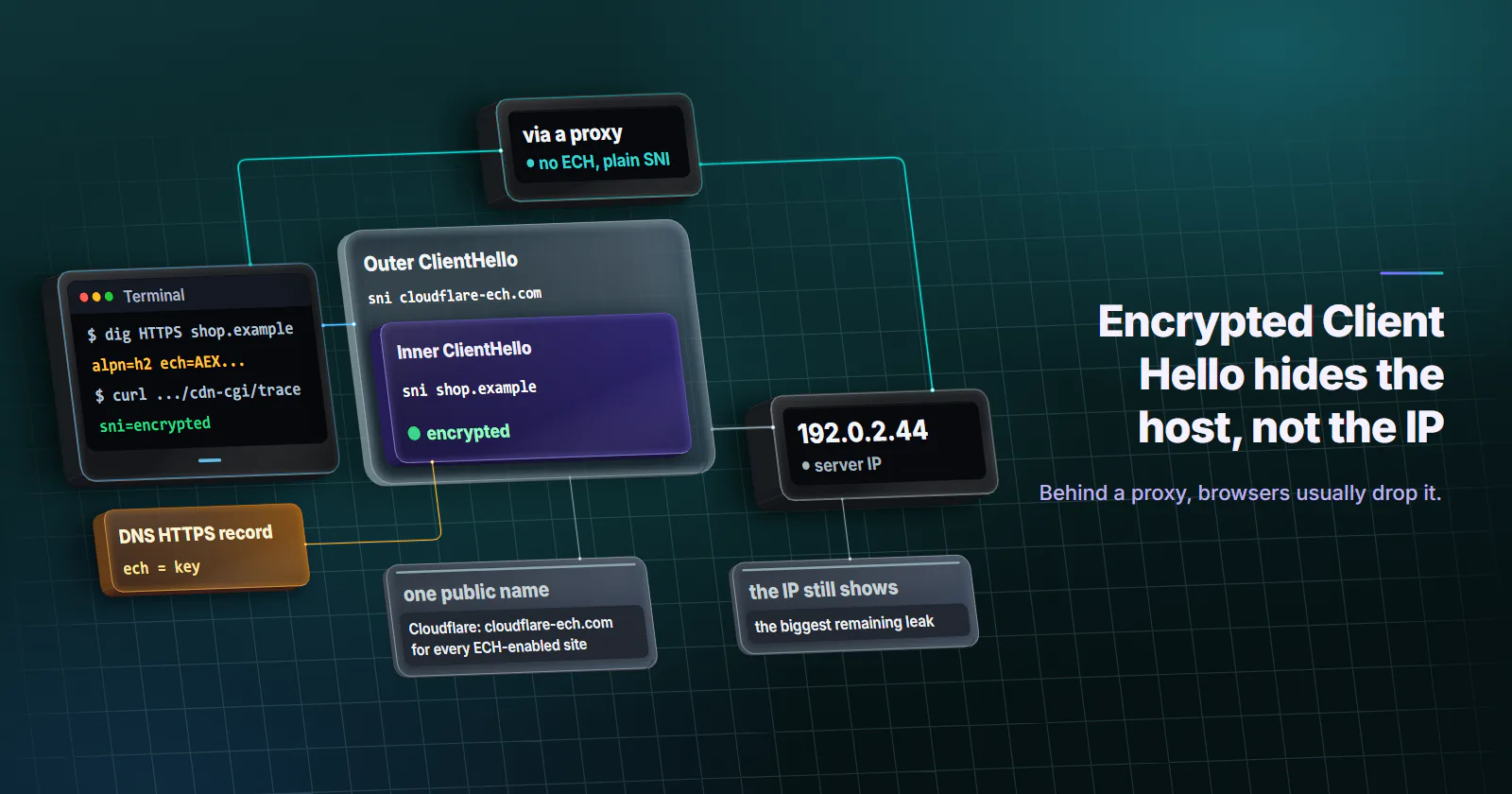
- ECH encrypts the hostname in the TLS handshake. The real server name and ALPN list travel in an encrypted inner ClientHello, while the outer hello shows only a shared public name such as cloudflare-ech.com.
- The key comes from DNS. Sites publish it in an HTTPS record, so ECH depends on the client fetching that record, ideally over encrypted DNS.
- The IP address, DNS lookups and traffic patterns stay visible. ECH hides a site well only when many sites share one front and one public name.
- Browsers usually drop it behind a proxy. Chrome applies ECH keys on direct connections only, and Firefox fetches the key through a proxy only when it resolves names itself.
Encrypted Client Hello (ECH) is a TLS 1.3 extension that encrypts the first handshake message, including the SNI hostname, with a public key the website publishes in DNS. Network observers see a shared public name instead of the real site. It became RFC 9849 in March 2026 and ships enabled in Chrome and Firefox.
Behind a proxy it often stops working. A browser that uses ECH on a home connection usually drops it once requests go through an HTTP or SOCKS5 proxy, and the real hostname then travels in plain SNI between the exit and the target.
The cause sits in browser source code and in where the DNS lookup happens. Both decide what a target, a network and the proxy itself can read.
How encrypted client hello works
Every TLS connection opens with a ClientHello. TLS 1.3 already encrypts most of the handshake, the certificate included, but not that first message. It carries the Server Name Indication (SNI) so that a server hosting many sites knows which certificate to present, and anyone on the path can read the hostname there.
ECH splits the message in two.
Inner ClientHello. The real hostname, the ALPN list and the other sensitive fields, encrypted with HPKE (Hybrid Public Key Encryption) under the server’s public key.
Outer ClientHello. Ordinary handshake parameters plus a public_name, the name of the client-facing server that every site behind it shares. On Cloudflare that name is cloudflare-ech.com for every ECH-enabled site, according to Cloudflare’s ECH documentation (checked October 2026).
The server decrypts the inner hello and completes the handshake with it. RFC 9849 (March 2026) calls a deployment where one operator decrypts and serves the site “shared mode”, and one where a front decrypts and forwards to a separate backend “split mode”. ECH needs TLS 1.3 or DTLS 1.3. It replaced the older Encrypted SNI (ESNI) draft, which hid the server name alone.
Where the client gets the ECH key
The key lives in DNS. A site publishes an HTTPS resource record, the record type defined in RFC 9460 (November 2023), with an ech parameter holding an ECHConfigList: the public key, the cipher suites and the public name. The client has to fetch that record before it opens the TLS connection.
That record arrives through ordinary DNS, without authentication, so a resolver or an on-path attacker can strip it. RFC 9849 notes that SNI encryption is “less useful without encryption of DNS queries in transit”, which is why browsers pair ECH with encrypted DNS.
Keys also rotate. When a client offers a stale key, the server completes a handshake under the public name and returns fresh retry_configs, and the client reconnects with the new key.
GREASE ECH. A client with no key for a site can still send an ECH extension filled with random bytes. Real and decoy ECH look alike on the wire, so an observer cannot tell which connections hid something. Chromium turns the decoy on whenever ECH is enabled, per its TLS socket code (checked October 2026).
What ECH hides, what stays visible
ECH closes one leak: the hostname and ALPN in the first handshake message. Everything else a network could see before, it can still see.
The IP address is the biggest remaining leak. ECH hides a site only inside a crowd: when thousands of sites share one front and one public name, the address says “a Cloudflare customer” and nothing more. A site alone on its own IP gives itself away whatever the handshake says. RFC 9849 states it: “ECH is not in itself sufficient to protect the identity of the server.”
Browser and server support in 2026
Browsers. Chrome began shipping ECH with version 117 in September 2023, the month Cloudflare announced ECH support for its Free plans (29 September 2023). Cloudflare paused it soon after and rolled it out again to Free zones from August 2024. Firefox turned it on by default in version 119, released on 24 October 2023, and fetches the key through DNS over HTTPS.
Servers. Cloudflare enables ECH by default on Free zones; other plans can switch it on or off in the dashboard. OpenSSL 4.0, released on 14 April 2026, added ECH per RFC 9849, which brings it to servers and clients that build on the most common TLS library.
Command-line and script clients. curl’s ECH support is still marked experimental in its ECH documentation (checked October 2026). It works with AWS-LC, BoringSSL, OpenSSL, Rustls or wolfSSL, and fetches the key when curl itself resolves names over DoH. Any HTTP library needs two things before it sends ECH: a TLS library with ECH, and a resolver that fetches HTTPS records.
Turning ECH on
Firefox. ECH needs DNS over HTTPS. Under Settings, Privacy & Security, set DNS over HTTPS to Increased or Max Protection with a resolver that returns HTTPS records. Without DoH there is no key, so there is no ECH.
Chrome. ECH is on by default. Turning on “Use secure DNS” under Settings, Privacy and security, Security keeps the HTTPS record lookup itself private.
Site owners. On Cloudflare, Free zones have ECH on by default; on other plans it is a toggle under Edge Certificates. A self-hosted server needs a TLS stack with ECH, such as OpenSSL 4.0, plus an HTTPS record that publishes the key and a certificate valid for the public name, because that is the name the server answers to when a client retries with fresh keys.
Does encrypted client hello work through a proxy?
A proxy raises two separate questions: what the proxy itself learns, and whether the browser still uses ECH toward the target.
The proxy learns the hostname from the tunnel request. HTTP CONNECT names the destination host and port in the request line (RFC 9110, June 2022), and a SOCKS5 connect request carries either a domain name or an IP address. The TLS handshake starts only after the tunnel is up. ECH has no say over that earlier step, the same way it has no say over what a DNS resolver sees.
Chrome uses ECH on direct connections only
Chromium attaches ECH keys only to direct connections. A comment in its SSL connect job (checked October 2026) reads: “Overriding the DNS lookup only works for direct connections. We currently do not support ECH with other connection types.” Through an HTTP or SOCKS5 proxy, Chrome has no key for the target. The handshake still carries an ECH extension, the GREASE decoy, while the real hostname sits in plain SNI. Chrome also always resolves names on the proxy side for SOCKS5, per its proxy documentation.
Firefox follows its DNS setting
Firefox decides by proxy type who resolves the hostname. In its HTTP networking code (checked October 2026), a SOCKS proxy without remote DNS leaves resolution to the browser, and every other proxy type, HTTP proxies included, hands it to the proxy. The HTTPS record lookup follows that choice, so Firefox fetches an ECH key through a proxy only when it resolves names itself, unless the network.dns.force_use_https_rr preference forces the lookup. How the two proxy schemes differ beyond ECH is covered in SOCKS5 vs HTTP proxy.
The last row looks like the private option, but it moves the DNS lookup back to the client’s own network and location, the classic proxy DNS leak. On proxymint’s rotating residential proxies and mobile proxies, HTTP CONNECT and socks5h lookups resolved on the proxy side, while plain socks5 used the client’s own resolver (proxymint Lab #1, measured 2026-09-28, one package per tier, US exits). Proxy-side DNS keeps lookups off the client’s network, and local DNS keeps ECH possible, so the setting is a tradeoff to choose on purpose.
A client that fetches the HTTPS record itself over DoH and hands the key to its TLS library could in principle offer ECH inside a tunnel, since CONNECT and SOCKS5 relay the handshake bytes unchanged. Test that setup with the check below before relying on it.
What ECH changes for TLS fingerprints
For the target, nothing is hidden. The site’s front decrypts the inner hello and sees the real hostname, the ALPN list, the client IP and every header, exactly as before. Its protection covers the network path between client and site.
Network-side fingerprints shift slightly. A JA4 fingerprint taken on the wire is computed from the outer hello, and its SNI letter stays d because the outer hello still names a server, the public name (FoxIO JA4 specification, checked October 2026). The ECH extension appears in the extension list whether the key is real or a decoy, which is the point of GREASE.
Chrome’s handshake carries the ECH extension on every path, direct or proxied. A script whose TLS library lacks ECH sends no such extension, so its handshake differs from the browser it may claim to be in the user agent. A proxy cannot add or remove it: CONNECT and SOCKS5 relay the client’s handshake as it is.
IP reputation is untouched too. Whether a target accepts a datacenter, residential, ISP or mobile address is a separate question, covered in types of proxies.
Blocking and enterprise networks
Filters that read SNI (firewalls, school and parental filters, enterprise policy engines) lose the hostname when ECH succeeds. Cloudflare’s documentation lists the switches a network operator can use instead. The resolver can drop HTTPS records or answer HTTPS queries with NXDOMAIN, which stops Chrome from getting a key. It can also answer NXDOMAIN for the canary domain use-application-dns.net, which tells Firefox to switch ECH off.
TLS-inspecting proxies are covered by RFC 9849. A terminating proxy that does not support ECH answers as the public name; the client then retries without ECH if it trusts the proxy’s certificate, or fails. A proxy that is not authoritative for the public name “cannot forge a signal to disable ECH”. So ECH can be blocked or disabled, but only visibly, by the network or by a managed device’s policy.
How to check whether ECH is used
The check takes three commands and one browser tab, and it runs the same way on a direct line and through a proxy profile.
# 1. Does the site publish an ECH key? Look for ech= in the answer.
dig +short HTTPS defo.ie

# 2. Ask an ECH test page what it received (needs an ECH-enabled curl build).
#    "hard" fails the request if ECH cannot be attempted.
curl --ech hard --doh-url https://one.one.one.one/dns-query https://defo.ie/ech-check.php

# 3. In the browser, open this page and read the sni= line:
#    sni=encrypted means ECH worked, sni=plaintext means it did not.
#    https://crypto.cloudflare.com/cdn-cgi/trace
Run step 3 once with the browser connected directly and once through the proxy, in Chrome and in Firefox. The difference between the two runs is the table above, measured on your own setup. A packet capture with Wireshark on your own machine shows the outer hello itself: the public name in SNI and the encrypted_client_hello extension.
Which setup fits which goal
Encrypted client hello is a privacy layer for the network path. Match it to the goal.
- Hiding the visited site from your local network. Connect directly, with ECH and encrypted DNS on, to sites that publish a key. Outside a large shared front, the IP address can still give the site away.
- Routing traffic through a forward proxy. The proxy learns the hostname by design, and both browsers drop ECH toward the target unless Firefox resolves names itself. Pick DNS on purpose: HTTP CONNECT or
socks5hresolves names on the proxy side; local resolution keeps ECH possible but sends lookups from your own network. - Getting a request accepted by a target. ECH changes nothing here. The target sees the inner hello, the IP and the headers. Keep the client handshake consistent with the browser it claims to be, and choose the exit type by what the target checks.
- Running a network that must filter. Control ECH at the resolver, the method Cloudflare documents, and clients keep end-to-end TLS.
Frequently asked questions
Encrypted Client Hello (ECH) is a TLS 1.3 extension that encrypts the first handshake message, including the server name, with a public key the site publishes in DNS. Network observers see only a shared public name. It was published as RFC 9849 in March 2026.
ECH hides the contents of the inner ClientHello, chiefly the Server Name Indication and the ALPN list. The certificate was already encrypted in TLS 1.3. Everything outside the handshake, such as the destination IP address and traffic timing, stays as visible as before.
No. ECH encrypts part of the TLS handshake; the IP addresses on both ends of the connection are still visible to the network. If a site sits alone on its own IP address, that address can identify it even when the hostname is encrypted.
Yes. Chrome began rolling ECH out with version 117 in September 2023, and Firefox enabled it by default in version 119 in October 2023, using DNS over HTTPS to fetch the key. A browser uses ECH only for sites that publish a key in their DNS HTTPS record.
Usually not. Chrome applies ECH keys only on direct connections, and Firefox fetches the key only when it resolves hostnames itself, which rules out HTTP proxies and SOCKS proxies with remote DNS. The proxy also learns the hostname from the CONNECT line or SOCKS5 request whatever the handshake does.
Yes, but visibly. A network resolver can drop the HTTPS records that carry ECH keys, or answer the canary domain use-application-dns.net with NXDOMAIN to switch Firefox's ECH off. A TLS-inspecting proxy can make the client fall back only if the client trusts that proxy's certificate.
Open https://crypto.cloudflare.com/cdn-cgi/trace and read the sni= line: encrypted means ECH succeeded, plaintext means it did not. Repeat the test directly and through any proxy you use, and check the site's DNS HTTPS record for an ech parameter.
Researched and drafted with AI tools, then checked against our publishing rules before it went live: 13 outside links, 5 links to other proxymint pages, no prices and a fact-check pass against our product records. How we write.