
Sticky session duration: how long one IP holds, and why
Sticky session duration explained: what ends a session early, how to size the timer to the task, a script that measures hold time, and load balancer stickiness.
Quick summary · TL;DR
- If your IP changed before the timer ran out, the device probably went offline. The timer is only the upper limit, and a home router or a phone on a carrier network can drop at any point, so the real hold time is whatever ends first.
- Set the timer from your longest step, not from the menu. Time login to logout or cart to confirmation, add margin and round up to the next 5-minute step, which on proxymint goes from 5 to 60 minutes, or sticky while the device stays online.
- Watch the site's own logout clock too. OWASP's common idle timeouts run 2-5 minutes on high-value apps, so a 60-minute sticky IP can easily outlast the login it was meant to protect.
- Measure before you plan a big job around it. Sampling the exit IP every 30 seconds on a few ports tells you how many are still on their first IP at 10, 30 and 60 minutes, which beats guessing.
If your sticky IP changed halfway through a login flow, the timer you picked was probably not the clock that ended it. Sticky session duration is the time one exit IP stays attached to your traffic, and it ends at whichever comes first: the proxy’s timer, the exit device going offline, or the target’s own session timeout. Size it from your longest task, then check the IP anyway.
Still choosing between rotating and sticky at all? That decision lives in rotating vs sticky proxies. Here the mode is settled and the question is length, plus the load balancer setting that shares the name and does something else entirely.
How sticky session duration works
A sticky session is a window in which a rotating gateway sends your requests out through one exit IP. The gateway pins that exit to a session handle, which is a port, a username tag or a session ID depending on the provider. When the window ends, the next request gets a new exit. Sticky session duration is the length of that window, and the number on the settings page is only its upper bound.
On proxymint’s mobile proxies and rotating residential proxies, the window is set per order. You pick a new IP every request, a timer from 5 to 60 minutes in 5-minute steps, or sticky for as long as the device stays online. A new order starts on “New IP every request”, so a login job needs the setting changed before it runs. Username session tags do not work on these lists. Run each parallel sticky session on its own port and use the login exactly as issued.
You can change the setting later. “Change location” in My proxies updates rotation in place, and the logins and ports stay the same.
What ends a sticky session
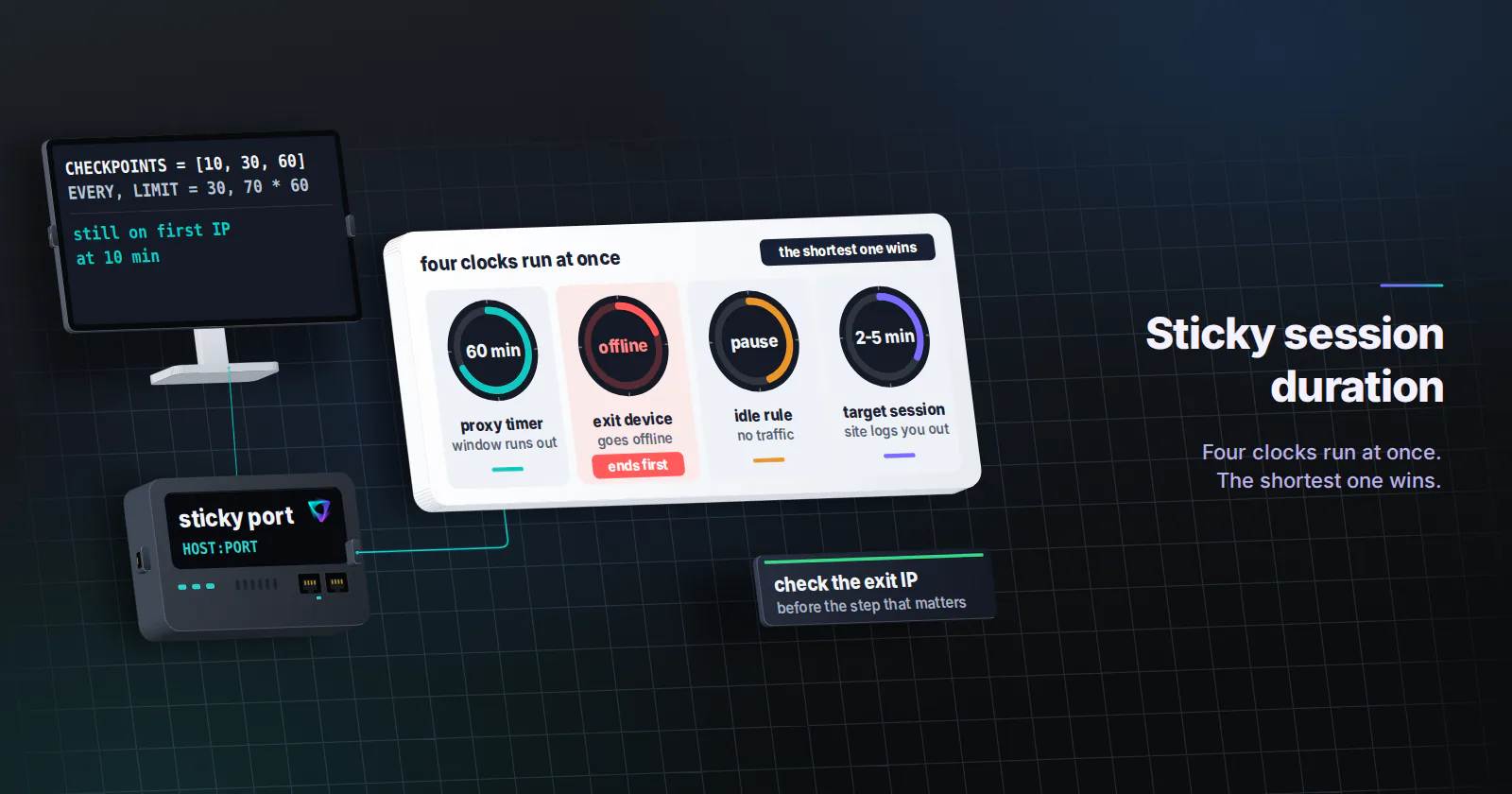
Ask a provider how long do sticky sessions last and you usually get one number, the default timer. In practice four clocks run at once, and the shortest one wins.
| Clock | What ends it | Who controls it | How to plan for it |
|---|---|---|---|
| Proxy timer | The window runs out | You, in the order settings | Set it above the longest step that needs one IP |
| Exit device | The home or carrier device goes offline | Nobody, really | Check the IP before the step that matters |
| Idle rule | No traffic for a while, on providers that have one | The provider | Keep traffic flowing or expect a new IP after a pause |
| Target session | The site logs you out on its own schedule | The target site | Read the site’s session length, it can be shorter than your timer |
People forget the device clock most. A 60-minute timer means the gateway will not move you on purpose inside that window. But it cannot keep a phone on a carrier network or a home router online. If the exit becomes unavailable, the port can move to a new IP before the timer ends. “Sticky while online” runs on that clock alone, with no timer on top.
The target’s clock is the other surprise. OWASP’s Session Management Cheat Sheet (checked 2026-11-07) gives common idle timeouts of 2-5 minutes for high-value applications and 15-30 minutes for low-risk ones, and tells developers to add an absolute timeout on top, suggesting 4 to 8 hours for an app an office worker keeps open all day. So a 60-minute sticky IP on a banking-style dashboard can outlive the login it was meant to protect. That cheat sheet also treats an IP change in the middle of a session as a possible hijacking signal, and says the app can alert or end the session when it sees one. That is why an early exit change tends to show up as a forced re-login.
Fixed and sliding timers
Timers come in two shapes across the market. A fixed timer counts from the moment the session starts, so a 10-minute window flips at minute 10 even if you are mid-checkout. A sliding timer counts from the last request and keeps a busy session alive. Some provider docs describe one behaviour on one page and the other on the next, so treat the label as a hint.
Whichever shape you have, the practical rule holds. If a flow starts late in a window, it can cross the boundary. Either the timer covers the whole flow with room to spare, or the flow checks its exit and restarts cleanly.
When the session will not hold at all
If the IP changes on almost every call, the device clock is rarely the cause. Check the setup first, in this order:
- The rotation setting. A new proxymint order starts on “New IP every request”. If nobody changed it, every call gets a new exit by design.
- Port spreading. A client that cycles through the whole proxy list sends each call through a different port, so one flow ends up on several exits. Pin one flow to one port.
- Username edits. A session tag appended to the login does not work on these lists. Use the login as issued, and if a hand-edited login starts failing with 407 Proxy Authentication Required, the edit is the first suspect.
- A recent settings change. After “Change location”, new connections pick up the new rotation and location, so a run that straddles the change sees a new exit.
Sticky session duration by task
Time the longest step that must leave from one IP. Login to logout, cart to confirmation, first to last page of one paginated query. Then add margin and round up to the next 5-minute step. Treat these rows as starting points to test on your own target.
| Task | What must share one IP | Starting setting |
|---|---|---|
| Paginated search, one query | First to last page | 5-10 min timer, new session per query |
| QA of your own checkout | Cart to confirmation | A timer two to three times the flow, e.g. 15-20 min for a 7-minute run |
| Dashboard you manage, short visits | Login to logout | 15-30 min timer, and log in again per visit |
| Long automation, an hour or more | Each resumable step | Sticky while online, plus an IP check between steps |
| One identity for days | Everything | Not a sticky job: see the static section below |
Two things push the number down. The target’s own session timeout, if it is shorter than your flow, sets the real ceiling. And a longer timer carries its own risk. If one exit is slow or flagged, a long window keeps you on it. So pick the shortest proxy session lifetime that covers the task.
For mobile work the same logic holds with one extra detail. Carrier networks put many subscribers behind shared public addresses (CGNAT), so “the same IP for 30 minutes” means the same carrier address, which is normal for that network and expected by the apps built for it.
Measure how long sessions hold
Your settings page gives the upper bound. Only measurement tells you what your ports actually do on your target country and time of day. The script below holds several sticky ports, samples each one’s exit IP every 30 seconds, and reports how many were still on their first IP at 10, 30 and 60 minutes. Placeholders are in capitals, and the login is percent-encoded because a password with : or @ breaks a proxy URL.
import time
from urllib.parse import quote

import requests

ECHO = "https://api.ipify.org"
USER, PASS = quote("USERNAME", safe=""), quote("PASSWORD", safe="")
PORTS = [PORT_1, PORT_2, PORT_3, PORT_4, PORT_5]
CHECKPOINTS = [10, 30, 60]  # minutes
EVERY, LIMIT = 30, 70 * 60  # seconds


def exit_ip(port):
    url = f"http://{USER}:{PASS}@HOST:{port}"
    return requests.get(ECHO, proxies={"http": url, "https": url}, timeout=20).text.strip()


start = time.time()
first = {p: exit_ip(p) for p in PORTS}
held_until = {}  # port -> minutes until the first IP change
while len(held_until) < len(PORTS) and time.time() - start < LIMIT:
    time.sleep(EVERY)
    for p in PORTS:
        if p in held_until:
            continue
        try:
            ip = exit_ip(p)
        except requests.RequestException:
            continue  # a failed call is not an IP change; log it separately
        if ip != first[p]:
            held_until[p] = (time.time() - start) / 60
            print(f"port {p}: {first[p]} -> {ip} after {held_until[p]:.1f} min")

for c in CHECKPOINTS:
    alive = sum(1 for p in PORTS if held_until.get(p, float("inf")) > c)
    print(f"still on first IP at {c} min: {alive}/{len(PORTS)}")
Run it twice, once with the list on “sticky while online” and once on the timer you plan to use. On a timer, the first change should land near the set time, and an early change tells you the device clock won. Five ports is a smoke test. For a number you would plan a job around, use more ports and repeat at a different hour.
Guard the step that matters
That script only measures. In the job itself, read the exit IP before a step that must share it, and restart the step if it moved.
def run_step(port, expected_ip, step):
    if exit_ip(port) != expected_ip:
        raise RuntimeError("exit IP changed, restart this flow from its last saved state")
    return step()
That costs one tiny request per step and turns a dropped device into a clean retry.
When an hour is not enough
If the identity must hold for days, sticky session duration is the wrong setting to tune. A sticky session is borrowed from a rotating pool and ends. A static ISP proxy is one ISP-registered address assigned to your order for the whole billing term, and it never rotates. Accounts tied to a consistent login location, partner firewall rules and anything you come back to next week belong there.
Long jobs that do fit sticky have one requirement in common. They save state between steps, so the run can continue from a new exit. “Sticky while online” on mobile or residential is the right setting for them, because it holds as long as the device allows instead of flipping on a schedule.
Load balancer sticky session duration
Several results for this search are about a different setting. On a load balancer, stickiness pins a visitor to one backend server, not to one exit IP. On an AWS Application Load Balancer, duration-based stickiness uses a cookie called AWSALB, and the AWS sticky sessions guide (checked 2026-11-07) lets you set the duration anywhere from 1 second to 7 days, through the stickiness.lb_cookie.duration_seconds attribute in the CLI. If the cookie points at a target that is unhealthy or deregistered, the load balancer picks a new target and rewrites the cookie, which is the load balancer’s version of a device dropping offline.
These two settings meet only when you test your own site through a proxy. A scraper or QA run that drops cookies between requests loses load balancer stickiness on every call, whatever the proxy timer says. Keep the cookie jar per session, the same way you keep the port per session.
Pick the duration from the task
If one query or one short flow needs a single IP, use a 5-15 minute timer and a new session per flow. If a login must survive a visit, set the timer above the visit and below the site’s own session timeout. If the job runs for hours, use sticky while online and guard each step. If the identity must last for days, move it to a static ISP address and stop tuning sticky session duration at all.
Frequently asked questions
It lasts until the first of several clocks runs out: the proxy timer, the exit device going offline, or the target's own session timeout. On proxymint residential and mobile proxies the timer is 5 to 60 minutes in 5-minute steps, or sticky for as long as the device stays online. No provider can promise how long a home or carrier device stays connected.
Time the visit from login to logout, then set the timer two to three times longer and round up to the next step. Keep it below or close to the site's own session timeout, because the site will log you out on its schedule whatever the proxy does. For visits longer than an hour, use sticky while online and check the exit IP between steps.
It depends on the provider. Some count a fixed window from the start of the session, others count from the last request, and some documentation describes both. The safe approach is to measure the exit IP over a full window on your own ports and to start each flow on a fresh session so it never begins near the end of a window.
Usually the device carrying the exit went offline, and the port moved to a new IP. A timer is a promise not to rotate on purpose before it runs out, but it cannot keep a home connection or a phone online. Handle it in the client by checking the exit IP before an important step and restarting that step if it changed.
The next request through that port leaves from a different exit IP. Cookies and tokens the target tied to the old address may stop working, so a logged-in flow can be sent back to the login page or asked for an extra check. Jobs that save state between steps can simply continue from the new IP.
On a load balancer, stickiness keeps a visitor on one backend server, not on one exit IP. AWS Application Load Balancer duration-based stickiness uses a cookie named AWSALB and accepts a duration from 1 second to 7 days. It is a setting on your own infrastructure and has nothing to do with a proxy's session timer.
No. A longer window does not keep the exit device online, and if the exit is slow or flagged by the target, a long window keeps you on it. Pick the shortest duration that covers the task, and for an identity that must hold for days use a static ISP address instead of a sticky session.
Researched and drafted with AI tools, then checked against our publishing rules before it went live: 2 outside links, 6 links to other proxymint pages, no prices and a fact-check pass against our product records. How we write.