C# HttpClient proxy: WebProxy, auth, SOCKS5 and rotation
C# HttpClient proxy setup for .NET 8 and 10: WebProxy credentials, SOCKS5, environment proxies, IHttpClientFactory, rotation and the 407 and https:// traps.
Quick summary · TL;DR
- A WebProxy on the handler is the whole setup. Create new WebProxy("http://HOST:PORT") with a NetworkCredential on its Credentials property, assign it to SocketsHttpHandler.Proxy or HttpClientHandler.Proxy with UseProxy = true, and pass the handler to HttpClient.
- Credentials in the proxy URL are ignored by WebProxy. new WebProxy("http://USERNAME:PASSWORD@HOST:PORT") still gets a 407. The HTTPS_PROXY environment variable is the one place where user:pass in the address is read as credentials.
- SOCKS5 works from .NET 6 with a socks5:// address. socks5h:// throws NotSupportedException, but .NET's socks5 already sends the hostname, so DNS resolves at the proxy.
- Never write https:// in the proxy address. On .NET 8 and 10 it means TLS to the proxy itself, so an ordinary proxy port either stalls until the timeout or fails at once with an SSL error.
To set up a C# HttpClient proxy, create a WebProxy with the proxy’s http://HOST:PORT address, put the username and password on its Credentials property as a NetworkCredential, and assign it to the Proxy property of a SocketsHttpHandler (or HttpClientHandler) with UseProxy = true. Pass that handler to the HttpClient constructor. HTTPS targets then travel through a CONNECT tunnel, and SOCKS5 works the same way with a socks5:// address on .NET 6 and later.
That setup is on every page that ranks for a C# HttpClient proxy, and the trouble starts after it. A 407 Proxy Authentication Required arrives with the right password, because the credentials sat in the URL. Requests hang until the timeout, because the proxy address started with https://. socks5h:// throws NotSupportedException, a bypass entry like *.corp throws RegexParseException, and a rotating proxy hands out the same IP for a whole run.
Each of these comes from what the handler sends on the wire, so every section below shows that too. Every snippet compiles on .NET 8 and .NET 10, and every behaviour described here traces to the dotnet/runtime source (release/10.0 branch, checked October 11, 2026).
C# HttpClient proxy setup in code
Here is the working minimum, with the connection details read from environment variables so they stay out of source control:
using System.Net;

var host = Environment.GetEnvironmentVariable("PROXY_HOST");
var port = Environment.GetEnvironmentVariable("PROXY_PORT");

var proxy = new WebProxy($"http://{host}:{port}")
{
    Credentials = new NetworkCredential(
        Environment.GetEnvironmentVariable("PROXY_USER"),
        Environment.GetEnvironmentVariable("PROXY_PASS"))
};

var handler = new SocketsHttpHandler { Proxy = proxy, UseProxy = true };
using var client = new HttpClient(handler);

Console.WriteLine(await client.GetStringAsync("https://api.ipify.org"));
What prints is the proxy’s exit address, not the machine’s own. For an https:// URL the handler sends CONNECT api.ipify.org:443 to the proxy and runs TLS to the target inside the tunnel, so the proxy sees the hostname and port but never the request path, headers or body. Plain http:// URLs are different: the handler sends the full request to the proxy, which forwards it.
An HttpClient can get its proxy in three ways, and the one that applies decides where the credentials and the bypass rules go.
SocketsHttpHandler or HttpClientHandler
On Windows, Linux and macOS, from .NET 5, HttpClientHandler wraps SocketsHttpHandler (on .NET Core 2.1 to 3.1 it was the default; Android, iOS, MAUI and Browser use their own native handlers, without SOCKS), so the proxy logic is the same. Use SocketsHttpHandler when you need PooledConnectionLifetime or ConnectTimeout, both of which matter for proxies. Use HttpClientHandler when the code must also build for .NET Framework, where SocketsHttpHandler does not exist:
using System.Net;

var handler = new HttpClientHandler
{
    Proxy = new WebProxy("http://HOST:8080")
    {
        Credentials = new NetworkCredential("USERNAME", "PASSWORD")
    },
    UseProxy = true
};
using var client = new HttpClient(handler);
.NET Framework code also picks up the old WebRequest.DefaultWebProxy and the <defaultProxy> element in app.config. Neither is read by .NET 8 or 10.
The https:// proxy scheme trap
Any proxy address scheme describes the hop from your code to the proxy, not the target. In the runtime’s list of accepted proxy schemes https sits next to http and the SOCKS schemes, and the handler treats it as a TLS connection to the proxy before the CONNECT. Proxy ports that speak plain HTTP receive a TLS ClientHello where they expect CONNECT host:443 HTTP/1.1. Proxies that wait for a complete request line leave the request sitting there; those that reject the first non-HTTP byte answer 400 in plain text, and the TLS handshake fails within milliseconds with HttpRequestError.SecureConnectionError and an inner AuthenticationException.
Neither symptom names the scheme: the timeout reads like a slow or dead proxy, and the SSL error like a certificate problem. Two checks settle it: the address starts with http:// or socks5://, and SocketsHttpHandler.ConnectTimeout is set to a few seconds, so a wrong address fails fast instead of waiting out the 100-second HttpClient.Timeout default.
C# HttpClient proxy authentication
Credentials belong on the WebProxy. A NetworkCredential on WebProxy.Credentials is what the handler uses to answer the proxy. Writing them into the address, as in new WebProxy("http://USERNAME:PASSWORD@HOST:PORT"), compiles and runs, and the proxy still answers 407: WebProxy keeps the user info in the URI but never turns it into credentials. Credentials in HttpClientHandler.Credentials go to the target website, not the proxy.
First comes a CONNECT without them. Proxy authentication in SocketsHttpHandler is challenge-based: the handler opens the tunnel with no Proxy-Authorization header, reads the 407 and its Proxy-Authenticate scheme, then repeats the CONNECT with Basic credentials (Digest, NTLM and Negotiate are handled the same way when the proxy asks for them). That costs one extra round trip per new tunnel. With a pooled client it happens once per connection, which is one more reason to reuse the client. For the same status code in other clients, see the 407 Proxy Authentication Required guide.
A hand-made header does not reach the tunnel. Setting request.Headers.ProxyAuthorization yourself works for plain http:// URLs, because that request goes to the proxy as is. With https:// URLs the handler builds the CONNECT request separately and leaves your header out, so the tunnel still gets a 407.
Special characters need no escaping. NetworkCredential takes the raw strings, so a password with @, : or # works unchanged. Percent-encoding matters only for the environment-variable form below.
UseDefaultCredentials and DefaultProxyCredentials serve other setups. WebProxy.UseDefaultCredentials sends the signed-in Windows account (NTLM or Kerberos) to a corporate proxy, and DefaultProxyCredentials on the handler fills in for a proxy that has no credentials of its own, usually the default proxy. Commercial proxies with a username and password need neither.
SOCKS5 proxy with HttpClient
Since .NET 6, SocketsHttpHandler accepts socks5://, socks4:// and socks4a:// proxy addresses. Setup is identical to an HTTP proxy, and the credentials go through the SOCKS5 username and password method from RFC 1929 (published March 1996):
using System.Net;

var handler = new SocketsHttpHandler
{
    Proxy = new WebProxy("socks5://HOST:1080")
    {
        Credentials = new NetworkCredential("USERNAME", "PASSWORD")
    },
    UseProxy = true
};
using var client = new HttpClient(handler);
socks5h:// throws. curl and Python users write socks5h:// to make the proxy resolve hostnames. In .NET that address fails with NotSupportedException: Only the 'http', 'https', 'socks4', 'socks4a' and 'socks5' schemes are allowed for proxies.
.NET’s socks5:// already sends the hostname. The SocksHelper source puts the target into the SOCKS5 request as a domain name unless it is already an IP address, so DNS resolves at the proxy, which is what socks5h means elsewhere. socks4:// is the exception: it resolves the name on the client, and socks4a:// passes it to the proxy. On proxymint’s gateway, proxymint Lab #1 measured proxy-side resolution for both CONNECT and SOCKS requests that carry the hostname.
Missing credentials fail at the handshake. If the SOCKS server requires a login and Credentials is empty, the handler offers only “no authentication” and the request fails with SocksException: SOCKS server did not return a suitable authentication method.
With HTTPS targets, an HTTP proxy using CONNECT and a SOCKS5 proxy both end in a TCP tunnel to the target with TLS inside. Where they differ is covered in SOCKS5 vs HTTP proxy.
Default proxy and environment variables
An HttpClient built without a handler, or with a handler whose Proxy is null and UseProxy is true, uses HttpClient.DefaultProxy. It is built once per process from environment variables first, and on Windows and macOS falls back to the operating system’s proxy settings when none are set:
export HTTPS_PROXY="http://USERNAME:PASSWORD@HOST:PORT"
export HTTP_PROXY="http://USERNAME:PASSWORD@HOST:PORT"
export NO_PROXY=".internal.example,localhost"
Here the user info counts. Unlike new WebProxy(...), the environment parser reads USERNAME:PASSWORD from the variable and uses it as proxy credentials. It splits at the last @ and percent-decodes the rest, so a raw @ in the password works, %40 works too, and a literal % followed by two hex digits must be written as %25. ALL_PROXY covers both schemes when the specific variable is missing and accepts socks5:// addresses too.
Lowercase wins on Linux and macOS. https_proxy takes precedence over HTTPS_PROXY. Any leftover lowercase variable in a container image overrides the uppercase one you just set.
HTTP_PROXY is ignored under CGI. When GATEWAY_INTERFACE is set, the uppercase HTTP_PROXY is skipped, because a CGI server fills it from the client’s Proxy: request header.
The default proxy is read once. It is created on first use and cached for the life of the process, so changing the variables at runtime does nothing. To change it in code, assign HttpClient.DefaultProxy = new WebProxy(...) before any client sends a request, or give the client its own handler.
UseProxy = false opts out. With it, the handler goes direct regardless of the environment. That is also the fix when a CI runner or a corporate laptop sends traffic through a proxy nobody configured in the code.
Bypass rules that do not crash
WebProxy has two bypass controls. BypassProxyOnLocal = true sends loopback addresses and single-label hosts such as http://intranet/ direct.
BypassList takes regular expressions, not wildcards. Inside the WebProxy source, each entry is compiled with new Regex(...) and matched against scheme://host, plus :port when the port is not the default. An entry like *.internal.example throws RegexParseException the moment it is assigned. Escape the dots and allow for a port:
using System.Net;

var proxy = new WebProxy("http://HOST:8080")
{
    Credentials = new NetworkCredential("USERNAME", "PASSWORD"),
    BypassProxyOnLocal = true,
    BypassList = new[] { @"\.internal\.example(:\d+)?$" }
};

Console.WriteLine(proxy.IsBypassed(new Uri("https://api.internal.example:8443/"))); // True
Console.WriteLine(proxy.IsBypassed(new Uri("https://api.ipify.org/")));             // False
Without the (:\d+)? part, https://api.internal.example:8443/ would still go through the proxy, because the port is part of the matched string. NO_PROXY works differently: comma-separated entries, where .internal.example matches the domain and every subdomain.
IHttpClientFactory and dependency injection
In ASP.NET Core and worker services, the proxy goes on the primary handler of a named or typed client. Microsoft documents that from .NET 9 the factory’s default primary handler is a SocketsHttpHandler (breaking-change note, checked October 11, 2026), so code that casts it to HttpClientHandler to set UseProxy breaks. Returning your own handler avoids the question:
using System.Net;
using Microsoft.Extensions.DependencyInjection;

var services = new ServiceCollection();

services.AddHttpClient("proxied", c => c.Timeout = TimeSpan.FromSeconds(30))
    .ConfigurePrimaryHttpMessageHandler(() => new SocketsHttpHandler
    {
        Proxy = new WebProxy("http://HOST:8080")
        {
            Credentials = new NetworkCredential("USERNAME", "PASSWORD")
        },
        UseProxy = true,
        PooledConnectionLifetime = TimeSpan.FromMinutes(5)
    })
    .SetHandlerLifetime(Timeout.InfiniteTimeSpan);

using var provider = services.BuildServiceProvider();
var client = provider.GetRequiredService<IHttpClientFactory>().CreateClient("proxied");
PooledConnectionLifetime recycles connections, which also picks up DNS changes for the proxy host, so the factory’s own handler rotation can be switched off with SetHandlerLifetime(Timeout.InfiniteTimeSpan). One named client per proxy configuration keeps the pools apart. In Program.cs of a web app the same chain hangs off builder.Services.AddHttpClient(...).
Rotation and connection reuse
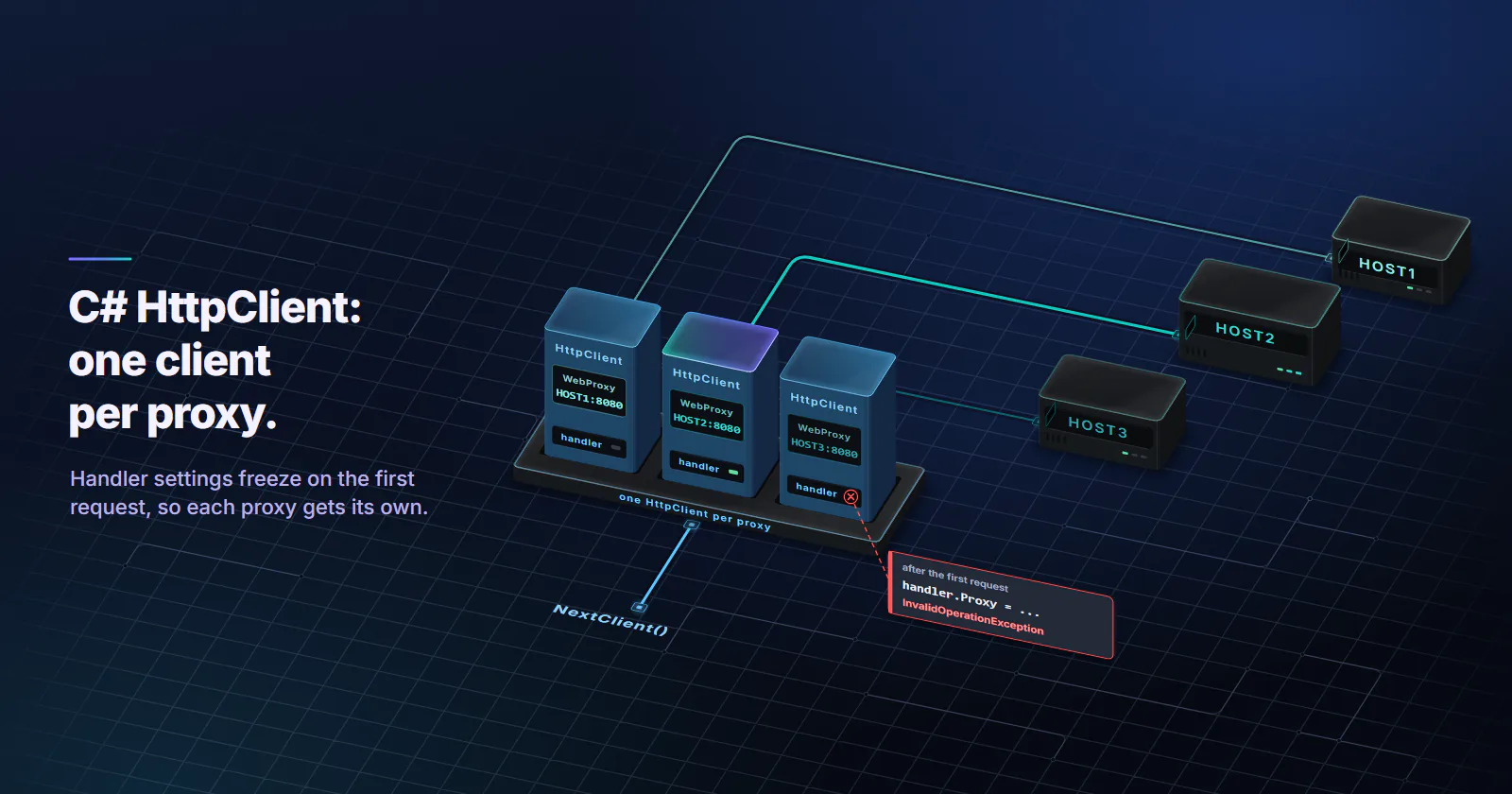
Handler settings freeze on the first request. Changing handler.Proxy after the client has sent anything throws InvalidOperationException: This instance has already started one or more requests. Properties can only be modified before sending the first request. There is no per-request proxy on HttpRequestMessage. Using several proxies means one handler, and one HttpClient, per proxy:
using System.Net;

string[] proxies = ["http://HOST1:8080", "http://HOST2:8080", "http://HOST3:8080"];
var creds = new NetworkCredential("USERNAME", "PASSWORD");

// One handler per proxy, created once and reused.
var clients = proxies
    .Select(p => new HttpClient(new SocketsHttpHandler
    {
        Proxy = new WebProxy(p) { Credentials = creds },
        UseProxy = true
    }))
    .ToArray();

var next = 0;
HttpClient NextClient() => clients[(uint)Interlocked.Increment(ref next) % clients.Length];
Do not create a new HttpClient and handler per request to get a new proxy. Each one opens new sockets, repeats the 407 round trip and the TLS handshake, and leaves connections in TIME_WAIT.
A pooled tunnel pins the exit. Through a rotating gateway, the exit IP is chosen when the tunnel opens. Every request inside one CONNECT tunnel rides the same TCP connection from the same exit to the target, so a pooled HttpClient that reuses its connection sends a whole burst from one IP, whatever the rotation setting. Rotation mode itself (a new IP per request, on a timer, or sticky) is chosen on the proxymint order and can be changed later without new credentials, and the rotating vs sticky proxies guide explains what breaks under each.
Verify the exit IP
This loop compares one pooled client with a client whose PooledConnectionLifetime is zero, which closes each connection after its request:
using System.Net;

var proxyUri = Environment.GetEnvironmentVariable("PROXY_URI");   // http://HOST:PORT
var creds = new NetworkCredential(
    Environment.GetEnvironmentVariable("PROXY_USER"),
    Environment.GetEnvironmentVariable("PROXY_PASS"));
const string Echo = "https://api.ipify.org";

HttpClient NewClient(TimeSpan lifetime) => new(new SocketsHttpHandler
{
    Proxy = new WebProxy(proxyUri) { Credentials = creds },
    UseProxy = true,
    PooledConnectionLifetime = lifetime
});

using var direct = new HttpClient(new SocketsHttpHandler { UseProxy = false });
Console.WriteLine($"direct: {await direct.GetStringAsync(Echo)}");

using var pooled = NewClient(Timeout.InfiniteTimeSpan);
using var fresh = NewClient(TimeSpan.Zero);

var pooledExits = new HashSet<string>();
var freshExits = new HashSet<string>();
for (var i = 0; i < 20; i++)
{
    pooledExits.Add(await pooled.GetStringAsync(Echo));
    freshExits.Add(await fresh.GetStringAsync(Echo));
}
Console.WriteLine($"one pooled tunnel: {pooledExits.Count} distinct exits");
Console.WriteLine($"new tunnel per request: {freshExits.Count} distinct exits");
On an order set to a new IP per request, the pooled line shows how far connection reuse holds one exit, and the second line shows the rotation the order delivers. If the direct line matches either of them, the proxy is not in use at all. Use an https:// echo endpoint: Lab #1 found that proxymint’s gateway answers plain http:// requests with a 301 to the https:// URL, which HttpClient follows, so an http:// check ends up testing something else.
When the proxy fails: what HttpClient throws
No exception type is specific to proxies. Proxy faults arrive as an HttpRequestException or a TaskCanceledException, and from .NET 8 the HttpRequestException.HttpRequestError property names the hop that broke. The messages below are the ones .NET 8 and .NET 10 print:
| What went wrong | What the code receives | Check first |
|---|---|---|
Rejected credentials, https:// target | HttpRequestException, ProxyTunnelError: “The proxy tunnel request to proxy ’…’ failed with status code ‘407’.” | WebProxy.Credentials |
Rejected credentials, http:// target | A response with status 407; GetStringAsync turns it into an HttpRequestException with StatusCode 407 | WebProxy.Credentials |
| SOCKS5 login rejected | HttpRequestException, ProxyTunnelError, inner SocksException: “Failed to authenticate with the SOCKS server.” | Username and password |
| Proxy port closed | HttpRequestException, ConnectionError, inner SocketException: “Connection refused” | Host and port |
| Proxy hostname does not resolve | HttpRequestException, NameResolutionError | Spelling of the proxy host |
https:// proxy address, proxy that rejects non-HTTP bytes | HttpRequestException, SecureConnectionError: “The SSL connection could not be established, see inner exception.” | Address scheme |
Proxy silently drops packets, or an https:// proxy address on a proxy that waits | TaskCanceledException, inner TimeoutException: “A connection could not be established within the configured ConnectTimeout.” | Firewall, address scheme |
| The whole request ran too long | TaskCanceledException, inner TimeoutException, message naming HttpClient.Timeout | Target and exit speed |
Branch on HttpRequestError, not StatusCode. The connection pool source throws ProxyTunnelError for any CONNECT answer other than 200, so a 502 from a proxy that cannot reach the target lands in the same row with its own code in the message. .NET 10 also copies that code into StatusCode; on .NET 8 it stays null.
Across a list of proxies, those errors decide when to move on. This helper tries each client in turn and skips the ones that are down or slow:
using System.Net;

var creds = new NetworkCredential("USERNAME", "PASSWORD");
string[] proxies = ["http://HOST1:8080", "http://HOST2:8080"];
var clients = proxies
    .Select(p => new HttpClient(new SocketsHttpHandler
    {
        Proxy = new WebProxy(p) { Credentials = creds },
        UseProxy = true,
        ConnectTimeout = TimeSpan.FromSeconds(5)
    }) { Timeout = TimeSpan.FromSeconds(30) })
    .ToArray();

Console.WriteLine(await GetWithFailoverAsync(clients, "https://api.ipify.org"));

static async Task<string> GetWithFailoverAsync(HttpClient[] clients, string url)
{
    var errors = new List<Exception>();
    foreach (var client in clients)
    {
        try
        {
            return await client.GetStringAsync(url);
        }
        catch (HttpRequestException e) when (e.HttpRequestError is
            HttpRequestError.ConnectionError or HttpRequestError.ProxyTunnelError)
        {
            errors.Add(e); // proxy down, or CONNECT refused: try the next proxy
        }
        catch (TaskCanceledException e) when (e.InnerException is TimeoutException)
        {
            errors.Add(e); // ConnectTimeout or HttpClient.Timeout ran out
        }
    }
    throw new AggregateException("Every proxy failed", errors);
}
When every client in the AggregateException failed with 407, the shared credentials are wrong, not the proxies. Target answers such as 403 or 429 arrive with HttpRequestError.Unknown and a StatusCode, so it passes both filters and reaches the caller: that is the target’s answer, not a proxy fault.
Which proxy type fits an HttpClient job
Handler code is the same for every proxy category. What changes is the address that leaves the gateway, and that follows from the target.
Collecting public pages that treat home users differently (prices, stock, search results by location, ad checks): rotating residential proxies, with rotation per request for broad coverage or a 5 to 60 minute timer when a short session must hold.
APIs and lenient targets at volume: datacenter proxies. Hosting addresses are fast and consistent, and targets without anti-bot scoring do not care where the request comes from.
One identity over days (a dashboard login, a partner API that expects one fixed address): static ISP proxies, one fixed ISP-registered address for the whole term.
Residential, static ISP and datacenter all take username and password over HTTP and SOCKS5, so the http:// and socks5:// handler forms above work unchanged on each of them.
Frequently asked questions
Create a WebProxy with the proxy address, for example new WebProxy("http://HOST:PORT"), and assign it to the Proxy property of a SocketsHttpHandler or HttpClientHandler with UseProxy set to true. Pass that handler to the HttpClient constructor and reuse the client. HTTPS URLs then go through a CONNECT tunnel at the proxy.
Set WebProxy.Credentials to new NetworkCredential("USERNAME", "PASSWORD"). Putting the username and password in the WebProxy address does not work, and HttpClientHandler.Credentials goes to the target website, not the proxy. For the default proxy, the HTTPS_PROXY environment variable accepts http://USERNAME:PASSWORD@HOST:PORT.
The proxy did not receive credentials it accepts. The usual causes are credentials written into the WebProxy URL, credentials on HttpClientHandler.Credentials instead of WebProxy.Credentials, a Proxy-Authorization header set by hand on an HTTPS request (it never reaches the CONNECT), or a wrong password. The first CONNECT always goes without credentials and gets a 407 by design; the handler then retries with them.
Yes, from .NET 6. Use new WebProxy("socks5://HOST:PORT") with a NetworkCredential, and SocketsHttpHandler authenticates with the SOCKS5 username and password method. The socks5h scheme is rejected with NotSupportedException, but .NET sends the target hostname to a socks5 proxy, so DNS resolves at the proxy anyway. .NET Framework has no built-in SOCKS support.
Yes. A handler without its own proxy uses HttpClient.DefaultProxy, which reads HTTP_PROXY, HTTPS_PROXY, ALL_PROXY and NO_PROXY first, and on Windows and macOS falls back to the operating system's proxy settings. It is built once per process. Set UseProxy to false on the handler to ignore it.
Handler properties cannot change after the first request, so a list of proxies needs one handler and one HttpClient per proxy, picked round robin. With a rotating gateway, the rotation mode is set on the proxy order, and a pooled client keeps one tunnel and one exit until the connection closes; PooledConnectionLifetime controls how long that is.
Set BypassProxyOnLocal to true for loopback and single-label hosts, and add regular expressions to WebProxy.BypassList, such as \.internal\.example(:\d+)?$, which match against scheme://host:port. A wildcard entry like *.internal.example throws RegexParseException. For the default proxy, list domains in NO_PROXY, where a leading dot matches all subdomains.
Researched and drafted with AI tools, then checked against our publishing rules before it went live: 8 outside links, 8 links to other proxymint pages, no prices and a fact-check pass against our product records. How we write.