
robots.txt for web scraping: rules, law and a pre-check
What robots.txt means for web scraping: groups and wildcards, Crawl-delay, status codes, what the law says in 2026, and a script that checks URLs first.
Quick summary · TL;DR
- Before your first request, fetch /robots.txt and find the group that names your crawler. Nothing enforces it, since RFC 9309 says the rules are not access authorization, but it's the first thing a site owner will check you against.
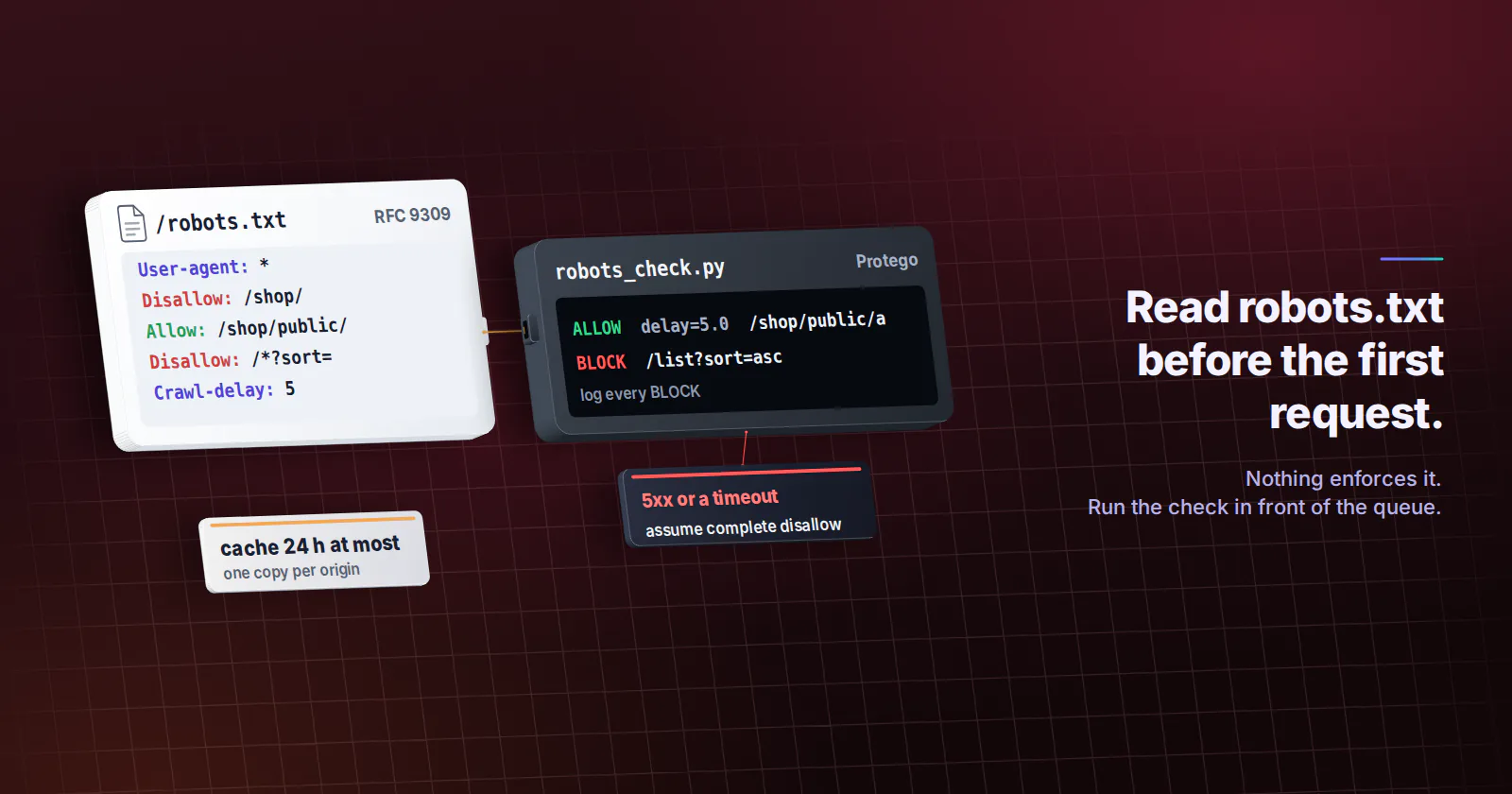
- Don't trust Python's built-in parser on its own. On Python 3.11 urllib.robotparser blocks /shop/public/a even when an Allow rule covers it and lets /list?sort=asc through a wildcard Disallow, so use Protego or a release with the May 2026 fix.
- The status code changes the meaning. A 404 means no rules apply, but a 503 or a timeout means you assume everything is disallowed and pause, which is an easy one to get backwards.
- Legally it's mostly evidence, not a contract. The December 2025 Ziff Davis v. OpenAI ruling said robots.txt is not a DMCA access control, yet ignoring it still shows you knew the owner objected, and terms of service do the binding.
If your scraper is about to hit a site for the first time, robots.txt is the file to read before anything else. For web scraping it is a published request that nothing on the server enforces. It tells your user agent which paths to stay out of and sometimes how slowly to go. Following it costs a few lines of code, and ignoring it is the first thing a site owner or a court will point at.
Most robots.txt web scraping advice stops right there. The file has real parsing rules, status codes that change its meaning, and a legal position that moved in December 2025. And the parser in Python’s standard library still gets two of those rules wrong on most installed versions, which is easy to miss until a job crawls a path it was told to skip.
So this guide reads the file the way RFC 9309 does, then looks at where the law stood in late 2026 (not legal advice), and ends with a short Python pre-check you can put in front of any job before its first request.
What robots.txt means for web scraping
robots.txt is a plain text file at the root of a site that lists which paths each crawler should not fetch. RFC 9309 (September 2022) standardised it and says outright that the rules “are not a form of access authorization”. Nothing on the server enforces them. A compliant crawler reads the file and stays out, and a script that never fetches it gets the same pages as everyone else.
The protocol makes no distinction between a search engine and your price monitor. Any automated client that fetches pages is a crawler in its sense, and the groups in the file are addressed by user agent, not by purpose. If your job sends requests on a schedule, the file is talking to you.
That makes respecting it the baseline of robots.txt web scraping practice, for any project you would be happy to explain. It doesn’t make a project lawful on its own, and the rest of this guide is about where it stops.
How to read robots.txt rules
A file is a set of groups. Each group starts with one or more User-agent lines and is followed by Allow and Disallow rules. Here is a typical shop:
User-agent: *
Disallow: /cart/
Disallow: /shop/
Allow: /shop/public/
Disallow: /*?sort=
Crawl-delay: 5

User-agent: acme-price-monitor
Disallow: /

Sitemap: https://www.example.com/sitemap.xml
Which group applies to you
Your crawler follows exactly one group. The RFC says to match the product token in your user agent against the User-agent lines case-insensitively, pick the most specific group that matches, and fall back to the * group only when nothing names you. Groups that name the same agent are merged.
Look at the second group above before you skip it. A bot called acme-price-monitor gets Disallow: / from its own group and ignores the friendlier * rules completely. If your crawler has a name, search the file for it before you read anything else.
Allow, Disallow and wildcards
- Paths match by prefix.
Disallow: /shop/covers/shop/,/shop/band everything under it. *matches any run of characters.Disallow: /*?sort=blocks every URL with a sort parameter, wherever it appears.$anchors the end.Disallow: /*.pdf$blocks PDFs but not/report.pdf?page=2.- The longest match wins. For
/shop/public/a, bothDisallow: /shop/andAllow: /shop/public/match, and the longerAllowrule decides, so the URL is allowed. - A tie goes to Allow. When an Allow and a Disallow rule are equally long, RFC 9309 says the Allow rule should be used.
Sitemap lines sit outside the groups and apply to everyone. For a scraper they are a gift. A sitemap lists the URLs the owner wants found, often with last-modified dates, which can replace a lot of link-following.
Scope, status codes and caching
Where robots.txt lives and its scope
The file must be at /robots.txt, lowercase, at the top level of the host. It covers one scheme, host and port, and nothing else. https://www.example.com/robots.txt says nothing about https://shop.example.com/ or http://www.example.com:8080/, and Google’s robots.txt documentation (checked November 2026) applies the same per-protocol, per-host rule.
In practice that means one fetch per origin your job touches. A crawl that starts on www and follows links into help. or cdn. subdomains needs each of their files too, and the classic bug is a cache keyed on the domain name instead of the full origin.
Status codes and caching
What the server answers for /robots.txt changes what the file means. RFC 9309 is specific:
| Response for /robots.txt | What a compliant crawler does |
|---|---|
| 200 with rules | Follow the rules for your group |
| 4xx (404, 410, even 401 and 403) | No rules apply; the crawler may access any path (Google treats 429 like a server error) |
| 5xx, or the host is unreachable | Assume complete disallow and do not crawl |
| Redirects | Follow at least five hops, then treat the file as unavailable |
The 5xx row is the one that bites. If a site’s robots.txt is down, a careful job pauses instead of treating the silence as permission. After a long outage a crawler may treat the file as unavailable or keep using its last cached copy. The RFC gives 30 days as its example of a long outage, and Google uses the same 30 days while it keeps re-checking, which makes it a sensible ceiling for your own retries.
Caching matters as much. The RFC says crawlers should not reuse a cached copy for more than 24 hours, unless the file is unreachable, and must parse at least the first 500 KiB. Google caps the file at that size and ignores anything beyond it.
Crawl-delay, pace and proxies
Crawl-delay and request pace
Crawl-delay: 5 asks for at least five seconds between requests. It is not in RFC 9309, and support is split. Google announced in July 2019 that it does not support the rule, along with unofficial lines such as noindex in robots.txt, while Bing’s webmaster blog (August 2009) describes robots.txt as the place to set a crawl delay for its crawler.
Do you have to follow Crawl-delay? No standard forces you to. But a site that writes the line is telling you the pace it can live with, and a scraper that honours it is far less likely to see a 429 Too Many Requests or a block page. Treat it as the floor between requests to that site, and slow down further if response times climb. You will also meet Request-rate and Visit-time lines in older files. No major crawler documents them, but Python’s parser reads Request-rate, and they say the same thing about pace.
Proxies and robots.txt
A proxy changes the IP address your request leaves from. It changes nothing in robots.txt. The rules are written for a user agent at an origin, so a Disallow path stays disallowed through every exit, and Crawl-delay: 5 means five seconds between your requests to that site, not five seconds per IP.
That is where distributed jobs go wrong. Spread one site across fifty exits with a per-exit delay and you send fifty times the pace the owner asked for, which is the pattern rate limiters exist to catch. Keep a single pacing budget per target in the scheduler and let the pool share it; the web scraping architecture guide shows where that budget sits, and the proxy rotation strategy guide covers sessions and retries under it.
Where a proxy does belong is in seeing what each market sees on pages you are allowed to fetch. Price and stock monitoring across countries is the usual case, because shops show home visitors local prices and stock. Rotating residential proxies fit that job with country, region and city targeting, on top of a job that already reads robots.txt and paces per site, never as a way past a rule. Sites that want to tell good bots from bad ones are also moving to signed requests; Web Bot Auth explains how a crawler proves who it is whatever exit it uses.
Is robots.txt legally binding?
On the legal side of robots.txt web scraping in 2026, the short answer is that the file mostly does not bind you by itself, and it still matters in court. The main lines sit in four places.
The DMCA question was answered in December 2025. In Ziff Davis v. OpenAI, Judge Stein of the Southern District of New York held that robots.txt directives are not a technological measure that effectively controls access, so disregarding them is not circumvention under DMCA section 1201. Eric Goldman’s write-up (December 2025) stresses how narrow that is: it answers one statute, other claims in the case went on, and it says nothing about whether the scraping or training was lawful.
Computer-misuse law points the same way for public pages. In hiQ Labs v. LinkedIn, the Ninth Circuit read the US Computer Fraud and Abuse Act as not covering publicly available pages. The same dispute later turned on LinkedIn’s user agreement instead, which is the lesson most guides leave out.
Terms of service are where the binding part usually lives. Some sites write robots.txt compliance straight into their terms, and a contract claim does not care whether the file is a “technological measure”. An academic paper on the liabilities of robots.txt (March 2025) concludes that the legal consequences of ignoring it remain ambiguous and argues it can work as a unilateral contract in some circumstances.
In the EU, machine-readable opt-outs carry weight. The text and data mining exception in the Digital Single Market Directive lets rights holders reserve their content in machine-readable form, and robots.txt is the format most people mean. The General-Purpose AI Code of Practice, published by the European Commission on July 10, 2025, commits signatories to crawlers that read and follow robots.txt as RFC 9309 defines it (Jones Day summary, August 2025).
Ignoring robots.txt is rarely illegal by itself. But ignoring an explicit Disallow is evidence that you knew the owner objected, and that evidence travels into contract, copyright and privacy claims.
Check robots.txt in code before a job
Python ships urllib.robotparser, and it is the first thing most people reach for. It has two gaps worth knowing. It applies the first matching rule in file order instead of the longest match, a gap reported in CPython issue 39187 (January 2020), and it does not understand * or $ inside paths. A fix that follows RFC 9309 (gh-138907) was merged in May 2026, so check your version before you trust it.
On Python 3.11, against the example file above, the two parsers disagree on two of four URLs:
| URL | RFC 9309 answer | urllib.robotparser (3.11) | Protego 0.7 |
|---|---|---|---|
| /shop/public/a | Allowed (longer Allow) | Blocked | Allowed |
| /shop/b | Blocked | Blocked | Blocked |
| /list?sort=asc | Blocked (wildcard) | Allowed | Blocked |
| /ok | Allowed | Allowed | Allowed |
Protego is the parser Scrapy uses, and it handles wildcards and longest match. If you run Scrapy, ROBOTSTXT_OBEY = True is already in the settings.py that scrapy startproject generates, and it makes every spider respect robots.txt; leave it there. For everything else, the robots.txt web scraping pre-check below covers the status codes and the cache as well.
import sys
import time
from urllib.parse import urlsplit

import requests
from protego import Protego

USER_AGENT = "acme-price-monitor/1.0 (+https://example.com/bot)"
CACHE = {}  # origin -> (fetched_at, parser or verdict)
MAX_AGE = 24 * 3600  # RFC 9309: do not reuse a cached copy for more than 24 hours


def robots_for(url):
    parts = urlsplit(url)
    origin = f"{parts.scheme}://{parts.netloc}"
    hit = CACHE.get(origin)
    if hit and time.time() - hit[0] < MAX_AGE:
        return hit[1]
    try:
        r = requests.get(f"{origin}/robots.txt", timeout=10,
                         headers={"User-Agent": USER_AGENT})
        if r.status_code >= 500:
            rules = "disallow-all"          # server error: assume complete disallow
        elif r.status_code >= 400:
            rules = "allow-all"             # 4xx (404, 410...): no rules apply
        else:
            rules = Protego.parse(r.text[:512000])  # parse at least the first 500 KiB
    except requests.RequestException:
        rules = "disallow-all"              # unreachable: assume complete disallow
    CACHE[origin] = (time.time(), rules)
    return rules


def check(url):
    rules = robots_for(url)
    if rules == "allow-all":
        return True, None
    if rules == "disallow-all":
        return False, None
    return rules.can_fetch(url, USER_AGENT), rules.crawl_delay(USER_AGENT)


if __name__ == "__main__":
    for url in sys.argv[1:]:
        ok, delay = check(url)
        print(f"{'ALLOW' if ok else 'BLOCK'}  delay={delay}  {url}")
Run it with pip install requests protego and python robots_check.py URL [URL...]. Against a local test server it printed ALLOW delay=5.0 for /shop/public/a, BLOCK for /list?sort=asc, ALLOW for any path on a host whose file returned 404, and BLOCK for a host returning 503. Put the same check at the front of your queue, not after the fetch, and log every BLOCK so someone can see what the job skipped.
Two more details save trouble later. Give your crawler a real product token and a contact URL, like the USER_AGENT above, so a site owner can write a group for you. And never borrow another crawler’s token: sending Googlebot gets you Google’s rules and a fast block once the site checks reverse DNS.
What robots.txt does not cover
A clean robots.txt check is necessary, and it is nowhere near the whole job. The file says nothing about:
- the site’s terms of service, which can forbid automated access to paths robots.txt allows;
- anything behind a login, where you have accepted terms by signing in;
- personal data, which brings in privacy law regardless of what the file says;
- rate limits,
403answers, challenge pages and captchas; - load. A job that slows a site down can support a trespass to chattels claim in the US, robots.txt or not.
A block, a captcha or a run of 429 responses is the site answering you directly, and it means stop and reassess, not retry from somewhere else. For a named target, the official API or data route comes first. The Amazon scraping guide shows that order with Amazon’s own terms, and proxy acceptable use policies spell out what providers ban on top of the law.
AI usage signals in robots.txt
If your data feeds a model, robots.txt now carries a second kind of line. These lines cover what you may do with a page after you fetch it.
Content-Signal. Cloudflare’s Content Signals Policy (September 2025) adds a line such as Content-Signal: search=yes, ai-train=no inside a group. The three signals are search, ai-input (grounding and retrieval for AI answers) and ai-train (training or fine-tuning).
Content-Usage. The IETF AI preferences group’s attachment draft (published September 14, 2026) defines a Content-Usage rule in robots.txt for the same purpose. It is still a draft, so expect the vocabulary to move.
A training pipeline should parse both and store the answer next to every document it keeps. Neither line stops a fetch, and both are exactly the machine-readable reservation the EU rules care about. The guide to proxies for AI training data covers the rest of that pipeline.
Before your next job runs
Each line below is one decision your robots.txt web scraping check should make before the first request goes out.
- If the file names your user agent, read that group first and only that group. A
Disallow: /there ends the question. - If you parse in Python, use Protego or a Python release with the RFC 9309 fix, and test one Allow-inside-Disallow URL and one wildcard URL before you trust it.
- If robots.txt answers 5xx or times out, pause the job for that origin. If it answers 404, there are no rules, but the terms still apply.
- If the site sets Crawl-delay, use it as the floor per site, shared across every exit.
- If the data trains or grounds a model, store the Content-Signal and Content-Usage answers with each document.
- If you get blocks, captchas or 429s on allowed paths, slow down or stop, and look for the site’s API before anything else.
Frequently asked questions
Not on its own in most cases. In December 2025 a New York federal court held in Ziff Davis v. OpenAI that robots.txt is not a technological measure under the DMCA, so ignoring it is not circumvention. It still matters as evidence that the owner objected, and a site's terms of service can make compliance a contractual duty. This is not legal advice.
Yes. The Robots Exclusion Protocol addresses any automated client by user agent, whatever its purpose, so a price monitor or a research script is a crawler in its sense. Your job should follow the group that names its user agent, or the * group when no group names it.
Usually not by itself, but it can make other claims stronger. Ignoring an explicit Disallow shows you knew the owner did not want those pages crawled, which can feed into contract, copyright or privacy claims depending on the country. In the EU, robots.txt is the usual form of the machine-readable opt-out for text and data mining. Check with a lawyer for a specific project.
No standard requires it, since Crawl-delay is not part of RFC 9309 and Google has never supported it, while Bing documents support for it. It is still the clearest statement of the pace a site can handle. Use it as the minimum gap between your requests to that site, shared across every IP your job uses.
Give your crawler its own product token, such as acme-price-monitor, plus a contact URL in the User-Agent header. Your crawler then follows the most specific group that matches that token, case-insensitively, and the * group only when nothing names it. Never send another crawler's token, because sites verify the big ones and the rules for them were not written for you.
If /robots.txt returns a 404 or another 4xx status, RFC 9309 says no rules apply and a crawler may access any path. A 5xx error or a timeout means something else: the crawler should assume complete disallow and wait. Either way the site's terms of service and any rate limits still apply.
Parse the file with Protego, the parser Scrapy uses, and call can_fetch with the URL and your user agent before each request. The standard library's urllib.robotparser applies the first matching rule and ignores wildcards on releases without the May 2026 fix, so it can give wrong answers. In Scrapy, leave ROBOTSTXT_OBEY set to True as the project template generates it.
Researched and drafted with AI tools, then checked against our publishing rules before it went live: 11 outside links, 7 links to other proxymint pages, no prices and a fact-check pass against our product records. How we write.